How to change Zip folder icons in Windows 11? 🤔


What's the rush? I can export the HK Classes Root key in about five seconds (786,000 lines of .reg file), and re-merge that .reg file in about three. So? It would be worth doing if I were going to meddle with my file types to a significant extent, but I don't feel the need to do that. If I just make a new Restore Point before I do something significant to my registry, it doesn't take long to restore from that point. If that went south, and it never has for me (unless I forgot to kill my AV program first), I'd use the previous night's image.
 

My Computers My Computers

  • At a glance

    11 Pro 24H2 26100.2454i7-9700 @ 3.00GHz32GBDDR4 @ 2666MHzIntel HD 630 Graphics onboard
    OS
    11 Pro 24H2 26100.2454
    Computer type
    PC/Desktop
    Manufacturer/Model
    Lenovo ThinkCentre M920S SFF
    CPU
    i7-9700 @ 3.00GHz
    Motherboard
    Lenovo 3132
    Memory
    32GBDDR4 @ 2666MHz
    Graphics Card(s)
    Intel HD 630 Graphics onboard
    Sound Card
    Realtek HD Audio
    Monitor(s) Displays
    LG E2442
    Screen Resolution
    1920x1080
    Hard Drives
    1 x Samsung 970 EVO PLUS 500GB NVMe SSD, 1 x WD_BLACK SN770
    250GB NVMe SSD (OS and programs), 1 x WD_BLACK SN770
    500GB NVMe SSD (Data)
    Case
    Lenovo SFF
    Keyboard
    Cherry Stream TKL JK-8600US-2 Wired
    Mouse
    LogiTech M510 wireless
    Internet Speed
    Fast (for fixed wireless!)
    Browser
    Chrome, sometimes Firefox
    Antivirus
    Malwarebytes Premium & Defender (working together beautifully!)
  • At a glance

    11 Pro 24H2 26100.2454i5-8400 @ 2.80GHz32GB DDR4 @ 2600MHzIntel HD 630 Graphics onboard
    Operating System
    11 Pro 24H2 26100.2454
    Computer type
    PC/Desktop
    Manufacturer/Model
    Lenovo ThinkCentre M920S SFF
    CPU
    i5-8400 @ 2.80GHz
    Motherboard
    Lenovo 3132
    Memory
    32GB DDR4 @ 2600MHz
    Graphics card(s)
    Intel HD 630 Graphics onboard
    Sound Card
    Realtek High Definition Audio onboard
    Monitor(s) Displays
    LG FULL HD (1920x1080@59Hz)
    Screen Resolution
    1920 x 1080
    Hard Drives
    1 x Samsung 970 EVO PLUS NVMe; 1 x Samsung 980 NVMe SSD
    Case
    Lenovo Think Centre SFF
    Keyboard
    Cherry Stream TKL JK-8600US-2 Wired
    Mouse
    LogiTech M510 wireless
    Internet Speed
    Fast (for fixed wireless!)
    Browser
    Chrome
    Antivirus
    Malwarebytes Premium and MS Defender, beautiful together
What's the rush? I can export the HK Classes Root key in about five seconds (786,000 lines of .reg file), and re-merge that .reg file in about three. So? It would be worth doing if I were going to meddle with my file types to a significant extent, but I don't feel the need to do that. If I just make a new Restore Point before I do something significant to my registry, it doesn't take long to restore from that point. If that went south, and it never has for me (unless I forgot to kill my AV program first), I'd use the previous night's image.
1) DPE restore takes 4 sec. Restore point of registry takes about 20 min. and changes the whole registry not the file types only.
Its the 1/300 of the time.
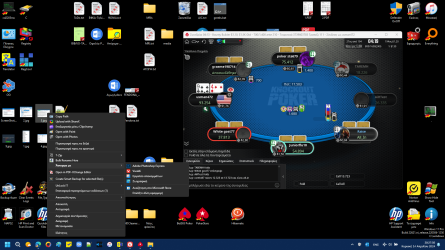
2) The changes you could to do with these programs arent only at HK Classes Root key. To understand this , check my right click at .jpeg file type :

View attachment 93457

CAUTION : Before use Default Programs Editor , please read answer #58.
 

Attachments

  • 1713115810556.png
    1713115810556.png
    327.6 KB · Views: 7
Last edited:

My Computer My Computer

At a glance

Windows 11 ProIntel 113700H16GBNVIDIA RTX 3050 ti
OS
Windows 11 Pro
Computer type
Laptop
Manufacturer/Model
HP Pavilion 17 cd2205nw
CPU
Intel 113700H
Memory
16GB
Graphics Card(s)
NVIDIA RTX 3050 ti
Screen Resolution
1980x1020
Hard Drives
Micron 512GB
Mouse
Logitech
Internet Speed
100Mbs
Browser
Vivaldi , Edge
Antivirus
Windows defender
Thanks for your suggestions, guys.

I still didn't find a way for Total Commander to read the blue icons, but I'm kinda giving up. I tend to be on the punctilious side with these kind of little details, but in the end it's not that huge a problem and I already wasted waaaaay more time than this issue deserves.
 

My Computer My Computer

At a glance

Win 11 Pro 24H2 26100.1882Ryzen 9 5950X32GBRTX 4080
OS
Win 11 Pro 24H2 26100.1882
Computer type
PC/Desktop
CPU
Ryzen 9 5950X
Motherboard
Gigabyte X570 Aorus Ultra
Memory
32GB
Graphics Card(s)
RTX 4080
Monitor(s) Displays
Aorus 2160p 144Hz + NexiGo Aurora Pro UHD HDMI 2.1 projector
Screen Resolution
2160p
Keyboard
Logitech 915
Mouse
Logitech MX Master 3
Internet Speed
100MB
Browser
Chrome
Antivirus
MalwareHunter + MalwareBytes
Finally found where TC gets the compressed folder icons (zip, rar, 7z, etc) from:

c:\Windows\SystemResources\zipfldr.dll.mun

Changing the icons in that file with CustomizerGod made them appear right in TC. 😁

1714486550920.png
 

My Computer My Computer

At a glance

Win 11 Pro 24H2 26100.1882Ryzen 9 5950X32GBRTX 4080
OS
Win 11 Pro 24H2 26100.1882
Computer type
PC/Desktop
CPU
Ryzen 9 5950X
Motherboard
Gigabyte X570 Aorus Ultra
Memory
32GB
Graphics Card(s)
RTX 4080
Monitor(s) Displays
Aorus 2160p 144Hz + NexiGo Aurora Pro UHD HDMI 2.1 projector
Screen Resolution
2160p
Keyboard
Logitech 915
Mouse
Logitech MX Master 3
Internet Speed
100MB
Browser
Chrome
Antivirus
MalwareHunter + MalwareBytes
Finally found where TC gets the compressed folder icons (zip, rar, 7z, etc) from:

c:\Windows\SystemResources\zipfldr.dll.mun

Changing the icons in that file with CustomizerGod made them appear right in TC. 😁

View attachment 94803
Hello, will it be possible for you to share the blue zip icons ? I'm having hard time spotting the archives in the Downloads folder as both normal folders and zip folders use the same colored icons.

Thank you and kind regards
 

My Computer My Computer

At a glance

Windows 1112th Gen i516 GBIntel Iris Xe
OS
Windows 11
Computer type
Laptop
Manufacturer/Model
Dell
CPU
12th Gen i5
Memory
16 GB
Graphics Card(s)
Intel Iris Xe
Hard Drives
Micron 512GB NVMe SSD (System Drive)
Irvine 1TB SATA SSD (Data drive)
Browser
Firefox 134
Hello, will it be possible for you to share the blue zip icons ? I'm having hard time spotting the archives in the Downloads folder as both normal folders and zip folders use the same colored icons.

Thank you and kind regards

Hey.
Also check these icons.
 

My Computer My Computer

At a glance

Windows 11 ProIntel 113700H16GBNVIDIA RTX 3050 ti
OS
Windows 11 Pro
Computer type
Laptop
Manufacturer/Model
HP Pavilion 17 cd2205nw
CPU
Intel 113700H
Memory
16GB
Graphics Card(s)
NVIDIA RTX 3050 ti
Screen Resolution
1980x1020
Hard Drives
Micron 512GB
Mouse
Logitech
Internet Speed
100Mbs
Browser
Vivaldi , Edge
Antivirus
Windows defender

My Computer My Computer

At a glance

Windows 1112th Gen i516 GBIntel Iris Xe
OS
Windows 11
Computer type
Laptop
Manufacturer/Model
Dell
CPU
12th Gen i5
Memory
16 GB
Graphics Card(s)
Intel Iris Xe
Hard Drives
Micron 512GB NVMe SSD (System Drive)
Irvine 1TB SATA SSD (Data drive)
Browser
Firefox 134

Latest Support Threads

Back
Top Bottom