I ran Independently to this problem myself. I was helping someone on a ASUS ROG Forum and found to my amazement that my PC wasn't updated from a DBX standpoint of view. This has also to to do with that CA2023 issue. 1st; I ran against TPM-WMI errors in my Windows logbooks. Solved that. Now I became aware of this 2nd problem. Thought "not again..."
Fix was easy. There seems to be some confusion of how too. So plain and simple:
Just download the complete package at
GitHub - cjee21/Check-UEFISecureBootVariables: PowerShell scripts to check the UEFI KEK, DB and DBX Secure Boot variables. (Go to Code, and download the zip file)
Extract it somewhere. Open CMD as admin, go to that directory.
Run
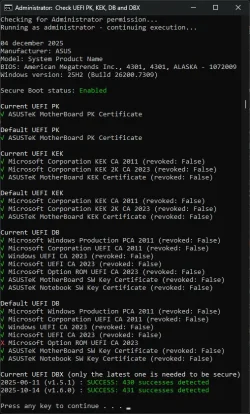
"Check UEFI PK, KEK, DB and DBX.cmd" (Incl. ") Look at the checkmarks and at the last 2 lines of the result. If it says "
FAIL: Check DBX failed" or "
FAIL: xx errors xxx success" (as was in my case) Then your DBX needs to be updated. Run
"Apply DBX update (restart required).reg"
Reboot your PC to send things in motion. There is no need to reboot and reboot again and again. One is enough. MS has a script somewhere in his task manager list (Think one of the tasks underneath: Taskmanager - Microsoft - CertificateServiceClient - * ) that runs once every x time per hour. (it will not be solved directly after a reboot) Leave your system alone for a while. (30-60 minutes.)
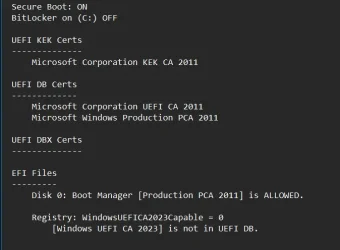
Run if you want "Check Windows State.cmd" to see the flag status:
AvailableUpdates : 0x0002.
The update is pending and awaiting to be picked up by that Taskmanager script and downloading some DBX things from MS to update your DBX.
After the update; the flag will be reset; AvailableUpdates : 0x0000.
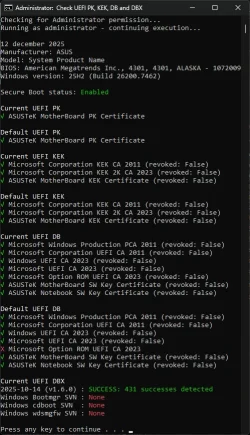
Run again
"Check UEFI PK, KEK, DB and DBX.cmd" And you will see that the result will be "
SUCCESS: xxx successes detected"
For the checkmarks. There are 2 sets visible. The default one and the current one. There are 3 sets of them both;
1 - UEFI PK
2 - UEFI KEK
3 - UEFI DB
1 and 2 are always OK. There could be a red cross inside #3 in the default section. Ignore that. More important is the status of the current ones. (That is valid now) If there is a red cross inside #3 current section; You have to run
"Apply DB update (restart required).reg" and reboot and wait....
You can run other scripts at your discretion but the above ones are the scripts that will solve this issue if you had one.
Goodluck.
Again. Don't know if we discovered this CA2023 issue earlier then expected. But I am sure that MS could integrated this inside an update. It is just basically setting a flag and let an already available script do it's thing. I suspect that MS was thinking; "No need to implement this now. Expiration date is Nov. 2026.... Enough time." That might be the case but that initial TPM-WMI error inside my Windows logbook set me on a trail. This was after 26200.6899 if I remember correctly. (After one update for a fact) So. Don't wake up the dogs then...... Oops.