How to check if your Secure Boot certs are updated. (three methods)


Method Two...

1. Download the script at the bottom of this post.
2. Extract the Check-SecureBootCerts.ps1 script and place it on your desktop.
3. Go to: C:\Users\your account name\Desktop and right click Desktop and choose: Open in Terminal
4. In the powershell window that pops up, type the following...

5. Set-ExecutionPolicy unrestricted <------ So the script can run.

Then...

6. .\Check-SecureBootCerts.ps1 and hit the ENTER key.

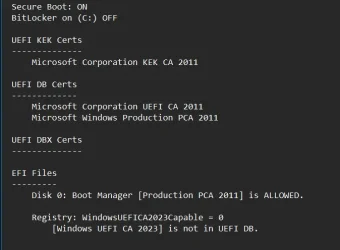
You should get a result similar to this...

View attachment 154845


Then...

7. Set-ExecutionPolicy restricted <------ To return to the more secure state.


Here is the script... credit to @garlin
None of these work. It won't even let me do the unrestricted thing with a bunch of nonsensical text in red.
 

My Computer

System One

  • OS
    Windows 11 Pro 25H2
    Computer type
    Laptop
    Manufacturer/Model
    HP
    CPU
    Gen 11 Core i5
    Memory
    16GB
None of these work. It won't even let me do the unrestricted thing with a bunch of nonsensical text in red.

Q.
are you opening PowerShell as Administrator

then run the commands please.
best of luck Steve ..
 

My Computers

System One System Two

  • OS
    Windows 11 Home
    Computer type
    PC/Desktop
    Manufacturer/Model
    HP 24" AiO
    CPU
    Ryzen 7 5825u
    Motherboard
    HP
    Memory
    64GB DDR4 3200
    Graphics Card(s)
    Ryzen 7 5825u
    Sound Card
    RealTek
    Monitor(s) Displays
    24" HP AiO
    Screen Resolution
    1920 x 1080 @60 Hz
    Hard Drives
    1TB WD Blue SN580 M2 SSD Partitioned.
    2x 1TB USB HDD External Backup/Storage.
    PSU
    90W external power brick
    Case
    24" All in One
    Cooling
    Default Air Cooling
    Keyboard
    HP WiFi UK extended
    Mouse
    HP WiFi 3 Button
    Internet Speed
    1GB full fibre
    Browser
    Edge & Firefox
    Antivirus
    AVG Internet Security/Windows Defender
    Other Info
    Mainly Open Source Software
  • Operating System
    Ubuntu 22.04.5 LTS
    Computer type
    Laptop
    Manufacturer/Model
    Dell 13" Latitude 2017
    CPU
    i5 7200u
    Motherboard
    Dell
    Memory
    16GB DDR4
    Graphics card(s)
    Intel
    Sound Card
    Intel
    Monitor(s) Displays
    13" Dell Laptop
    Hard Drives
    250GB Crucial 2.5" SSD
    Mouse
    Generic WiFi 3 button
    Internet Speed
    WiFi only
    Browser
    Firefox
    Antivirus
    ClamAV TK
    Other Info
    Mainly Open Source Software
I ran Independently to this problem myself. I was helping someone on a ASUS ROG Forum and found to my amazement that my PC wasn't updated from a DBX standpoint of view. This has also to to do with that CA2023 issue. 1st; I ran against TPM-WMI errors in my Windows logbooks. Solved that. Now I became aware of this 2nd problem. Thought "not again..."

Fix was easy. There seems to be some confusion of how too. So plain and simple:
Just download the complete package at GitHub - cjee21/Check-UEFISecureBootVariables: PowerShell scripts to check the UEFI KEK, DB and DBX Secure Boot variables. (Go to Code, and download the zip file)
Extract it somewhere. Open CMD as admin, go to that directory.

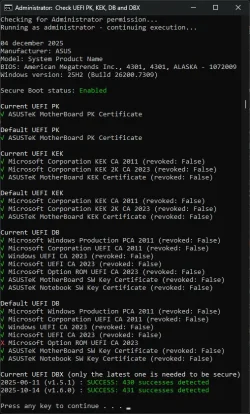
Run "Check UEFI PK, KEK, DB and DBX.cmd" (Incl. ") Look at the checkmarks and at the last 2 lines of the result. If it says "FAIL: Check DBX failed" or "FAIL: xx errors xxx success" (as was in my case) Then your DBX needs to be updated. Run "Apply DBX update (restart required).reg"
Reboot your PC to send things in motion. There is no need to reboot and reboot again and again. One is enough. MS has a script somewhere in his task manager list (Think one of the tasks underneath: Taskmanager - Microsoft - CertificateServiceClient - * ) that runs once every x time per hour. (it will not be solved directly after a reboot) Leave your system alone for a while. (30-60 minutes.)

Run if you want "Check Windows State.cmd" to see the flag status:
AvailableUpdates : 0x0002.
The update is pending and awaiting to be picked up by that Taskmanager script and downloading some DBX things from MS to update your DBX.

After the update; the flag will be reset; AvailableUpdates : 0x0000.
Run again "Check UEFI PK, KEK, DB and DBX.cmd" And you will see that the result will be "SUCCESS: xxx successes detected"


For the checkmarks. There are 2 sets visible. The default one and the current one. There are 3 sets of them both;
1 - UEFI PK
2 - UEFI KEK
3 - UEFI DB

1 and 2 are always OK. There could be a red cross inside #3 in the default section. Ignore that. More important is the status of the current ones. (That is valid now) If there is a red cross inside #3 current section; You have to run "Apply DB update (restart required).reg" and reboot and wait....
You can run other scripts at your discretion but the above ones are the scripts that will solve this issue if you had one.
Goodluck.

Again. Don't know if we discovered this CA2023 issue earlier then expected. But I am sure that MS could integrated this inside an update. It is just basically setting a flag and let an already available script do it's thing. I suspect that MS was thinking; "No need to implement this now. Expiration date is Nov. 2026.... Enough time." That might be the case but that initial TPM-WMI error inside my Windows logbook set me on a trail. This was after 26200.6899 if I remember correctly. (After one update for a fact) So. Don't wake up the dogs then...... Oops.

 

Attachments

  • CA2023 Solved situation.webp
    CA2023 Solved situation.webp
    90 KB · Views: 9
Last edited:

My Computer

System One

  • OS
    Win 11 Pro "25H2" Build 26200.8524, Zorin OS Pro
    Computer type
    PC/Desktop
    Manufacturer/Model
    Self built
    CPU
    Intel® Core™ i7-12700KF 12th Gen.
    Motherboard
    ASUS Prime Z690-A, BIOS v4505
    Memory
    32GB DDR5 5600-36 Vengeance
    Graphics Card(s)
    PCIe4.0 Asus NVIDIA RTX3060Ti
    Sound Card
    Onboard; Realtek
    Monitor(s) Displays
    34" LG 34UC79G-B Curved 21:9 144Hz
    Screen Resolution
    2560x1080 (No HDR)
    Hard Drives
    250Gb Samsung 870PRO NVMe (Win 11 Pro)
    1Tb Samsung 980PRO NVMe
    1Tb Samsung 970EVO NVMe
    2Tb Samsung 990PRO NVMe with heatsink.
    4Tb WDC WD40EZRZ Blue SATA (Int.)
    4Tb WDC WD40EZRZ Blue SATA (Int.)
    3Tb WDC WD30EFRZ Red SATA (Int.)
    256Gb Samsung 840PRO SSD (RHEL 9,5)
    256Gb Samsung 850PRO SSD (Zorin OS Pro 18)
    PSU
    Coolermaster 850W V2 Gold with internal 12cm exaust fan
    Case
    Be-Quiet Pure Base 600.
    Cooling
    3x Be-Quiet! 12/14cm "Silent Wings 4" casefans, 1x Arctic Freezer i35 CPU towerblock with fan.
    Keyboard
    Steelseries APEX 7 keyboard.
    Mouse
    Logitech G-502 Hero
    Internet Speed
    1Gb
    Browser
    Brave
    Antivirus
    F-Secure
    Other Info
    No Noise system.
    256Gb Kingston Travler USB 3.0 drive.
    64Gb Sandisk USB 3.2 drive. (Ventoy)
    8Gb Philips USB 3.0 drive. (Win. Inst.)
    8Gb Philips USB 3.0 drive. (Rescue disk)
    2Tb WD USB 3.0 Passport drive.
    USB Ext. 500Gb WD SATA drive.
    External USB 3.0 C.A. CD/DVD* burner.
I have successfully upgraded this computer Z590 and the ASUS Vivobook so far with the help from this forum. Many thanks.

Cheers
 

My Computer

System One

  • OS
    Windows 11 Pro
    Computer type
    PC/Desktop
    Manufacturer/Model
    ASUS
    CPU
    Intel Core i7-11700K Desktop Processor 8 Cores
    Motherboard
    ASUS ROG Strix Z590-A Gaming WiFi LGA 1200
    Memory
    Corsair Vengeance LPX 32GB (2 x 16GB) DDR4 DRAM 3600MHz
    Graphics Card(s)
    ASUS GTX ROG STRIX 1080 8GB
    Sound Card
    Sound Blaster Z SE
    Monitor(s) Displays
    ASUS VG34VQL1B plus a Samsung 60" Smartv
    Screen Resolution
    3440x1440, 165Hz
    Hard Drives
    Samsung 980 Series - (OS)1TB Pro Gen4 NVMe M.2, 1TB Gen3. x4 NVMe 1.4 - M.2, WD 1TB, WD 500GB, WD 350GB
    PSU
    Silverstone Olympia OP1000W PSW
    Case
    Phanteks Enthoo Pro
    Cooling
    Noctua NH-D15 SSO2 D-Type Premium CPU Cooler, NF-A15 x 2 PWM Fans
    Keyboard
    Corsair K70 RGB
    Mouse
    Logitech 310 wireless
    Internet Speed
    1 GB
    Browser
    Firefox
    Antivirus
    ESET Internet Security
    Other Info
    Testing Windows 10 Pro on 350GB drive
I ran Independently to this problem myself. I was helping someone on a ASUS ROG Forum and found to my amazement that my PC wasn't updated from a DBX standpoint of view. This has also to to do with that CA2023 issue. 1st; I ran against TPM-WMI errors in my Windows logbooks. Solved that. Now I became aware of this 2nd problem. Thought "not again..."

Fix was easy. There seems to be some confusion of how too. So plain and simple:
Just download the complete package at GitHub - cjee21/Check-UEFISecureBootVariables: PowerShell scripts to check the UEFI KEK, DB and DBX Secure Boot variables. (Go to Code, and download the zip file)
Extract it somewhere. Open CMD as admin, go to that directory.

Run "Check UEFI PK, KEK, DB and DBX.cmd" (Incl. ") Look at the checkmarks and at the last 2 lines of the result. If it says "FAIL: Check DBX failed" or "FAIL: xx errors xxx success" (as was in my case) Then your DBX needs to be updated. Run "Apply DBX update (restart required).reg"
Reboot your PC to send things in motion. There is no need to reboot and reboot again and again. One is enough. MS has a script somewhere in his task manager list (Think one of the tasks underneath: Taskmanager - Microsoft - CertificateServiceClient - * ) that runs once every x time per hour. (it will not be solved directly after a reboot) Leave your system alone for a while. (30-60 minutes.)

Run if you want "Check Windows State.cmd" to see the flag status:
AvailableUpdates : 0x0002.
The update is pending and awaiting to be picked up by that Taskmanager script and downloading some DBX things from MS to update your DBX.

After the update; the flag will be reset; AvailableUpdates : 0x0000.
Run again "Check UEFI PK, KEK, DB and DBX.cmd" And you will see that the result will be "SUCCESS: xxx successes detected"


For the checkmarks. There are 2 sets visible. The default one and the current one. There are 3 sets of them both;
1 - UEFI PK
2 - UEFI KEK
3 - UEFI DB

1 and 2 are always OK. There could be a red cross inside #3 in the default section. Ignore that. More important is the status of the current ones. (That is valid now) If there is a red cross inside #3 current section; You have to run "Apply DB update (restart required).reg" and reboot and wait....
You can run other scripts at your discretion but the above ones are the scripts that will solve this issue if you had one.
Goodluck.

Again. Don't know if we discovered this CA2023 issue earlier then expected. But I am sure that MS could integrated this inside an update. It is just basically setting a flag and let an already available script do it's thing. I suspect that MS was thinking; "No need to implement this now. Expiration date is Nov. 2026.... Enough time." That might be the case but that initial TPM-WMI error inside my Windows logbook set me on a trail. This was after 26200.6899 if I remember correctly. (After one update for a fact) So. Don't wake up the dogs then...... Oops.
More and more confusion from Microsoft about CA 2023 update.
They need some better clear instructions for the whole CA 2023 update process. 🤬🤷‍♂️
 

My Computer

System One

  • OS
    Windows 11 Pro 25H2
    Computer type
    PC/Desktop
    Manufacturer/Model
    Dell XPS 8930
    CPU
    Intel I9-9900K
    Memory
    64GB
    Graphics Card(s)
    NVIDIA RTX 2060
    Sound Card
    NVIDIA High Definition Audio
    Monitor(s) Displays
    4k Samsung
    Screen Resolution
    3840 x 2160
    Hard Drives
    512GB NVMe, ADATA SU 800, 2TB HDD
ok so while my DELL laptop has Secure-boot enabled..
it does not have the updated certs..
hmmm..

1764902228377.webp
 

My Computers

System One System Two

  • OS
    Windows 11 Pro (x64)(v25H2)(26200.8524)
    Computer type
    PC/Desktop
    Manufacturer/Model
    [Self-built](custom-build)(June 2020)
    CPU
    AMD Ryzen 9 3900X 12-Core/24-threads
    Motherboard
    Asus PRIME X570-PRO (BIOS_r5044 [01/04/2026])
    Memory
    64GB, 2x G.Skill 32GB (PC3200)(DDR4-2137)
    Graphics Card(s)
    ASUS PRIME GeForce RTX 5070 12GB OC Edition, GPU by NVIDIA.
    Sound Card
    Realtek® ALC1220A 8-Channel High Definition Audio CODEC
    Monitor(s) Displays
    24" DELL Gaming Monitor - G2422HS - DisplayPort used
    Screen Resolution
    1920x1080p at 165Hz (16:9 Aspect Ratio)
    Hard Drives
    2TB Samsung 980 Pro (NVMe)(SSD)
    4TB Samsung 990 Pro (NVMe)(SSD)
    2TB Samsung 870 EVO (SSD)

    NVMe 2TB
    -- OS(Win11 Pro x64),
    -- programs,
    -- programming(MS Visual Studios 2022 Community Ed.),
    -- music

    NVMe 4TB
    video game installs.

    #3 FILE Server!
    PSU
    Thermaltake TOUGHPOWER DPS G RGB Titanium Certified 1250Watt
    Case
    Corsair Graphite Series 780T Full Tower PC Case
    Cooling
    AMD Wraith cooler (stock) & 3x Corsair case fans
    Keyboard
    Redragon K580 VATA RGB LED Backlit Mechanical Gaming Keyboard (brown switches).
    Mouse
    Redragon M602 RGB Wired USB Gaming mouse
    Internet Speed
    2,100Mbps Download, 300Mbps Upload
    Browser
    Firefox & Google Chrome
    Antivirus
    n/a aka "ABOVE TOP SECRET!" lol ;)
    Other Info
    My System is the ULTIMATE GAMING RIG ^_^
    TP-Link BE9300 Tri-Band Wi-Fi 7 Wireless 2.5Gigabit Router
    Model Archer BE550 (v1.0)
    Arris S34 Cable Modem
    Nvidia GFX Drivers: (v596.49)
    Realtek UAD Drivers: (v6.0.9977.1)
    Realtek LAN Drivers:(v1125.29.50.202)(2026-04-19)
    Intel LAN Drivers: (v14.01.24.00)(2025-10-03)
  • Operating System
    Windows 11 Pro x64
    Computer type
    Laptop
    Manufacturer/Model
    DELL G15 Ryzen edition, model 5515
    CPU
    AMD Ryzen 7 5800H
    Motherboard
    DELL G15 Ryzen edition
    Memory
    32GB GSkill DDR4 2x 16GB sticks
    Graphics card(s)
    Ryzen 7 5800H integrated AMD Radeon Graphics and Nvidia GeForce 3060 6GB
    Sound Card
    Realtek ALC3254 with Nahimic 3D Audio for Gamers
    Monitor(s) Displays
    built-in
    Screen Resolution
    1920x1080
    Hard Drives
    512GB NVMe SSD, 1TB Samsung 970 EVO NVMe SSD
    PSU
    unknown
    Case
    laptop
    Keyboard
    built-in
    Mouse
    Logitech B100 USB
    Internet Speed
    2,100Mbps download, 300Mbps upload
    Browser
    Firefox & Google Chrome
Don't know if we discovered this CA2023 issue earlier then expected.

Nah, it's been around for a couple of years now.


My Computers

System One System Two

  • OS
    Win 11 Pro 25H2 26200.8524
    Computer type
    PC/Desktop
    Manufacturer/Model
    Self Built
    CPU
    Intel® Core™ i7-14700K
    Motherboard
    ASUS TUF Z690-PLUS WIFI BIOS 4505 11/29/25
    Memory
    G.SKILL Ripjaws S5 Series 64GB (2 x 32GB) DDR5
    Graphics Card(s)
    ASUS GeForce RTX 4070 Super 12GB
    Sound Card
    Sound Blaster AE-5 Plus
    Monitor(s) Displays
    ASUS TUF Gaming 27" 2K HDR Gaming
    Screen Resolution
    2560 x 1440
    Hard Drives
    Samsung 990 Pro 1TB NVMe (Win 11 25H2)
    SK hynix P41 500GB NVMe 25H2 DEV/Games
    SK hynix P41 2TB NVMe (x3)
    Crucial P3 Plus 4TB
    PSU
    Corsair RM850x Shift
    Case
    Antec Dark Phantom DP502 FLUX
    Cooling
    Corsair Nautilus 360 RS AIO
    Keyboard
    Logitech MK 320
    Mouse
    Razer Basilisk V3
    Internet Speed
    350Mbs
    Browser
    Firefox
    Antivirus
    Winows Security
    Other Info
    MR 8.1 Home

    System 3 Specs
    Win 11 Pro 25H2 26200.8524
    ASUS PRIME Z370-P II BIOS 3004 7/12/21
    Intel Core i7-8700 CPU @ 3.20GHz
    32GB DDR4 RAM (4x8)
    iGPU Intel UHD Graphics 630
  • Operating System
    Win 11 Pro 25H2 26200.8524
    Computer type
    PC/Desktop
    Manufacturer/Model
    Self Built
    CPU
    Intel Core i7-11700F
    Motherboard
    Asus TUF Gaming Z590 Plus WiFi (BIOS 2803)
    Memory
    64 GB DDR4
    Graphics card(s)
    MSI GeForce RTX 3060 Ventus 2X 12GB
    Sound Card
    SoundBlaster Audigy Fx V2
    Monitor(s) Displays
    Samsung F27T350
    Screen Resolution
    1920x1080
    Hard Drives
    Samsung 980 Pro 1TB
    Samsung 970 EVO Plus 2TB
    Samsung 870 EVO 500GB SSD
    PSU
    Corsair HX750
    Case
    Cougar MX330-G Window
    Cooling
    Thermalright Frozen Edge 240 Black AIO
    Internet Speed
    350Mbps
    Browser
    Firefox
    Antivirus
    Windows Security
No they don't. The said it will be there. Remember. It's still a way to go till Nov 26. They had to address it before that time. Ok. I understand that completely. Enough time. But with the introduction with 25H2 some idiot forgot others to inform that he was introducing a partial part what would come though a normal update. Yes. after 6899 things starts to whirl. TPM-WMI errors? WTF? Others then MS dived in and found the solution at first. Solved it. And now? an other issue came up diving deeper into the problem. cjee21 found the way to fix this also. And MS? Silent.

They can not be bothered with it. We have seen it all. The introduction off 25H2. So wonderful.... Yeah. I find it bugged from the start, A complete failure. Promised us all "will be advanced no bugs and it would be faster" Well with their fixes after the introduction.... A complete fail. Updates are still as slow as before. Errors? If we are still using 24H2. And that is just the case. Look inside the component store. You will find only 24H2 packages there. Nothing has changed. They told only the winver and system settings to convince use... "Yes you are on 25H2 now" No it isn't it is still 24H2. Look at their update pages. 24H2 and 25H2 patches go hand in hand. The only difference? 25H2 pushed things forwards. BS. If I know that the difference is between 25H2 and 24H2 if can also push 24H2 forwards.... They admitted themself. In an odd way. The next 26H2? Available in it early state on ARM. The indirection screen; "Is your system 24H2/25H2?" Yeah... It's the same. 25H2 came out under marketing pressure. "We have to intoduce a new version" Lets call it 25H2.....
 

My Computer

System One

  • OS
    Win 11 Pro "25H2" Build 26200.8524, Zorin OS Pro
    Computer type
    PC/Desktop
    Manufacturer/Model
    Self built
    CPU
    Intel® Core™ i7-12700KF 12th Gen.
    Motherboard
    ASUS Prime Z690-A, BIOS v4505
    Memory
    32GB DDR5 5600-36 Vengeance
    Graphics Card(s)
    PCIe4.0 Asus NVIDIA RTX3060Ti
    Sound Card
    Onboard; Realtek
    Monitor(s) Displays
    34" LG 34UC79G-B Curved 21:9 144Hz
    Screen Resolution
    2560x1080 (No HDR)
    Hard Drives
    250Gb Samsung 870PRO NVMe (Win 11 Pro)
    1Tb Samsung 980PRO NVMe
    1Tb Samsung 970EVO NVMe
    2Tb Samsung 990PRO NVMe with heatsink.
    4Tb WDC WD40EZRZ Blue SATA (Int.)
    4Tb WDC WD40EZRZ Blue SATA (Int.)
    3Tb WDC WD30EFRZ Red SATA (Int.)
    256Gb Samsung 840PRO SSD (RHEL 9,5)
    256Gb Samsung 850PRO SSD (Zorin OS Pro 18)
    PSU
    Coolermaster 850W V2 Gold with internal 12cm exaust fan
    Case
    Be-Quiet Pure Base 600.
    Cooling
    3x Be-Quiet! 12/14cm "Silent Wings 4" casefans, 1x Arctic Freezer i35 CPU towerblock with fan.
    Keyboard
    Steelseries APEX 7 keyboard.
    Mouse
    Logitech G-502 Hero
    Internet Speed
    1Gb
    Browser
    Brave
    Antivirus
    F-Secure
    Other Info
    No Noise system.
    256Gb Kingston Travler USB 3.0 drive.
    64Gb Sandisk USB 3.2 drive. (Ventoy)
    8Gb Philips USB 3.0 drive. (Win. Inst.)
    8Gb Philips USB 3.0 drive. (Rescue disk)
    2Tb WD USB 3.0 Passport drive.
    USB Ext. 500Gb WD SATA drive.
    External USB 3.0 C.A. CD/DVD* burner.
You may think it's a giant conspiracy, but MS has been discussing how to revoke the CA 2011 certs since 2021 in discussion with the UEFI org, which includes the major Linux players. cjee21 didn't find a hidden "fix". The methods used are published in several KB articles if you bother to read them.

Scroll to the bottom... right there.
Secure Boot Certificate updates: Guidance for IT professionals and organizations - Microsoft Support

Where MS was slow was waiting until this summer to gather all the details into one site. Parts of the update instructions have been floating around since 2023-2024, but were only shared with enterprises since they could be trusted to do the updates themselves, before later CU's introduced the Secure Boot scheduled task.

I have to keep repeating myself. MS wanted to roll this migration much earlier, but a lot of vendors were complaining they needed more time.

If you review the Secure Boot Objects GitHub, vendors are still checking in signed KEK updates this month!!
Folks like Lenovo, ASUS and even Red Hat today.
Commits · microsoft/secureboot_objects
 
Last edited:

My Computer

System One

  • OS
    Windows 7
Thank you for the Tutorial and Scripts.

Screenshot 2025-12-06 174515.webp
 

My Computer

System One

  • OS
    Windows 11
    Computer type
    PC/Desktop
    Manufacturer/Model
    Generic
    CPU
    AMD Ryzen 8700G
    Motherboard
    Gigabyte B650 UD AC
    Memory
    64 GB
    Graphics Card(s)
    Onboard
    Sound Card
    Onboard
    Monitor(s) Displays
    Del U2723QE
    Screen Resolution
    3840 x 2160
    Hard Drives
    Corsiar MP600 1TB
    PSU
    Silverstone 750 GOLD
    Case
    Silverstone FARA 513
I upgraded the keys, revoked the 2011 Cert, and have the job done with information obtain here. With Mosby and some expert help from folks like @garlin , it's really not that hard.

1765038687623.webp

1765038761541.webp
 

My Computers

System One System Two

  • OS
    Win 11 Pro 25H2, Build 26200.8524
    Computer type
    PC/Desktop
    Manufacturer/Model
    Home Brew
    CPU
    Intel Core i5 14500
    Motherboard
    Gigabyte B760M G P WIFI
    Memory
    64GB DDR4
    Graphics Card(s)
    GeForce RTX 4060
    Sound Card
    Chipset Realtek
    Monitor(s) Displays
    LG 45" Ultragear, Acer 24" 1080p
    Screen Resolution
    5120x1440, 1920x1080
    Hard Drives
    Crucial P310 2TB 2280 PCIe Gen4 3D NAND NVMe M.2 SSD (O/S)
    Silicon Power 2TB US75 NVMe PCIe Gen4 M.2 2280 SSD (backup)
    Crucial BX500 2TB 3D NAND (2nd backup)
    Seagate 4TB Ironwolf, rotating HDD archive files
    External off-line backup Drives: 2 NVMe 4TB drives in external enclosures
    PSU
    Thermaltake Toughpower GF3 750W
    Case
    LIAN LI LANCOOL 216 E-ATX PC Case
    Cooling
    Lots of fans!
    Keyboard
    Microsoft Comfort Curve 2000
    Mouse
    Logitech G305
    Internet Speed
    Verizon FiOS 1GB
    Browser
    Firefox
    Antivirus
    Malware Bytes & Windows Defender Security
  • Operating System
    Win 11 Pro 25H2, Build 26200.8524
    Computer type
    PC/Desktop
    Manufacturer/Model
    Home Brew
    CPU
    Intel Core i5 14400
    Motherboard
    Gigabyte B760M DS3H AX
    Memory
    32GB DDR5
    Graphics card(s)
    Intel 700 Embedded GPU
    Sound Card
    Realtek Embedded
    Monitor(s) Displays
    27" HP 1080p
    Screen Resolution
    1920x1080
    Hard Drives
    Crucial P310 2TB 2280 PCIe Gen4 eD NAND PCIe SSD
    Samsung EVO 990 2TB NVMe Gen4 SSD
    Samsung 2TB SATA SSD
    PSU
    Thermaltake Smart BM3 650W
    Case
    Okinos Micro ATX Case
    Cooling
    Fans
    Keyboard
    Microsoft Comfort Curve 2000
    Mouse
    Logitech G305
    Internet Speed
    Verizon FiOS 1GB
    Browser
    Firefox
    Antivirus
    Malware Bytes & Windows Defender Security
Here's where I am at. I'm not sure if I need to do anything further or not.
Current Secure boot 12-15.webp
 

My Computer

System One

  • OS
    Windows 11 25H2
    Computer type
    PC/Desktop
    Manufacturer/Model
    EVGA home brew
    CPU
    Broadwell-e 6850K 4.5ghz @1.36v
    Motherboard
    EVGA X99 FTW K
    Memory
    32GB Corsair LPM 3600 C16
    Graphics Card(s)
    EVGA RTX 3080Ti FTW
    Sound Card
    Asus Centurion true 7.1 headset. (5 speakers in each earpeice)
    Monitor(s) Displays
    LG C4 55"
    Screen Resolution
    4K 144hz
    Hard Drives
    Various models of SSDs ~10TB No HDDs installed.
    PSU
    be quiet! BN516 Straight Power 12-1000w 80 Plus Platinum
    Case
    Corsair 780T modified to dual 200mm intake fans
    Cooling
    Corsair H110i
    Keyboard
    Corsair K95 Platinum
    Mouse
    Corsair M65 RGB Elite
    Internet Speed
    50Mbs
My Asus board has the latest BIOS:
PRIME B560M-A AC BIOS 2001
Version 2001
9.24 MB
2023/03/07
"1. Improve system stability
2. Improve system compatibility"

I ran the script and got:

Screenshot 2025-12-15 063813.webp


So I'll wait until the last minute to see if MS updates the Key and go from there. I'm fairly certain that we will have some options and if not, I'm only an hour away from installing an alternative OS.
 

My Computers

System One System Two

  • OS
    Win 11 Pro
    Computer type
    PC/Desktop
    Manufacturer/Model
    ABS (Newegg)
    CPU
    Intel(R) Core(TM) i5-10400F CPU @ 2.90GHz
    Motherboard
    ASUSTeK COMPUTER INC. PRIME B560M-A AC Rev 1.xx
    Memory
    Corsair VENGEANCE® LPX 32GB (2 x 16GB) DDR4 DRAM 3600MHz
    Graphics Card(s)
    MSI NVIDIA GeForce RTX 3060 Ti
    Sound Card
    Realtek Digital Output (Realtek(R) Audio)
    Monitor(s) Displays
    Viewsonic VS 2725 -2k 27"
    Screen Resolution
    2560x1440 100hz
    Hard Drives
    T-FORCE TM8FP800 1TB + a couple SATA SSDs
    PSU
    Gigabyte P650E
    Case
    DeepCool Matrexx 50 mid-tower
    Cooling
    Assassin X 120 Refined SE and 5 Thermalright TL-C12C case fans
    Keyboard
    Redragon K655 or K720
    Mouse
    CoolerMaster MM711 or Redragon M612
    Internet Speed
    Starlink: speed varies
    Browser
    Brave (default), Chrome (for ATG), Edge (for ATMS)
    Antivirus
    Windows Defender
    Other Info
    An assortment of "land fill, obsolete" computers all running Linux Mint 22 (at the moment).
  • Operating System
    Linux Mint 22.2 Cinnamon
    Computer type
    PC/Desktop
    Manufacturer/Model
    Hewlett-Packard HP ProDesk 600 G1 SFF
    CPU
    i5 4590
    Motherboard
    HP
    Memory
    16 GB
    Graphics card(s)
    Intel(R) HD Graphics 4600
    Sound Card
    Realtek High Definition Audio
    Monitor(s) Displays
    Generic 24"
    Hard Drives
    Samsung SSD 860 EVO 500GB
    Hitachi HUA722010CLA330
    WDC WD40EZAZ-19SF3B0
    PSU
    Factory 240 watt
    Case
    Low Profile Desktop
    Cooling
    Factory cooling
    Keyboard
    HP
    Mouse
    HP
    Internet Speed
    Starlink
    Browser
    Brave
    Antivirus
    ?
    Other Info
    This is my media server
Here's where I am at. I'm not sure if I need to do anything further or not.
There is a new update of cjee21 Check-UEFISecureBootVariables program: GitHub - cjee21/Check-UEFISecureBootVariables: PowerShell scripts to check the UEFI KEK, DB and DBX Secure Boot variables as well as scripts for other Secure Boot related items.
Download the .zip file and extract that one. You need to run "Apply 2023 KEK, DB and bootmgfw update.cmd" to update your KEK and DB current values. (ignore the default one; That will be the setting if you reset it all. Don't! ) The DBX part is already updated.
 

My Computer

System One

  • OS
    Win 11 Pro "25H2" Build 26200.8524, Zorin OS Pro
    Computer type
    PC/Desktop
    Manufacturer/Model
    Self built
    CPU
    Intel® Core™ i7-12700KF 12th Gen.
    Motherboard
    ASUS Prime Z690-A, BIOS v4505
    Memory
    32GB DDR5 5600-36 Vengeance
    Graphics Card(s)
    PCIe4.0 Asus NVIDIA RTX3060Ti
    Sound Card
    Onboard; Realtek
    Monitor(s) Displays
    34" LG 34UC79G-B Curved 21:9 144Hz
    Screen Resolution
    2560x1080 (No HDR)
    Hard Drives
    250Gb Samsung 870PRO NVMe (Win 11 Pro)
    1Tb Samsung 980PRO NVMe
    1Tb Samsung 970EVO NVMe
    2Tb Samsung 990PRO NVMe with heatsink.
    4Tb WDC WD40EZRZ Blue SATA (Int.)
    4Tb WDC WD40EZRZ Blue SATA (Int.)
    3Tb WDC WD30EFRZ Red SATA (Int.)
    256Gb Samsung 840PRO SSD (RHEL 9,5)
    256Gb Samsung 850PRO SSD (Zorin OS Pro 18)
    PSU
    Coolermaster 850W V2 Gold with internal 12cm exaust fan
    Case
    Be-Quiet Pure Base 600.
    Cooling
    3x Be-Quiet! 12/14cm "Silent Wings 4" casefans, 1x Arctic Freezer i35 CPU towerblock with fan.
    Keyboard
    Steelseries APEX 7 keyboard.
    Mouse
    Logitech G-502 Hero
    Internet Speed
    1Gb
    Browser
    Brave
    Antivirus
    F-Secure
    Other Info
    No Noise system.
    256Gb Kingston Travler USB 3.0 drive.
    64Gb Sandisk USB 3.2 drive. (Ventoy)
    8Gb Philips USB 3.0 drive. (Win. Inst.)
    8Gb Philips USB 3.0 drive. (Rescue disk)
    2Tb WD USB 3.0 Passport drive.
    USB Ext. 500Gb WD SATA drive.
    External USB 3.0 C.A. CD/DVD* burner.
My Asus board has the latest BIOS:
PRIME B560M-A AC BIOS 2001
Version 2001
9.24 MB
2023/03/07
"1. Improve system stability
2. Improve system compatibility"

I ran the script and got:

View attachment 157006


So I'll wait until the last minute to see if MS updates the Key and go from there. I'm fairly certain that we will have some options and if not, I'm only an hour away from installing an alternative OS.
Use this link to download the zip-file https://github.com/cjee21/Check-UEFISecureBootVariables/archive/refs/heads/main.zip Extract it and just run the script "Check UEFI PK, KEK, DB and DBX.cmd" It will show you a complete overview of everything. (Site = GitHub - cjee21/Check-UEFISecureBootVariables: PowerShell scripts to check the UEFI KEK, DB and DBX Secure Boot variables as well as scripts for other Secure Boot related items.)

If there are red crosses visible inside the current values of UEFI KEK and/or UEFI DB; run "Apply 2023 KEK, DB and bootmgfw update.cmd"
If it says FAIL at the UEFI DBX part just run: "Apply DBX update.cmd"

Note: MS will update everything at some build in the future, but not now. There is now no need to do it now; The CA2011 certificate will expire on Jun-Oct 2026. Until that time Secure boot will continue as it is now without any problems. This is just a fix ahead of time. CA2023 is already integrated inside 25H2 but not completely active. After this it will be. But we still have to wait until with a future build MS replaces every file that points towards that CA2011 certificate with a file that is pointing towards the new CA2023 certificate. At the moment all signed files are still pointing towards the old CA2011 certificate.

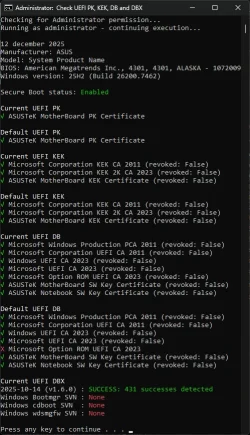
A screenshot when everything is OK.

We can jump up and down as much as we want; Everybody has to still to wait until the final fase (replacing all signed files) will start.
 

Attachments

  • CA2023 Solved Check PK,KEK,DB,DBX new#1.webp
    CA2023 Solved Check PK,KEK,DB,DBX new#1.webp
    80.3 KB · Views: 7
Last edited:

My Computer

System One

  • OS
    Win 11 Pro "25H2" Build 26200.8524, Zorin OS Pro
    Computer type
    PC/Desktop
    Manufacturer/Model
    Self built
    CPU
    Intel® Core™ i7-12700KF 12th Gen.
    Motherboard
    ASUS Prime Z690-A, BIOS v4505
    Memory
    32GB DDR5 5600-36 Vengeance
    Graphics Card(s)
    PCIe4.0 Asus NVIDIA RTX3060Ti
    Sound Card
    Onboard; Realtek
    Monitor(s) Displays
    34" LG 34UC79G-B Curved 21:9 144Hz
    Screen Resolution
    2560x1080 (No HDR)
    Hard Drives
    250Gb Samsung 870PRO NVMe (Win 11 Pro)
    1Tb Samsung 980PRO NVMe
    1Tb Samsung 970EVO NVMe
    2Tb Samsung 990PRO NVMe with heatsink.
    4Tb WDC WD40EZRZ Blue SATA (Int.)
    4Tb WDC WD40EZRZ Blue SATA (Int.)
    3Tb WDC WD30EFRZ Red SATA (Int.)
    256Gb Samsung 840PRO SSD (RHEL 9,5)
    256Gb Samsung 850PRO SSD (Zorin OS Pro 18)
    PSU
    Coolermaster 850W V2 Gold with internal 12cm exaust fan
    Case
    Be-Quiet Pure Base 600.
    Cooling
    3x Be-Quiet! 12/14cm "Silent Wings 4" casefans, 1x Arctic Freezer i35 CPU towerblock with fan.
    Keyboard
    Steelseries APEX 7 keyboard.
    Mouse
    Logitech G-502 Hero
    Internet Speed
    1Gb
    Browser
    Brave
    Antivirus
    F-Secure
    Other Info
    No Noise system.
    256Gb Kingston Travler USB 3.0 drive.
    64Gb Sandisk USB 3.2 drive. (Ventoy)
    8Gb Philips USB 3.0 drive. (Win. Inst.)
    8Gb Philips USB 3.0 drive. (Rescue disk)
    2Tb WD USB 3.0 Passport drive.
    USB Ext. 500Gb WD SATA drive.
    External USB 3.0 C.A. CD/DVD* burner.
Here's where I am at. I'm not sure if I need to do anything further or not.
You need to run (with the latest zip version of cjee21, a newer one) "Apply 2023 KEK, DB and bootmgfw update.cmd" Your DBX is already fine.
Verify all statuses again after that with "Check UEFI PK, KEK, DB and DBX.cmd"
 

My Computer

System One

  • OS
    Win 11 Pro "25H2" Build 26200.8524, Zorin OS Pro
    Computer type
    PC/Desktop
    Manufacturer/Model
    Self built
    CPU
    Intel® Core™ i7-12700KF 12th Gen.
    Motherboard
    ASUS Prime Z690-A, BIOS v4505
    Memory
    32GB DDR5 5600-36 Vengeance
    Graphics Card(s)
    PCIe4.0 Asus NVIDIA RTX3060Ti
    Sound Card
    Onboard; Realtek
    Monitor(s) Displays
    34" LG 34UC79G-B Curved 21:9 144Hz
    Screen Resolution
    2560x1080 (No HDR)
    Hard Drives
    250Gb Samsung 870PRO NVMe (Win 11 Pro)
    1Tb Samsung 980PRO NVMe
    1Tb Samsung 970EVO NVMe
    2Tb Samsung 990PRO NVMe with heatsink.
    4Tb WDC WD40EZRZ Blue SATA (Int.)
    4Tb WDC WD40EZRZ Blue SATA (Int.)
    3Tb WDC WD30EFRZ Red SATA (Int.)
    256Gb Samsung 840PRO SSD (RHEL 9,5)
    256Gb Samsung 850PRO SSD (Zorin OS Pro 18)
    PSU
    Coolermaster 850W V2 Gold with internal 12cm exaust fan
    Case
    Be-Quiet Pure Base 600.
    Cooling
    3x Be-Quiet! 12/14cm "Silent Wings 4" casefans, 1x Arctic Freezer i35 CPU towerblock with fan.
    Keyboard
    Steelseries APEX 7 keyboard.
    Mouse
    Logitech G-502 Hero
    Internet Speed
    1Gb
    Browser
    Brave
    Antivirus
    F-Secure
    Other Info
    No Noise system.
    256Gb Kingston Travler USB 3.0 drive.
    64Gb Sandisk USB 3.2 drive. (Ventoy)
    8Gb Philips USB 3.0 drive. (Win. Inst.)
    8Gb Philips USB 3.0 drive. (Rescue disk)
    2Tb WD USB 3.0 Passport drive.
    USB Ext. 500Gb WD SATA drive.
    External USB 3.0 C.A. CD/DVD* burner.
Good evening,cmd_6wYnWSAg9Q.webp
I have this, is it okay?
 

My Computer

System One

  • OS
    windows 11 25H2
    Computer type
    Laptop
    Manufacturer/Model
    ASUS Vivobook 15 (X1504)
    Motherboard
    Intel Alder Lake-P PCH
    Memory
    24GB
    Graphics Card(s)
    iris xe
    Sound Card
    realtek
    Screen Resolution
    1920X1080
    Hard Drives
    Samsung SSD 990 PRO 1TB
    Browser
    edge
    Antivirus
    eset anti virus
Good evening,
I have this, is it okay?
Yes! Everything looks fine. All current values do have Green checkmarks. UEFI PK, KEK, DB and DBX. You're done. Congratulations. (y)

(Script writer forgot to issue a new-line statement in the Current UEFI KEK section. If you make the CMD-box bigger than the spacing is not correct. (Less readable) Will tell him that.)
 

My Computer

System One

  • OS
    Win 11 Pro "25H2" Build 26200.8524, Zorin OS Pro
    Computer type
    PC/Desktop
    Manufacturer/Model
    Self built
    CPU
    Intel® Core™ i7-12700KF 12th Gen.
    Motherboard
    ASUS Prime Z690-A, BIOS v4505
    Memory
    32GB DDR5 5600-36 Vengeance
    Graphics Card(s)
    PCIe4.0 Asus NVIDIA RTX3060Ti
    Sound Card
    Onboard; Realtek
    Monitor(s) Displays
    34" LG 34UC79G-B Curved 21:9 144Hz
    Screen Resolution
    2560x1080 (No HDR)
    Hard Drives
    250Gb Samsung 870PRO NVMe (Win 11 Pro)
    1Tb Samsung 980PRO NVMe
    1Tb Samsung 970EVO NVMe
    2Tb Samsung 990PRO NVMe with heatsink.
    4Tb WDC WD40EZRZ Blue SATA (Int.)
    4Tb WDC WD40EZRZ Blue SATA (Int.)
    3Tb WDC WD30EFRZ Red SATA (Int.)
    256Gb Samsung 840PRO SSD (RHEL 9,5)
    256Gb Samsung 850PRO SSD (Zorin OS Pro 18)
    PSU
    Coolermaster 850W V2 Gold with internal 12cm exaust fan
    Case
    Be-Quiet Pure Base 600.
    Cooling
    3x Be-Quiet! 12/14cm "Silent Wings 4" casefans, 1x Arctic Freezer i35 CPU towerblock with fan.
    Keyboard
    Steelseries APEX 7 keyboard.
    Mouse
    Logitech G-502 Hero
    Internet Speed
    1Gb
    Browser
    Brave
    Antivirus
    F-Secure
    Other Info
    No Noise system.
    256Gb Kingston Travler USB 3.0 drive.
    64Gb Sandisk USB 3.2 drive. (Ventoy)
    8Gb Philips USB 3.0 drive. (Win. Inst.)
    8Gb Philips USB 3.0 drive. (Rescue disk)
    2Tb WD USB 3.0 Passport drive.
    USB Ext. 500Gb WD SATA drive.
    External USB 3.0 C.A. CD/DVD* burner.
thank you very much
 

My Computer

System One

  • OS
    windows 11 25H2
    Computer type
    Laptop
    Manufacturer/Model
    ASUS Vivobook 15 (X1504)
    Motherboard
    Intel Alder Lake-P PCH
    Memory
    24GB
    Graphics Card(s)
    iris xe
    Sound Card
    realtek
    Screen Resolution
    1920X1080
    Hard Drives
    Samsung SSD 990 PRO 1TB
    Browser
    edge
    Antivirus
    eset anti virus

Latest Support Threads

Back
Top Bottom