

Madar
Member
- Local time
- 2:40 PM
- Posts
- 5
- OS
- Windows 11
Hi, so I have a laptop which working fine with the installed W11 25H2, but I cannot create a flash drive which would make a boot.
- laptop bios is up to date (HP 850 G8, HP 835 G11, HP G2a)
- certificate settings are fine
- if I turn off the secure boot in the bios I can boot
- I can turn off the secure boot, reset bios settings, turn back - doesn't help
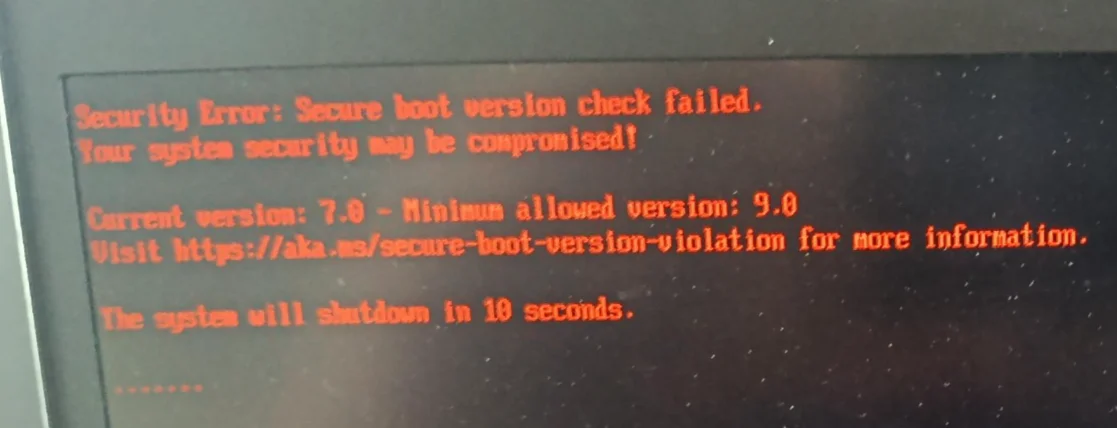
I am getting a message that current version is 7.0, but the required minimum is 9.0
- I am downloading the newest ISO from Microsoft
- I am using their Make2023BootableMedia.ps1 script
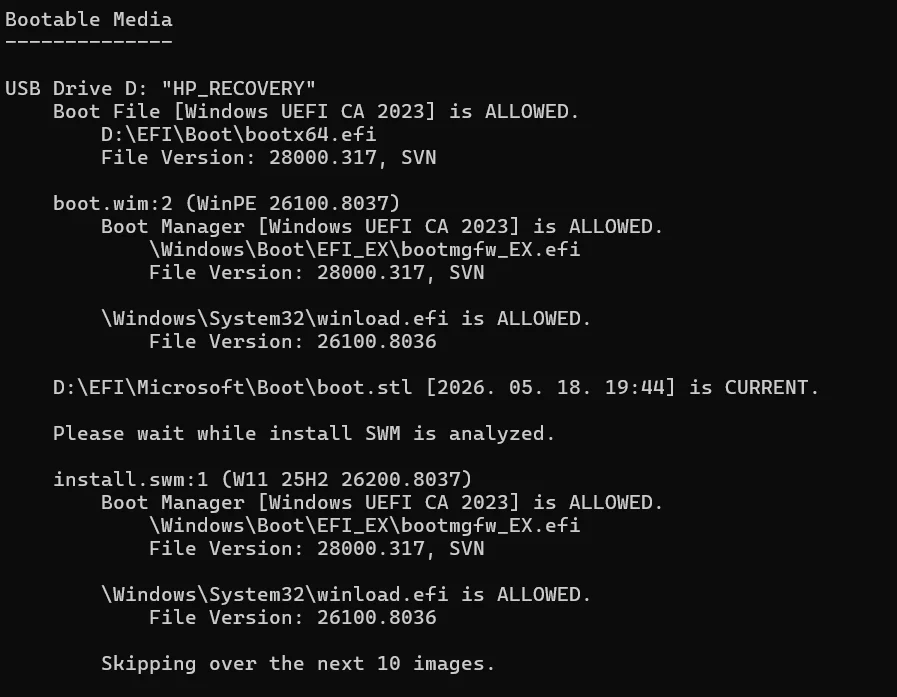
- certificate looks OK on the flash drive
What do I miss? Did I get a wrong image from MS? Or the problem is not with the flash?
- laptop bios is up to date (HP 850 G8, HP 835 G11, HP G2a)
- certificate settings are fine
- if I turn off the secure boot in the bios I can boot
- I can turn off the secure boot, reset bios settings, turn back - doesn't help
I am getting a message that current version is 7.0, but the required minimum is 9.0
- I am downloading the newest ISO from Microsoft
- I am using their Make2023BootableMedia.ps1 script
- certificate looks OK on the flash drive
What do I miss? Did I get a wrong image from MS? Or the problem is not with the flash?
My Computer
At a glance
Windows 11
- OS
- Windows 11






