Solved How to create secure boot svn 9.0 boot flash?


Madar

Member
Local time
4:56 PM
Posts
5
OS
Windows 11
Hi, so I have a laptop which working fine with the installed W11 25H2, but I cannot create a flash drive which would make a boot.

- laptop bios is up to date (HP 850 G8, HP 835 G11, HP G2a)
- certificate settings are fine
- if I turn off the secure boot in the bios I can boot
- I can turn off the secure boot, reset bios settings, turn back - doesn't help

I am getting a message that current version is 7.0, but the required minimum is 9.0

- I am downloading the newest ISO from Microsoft
- I am using their Make2023BootableMedia.ps1 script
- certificate looks OK on the flash drive

What do I miss? Did I get a wrong image from MS? Or the problem is not with the flash?
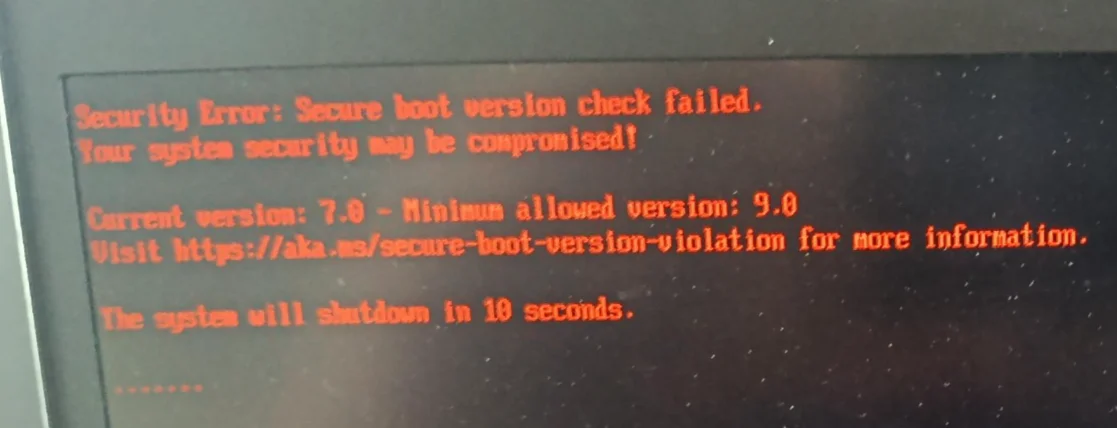
image006.webp

Screenshot 2026-09-08 114002.webp
 

My Computer My Computer

At a glance

Windows 11
OS
Windows 11
1. This recovery ISO is 26200.8037, or March 2026. Your PC's UEFI has been updated to SVN 9.0, or June 2026.

2. You will need to create a new recovery ISO, since now the UEFI requires a boot file that is SVN 9.0 or a higher version. Or you can temporarily disable Secure Boot, use the recovery drive, update Windows to the latest Monthly Update, and then re-enable Secure Boot mode.

3. What version of the Check_Boot-Media.ps1 script are you using? I see the SVN number isn't being reported. Try this version of the same script.
 

Attachments

My Computer My Computer

At a glance

Windows 7
OS
Windows 7
Thanks Garlin,

I ran your script on a different computer which doesn't have secure boot turned on. Since it's a flash drive check script, I didn't expect the computer where I am running it, matters.

If I run on a laptop which is involved in the question, I am getting this results:

image (1).webp

So I guess the image on the flash drive is too old, I should download the newest monthly cumulative update, bake into the flash drive with dism, and I will get a higher version of svn (hopefully 9.0)?
 

My Computer My Computer

At a glance

Windows 11
OS
Windows 11
June 2026 was SVN 9.0. September is now SVN 11.0. If you're going to make a new USB, I would update to September first so you don't waste your time.

If you make an ISO with a higher SVN, it will always boot on a system where the SVN hasn't been updated yet. SVN 11.0 will boot on anything SVN 11.0 or lower in the UEFI. Basically anything from June 2026 or earlier in time.
 

My Computer My Computer

At a glance

Windows 7
OS
Windows 7
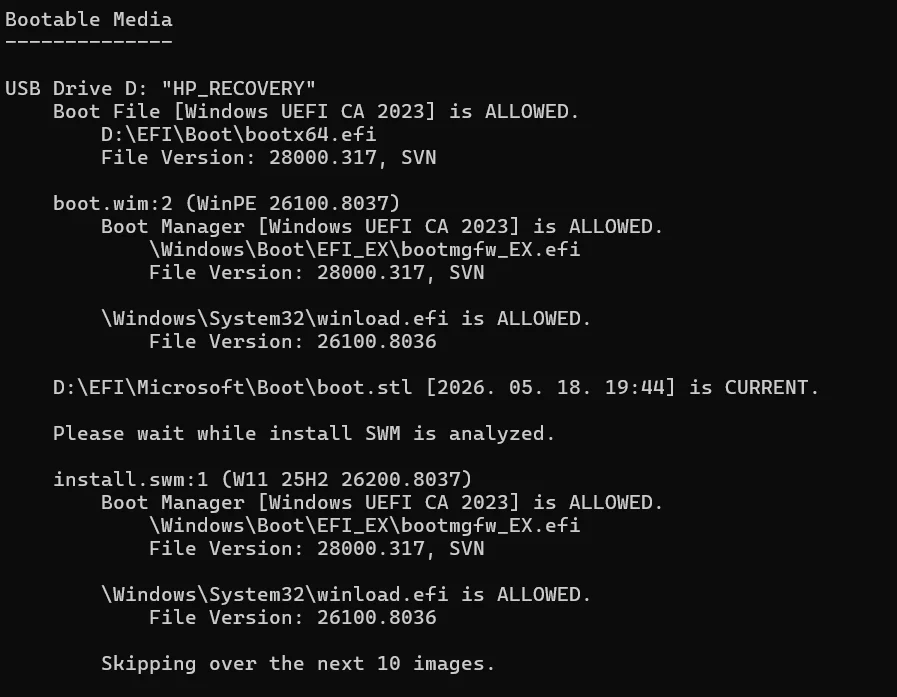
I've updated the wim on the flashdrive, which looks OK now, but still trying to figure out, how to update bootx64.efi on the flash drive.

current state is:

1789020276660.webp
 

My Computer My Computer

At a glance

Windows 11
OS
Windows 11
While you could update "\EFI\Boot\bootx64.efi" on the USB drive, you still have a problem as the boot.wim is SVN 7.0.

All 3 versions need to line up:
D:\EFI\Boot\bootx64.efi
boot.wim's bootmgfw_EX.efi
install.swm's bootmgfw_EX.efi

Right now, you only have 1 out of 3 updated. Two are SVN 7.0, and install SWM is SVN 9.0

What process are you using to create this USB drive?
 

My Computer My Computer

At a glance

Windows 7
OS
Windows 7
yea thats what I thought too

- I downloaded Win11 ISO from MS Download Windows 11
- I signed it with the Make2023BootableMedia.ps1 Updating Windows bootable media to use the PCA2023 signed boot manager - Microsoft Support

thats how I ended up with an svn 7.0 boot flash

- then I downloaded the August cumulative patch from the Windows Catalog (I understood your advice with the september patch and svn11.0, but didn't want to run ahead)
- updated the swm on the flash drive with dism

but obviously I ended up updated only one of the 3 items with this process.

Now I guess I either have to get a fully up-to-date iso to work with, or have to update the remaining 2 elements to svn 9.0 as well
 

My Computer My Computer

At a glance

Windows 11
OS
Windows 11
yea thats what I thought too

- I downloaded Win11 ISO from MS Download Windows 11
- I signed it with the Make2023BootableMedia.ps1 Updating Windows bootable media to use the PCA2023 signed boot manager - Microsoft Support
The real problem is the direct download ISO is not updated every month. The current ISO is from March 2026.

MS intends for this ISO to be used by IT admins, who understand the process of mounting images and applying the Monthly Update packages to them. If you don't want to go through that process, use Media Creation Tool to save the ISO to a local file (don't allow it to write the ISO to the USB drive).

With the ISO file, you can use Rufus to write the ISO to your USB drive. Rufus offers the option to copy the newer CA 2023 boot files (using the ISO). This eliminates the need for Make2023BootableMedia.ps1.

MCT offers a new 25H2 ISO every month, within a week of Patch Tuesday. So if you wait until Friday, MCT will download the September 2026 ISO for you (and you don't need to spend time patching images). The schedule isn't exact but usually MS changes the ISO at the end of Patch Tuesday week.
 

My Computer My Computer

At a glance

Windows 7
OS
Windows 7
thanks, I've managed to do it. Downloaded iso with mediacreation tool, signed with Make2023BootableMedia.ps1 to a local folder, copied over to an NTFS flash drive, and all good now.

Thank you for helping me to understand that secure boot svn version is tied to Windows patch version. Somehow this basic information is cannot be found on the internet written, or at least I didn't find it.

And also thank you for pointing me to the fact that the MS download is an old version of ISO, but mediacreation tool can grab a new one.

cheers!
 

My Computer My Computer

At a glance

Windows 11
OS
Windows 11

Latest Support Threads

Back
Top Bottom