
How to prevent notifications waking PC? (without disabling them or wake timers)


Sqrly

Well-known member
Member
VIP
Local time
7:29 AM
Posts
223
OS
Windroid 11 Pro / Win 10 Pro
Now both my (Win11) pc's are doing it, forking M.$!

Anyone, someone, how do I stop notifications from waking my pc?

"Without disabling notification or wake timers."
 

My Computers My Computers

  • At a glance

    Windroid 11 Pro / Win 10 ProIntel Core i9-14900K Raptor Lake Refreshed 6....32GB (2x16) GSKILL Trident Z5 RGB Series (Int...MSI Gaming GeForce RTX 4070 12GB
    OS
    Windroid 11 Pro / Win 10 Pro
    Computer type
    PC/Desktop
    Manufacturer/Model
    MSI
    CPU
    Intel Core i9-14900K Raptor Lake Refreshed 6.0 GHZ
    Motherboard
    MSI MAG Z790 Tomahawk WiFi
    Memory
    32GB (2x16) GSKILL Trident Z5 RGB Series (Intel XMP 3.0) DDR5 RAM 6700MT/s
    Graphics Card(s)
    MSI Gaming GeForce RTX 4070 12GB
    Sound Card
    Onboard Realtek® ALC4080 Codec
    Monitor(s) Displays
    Monitor #1 Samsung Odyssey G50A WQHD G-Sync HDR10 Monitor #2 HP LA1911
    Screen Resolution
    2560x1440 and 1280x1024
    Hard Drives
    Samsung 980 PRO SSD 1TB PCIe 4.0 NVMe Gen 4 Gaming M.2 (145GB Win11/100GB Win10/685GB More Games)
    Crucial CT2000MX500SSD1 2TB (Games)
    Western Digital Blue WD60EZAZ 6TB (Data/Backup)
    Western Digital Blue WD60EZAZ 6TB (Media)
    Western Digital Blue WD80EAAZ 8TB (Storage)
    PSU
    Rosewill Hive-750S
    Case
    Cooler Master Elite 430 Mid Tower
    Cooling
    Cooler Master ML240L V2 Liquid CPU cooler + 3x120mm in + Isolated PSU Standard upward flow
    Keyboard
    Microsoft Natural Elite White PS/2 (with usb adapter)
    Mouse
    Microsoft D67-00001 Trackball Optical Mouse (rebuilt with ceramic bearings)
    Internet Speed
    450Mb/s hard wired
    Browser
    FF, Mullvad, Tor
    Antivirus
    Win Def
    Other Info
    Razer Tartarus V2 Gaming Keypad
    Logitech Z-906 5.1 THX 500w (Original 8" Sub with Polk Audio satellites)
  • At a glance

    Windows 11 ProIntel Core i9-14900K Raptor Lake Refreshed 6....32GB (2x16) GSKILL Trident Z5 RGB Series (Int...MSI Gaming GeForce RTX 3060Ti 8GB
    Operating System
    Windows 11 Pro
    Computer type
    PC/Desktop
    Manufacturer/Model
    MSI
    CPU
    Intel Core i9-14900K Raptor Lake Refreshed 6.0 GHz FCLGA1700 (Gen 14)
    Motherboard
    MSI MAG Z790 Tomahawk WiFi
    Memory
    32GB (2x16) GSKILL Trident Z5 RGB Series (Intel XMP 3.0) DDR5 RAM 6700MT/s
    Graphics card(s)
    MSI Gaming GeForce RTX 3060Ti 8GB
    Sound Card
    Onboard Realtek® ALC4080 Codec
    Monitor(s) Displays
    Monitor #1 Samsung Odyssey G50A WQHD G-Sync HDR10 Monitor #2 Samsung TU7000 55" TV
    Screen Resolution
    2560x1440 and 3840x2160
    Hard Drives
    Samsung 980 PRO SSD 1TB PCIe 4.0 NVMe Gen 4 Gaming M.2 (System)
    Samsung 980 PRO SSD 2TB PCIe 4.0 NVMe Gen 4 Gaming M.2 (Games)
    Crucial CT1000MX500SSD1 1TB (More Games)
    WD Green WD20EZRX 2TB (Data/Backup)
    WD Blue WD60EZAZ 6TB (Media)
    PSU
    Rosewill Hive-750S
    Case
    Cooler Master N400 NSE-400-KKN2 Mid-Tower
    Cooling
    Cooler Master ML240L V2 Liquid CPU cooler + 3x120mm in + 2x120mm + Isolated PSU Reverse flow front exhaust
    Keyboard
    Logitech MK345 Wireless
    Mouse
    MSI G20 Elite and Logitech MK345 Wireless
    Internet Speed
    450Mb/s hard wired
    Browser
    FF
    Antivirus
    Win Def
    Other Info
    Razer Tartarus Gaming Keypad
    MSI GC30 Gaming Controller (Xbox style)
Hi.

I have to say, notifications don’t wake my PC. Are you 100% positive that it is a notification that wakes the computers and not related to a wake timer? Have you seen it happen or do you wake up and see it when you get to the computer and notice a notification there, assuming that it is the culprit?
 

My Computers My Computers

  • At a glance

    Windows 11 Pro 25H2 Build 26200.8655Intel(R) Core(TM) i7-4770K CPU @ 3.50GHz32.0 GB of I forget and the box is in storage.Gigabyte nVidia GeForce GTX 1660 Super OC 6GB
    OS
    Windows 11 Pro 25H2 Build 26200.8655
    Computer type
    PC/Desktop
    Manufacturer/Model
    Sin-built 2013
    CPU
    Intel(R) Core(TM) i7-4770K CPU @ 3.50GHz
    Motherboard
    ASUS ROG Maximus VI Formula
    Memory
    32.0 GB of I forget and the box is in storage.
    Graphics Card(s)
    Gigabyte nVidia GeForce GTX 1660 Super OC 6GB
    Sound Card
    ROG SupremeFX Formula 8-Channel High Definition Audio
    Monitor(s) Displays
    5 x LG 25MS500-B - 1 x 24MK430H-B - 1 x Wacom Pro 22" Touch Screen Tablet
    Screen Resolution
    All over the place
    Hard Drives
    Too many to list. OS on Samsung 1TB 870 QVO SATA
    PSU
    Silverstone 1500
    Case
    NZXT Phantom 820 Full-Tower Case
    Cooling
    Noctua NH-D15 Elite Class Dual Tower CPU Cooler / 6 x EziDIY 120mm / 2 x Corsair 140mm somethings / 1 x 140mm Thermaltake something / 2 x 200mm Corsair.
    Keyboard
    Corsair K95 / Logitech diNovo Edge Wireless
    Mouse
    Logitech: G402 / G502 / Mx Masters / Mx Air Cordless
    Internet Speed
    2000/500Mbps
    Browser
    All sorts
    Antivirus
    Kaspersky Premium
    Other Info
    ㅤㅤㅤㅤㅤㅤㅤㅤㅤㅤㅤㅤㅤㅤㅤㅤㅤㅤㅤㅤㅤㅤㅤㅤㅤㅤㅤㅤㅤㅤㅤㅤㅤㅤㅤㅤㅤㅤㅤㅤ⠀⠀⠀⠀⠀⠀⠀⠀⠀⠀
    TP-Link BE9300 WiFi 7 Bluetooth 5.4 (Archer TBE550E)
    TP-Link TX201 V1 2.5GB Lan

    Grandstream HT812 - VoIP
    ASUS DSL-AX82U - Mesh
    ASUS RT-AC68U - Mesh
    ASUS RT-BE88U Router

    Brother MFC-L2880DW Printer

    I’m on a horse.
  • At a glance

    Windows 11 Pro 25H2 Build 26200.8655 (Wifes)13th Generation Intel® Core™ i5-1340P Process...16GB LPDDR5-52001x Intel® Iris® Xe Graphics
    Operating System
    Windows 11 Pro 25H2 Build 26200.8655 (Wifes)
    Computer type
    Laptop
    Manufacturer/Model
    LENOVO Yoga 7 14IRL8 - Type 82YL
    CPU
    13th Generation Intel® Core™ i5-1340P Processor(Core™ i5-1340P)
    Memory
    16GB LPDDR5-5200
    Graphics card(s)
    1x Intel® Iris® Xe Graphics
    Sound Card
    Optimized with Dolby Atmos®
    Screen Resolution
    QHD 2880 x 1800 OLED
    Hard Drives
    M.2 512 GB SSD PCIe
    Mouse
    Logiteck MX Master 3S
    Internet Speed
    2000/500
    Antivirus
    Defender / Malwarebytes
    Other Info
    …still on a horse.


    Wireless Network: Wi-Fi 6E 2x2 AX; Bluetooth® 5.1 or above
    Ports: 1x 1 Novo button; 2 in 1 Audio Combo jack; Micro SD Card Reader; HDMI 1.4b; 2 x USB Type-C (TBT4)
    USB 3.2 Gen 2 DP 1.4a
    PD 3.0); 1 x USB 3.2 Gen1 Type A
    Camera
    1x 1080P FHD IR/RGB Hybrid with Privacy Shutter and Dual Array Microphone
    Graphics
    1x Intel® Iris® Xe Graphics
    Monitor
    14" WUXGA
    Form Factor
    Convertible Notebook
  • Windows 11 Pro 25H2 Build 26200.8655 (Wifes)

    Yoga 7 2-in-1 14IML9 - Type 83DJ

    Processor: Intel® Core™ Ultra 7 155H Processor(Core™ Ultra 7 155H)

    Memory: 32GB LPD5X-7467

    Hard Drive: 1 TB SSD PCIe

    Wireless Network: 1x Wi-Fi 6E 2x2 AX; Bluetooth® 5.1 or above

    Ports: 1 x HDMI 2.1 TMDS; 1 x Novo Button; 1 x Combo Audio Jack
    2 x USB-C (USB 4.0)
    1 x USB-A 3.2 Gen 1

    Camera: 1080P FHD IR Hybrid with Dual Microphone

    Graphics: Intel® Arc™ Graphics

    Monitor: 14" 2.8K

    ...Where's my horse?
Hi.

I have to say, notifications don’t wake my PC. Are you 100% positive that it is a notification that wakes the computers and not related to a wake timer? Have you seen it happen or do you wake up and see it when you get to the computer and notice a notification there, assuming that it is the culprit?

Yes. it happened while I was sitting at the pc just before I created this thread.

Code:
C:\Users\XXXX\Desktop>powercfg /lastwake
Wake History Count - 1
Wake History [0]
  Wake Source Count - 1
  Wake Source [0]
    Type: Wake Timer
    Owner: [PROCESS] \Device\HarddiskVolume3\Windows\UUS\Packages\Preview\amd64\MoNotificationUx.exe

And there's only 2 wake timers set.

Code:
C:\Users\XXXX\Desktop>powercfg /waketimers
Timer set by [SERVICE] \Device\HarddiskVolume3\Program Files\Macrium\Common\MacriumService.exe (MacriumService) expires at 1:00:00 AM on 9/2/2024.

Timer set by [SERVICE] \Device\HarddiskVolume3\Program Files\Macrium\Common\MacriumService.exe (MacriumService) expires at 2:00:00 AM on 8/28/2024.

First it was just one PC. When we tried to put it to sleep it would wake right back up. MoNotificationUx.exe keeps waking PC

Now they are both doing it. The 2 PC's are internally identical except for the GPU's and non system storage.

I tried adding a requests override, it didn't change anything.

After starting this post I tried another angle. I took ownership of the exe, added myself with full control, removed administrators, and set all other principles to read only. It hasn't been long enough to tell what these changes will do.

Note: This files runs as a sub proccess to MoUsoCoreWorker.exe. The idea is, the PC will still check for updates, it just won't be able to create any notifications about them while every other notification I want to see will still function normally.

Note: Windows Update is set to "Notify for Download and Install" in the Group Policy. So it can check for updates automatically but it won't do anything about them until I want it to. Apparently this angers it so it yells at me.

monotifications_wake_pc.jpg
 

My Computers My Computers

  • At a glance

    Windroid 11 Pro / Win 10 ProIntel Core i9-14900K Raptor Lake Refreshed 6....32GB (2x16) GSKILL Trident Z5 RGB Series (Int...MSI Gaming GeForce RTX 4070 12GB
    OS
    Windroid 11 Pro / Win 10 Pro
    Computer type
    PC/Desktop
    Manufacturer/Model
    MSI
    CPU
    Intel Core i9-14900K Raptor Lake Refreshed 6.0 GHZ
    Motherboard
    MSI MAG Z790 Tomahawk WiFi
    Memory
    32GB (2x16) GSKILL Trident Z5 RGB Series (Intel XMP 3.0) DDR5 RAM 6700MT/s
    Graphics Card(s)
    MSI Gaming GeForce RTX 4070 12GB
    Sound Card
    Onboard Realtek® ALC4080 Codec
    Monitor(s) Displays
    Monitor #1 Samsung Odyssey G50A WQHD G-Sync HDR10 Monitor #2 HP LA1911
    Screen Resolution
    2560x1440 and 1280x1024
    Hard Drives
    Samsung 980 PRO SSD 1TB PCIe 4.0 NVMe Gen 4 Gaming M.2 (145GB Win11/100GB Win10/685GB More Games)
    Crucial CT2000MX500SSD1 2TB (Games)
    Western Digital Blue WD60EZAZ 6TB (Data/Backup)
    Western Digital Blue WD60EZAZ 6TB (Media)
    Western Digital Blue WD80EAAZ 8TB (Storage)
    PSU
    Rosewill Hive-750S
    Case
    Cooler Master Elite 430 Mid Tower
    Cooling
    Cooler Master ML240L V2 Liquid CPU cooler + 3x120mm in + Isolated PSU Standard upward flow
    Keyboard
    Microsoft Natural Elite White PS/2 (with usb adapter)
    Mouse
    Microsoft D67-00001 Trackball Optical Mouse (rebuilt with ceramic bearings)
    Internet Speed
    450Mb/s hard wired
    Browser
    FF, Mullvad, Tor
    Antivirus
    Win Def
    Other Info
    Razer Tartarus V2 Gaming Keypad
    Logitech Z-906 5.1 THX 500w (Original 8" Sub with Polk Audio satellites)
  • At a glance

    Windows 11 ProIntel Core i9-14900K Raptor Lake Refreshed 6....32GB (2x16) GSKILL Trident Z5 RGB Series (Int...MSI Gaming GeForce RTX 3060Ti 8GB
    Operating System
    Windows 11 Pro
    Computer type
    PC/Desktop
    Manufacturer/Model
    MSI
    CPU
    Intel Core i9-14900K Raptor Lake Refreshed 6.0 GHz FCLGA1700 (Gen 14)
    Motherboard
    MSI MAG Z790 Tomahawk WiFi
    Memory
    32GB (2x16) GSKILL Trident Z5 RGB Series (Intel XMP 3.0) DDR5 RAM 6700MT/s
    Graphics card(s)
    MSI Gaming GeForce RTX 3060Ti 8GB
    Sound Card
    Onboard Realtek® ALC4080 Codec
    Monitor(s) Displays
    Monitor #1 Samsung Odyssey G50A WQHD G-Sync HDR10 Monitor #2 Samsung TU7000 55" TV
    Screen Resolution
    2560x1440 and 3840x2160
    Hard Drives
    Samsung 980 PRO SSD 1TB PCIe 4.0 NVMe Gen 4 Gaming M.2 (System)
    Samsung 980 PRO SSD 2TB PCIe 4.0 NVMe Gen 4 Gaming M.2 (Games)
    Crucial CT1000MX500SSD1 1TB (More Games)
    WD Green WD20EZRX 2TB (Data/Backup)
    WD Blue WD60EZAZ 6TB (Media)
    PSU
    Rosewill Hive-750S
    Case
    Cooler Master N400 NSE-400-KKN2 Mid-Tower
    Cooling
    Cooler Master ML240L V2 Liquid CPU cooler + 3x120mm in + 2x120mm + Isolated PSU Reverse flow front exhaust
    Keyboard
    Logitech MK345 Wireless
    Mouse
    MSI G20 Elite and Logitech MK345 Wireless
    Internet Speed
    450Mb/s hard wired
    Browser
    FF
    Antivirus
    Win Def
    Other Info
    Razer Tartarus Gaming Keypad
    MSI GC30 Gaming Controller (Xbox style)
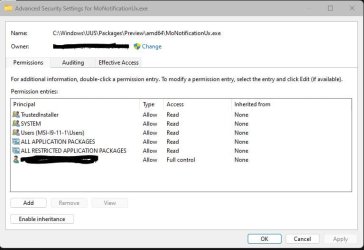
Note: Windows Update is set to "Notify for Download and Install" in the Group Policy. So it can check for updates automatically but it won't do anything about them until I want it to. Apparently this angers it so it yells at me.

When I initially read your post and was scouring the internet, Windows Update was the most dominant cause. Outside of that, I don’t know, sorry.
 

My Computers My Computers

  • At a glance

    Windows 11 Pro 25H2 Build 26200.8655Intel(R) Core(TM) i7-4770K CPU @ 3.50GHz32.0 GB of I forget and the box is in storage.Gigabyte nVidia GeForce GTX 1660 Super OC 6GB
    OS
    Windows 11 Pro 25H2 Build 26200.8655
    Computer type
    PC/Desktop
    Manufacturer/Model
    Sin-built 2013
    CPU
    Intel(R) Core(TM) i7-4770K CPU @ 3.50GHz
    Motherboard
    ASUS ROG Maximus VI Formula
    Memory
    32.0 GB of I forget and the box is in storage.
    Graphics Card(s)
    Gigabyte nVidia GeForce GTX 1660 Super OC 6GB
    Sound Card
    ROG SupremeFX Formula 8-Channel High Definition Audio
    Monitor(s) Displays
    5 x LG 25MS500-B - 1 x 24MK430H-B - 1 x Wacom Pro 22" Touch Screen Tablet
    Screen Resolution
    All over the place
    Hard Drives
    Too many to list. OS on Samsung 1TB 870 QVO SATA
    PSU
    Silverstone 1500
    Case
    NZXT Phantom 820 Full-Tower Case
    Cooling
    Noctua NH-D15 Elite Class Dual Tower CPU Cooler / 6 x EziDIY 120mm / 2 x Corsair 140mm somethings / 1 x 140mm Thermaltake something / 2 x 200mm Corsair.
    Keyboard
    Corsair K95 / Logitech diNovo Edge Wireless
    Mouse
    Logitech: G402 / G502 / Mx Masters / Mx Air Cordless
    Internet Speed
    2000/500Mbps
    Browser
    All sorts
    Antivirus
    Kaspersky Premium
    Other Info
    ㅤㅤㅤㅤㅤㅤㅤㅤㅤㅤㅤㅤㅤㅤㅤㅤㅤㅤㅤㅤㅤㅤㅤㅤㅤㅤㅤㅤㅤㅤㅤㅤㅤㅤㅤㅤㅤㅤㅤㅤ⠀⠀⠀⠀⠀⠀⠀⠀⠀⠀
    TP-Link BE9300 WiFi 7 Bluetooth 5.4 (Archer TBE550E)
    TP-Link TX201 V1 2.5GB Lan

    Grandstream HT812 - VoIP
    ASUS DSL-AX82U - Mesh
    ASUS RT-AC68U - Mesh
    ASUS RT-BE88U Router

    Brother MFC-L2880DW Printer

    I’m on a horse.
  • At a glance

    Windows 11 Pro 25H2 Build 26200.8655 (Wifes)13th Generation Intel® Core™ i5-1340P Process...16GB LPDDR5-52001x Intel® Iris® Xe Graphics
    Operating System
    Windows 11 Pro 25H2 Build 26200.8655 (Wifes)
    Computer type
    Laptop
    Manufacturer/Model
    LENOVO Yoga 7 14IRL8 - Type 82YL
    CPU
    13th Generation Intel® Core™ i5-1340P Processor(Core™ i5-1340P)
    Memory
    16GB LPDDR5-5200
    Graphics card(s)
    1x Intel® Iris® Xe Graphics
    Sound Card
    Optimized with Dolby Atmos®
    Screen Resolution
    QHD 2880 x 1800 OLED
    Hard Drives
    M.2 512 GB SSD PCIe
    Mouse
    Logiteck MX Master 3S
    Internet Speed
    2000/500
    Antivirus
    Defender / Malwarebytes
    Other Info
    …still on a horse.


    Wireless Network: Wi-Fi 6E 2x2 AX; Bluetooth® 5.1 or above
    Ports: 1x 1 Novo button; 2 in 1 Audio Combo jack; Micro SD Card Reader; HDMI 1.4b; 2 x USB Type-C (TBT4)
    USB 3.2 Gen 2 DP 1.4a
    PD 3.0); 1 x USB 3.2 Gen1 Type A
    Camera
    1x 1080P FHD IR/RGB Hybrid with Privacy Shutter and Dual Array Microphone
    Graphics
    1x Intel® Iris® Xe Graphics
    Monitor
    14" WUXGA
    Form Factor
    Convertible Notebook
  • Windows 11 Pro 25H2 Build 26200.8655 (Wifes)

    Yoga 7 2-in-1 14IML9 - Type 83DJ

    Processor: Intel® Core™ Ultra 7 155H Processor(Core™ Ultra 7 155H)

    Memory: 32GB LPD5X-7467

    Hard Drive: 1 TB SSD PCIe

    Wireless Network: 1x Wi-Fi 6E 2x2 AX; Bluetooth® 5.1 or above

    Ports: 1 x HDMI 2.1 TMDS; 1 x Novo Button; 1 x Combo Audio Jack
    2 x USB-C (USB 4.0)
    1 x USB-A 3.2 Gen 1

    Camera: 1080P FHD IR Hybrid with Dual Microphone

    Graphics: Intel® Arc™ Graphics

    Monitor: 14" 2.8K

    ...Where's my horse?
Have you tested with Fast Startup turned off?
 

My Computers My Computers

  • At a glance

    Windows 11 Pro 25H2 Build 26200.8655Intel(R) Core(TM) i7-4770K CPU @ 3.50GHz32.0 GB of I forget and the box is in storage.Gigabyte nVidia GeForce GTX 1660 Super OC 6GB
    OS
    Windows 11 Pro 25H2 Build 26200.8655
    Computer type
    PC/Desktop
    Manufacturer/Model
    Sin-built 2013
    CPU
    Intel(R) Core(TM) i7-4770K CPU @ 3.50GHz
    Motherboard
    ASUS ROG Maximus VI Formula
    Memory
    32.0 GB of I forget and the box is in storage.
    Graphics Card(s)
    Gigabyte nVidia GeForce GTX 1660 Super OC 6GB
    Sound Card
    ROG SupremeFX Formula 8-Channel High Definition Audio
    Monitor(s) Displays
    5 x LG 25MS500-B - 1 x 24MK430H-B - 1 x Wacom Pro 22" Touch Screen Tablet
    Screen Resolution
    All over the place
    Hard Drives
    Too many to list. OS on Samsung 1TB 870 QVO SATA
    PSU
    Silverstone 1500
    Case
    NZXT Phantom 820 Full-Tower Case
    Cooling
    Noctua NH-D15 Elite Class Dual Tower CPU Cooler / 6 x EziDIY 120mm / 2 x Corsair 140mm somethings / 1 x 140mm Thermaltake something / 2 x 200mm Corsair.
    Keyboard
    Corsair K95 / Logitech diNovo Edge Wireless
    Mouse
    Logitech: G402 / G502 / Mx Masters / Mx Air Cordless
    Internet Speed
    2000/500Mbps
    Browser
    All sorts
    Antivirus
    Kaspersky Premium
    Other Info
    ㅤㅤㅤㅤㅤㅤㅤㅤㅤㅤㅤㅤㅤㅤㅤㅤㅤㅤㅤㅤㅤㅤㅤㅤㅤㅤㅤㅤㅤㅤㅤㅤㅤㅤㅤㅤㅤㅤㅤㅤ⠀⠀⠀⠀⠀⠀⠀⠀⠀⠀
    TP-Link BE9300 WiFi 7 Bluetooth 5.4 (Archer TBE550E)
    TP-Link TX201 V1 2.5GB Lan

    Grandstream HT812 - VoIP
    ASUS DSL-AX82U - Mesh
    ASUS RT-AC68U - Mesh
    ASUS RT-BE88U Router

    Brother MFC-L2880DW Printer

    I’m on a horse.
  • At a glance

    Windows 11 Pro 25H2 Build 26200.8655 (Wifes)13th Generation Intel® Core™ i5-1340P Process...16GB LPDDR5-52001x Intel® Iris® Xe Graphics
    Operating System
    Windows 11 Pro 25H2 Build 26200.8655 (Wifes)
    Computer type
    Laptop
    Manufacturer/Model
    LENOVO Yoga 7 14IRL8 - Type 82YL
    CPU
    13th Generation Intel® Core™ i5-1340P Processor(Core™ i5-1340P)
    Memory
    16GB LPDDR5-5200
    Graphics card(s)
    1x Intel® Iris® Xe Graphics
    Sound Card
    Optimized with Dolby Atmos®
    Screen Resolution
    QHD 2880 x 1800 OLED
    Hard Drives
    M.2 512 GB SSD PCIe
    Mouse
    Logiteck MX Master 3S
    Internet Speed
    2000/500
    Antivirus
    Defender / Malwarebytes
    Other Info
    …still on a horse.


    Wireless Network: Wi-Fi 6E 2x2 AX; Bluetooth® 5.1 or above
    Ports: 1x 1 Novo button; 2 in 1 Audio Combo jack; Micro SD Card Reader; HDMI 1.4b; 2 x USB Type-C (TBT4)
    USB 3.2 Gen 2 DP 1.4a
    PD 3.0); 1 x USB 3.2 Gen1 Type A
    Camera
    1x 1080P FHD IR/RGB Hybrid with Privacy Shutter and Dual Array Microphone
    Graphics
    1x Intel® Iris® Xe Graphics
    Monitor
    14" WUXGA
    Form Factor
    Convertible Notebook
  • Windows 11 Pro 25H2 Build 26200.8655 (Wifes)

    Yoga 7 2-in-1 14IML9 - Type 83DJ

    Processor: Intel® Core™ Ultra 7 155H Processor(Core™ Ultra 7 155H)

    Memory: 32GB LPD5X-7467

    Hard Drive: 1 TB SSD PCIe

    Wireless Network: 1x Wi-Fi 6E 2x2 AX; Bluetooth® 5.1 or above

    Ports: 1 x HDMI 2.1 TMDS; 1 x Novo Button; 1 x Combo Audio Jack
    2 x USB-C (USB 4.0)
    1 x USB-A 3.2 Gen 1

    Camera: 1080P FHD IR Hybrid with Dual Microphone

    Graphics: Intel® Arc™ Graphics

    Monitor: 14" 2.8K

    ...Where's my horse?
Update:

Modifying the permissions did stop it from waking the pc. However it also caused an undesirable side effect.

Any updates that require a reboot won't complete. Click the "restart now" button in Settings > Windows Update does nothing. Resstarting manually does not trigger the update to finish.

Once I restored the original permissions a notifcation popped up telling me I needed to restart. Then the update would finish.
Have you tested with Fast Startup turned off?

No, why would I?
 

My Computers My Computers

  • At a glance

    Windroid 11 Pro / Win 10 ProIntel Core i9-14900K Raptor Lake Refreshed 6....32GB (2x16) GSKILL Trident Z5 RGB Series (Int...MSI Gaming GeForce RTX 4070 12GB
    OS
    Windroid 11 Pro / Win 10 Pro
    Computer type
    PC/Desktop
    Manufacturer/Model
    MSI
    CPU
    Intel Core i9-14900K Raptor Lake Refreshed 6.0 GHZ
    Motherboard
    MSI MAG Z790 Tomahawk WiFi
    Memory
    32GB (2x16) GSKILL Trident Z5 RGB Series (Intel XMP 3.0) DDR5 RAM 6700MT/s
    Graphics Card(s)
    MSI Gaming GeForce RTX 4070 12GB
    Sound Card
    Onboard Realtek® ALC4080 Codec
    Monitor(s) Displays
    Monitor #1 Samsung Odyssey G50A WQHD G-Sync HDR10 Monitor #2 HP LA1911
    Screen Resolution
    2560x1440 and 1280x1024
    Hard Drives
    Samsung 980 PRO SSD 1TB PCIe 4.0 NVMe Gen 4 Gaming M.2 (145GB Win11/100GB Win10/685GB More Games)
    Crucial CT2000MX500SSD1 2TB (Games)
    Western Digital Blue WD60EZAZ 6TB (Data/Backup)
    Western Digital Blue WD60EZAZ 6TB (Media)
    Western Digital Blue WD80EAAZ 8TB (Storage)
    PSU
    Rosewill Hive-750S
    Case
    Cooler Master Elite 430 Mid Tower
    Cooling
    Cooler Master ML240L V2 Liquid CPU cooler + 3x120mm in + Isolated PSU Standard upward flow
    Keyboard
    Microsoft Natural Elite White PS/2 (with usb adapter)
    Mouse
    Microsoft D67-00001 Trackball Optical Mouse (rebuilt with ceramic bearings)
    Internet Speed
    450Mb/s hard wired
    Browser
    FF, Mullvad, Tor
    Antivirus
    Win Def
    Other Info
    Razer Tartarus V2 Gaming Keypad
    Logitech Z-906 5.1 THX 500w (Original 8" Sub with Polk Audio satellites)
  • At a glance

    Windows 11 ProIntel Core i9-14900K Raptor Lake Refreshed 6....32GB (2x16) GSKILL Trident Z5 RGB Series (Int...MSI Gaming GeForce RTX 3060Ti 8GB
    Operating System
    Windows 11 Pro
    Computer type
    PC/Desktop
    Manufacturer/Model
    MSI
    CPU
    Intel Core i9-14900K Raptor Lake Refreshed 6.0 GHz FCLGA1700 (Gen 14)
    Motherboard
    MSI MAG Z790 Tomahawk WiFi
    Memory
    32GB (2x16) GSKILL Trident Z5 RGB Series (Intel XMP 3.0) DDR5 RAM 6700MT/s
    Graphics card(s)
    MSI Gaming GeForce RTX 3060Ti 8GB
    Sound Card
    Onboard Realtek® ALC4080 Codec
    Monitor(s) Displays
    Monitor #1 Samsung Odyssey G50A WQHD G-Sync HDR10 Monitor #2 Samsung TU7000 55" TV
    Screen Resolution
    2560x1440 and 3840x2160
    Hard Drives
    Samsung 980 PRO SSD 1TB PCIe 4.0 NVMe Gen 4 Gaming M.2 (System)
    Samsung 980 PRO SSD 2TB PCIe 4.0 NVMe Gen 4 Gaming M.2 (Games)
    Crucial CT1000MX500SSD1 1TB (More Games)
    WD Green WD20EZRX 2TB (Data/Backup)
    WD Blue WD60EZAZ 6TB (Media)
    PSU
    Rosewill Hive-750S
    Case
    Cooler Master N400 NSE-400-KKN2 Mid-Tower
    Cooling
    Cooler Master ML240L V2 Liquid CPU cooler + 3x120mm in + 2x120mm + Isolated PSU Reverse flow front exhaust
    Keyboard
    Logitech MK345 Wireless
    Mouse
    MSI G20 Elite and Logitech MK345 Wireless
    Internet Speed
    450Mb/s hard wired
    Browser
    FF
    Antivirus
    Win Def
    Other Info
    Razer Tartarus Gaming Keypad
    MSI GC30 Gaming Controller (Xbox style)
Update:

I think I found a workaround. I have not been able to stop the notifications from waking the PC without breaking other things but....

I was able to stop the notifications themselves. Now I have to open the settings page to know if there's any available updates but that's fine by me. To be clear, windows still checks for updates when ever it wants, It just doesn't do anything about them until I manually start them.

It will still show a notification if a restart is required after an update though that can be turned off too. I still want to get that one.

Code:
Group Policy > Computer Configuration > Administrative Templates > Windows Components > Windows Update > Manage end user experience > Display options for update notifications


Capture.jpg
 

My Computers My Computers

  • At a glance

    Windroid 11 Pro / Win 10 ProIntel Core i9-14900K Raptor Lake Refreshed 6....32GB (2x16) GSKILL Trident Z5 RGB Series (Int...MSI Gaming GeForce RTX 4070 12GB
    OS
    Windroid 11 Pro / Win 10 Pro
    Computer type
    PC/Desktop
    Manufacturer/Model
    MSI
    CPU
    Intel Core i9-14900K Raptor Lake Refreshed 6.0 GHZ
    Motherboard
    MSI MAG Z790 Tomahawk WiFi
    Memory
    32GB (2x16) GSKILL Trident Z5 RGB Series (Intel XMP 3.0) DDR5 RAM 6700MT/s
    Graphics Card(s)
    MSI Gaming GeForce RTX 4070 12GB
    Sound Card
    Onboard Realtek® ALC4080 Codec
    Monitor(s) Displays
    Monitor #1 Samsung Odyssey G50A WQHD G-Sync HDR10 Monitor #2 HP LA1911
    Screen Resolution
    2560x1440 and 1280x1024
    Hard Drives
    Samsung 980 PRO SSD 1TB PCIe 4.0 NVMe Gen 4 Gaming M.2 (145GB Win11/100GB Win10/685GB More Games)
    Crucial CT2000MX500SSD1 2TB (Games)
    Western Digital Blue WD60EZAZ 6TB (Data/Backup)
    Western Digital Blue WD60EZAZ 6TB (Media)
    Western Digital Blue WD80EAAZ 8TB (Storage)
    PSU
    Rosewill Hive-750S
    Case
    Cooler Master Elite 430 Mid Tower
    Cooling
    Cooler Master ML240L V2 Liquid CPU cooler + 3x120mm in + Isolated PSU Standard upward flow
    Keyboard
    Microsoft Natural Elite White PS/2 (with usb adapter)
    Mouse
    Microsoft D67-00001 Trackball Optical Mouse (rebuilt with ceramic bearings)
    Internet Speed
    450Mb/s hard wired
    Browser
    FF, Mullvad, Tor
    Antivirus
    Win Def
    Other Info
    Razer Tartarus V2 Gaming Keypad
    Logitech Z-906 5.1 THX 500w (Original 8" Sub with Polk Audio satellites)
  • At a glance

    Windows 11 ProIntel Core i9-14900K Raptor Lake Refreshed 6....32GB (2x16) GSKILL Trident Z5 RGB Series (Int...MSI Gaming GeForce RTX 3060Ti 8GB
    Operating System
    Windows 11 Pro
    Computer type
    PC/Desktop
    Manufacturer/Model
    MSI
    CPU
    Intel Core i9-14900K Raptor Lake Refreshed 6.0 GHz FCLGA1700 (Gen 14)
    Motherboard
    MSI MAG Z790 Tomahawk WiFi
    Memory
    32GB (2x16) GSKILL Trident Z5 RGB Series (Intel XMP 3.0) DDR5 RAM 6700MT/s
    Graphics card(s)
    MSI Gaming GeForce RTX 3060Ti 8GB
    Sound Card
    Onboard Realtek® ALC4080 Codec
    Monitor(s) Displays
    Monitor #1 Samsung Odyssey G50A WQHD G-Sync HDR10 Monitor #2 Samsung TU7000 55" TV
    Screen Resolution
    2560x1440 and 3840x2160
    Hard Drives
    Samsung 980 PRO SSD 1TB PCIe 4.0 NVMe Gen 4 Gaming M.2 (System)
    Samsung 980 PRO SSD 2TB PCIe 4.0 NVMe Gen 4 Gaming M.2 (Games)
    Crucial CT1000MX500SSD1 1TB (More Games)
    WD Green WD20EZRX 2TB (Data/Backup)
    WD Blue WD60EZAZ 6TB (Media)
    PSU
    Rosewill Hive-750S
    Case
    Cooler Master N400 NSE-400-KKN2 Mid-Tower
    Cooling
    Cooler Master ML240L V2 Liquid CPU cooler + 3x120mm in + 2x120mm + Isolated PSU Reverse flow front exhaust
    Keyboard
    Logitech MK345 Wireless
    Mouse
    MSI G20 Elite and Logitech MK345 Wireless
    Internet Speed
    450Mb/s hard wired
    Browser
    FF
    Antivirus
    Win Def
    Other Info
    Razer Tartarus Gaming Keypad
    MSI GC30 Gaming Controller (Xbox style)

Latest Support Threads

Back
Top Bottom




