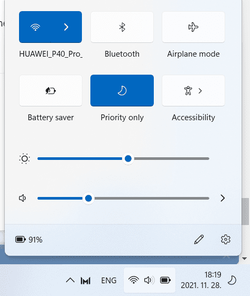
How to ungroup WiFi, Sound, Battery Charging taskbar icons in Win 11?


As Windows enthusiasts we sometimes get obsessed with finding a solution to our goal. With ExplorerPatcher, I get the results I want, but there are 2 system locked files (.dll's) that I don't know exactly what they are doing. My needs are fairly simple, and it seems like I am close to reaching my goal without keeping something running in Windows, but instead through what Windows already has available with registry changes.

I want to turn off Taskview, Search, etc... before I make the following change. I know the settings...

I want the Windows 10 style taskbar. I know the settings...

I want a small task bar. I know the settings...

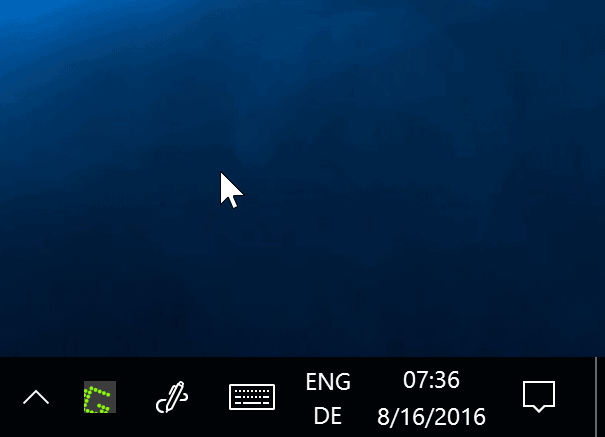
I want to restore the clock, volume and network in the system tray. I know the settings...

after those changes, I can use the taskbar like before and add toolbars or hide/unhide tray icons.

What I can't figure out is why the classic network icon that I restored only displays the dialogue box for just a split second, and how to remove the Control Center icon that would now be redundant.

Is there a fairly simple way to restore the tray Network icon so that it works properly (like it does with ExplorerPatcher)? and, Is there a simple registry setting to remove the Control Center (without ExplorerPatcher)?

I am grateful for the work people put into these programs, but in this case, this one is open source so maybe someone smarter the me can help as I would prefer not to run stuff if I could just make the manual changes.

Thanks!
 

My Computer My Computer

At a glance

Windows 11
OS
Windows 11
Thank you both (and The-Hive)!
To be completely fair IMO, Valinet (the author of ExplorerPatcher) is the guy you should be thanking instead.
 

My Computers My Computers

  • At a glance

    11 Homei7 13650HX16GB DDR5GeForce RTX 4060 Mobile
    OS
    11 Home
    Computer type
    Laptop
    Manufacturer/Model
    Asus TUF Gaming F16 (2024)
    CPU
    i7 13650HX
    Memory
    16GB DDR5
    Graphics Card(s)
    GeForce RTX 4060 Mobile
    Sound Card
    Eastern Electric MiniMax DAC Supreme; Emotiva UMC-200; Astell & Kern AK240
    Monitor(s) Displays
    Sony Bravia XR-55X90J
    Screen Resolution
    3840×2160
    Hard Drives
    512GB SSD internal
    37TB external
    PSU
    Li-ion
    Cooling
    2× Arc Flow Fans, 4× exhaust vents, 5× heatpipes
    Keyboard
    Logitech K800
    Mouse
    Logitech G402
    Internet Speed
    30Mbit/s up, 500Mbit/s down
    Browser
    FF
    Antivirus
    What's an antivirus?
  • At a glance

    11 Homei5 1135G716GB DDR4Intel Iris Xe
    Operating System
    11 Home
    Computer type
    Laptop
    Manufacturer/Model
    Medion S15450
    CPU
    i5 1135G7
    Memory
    16GB DDR4
    Graphics card(s)
    Intel Iris Xe
    Sound Card
    Eastern Electric MiniMax DAC Supreme; Emotiva UMC-200; Astell & Kern AK240
    Monitor(s) Displays
    Sony Bravia XR-55X90J
    Screen Resolution
    3840×2160
    Hard Drives
    2TB SSD internal
    37TB external
    PSU
    Li-ion
    Keyboard
    Logitech K800
    Mouse
    Logitech G402
    Internet Speed
    30Mbit/s up, 500Mbit/s down
    Browser
    FF
To be completely fair IMO, Valinet (the author of ExplorerPatcher) is the guy you should be thanking instead.
yes, he is one smart guy. much of what he accomplished should be easy modifications, but turns out they are not so easy. the people that help or point people in the right direction also deserve thanks. sometime it's hard just to know how to word a search. I am glad there is help here.
 

My Computer My Computer

At a glance

Windows 11
OS
Windows 11
Is there a fairly simple way to restore the tray Network icon so that it works properly (like it does with ExplorerPatcher)?
You could create a new shortcut and paste ms-availablenetworks: in the target field I guess. At least in my view, ExplorerPatcher already perfectly matches the definition of "fairly simple way", though.
and, Is there a simple registry setting to remove the Control Center (without ExplorerPatcher)?
I haven't tested this myself yet, but you could try running
Code:
reg add HKEY_CURRENT_USER\SOFTWARE\Policies\Microsoft\Windows\Explorer /f /v DisableNotificationCenter /t REG_DWORD /d 1
from an elevated command prompt, reboot, see if that works. AFAIK on Windows 10 this registry tweak disables the Action Center and causes notifications to behave like in Windows 7, 8, and 8.1.
EDIT: I tried it just now, the registry tweak disables the Action Center on the Windows 10 taskbar of Windows 11, but it doesn't hide the icon (the cogwheel icon next to the clock).
EDIT2: Doesn't seem like it can be hidden without ExplorerPatcher. In case you want to avoid going into ExplorerPatcher's settings window panel, you can copypaste the following code to a batchfile and run it as administrator, but you still need to have installed ExplorerPatcher for this to work:
Code:
reg add HKEY_CURRENT_USER\Software\Microsoft\Windows\CurrentVersion\Explorer\ExplorerPatcher /f /v HideControlCenterButton /t REG_DWORD /d 1
rundll32 "C:\Windows\dxgi.dll",ZZRestartExplorer
(The 2nd line is to restart Explorer. Don't use the taskkill command or 'end process' option in task manager instead, Valinet has explained why not.)
 
Last edited:

My Computers My Computers

  • At a glance

    11 Homei7 13650HX16GB DDR5GeForce RTX 4060 Mobile
    OS
    11 Home
    Computer type
    Laptop
    Manufacturer/Model
    Asus TUF Gaming F16 (2024)
    CPU
    i7 13650HX
    Memory
    16GB DDR5
    Graphics Card(s)
    GeForce RTX 4060 Mobile
    Sound Card
    Eastern Electric MiniMax DAC Supreme; Emotiva UMC-200; Astell & Kern AK240
    Monitor(s) Displays
    Sony Bravia XR-55X90J
    Screen Resolution
    3840×2160
    Hard Drives
    512GB SSD internal
    37TB external
    PSU
    Li-ion
    Cooling
    2× Arc Flow Fans, 4× exhaust vents, 5× heatpipes
    Keyboard
    Logitech K800
    Mouse
    Logitech G402
    Internet Speed
    30Mbit/s up, 500Mbit/s down
    Browser
    FF
    Antivirus
    What's an antivirus?
  • At a glance

    11 Homei5 1135G716GB DDR4Intel Iris Xe
    Operating System
    11 Home
    Computer type
    Laptop
    Manufacturer/Model
    Medion S15450
    CPU
    i5 1135G7
    Memory
    16GB DDR4
    Graphics card(s)
    Intel Iris Xe
    Sound Card
    Eastern Electric MiniMax DAC Supreme; Emotiva UMC-200; Astell & Kern AK240
    Monitor(s) Displays
    Sony Bravia XR-55X90J
    Screen Resolution
    3840×2160
    Hard Drives
    2TB SSD internal
    37TB external
    PSU
    Li-ion
    Keyboard
    Logitech K800
    Mouse
    Logitech G402
    Internet Speed
    30Mbit/s up, 500Mbit/s down
    Browser
    FF
Don't use the taskkill command or 'end process' option in task manager instead, Valinet has explained why not.)
Please would you post a link to Valinet's post [which must be in another thread] so I can study the topic.

All the best,
Denis
 

My Computer My Computer

At a glance

Windows 11 Home x64 Version 25H2 Build 26200....
OS
Windows 11 Home x64 Version 25H2 Build 26200.9168
You could create a new shortcut and paste ms-availablenetworks: in the target field I guess. At least in my view, ExplorerPatcher already perfectly matches the definition of "fairly simple way", though.

I haven't tested this myself yet, but you could try running
Code:
reg add HKEY_CURRENT_USER\SOFTWARE\Policies\Microsoft\Windows\Explorer /f /v DisableNotificationCenter /t REG_DWORD /d 1
from an elevated command prompt, reboot, see if that works. AFAIK on Windows 10 this registry tweak disables the Action Center and causes notifications to behave like in Windows 7, 8, and 8.1.
EDIT: I tried it just now, the registry tweak disables the Action Center on the Windows 10 taskbar of Windows 11, but it doesn't hide the icon (the cogwheel icon next to the clock).
EDIT2: Doesn't seem like it can be hidden without ExplorerPatcher. In case you want to avoid going into ExplorerPatcher's settings window panel, you can copypaste the following code to a batchfile and run it as administrator, but you still need to have installed ExplorerPatcher for this to work:
Code:
reg add HKEY_CURRENT_USER\Software\Microsoft\Windows\CurrentVersion\Explorer\ExplorerPatcher /f /v HideControlCenterButton /t REG_DWORD /d 1
rundll32 "C:\Windows\dxgi.dll",ZZRestartExplorer
(The 2nd line is to restart Explorer. Don't use the taskkill command or 'end process' option in task manager instead, Valinet has explained why not.)
Thank you! I will study and try your suggestions.
 

My Computer My Computer

At a glance

Windows 11
OS
Windows 11
Please would you post a link to Valinet's post [which must be in another thread] so I can study the topic.

All the best,
Denis
From: Useful development tools/scripts/helpers · Discussion #183 · valinet/ExplorerPatcher
Avoid killing Explorer with taskkill /f /im explorer.exe, for example, as that shuts it down without it having a chance to save the settings. Instead, use the new exported function of ExplorerPatcher, ZZRestartExplorer, which restarts it gracefully using Windows' Restart Manager. This will also reopen any folder windows that you had open, mainly restoring the state before the restart.
 

My Computers My Computers

  • At a glance

    11 Homei7 13650HX16GB DDR5GeForce RTX 4060 Mobile
    OS
    11 Home
    Computer type
    Laptop
    Manufacturer/Model
    Asus TUF Gaming F16 (2024)
    CPU
    i7 13650HX
    Memory
    16GB DDR5
    Graphics Card(s)
    GeForce RTX 4060 Mobile
    Sound Card
    Eastern Electric MiniMax DAC Supreme; Emotiva UMC-200; Astell & Kern AK240
    Monitor(s) Displays
    Sony Bravia XR-55X90J
    Screen Resolution
    3840×2160
    Hard Drives
    512GB SSD internal
    37TB external
    PSU
    Li-ion
    Cooling
    2× Arc Flow Fans, 4× exhaust vents, 5× heatpipes
    Keyboard
    Logitech K800
    Mouse
    Logitech G402
    Internet Speed
    30Mbit/s up, 500Mbit/s down
    Browser
    FF
    Antivirus
    What's an antivirus?
  • At a glance

    11 Homei5 1135G716GB DDR4Intel Iris Xe
    Operating System
    11 Home
    Computer type
    Laptop
    Manufacturer/Model
    Medion S15450
    CPU
    i5 1135G7
    Memory
    16GB DDR4
    Graphics card(s)
    Intel Iris Xe
    Sound Card
    Eastern Electric MiniMax DAC Supreme; Emotiva UMC-200; Astell & Kern AK240
    Monitor(s) Displays
    Sony Bravia XR-55X90J
    Screen Resolution
    3840×2160
    Hard Drives
    2TB SSD internal
    37TB external
    PSU
    Li-ion
    Keyboard
    Logitech K800
    Mouse
    Logitech G402
    Internet Speed
    30Mbit/s up, 500Mbit/s down
    Browser
    FF
Thanks for the info. I'll stick with using the established taskkill method of restarting explorer for the time being.

Addn: I don't think there is any problem with the established taskkill method at all. See my later post at Restart Windows Explorer.exe Process in Windows 11

Denis
 
Last edited:

My Computer My Computer

At a glance

Windows 11 Home x64 Version 25H2 Build 26200....
OS
Windows 11 Home x64 Version 25H2 Build 26200.9168
I said I modified the registry to get the results I wanted on 2 computers to get the taskbar how I wanted, but on one, the tray wifi button didn't work properly. After yesterdays Cumulative Windows 11 update, now both computers wifi icons no longer work.

I just tried explorerpatcher and it fixed the icon to work properly and easily removed the redundant Control Center. Thank you both (and The-Hive)!

I can follow instructions, but I like manually changing the registry so I know what changes are being made, but I am not quite at the level of following source code. Being open source I am confident it is safe, but all things being equal I wish I had the skills to do the changes manually.

Thanks for your replies as they did get me the results I want. :)
Yeah, after I had upgraded my Windows 10 to 11, I got so caught up with manually changing the registry that it took a while before finally I noticed that somewhere on here someone had pointed out the existence of ExplorerPatcher. In fact many of the settings that ExplorerPatcher's settings menu allows you to easily change are the same registry settings that can also be found in various tutorials on here and on Tenforums.com or in Winaero Tweaker (from Winaero.com). In Winaero Tweaker you get to see links that you can click on in the description of various tweaks that it offers, each link points to an article on the Winaero.com website where you'll often find out the actual registry settings that apply. I am always on the lookout for additional tweaks, tips and tricks that can potentially be useful to me, so I tend to go searching for them (sometimes regularly).
 

My Computers My Computers

  • At a glance

    11 Homei7 13650HX16GB DDR5GeForce RTX 4060 Mobile
    OS
    11 Home
    Computer type
    Laptop
    Manufacturer/Model
    Asus TUF Gaming F16 (2024)
    CPU
    i7 13650HX
    Memory
    16GB DDR5
    Graphics Card(s)
    GeForce RTX 4060 Mobile
    Sound Card
    Eastern Electric MiniMax DAC Supreme; Emotiva UMC-200; Astell & Kern AK240
    Monitor(s) Displays
    Sony Bravia XR-55X90J
    Screen Resolution
    3840×2160
    Hard Drives
    512GB SSD internal
    37TB external
    PSU
    Li-ion
    Cooling
    2× Arc Flow Fans, 4× exhaust vents, 5× heatpipes
    Keyboard
    Logitech K800
    Mouse
    Logitech G402
    Internet Speed
    30Mbit/s up, 500Mbit/s down
    Browser
    FF
    Antivirus
    What's an antivirus?
  • At a glance

    11 Homei5 1135G716GB DDR4Intel Iris Xe
    Operating System
    11 Home
    Computer type
    Laptop
    Manufacturer/Model
    Medion S15450
    CPU
    i5 1135G7
    Memory
    16GB DDR4
    Graphics card(s)
    Intel Iris Xe
    Sound Card
    Eastern Electric MiniMax DAC Supreme; Emotiva UMC-200; Astell & Kern AK240
    Monitor(s) Displays
    Sony Bravia XR-55X90J
    Screen Resolution
    3840×2160
    Hard Drives
    2TB SSD internal
    37TB external
    PSU
    Li-ion
    Keyboard
    Logitech K800
    Mouse
    Logitech G402
    Internet Speed
    30Mbit/s up, 500Mbit/s down
    Browser
    FF
In my opinion this recent discussion simply highlights the fact that Microsoft should document the registry settings. If that were the case, people would not need to waste their time on "discovering" how to change the taskbar or making special programs to do that.
 

My Computer My Computer

At a glance

Windows 10i5-10600K16 GBGeForce GTX 1650
OS
Windows 10
Computer type
PC/Desktop
CPU
i5-10600K
Motherboard
Asus Rog Strix Z490-A Gaming
Memory
16 GB
Graphics Card(s)
GeForce GTX 1650
Monitor(s) Displays
Samsung U32J59x 32" 4K
Screen Resolution
3840x2160
Guys, this is super annoying. They have hidden away the WiFi menu. Practically you can no longer see WiFi networks in one click, you have to open up that group and then click the > button... and to see that there is no official solution to this issue, only very ugly ones such as binary patching a key windows component (explorer) that gets changed very often... or restoring the old task bar which is now outdated and no longer updated therefore could cause compatibility issues... Come on Microsoft, you need to fix this!

I created a suggestion of Feedback Hub for this, could you all please take the time to UPVOTE this issue and share it everywhere you can? Thank you.

Give back option to open WiFi menu with one click
Windows Insider Program
 

My Computers My Computers

1 Those icons are not grouped together. Please explain what you want without using the word grouped [because you are not using it the way everybody else does].

This is what people normally mean by taskbar grouping - Enable or Disable Grouping of Taskbar Buttons [Windows 10, 11] - TenForumsTutorials

Do you, possibly, mean whether or not they are shown on the Taskbar itself as opposed to the ^ area?
This is illustrated in Notification Area Icons - Hide or Show in Windows 10 - Windows 10 Forums

Denis
Uhm, have you seen Windows 11 so far? Because he/she is clearly talking about a new change in Windows 11 , NOT Windows 10.

And yes, those icons are now clearly grouped (stacked) together. You cannot just click on WiFi, you can only click on the whole group. it is so annoying. Changing WiFi networks is much more difficult now.

@Try3
 

Attachments

  • w11.png
    w11.png
    4.9 KB · Views: 8
  • w112.png
    w112.png
    34.9 KB · Views: 38

My Computers My Computers

thanks! unfortunately, #1 and #3 is not found in the link you provided. Any advice please? Cheers.
For #3 see...


My Computers My Computers

  • At a glance

    Windows 11 HomeAMD Athlon Silver 3050U8GBRadeon Graphics
    OS
    Windows 11 Home
    Computer type
    Laptop
    Manufacturer/Model
    Acer Aspire 3 A315-23-R9VY
    CPU
    AMD Athlon Silver 3050U
    Memory
    8GB
    Graphics Card(s)
    Radeon Graphics
    Monitor(s) Displays
    laptop screen
    Screen Resolution
    1366x768 native resolution, up to 2560x1440 with Radeon Virtual Super Resolution
    Hard Drives
    1TB Samsung EVO 870 SSD (from April 2026: 250GB EVO 850)
    Internet Speed
    150 Mbps
    Browser
    Edge, Firefox
    Antivirus
    Defender
    Other Info
    UPDATE - 11 April 2026: due to lid hinges starting to break up this laptop has been retired from active duty. The OS with all software and files has been migrated to my System Seven in 'Other systems' to carry on as my general purpose 'main machine'.

    I've now clean installed 25H2 and used Garlin's scripts to update Secure Boot to CA 2023 and revoke the PCA 2011 certificates. It's new role is to test secure boot issues.

    Info for 2021-2026:
    fully 'Windows 11 ready' laptop. Windows 10 C: partition migrated from my old unsupported 'main machine' then upgraded to 11. A test migration ran Insider builds for 2 months. When 11 was released on 5th October 2021 it was re-imaged back to 10 and was offered the upgrade in Windows Update on 20th October. Windows Update offered the 22H2 Feature Update on 20th September 2022. It got the 23H2 Feature Update on 4th November 2023 through Windows Update, 24H2 on 3rd October 2024 through Windows Update by setting the Target Release Version for 24H2, and 25H2 on 30th September 2025 through Windows Update by setting the Target Release Version for 25H2.
  • At a glance

    Windows 11 ProIntel® Core™ i5-520M8GB(integrated graphics) Intel HD Graphics
    Operating System
    Windows 11 Pro
    Computer type
    Laptop
    Manufacturer/Model
    Dell Latitude E4310
    CPU
    Intel® Core™ i5-520M
    Motherboard
    0T6M8G
    Memory
    8GB
    Graphics card(s)
    (integrated graphics) Intel HD Graphics
    Screen Resolution
    1366x768
    Hard Drives
    500GB Crucial MX500 SSD
    Browser
    Firefox, Edge
    Antivirus
    Defender
    Other Info
    unsupported machine: Legacy bios, MBR, TPM 1.2, upgraded from W10 to W11 using W10/W11 hybrid install media workaround.

    In-place upgrade to 22H2 using ISO and a workaround.
    Feature Update to 23H2 by manually installing the Enablement Package.
    In-place upgrade to 24H2 using hybrid 23H2/24H2 install media.
    Upgraded to 25H2 by Enablement Package.

    Also running Insider Experimental 263xx and 29xxx builds and Windows 10 as native boot .vhdx.
  • My SYSTEM THREE is a Dell Latitude 5410, i7-10610U, 32GB RAM, 512GB NVMe ssd, supported device running Windows 11 Pro.

    My SYSTEM FOUR was a 2-in-1 convertible Lenovo Yoga 11e (1st gen) type 20DA, Celeron N2930, 8GB RAM, 256GB ssd. Unsupported device. This has now been sold. It has been replaced by my System Eight.

    My SYSTEM FIVE is a Dell Latitude 3190 2-in-1, Pentium Silver N5030, 8GB RAM, 1TB NVMe ssd, supported device running Windows 11 Pro, plus Insider Beta, Experimental 263xx and 29xxx builds (and a few others) as a native boot .vhdx.

    My SYSTEM SIX is a Dell Latitude 5550, Core Ultra 7 165H, 64GB RAM, 1TB NVMe SSD, supported device, Windows 11 Pro, Hyper-V host machine. Updated to 25H2 on 30th September 2025.

    My SYSTEM SEVEN is a Lenovo Thinkpad T580, 1920x1080 touchscreen, Intel Core i7-8650U, 16GB RAM, 512GB NVMe SSD + 2nd 512GB NVMe SSD, a supported device for Windows 11. This is my current general purpose 'main machine'. The installed Windows 11 Home from my System One has been migrated to this machine. As its new home has an existing digital licence for Pro I've been able to upgrade the migrated OS from Home to Pro.

    My SYSTEM EIGHT is a 2-in-1 convertible Lenovo Yoga 11e (5th gen) type 20LN, Celeron N4120, 8GB RAM, 512GB NVMe ssd, a supported device for Windows 11. Currently running Windows 11 Pro, plus Insider Beta, Experimental 263xx and 29xxx builds as native boot vhdx.

My Computer My Computer

At a glance

Windows 11 Home x64 Version 25H2 Build 26200....
OS
Windows 11 Home x64 Version 25H2 Build 26200.9168
, only very ugly ones such as binary patching a key windows component (explorer) that gets changed very often... or restoring the old task bar which is now outdated and no longer updated therefore could cause compatibility issues...
First off, early dll injection into the Explorer process by adding a file dxgi.dll in C:\Windows is nowhere nearly the same as binary patching. The file explorer.exe is not being modified, and, simply removing dxgi.dll again before restarting Explorer will reverse changes without needing to reboot or logoff/logon. It is far less ugly IMO than having to live with the new taskbar and especially the blatant loss of a whole variety of features that can be restored by using the free ExplorerPatcher, but of course you can still disagree. Either way, your point about the old taskbar being outdated and no longer updated is moot as moot can be, as it is the new and updated one that's giving you troubles, not the old one. So this is a contradiction at its finest. Harsh, I know... but tell that to Microsoft.
 

My Computers My Computers

  • At a glance

    11 Homei7 13650HX16GB DDR5GeForce RTX 4060 Mobile
    OS
    11 Home
    Computer type
    Laptop
    Manufacturer/Model
    Asus TUF Gaming F16 (2024)
    CPU
    i7 13650HX
    Memory
    16GB DDR5
    Graphics Card(s)
    GeForce RTX 4060 Mobile
    Sound Card
    Eastern Electric MiniMax DAC Supreme; Emotiva UMC-200; Astell & Kern AK240
    Monitor(s) Displays
    Sony Bravia XR-55X90J
    Screen Resolution
    3840×2160
    Hard Drives
    512GB SSD internal
    37TB external
    PSU
    Li-ion
    Cooling
    2× Arc Flow Fans, 4× exhaust vents, 5× heatpipes
    Keyboard
    Logitech K800
    Mouse
    Logitech G402
    Internet Speed
    30Mbit/s up, 500Mbit/s down
    Browser
    FF
    Antivirus
    What's an antivirus?
  • At a glance

    11 Homei5 1135G716GB DDR4Intel Iris Xe
    Operating System
    11 Home
    Computer type
    Laptop
    Manufacturer/Model
    Medion S15450
    CPU
    i5 1135G7
    Memory
    16GB DDR4
    Graphics card(s)
    Intel Iris Xe
    Sound Card
    Eastern Electric MiniMax DAC Supreme; Emotiva UMC-200; Astell & Kern AK240
    Monitor(s) Displays
    Sony Bravia XR-55X90J
    Screen Resolution
    3840×2160
    Hard Drives
    2TB SSD internal
    37TB external
    PSU
    Li-ion
    Keyboard
    Logitech K800
    Mouse
    Logitech G402
    Internet Speed
    30Mbit/s up, 500Mbit/s down
    Browser
    FF
First off, early dll injection into the Explorer process by adding a file dxgi.dll in C:\Windows is nowhere nearly the same as binary patching. The file explorer.exe is not being modified, and, simply removing dxgi.dll again before restarting Explorer will reverse changes without needing to reboot or logoff/logon. It is far less ugly IMO than having to live with the new taskbar and especially the blatant loss of a whole variety of features that can be restored by using the free ExplorerPatcher, but of course you can still disagree. Either way, your point about the old taskbar being outdated and no longer updated is moot as moot can be, as it is the new and updated one that's giving you troubles, not the old one. So this is a contradiction at its finest.

Agreed, you got a point there. My mistake, it is not binary patching. But still this patch could still very easily break with a future Windows Update... not a reliable method.

I agree that the feature loss is substantial and undesirable. But I don't agree that reverting to the old task bar using hacks could be called a solution, or even a workaround. It is more like a 'fix with duct tape' trying to keep a sinking ship afloat. It could work for a while, then not anymore.


Harsh, I know... but tell that to Microsoft.
Yes, let's tell them! I created a feedback hub entry dedicated to this. Could you all spare a moment to go and upvote it? I need upvotes for my suggestion to ungroup these icons. They basically took away the ability to adjust WiFi or sound settings in one click.
Now I have to enter a menu and then enter a submenu to do what I could easier on Windows 10. I cannot live with this nonsense.

Due to other stability issues (including frequent explorer and settings app crashes) I reverted to Windows 10 and will stay there until this gets fixed. If it doesn't get fixed by 2025 I guess I will resort to the explorerpatcher hack you described. But I really hope it will be fixed by then. For that fix to happen please upvote. This feedback hub entry should already have hundreds of upvotes by now, yet it barely has two. People only seem to pour their hearts here, and not over there. I cannot see why. Anyway:

Give back option to open WiFi menu with one click -- please upvote:

Windows Insider Program link to post: Give back option to open WiFi menu with one click


My Computers My Computers

But I don't agree that reverting to the old task bar using hacks could be called a solution, or even a workaround.
4fb0223b9d2c4b3c4d86fee0e67efd761de2f66743193688239949e55f043621.jpg
 

My Computers My Computers

  • At a glance

    11 Homei7 13650HX16GB DDR5GeForce RTX 4060 Mobile
    OS
    11 Home
    Computer type
    Laptop
    Manufacturer/Model
    Asus TUF Gaming F16 (2024)
    CPU
    i7 13650HX
    Memory
    16GB DDR5
    Graphics Card(s)
    GeForce RTX 4060 Mobile
    Sound Card
    Eastern Electric MiniMax DAC Supreme; Emotiva UMC-200; Astell & Kern AK240
    Monitor(s) Displays
    Sony Bravia XR-55X90J
    Screen Resolution
    3840×2160
    Hard Drives
    512GB SSD internal
    37TB external
    PSU
    Li-ion
    Cooling
    2× Arc Flow Fans, 4× exhaust vents, 5× heatpipes
    Keyboard
    Logitech K800
    Mouse
    Logitech G402
    Internet Speed
    30Mbit/s up, 500Mbit/s down
    Browser
    FF
    Antivirus
    What's an antivirus?
  • At a glance

    11 Homei5 1135G716GB DDR4Intel Iris Xe
    Operating System
    11 Home
    Computer type
    Laptop
    Manufacturer/Model
    Medion S15450
    CPU
    i5 1135G7
    Memory
    16GB DDR4
    Graphics card(s)
    Intel Iris Xe
    Sound Card
    Eastern Electric MiniMax DAC Supreme; Emotiva UMC-200; Astell & Kern AK240
    Monitor(s) Displays
    Sony Bravia XR-55X90J
    Screen Resolution
    3840×2160
    Hard Drives
    2TB SSD internal
    37TB external
    PSU
    Li-ion
    Keyboard
    Logitech K800
    Mouse
    Logitech G402
    Internet Speed
    30Mbit/s up, 500Mbit/s down
    Browser
    FF

My Computers My Computers

My Computers My Computers

1 Those icons are not grouped together. Please explain what you want without using the word grouped [because you are not using it the way everybody else does].
No, they are grouped together, and there's nothing wrong with their usage of the word.
 

My Computer My Computer

At a glance

Windows11, 10, 7, Kali, Ubuntu, WorkbenchIntel 12900KBALLISTIX 64GB 3200ZOTAC RTX 3090 TRINITY
OS
Windows11, 10, 7, Kali, Ubuntu, Workbench
Computer type
PC/Desktop
Manufacturer/Model
N/A
CPU
Intel 12900K
Motherboard
ASUS TUF GAM Z690-PLUS WIFI D4
Memory
BALLISTIX 64GB 3200
Graphics Card(s)
ZOTAC RTX 3090 TRINITY
Sound Card
N/A
Monitor(s) Displays
AOC CU34G2X/BK 34"
Screen Resolution
3440x1440
Hard Drives
SAMSUNG 980 PRO 1TB NVME, WD SN750 1TB NVME M.2 SSD, WD BLUE 3D 1TB M.2 SSD
PSU
RM1000X 1000W 80PLUSGOLD
Case
ENTHOO EVOLV X SATIN BLACK
Cooling
NZXT KRAKEN X73
Internet Speed
Gigabit

Latest Support Threads

Back
Top Bottom