How to use Microsoft Defender when another Security provider is installed


Local time
10:39 AM
Posts
69
OS
Windows 11
I am planning to use a free security provider (AVG or Avira) on my laptop, but I would like to keep using Microsoft Defender in a limited capacity. Specifically, I want to be able to run Microsoft Defender quick and full scans ONLY on demand. Either by creating two desktop shortcuts, one for full scan and one for quick scan, or by using elevated command prompt or terminal(Admin) or by using a cmdlets or some other mechanism.
Also I would like to be able to run a Microsofts Defender on demand scanner/custom scan or a file (either an archive or other file). Preferably by right clicking a file and having an option like "Scan with MS Defender". When a new security provider is introduced it typically disables the option to scan with Microsoft Defender.
Finally I would like to update the definitions for MS Defender regualary too.

I am not looking for Microsoft Defender to be enabled and running in the background all the time, competing with the other security provider. I also do not want Microsoft Defender to automatically trigger a scan on access of any file or stream. Rather I want Microsoft Defender scan to be user initiated. Like a dormant capabilty that can be woken up and ONLY used on demand. After it use, it terminates.

I looked at Microsoft learns documentation, Configure and run on-demand Microsoft Defender Antivirus scans but that did not help much.

I thought about using Malicious Software Removal tool (i.e. %windir%\system32\MRT.exe) but dropped the idea for two reasons. Firstly MRT only scans for the most widely prevelant malware infecting windows machines protected by Microsoft Defender. Secondly it gets updated every month. Rather I would like to use the vast definitions that are available with Microsoft Defender.

Any suggestions and ideas on how this can be done?
 
Windows Build/Version
Win 11 25H2

My Computer My Computer

At a glance

Windows 11Intel16 GBIntel UHD Integrated
OS
Windows 11
Computer type
Laptop
CPU
Intel
Memory
16 GB
Graphics Card(s)
Intel UHD Integrated
Mouse
Inbuilt
Browser
Firefox
Antivirus
Microsoft Defender
According to this you should be able to run scans, though probably not via right-click on context menu.
After enabling periodic scanning, run scan via command or powershell.
 
Last edited:

My Computer My Computer

At a glance

Windows 11 Pro 25H2 26200.9168Intel Core i3-8145U16GB
OS
Windows 11 Pro 25H2 26200.9168
Computer type
Laptop
Manufacturer/Model
Lenovo IdeaPad L340
CPU
Intel Core i3-8145U
Memory
16GB
Hard Drives
500 GB M2 1 TB HDD
Internet Speed
400 MB
Browser
Chrome | Edge
Antivirus
Microsoft Defender | Block unknown executables | Various ASR rules enabled | Smart App Control
IMHO, AVG and Avira are both a step down from Microsoft Defender.

Not sure what advantage you think you'll be getting...
 

My Computer My Computer

At a glance

Windows 11 Pro 25H2
OS
Windows 11 Pro 25H2
Computer type
Laptop
Manufacturer/Model
Toshiba

My Computer My Computer

At a glance

Home2FH2CanAMD Ryzen 5 8600G (07/24)2x32GB Kingston FURY DDR5 5600 MHz CL36 @5200...ASROCK Radeon RX 6600 Challenger D 8G @48FPS ...
OS
Home2FH2Can
Computer type
PC/Desktop
CPU
AMD Ryzen 5 8600G (07/24)
Motherboard
ASROCK B650M-HDV/M.2 (07/24) BIOS 4.43 AGESA ComboAM5 1.3.0.1b Patch A (07/26)
Memory
2x32GB Kingston FURY DDR5 5600 MHz CL36 @5200 CL40 (07/24)
Graphics Card(s)
ASROCK Radeon RX 6600 Challenger D 8G @48FPS (08/24)
Sound Card
Creative Sound BlasterX AE-5 Plus (05/24)
Monitor(s) Displays
24" Philips 24M1N3200ZS/00 (05/24)
Screen Resolution
1920×1080@165Hz via DP1.4
Hard Drives
Kingston KC3000 NVMe 2TB (05/24)
ADATA XPG GAMMIX S11 Pro 512GB (07/19)
PSU
Seasonic Core GM 550 Gold (04/24)
Case
Fractal Design Define 7 Mini with 3x Noctua NF-P14s/12@555rpm (04/24)
Cooling
Noctua NH-U12S with Noctua NF-P12 (04/24)
Keyboard
HP Pavilion Wired Keyboard 300 (07/24) + Rabalux 76017 Parker (01/24)
Mouse
Logitech M330 Silent Plus (07/26)
Internet Speed
500/100 Mbps via RouterOS (05/21) & TCP Optimizer
Browser
Edge, Brave for YouTube, LibreWolf for FB
Antivirus
NextDNS blocking 1/3 Traffic
Other Info
Phone: Motorola Moto G86 (02/26)
Backup: Hasleo Backup Suite (PreOS)
Headphones: Sennheiser RS170 (09/10)
Chair: Huzaro Force 4.4 Grey Mesh (05/24)
Notifier: Xiaomi Mi Band 9 Milanese (10/24)
FlexCore USB-C 3.2 Gen 1 (M) to LAN (F) (08/25)
According to this you should be able to run scans, though probably not via right-click on context menu.
After enabling periodic scanning, run scan via command or powershell.
So, can I schedule a scan to be run with Microsoft Defender say every Monday evening at 05:30 pm using Task Scheduler? If there is a shell script file with the following commands and it is scheduled, then will this work?

Powershell:
Update-MpSignature  -ProgressAction 
Start-MpScan -ScanType FullScan
 

My Computer My Computer

At a glance

Windows 11Intel16 GBIntel UHD Integrated
OS
Windows 11
Computer type
Laptop
CPU
Intel
Memory
16 GB
Graphics Card(s)
Intel UHD Integrated
Mouse
Inbuilt
Browser
Firefox
Antivirus
Microsoft Defender
Defender is always running, even with 3rd party AV, so on-demand scanning is no problem.
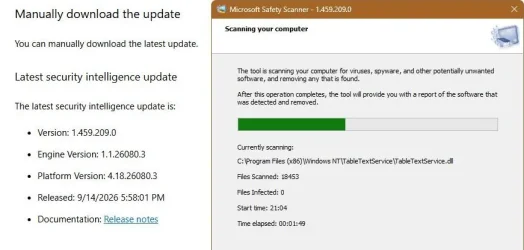
But you can also run Microsoft Safety Scanner Download - Microsoft Defender for Endpoint

View attachment 182976
Thanks for this, I did not know about this product from Microsoft. This would require an updated MS Safety Scanner executable to be downloaded every week. I was hoping to use Microsoft Defender itself rather than do this every week, 52 times in a year.

Also if a 3rd party Security provider is installed, isnt Defender disabled? i.e. the Service and process is no longer run?
 

My Computer My Computer

At a glance

Windows 11Intel16 GBIntel UHD Integrated
OS
Windows 11
Computer type
Laptop
CPU
Intel
Memory
16 GB
Graphics Card(s)
Intel UHD Integrated
Mouse
Inbuilt
Browser
Firefox
Antivirus
Microsoft Defender
IMHO, AVG and Avira are both a step down from Microsoft Defender.

Not sure what advantage you think you'll be getting...
AVG has some very good results from AV-Comparatives for the Real-World Protection Test July-August 2026. It is in the top quadrant, almost at par with Norton and BitDefender. That is why it is in the short list.

Is there some reason why AVG free would be a step down from Microsoft Defender? Is the Free version of AVG somewhat inferior to other offerings, including Microsoft Defender? I am not trying to throw shade on what you said. I would like to know if I have missed something while short listing AVG. I am open to receiving new information which could help me make a better decision. Again, I am not belittling what you have said.
 

My Computer My Computer

At a glance

Windows 11Intel16 GBIntel UHD Integrated
OS
Windows 11
Computer type
Laptop
CPU
Intel
Memory
16 GB
Graphics Card(s)
Intel UHD Integrated
Mouse
Inbuilt
Browser
Firefox
Antivirus
Microsoft Defender
I run Windows Defender and Malwarebytes Licensed. They don't step on each other and give me pretty good coverage.
 

My Computers My Computers

  • At a glance

    Win 11 Pro 25H2, Build 26200.9457Intel Core i5 14500, 14th Generation64GB DDR4GeForce RTX 4060
    OS
    Win 11 Pro 25H2, Build 26200.9457
    Computer type
    PC/Desktop
    Manufacturer/Model
    Home Brew
    CPU
    Intel Core i5 14500, 14th Generation
    Motherboard
    Gigabyte B760M G P WIFI
    Memory
    64GB DDR4
    Graphics Card(s)
    GeForce RTX 4060
    Sound Card
    Chipset Realtek
    Monitor(s) Displays
    LG 45" Ultragear & Acer 24" 1080p
    Screen Resolution
    5120x1440 & 1920x1080
    Hard Drives
    Crucial P310 2TB 2280 PCIe Gen4 3D NAND NVMe M.2 SSD (O/S)
    Silicon Power 2TB US75 NVMe PCIe Gen4 M.2 2280 SSD (backup)
    Crucial BX500 2TB 3D NAND (2nd backup)
    Seagate 4TB Ironwolf, rotating HDD secondary backup
    External off-line backup Drives: 2 NVMe 4TB drives in external enclosures
    PSU
    Thermaltake Toughpower GF3 750W
    Case
    LIAN LI LANCOOL 216 E-ATX PC Case
    Cooling
    Lots of fans!
    Keyboard
    Microsoft Comfort Curve 2000
    Mouse
    Logitech G305
    Internet Speed
    Verizon FiOS 1GB
    Browser
    Firefox
    Antivirus
    Malware Bytes & Windows Defender Security
  • At a glance

    Win 11 Pro 25H2, Build 26200.9168Intel Core i5 1440032GB DDR5Intel 700 Embedded GPU
    Operating System
    Win 11 Pro 25H2, Build 26200.9168
    Computer type
    PC/Desktop
    Manufacturer/Model
    Home Brew
    CPU
    Intel Core i5 14400
    Motherboard
    Gigabyte B760M DS3H AX
    Memory
    32GB DDR5
    Graphics card(s)
    Intel 700 Embedded GPU
    Sound Card
    Realtek Embedded
    Monitor(s) Displays
    27" HP 1080p
    Screen Resolution
    1920x1080
    Hard Drives
    Crucial P310 2TB NVMe Gen4 SSD
    Samsung EVO 990 2TB NVMe Gen4 SSD
    Samsung 2TB SATA SSD
    Seagate 4TB Ironwolf, rotating HDD secondary backup
    PSU
    Thermaltake Smart BM3 650W
    Case
    Okinos Micro ATX Case
    Cooling
    Fans
    Keyboard
    Microsoft Comfort Curve 2000
    Mouse
    Logitech G305
    Internet Speed
    Verizon FiOS 1GB
    Browser
    Firefox
    Antivirus
    Malware Bytes & Windows Defender Security
  • Nimo N171 17" Laptop, (Intel i3-1215U, 16GB RAM, 2TB NVMe, Win11 Pro)
    Acemagic Vista Mini PC V1 (Intel N150, 16GB RAM, 1TB NVMe, Win11 Pro)
    HP ENVY h8-1540t, (24GB RAM, 2TB SSD, 2TB HDD, Win11 Pro)
AVG has some very good results from AV-Comparatives for the Real-World Protection Test July-August 2026. It is in the top quadrant, almost at par with Norton and BitDefender. That is why it is in the short list.

Is there some reason why AVG free would be a step down from Microsoft Defender? Is the Free version of AVG somewhat inferior to other offerings, including Microsoft Defender? I am not trying to throw shade on what you said. I would like to know if I have missed something while short listing AVG. I am open to receiving new information which could help me make a better decision. Again, I am not belittling what you have said.

mine and my wifes systems use AVG internet security for several years with no issues or problems
MS defender is still active in the background but both function well together

i can only say as i found
best of luck Steve ..
 

My Computers My Computers

  • At a glance

    Windows 11 HomeRyzen 7 5825u64GB DDR4 3200Ryzen 7 5825u
    OS
    Windows 11 Home
    Computer type
    PC/Desktop
    Manufacturer/Model
    HP 24" AiO
    CPU
    Ryzen 7 5825u
    Motherboard
    HP
    Memory
    64GB DDR4 3200
    Graphics Card(s)
    Ryzen 7 5825u
    Sound Card
    Realtek External 5w speaker bar.
    Monitor(s) Displays
    24" HP AiO
    Screen Resolution
    1920 x 1080 @60 Hz
    Hard Drives
    1TB WD Blue SN580 M2 SSD Partitioned C:/D: drives.
    2x 1TB USB HDD External Backup/Storage.
    all VeraCrypt encrypted.
    PSU
    90W external power brick
    Case
    24" All in One
    Cooling
    Default Air Cooling
    Keyboard
    Dell WiFi UK extended
    Mouse
    Dell WiFi 3 Button
    Internet Speed
    1GB full fibre
    Browser
    Vivaldi Browser/Email/Calendar
    Antivirus
    AVG Internet Security/Windows Defender
    Other Info
    Mainly Open Source Software
  • At a glance

    Ubuntu 22.04.5 LTSi5 7200u16GB DDR4Intel
    Operating System
    Ubuntu 22.04.5 LTS
    Computer type
    Laptop
    Manufacturer/Model
    Dell 13" Latitude 2017
    CPU
    i5 7200u
    Motherboard
    Dell
    Memory
    16GB DDR4
    Graphics card(s)
    Intel
    Sound Card
    Intel
    Monitor(s) Displays
    13" Dell Laptop
    Hard Drives
    250GB Crucial 2.5" SSD
    Mouse
    Generic WiFi 3 button
    Internet Speed
    WiFi only
    Browser
    Firefox
    Antivirus
    ClamAV TK
    Other Info
    Mainly Open Source Software
So, can I schedule a scan to be run with Microsoft Defender say every Monday evening at 05:30 pm using Task Scheduler? If there is a shell script file with the following commands and it is scheduled, then will this work?
I don't see why not. Try it.
 

My Computer My Computer

At a glance

Windows 11 Pro 25H2 26200.9168Intel Core i3-8145U16GB
OS
Windows 11 Pro 25H2 26200.9168
Computer type
Laptop
Manufacturer/Model
Lenovo IdeaPad L340
CPU
Intel Core i3-8145U
Memory
16GB
Hard Drives
500 GB M2 1 TB HDD
Internet Speed
400 MB
Browser
Chrome | Edge
Antivirus
Microsoft Defender | Block unknown executables | Various ASR rules enabled | Smart App Control
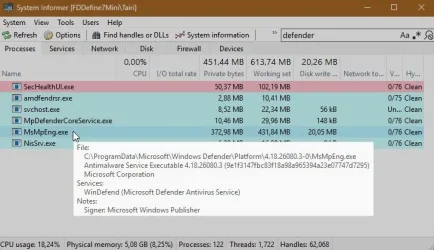
Also if a 3rd party Security provider is installed, isnt Defender disabled? i.e. the Service and process is no longer run?
It used to be for a few months, but malware abused it, because in order to properly start it, Windows had to be restarted. So it is running nonstop and as soon as 3rd party AV gets disabled, it kicks in. You can check by searching for Defender name in processes.

capture-08212026-180600.webp
 

My Computer My Computer

At a glance

Home2FH2CanAMD Ryzen 5 8600G (07/24)2x32GB Kingston FURY DDR5 5600 MHz CL36 @5200...ASROCK Radeon RX 6600 Challenger D 8G @48FPS ...
OS
Home2FH2Can
Computer type
PC/Desktop
CPU
AMD Ryzen 5 8600G (07/24)
Motherboard
ASROCK B650M-HDV/M.2 (07/24) BIOS 4.43 AGESA ComboAM5 1.3.0.1b Patch A (07/26)
Memory
2x32GB Kingston FURY DDR5 5600 MHz CL36 @5200 CL40 (07/24)
Graphics Card(s)
ASROCK Radeon RX 6600 Challenger D 8G @48FPS (08/24)
Sound Card
Creative Sound BlasterX AE-5 Plus (05/24)
Monitor(s) Displays
24" Philips 24M1N3200ZS/00 (05/24)
Screen Resolution
1920×1080@165Hz via DP1.4
Hard Drives
Kingston KC3000 NVMe 2TB (05/24)
ADATA XPG GAMMIX S11 Pro 512GB (07/19)
PSU
Seasonic Core GM 550 Gold (04/24)
Case
Fractal Design Define 7 Mini with 3x Noctua NF-P14s/12@555rpm (04/24)
Cooling
Noctua NH-U12S with Noctua NF-P12 (04/24)
Keyboard
HP Pavilion Wired Keyboard 300 (07/24) + Rabalux 76017 Parker (01/24)
Mouse
Logitech M330 Silent Plus (07/26)
Internet Speed
500/100 Mbps via RouterOS (05/21) & TCP Optimizer
Browser
Edge, Brave for YouTube, LibreWolf for FB
Antivirus
NextDNS blocking 1/3 Traffic
Other Info
Phone: Motorola Moto G86 (02/26)
Backup: Hasleo Backup Suite (PreOS)
Headphones: Sennheiser RS170 (09/10)
Chair: Huzaro Force 4.4 Grey Mesh (05/24)
Notifier: Xiaomi Mi Band 9 Milanese (10/24)
FlexCore USB-C 3.2 Gen 1 (M) to LAN (F) (08/25)

Latest Support Threads

Back
Top Bottom