Solved Icons don't Display in desktop in the explorer, sidebar... no the typical no icons display


warch

New member
Local time
4:06 AM
Posts
5
OS
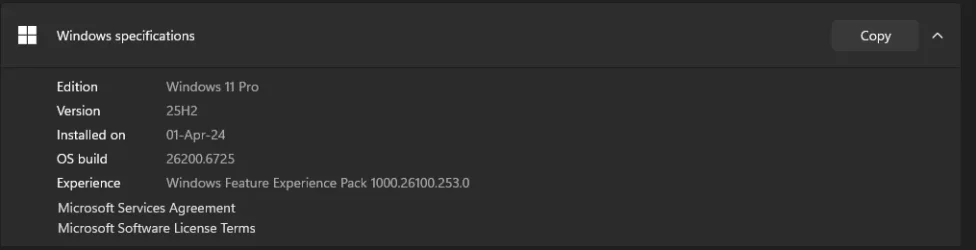
win11
Hi everyone,
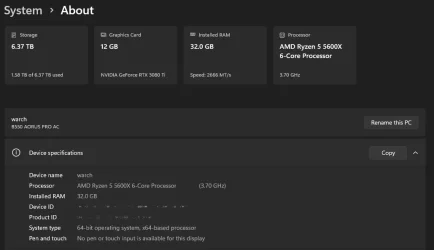
I really need your help. I've searched all over the internet and tried every possible tutorial and command I could find: deleted the iconcache.db, ran sfc /scannow, and followed several other fixes that claim to restore missing icons.


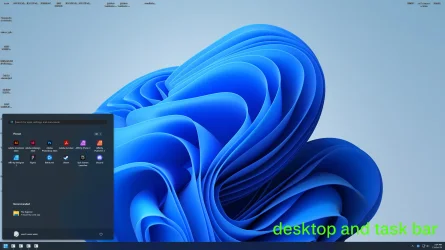
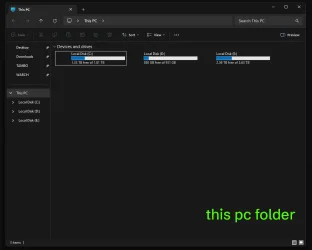
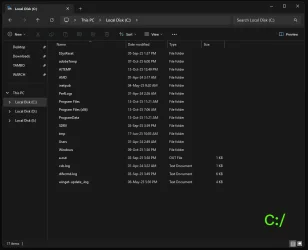
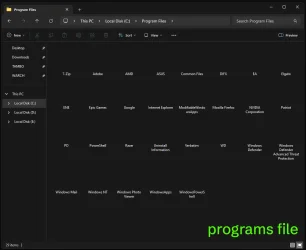
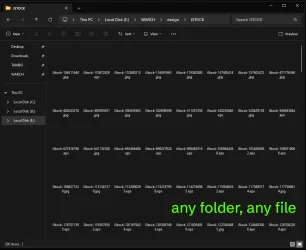
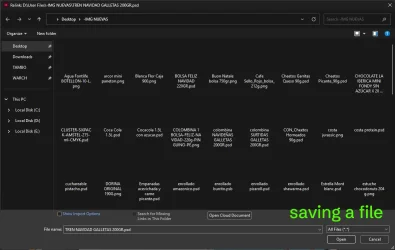
As you can see, it’s not just the desktop icons — all system icons are gone. They don’t show up in File Explorer, the sidebar, or even the taskbar. Only the text labels remain, but the icons themselves are completely missing.


If anyone knows a way to restore them without having to format or reinstall Windows, I’d really appreciate it. I’m currently very busy with work and can’t afford to reset my whole system right now.


My PC is fully updated — BIOS, Windows, and all software are up to date. I’ve scanned with Malwarebytes and Windows Defender, and neither found any issues or malware.


Since I’ve run out of options, I’m reaching out to see if anyone has encountered this problem and found a working solution.


Thanks in advance for any help or advice!
 

Attachments
  • 01 winedition.webp
    01 winedition.webp
    10 KB · Views: 1
  • 02 pcabout.webp
    02 pcabout.webp
    22.6 KB · Views: 1
  • 03desktop.webp
    03desktop.webp
    156.6 KB · Views: 2
  • 04 thispc.webp
    04 thispc.webp
    21.7 KB · Views: 2
  • 05 win parti.webp
    05 win parti.webp
    43.4 KB · Views: 2
  • 06 programfiles.webp
    06 programfiles.webp
    32.8 KB · Views: 1
  • 07 anyfolder.webp
    07 anyfolder.webp
    57.2 KB · Views: 1
  • 08 saving programs.webp
    08 saving programs.webp
    57.4 KB · Views: 1

My Computer My Computer

At a glance

win11
OS
win11
Computer type
PC/Desktop
Manufacturer/Model
Gigabyte
My PC is fully updated — BIOS, Windows, and all software are up to date. I’ve scanned with Malwarebytes and Windows Defender, and neither found any issues or malware.

but what modifications have you made..? theme patcher; third party add-ons?
 

My Computer My Computer

At a glance

Windows 11 Pro
OS
Windows 11 Pro
but what modifications have you made..? theme patcher; third party add-ons?
nop nothing only play yesterday a lil cod session view some videos and use photoshop and InDesign and shutdown my pc as always. the only program update was the razer synapse and that was on saturday morning and was fine for the sunday
 

My Computer My Computer

At a glance

win11
OS
win11
Computer type
PC/Desktop
Manufacturer/Model
Gigabyte
lets start off just to cover bases here... save both of these as .bat each and run them as admin.
*1st one will restart explorer when done and 2nd one will reboot computer when done.

Code:
@echo off

echo.
taskkill /f /im explorer.exe
timeout 2 /nobreak>nul
echo.

DEL /F /Q /A %LocalAppData%\IconCache.db
DEL /F /S /Q /A %LocalAppData%\Microsoft\Windows\Explorer\iconcache_*.db
DEL /F /S /Q /A %LocalAppData%\Microsoft\Windows\Explorer\thumbcache_*.db

timeout 2 /nobreak>nul
start explorer.exe


Code:
@echo off
ie4uinit.exe -show
taskkill /IM explorer.exe /F
DEL /A /Q "%localappdata%\IconCache.db"
shutdown /r /f /t 00
 

My Computer My Computer

At a glance

Windows 11 Pro
OS
Windows 11 Pro
if that doesnt work... run this .reg to reset .ico associations to default:

Code:
Windows Registry Editor Version 5.00

[HKEY_CLASSES_ROOT\.ico]
@="icofile"

[HKEY_CLASSES_ROOT\icofile]
@="Icon File"

[HKEY_CLASSES_ROOT\icofile\DefaultIcon]
@="%1"

[HKEY_CLASSES_ROOT\icofile\shell]

[HKEY_CLASSES_ROOT\icofile\shell\open]
@="Open"

[HKEY_CLASSES_ROOT\icofile\shell\open\command]
@="\"%SystemRoot%\\System32\\rundll32.exe\" \"%SystemRoot%\\System32\\shimgvw.dll\",ImageView_Fullscreen %1"
 

My Computer My Computer

At a glance

Windows 11 Pro
OS
Windows 11 Pro
i run both and nothing, idk why when i do right clic run as adm, don't run its weird... only work as double clic, run the bat and do the restart, btw the taskbar manager don't load im start getting worried

look this record the screen


------------------UPDATE--------------------------

I ran the .reg file both ways I know with regedit, both by importing and by double-clicking, and no changes were made.
I think I'm throwing in the towel. I think I've got a virus. Do you know of any way I can log my PC so you can get a better idea of what might be wrong?
 
Last edited:

My Computer My Computer

At a glance

win11
OS
win11
Computer type
PC/Desktop
Manufacturer/Model
Gigabyte
did you run the reg file?
 

My Computer My Computer

At a glance

Windows 11 Pro
OS
Windows 11 Pro
did you run the reg file?
Yes, I wrote it as an update in the previous post (so as not to create too many posts), but I've tried it in the two ways I know. Do you think there's some way I can log something so you can better understand what the problem could be?
 

My Computer My Computer

At a glance

win11
OS
win11
Computer type
PC/Desktop
Manufacturer/Model
Gigabyte
try regedit
HKEY_LOCAL_MACHINE\SOFTWARE\Microsoft\Windows\CurrentVersion\Explorer\Shell Icons

- delete the key "Shell Icons" and reboot
 

My Computer My Computer

At a glance

Windows 11 Pro
OS
Windows 11 Pro
try regedit
HKEY_LOCAL_MACHINE\SOFTWARE\Microsoft\Windows\CurrentVersion\Explorer\Shell Icons

- delete the key "Shell Icons" and reboot

Oh man, you're the best! That works! I'm new here, how can I reward your time and knowledge? It's fixed!
 

My Computer My Computer

At a glance

win11
OS
win11
Computer type
PC/Desktop
Manufacturer/Model
Gigabyte
Oh man, you're the best! That works! I'm new here, how can I reward your time and knowledge? It's fixed!
haha no worries. glad it worked. if you hover over the like button you can do the IT guy = great support
 

My Computer My Computer

At a glance

Windows 11 Pro
OS
Windows 11 Pro
Back
Top Bottom