Icotera Router i4850


sbh7600

d(^_^)b
Local time
10:48 AM
Posts
51
Location
Struer, DK
OS
Windows 11
Hey,

I have finally gotten fiber \o/

And I would like to change the internal IP range from : 192.168.x to 10.0.0.x (is that possible?)

I have tried diffrent things to "try" to get it to work. and I can get the internet working (browsing websites) but when I do : 10.0.0.1 I get and error and the site can't be reached
Here are some images from the router interface:

router1.png

router2.png
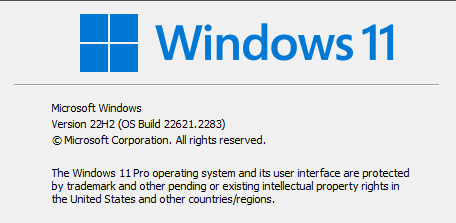
winver.png
 

My Computer My Computer

At a glance

Windows 11AMD Ryzen 7 3700X 8-Core Processor16Radeon RX 5500 XT
OS
Windows 11
Computer type
PC/Desktop
Manufacturer/Model
MM-Vision build
CPU
AMD Ryzen 7 3700X 8-Core Processor
Motherboard
ASUS Prime B450-Plus
Memory
16
Graphics Card(s)
Radeon RX 5500 XT
Sound Card
Onboard
Monitor(s) Displays
2 x AOC 27"
Screen Resolution
1920x1080 144mhz
Hard Drives
1TB - Kingston NVME M.2
1TB - WDC WD10EZEZ-21M2NA0
1TB - WDC WD10EZRX-00A8LB0
2TB - WDC WD20EARX-00PASB0
4TB - Hitachi HDS5C4040ALE630
PSU
Corsair
Case
Vision
Cooling
Be Quiet!
Keyboard
Logitech G213
Mouse
Logitech G502 Hero
Internet Speed
1000/1000 MB/S
Browser
Brave/Chrome/FireFox
Antivirus
Windows Defender
Private Address Ranges
  • Class A: 10.0. 0.0 to 10.255. 255.255.
  • Class B: 172.16. 0.0 to 172.31. 255.255.
  • Class C: 192.168. 0.0 to 192.168. 255.255.
Make sure to change Primary and Second IP addresses to 8.8.8.8 and 8.8.4.4 hopefully it will help.
 

My Computer My Computer

At a glance

Windows 11AMD Ryzen 7 5700GMicron Technology DDR4-3200 16GBNVIDIA GeForce RTX 3060
OS
Windows 11
Computer type
PC/Desktop
Manufacturer/Model
HP Pavilion
CPU
AMD Ryzen 7 5700G
Motherboard
Erica6
Memory
Micron Technology DDR4-3200 16GB
Graphics Card(s)
NVIDIA GeForce RTX 3060
Sound Card
Realtek ALC671
Monitor(s) Displays
Samsung SyncMaster U28E590
Screen Resolution
3840 x 2160
Hard Drives
SAMSUNG MZVLQ1T0HALB-000H1
Private Address Ranges
  • Class A: 10.0. 0.0 to 10.255. 255.255.
  • Class B: 172.16. 0.0 to 172.31. 255.255.
  • Class C: 192.168. 0.0 to 192.168. 255.255.
Make sure to change Primary and Second IP addresses to 8.8.8.8 and 8.8.4.4 hopefully it will help.
Hey!

I don't fully understand what you mean, sorry
 

My Computer My Computer

At a glance

Windows 11AMD Ryzen 7 3700X 8-Core Processor16Radeon RX 5500 XT
OS
Windows 11
Computer type
PC/Desktop
Manufacturer/Model
MM-Vision build
CPU
AMD Ryzen 7 3700X 8-Core Processor
Motherboard
ASUS Prime B450-Plus
Memory
16
Graphics Card(s)
Radeon RX 5500 XT
Sound Card
Onboard
Monitor(s) Displays
2 x AOC 27"
Screen Resolution
1920x1080 144mhz
Hard Drives
1TB - Kingston NVME M.2
1TB - WDC WD10EZEZ-21M2NA0
1TB - WDC WD10EZRX-00A8LB0
2TB - WDC WD20EARX-00PASB0
4TB - Hitachi HDS5C4040ALE630
PSU
Corsair
Case
Vision
Cooling
Be Quiet!
Keyboard
Logitech G213
Mouse
Logitech G502 Hero
Internet Speed
1000/1000 MB/S
Browser
Brave/Chrome/FireFox
Antivirus
Windows Defender
Log into your network router as the Admin user
Locate the IP Address, Networking or DNS Server settings of the router
Add one or both of Google public DNS Servers to the routers configuration
Google Primary DNS server: 8.8.8.8
Google Secondary DNS server: 8.8.4.4
Save the Changes on the router
Reboot your router
Reboot your computer
 

My Computer My Computer

At a glance

Windows 11AMD Ryzen 7 5700GMicron Technology DDR4-3200 16GBNVIDIA GeForce RTX 3060
OS
Windows 11
Computer type
PC/Desktop
Manufacturer/Model
HP Pavilion
CPU
AMD Ryzen 7 5700G
Motherboard
Erica6
Memory
Micron Technology DDR4-3200 16GB
Graphics Card(s)
NVIDIA GeForce RTX 3060
Sound Card
Realtek ALC671
Monitor(s) Displays
Samsung SyncMaster U28E590
Screen Resolution
3840 x 2160
Hard Drives
SAMSUNG MZVLQ1T0HALB-000H1
Log into your network router as the Admin user
Locate the IP Address, Networking or DNS Server settings of the router
Add one or both of Google public DNS Servers to the routers configuration
Google Primary DNS server: 8.8.8.8
Google Secondary DNS server: 8.8.4.4
Save the Changes on the router
Reboot your router
Reboot your computer
Hey!

That wont change my internal ip addresses to : 10.0.0.x instead of 192.168.x.x ?
 

My Computer My Computer

At a glance

Windows 11AMD Ryzen 7 3700X 8-Core Processor16Radeon RX 5500 XT
OS
Windows 11
Computer type
PC/Desktop
Manufacturer/Model
MM-Vision build
CPU
AMD Ryzen 7 3700X 8-Core Processor
Motherboard
ASUS Prime B450-Plus
Memory
16
Graphics Card(s)
Radeon RX 5500 XT
Sound Card
Onboard
Monitor(s) Displays
2 x AOC 27"
Screen Resolution
1920x1080 144mhz
Hard Drives
1TB - Kingston NVME M.2
1TB - WDC WD10EZEZ-21M2NA0
1TB - WDC WD10EZRX-00A8LB0
2TB - WDC WD20EARX-00PASB0
4TB - Hitachi HDS5C4040ALE630
PSU
Corsair
Case
Vision
Cooling
Be Quiet!
Keyboard
Logitech G213
Mouse
Logitech G502 Hero
Internet Speed
1000/1000 MB/S
Browser
Brave/Chrome/FireFox
Antivirus
Windows Defender
You said you have changed the IP address to 10.0.0.x, but you had problem with DNS site can't be reached error message.
 

My Computer My Computer

At a glance

Windows 11AMD Ryzen 7 5700GMicron Technology DDR4-3200 16GBNVIDIA GeForce RTX 3060
OS
Windows 11
Computer type
PC/Desktop
Manufacturer/Model
HP Pavilion
CPU
AMD Ryzen 7 5700G
Motherboard
Erica6
Memory
Micron Technology DDR4-3200 16GB
Graphics Card(s)
NVIDIA GeForce RTX 3060
Sound Card
Realtek ALC671
Monitor(s) Displays
Samsung SyncMaster U28E590
Screen Resolution
3840 x 2160
Hard Drives
SAMSUNG MZVLQ1T0HALB-000H1
You said you have changed the IP address to 10.0.0.x, but you had problem with DNS site can't be reached error message.
Not quite I said : "And I would like to change the internal IP range from : 192.168.x to 10.0.0.x (is that possible?)"

and

"I have tried diffrent things to "try" to get it to work. and I can get the internet working (browsing websites) but when I do : 10.0.0.1 I get and error and the site can't be reached"
 

My Computer My Computer

At a glance

Windows 11AMD Ryzen 7 3700X 8-Core Processor16Radeon RX 5500 XT
OS
Windows 11
Computer type
PC/Desktop
Manufacturer/Model
MM-Vision build
CPU
AMD Ryzen 7 3700X 8-Core Processor
Motherboard
ASUS Prime B450-Plus
Memory
16
Graphics Card(s)
Radeon RX 5500 XT
Sound Card
Onboard
Monitor(s) Displays
2 x AOC 27"
Screen Resolution
1920x1080 144mhz
Hard Drives
1TB - Kingston NVME M.2
1TB - WDC WD10EZEZ-21M2NA0
1TB - WDC WD10EZRX-00A8LB0
2TB - WDC WD20EARX-00PASB0
4TB - Hitachi HDS5C4040ALE630
PSU
Corsair
Case
Vision
Cooling
Be Quiet!
Keyboard
Logitech G213
Mouse
Logitech G502 Hero
Internet Speed
1000/1000 MB/S
Browser
Brave/Chrome/FireFox
Antivirus
Windows Defender
Which site cannot be reached?
 

My Computer My Computer

At a glance

Windows 11AMD Ryzen 7 5700GMicron Technology DDR4-3200 16GBNVIDIA GeForce RTX 3060
OS
Windows 11
Computer type
PC/Desktop
Manufacturer/Model
HP Pavilion
CPU
AMD Ryzen 7 5700G
Motherboard
Erica6
Memory
Micron Technology DDR4-3200 16GB
Graphics Card(s)
NVIDIA GeForce RTX 3060
Sound Card
Realtek ALC671
Monitor(s) Displays
Samsung SyncMaster U28E590
Screen Resolution
3840 x 2160
Hard Drives
SAMSUNG MZVLQ1T0HALB-000H1
The router can not be reached after I changed the lan stuff in the router but the www works fine

A tech guy from the company I have fiber from said: the ip range is fixed, and can not be changed. If you like to do so, you need to buy a router and connect to the fiber box. if he is telling the truth I do not know.
 

My Computer My Computer

At a glance

Windows 11AMD Ryzen 7 3700X 8-Core Processor16Radeon RX 5500 XT
OS
Windows 11
Computer type
PC/Desktop
Manufacturer/Model
MM-Vision build
CPU
AMD Ryzen 7 3700X 8-Core Processor
Motherboard
ASUS Prime B450-Plus
Memory
16
Graphics Card(s)
Radeon RX 5500 XT
Sound Card
Onboard
Monitor(s) Displays
2 x AOC 27"
Screen Resolution
1920x1080 144mhz
Hard Drives
1TB - Kingston NVME M.2
1TB - WDC WD10EZEZ-21M2NA0
1TB - WDC WD10EZRX-00A8LB0
2TB - WDC WD20EARX-00PASB0
4TB - Hitachi HDS5C4040ALE630
PSU
Corsair
Case
Vision
Cooling
Be Quiet!
Keyboard
Logitech G213
Mouse
Logitech G502 Hero
Internet Speed
1000/1000 MB/S
Browser
Brave/Chrome/FireFox
Antivirus
Windows Defender
Change the router IP settings way you do and post a screenshot of the configuration you have done.
 

My Computer My Computer

At a glance

Windows 11AMD Ryzen 7 5700GMicron Technology DDR4-3200 16GBNVIDIA GeForce RTX 3060
OS
Windows 11
Computer type
PC/Desktop
Manufacturer/Model
HP Pavilion
CPU
AMD Ryzen 7 5700G
Motherboard
Erica6
Memory
Micron Technology DDR4-3200 16GB
Graphics Card(s)
NVIDIA GeForce RTX 3060
Sound Card
Realtek ALC671
Monitor(s) Displays
Samsung SyncMaster U28E590
Screen Resolution
3840 x 2160
Hard Drives
SAMSUNG MZVLQ1T0HALB-000H1
Hey,

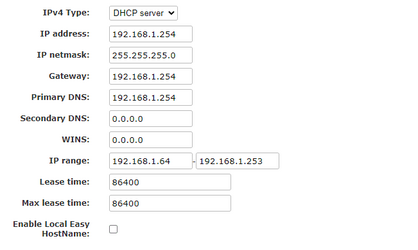
This would be the way I would do it:
router3.png
 

My Computer My Computer

At a glance

Windows 11AMD Ryzen 7 3700X 8-Core Processor16Radeon RX 5500 XT
OS
Windows 11
Computer type
PC/Desktop
Manufacturer/Model
MM-Vision build
CPU
AMD Ryzen 7 3700X 8-Core Processor
Motherboard
ASUS Prime B450-Plus
Memory
16
Graphics Card(s)
Radeon RX 5500 XT
Sound Card
Onboard
Monitor(s) Displays
2 x AOC 27"
Screen Resolution
1920x1080 144mhz
Hard Drives
1TB - Kingston NVME M.2
1TB - WDC WD10EZEZ-21M2NA0
1TB - WDC WD10EZRX-00A8LB0
2TB - WDC WD20EARX-00PASB0
4TB - Hitachi HDS5C4040ALE630
PSU
Corsair
Case
Vision
Cooling
Be Quiet!
Keyboard
Logitech G213
Mouse
Logitech G502 Hero
Internet Speed
1000/1000 MB/S
Browser
Brave/Chrome/FireFox
Antivirus
Windows Defender
After changing IP address for Gateway reboot your router and open Command Prompt type ipconfig command to find out Gateway ip address.
 

My Computer My Computer

At a glance

Windows 11AMD Ryzen 7 5700GMicron Technology DDR4-3200 16GBNVIDIA GeForce RTX 3060
OS
Windows 11
Computer type
PC/Desktop
Manufacturer/Model
HP Pavilion
CPU
AMD Ryzen 7 5700G
Motherboard
Erica6
Memory
Micron Technology DDR4-3200 16GB
Graphics Card(s)
NVIDIA GeForce RTX 3060
Sound Card
Realtek ALC671
Monitor(s) Displays
Samsung SyncMaster U28E590
Screen Resolution
3840 x 2160
Hard Drives
SAMSUNG MZVLQ1T0HALB-000H1
After changing IP address for Gateway reboot your router and open Command Prompt type ipconfig command to find out Gateway ip address.
Hey,

So change all settings and reload/restart the router. and ipconfig afterwards?
 

My Computer My Computer

At a glance

Windows 11AMD Ryzen 7 3700X 8-Core Processor16Radeon RX 5500 XT
OS
Windows 11
Computer type
PC/Desktop
Manufacturer/Model
MM-Vision build
CPU
AMD Ryzen 7 3700X 8-Core Processor
Motherboard
ASUS Prime B450-Plus
Memory
16
Graphics Card(s)
Radeon RX 5500 XT
Sound Card
Onboard
Monitor(s) Displays
2 x AOC 27"
Screen Resolution
1920x1080 144mhz
Hard Drives
1TB - Kingston NVME M.2
1TB - WDC WD10EZEZ-21M2NA0
1TB - WDC WD10EZRX-00A8LB0
2TB - WDC WD20EARX-00PASB0
4TB - Hitachi HDS5C4040ALE630
PSU
Corsair
Case
Vision
Cooling
Be Quiet!
Keyboard
Logitech G213
Mouse
Logitech G502 Hero
Internet Speed
1000/1000 MB/S
Browser
Brave/Chrome/FireFox
Antivirus
Windows Defender
Hey,

So change all settings and reload/restart the router. and ipconfig afterwards?
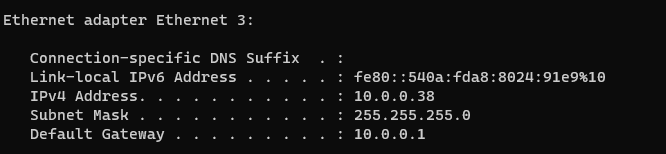
Yes post a screenshot of ipconfig command output.
 

My Computer My Computer

At a glance

Windows 11AMD Ryzen 7 5700GMicron Technology DDR4-3200 16GBNVIDIA GeForce RTX 3060
OS
Windows 11
Computer type
PC/Desktop
Manufacturer/Model
HP Pavilion
CPU
AMD Ryzen 7 5700G
Motherboard
Erica6
Memory
Micron Technology DDR4-3200 16GB
Graphics Card(s)
NVIDIA GeForce RTX 3060
Sound Card
Realtek ALC671
Monitor(s) Displays
Samsung SyncMaster U28E590
Screen Resolution
3840 x 2160
Hard Drives
SAMSUNG MZVLQ1T0HALB-000H1
router4.png
 

My Computer My Computer

At a glance

Windows 11AMD Ryzen 7 3700X 8-Core Processor16Radeon RX 5500 XT
OS
Windows 11
Computer type
PC/Desktop
Manufacturer/Model
MM-Vision build
CPU
AMD Ryzen 7 3700X 8-Core Processor
Motherboard
ASUS Prime B450-Plus
Memory
16
Graphics Card(s)
Radeon RX 5500 XT
Sound Card
Onboard
Monitor(s) Displays
2 x AOC 27"
Screen Resolution
1920x1080 144mhz
Hard Drives
1TB - Kingston NVME M.2
1TB - WDC WD10EZEZ-21M2NA0
1TB - WDC WD10EZRX-00A8LB0
2TB - WDC WD20EARX-00PASB0
4TB - Hitachi HDS5C4040ALE630
PSU
Corsair
Case
Vision
Cooling
Be Quiet!
Keyboard
Logitech G213
Mouse
Logitech G502 Hero
Internet Speed
1000/1000 MB/S
Browser
Brave/Chrome/FireFox
Antivirus
Windows Defender
Default Gateway is 10.0.0.1 you should use this to connect to router setting page.
 

My Computer My Computer

At a glance

Windows 11AMD Ryzen 7 5700GMicron Technology DDR4-3200 16GBNVIDIA GeForce RTX 3060
OS
Windows 11
Computer type
PC/Desktop
Manufacturer/Model
HP Pavilion
CPU
AMD Ryzen 7 5700G
Motherboard
Erica6
Memory
Micron Technology DDR4-3200 16GB
Graphics Card(s)
NVIDIA GeForce RTX 3060
Sound Card
Realtek ALC671
Monitor(s) Displays
Samsung SyncMaster U28E590
Screen Resolution
3840 x 2160
Hard Drives
SAMSUNG MZVLQ1T0HALB-000H1
I know, but that does not work
 

My Computer My Computer

At a glance

Windows 11AMD Ryzen 7 3700X 8-Core Processor16Radeon RX 5500 XT
OS
Windows 11
Computer type
PC/Desktop
Manufacturer/Model
MM-Vision build
CPU
AMD Ryzen 7 3700X 8-Core Processor
Motherboard
ASUS Prime B450-Plus
Memory
16
Graphics Card(s)
Radeon RX 5500 XT
Sound Card
Onboard
Monitor(s) Displays
2 x AOC 27"
Screen Resolution
1920x1080 144mhz
Hard Drives
1TB - Kingston NVME M.2
1TB - WDC WD10EZEZ-21M2NA0
1TB - WDC WD10EZRX-00A8LB0
2TB - WDC WD20EARX-00PASB0
4TB - Hitachi HDS5C4040ALE630
PSU
Corsair
Case
Vision
Cooling
Be Quiet!
Keyboard
Logitech G213
Mouse
Logitech G502 Hero
Internet Speed
1000/1000 MB/S
Browser
Brave/Chrome/FireFox
Antivirus
Windows Defender
I have no clue why it won't but i think you can connect to your router with HostName.
 

My Computer My Computer

At a glance

Windows 11AMD Ryzen 7 5700GMicron Technology DDR4-3200 16GBNVIDIA GeForce RTX 3060
OS
Windows 11
Computer type
PC/Desktop
Manufacturer/Model
HP Pavilion
CPU
AMD Ryzen 7 5700G
Motherboard
Erica6
Memory
Micron Technology DDR4-3200 16GB
Graphics Card(s)
NVIDIA GeForce RTX 3060
Sound Card
Realtek ALC671
Monitor(s) Displays
Samsung SyncMaster U28E590
Screen Resolution
3840 x 2160
Hard Drives
SAMSUNG MZVLQ1T0HALB-000H1
Back
Top Bottom