Solved I'm running 23H2.


It hasn't been supported since November 2025

23H2 is still supported until november 2026, but only for Enterprise and Education installations.
 

My Computer

System One

  • OS
    Win 11 Pro 23H2
    Computer type
    PC/Desktop
    CPU
    13700K
    Motherboard
    MAG Z790 TOMAHAWK WIFI (7D91vHH - 0x12F)
    Memory
    32GB DDR5 Kingston Fury Renegade @6400
    Graphics Card(s)
    MSI GeForce RTX 4070 Ti Gaming X Slim White 12G
    Sound Card
    Creative Sound Blaster Z SE
    Monitor(s) Displays
    ASUS VA24DQ
    Hard Drives
    WD Black SN850X 2TB (main)
    SAMSUNG SSD 990 Pro 2TB
    WD Blue 1TB 7200rpm
    PSU
    Corsair RM1000x SHIFT
    Case
    DeepCool CH560 WH
    Cooling
    Noctua NH-D15S
    Keyboard
    Ducky One 3 Pro Nazca Line
    Mouse
    Logitech G403 HERO
I've been running Win11 25H2 on my system #1 since 9/20/25 without any problems.
 

My Computers

System One System Two

  • OS
    Windows 11 Pro 25H2
    Computer type
    PC/Desktop
    Manufacturer/Model
    PowerSpec B746
    CPU
    Intel Core i7-10700K
    Motherboard
    ASRock Z490 Phantom Gaming 4/ax
    Memory
    16GB (8GB PC4-19200 DDR4 SDRAM x2)
    Graphics Card(s)
    NVIDIA GeForce GTX 1050 TI
    Sound Card
    Realtek Audio
    Monitor(s) Displays
    #1. LG ULTRAWIDE 34" #2. AOC Q32G2WG3 32"
    Screen Resolution
    #1. 3440 X 1440 #2. 1920 x 1080
    Hard Drives
    NVMe WDC WDS100T2B0C-00PXH0 1TB
    Samsung SSD 860 EVO 1TB
    PSU
    750 Watts (62.5A)
    Case
    PowerSpec/Lian Li ATX 205
    Keyboard
    Logitech K270
    Mouse
    Logitech M185
    Browser
    Microsoft Edge and Firefox
    Antivirus
    Webroot SecureAnywhere CE 26.1
  • Operating System
    Windows 11 Canary Channel
    Computer type
    PC/Desktop
    Manufacturer/Model
    PowerSpec G156
    CPU
    Intel Core i5-8400 CPU @ 2.80GHz
    Motherboard
    AsusTeK Prime B360M-A
    Memory
    16 MB DDR 4-2666
    Monitor(s) Displays
    23" Speptre HDMI 75Hz
    Screen Resolution
    1920x1080
    Hard Drives
    Samsung 970 EVO 500GB NVMe
    Keyboard
    Logitek K270
    Mouse
    Logitek M185
    Browser
    Firefox, Edge and Edge Canary
    Antivirus
    Windows Defender

My Computers

System One System Two

  • OS
    Windows 11 pro
    Computer type
    Laptop
    Manufacturer/Model
    Precision 7780
    CPU
    Processor 13th Gen Intel(R) Core(TM) i9-13950HX, 2200 M
    Motherboard
    Dell calls it the “system board” in the service manual.
    Memory
    64GIG
    Graphics Card(s)
    NVIDIA RTX 5000 Ada Generation Laptop GPU
    Sound Card
    NVIDIA HIGH DEFINITION AUDIO
    Monitor(s) Displays
    Samsung and a HP Monitor
    Screen Resolution
    Resolution 3840 x 2160 x 60 hertz
    Hard Drives
    3 1T NVME and 1 223 Gb
    PSU
    External
    Case
    Laptop
    Cooling
    Dual fans
    Keyboard
    LOGI REMOTE KEYBOARD
    Mouse
    LOGI REMOTE MOUSE
    Internet Speed
    538 Mbps 163 Mbps upload
    Browser
    Duck, Chrome, Edge, Opra
    Antivirus
    Norton Antivirus
  • Operating System
    WIN 11 PRO
    Computer type
    Laptop
    Manufacturer/Model
    HP
    CPU
    RTX ADA 5000
    Memory
    32
    Monitor(s) Displays
    MY BIG SCREEN TV
    Screen Resolution
    3840 X 2016
    Hard Drives
    2 NVME
    Keyboard
    REMOTE USB
    Mouse
    REMOTE USB LOGI
    Internet Speed
    FIBER TO MY DOOR
    Browser
    DUCK FIREFOX CHROME OPRA
    Antivirus
    NORTON
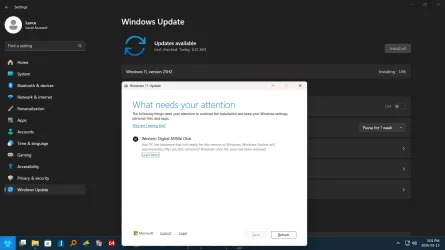
Well Windows Updates decided to offer me 25H2. So I thought OK! So I ran the update... It wouldn't install because it didn't like one of my NVME'S. No explanation just can't continue.

Screenshot (5).webp
 

My Computers

System One System Two

  • OS
    Windows 11 Pro 23H2
    Computer type
    PC/Desktop
    Manufacturer/Model
    Custom Build By Lance1
    CPU
    Intel 12th Gen Intel Core i5-12600KF, 3686 MHz
    Motherboard
    GIGABYTE Z790 AORUS ELITE AX LGA 1700 Intel Z790 ATX
    Memory
    CORSAIR Vengeance 32GB (2 x 16GB) 288-Pin PC RAM DDR5 6400 (PC5 51200) Dual-Channel
    Graphics Card(s)
    GIGABYTE GeForce RTX 4060, 3x Fans, 8GB GDDR6 OC
    Sound Card
    AMD High Definition
    Monitor(s) Displays
    Samsung 32" 60Hz 4ms Curved PLS LED
    Screen Resolution
    1920 X 1080
    Hard Drives
    WD Blue NVME M.2 1T Boot Drive
    WD Blue SSD 1T
    WD Blue NVME M.2 2T
    PSU
    EVGA SuperNOVA 850 GT, 80 Plus Gold 850W, Fully Modular,
    Case
    Fractal Design Pop XL Air RGB Black TG ATX High-Airflow Clear Tempered Glass Window Full Tower
    Cooling
    Noctua NH-D15 chromax black, Dual Tower CPU Cooler with Dual NF-A15 PWM 140mm Fans (Black)
    Keyboard
    Devistator 3
    Mouse
    Inphic PM6 Pro
    Internet Speed
    Telus Fiber Optic: Download 332.7 Mbps / Upload 331.5 Mbps
    Browser
    Vivaldi (64bit)
    Antivirus
    Windows Defender
  • Operating System
    Window 11 Pro
    Computer type
    Laptop
    Manufacturer/Model
    DELL Inspiron N7110
    CPU
    Intel(R) Core(TM) i3-2310M CPU @ 2.10GHz
    Motherboard
    Dell Inc. 0YH79Y
    Memory
    4 GB DDR3
    Graphics card(s)
    Intel(R) HD Graphics 3000
    Sound Card
    High Definition Audio
    Monitor(s) Displays
    17.3 Inch Display
    Screen Resolution
    1600 X 900
    Hard Drives
    Samsung SSD 860 EVO 500GB
    Internet Speed
    Fiber Optic: Download 332.7 Mbps / Upload 331.5 Mbps
    Browser
    Vivaldi 64 bit
    Antivirus
    Windows Defender
    Other Info
    YA! This the old backup. In case things go south. It'll give me access to everything I need.
Hi, Lance.

I believe Microsoft put a compatability hold on some WD NVMe drives. I would have thought it was past.
Try a firmware update for the NVMe?
 

My Computers

System One System Two

  • OS
    Windows 11 Pro 25H2 Build 26200.8524
    Computer type
    PC/Desktop
    Manufacturer/Model
    Sin-built 2013
    CPU
    Intel(R) Core(TM) i7-4770K CPU @ 3.50GHz
    Motherboard
    ASUS ROG Maximus VI Formula
    Memory
    32.0 GB of I forget and the box is in storage.
    Graphics Card(s)
    Gigabyte nVidia GeForce GTX 1660 Super OC 6GB
    Sound Card
    Onboard thingy
    Monitor(s) Displays
    5 x LG 25MS500-B - 1 x 24MK430H-B - 1 x Wacom Pro 22" Touch Screen Tablet
    Screen Resolution
    All over the place
    Hard Drives
    Too many to list.
    OS on Samsung 1TB 870 QVO SATA
    PSU
    Silverstone 1500
    Case
    NZXT Phantom 820 Full-Tower Case
    Cooling
    Noctua NH-D15 Elite Class Dual Tower CPU Cooler / 6 x EziDIY 120mm / 2 x Corsair 140mm somethings / 1 x 140mm Thermaltake something / 2 x 200mm Corsair.
    Keyboard
    Corsair K95 / Logitech diNovo Edge Wireless
    Mouse
    Logitech: G402 / G502 / Mx Masters / Mx Air Cordless
    Internet Speed
    2000/500Mbps
    Browser
    All sorts
    Antivirus
    Kaspersky Premium
    Other Info
    ㅤㅤㅤㅤㅤㅤㅤㅤㅤㅤㅤㅤㅤㅤㅤㅤㅤㅤㅤㅤㅤㅤㅤㅤㅤㅤㅤㅤㅤㅤㅤㅤㅤㅤㅤㅤㅤㅤㅤㅤ⠀⠀⠀⠀⠀⠀⠀⠀⠀⠀
    TP-Link BE9300 WiFi 7 Bluetooth 5.4 (Archer TBE550E)
    TP-Link TX201 V1 2.5GB Lan

    Grandstream HT812 - VoIP
    ASUS DSL-AX82U - Mesh
    ASUS RT-AC68U - Mesh
    ASUS RT-BE88U Router

    Brother MFC-L2880DW Printer

    I’m on a horse.
  • Operating System
    Windows 11 Pro 25H2 Build 26200.8524
    Computer type
    Laptop
    Manufacturer/Model
    LENOVO Yoga 7 14IRL8 - 7i EVO OLED 14" Touchscreen i5 12 Core 16GB/512GB
    CPU
    Intel Core 12th Gen i5-1240P Processor (1.7 - 4.4GHz)
    Memory
    16GB LPDDR5 RAM
    Graphics card(s)
    Intel Iris Xe Graphics Processor
    Sound Card
    Optimized with Dolby Atmos®
    Screen Resolution
    QHD 2880 x 1800 OLED
    Hard Drives
    M.2 512GB
    Antivirus
    Defender / Malwarebytes
    Other Info
    …still on a horse.
Hi, Lance.

I believe Microsoft put a compatability hold on some WD NVMe drives. I would have thought it was past.
Try a firmware update for the NVMe?
I have three WD NVME'S. I've never done a firmware update on NVMe. How would I go about doing this?
 

My Computers

System One System Two

  • OS
    Windows 11 Pro 23H2
    Computer type
    PC/Desktop
    Manufacturer/Model
    Custom Build By Lance1
    CPU
    Intel 12th Gen Intel Core i5-12600KF, 3686 MHz
    Motherboard
    GIGABYTE Z790 AORUS ELITE AX LGA 1700 Intel Z790 ATX
    Memory
    CORSAIR Vengeance 32GB (2 x 16GB) 288-Pin PC RAM DDR5 6400 (PC5 51200) Dual-Channel
    Graphics Card(s)
    GIGABYTE GeForce RTX 4060, 3x Fans, 8GB GDDR6 OC
    Sound Card
    AMD High Definition
    Monitor(s) Displays
    Samsung 32" 60Hz 4ms Curved PLS LED
    Screen Resolution
    1920 X 1080
    Hard Drives
    WD Blue NVME M.2 1T Boot Drive
    WD Blue SSD 1T
    WD Blue NVME M.2 2T
    PSU
    EVGA SuperNOVA 850 GT, 80 Plus Gold 850W, Fully Modular,
    Case
    Fractal Design Pop XL Air RGB Black TG ATX High-Airflow Clear Tempered Glass Window Full Tower
    Cooling
    Noctua NH-D15 chromax black, Dual Tower CPU Cooler with Dual NF-A15 PWM 140mm Fans (Black)
    Keyboard
    Devistator 3
    Mouse
    Inphic PM6 Pro
    Internet Speed
    Telus Fiber Optic: Download 332.7 Mbps / Upload 331.5 Mbps
    Browser
    Vivaldi (64bit)
    Antivirus
    Windows Defender
  • Operating System
    Window 11 Pro
    Computer type
    Laptop
    Manufacturer/Model
    DELL Inspiron N7110
    CPU
    Intel(R) Core(TM) i3-2310M CPU @ 2.10GHz
    Motherboard
    Dell Inc. 0YH79Y
    Memory
    4 GB DDR3
    Graphics card(s)
    Intel(R) HD Graphics 3000
    Sound Card
    High Definition Audio
    Monitor(s) Displays
    17.3 Inch Display
    Screen Resolution
    1600 X 900
    Hard Drives
    Samsung SSD 860 EVO 500GB
    Internet Speed
    Fiber Optic: Download 332.7 Mbps / Upload 331.5 Mbps
    Browser
    Vivaldi 64 bit
    Antivirus
    Windows Defender
    Other Info
    YA! This the old backup. In case things go south. It'll give me access to everything I need.
I have three WD NVME'S. I've never done a firmware update on NVMe. How would I go about doing this?

That is a good question, Lance. I was just now looking for you and the only clear answer I can find, is to check the product support page for the particular drives. Then I believe there is a WD dashboard that can help update the firmware.

Your boot drive, the WD Blue NVME M.2 1T, I am not sure if there are multiple types. I keep seeing the SN570 mentioned.

Sorry, I don’t have any NVMe drives. Plenty here should know?
 

My Computers

System One System Two

  • OS
    Windows 11 Pro 25H2 Build 26200.8524
    Computer type
    PC/Desktop
    Manufacturer/Model
    Sin-built 2013
    CPU
    Intel(R) Core(TM) i7-4770K CPU @ 3.50GHz
    Motherboard
    ASUS ROG Maximus VI Formula
    Memory
    32.0 GB of I forget and the box is in storage.
    Graphics Card(s)
    Gigabyte nVidia GeForce GTX 1660 Super OC 6GB
    Sound Card
    Onboard thingy
    Monitor(s) Displays
    5 x LG 25MS500-B - 1 x 24MK430H-B - 1 x Wacom Pro 22" Touch Screen Tablet
    Screen Resolution
    All over the place
    Hard Drives
    Too many to list.
    OS on Samsung 1TB 870 QVO SATA
    PSU
    Silverstone 1500
    Case
    NZXT Phantom 820 Full-Tower Case
    Cooling
    Noctua NH-D15 Elite Class Dual Tower CPU Cooler / 6 x EziDIY 120mm / 2 x Corsair 140mm somethings / 1 x 140mm Thermaltake something / 2 x 200mm Corsair.
    Keyboard
    Corsair K95 / Logitech diNovo Edge Wireless
    Mouse
    Logitech: G402 / G502 / Mx Masters / Mx Air Cordless
    Internet Speed
    2000/500Mbps
    Browser
    All sorts
    Antivirus
    Kaspersky Premium
    Other Info
    ㅤㅤㅤㅤㅤㅤㅤㅤㅤㅤㅤㅤㅤㅤㅤㅤㅤㅤㅤㅤㅤㅤㅤㅤㅤㅤㅤㅤㅤㅤㅤㅤㅤㅤㅤㅤㅤㅤㅤㅤ⠀⠀⠀⠀⠀⠀⠀⠀⠀⠀
    TP-Link BE9300 WiFi 7 Bluetooth 5.4 (Archer TBE550E)
    TP-Link TX201 V1 2.5GB Lan

    Grandstream HT812 - VoIP
    ASUS DSL-AX82U - Mesh
    ASUS RT-AC68U - Mesh
    ASUS RT-BE88U Router

    Brother MFC-L2880DW Printer

    I’m on a horse.
  • Operating System
    Windows 11 Pro 25H2 Build 26200.8524
    Computer type
    Laptop
    Manufacturer/Model
    LENOVO Yoga 7 14IRL8 - 7i EVO OLED 14" Touchscreen i5 12 Core 16GB/512GB
    CPU
    Intel Core 12th Gen i5-1240P Processor (1.7 - 4.4GHz)
    Memory
    16GB LPDDR5 RAM
    Graphics card(s)
    Intel Iris Xe Graphics Processor
    Sound Card
    Optimized with Dolby Atmos®
    Screen Resolution
    QHD 2880 x 1800 OLED
    Hard Drives
    M.2 512GB
    Antivirus
    Defender / Malwarebytes
    Other Info
    …still on a horse.
I have three WD NVME'S. I've never done a firmware update on NVMe. How would I go about doing this?
Usually you just go to the manufacturer website, look up your model and check for the latest firmware then download it.
 

My Computers

System One System Two

  • OS
    Windows 11 Home 25H2
    Computer type
    Laptop
    Manufacturer/Model
    HP Pavilion 14-ce3606sa
    CPU
    Core i5-1035G1
    Memory
    32gb
    Hard Drives
    Samsung 870 evo sata ssd
    Cooling
    Could be better
    Internet Speed
    50 mbps Starlink
    Browser
    Firefox
    Other Info
    Originally came installed with a 500gb H10 Optane ssd
  • Operating System
    Windows 11 Home
    Computer type
    Laptop
    Manufacturer/Model
    HP Pavilion ce3606sa
    CPU
    Intel Core i5-1035G1
    Memory
    16gb
    Hard Drives
    Hynix Gold P31 2TB
    Internet Speed
    200mbps Starlink
    Browser
    Firefox
    Antivirus
    Defender

My Computers

System One System Two

  • OS
    Windows 11 Home 25H2
    Computer type
    Laptop
    Manufacturer/Model
    HP Pavilion 14-ce3606sa
    CPU
    Core i5-1035G1
    Memory
    32gb
    Hard Drives
    Samsung 870 evo sata ssd
    Cooling
    Could be better
    Internet Speed
    50 mbps Starlink
    Browser
    Firefox
    Other Info
    Originally came installed with a 500gb H10 Optane ssd
  • Operating System
    Windows 11 Home
    Computer type
    Laptop
    Manufacturer/Model
    HP Pavilion ce3606sa
    CPU
    Intel Core i5-1035G1
    Memory
    16gb
    Hard Drives
    Hynix Gold P31 2TB
    Internet Speed
    200mbps Starlink
    Browser
    Firefox
    Antivirus
    Defender

My Computers

System One System Two

  • OS
    Windows 11 Pro 23H2
    Computer type
    PC/Desktop
    Manufacturer/Model
    Custom Build By Lance1
    CPU
    Intel 12th Gen Intel Core i5-12600KF, 3686 MHz
    Motherboard
    GIGABYTE Z790 AORUS ELITE AX LGA 1700 Intel Z790 ATX
    Memory
    CORSAIR Vengeance 32GB (2 x 16GB) 288-Pin PC RAM DDR5 6400 (PC5 51200) Dual-Channel
    Graphics Card(s)
    GIGABYTE GeForce RTX 4060, 3x Fans, 8GB GDDR6 OC
    Sound Card
    AMD High Definition
    Monitor(s) Displays
    Samsung 32" 60Hz 4ms Curved PLS LED
    Screen Resolution
    1920 X 1080
    Hard Drives
    WD Blue NVME M.2 1T Boot Drive
    WD Blue SSD 1T
    WD Blue NVME M.2 2T
    PSU
    EVGA SuperNOVA 850 GT, 80 Plus Gold 850W, Fully Modular,
    Case
    Fractal Design Pop XL Air RGB Black TG ATX High-Airflow Clear Tempered Glass Window Full Tower
    Cooling
    Noctua NH-D15 chromax black, Dual Tower CPU Cooler with Dual NF-A15 PWM 140mm Fans (Black)
    Keyboard
    Devistator 3
    Mouse
    Inphic PM6 Pro
    Internet Speed
    Telus Fiber Optic: Download 332.7 Mbps / Upload 331.5 Mbps
    Browser
    Vivaldi (64bit)
    Antivirus
    Windows Defender
  • Operating System
    Window 11 Pro
    Computer type
    Laptop
    Manufacturer/Model
    DELL Inspiron N7110
    CPU
    Intel(R) Core(TM) i3-2310M CPU @ 2.10GHz
    Motherboard
    Dell Inc. 0YH79Y
    Memory
    4 GB DDR3
    Graphics card(s)
    Intel(R) HD Graphics 3000
    Sound Card
    High Definition Audio
    Monitor(s) Displays
    17.3 Inch Display
    Screen Resolution
    1600 X 900
    Hard Drives
    Samsung SSD 860 EVO 500GB
    Internet Speed
    Fiber Optic: Download 332.7 Mbps / Upload 331.5 Mbps
    Browser
    Vivaldi 64 bit
    Antivirus
    Windows Defender
    Other Info
    YA! This the old backup. In case things go south. It'll give me access to everything I need.
Aside from being out of warranty (I edited my post!) it just seems there aren't any :-) When you say you have three NVME drives, assume you're just installing Windows on one of them.
Maybe do a system image, try a clean install and see if that makes a difference. If it doesn't you can just restore your image. Could just be some kind of compatibility glitch.
 

My Computers

System One System Two

  • OS
    Windows 11 Home 25H2
    Computer type
    Laptop
    Manufacturer/Model
    HP Pavilion 14-ce3606sa
    CPU
    Core i5-1035G1
    Memory
    32gb
    Hard Drives
    Samsung 870 evo sata ssd
    Cooling
    Could be better
    Internet Speed
    50 mbps Starlink
    Browser
    Firefox
    Other Info
    Originally came installed with a 500gb H10 Optane ssd
  • Operating System
    Windows 11 Home
    Computer type
    Laptop
    Manufacturer/Model
    HP Pavilion ce3606sa
    CPU
    Intel Core i5-1035G1
    Memory
    16gb
    Hard Drives
    Hynix Gold P31 2TB
    Internet Speed
    200mbps Starlink
    Browser
    Firefox
    Antivirus
    Defender
Or you could try this - came across it online - it's apparently a common problem. This is supposed to update the firmware (WD is now owned by Sandisk). There's a link further down the page. This is supposed to be the solution (according to Reddit!) Download Sandisk dashboard. Which apparently is the way to update the firmware. A clean install should work as well, as should an inplace upgrade.


My Computers

System One System Two

  • OS
    Windows 11 Home 25H2
    Computer type
    Laptop
    Manufacturer/Model
    HP Pavilion 14-ce3606sa
    CPU
    Core i5-1035G1
    Memory
    32gb
    Hard Drives
    Samsung 870 evo sata ssd
    Cooling
    Could be better
    Internet Speed
    50 mbps Starlink
    Browser
    Firefox
    Other Info
    Originally came installed with a 500gb H10 Optane ssd
  • Operating System
    Windows 11 Home
    Computer type
    Laptop
    Manufacturer/Model
    HP Pavilion ce3606sa
    CPU
    Intel Core i5-1035G1
    Memory
    16gb
    Hard Drives
    Hynix Gold P31 2TB
    Internet Speed
    200mbps Starlink
    Browser
    Firefox
    Antivirus
    Defender
Or you could try this - came across it online - it's apparently a common problem. This is supposed to update the firmware (WD is now owned by Sandisk). There's a link further down the page. This is supposed to be the solution (according to Reddit!) Download Sandisk dashboard. Which apparently is the way to update the firmware. A clean install should work as well, as should an inplace upgrade.

OK I downloaded it and installed it and ran it. I says that I need it update the firmware BUT!! It says that I could loose all data on those drives. I am now creating and image of the drive in question. I'll let you know how it works out.
 

My Computers

System One System Two

  • OS
    Windows 11 Pro 23H2
    Computer type
    PC/Desktop
    Manufacturer/Model
    Custom Build By Lance1
    CPU
    Intel 12th Gen Intel Core i5-12600KF, 3686 MHz
    Motherboard
    GIGABYTE Z790 AORUS ELITE AX LGA 1700 Intel Z790 ATX
    Memory
    CORSAIR Vengeance 32GB (2 x 16GB) 288-Pin PC RAM DDR5 6400 (PC5 51200) Dual-Channel
    Graphics Card(s)
    GIGABYTE GeForce RTX 4060, 3x Fans, 8GB GDDR6 OC
    Sound Card
    AMD High Definition
    Monitor(s) Displays
    Samsung 32" 60Hz 4ms Curved PLS LED
    Screen Resolution
    1920 X 1080
    Hard Drives
    WD Blue NVME M.2 1T Boot Drive
    WD Blue SSD 1T
    WD Blue NVME M.2 2T
    PSU
    EVGA SuperNOVA 850 GT, 80 Plus Gold 850W, Fully Modular,
    Case
    Fractal Design Pop XL Air RGB Black TG ATX High-Airflow Clear Tempered Glass Window Full Tower
    Cooling
    Noctua NH-D15 chromax black, Dual Tower CPU Cooler with Dual NF-A15 PWM 140mm Fans (Black)
    Keyboard
    Devistator 3
    Mouse
    Inphic PM6 Pro
    Internet Speed
    Telus Fiber Optic: Download 332.7 Mbps / Upload 331.5 Mbps
    Browser
    Vivaldi (64bit)
    Antivirus
    Windows Defender
  • Operating System
    Window 11 Pro
    Computer type
    Laptop
    Manufacturer/Model
    DELL Inspiron N7110
    CPU
    Intel(R) Core(TM) i3-2310M CPU @ 2.10GHz
    Motherboard
    Dell Inc. 0YH79Y
    Memory
    4 GB DDR3
    Graphics card(s)
    Intel(R) HD Graphics 3000
    Sound Card
    High Definition Audio
    Monitor(s) Displays
    17.3 Inch Display
    Screen Resolution
    1600 X 900
    Hard Drives
    Samsung SSD 860 EVO 500GB
    Internet Speed
    Fiber Optic: Download 332.7 Mbps / Upload 331.5 Mbps
    Browser
    Vivaldi 64 bit
    Antivirus
    Windows Defender
    Other Info
    YA! This the old backup. In case things go south. It'll give me access to everything I need.
Here's something interesting. In my imaging software One of my drives are missing. That would be my D: It's a 1 TB NVME. Could this be the culprit?
 

My Computers

System One System Two

  • OS
    Windows 11 Pro 23H2
    Computer type
    PC/Desktop
    Manufacturer/Model
    Custom Build By Lance1
    CPU
    Intel 12th Gen Intel Core i5-12600KF, 3686 MHz
    Motherboard
    GIGABYTE Z790 AORUS ELITE AX LGA 1700 Intel Z790 ATX
    Memory
    CORSAIR Vengeance 32GB (2 x 16GB) 288-Pin PC RAM DDR5 6400 (PC5 51200) Dual-Channel
    Graphics Card(s)
    GIGABYTE GeForce RTX 4060, 3x Fans, 8GB GDDR6 OC
    Sound Card
    AMD High Definition
    Monitor(s) Displays
    Samsung 32" 60Hz 4ms Curved PLS LED
    Screen Resolution
    1920 X 1080
    Hard Drives
    WD Blue NVME M.2 1T Boot Drive
    WD Blue SSD 1T
    WD Blue NVME M.2 2T
    PSU
    EVGA SuperNOVA 850 GT, 80 Plus Gold 850W, Fully Modular,
    Case
    Fractal Design Pop XL Air RGB Black TG ATX High-Airflow Clear Tempered Glass Window Full Tower
    Cooling
    Noctua NH-D15 chromax black, Dual Tower CPU Cooler with Dual NF-A15 PWM 140mm Fans (Black)
    Keyboard
    Devistator 3
    Mouse
    Inphic PM6 Pro
    Internet Speed
    Telus Fiber Optic: Download 332.7 Mbps / Upload 331.5 Mbps
    Browser
    Vivaldi (64bit)
    Antivirus
    Windows Defender
  • Operating System
    Window 11 Pro
    Computer type
    Laptop
    Manufacturer/Model
    DELL Inspiron N7110
    CPU
    Intel(R) Core(TM) i3-2310M CPU @ 2.10GHz
    Motherboard
    Dell Inc. 0YH79Y
    Memory
    4 GB DDR3
    Graphics card(s)
    Intel(R) HD Graphics 3000
    Sound Card
    High Definition Audio
    Monitor(s) Displays
    17.3 Inch Display
    Screen Resolution
    1600 X 900
    Hard Drives
    Samsung SSD 860 EVO 500GB
    Internet Speed
    Fiber Optic: Download 332.7 Mbps / Upload 331.5 Mbps
    Browser
    Vivaldi 64 bit
    Antivirus
    Windows Defender
    Other Info
    YA! This the old backup. In case things go south. It'll give me access to everything I need.
That would be my D: It's a 1 TB NVME. Could this be the culprit?

I think Windows installation only concerns itself with the intended boot drive. I am not sure.
 

My Computers

System One System Two

  • OS
    Windows 11 Pro 25H2 Build 26200.8524
    Computer type
    PC/Desktop
    Manufacturer/Model
    Sin-built 2013
    CPU
    Intel(R) Core(TM) i7-4770K CPU @ 3.50GHz
    Motherboard
    ASUS ROG Maximus VI Formula
    Memory
    32.0 GB of I forget and the box is in storage.
    Graphics Card(s)
    Gigabyte nVidia GeForce GTX 1660 Super OC 6GB
    Sound Card
    Onboard thingy
    Monitor(s) Displays
    5 x LG 25MS500-B - 1 x 24MK430H-B - 1 x Wacom Pro 22" Touch Screen Tablet
    Screen Resolution
    All over the place
    Hard Drives
    Too many to list.
    OS on Samsung 1TB 870 QVO SATA
    PSU
    Silverstone 1500
    Case
    NZXT Phantom 820 Full-Tower Case
    Cooling
    Noctua NH-D15 Elite Class Dual Tower CPU Cooler / 6 x EziDIY 120mm / 2 x Corsair 140mm somethings / 1 x 140mm Thermaltake something / 2 x 200mm Corsair.
    Keyboard
    Corsair K95 / Logitech diNovo Edge Wireless
    Mouse
    Logitech: G402 / G502 / Mx Masters / Mx Air Cordless
    Internet Speed
    2000/500Mbps
    Browser
    All sorts
    Antivirus
    Kaspersky Premium
    Other Info
    ㅤㅤㅤㅤㅤㅤㅤㅤㅤㅤㅤㅤㅤㅤㅤㅤㅤㅤㅤㅤㅤㅤㅤㅤㅤㅤㅤㅤㅤㅤㅤㅤㅤㅤㅤㅤㅤㅤㅤㅤ⠀⠀⠀⠀⠀⠀⠀⠀⠀⠀
    TP-Link BE9300 WiFi 7 Bluetooth 5.4 (Archer TBE550E)
    TP-Link TX201 V1 2.5GB Lan

    Grandstream HT812 - VoIP
    ASUS DSL-AX82U - Mesh
    ASUS RT-AC68U - Mesh
    ASUS RT-BE88U Router

    Brother MFC-L2880DW Printer

    I’m on a horse.
  • Operating System
    Windows 11 Pro 25H2 Build 26200.8524
    Computer type
    Laptop
    Manufacturer/Model
    LENOVO Yoga 7 14IRL8 - 7i EVO OLED 14" Touchscreen i5 12 Core 16GB/512GB
    CPU
    Intel Core 12th Gen i5-1240P Processor (1.7 - 4.4GHz)
    Memory
    16GB LPDDR5 RAM
    Graphics card(s)
    Intel Iris Xe Graphics Processor
    Sound Card
    Optimized with Dolby Atmos®
    Screen Resolution
    QHD 2880 x 1800 OLED
    Hard Drives
    M.2 512GB
    Antivirus
    Defender / Malwarebytes
    Other Info
    …still on a horse.
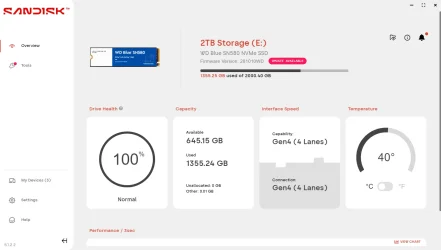
As I'm running my image I thought to look at the SanDisk app again. I click on Overview and found that it my 2 TB NVME that needs the update. Glad I'm imaging it. But it's slow going. Probably do the upgrade in the morning.


Screenshot 2026-02-13 162658.webp
 

My Computers

System One System Two

  • OS
    Windows 11 Pro 23H2
    Computer type
    PC/Desktop
    Manufacturer/Model
    Custom Build By Lance1
    CPU
    Intel 12th Gen Intel Core i5-12600KF, 3686 MHz
    Motherboard
    GIGABYTE Z790 AORUS ELITE AX LGA 1700 Intel Z790 ATX
    Memory
    CORSAIR Vengeance 32GB (2 x 16GB) 288-Pin PC RAM DDR5 6400 (PC5 51200) Dual-Channel
    Graphics Card(s)
    GIGABYTE GeForce RTX 4060, 3x Fans, 8GB GDDR6 OC
    Sound Card
    AMD High Definition
    Monitor(s) Displays
    Samsung 32" 60Hz 4ms Curved PLS LED
    Screen Resolution
    1920 X 1080
    Hard Drives
    WD Blue NVME M.2 1T Boot Drive
    WD Blue SSD 1T
    WD Blue NVME M.2 2T
    PSU
    EVGA SuperNOVA 850 GT, 80 Plus Gold 850W, Fully Modular,
    Case
    Fractal Design Pop XL Air RGB Black TG ATX High-Airflow Clear Tempered Glass Window Full Tower
    Cooling
    Noctua NH-D15 chromax black, Dual Tower CPU Cooler with Dual NF-A15 PWM 140mm Fans (Black)
    Keyboard
    Devistator 3
    Mouse
    Inphic PM6 Pro
    Internet Speed
    Telus Fiber Optic: Download 332.7 Mbps / Upload 331.5 Mbps
    Browser
    Vivaldi (64bit)
    Antivirus
    Windows Defender
  • Operating System
    Window 11 Pro
    Computer type
    Laptop
    Manufacturer/Model
    DELL Inspiron N7110
    CPU
    Intel(R) Core(TM) i3-2310M CPU @ 2.10GHz
    Motherboard
    Dell Inc. 0YH79Y
    Memory
    4 GB DDR3
    Graphics card(s)
    Intel(R) HD Graphics 3000
    Sound Card
    High Definition Audio
    Monitor(s) Displays
    17.3 Inch Display
    Screen Resolution
    1600 X 900
    Hard Drives
    Samsung SSD 860 EVO 500GB
    Internet Speed
    Fiber Optic: Download 332.7 Mbps / Upload 331.5 Mbps
    Browser
    Vivaldi 64 bit
    Antivirus
    Windows Defender
    Other Info
    YA! This the old backup. In case things go south. It'll give me access to everything I need.
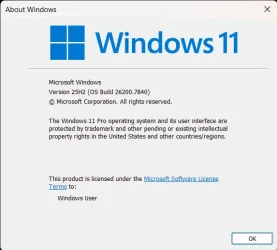
Thanks Hazel123 for the Sandisk link. My firmware is updated with no lost data and I'm at 25H2.

Screenshot 2026-02-14 153844.webp
 

My Computers

System One System Two

  • OS
    Windows 11 Pro 23H2
    Computer type
    PC/Desktop
    Manufacturer/Model
    Custom Build By Lance1
    CPU
    Intel 12th Gen Intel Core i5-12600KF, 3686 MHz
    Motherboard
    GIGABYTE Z790 AORUS ELITE AX LGA 1700 Intel Z790 ATX
    Memory
    CORSAIR Vengeance 32GB (2 x 16GB) 288-Pin PC RAM DDR5 6400 (PC5 51200) Dual-Channel
    Graphics Card(s)
    GIGABYTE GeForce RTX 4060, 3x Fans, 8GB GDDR6 OC
    Sound Card
    AMD High Definition
    Monitor(s) Displays
    Samsung 32" 60Hz 4ms Curved PLS LED
    Screen Resolution
    1920 X 1080
    Hard Drives
    WD Blue NVME M.2 1T Boot Drive
    WD Blue SSD 1T
    WD Blue NVME M.2 2T
    PSU
    EVGA SuperNOVA 850 GT, 80 Plus Gold 850W, Fully Modular,
    Case
    Fractal Design Pop XL Air RGB Black TG ATX High-Airflow Clear Tempered Glass Window Full Tower
    Cooling
    Noctua NH-D15 chromax black, Dual Tower CPU Cooler with Dual NF-A15 PWM 140mm Fans (Black)
    Keyboard
    Devistator 3
    Mouse
    Inphic PM6 Pro
    Internet Speed
    Telus Fiber Optic: Download 332.7 Mbps / Upload 331.5 Mbps
    Browser
    Vivaldi (64bit)
    Antivirus
    Windows Defender
  • Operating System
    Window 11 Pro
    Computer type
    Laptop
    Manufacturer/Model
    DELL Inspiron N7110
    CPU
    Intel(R) Core(TM) i3-2310M CPU @ 2.10GHz
    Motherboard
    Dell Inc. 0YH79Y
    Memory
    4 GB DDR3
    Graphics card(s)
    Intel(R) HD Graphics 3000
    Sound Card
    High Definition Audio
    Monitor(s) Displays
    17.3 Inch Display
    Screen Resolution
    1600 X 900
    Hard Drives
    Samsung SSD 860 EVO 500GB
    Internet Speed
    Fiber Optic: Download 332.7 Mbps / Upload 331.5 Mbps
    Browser
    Vivaldi 64 bit
    Antivirus
    Windows Defender
    Other Info
    YA! This the old backup. In case things go south. It'll give me access to everything I need.

Latest Support Threads

Back
Top Bottom