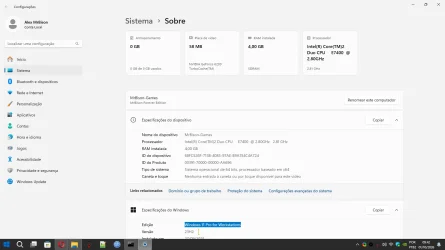
Solved I'm Trying To Install Windows 11 Pro on my Windows 10 Desktop Computer


NO. @Bree stated it plainly. The Core 2 Duo lacks the SSE4.2 instruction set that's an essential requirement to run 24H2 and above.
There is no workaround, registry tweak, change to the install media, batch file, or sacrifice to the computer gods that will make 24h2 or later install on that device.
I guess that's always been an issue for me to know when to give up on something when I know I need to. Besides windows 10 is functioning pretty well now since I replaced the older disk hard drive with a new solid state drive. Now all that I'd like to do is make some comestic changes, such as making the taskbar icons move to the center of the taskbar like they are on windows 11.
 

My Computers My Computers

  • At a glance

    Windows11Pro (x64)Intel(R) Core(TM) i5-3470 CPU @ 3.20GHz 3.20 GHz8.00 GB (7.88 GB usable)
    OS
    Windows11Pro (x64)
    Computer type
    PC/Desktop
    Manufacturer/Model
    HP/HP8300EliteSFF
    CPU
    Intel(R) Core(TM) i5-3470 CPU @ 3.20GHz 3.20 GHz
    Memory
    8.00 GB (7.88 GB usable)
  • At a glance

    Windows11Pro(x64)Intel(R) Core(TM) i5-3320M CPU @ 2.60GHz 2.60...8.00 GB (7.82 GB usable)Intel (R) HD Graphics 4000
    Operating System
    Windows11Pro(x64)
    Computer type
    Laptop
    Manufacturer/Model
    Lenovo/T430
    CPU
    Intel(R) Core(TM) i5-3320M CPU @ 2.60GHz 2.60 GHz
    Motherboard
    Lenovo 2349KB7
    Memory
    8.00 GB (7.82 GB usable)
    Graphics card(s)
    Intel (R) HD Graphics 4000
    Sound Card
    Realtek High Definition Audio
    Hard Drives
    SSD 222.79 GB

My Computers My Computers

  • At a glance

    Windows 11 HomeAMD Athlon Silver 3050U8GBRadeon Graphics
    OS
    Windows 11 Home
    Computer type
    Laptop
    Manufacturer/Model
    Acer Aspire 3 A315-23-R9VY
    CPU
    AMD Athlon Silver 3050U
    Memory
    8GB
    Graphics Card(s)
    Radeon Graphics
    Monitor(s) Displays
    laptop screen
    Screen Resolution
    1366x768 native resolution, up to 2560x1440 with Radeon Virtual Super Resolution
    Hard Drives
    1TB Samsung EVO 870 SSD (from April 2026: 250GB EVO 850)
    Internet Speed
    150 Mbps
    Browser
    Edge, Firefox
    Antivirus
    Defender
    Other Info
    UPDATE - 11 April 2026: due to lid hinges starting to break up this laptop has been retired from active duty. The OS with all software and files has been migrated to my System Seven in 'Other systems' to carry on as my general purpose 'main machine'.

    I've now clean installed 25H2 and used Garlin's scripts to update Secure Boot to CA 2023 and revoke the PCA 2011 certificates. It's new role is to test secure boot issues.

    Info for 2021-2026:
    fully 'Windows 11 ready' laptop. Windows 10 C: partition migrated from my old unsupported 'main machine' then upgraded to 11. A test migration ran Insider builds for 2 months. When 11 was released on 5th October 2021 it was re-imaged back to 10 and was offered the upgrade in Windows Update on 20th October. Windows Update offered the 22H2 Feature Update on 20th September 2022. It got the 23H2 Feature Update on 4th November 2023 through Windows Update, 24H2 on 3rd October 2024 through Windows Update by setting the Target Release Version for 24H2, and 25H2 on 30th September 2025 through Windows Update by setting the Target Release Version for 25H2.
  • At a glance

    Windows 11 ProIntel® Core™ i5-520M8GB(integrated graphics) Intel HD Graphics
    Operating System
    Windows 11 Pro
    Computer type
    Laptop
    Manufacturer/Model
    Dell Latitude E4310
    CPU
    Intel® Core™ i5-520M
    Motherboard
    0T6M8G
    Memory
    8GB
    Graphics card(s)
    (integrated graphics) Intel HD Graphics
    Screen Resolution
    1366x768
    Hard Drives
    500GB Crucial MX500 SSD
    Browser
    Firefox, Edge
    Antivirus
    Defender
    Other Info
    unsupported machine: Legacy bios, MBR, TPM 1.2, upgraded from W10 to W11 using W10/W11 hybrid install media workaround.

    In-place upgrade to 22H2 using ISO and a workaround.
    Feature Update to 23H2 by manually installing the Enablement Package.
    In-place upgrade to 24H2 using hybrid 23H2/24H2 install media.
    Upgraded to 25H2 by Enablement Package.
    Upgraded to 26H2 by Enablement Package.

    Also running Insider Experimental 263xx and 29xxx builds and Windows 10 as native boot .vhdx.
  • My SYSTEM THREE is a Dell Latitude 5410, i7-10610U, 32GB RAM, 512GB NVMe ssd, supported device running Windows 11 Pro.

    My SYSTEM FOUR was a 2-in-1 convertible Lenovo Yoga 11e (1st gen) type 20DA, Celeron N2930, 8GB RAM, 256GB ssd. Unsupported device. This has now been sold. It has been replaced by my System Eight.

    My SYSTEM FIVE is a Dell Latitude 3190 2-in-1, Pentium Silver N5030, 8GB RAM, 1TB NVMe ssd, supported device running Windows 11 Pro, plus Insider Beta, Experimental 263xx and 29xxx builds (and a few others) as a native boot .vhdx.

    My SYSTEM SIX is a Dell Latitude 5550, Core Ultra 7 165H, 64GB RAM, 1TB NVMe SSD, supported device, Windows 11 Pro, Hyper-V host machine. Updated to 25H2 on 30th September 2025.

    My SYSTEM SEVEN is a Lenovo Thinkpad T580, 1920x1080 touchscreen, Intel Core i7-8650U, 16GB RAM, 512GB NVMe SSD + 2nd 512GB NVMe SSD, a supported device for Windows 11. This is my current general purpose 'main machine'. The installed Windows 11 Home from my System One has been migrated to this machine. As its new home has an existing digital licence for Pro I've been able to upgrade the migrated OS from Home to Pro.
    29 Sept. 2026 Feature Update to 26H2 through Windows Update.

    My SYSTEM EIGHT is a 2-in-1 convertible Lenovo Yoga 11e (5th gen) type 20LN, Celeron N4120, 8GB RAM, 512GB NVMe ssd, a supported device for Windows 11. Currently running Windows 11 Pro, plus Insider Beta, Experimental 263xx and 29xxx builds as native boot vhdx.

I’m pretty sure I installed Windows 11 on an old laptop that is equipped — if I recall correctly — with a Celeron processor. Obviously, the computer is not so snappy, given the limited hardware resources, but it wasn’t with Windows 10 either. As soon as I get a chance to see the owner of that computer, I might check the hardware specs to confirm.
 

My Computer My Computer

At a glance

Windows 11
OS
Windows 11
Computer type
Laptop
I’m pretty sure I installed Windows 11 on an old laptop that is equipped — if I recall correctly — with a Celeron processor. Obviously, the computer is not so snappy, given the limited hardware resources, but it wasn’t with Windows 10 either. As soon as I get a chance to see the owner of that computer, I might check the hardware specs to confirm.
Probably a newer generation Intel Celeron with SSE4.2 instructions, or it was an older Windows 11 version that didn't require SSE4.2

For reference:

- You can install Windows 11 21H2, 22H2 and 23H2 on any 64-bit CPU system with 2GB or more RAM and at least 40GB hard disk space. You only have to bypass compatibility check. The exception is the 1st generation AMD 64 CPUs that cannot even run Windows 8 64-bit. These AMD are limited to either Windows 7 SP1 64-bit or Windows 10 22H2 32-bit. As an experiment I have installed Windows 11 21H2 on an Intel Pentium HT 640 3.2GHz socket 775 system from 2005 with 2GB RAM and a very old IDE mechanical hard disk! No SATA, no UEFI, no Secure Boot, no TPM, no WDDM 3.x graphics drivers! The lowest possible, it is actually the FIRST Intel 64-bit CPU family! Of course it was too slow for everyday use, even slower since the graphics card had no WDDM drivers and I used Microsoft Basic Display Adapter without any hardware acceleration, but I did it as proof of concept. If that system can run Windows 11, any newer system can!

- You can install Windows 24H2, 25H@ and 26H2 on any 64-vit CPU with SSE4.2 instructions. These are the 1st generation Intel Core-i3 or higher and equivalent AMDs. Warning: Early Intel Pentium and Atom CPUs might not have SSE4.2, check with CPU-Z before installing. For older CPUs without SSE4.2, I prefer to install Windows 11 23H2 to be as modern as possible. I would not like being stuck with Windows 10 22H2 64-bit. At least Windows 11 24H2 is a little newer and probably supports more hardware and applications than Windows 10.
 

My Computers My Computers

  • At a glance

    Windows 11 Pro 23H2 (7584), 25H2 (9457)Mobile DualCore Intel Core 2 Duo T7250, 2000 MHz4GBMobile Intel(R) GMA 4500M (Mobile 4 series)
    OS
    Windows 11 Pro 23H2 (7584), 25H2 (9457)
    Computer type
    Laptop
    Manufacturer/Model
    Acer Extensa 5630EZ
    CPU
    Mobile DualCore Intel Core 2 Duo T7250, 2000 MHz
    Motherboard
    Acer Extensa 5630
    Memory
    4GB
    Graphics Card(s)
    Mobile Intel(R) GMA 4500M (Mobile 4 series)
    Sound Card
    Realtek ALC268 @ Intel 82801IB ICH9 - High Definition Audio Controller
    Monitor(s) Displays
    1
    Screen Resolution
    1280x800
    Hard Drives
    Samsung SSD 850 EVO 250GB SATA Device (250 GB, SATA-III)
    Internet Speed
    802.11g wireless 54 Mbps
    Browser
    MICROSOFT EDGE
    Antivirus
    WINDOWS DEFENDER
    Other Info
    Legacy MBR installation, no TPM, no Secure Boot, no WDDM 2.0 graphics drivers, no SSE4.2, cannot get more unsupported ;) This is only my test laptop. I had installed Windows 11 here before upgrading my main PC. For my main PC I use everyday see my 2nd system specs.
  • At a glance

    Windows 11 Pro 25H2 (build 26200.9457)Intel Core-i7 3770 3.40GHz s1155 (3rd generat...2x Kingston Hyper-X Blu 8GB DDR3-1600GIGABYTE GeForce RTX 3050 WINDFORCE OC V2 6GB...
    Operating System
    Windows 11 Pro 25H2 (build 26200.9457)
    Computer type
    PC/Desktop
    Manufacturer/Model
    Custom-built PC
    CPU
    Intel Core-i7 3770 3.40GHz s1155 (3rd generation)
    Motherboard
    Asus P8H61 s1155 ATX
    Memory
    2x Kingston Hyper-X Blu 8GB DDR3-1600
    Graphics card(s)
    GIGABYTE GeForce RTX 3050 WINDFORCE OC V2 6GB (GV-N3050WF2OCV2-6GD)
    Sound Card
    Realtek HD audio (ALC887)
    Monitor(s) Displays
    Sony Bravia KDL-19L4000 19" LCD TV via VGA
    Screen Resolution
    1440x900 32-bit 60Hz
    Hard Drives
    WD Blue SA510 2.5 1000GB SSD as system disk, Western Digital Caviar Purple 4TB SATA III (WD40PURZ) as second
    PSU
    Thermaltake Litepower RGB 550W Full Wired
    Case
    SUPERCASE MIDI-TOWER
    Cooling
    Deepcool Gamma Archer CPU cooler, 1x 8cm fan at the back
    Keyboard
    Mitsumi 101-key PS/2
    Mouse
    Microsoft Compact Optical Mouse
    Internet Speed
    802.11ac 5GHz wireless 260Mpbs
    Browser
    Microsoft Edge, Mozilla Firefox
    Antivirus
    Microsoft Windows Defender
    Other Info
    Legacy BIOS (MBR) installation, no TPM, no Secure Boot, WDDM 3.0 graphics drivers, WEI score 7.4
So you don't think there's ANY possible way to install windows 11 pro on my older desktop computer ?
Once a PC is pushing 20 some odd years it's pretty much reached recycling status. You could keep it for posterity's sake or, as a curiosity, a learning tool perhaps? Your PC will likely run Linux just fine but I would not trust it for doing financial transactions or security sensitive tasks. Windows 10 still gives you over a year of extended security updates and your old desktop could be used for watching videos and listening to audio files. That sort of thing. Myself, I generally recycle after cannibalizing the parts I know I can still use.
 

My Computer My Computer

At a glance

WIN 11, WIN 10, WIN 8.1, WIN 7 U, WIN 7 PRO, ...Intel i7 6900K and i9-7960X / AMD 3800X (8 core)128 GB CORSAIR DOMINATOR PLATINUM (B DIE)NVIDIA 1070 and RTX 3070
OS
WIN 11, WIN 10, WIN 8.1, WIN 7 U, WIN 7 PRO, WIN 7 HOME (32 Bit), LINUX MINT
Computer type
PC/Desktop
Manufacturer/Model
DIY, ASUS, and DELL
CPU
Intel i7 6900K and i9-7960X / AMD 3800X (8 core)
Motherboard
ASUS X99E-WS USB 3.1 and ASUS X299 SAGE
Memory
128 GB CORSAIR DOMINATOR PLATINUM (B DIE)
Graphics Card(s)
NVIDIA 1070 and RTX 3070
Sound Card
Crystal Sound (onboard)
Monitor(s) Displays
single Samsung 30" 4K and 8" aux monitor
Screen Resolution
4K and something equally attrocious. I'll be working on this.
Hard Drives
A, B, C, D, E, F, G, H, I, J, K, L, M, N, O, P, Q, R, S, T, U, V, W

Ports X, Y, and Z are reserved for USB access and removable drives.

Drive types consist of the following: Various mechanical hard drives bearing the brand names, Seagate, Toshiba, and Western Digital. Various NVMe drives bearing the brand names Kingston, Intel, Silicon Power, Crucial, Western Digital, and Team Group. Various SATA SSDs bearing various different brand names.

RAID arrays included:

LSI RAID 10 (WD Velociraptors) 1115.72 GB
LSI RAID 10 (WD SSDS) 463.80 GB

INTEL RAID 0 (KINGSTON HYPER X) System 447.14 GB
INTEL RAID 1 TOSHIBA ENTERPRIZE class Data 2794.52 GB
INTEL RAID 1 SEAGATE HYBRID 931.51 GB
PSU
SEVERAL. I prefer my Corsair Platinum HX1000i but I also like EVGA power supplies
Case
ThermalTake Level 10 GT (among others)
Cooling
Noctua is my favorite and I use it in my main. I also own various other coolers.
Keyboard
all kinds.
Mouse
all kinds
Internet Speed
360 mbps - 1 gbps (depending)
Browser
FIREFOX
Antivirus
KASPERSKY (no apologies)
Other Info
Gave Dell touch screen with Windows 11 to daughter and got me an OTVOC. Being a PC builder I own many desktop PCs as well. I am a father of five providing PCs, laptops, and tablets for all my family, most of which I have modified, rebuilt, or simply built from scratch. I do not own a cell phone, never have, never will.
Once a PC is pushing 20 some odd years it's pretty much reached recycling status. You could keep it for posterity's sake or, as a curiosity, a learning tool perhaps? Your PC will likely run Linux just fine but I would not trust it for doing financial transactions or security sensitive tasks. Windows 10 still gives you over a year of extended security updates and your old desktop could be used for watching videos and listening to audio files. That sort of thing. Myself, I generally recycle after cannibalizing the parts I know I can still use.
Thanks for your valued reply, everything that you stated perfectly makes sense. Actually after using windows 10 pro for awhile once again I'm finding it really not so bad afterall. At least now I've got my taskbar icon's in the center of my taskbar by using the 'explorer patcher' software.
 

My Computers My Computers

  • At a glance

    Windows11Pro (x64)Intel(R) Core(TM) i5-3470 CPU @ 3.20GHz 3.20 GHz8.00 GB (7.88 GB usable)
    OS
    Windows11Pro (x64)
    Computer type
    PC/Desktop
    Manufacturer/Model
    HP/HP8300EliteSFF
    CPU
    Intel(R) Core(TM) i5-3470 CPU @ 3.20GHz 3.20 GHz
    Memory
    8.00 GB (7.88 GB usable)
  • At a glance

    Windows11Pro(x64)Intel(R) Core(TM) i5-3320M CPU @ 2.60GHz 2.60...8.00 GB (7.82 GB usable)Intel (R) HD Graphics 4000
    Operating System
    Windows11Pro(x64)
    Computer type
    Laptop
    Manufacturer/Model
    Lenovo/T430
    CPU
    Intel(R) Core(TM) i5-3320M CPU @ 2.60GHz 2.60 GHz
    Motherboard
    Lenovo 2349KB7
    Memory
    8.00 GB (7.82 GB usable)
    Graphics card(s)
    Intel (R) HD Graphics 4000
    Sound Card
    Realtek High Definition Audio
    Hard Drives
    SSD 222.79 GB
Actually after using windows 10 pro for awhile once again I'm finding it really not so bad afterall.

I couldn't agree with you more. In fact, on my bedroom Intel Gen 1 platform I switched back to Win 10 after learning about the extension. Of course, I kept the garbage (Cortana, Bit Locker, Key Logger, One Drive, Co-Pilot etc.) out of it and it runs like a charm. Opted out for a Brave browser and Start Page. My biggest beef with Win 10 was all the bloatware and garbage that came with it. Once you clear out the trash it's a pretty decent OS. Nothing I'd want to do financial transactions on, but that is a matter of personal preference. Somehow Linux just feels safer in that regard.
 

My Computer My Computer

At a glance

WIN 11, WIN 10, WIN 8.1, WIN 7 U, WIN 7 PRO, ...Intel i7 6900K and i9-7960X / AMD 3800X (8 core)128 GB CORSAIR DOMINATOR PLATINUM (B DIE)NVIDIA 1070 and RTX 3070
OS
WIN 11, WIN 10, WIN 8.1, WIN 7 U, WIN 7 PRO, WIN 7 HOME (32 Bit), LINUX MINT
Computer type
PC/Desktop
Manufacturer/Model
DIY, ASUS, and DELL
CPU
Intel i7 6900K and i9-7960X / AMD 3800X (8 core)
Motherboard
ASUS X99E-WS USB 3.1 and ASUS X299 SAGE
Memory
128 GB CORSAIR DOMINATOR PLATINUM (B DIE)
Graphics Card(s)
NVIDIA 1070 and RTX 3070
Sound Card
Crystal Sound (onboard)
Monitor(s) Displays
single Samsung 30" 4K and 8" aux monitor
Screen Resolution
4K and something equally attrocious. I'll be working on this.
Hard Drives
A, B, C, D, E, F, G, H, I, J, K, L, M, N, O, P, Q, R, S, T, U, V, W

Ports X, Y, and Z are reserved for USB access and removable drives.

Drive types consist of the following: Various mechanical hard drives bearing the brand names, Seagate, Toshiba, and Western Digital. Various NVMe drives bearing the brand names Kingston, Intel, Silicon Power, Crucial, Western Digital, and Team Group. Various SATA SSDs bearing various different brand names.

RAID arrays included:

LSI RAID 10 (WD Velociraptors) 1115.72 GB
LSI RAID 10 (WD SSDS) 463.80 GB

INTEL RAID 0 (KINGSTON HYPER X) System 447.14 GB
INTEL RAID 1 TOSHIBA ENTERPRIZE class Data 2794.52 GB
INTEL RAID 1 SEAGATE HYBRID 931.51 GB
PSU
SEVERAL. I prefer my Corsair Platinum HX1000i but I also like EVGA power supplies
Case
ThermalTake Level 10 GT (among others)
Cooling
Noctua is my favorite and I use it in my main. I also own various other coolers.
Keyboard
all kinds.
Mouse
all kinds
Internet Speed
360 mbps - 1 gbps (depending)
Browser
FIREFOX
Antivirus
KASPERSKY (no apologies)
Other Info
Gave Dell touch screen with Windows 11 to daughter and got me an OTVOC. Being a PC builder I own many desktop PCs as well. I am a father of five providing PCs, laptops, and tablets for all my family, most of which I have modified, rebuilt, or simply built from scratch. I do not own a cell phone, never have, never will.
As long as you keep Windows Defender or third-party antivirus updated and not blindly click OK to close a popup window, you should be safe to use Windows 10 or even Windows 7. In any case make sure you regularly backup your precious files and take a full disk backup at least once a month. If the computer is ever compromised, you can just wipe the disk and restore the last full disk backup. After Windows 10 ESU period expires, I would upgrade to Windows 11 23H2 to be a little more modern and possibly support more devices and apps. I strongly recommend to take your time and familiarize with Linux at least a couple of months before adopting. In my computer I would rather run an old Windows version than use Linux. There are many things I cannot do in Linux, or at least I cannot do the way I want. Also I hate the steep learning curve and the frequent need to use the Terminal. It's 2026 for God's sake, not the 80's!
 

My Computers My Computers

  • At a glance

    Windows 11 Pro 23H2 (7584), 25H2 (9457)Mobile DualCore Intel Core 2 Duo T7250, 2000 MHz4GBMobile Intel(R) GMA 4500M (Mobile 4 series)
    OS
    Windows 11 Pro 23H2 (7584), 25H2 (9457)
    Computer type
    Laptop
    Manufacturer/Model
    Acer Extensa 5630EZ
    CPU
    Mobile DualCore Intel Core 2 Duo T7250, 2000 MHz
    Motherboard
    Acer Extensa 5630
    Memory
    4GB
    Graphics Card(s)
    Mobile Intel(R) GMA 4500M (Mobile 4 series)
    Sound Card
    Realtek ALC268 @ Intel 82801IB ICH9 - High Definition Audio Controller
    Monitor(s) Displays
    1
    Screen Resolution
    1280x800
    Hard Drives
    Samsung SSD 850 EVO 250GB SATA Device (250 GB, SATA-III)
    Internet Speed
    802.11g wireless 54 Mbps
    Browser
    MICROSOFT EDGE
    Antivirus
    WINDOWS DEFENDER
    Other Info
    Legacy MBR installation, no TPM, no Secure Boot, no WDDM 2.0 graphics drivers, no SSE4.2, cannot get more unsupported ;) This is only my test laptop. I had installed Windows 11 here before upgrading my main PC. For my main PC I use everyday see my 2nd system specs.
  • At a glance

    Windows 11 Pro 25H2 (build 26200.9457)Intel Core-i7 3770 3.40GHz s1155 (3rd generat...2x Kingston Hyper-X Blu 8GB DDR3-1600GIGABYTE GeForce RTX 3050 WINDFORCE OC V2 6GB...
    Operating System
    Windows 11 Pro 25H2 (build 26200.9457)
    Computer type
    PC/Desktop
    Manufacturer/Model
    Custom-built PC
    CPU
    Intel Core-i7 3770 3.40GHz s1155 (3rd generation)
    Motherboard
    Asus P8H61 s1155 ATX
    Memory
    2x Kingston Hyper-X Blu 8GB DDR3-1600
    Graphics card(s)
    GIGABYTE GeForce RTX 3050 WINDFORCE OC V2 6GB (GV-N3050WF2OCV2-6GD)
    Sound Card
    Realtek HD audio (ALC887)
    Monitor(s) Displays
    Sony Bravia KDL-19L4000 19" LCD TV via VGA
    Screen Resolution
    1440x900 32-bit 60Hz
    Hard Drives
    WD Blue SA510 2.5 1000GB SSD as system disk, Western Digital Caviar Purple 4TB SATA III (WD40PURZ) as second
    PSU
    Thermaltake Litepower RGB 550W Full Wired
    Case
    SUPERCASE MIDI-TOWER
    Cooling
    Deepcool Gamma Archer CPU cooler, 1x 8cm fan at the back
    Keyboard
    Mitsumi 101-key PS/2
    Mouse
    Microsoft Compact Optical Mouse
    Internet Speed
    802.11ac 5GHz wireless 260Mpbs
    Browser
    Microsoft Edge, Mozilla Firefox
    Antivirus
    Microsoft Windows Defender
    Other Info
    Legacy BIOS (MBR) installation, no TPM, no Secure Boot, WDDM 3.0 graphics drivers, WEI score 7.4
There are many things I cannot do in Linux, or at least I cannot do the way I want. Also I hate the steep learning curve and the frequent need to use the Terminal. It's 2026 for God's sake, not the 80's!
I'm with you on this. That's also why I keep the best of both worlds.
 

My Computer My Computer

At a glance

WIN 11, WIN 10, WIN 8.1, WIN 7 U, WIN 7 PRO, ...Intel i7 6900K and i9-7960X / AMD 3800X (8 core)128 GB CORSAIR DOMINATOR PLATINUM (B DIE)NVIDIA 1070 and RTX 3070
OS
WIN 11, WIN 10, WIN 8.1, WIN 7 U, WIN 7 PRO, WIN 7 HOME (32 Bit), LINUX MINT
Computer type
PC/Desktop
Manufacturer/Model
DIY, ASUS, and DELL
CPU
Intel i7 6900K and i9-7960X / AMD 3800X (8 core)
Motherboard
ASUS X99E-WS USB 3.1 and ASUS X299 SAGE
Memory
128 GB CORSAIR DOMINATOR PLATINUM (B DIE)
Graphics Card(s)
NVIDIA 1070 and RTX 3070
Sound Card
Crystal Sound (onboard)
Monitor(s) Displays
single Samsung 30" 4K and 8" aux monitor
Screen Resolution
4K and something equally attrocious. I'll be working on this.
Hard Drives
A, B, C, D, E, F, G, H, I, J, K, L, M, N, O, P, Q, R, S, T, U, V, W

Ports X, Y, and Z are reserved for USB access and removable drives.

Drive types consist of the following: Various mechanical hard drives bearing the brand names, Seagate, Toshiba, and Western Digital. Various NVMe drives bearing the brand names Kingston, Intel, Silicon Power, Crucial, Western Digital, and Team Group. Various SATA SSDs bearing various different brand names.

RAID arrays included:

LSI RAID 10 (WD Velociraptors) 1115.72 GB
LSI RAID 10 (WD SSDS) 463.80 GB

INTEL RAID 0 (KINGSTON HYPER X) System 447.14 GB
INTEL RAID 1 TOSHIBA ENTERPRIZE class Data 2794.52 GB
INTEL RAID 1 SEAGATE HYBRID 931.51 GB
PSU
SEVERAL. I prefer my Corsair Platinum HX1000i but I also like EVGA power supplies
Case
ThermalTake Level 10 GT (among others)
Cooling
Noctua is my favorite and I use it in my main. I also own various other coolers.
Keyboard
all kinds.
Mouse
all kinds
Internet Speed
360 mbps - 1 gbps (depending)
Browser
FIREFOX
Antivirus
KASPERSKY (no apologies)
Other Info
Gave Dell touch screen with Windows 11 to daughter and got me an OTVOC. Being a PC builder I own many desktop PCs as well. I am a father of five providing PCs, laptops, and tablets for all my family, most of which I have modified, rebuilt, or simply built from scratch. I do not own a cell phone, never have, never will.
An inexperienced user might think that switching to Linux is the answer to his prayers. Linux is not Panacea. Yes, it runs faster than Windows, but this is because the user interface has less visual effects enabled by default and run almost no apps in the background. Once you enable more effects and more apps run in the background it becomes slower, comparable to Windows. He must also consider the smaller number of available applications and games and the narrower range of supported hardware devices and peripherals. Is not only the ease of use, but also the compatibility which I consider equally important. Remember, it is a substitute, not a magic replacement of Windows, otherwise more than half the PCs would run some Linux distro. Most of us insist on running Windows, any version as long as it is Windows, for a reason.
 

My Computers My Computers

  • At a glance

    Windows 11 Pro 23H2 (7584), 25H2 (9457)Mobile DualCore Intel Core 2 Duo T7250, 2000 MHz4GBMobile Intel(R) GMA 4500M (Mobile 4 series)
    OS
    Windows 11 Pro 23H2 (7584), 25H2 (9457)
    Computer type
    Laptop
    Manufacturer/Model
    Acer Extensa 5630EZ
    CPU
    Mobile DualCore Intel Core 2 Duo T7250, 2000 MHz
    Motherboard
    Acer Extensa 5630
    Memory
    4GB
    Graphics Card(s)
    Mobile Intel(R) GMA 4500M (Mobile 4 series)
    Sound Card
    Realtek ALC268 @ Intel 82801IB ICH9 - High Definition Audio Controller
    Monitor(s) Displays
    1
    Screen Resolution
    1280x800
    Hard Drives
    Samsung SSD 850 EVO 250GB SATA Device (250 GB, SATA-III)
    Internet Speed
    802.11g wireless 54 Mbps
    Browser
    MICROSOFT EDGE
    Antivirus
    WINDOWS DEFENDER
    Other Info
    Legacy MBR installation, no TPM, no Secure Boot, no WDDM 2.0 graphics drivers, no SSE4.2, cannot get more unsupported ;) This is only my test laptop. I had installed Windows 11 here before upgrading my main PC. For my main PC I use everyday see my 2nd system specs.
  • At a glance

    Windows 11 Pro 25H2 (build 26200.9457)Intel Core-i7 3770 3.40GHz s1155 (3rd generat...2x Kingston Hyper-X Blu 8GB DDR3-1600GIGABYTE GeForce RTX 3050 WINDFORCE OC V2 6GB...
    Operating System
    Windows 11 Pro 25H2 (build 26200.9457)
    Computer type
    PC/Desktop
    Manufacturer/Model
    Custom-built PC
    CPU
    Intel Core-i7 3770 3.40GHz s1155 (3rd generation)
    Motherboard
    Asus P8H61 s1155 ATX
    Memory
    2x Kingston Hyper-X Blu 8GB DDR3-1600
    Graphics card(s)
    GIGABYTE GeForce RTX 3050 WINDFORCE OC V2 6GB (GV-N3050WF2OCV2-6GD)
    Sound Card
    Realtek HD audio (ALC887)
    Monitor(s) Displays
    Sony Bravia KDL-19L4000 19" LCD TV via VGA
    Screen Resolution
    1440x900 32-bit 60Hz
    Hard Drives
    WD Blue SA510 2.5 1000GB SSD as system disk, Western Digital Caviar Purple 4TB SATA III (WD40PURZ) as second
    PSU
    Thermaltake Litepower RGB 550W Full Wired
    Case
    SUPERCASE MIDI-TOWER
    Cooling
    Deepcool Gamma Archer CPU cooler, 1x 8cm fan at the back
    Keyboard
    Mitsumi 101-key PS/2
    Mouse
    Microsoft Compact Optical Mouse
    Internet Speed
    802.11ac 5GHz wireless 260Mpbs
    Browser
    Microsoft Edge, Mozilla Firefox
    Antivirus
    Microsoft Windows Defender
    Other Info
    Legacy BIOS (MBR) installation, no TPM, no Secure Boot, WDDM 3.0 graphics drivers, WEI score 7.4
At least now I've got my taskbar icon's in the center of my taskbar by using the 'explorer patcher' software.
You know, as I actually hate the centered alignment of the Windows icon, I moved it to the left — the classic way — using the unattended installation (with Rufus) 😅
 

My Computer My Computer

At a glance

Windows 11
OS
Windows 11
Computer type
Laptop
To get it installed, he'll need to grab a 23H2 ISO image and use Rufus to bypass the requirements—specifically TPM 2.0 and Secure Boot. I’ve got 23H2 running on a Core 2 Duo E7400 with 4GB of RAM.

1790858592299.webp
 

My Computer My Computer

At a glance

Windows 10, Pro for Workstationscore 2 duo E74004G DDR2NVIDIA Geforce 6200 TurboCache
OS
Windows 10, Pro for Workstations
Computer type
PC/Desktop
Manufacturer/Model
Custom
CPU
core 2 duo E7400
Motherboard
MSI G31M3-L V2 (MS-7529)
Memory
4G DDR2
Graphics Card(s)
NVIDIA Geforce 6200 TurboCache
Sound Card
None
Monitor(s) Displays
Philips TV 43PFG5102/78
Screen Resolution
1920x1080
Hard Drives
HDD: Old 930gb, Second HDD 698gb
PSU
300W
Case
Goldship
Cooling
default
Keyboard
Exbom
Mouse
Exbom
Internet Speed
600mb
Browser
Opera
Antivirus
Windows Segurity
Other Info
I no longer have my old computer—the one with the Ryzen 5500, GeForce 1650 Super, and 16GB of DDR4 3200 MHz RAM.
and the frequent need to use the Terminal. It's 2026 for God's sake, not the 80's!
*LOL* 😅 i thought we all loved the 80's :party:
But you dont need to use the terminal as a normal user in the more user-friendlier Linux distributions.
I use one of the less user-friendlier distros.. Debian with Xfce desktop environment.. and i almost never use the terminal..
So in ZorinOS or latest Mint or SteamOS/Bazzite for those who like gaming.. i dont even think a normal user will ever touch the Terminal unless they had incompatible hardware so they need to troubleshoot things.

I hate Linux as much as i hate Windows... they both sucks in different ways.. so I'm 50/50 on my haterage and use what sucks less for the task i need my computer for.:cool:
 

My Computers My Computers

  • At a glance

    Linux: Debian, Kali-linux, Alma, Win:7,10IoT,...i3, i5 and i7 From 2gen to 9th gen... Server ...
    OS
    Linux: Debian, Kali-linux, Alma, Win:7,10IoT,2012R
    Manufacturer/Model
    HP Elitebook 840, AsusX53, Aspire E1-572. AsusUX32A, HP Pro3130mt+3010mt, HP Proliant ML150, 3xCustom-PC, i3, i5, i7
    CPU
    i3, i5 and i7 From 2gen to 9th gen... Server dual Xenon
    Hard Drives
    Sata, M.2, SAS
  • At a glance

    Retro: 2003server.XPpro, Win2000, Win98SE, Wi...Oldest intel 8088 up to P4 dual core
    Operating System
    Retro: 2003server.XPpro, Win2000, Win98SE, Win95, Win3.11, MS-DOS, IBM-DOS
    Manufacturer/Model
    Commodore, AST, Fujitsu, Compaq, etc etc. etc Around 15 desktops and 20 laptops in the collection
    CPU
    Oldest intel 8088 up to P4 dual core
    Hard Drives
    MFM, IDE, SCSI
To get it installed, he'll need to grab a 23H2 ISO image and use Rufus to bypass the requirements—specifically TPM 2.0 and Secure Boot. I’ve got 23H2 running on a Core 2 Duo E7400 with 4GB of RAM.

View attachment 184887
Exactly like my test laptop (1st system specs), stuck to Windows 11 23H2, so what? Much better than running Linux. I not only want a "modern" OS. I want an easy to use OS, as much compatible as possible with hardware and applications and have the best possible performance for each hardware component. This is only achieved running Windows with the proprietary OEM drivers. Linux drivers hardly expose all device features and I don't think their performance compares to proprietary OEM drivers. Think again.
 

My Computers My Computers

  • At a glance

    Windows 11 Pro 23H2 (7584), 25H2 (9457)Mobile DualCore Intel Core 2 Duo T7250, 2000 MHz4GBMobile Intel(R) GMA 4500M (Mobile 4 series)
    OS
    Windows 11 Pro 23H2 (7584), 25H2 (9457)
    Computer type
    Laptop
    Manufacturer/Model
    Acer Extensa 5630EZ
    CPU
    Mobile DualCore Intel Core 2 Duo T7250, 2000 MHz
    Motherboard
    Acer Extensa 5630
    Memory
    4GB
    Graphics Card(s)
    Mobile Intel(R) GMA 4500M (Mobile 4 series)
    Sound Card
    Realtek ALC268 @ Intel 82801IB ICH9 - High Definition Audio Controller
    Monitor(s) Displays
    1
    Screen Resolution
    1280x800
    Hard Drives
    Samsung SSD 850 EVO 250GB SATA Device (250 GB, SATA-III)
    Internet Speed
    802.11g wireless 54 Mbps
    Browser
    MICROSOFT EDGE
    Antivirus
    WINDOWS DEFENDER
    Other Info
    Legacy MBR installation, no TPM, no Secure Boot, no WDDM 2.0 graphics drivers, no SSE4.2, cannot get more unsupported ;) This is only my test laptop. I had installed Windows 11 here before upgrading my main PC. For my main PC I use everyday see my 2nd system specs.
  • At a glance

    Windows 11 Pro 25H2 (build 26200.9457)Intel Core-i7 3770 3.40GHz s1155 (3rd generat...2x Kingston Hyper-X Blu 8GB DDR3-1600GIGABYTE GeForce RTX 3050 WINDFORCE OC V2 6GB...
    Operating System
    Windows 11 Pro 25H2 (build 26200.9457)
    Computer type
    PC/Desktop
    Manufacturer/Model
    Custom-built PC
    CPU
    Intel Core-i7 3770 3.40GHz s1155 (3rd generation)
    Motherboard
    Asus P8H61 s1155 ATX
    Memory
    2x Kingston Hyper-X Blu 8GB DDR3-1600
    Graphics card(s)
    GIGABYTE GeForce RTX 3050 WINDFORCE OC V2 6GB (GV-N3050WF2OCV2-6GD)
    Sound Card
    Realtek HD audio (ALC887)
    Monitor(s) Displays
    Sony Bravia KDL-19L4000 19" LCD TV via VGA
    Screen Resolution
    1440x900 32-bit 60Hz
    Hard Drives
    WD Blue SA510 2.5 1000GB SSD as system disk, Western Digital Caviar Purple 4TB SATA III (WD40PURZ) as second
    PSU
    Thermaltake Litepower RGB 550W Full Wired
    Case
    SUPERCASE MIDI-TOWER
    Cooling
    Deepcool Gamma Archer CPU cooler, 1x 8cm fan at the back
    Keyboard
    Mitsumi 101-key PS/2
    Mouse
    Microsoft Compact Optical Mouse
    Internet Speed
    802.11ac 5GHz wireless 260Mpbs
    Browser
    Microsoft Edge, Mozilla Firefox
    Antivirus
    Microsoft Windows Defender
    Other Info
    Legacy BIOS (MBR) installation, no TPM, no Secure Boot, WDDM 3.0 graphics drivers, WEI score 7.4
*LOL* 😅 i thought we all loved the 80's :party:
But you dont need to use the terminal as a normal user in the more user-friendlier Linux distributions.
I use one of the less user-friendlier distros.. Debian with Xfce desktop environment.. and i almost never use the terminal..
So in ZorinOS or latest Mint or SteamOS/Bazzite for those who like gaming.. i dont even think a normal user will ever touch the Terminal unless they had incompatible hardware so they need to troubleshoot things.

I hate Linux as much as i hate Windows... they both sucks in different ways.. so I'm 50/50 on my haterage and use what sucks less for the task i need my computer for.:cool:
Like you said "unless...". There is always some "unless" and you discover it the more inconvenient time. With Windows it just works and do your job. With Linux if not everything is preconfigured and preinstalled they way you want, you....must use the Terminal! Is ever any OS exactly the way you like it out of the box? Even in Windows I do several modifications before I can work or play on it, let alone Linux. Yes, the average user can use some easy Linux distro, provided some experienced user installs all the apps he need and configures it the way he wants beforehand. And of course he will never need something more that he already has. Rather unlikely isn't it? That's exactly why I will never recommend Linux to anyone. Because I will be that sucker, I mean "experienced" user to do all of these for him and provide support almost daily. No thanks! I don't do to others what I don't like to do at me.
 

My Computers My Computers

  • At a glance

    Windows 11 Pro 23H2 (7584), 25H2 (9457)Mobile DualCore Intel Core 2 Duo T7250, 2000 MHz4GBMobile Intel(R) GMA 4500M (Mobile 4 series)
    OS
    Windows 11 Pro 23H2 (7584), 25H2 (9457)
    Computer type
    Laptop
    Manufacturer/Model
    Acer Extensa 5630EZ
    CPU
    Mobile DualCore Intel Core 2 Duo T7250, 2000 MHz
    Motherboard
    Acer Extensa 5630
    Memory
    4GB
    Graphics Card(s)
    Mobile Intel(R) GMA 4500M (Mobile 4 series)
    Sound Card
    Realtek ALC268 @ Intel 82801IB ICH9 - High Definition Audio Controller
    Monitor(s) Displays
    1
    Screen Resolution
    1280x800
    Hard Drives
    Samsung SSD 850 EVO 250GB SATA Device (250 GB, SATA-III)
    Internet Speed
    802.11g wireless 54 Mbps
    Browser
    MICROSOFT EDGE
    Antivirus
    WINDOWS DEFENDER
    Other Info
    Legacy MBR installation, no TPM, no Secure Boot, no WDDM 2.0 graphics drivers, no SSE4.2, cannot get more unsupported ;) This is only my test laptop. I had installed Windows 11 here before upgrading my main PC. For my main PC I use everyday see my 2nd system specs.
  • At a glance

    Windows 11 Pro 25H2 (build 26200.9457)Intel Core-i7 3770 3.40GHz s1155 (3rd generat...2x Kingston Hyper-X Blu 8GB DDR3-1600GIGABYTE GeForce RTX 3050 WINDFORCE OC V2 6GB...
    Operating System
    Windows 11 Pro 25H2 (build 26200.9457)
    Computer type
    PC/Desktop
    Manufacturer/Model
    Custom-built PC
    CPU
    Intel Core-i7 3770 3.40GHz s1155 (3rd generation)
    Motherboard
    Asus P8H61 s1155 ATX
    Memory
    2x Kingston Hyper-X Blu 8GB DDR3-1600
    Graphics card(s)
    GIGABYTE GeForce RTX 3050 WINDFORCE OC V2 6GB (GV-N3050WF2OCV2-6GD)
    Sound Card
    Realtek HD audio (ALC887)
    Monitor(s) Displays
    Sony Bravia KDL-19L4000 19" LCD TV via VGA
    Screen Resolution
    1440x900 32-bit 60Hz
    Hard Drives
    WD Blue SA510 2.5 1000GB SSD as system disk, Western Digital Caviar Purple 4TB SATA III (WD40PURZ) as second
    PSU
    Thermaltake Litepower RGB 550W Full Wired
    Case
    SUPERCASE MIDI-TOWER
    Cooling
    Deepcool Gamma Archer CPU cooler, 1x 8cm fan at the back
    Keyboard
    Mitsumi 101-key PS/2
    Mouse
    Microsoft Compact Optical Mouse
    Internet Speed
    802.11ac 5GHz wireless 260Mpbs
    Browser
    Microsoft Edge, Mozilla Firefox
    Antivirus
    Microsoft Windows Defender
    Other Info
    Legacy BIOS (MBR) installation, no TPM, no Secure Boot, WDDM 3.0 graphics drivers, WEI score 7.4
Like you said "unless...". There is always some "unless" and you discover it the more inconvenient time. With Windows it just works and do your job. With Linux if not everything is preconfigured and preinstalled they way you want, you....must use the Terminal! Is ever any OS exactly the way you like it out of the box? Even in Windows I do several modifications before I can work or play on it, let alone Linux. Yes, the average user can use some easy Linux distro, provided some experienced user installs all the apps he need and configures it the way he wants beforehand. And of course he will never need something more that he already has. Rather unlikely isn't it? That's exactly why I will never recommend Linux to anyone. Because I will be that sucker, I mean "experienced" user to do all of these for him and provide support almost daily. No thanks! I don't do to others what I don't like to do at me.
I have been lucky with my computers.. they are all intel based and intel internal graphics.. I have a few with Nvidia, but they work great too when i use Nvidias driver instead of opensource drivers..
But i have bad experience with AMD and Radeon graphics.. also SiS in the past was a nightmare. *LOL* 😅

as i see you are VIP, then i can joke and say.... i have never-ever modified a Windows system.. i just LOVE windows out of the box. 😇 *lol*

i think we that dont like things out of the box always run in to trouble.. Terminal in Linux or Powershell in Windows... i think people like us is screwed either way. *lol* 😁
But normal users that do like things out of the box.. i think they can have a Terminal/Powershell free life in 2026 and 2027. 🤓
But me and you and people like us.. we will only be free from that the day we give up computing. 🤣
 

My Computers My Computers

  • At a glance

    Linux: Debian, Kali-linux, Alma, Win:7,10IoT,...i3, i5 and i7 From 2gen to 9th gen... Server ...
    OS
    Linux: Debian, Kali-linux, Alma, Win:7,10IoT,2012R
    Manufacturer/Model
    HP Elitebook 840, AsusX53, Aspire E1-572. AsusUX32A, HP Pro3130mt+3010mt, HP Proliant ML150, 3xCustom-PC, i3, i5, i7
    CPU
    i3, i5 and i7 From 2gen to 9th gen... Server dual Xenon
    Hard Drives
    Sata, M.2, SAS
  • At a glance

    Retro: 2003server.XPpro, Win2000, Win98SE, Wi...Oldest intel 8088 up to P4 dual core
    Operating System
    Retro: 2003server.XPpro, Win2000, Win98SE, Win95, Win3.11, MS-DOS, IBM-DOS
    Manufacturer/Model
    Commodore, AST, Fujitsu, Compaq, etc etc. etc Around 15 desktops and 20 laptops in the collection
    CPU
    Oldest intel 8088 up to P4 dual core
    Hard Drives
    MFM, IDE, SCSI
SiS drivers were nightmare even in Windows. I had downloaded them all to be able to install Windows on motherboards with the SiS chipset, but even then it wasn't clear which driver was the correct one. I had nicknames SiS to "siskata" (Greek for full of sh!t).
 

My Computers My Computers

  • At a glance

    Windows 11 Pro 23H2 (7584), 25H2 (9457)Mobile DualCore Intel Core 2 Duo T7250, 2000 MHz4GBMobile Intel(R) GMA 4500M (Mobile 4 series)
    OS
    Windows 11 Pro 23H2 (7584), 25H2 (9457)
    Computer type
    Laptop
    Manufacturer/Model
    Acer Extensa 5630EZ
    CPU
    Mobile DualCore Intel Core 2 Duo T7250, 2000 MHz
    Motherboard
    Acer Extensa 5630
    Memory
    4GB
    Graphics Card(s)
    Mobile Intel(R) GMA 4500M (Mobile 4 series)
    Sound Card
    Realtek ALC268 @ Intel 82801IB ICH9 - High Definition Audio Controller
    Monitor(s) Displays
    1
    Screen Resolution
    1280x800
    Hard Drives
    Samsung SSD 850 EVO 250GB SATA Device (250 GB, SATA-III)
    Internet Speed
    802.11g wireless 54 Mbps
    Browser
    MICROSOFT EDGE
    Antivirus
    WINDOWS DEFENDER
    Other Info
    Legacy MBR installation, no TPM, no Secure Boot, no WDDM 2.0 graphics drivers, no SSE4.2, cannot get more unsupported ;) This is only my test laptop. I had installed Windows 11 here before upgrading my main PC. For my main PC I use everyday see my 2nd system specs.
  • At a glance

    Windows 11 Pro 25H2 (build 26200.9457)Intel Core-i7 3770 3.40GHz s1155 (3rd generat...2x Kingston Hyper-X Blu 8GB DDR3-1600GIGABYTE GeForce RTX 3050 WINDFORCE OC V2 6GB...
    Operating System
    Windows 11 Pro 25H2 (build 26200.9457)
    Computer type
    PC/Desktop
    Manufacturer/Model
    Custom-built PC
    CPU
    Intel Core-i7 3770 3.40GHz s1155 (3rd generation)
    Motherboard
    Asus P8H61 s1155 ATX
    Memory
    2x Kingston Hyper-X Blu 8GB DDR3-1600
    Graphics card(s)
    GIGABYTE GeForce RTX 3050 WINDFORCE OC V2 6GB (GV-N3050WF2OCV2-6GD)
    Sound Card
    Realtek HD audio (ALC887)
    Monitor(s) Displays
    Sony Bravia KDL-19L4000 19" LCD TV via VGA
    Screen Resolution
    1440x900 32-bit 60Hz
    Hard Drives
    WD Blue SA510 2.5 1000GB SSD as system disk, Western Digital Caviar Purple 4TB SATA III (WD40PURZ) as second
    PSU
    Thermaltake Litepower RGB 550W Full Wired
    Case
    SUPERCASE MIDI-TOWER
    Cooling
    Deepcool Gamma Archer CPU cooler, 1x 8cm fan at the back
    Keyboard
    Mitsumi 101-key PS/2
    Mouse
    Microsoft Compact Optical Mouse
    Internet Speed
    802.11ac 5GHz wireless 260Mpbs
    Browser
    Microsoft Edge, Mozilla Firefox
    Antivirus
    Microsoft Windows Defender
    Other Info
    Legacy BIOS (MBR) installation, no TPM, no Secure Boot, WDDM 3.0 graphics drivers, WEI score 7.4
That's exactly why I will never recommend Linux to anyone. Because I will be that sucker, I mean "experienced" user to do all of these for him and provide support almost daily. No thanks! I don't do to others what I don't like to do at me.
I'm really careful about recommending any OS or software to anyone without asking what they need it for and what they have for expectations and how much new things they are willing to learn. :-)
I think you might have seen me saying Linux is not for everyone and Linux is not windows in the same way Windows isn't MacOS.. i and if they need some software that wont run in Linux, and also why they want to switch OS. then they should think twice before continue down the road.
But i never tell them to stay away from MacOS or Linux.. or the other way around.. Stay away from windows.
That is their choice :-)
I show them the door and what to expect, and then they have to make the decision to walk thru it... or walk another way. :-)


Edit:
as for OP here.. if he has the possibility to install Windows 10 Enterprise LTSC IoT, then he will have security updates to 2031 :-)
 

My Computers My Computers

  • At a glance

    Linux: Debian, Kali-linux, Alma, Win:7,10IoT,...i3, i5 and i7 From 2gen to 9th gen... Server ...
    OS
    Linux: Debian, Kali-linux, Alma, Win:7,10IoT,2012R
    Manufacturer/Model
    HP Elitebook 840, AsusX53, Aspire E1-572. AsusUX32A, HP Pro3130mt+3010mt, HP Proliant ML150, 3xCustom-PC, i3, i5, i7
    CPU
    i3, i5 and i7 From 2gen to 9th gen... Server dual Xenon
    Hard Drives
    Sata, M.2, SAS
  • At a glance

    Retro: 2003server.XPpro, Win2000, Win98SE, Wi...Oldest intel 8088 up to P4 dual core
    Operating System
    Retro: 2003server.XPpro, Win2000, Win98SE, Win95, Win3.11, MS-DOS, IBM-DOS
    Manufacturer/Model
    Commodore, AST, Fujitsu, Compaq, etc etc. etc Around 15 desktops and 20 laptops in the collection
    CPU
    Oldest intel 8088 up to P4 dual core
    Hard Drives
    MFM, IDE, SCSI
SiS drivers were nightmare even in Windows. I had downloaded them all to be able to install Windows on motherboards with the SiS chipset, but even then it wasn't clear which driver was the correct one. I had nicknames SiS to "siskata" (Greek for full of sh!t).
oh.. i have been lucky with SiS and Windows XP. But yeah.. OEM drivers always works better then windows built in drivers.
The same goes for Linux.. OEM (non-free) is always better then open-source kernel drivers..
So windows and Linux is 1-1 on that part in my eyes.. OEM always works better... a few exceptions might exist to confirm the rule. :-)
 

My Computers My Computers

  • At a glance

    Linux: Debian, Kali-linux, Alma, Win:7,10IoT,...i3, i5 and i7 From 2gen to 9th gen... Server ...
    OS
    Linux: Debian, Kali-linux, Alma, Win:7,10IoT,2012R
    Manufacturer/Model
    HP Elitebook 840, AsusX53, Aspire E1-572. AsusUX32A, HP Pro3130mt+3010mt, HP Proliant ML150, 3xCustom-PC, i3, i5, i7
    CPU
    i3, i5 and i7 From 2gen to 9th gen... Server dual Xenon
    Hard Drives
    Sata, M.2, SAS
  • At a glance

    Retro: 2003server.XPpro, Win2000, Win98SE, Wi...Oldest intel 8088 up to P4 dual core
    Operating System
    Retro: 2003server.XPpro, Win2000, Win98SE, Win95, Win3.11, MS-DOS, IBM-DOS
    Manufacturer/Model
    Commodore, AST, Fujitsu, Compaq, etc etc. etc Around 15 desktops and 20 laptops in the collection
    CPU
    Oldest intel 8088 up to P4 dual core
    Hard Drives
    MFM, IDE, SCSI
I show them the door and what to expect, and then they have to make the decision to walk thru it... or walk another way. :-)
Nice quote, Morpheus ;)
 

My Computers My Computers

  • At a glance

    Windows 11 HomeAMD Athlon Silver 3050U8GBRadeon Graphics
    OS
    Windows 11 Home
    Computer type
    Laptop
    Manufacturer/Model
    Acer Aspire 3 A315-23-R9VY
    CPU
    AMD Athlon Silver 3050U
    Memory
    8GB
    Graphics Card(s)
    Radeon Graphics
    Monitor(s) Displays
    laptop screen
    Screen Resolution
    1366x768 native resolution, up to 2560x1440 with Radeon Virtual Super Resolution
    Hard Drives
    1TB Samsung EVO 870 SSD (from April 2026: 250GB EVO 850)
    Internet Speed
    150 Mbps
    Browser
    Edge, Firefox
    Antivirus
    Defender
    Other Info
    UPDATE - 11 April 2026: due to lid hinges starting to break up this laptop has been retired from active duty. The OS with all software and files has been migrated to my System Seven in 'Other systems' to carry on as my general purpose 'main machine'.

    I've now clean installed 25H2 and used Garlin's scripts to update Secure Boot to CA 2023 and revoke the PCA 2011 certificates. It's new role is to test secure boot issues.

    Info for 2021-2026:
    fully 'Windows 11 ready' laptop. Windows 10 C: partition migrated from my old unsupported 'main machine' then upgraded to 11. A test migration ran Insider builds for 2 months. When 11 was released on 5th October 2021 it was re-imaged back to 10 and was offered the upgrade in Windows Update on 20th October. Windows Update offered the 22H2 Feature Update on 20th September 2022. It got the 23H2 Feature Update on 4th November 2023 through Windows Update, 24H2 on 3rd October 2024 through Windows Update by setting the Target Release Version for 24H2, and 25H2 on 30th September 2025 through Windows Update by setting the Target Release Version for 25H2.
  • At a glance

    Windows 11 ProIntel® Core™ i5-520M8GB(integrated graphics) Intel HD Graphics
    Operating System
    Windows 11 Pro
    Computer type
    Laptop
    Manufacturer/Model
    Dell Latitude E4310
    CPU
    Intel® Core™ i5-520M
    Motherboard
    0T6M8G
    Memory
    8GB
    Graphics card(s)
    (integrated graphics) Intel HD Graphics
    Screen Resolution
    1366x768
    Hard Drives
    500GB Crucial MX500 SSD
    Browser
    Firefox, Edge
    Antivirus
    Defender
    Other Info
    unsupported machine: Legacy bios, MBR, TPM 1.2, upgraded from W10 to W11 using W10/W11 hybrid install media workaround.

    In-place upgrade to 22H2 using ISO and a workaround.
    Feature Update to 23H2 by manually installing the Enablement Package.
    In-place upgrade to 24H2 using hybrid 23H2/24H2 install media.
    Upgraded to 25H2 by Enablement Package.
    Upgraded to 26H2 by Enablement Package.

    Also running Insider Experimental 263xx and 29xxx builds and Windows 10 as native boot .vhdx.
  • My SYSTEM THREE is a Dell Latitude 5410, i7-10610U, 32GB RAM, 512GB NVMe ssd, supported device running Windows 11 Pro.

    My SYSTEM FOUR was a 2-in-1 convertible Lenovo Yoga 11e (1st gen) type 20DA, Celeron N2930, 8GB RAM, 256GB ssd. Unsupported device. This has now been sold. It has been replaced by my System Eight.

    My SYSTEM FIVE is a Dell Latitude 3190 2-in-1, Pentium Silver N5030, 8GB RAM, 1TB NVMe ssd, supported device running Windows 11 Pro, plus Insider Beta, Experimental 263xx and 29xxx builds (and a few others) as a native boot .vhdx.

    My SYSTEM SIX is a Dell Latitude 5550, Core Ultra 7 165H, 64GB RAM, 1TB NVMe SSD, supported device, Windows 11 Pro, Hyper-V host machine. Updated to 25H2 on 30th September 2025.

    My SYSTEM SEVEN is a Lenovo Thinkpad T580, 1920x1080 touchscreen, Intel Core i7-8650U, 16GB RAM, 512GB NVMe SSD + 2nd 512GB NVMe SSD, a supported device for Windows 11. This is my current general purpose 'main machine'. The installed Windows 11 Home from my System One has been migrated to this machine. As its new home has an existing digital licence for Pro I've been able to upgrade the migrated OS from Home to Pro.
    29 Sept. 2026 Feature Update to 26H2 through Windows Update.

    My SYSTEM EIGHT is a 2-in-1 convertible Lenovo Yoga 11e (5th gen) type 20LN, Celeron N4120, 8GB RAM, 512GB NVMe ssd, a supported device for Windows 11. Currently running Windows 11 Pro, plus Insider Beta, Experimental 263xx and 29xxx builds as native boot vhdx.

Latest Support Threads

Back
Top Bottom