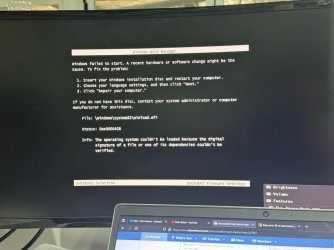
inaccessible boot device help


cynder

New member
Local time
4:05 PM
Posts
8
OS
win 11 pro (broken)
ok, 3 days of head bashing a brick wall and i give in i need some help.

Tuesday my PC rebooted into a BSOD of "inaccessible boot device" after what i can only assume was thnaks to a windows update.


i have tried
  1. rolling back updates
  2. system restore points
  3. using windows auto recovery (never works)
  4. BCDEDIT commands (access denied)
  5. using programs like nerosoft easyRE (broke worse)
  6. tryed removing other drives (no luck)
  7. tryed loading hyrens boot CD and useing easyBCD to re-write the boot tables (no luck)
  8. i installed a "new" OS onto a second drive and started moving files across to "fuse" the new (bootable) os with my old one to basically "transplant" my OS onto the new bootable table (so far with no luck, moving in the old OS files seam to break the boot load somehow)


tools i have:

windows 11 install media
arch linux live CD
g-parted
hyrens boot cd (windows 11 PE)
nero easy re
clone-zilla (and an image of the windows partition)
a copy of the raw files from the drive i can use to splice and move across to fuze them back together


what i need:

i need my OLD OS bootable again, it has my work programs, setup, network creds, maped drives and more.
while i "have the files" i need the raw OS to boot. so that everything is like it was.
once booted we can image and do a nice migration and all kinds of stuff but for now i need the OLD OS to boot.

im open to odd ideas, off the cuff and out of the pocket crazy because at this point im out of ideas and i need help.
 
Windows Build/Version
windows 11 pro

My Computer My Computer

At a glance

win 11 pro (broken)
OS
win 11 pro (broken)
Computer type
PC/Desktop
Manufacturer/Model
DYI
One way to solve this would be:
- Install the operating system on another disk.
- Boot the computer using the new disk.
- Open EasyBCD and edit by adding a new system, just indicate the drive letter of the previous system and save the changes.
- Restart your computer and choose the drive you want to access.
1.png2.png
 

My Computers My Computers

  • At a glance

    Windows 11 Pro 64-bits 25H2 26200-7922AMD Ryzen 3 3200G with Radeon Vega Graphics 3...32,00 GB TeamGroup DDR4-2667Nvidia GeForce GT 730 & Radeon™ Vega 8 Graphics
    OS
    Windows 11 Pro 64-bits 25H2 26200-7922
    Computer type
    PC/Desktop
    Manufacturer/Model
    Custom self built
    CPU
    AMD Ryzen 3 3200G with Radeon Vega Graphics 3.60 GHz
    Motherboard
    MSI B350 PC MATE
    Memory
    32,00 GB TeamGroup DDR4-2667
    Graphics Card(s)
    Nvidia GeForce GT 730 & Radeon™ Vega 8 Graphics
    Sound Card
    nVIDIA GK208 HDMI/DP High Definition Audio Controller
    Monitor(s) Displays
    AOC 27"
    Screen Resolution
    3840x2160
    Hard Drives
    SSD Team Group T-Force Cardea Zero Z440 1TB Gen4 M.2 NVMe (5000/4400MB/s), SSD Team Group CX2 512GB SATA III (530/470MB/s) and 2x Seagate 1TB BarraCuda 64MB 7200rpm SATA III 3.5 - ST1000DM010
    PSU
    LC-Power 650W V2.3
    Case
    ATX Nox Hummer ZS
    Cooling
    No cooling
    Keyboard
    Logitech K220
    Mouse
    Logitech
    Internet Speed
    1000/200
    Browser
    Firefox 148.0
    Antivirus
    Windows Defender
    Other Info
    Optical Drive ASUS DRW-24D5MT
  • At a glance

    Windows 11 Pro 64-bits 25H2 26200-7922Intel Core i5-8365U16 GBIntel UHD Graphics 620 - Whiskey Lake-U GT2
    Operating System
    Windows 11 Pro 64-bits 25H2 26200-7922
    Computer type
    Laptop
    Manufacturer/Model
    Dell Latitude 5400
    CPU
    Intel Core i5-8365U
    Motherboard
    Dell 03WM4C - Intel Cannon Lake-U PCH-LP Premium
    Memory
    16 GB
    Graphics card(s)
    Intel UHD Graphics 620 - Whiskey Lake-U GT2
    Sound Card
    Intel Cannon Lake-LP - cAVS (Audio, Voice, Speech) [D0]
    Monitor(s) Displays
    Dell NV14N4F
    Screen Resolution
    1920 x 1080
    Hard Drives
    Micron 2200S NVMe 256 GB
    PSU
    Dell X7XY03
    Internet Speed
    1000 Mbps / 200 MBps
    Browser
    Firefox 148.0
    Antivirus
    Microsoft Windows Defender
1) Check the drive using Sea Tools bootable Long Generic test > take pictures > post images or share links


2) Boot using a Windows 11 Media Creation Tool (MCT) (Windows 11 iso) > Windows Recovery Environment (RE) > troubleshooting > command prompt > type:

notepad
notepad
notepad


bcdedit
bcdedit | find "osdevice"


diskpart
lis dis
sel dis 0
det dis
sel dis 1
det dis
sel dis 2
det dis
lis vol


Save to notepad > save to a flash drive > upload into this thread
 

My Computer My Computer

At a glance

Windows 10Intel(R) Core(TM) i7-4800MQ CPU @ 2.70GHz16 GB Total: Manufacturer : Samsung MemoryTyp...NVIDIA Quadro K3100M; Intel(R) HD Graphics 4600
OS
Windows 10
Computer type
Laptop
Manufacturer/Model
HP
CPU
Intel(R) Core(TM) i7-4800MQ CPU @ 2.70GHz
Motherboard
Product : 190A Version : KBC Version 94.56
Memory
16 GB Total: Manufacturer : Samsung MemoryType : DDR3 FormFactor : SODIMM Capacity : 8GB Speed : 1600
Graphics Card(s)
NVIDIA Quadro K3100M; Intel(R) HD Graphics 4600
Sound Card
IDT High Definition Audio CODEC; PNP Device ID HDAUDIO\FUNC_01&VEN_111D&DEV_76E0
Hard Drives
Model Hitachi HTS727575A9E364
Antivirus
Microsoft Defender
Other Info
Mobile Workstation
One way to solve this would be:
- Install the operating system on another disk.
- Boot the computer using the new disk.
- Open EasyBCD and edit by adding a new system, just indicate the drive letter of the previous system and save the changes.
- Restart your computer and choose the drive you want to access.
View attachment 88052View attachment 88053
i thought i had done a BCD repair like this but ill try again, might have done it wrong before.

im setting this up, i will need another hour to get back to you with info. files are transferring now for the attempt.
 

My Computer My Computer

At a glance

win 11 pro (broken)
OS
win 11 pro (broken)
Computer type
PC/Desktop
Manufacturer/Model
DYI
1) Check the drive using Sea Tools bootable Long Generic test > take pictures > post images or share links


2) Boot using a Windows 11 Media Creation Tool (MCT) (Windows 11 iso) > Windows Recovery Environment (RE) > troubleshooting > command prompt > type:

notepad
notepad
notepad


bcdedit
bcdedit | find "osdevice"


diskpart
lis dis
sel dis 0
det dis
sel dis 1
det dis
sel dis 2
det dis
lis vol


Save to notepad > save to a flash drive > upload into this thread
question, what does the det command do?

is that deleting something?

ill be doing yours after i try the easyBCD edit above yours. stand by <3
 

My Computer My Computer

At a glance

win 11 pro (broken)
OS
win 11 pro (broken)
Computer type
PC/Desktop
Manufacturer/Model
DYI
det = detail

detailDisplays information about the selected disk, partition, volume, or virtual hard disk (VHD).


My Computer My Computer

At a glance

Windows 10Intel(R) Core(TM) i7-4800MQ CPU @ 2.70GHz16 GB Total: Manufacturer : Samsung MemoryTyp...NVIDIA Quadro K3100M; Intel(R) HD Graphics 4600
OS
Windows 10
Computer type
Laptop
Manufacturer/Model
HP
CPU
Intel(R) Core(TM) i7-4800MQ CPU @ 2.70GHz
Motherboard
Product : 190A Version : KBC Version 94.56
Memory
16 GB Total: Manufacturer : Samsung MemoryType : DDR3 FormFactor : SODIMM Capacity : 8GB Speed : 1600
Graphics Card(s)
NVIDIA Quadro K3100M; Intel(R) HD Graphics 4600
Sound Card
IDT High Definition Audio CODEC; PNP Device ID HDAUDIO\FUNC_01&VEN_111D&DEV_76E0
Hard Drives
Model Hitachi HTS727575A9E364
Antivirus
Microsoft Defender
Other Info
Mobile Workstation
det = detail

detailDisplays information about the selected disk, partition, volume, or virtual hard disk (VHD).


awesome, thanks for the clarification.

sorry if that came across as suspicious, not really knowing what im doing with the CMD i was worried this was the equivalent of "have you tryed the master key combo alt+f4" :P
 

My Computer My Computer

At a glance

win 11 pro (broken)
OS
win 11 pro (broken)
Computer type
PC/Desktop
Manufacturer/Model
DYI

My Computer My Computer

At a glance

Microsoft Windows 11 HomeIntel Core i5-13490F2 x 16 Patriot Memory (PDP Systems) PSD516G56...GIGABYTE GeForce RTX 4070 WINDFORCE OC 12G (G...
OS
Microsoft Windows 11 Home
Computer type
PC/Desktop
Manufacturer/Model
MSI MS-7D98
CPU
Intel Core i5-13490F
Motherboard
MSI B760 GAMING PLUS WIFI
Memory
2 x 16 Patriot Memory (PDP Systems) PSD516G560081 6400MT (32-37-37-74); 1.35V)
Graphics Card(s)
GIGABYTE GeForce RTX 4070 WINDFORCE OC 12G (GV-N4070WF3OC-12GD)
Sound Card
Bluetooth Аудио
Monitor(s) Displays
INNOCN 15K1F
Screen Resolution
1920 x 1080
Hard Drives
WD_BLACK SN770 250GB
KINGSTON SNV2S1000G (ELFK0S.6)
PSU
Thermaltake Toughpower GF3 1000W
Case
CG560 - DeepCool
Cooling
ID-COOLING SE-224-XTS / 2 x 140Mm Fan - rear and top; 3 x 120Mm - front
Keyboard
Corsair K70 RGB TKL
Mouse
Corsair KATAR PRO XT
Internet Speed
100 Mbps
Browser
Firefox
Antivirus
Microsoft Defender Antivirus
Other Info
https://www.userbenchmark.com/UserRun/66553205
That was fun in the 90's chat room days.
i know right, well they got more elaborate now but im always just a tiny bit suspicious of commands and comobs i dont know juuust in case.

side question, want some cheese? ;)
 

My Computer My Computer

At a glance

win 11 pro (broken)
OS
win 11 pro (broken)
Computer type
PC/Desktop
Manufacturer/Model
DYI

My Computer My Computer

At a glance

win 11 pro (broken)
OS
win 11 pro (broken)
Computer type
PC/Desktop
Manufacturer/Model
DYI
Have you got a shadow copy at a point before you had the problem?

I have had success creating a wim image of shadowcopy. Then applying the captured wim to either a diferent partition on the same disk, or onto another disk. Then fix the osletter and bcd entry .Done it several times.

Not difficult to do with suitable boot media .
 

My Computers My Computers

  • At a glance

    Win7,Win11i7-97002x16gb 3600mhz
    OS
    Win7,Win11
    Computer type
    PC/Desktop
    CPU
    i7-9700
    Motherboard
    gigabyte b365m ds3h
    Memory
    2x16gb 3600mhz
    Monitor(s) Displays
    benq gw2480
    PSU
    bequiet pure power 11 400CM
    Cooling
    cryorig m9i
  • At a glance

    win7,win11i5-84002x8gb 3200
    Operating System
    win7,win11
    Computer type
    PC/Desktop
    CPU
    i5-8400
    Motherboard
    gigabyte b365m ds3h
    Memory
    2x8gb 3200
    PSU
    xfx pro 450
One way to solve this would be:
- Install the operating system on another disk.
- Boot the computer using the new disk.
- Open EasyBCD and edit by adding a new system, just indicate the drive letter of the previous system and save the changes.
- Restart your computer and choose the drive you want to access.
View attachment 88052View attachment 88053
ok didnt work, i get a black and white page saying "boot manager failure" pic provided.
 

Attachments

  • thumbnail_image0.jpg
    thumbnail_image0.jpg
    196.3 KB · Views: 1

My Computer My Computer

At a glance

win 11 pro (broken)
OS
win 11 pro (broken)
Computer type
PC/Desktop
Manufacturer/Model
DYI
Please boot your computer with Windows Setup Media and from Windows Recovery Environment start the Command Prompt.

Please type the below command into Command Prompt and press the Enter key.

The following command scans integrity of all protected Windows system files and repairs files with problems when possible.

Code:
Sfc  /Scannow   /OFFBOOTDIR=C:\   /OFFWINDIR=C:\Windows


Please replace partition letter C: with Windows installed partition letter. When the computer boots into Windows Recovery Environment (WinRE) environment, the drive letter assign to Windows partition may not be C: drive letter because Windows 7, 8 , 8.1, 10 and 11 creates a separate system partition when it's installed from scratch. The system partition contains boot files WinRE assigns the system partition the C: drive letter and the Windows installed partition will be assigned any other drive letter, usually D: drive letter is assigned to Windows installed partition. The Bcdedit | find "osdevice" command can be used to find out the drive letter of the Windows installed partition, the output of the Bcdedit command is similar to this osdevice partition=D:. The drive letter after partition= is the drive letter of the Windows partition.
 

My Computer My Computer

At a glance

Windows 11AMD Ryzen 7 5700GMicron Technology DDR4-3200 16GBNVIDIA GeForce RTX 3060
OS
Windows 11
Computer type
PC/Desktop
Manufacturer/Model
HP Pavilion
CPU
AMD Ryzen 7 5700G
Motherboard
Erica6
Memory
Micron Technology DDR4-3200 16GB
Graphics Card(s)
NVIDIA GeForce RTX 3060
Sound Card
Realtek ALC671
Monitor(s) Displays
Samsung SyncMaster U28E590
Screen Resolution
3840 x 2160
Hard Drives
SAMSUNG MZVLQ1T0HALB-000H1
ok im thoroughly demoralized and im giving up.

new OS and i have to rebiuild.

unsure how to close a thread, mods are you able?

cheers.
 

My Computer My Computer

At a glance

win 11 pro (broken)
OS
win 11 pro (broken)
Computer type
PC/Desktop
Manufacturer/Model
DYI

Latest Support Threads

Back
Top Bottom