Solved Installation of a fresh windows 11 24h2 stop with errors


So,

Are we seeing pages and pages of posts in this thread, because certain people don't know how to use Rufus, to create Win11 boot USB?

Or, is it because, OP wants to perform in place upgrade from W1123H2 to W1124H2, on "incompatible machine" !?
I Guess you just like to type to have a +1 massage don't you?
 

My Computer My Computer

At a glance

windows 11 23h
OS
windows 11 23h
I have "forced" myself, to read "the entire thread".

And now still wondering,

Why some people don't just wait, for the impending "official" Win 11 24H2 launch,
There plenty of guides, to be found on Google, on how to use Rufus, to burn MS ISO, to allow unsupported machine support,
Are people really trying to install/upgrade "incompatible PC", to Win 11/24H2, using original ISO dpwnloaded from MS?

Be assured, won't be following this thread.
Allow me to answer this real quick so you and your arrogance can just leave
1 in my free time i can literally do what ever I wanna
2 I perfectly know how to find iso and use rufus
3 my machine is compatible with the o.s

Be sure we not gonna miss your arrogance and pointless messages ✌️
 

My Computer My Computer

At a glance

windows 11 23h
OS
windows 11 23h
Unless one is already running an insider build, I can't for the life of me undertand why anyone would join insider just to get 24h2 at this late stage of the game. (that is unless you plan to stay on insider going forward)We'll all get 24h2 in release within a month and a nice new clean release iso will be issued for anyone who wants to clean install or do a manual in-place upgrade..

I dint think is illegal do this isn't?
Either is having an opinion in a thread.

Allow me answer this real quick so you and your arrogance can just leave
1 in my free time i can literally do what ever I wanna
2 I perfectly know how to find iso and use rufus
3 my machine is compatible with the o.s

Be sure we not gonna miss your arrogance and pointless messages ✌️

I think you may be having a problem with grasping the concept of an open forum.
Sometimes things are repeated because either the commenter hasn’t read a thread or because they are failing to understand where a person posting the problem is failing. You weren’t mentioned, the individuals desire to cheat the system was.

Either way, again, it’s an open forum.
 

My Computers My Computers

  • At a glance

    Windows 11 Pro 25H2 Build 26200.8894Intel(R) Core(TM) i7-4770K CPU @ 3.50GHz32.0 GB of I forget and the box is in storage.Gigabyte nVidia GeForce GTX 1660 Super OC 6GB
    OS
    Windows 11 Pro 25H2 Build 26200.8894
    Computer type
    PC/Desktop
    Manufacturer/Model
    Sin-built 2013
    CPU
    Intel(R) Core(TM) i7-4770K CPU @ 3.50GHz
    Motherboard
    ASUS ROG Maximus VI Formula
    Memory
    32.0 GB of I forget and the box is in storage.
    Graphics Card(s)
    Gigabyte nVidia GeForce GTX 1660 Super OC 6GB
    Sound Card
    ROG SupremeFX Formula 8-Channel High Definition Audio
    Monitor(s) Displays
    5 x LG 25MS500-B - 1 x 24MK430H-B - 1 x Wacom Pro 22" Touch Screen Tablet
    Screen Resolution
    All over the place
    Hard Drives
    Too many to list. OS on Samsung 1TB 870 QVO SATA
    PSU
    Silverstone 1500
    Case
    NZXT Phantom 820 Full-Tower Case
    Cooling
    Noctua NH-D15 Elite Class Dual Tower CPU Cooler / 6 x EziDIY 120mm / 2 x Corsair 140mm somethings / 1 x 140mm Thermaltake something / 2 x 200mm Corsair.
    Keyboard
    Corsair K95 / Logitech diNovo Edge Wireless
    Mouse
    Logitech: G402 / G502 / Mx Masters / Mx Air Cordless
    Internet Speed
    2000/500Mbps
    Browser
    All sorts
    Antivirus
    Kaspersky Premium
    Other Info
    ㅤㅤㅤㅤㅤㅤㅤㅤㅤㅤㅤㅤㅤㅤㅤㅤㅤㅤㅤㅤㅤㅤㅤㅤㅤㅤㅤㅤㅤㅤㅤㅤㅤㅤㅤㅤㅤㅤㅤㅤ⠀⠀⠀⠀⠀⠀⠀⠀⠀⠀
    TP-Link BE9300 WiFi 7 Bluetooth 5.4 (Archer TBE550E)
    TP-Link TX201 V1 2.5GB Lan

    Grandstream HT812 - VoIP
    ASUS DSL-AX82U - Mesh
    ASUS RT-AC68U - Mesh
    ASUS RT-BE88U Router

    Brother MFC-L2880DW Printer

    I’m on a horse.
  • At a glance

    Windows 11 Pro 25H2 Build 26200.8894 (Wifes)13th Generation Intel® Core™ i5-1340P Process...16GB LPDDR5-52001x Intel® Iris® Xe Graphics
    Operating System
    Windows 11 Pro 25H2 Build 26200.8894 (Wifes)
    Computer type
    Laptop
    Manufacturer/Model
    LENOVO Yoga 7 14IRL8 - Type 82YL
    CPU
    13th Generation Intel® Core™ i5-1340P Processor(Core™ i5-1340P)
    Memory
    16GB LPDDR5-5200
    Graphics card(s)
    1x Intel® Iris® Xe Graphics
    Sound Card
    Optimized with Dolby Atmos®
    Screen Resolution
    QHD 2880 x 1800 OLED
    Hard Drives
    M.2 512 GB SSD PCIe
    Mouse
    Logiteck MX Master 3S
    Internet Speed
    2000/500
    Antivirus
    Defender / Malwarebytes
    Other Info
    …still on a horse.


    Wireless Network: Wi-Fi 6E 2x2 AX; Bluetooth® 5.1 or above
    Ports: 1x 1 Novo button; 2 in 1 Audio Combo jack; Micro SD Card Reader; HDMI 1.4b; 2 x USB Type-C (TBT4)
    USB 3.2 Gen 2 DP 1.4a
    PD 3.0); 1 x USB 3.2 Gen1 Type A
    Camera
    1x 1080P FHD IR/RGB Hybrid with Privacy Shutter and Dual Array Microphone
    Graphics
    1x Intel® Iris® Xe Graphics
    Monitor
    14" WUXGA
    Form Factor
    Convertible Notebook
  • Windows 11 Pro 25H2 Build 26200.8894 (Wifes)

    Yoga 7 2-in-1 14IML9 - Type 83DJ

    Processor: Intel® Core™ Ultra 7 155H Processor(Core™ Ultra 7 155H)

    Memory: 32GB LPD5X-7467

    Hard Drive: 1 TB SSD PCIe

    Wireless Network: 1x Wi-Fi 6E 2x2 AX; Bluetooth® 5.1 or above

    Ports: 1 x HDMI 2.1 TMDS; 1 x Novo Button; 1 x Combo Audio Jack
    2 x USB-C (USB 4.0)
    1 x USB-A 3.2 Gen 1

    Camera: 1080P FHD IR Hybrid with Dual Microphone

    Graphics: Intel® Arc™ Graphics

    Monitor: 14" 2.8K

    ...Where's my horse?
I think we can just close this post. Ty for all who try to help
 

My Computer My Computer

At a glance

windows 11 23h
OS
windows 11 23h
Top right of first post you can mark as resolved. It may attract a little less traffic. Threads don’t get closed here unless they are against the rules 🙏
 

My Computers My Computers

  • At a glance

    Windows 11 Pro 25H2 Build 26200.8894Intel(R) Core(TM) i7-4770K CPU @ 3.50GHz32.0 GB of I forget and the box is in storage.Gigabyte nVidia GeForce GTX 1660 Super OC 6GB
    OS
    Windows 11 Pro 25H2 Build 26200.8894
    Computer type
    PC/Desktop
    Manufacturer/Model
    Sin-built 2013
    CPU
    Intel(R) Core(TM) i7-4770K CPU @ 3.50GHz
    Motherboard
    ASUS ROG Maximus VI Formula
    Memory
    32.0 GB of I forget and the box is in storage.
    Graphics Card(s)
    Gigabyte nVidia GeForce GTX 1660 Super OC 6GB
    Sound Card
    ROG SupremeFX Formula 8-Channel High Definition Audio
    Monitor(s) Displays
    5 x LG 25MS500-B - 1 x 24MK430H-B - 1 x Wacom Pro 22" Touch Screen Tablet
    Screen Resolution
    All over the place
    Hard Drives
    Too many to list. OS on Samsung 1TB 870 QVO SATA
    PSU
    Silverstone 1500
    Case
    NZXT Phantom 820 Full-Tower Case
    Cooling
    Noctua NH-D15 Elite Class Dual Tower CPU Cooler / 6 x EziDIY 120mm / 2 x Corsair 140mm somethings / 1 x 140mm Thermaltake something / 2 x 200mm Corsair.
    Keyboard
    Corsair K95 / Logitech diNovo Edge Wireless
    Mouse
    Logitech: G402 / G502 / Mx Masters / Mx Air Cordless
    Internet Speed
    2000/500Mbps
    Browser
    All sorts
    Antivirus
    Kaspersky Premium
    Other Info
    ㅤㅤㅤㅤㅤㅤㅤㅤㅤㅤㅤㅤㅤㅤㅤㅤㅤㅤㅤㅤㅤㅤㅤㅤㅤㅤㅤㅤㅤㅤㅤㅤㅤㅤㅤㅤㅤㅤㅤㅤ⠀⠀⠀⠀⠀⠀⠀⠀⠀⠀
    TP-Link BE9300 WiFi 7 Bluetooth 5.4 (Archer TBE550E)
    TP-Link TX201 V1 2.5GB Lan

    Grandstream HT812 - VoIP
    ASUS DSL-AX82U - Mesh
    ASUS RT-AC68U - Mesh
    ASUS RT-BE88U Router

    Brother MFC-L2880DW Printer

    I’m on a horse.
  • At a glance

    Windows 11 Pro 25H2 Build 26200.8894 (Wifes)13th Generation Intel® Core™ i5-1340P Process...16GB LPDDR5-52001x Intel® Iris® Xe Graphics
    Operating System
    Windows 11 Pro 25H2 Build 26200.8894 (Wifes)
    Computer type
    Laptop
    Manufacturer/Model
    LENOVO Yoga 7 14IRL8 - Type 82YL
    CPU
    13th Generation Intel® Core™ i5-1340P Processor(Core™ i5-1340P)
    Memory
    16GB LPDDR5-5200
    Graphics card(s)
    1x Intel® Iris® Xe Graphics
    Sound Card
    Optimized with Dolby Atmos®
    Screen Resolution
    QHD 2880 x 1800 OLED
    Hard Drives
    M.2 512 GB SSD PCIe
    Mouse
    Logiteck MX Master 3S
    Internet Speed
    2000/500
    Antivirus
    Defender / Malwarebytes
    Other Info
    …still on a horse.


    Wireless Network: Wi-Fi 6E 2x2 AX; Bluetooth® 5.1 or above
    Ports: 1x 1 Novo button; 2 in 1 Audio Combo jack; Micro SD Card Reader; HDMI 1.4b; 2 x USB Type-C (TBT4)
    USB 3.2 Gen 2 DP 1.4a
    PD 3.0); 1 x USB 3.2 Gen1 Type A
    Camera
    1x 1080P FHD IR/RGB Hybrid with Privacy Shutter and Dual Array Microphone
    Graphics
    1x Intel® Iris® Xe Graphics
    Monitor
    14" WUXGA
    Form Factor
    Convertible Notebook
  • Windows 11 Pro 25H2 Build 26200.8894 (Wifes)

    Yoga 7 2-in-1 14IML9 - Type 83DJ

    Processor: Intel® Core™ Ultra 7 155H Processor(Core™ Ultra 7 155H)

    Memory: 32GB LPD5X-7467

    Hard Drive: 1 TB SSD PCIe

    Wireless Network: 1x Wi-Fi 6E 2x2 AX; Bluetooth® 5.1 or above

    Ports: 1 x HDMI 2.1 TMDS; 1 x Novo Button; 1 x Combo Audio Jack
    2 x USB-C (USB 4.0)
    1 x USB-A 3.2 Gen 1

    Camera: 1080P FHD IR Hybrid with Dual Microphone

    Graphics: Intel® Arc™ Graphics

    Monitor: 14" 2.8K

    ...Where's my horse?
Actually, the OP's machine is fully compatible with Win 11.

@RandomGuyinIT do you know if secure boot mitigations were ever applied to your computer?

Here's how to check. Open a Admin Terminal prompt and type the following:

Code:
[System.Text.Encoding]::ASCII.GetString((Get-SecureBootUEFI db).bytes) -match 'Windows UEFI CA 2023'

From this KB article

If it returns True, mitigations were applied.

1725987794418.png
 

My Computers My Computers

  • At a glance

    Win 11 Pro 25H2 26200.8894Intel® Core™ i7-14700KG.SKILL Ripjaws S5 Series 64GB (2 x 32GB) DDR5ASUS GeForce RTX 4070 Super 12GB
    OS
    Win 11 Pro 25H2 26200.8894
    Computer type
    PC/Desktop
    Manufacturer/Model
    Self Built
    CPU
    Intel® Core™ i7-14700K
    Motherboard
    ASUS TUF Z690-PLUS WIFI (BIOS 4505)
    Memory
    G.SKILL Ripjaws S5 Series 64GB (2 x 32GB) DDR5
    Graphics Card(s)
    ASUS GeForce RTX 4070 Super 12GB
    Sound Card
    Sound Blaster AE-5 Plus
    Monitor(s) Displays
    ASUS TUF Gaming 27" 2K HDR Gaming
    Screen Resolution
    2560 x 1440
    Hard Drives
    Samsung 990 Pro 1TB NVMe (Win 11 25H2)
    SK hynix P41 500GB NVMe
    SK hynix P41 2TB NVMe (x3)
    Crucial P3 Plus 4TB
    PSU
    Corsair RM850x Shift
    Case
    Antec Dark Phantom DP502 FLUX
    Cooling
    Corsair Nautilus 360 RS AIO
    Keyboard
    Logitech MK 320
    Mouse
    Razer Basilisk V3
    Internet Speed
    750Mbs
    Browser
    Firefox
    Antivirus
    Winows Security
    Other Info
    MR 8.1 Home
  • At a glance

    Win 11 Pro 25H2 26200.8894Intel Core i5-1140064 GB DDR4MSI GeForce RTX 3060 Ventus 2X 12GB
    Operating System
    Win 11 Pro 25H2 26200.8894
    Computer type
    PC/Desktop
    Manufacturer/Model
    Self Built
    CPU
    Intel Core i5-11400
    Motherboard
    Asus TUF Gaming Z590 Plus WiFi (BIOS 2803)
    Memory
    64 GB DDR4
    Graphics card(s)
    MSI GeForce RTX 3060 Ventus 2X 12GB
    Sound Card
    SoundBlaster Audigy Fx V2
    Monitor(s) Displays
    Samsung F27T350
    Screen Resolution
    1920x1080
    Hard Drives
    Samsung 980 Pro 1TB
    Samsung 970 EVO Plus 2TB
    Samsung 870 EVO 500GB SSD
    PSU
    Corsair HX750
    Case
    Cougar MX330-G Window
    Cooling
    Thermalright Frozen Edge 240 Black AIO
    Internet Speed
    350Mbps
    Browser
    Firefox
    Antivirus
    Windows Security
  • System Three
    Win 11 Pro 25H2 26200.8894
    ASUS PRIME Z370-P II BIOS 3004 7/12/21
    Intel Core i7-8700 CPU @ 3.20GHz
    32GB DDR4 RAM (4x8)
    iGPU Intel UHD Graphics 630
    Mid-Tower Desktop
100% ?. Your CPU is not on the Windows 11 supported list. Yes, is supports SSE4.2, but it's still not on the list.

Please download and run WhyNotWin11.


Here's what 100% supported hardware should look like.
View attachment 108065
the .com site is not official I think. there is the official site: GitHub - rcmaehl/WhyNotWin11: Detection Script to help identify why your PC is not Windows 11 Release Ready. Now Supporting Update Checks!
 

My Computer My Computer

At a glance

Windows 11 and Windows 10AMD Athlon(tm) X4 860K Quad Core Processor 3....16 GB DDR3Radeon RX 550 4GB
OS
Windows 11 and Windows 10
Computer type
PC/Desktop
Manufacturer/Model
MSI
CPU
AMD Athlon(tm) X4 860K Quad Core Processor 3.70 GHz
Motherboard
MSI A68HM-E33V2
Memory
16 GB DDR3
Graphics Card(s)
Radeon RX 550 4GB
Sound Card
Realtek Audio
Monitor(s) Displays
LG LED 100hz
Screen Resolution
1920x1080
Hard Drives
1xSSD
2xHDD
Case
Sentey
Keyboard
Redragon K552RGB-BA
Mouse
Redragon K552RGB-BA
Internet Speed
1Gbps
Browser
Edge, Chrome, Firefox
Antivirus
Microsoft Defender
 

My Computer My Computer

At a glance

Windows 11 and Windows 10AMD Athlon(tm) X4 860K Quad Core Processor 3....16 GB DDR3Radeon RX 550 4GB
OS
Windows 11 and Windows 10
Computer type
PC/Desktop
Manufacturer/Model
MSI
CPU
AMD Athlon(tm) X4 860K Quad Core Processor 3.70 GHz
Motherboard
MSI A68HM-E33V2
Memory
16 GB DDR3
Graphics Card(s)
Radeon RX 550 4GB
Sound Card
Realtek Audio
Monitor(s) Displays
LG LED 100hz
Screen Resolution
1920x1080
Hard Drives
1xSSD
2xHDD
Case
Sentey
Keyboard
Redragon K552RGB-BA
Mouse
Redragon K552RGB-BA
Internet Speed
1Gbps
Browser
Edge, Chrome, Firefox
Antivirus
Microsoft Defender
Hello everyone,
Why it is still bothering clean install/upgrade to Windows 11 v 24H2 despite meeting all requirements by windows users having latest machine pc hardware? This is happening ever since Windows 11 has been launched by Microsoft.
I have installed / upgraded to Windows 11 v24H2 on my unsupported pc many times irrespective of Windows 11 download from uupdump or Microsoft official website.
Registry bypass is still working on both supported / unsupported pc for installation / upgradation to Windows 11 v24H2.
Creating two partitions FAT32 & NTFS on bootable usb has been working greatly with FAT32 partition having boot.wim in manually created 'sources' folder and NTFS partition having all files and folder on it provided boot.wim moved to FAT32 partition 'sources' folder. This method has been clearly mentioned by our VIP members and by @Brink.
Thanks.

is it possible to install Windows 11 24H2 on an unsupported Intel 2nd generation computer? would it going to give errors for popcnt and SSE4.2 instruction set?
I tried to install it using Rufus but could not.USB had an NTFS file system.
can you post complete bypass instructions?
 

My Computer My Computer

At a glance

window 10 version 22H2 (OS Build 19045.6466Intel Core i7 @2.80GHz 57 °C Sandy Bridge 32n...4.00GB Dual-Channel DDR3 @ 665MHz (9-9-9-24)Intel HD Graphics 3000
OS
window 10 version 22H2 (OS Build 19045.6466
Computer type
Laptop
Manufacturer/Model
Dell/E6400
CPU
Intel Core i7 @2.80GHz 57 °C Sandy Bridge 32nm Tech
Motherboard
Dell Inc. 0K0DNP (CPU 1)
Memory
4.00GB Dual-Channel DDR3 @ 665MHz (9-9-9-24)
Graphics Card(s)
Intel HD Graphics 3000
Sound Card
High Definition Audio Device
Monitor(s) Displays
single
Screen Resolution
1366x768 pixels
Hard Drives
WDC WD2500BPVT-75JJ5T0
Keyboard
Device Name Standard PS/2 Keyboard
Mouse
PS/2 Compatible Mouse
Internet Speed
10mb
Browser
ms edge
Antivirus
win defender
Actually, the OP's machine is fully compatible with Win 11.

@RandomGuyinIT do you know if secure boot mitigations were ever applied to your computer?

Here's how to check. Open a Admin Terminal prompt and type the following:

Code:
[System.Text.Encoding]::ASCII.GetString((Get-SecureBootUEFI db).bytes) -match 'Windows UEFI CA 2023'

From this KB article

If it returns True, mitigations were applied.

View attachment 108111
ok i just check that and the is TRUE, so that is what could create the issue?
 

My Computer My Computer

At a glance

windows 11 23h
OS
windows 11 23h
is it possible to install Windows 11 24H2 on an unsupported Intel 2nd generation computer? would it going to give errors for popcnt and SSE4.2 instruction set?
I tried to install it using Rufus but could not.USB had an NTFS file system.
can you post complete bypass instructions?
If you provide the exact CPU model, we can look it up. But you can also do this. Just do a web search on the model of the CPU, Like Intel i5 xxxx specs.
 

My Computers My Computers

  • At a glance

    Win11 Pro 25H2 (RTM+)Intel i7-14650HX32 GBNo GPU - Built-in Intel Graphics
    OS
    Win11 Pro 25H2 (RTM+)
    Computer type
    PC/Desktop
    Manufacturer/Model
    Acemagic
    CPU
    Intel i7-14650HX
    Memory
    32 GB
    Graphics Card(s)
    No GPU - Built-in Intel Graphics
    Sound Card
    Integrated
    Monitor(s) Displays
    Varies as machine will often be moved to locations with different monitors
    Screen Resolution
    Varies
    Hard Drives
    1 x 1TB Gen 4 NVMe SSD
    PSU
    120W Power Brick
    Keyboard
    Corsair K70 Max RGB Magnetic Keyboard
    Mouse
    Logitech MX Master 3
    Internet Speed
    1Gb Up / 1 Gb Down
    Browser
    Edge
    Antivirus
    Windows Defender
  • At a glance

    Win11 Pro 25H2 (RTM+)Intel i7-1255U16 GBIntel Iris Xe Graphics
    Operating System
    Win11 Pro 25H2 (RTM+)
    Computer type
    Laptop
    Manufacturer/Model
    Lenovo ThinkBook 13x Gen 2
    CPU
    Intel i7-1255U
    Memory
    16 GB
    Graphics card(s)
    Intel Iris Xe Graphics
    Sound Card
    Realtek® ALC3306-CG codec
    Monitor(s) Displays
    13.3-inch IPS Display
    Screen Resolution
    WQXGA (2560 x 1600)
    Hard Drives
    2 TB 4 x 4 NVMe SSD
    PSU
    USB-C / Thunderbolt 4 Power / Charging
    Keyboard
    Backlit, spill resistant keyboard
    Mouse
    Buttonless Glass Precision Touchpad
    Internet Speed
    1Gb Up / 1Gb Down
    Browser
    Edge
    Antivirus
    Windows Defender
    Other Info
    WiFi 6e / Bluetooth 5.1 / Facial Recognition / Fingerprint Sensor / ToF (Time of Flight) Human Presence Sensor
Hello @gaffar,
To clean install Windows 11 v24H2 from bootable usb,on an unsupported pc , first prepare bootable usb following steps given in link 1 below(PART A). Then proceed as below:-
1. Place RegUpdates.reg in NTFS partition. Please find attached herewith.
2. Restart pc boot from installation media. Press Shift+F10 and run following commands one by one.
3. x:\sources>diskpart
4. diskpart>list vol
{Note the letter of NTFS partition of installation media, say K:}
5. diskpart>exit
6. x:\sources>K:
7. k:\>cd sources
8. K:\sources>ren appraiserres.dll appraiserres.dll.old
9. k:\sources>notepad appraiserres.txt
{Click Yes and close notepad window.}
10. K:\sources>ren appraiserres.txt appraiserres.dll
11. K:\sources>Regedit /S K:\RegUpdates.reg
12. K:\sources>exit
Continue installtion on MBR drive.
To install Windows 11 v24H2 on GPT drive, boot the installation media from UEFI mode as first boot sequence.
Alternatively,
{Try using bypass11.zip contents after extracting it as explained in link 1 PART B &PART C}
1. Install Windows 11 v 23H2 on unsupported pc without using command prompt by using bootable usb prepared manually within current Windows OS.
{Or upgrade using steps given in link 2}
2. In place upgrade Windows 11 v 24H2 build 26058.1100 to 26063.1
Thanks for reading.
 

Attachments

Last edited:

My Computer My Computer

At a glance

Window 11 v24H2 Build 26100.2033Intel(R) Core(TM) i3-2100 CPU @ 3.10GHz 3.10 GHz4.00 GB (3.89 GB usable)Onboard
OS
Window 11 v24H2 Build 26100.2033
Computer type
PC/Desktop
Manufacturer/Model
ASSEMMBLED
CPU
Intel(R) Core(TM) i3-2100 CPU @ 3.10GHz 3.10 GHz
Motherboard
ZEBRONICS
Memory
4.00 GB (3.89 GB usable)
Graphics Card(s)
Onboard
Sound Card
Onboard
Monitor(s) Displays
LG
Screen Resolution
1366x768
Hard Drives
Toshiba HDD 1 TB
Keyboard
Mechanical
Mouse
Mechanical
Internet Speed
700 kb/s
Browser
Microsoft EDGE, CHROME
Antivirus
Microsoft Defender
You folks can keep dreaming your hearts off.

If your CPU doesn't support SSE 4.2, no matter how you trick 24H2 into installing itself -- it won't boot Windows.
- bypass hacks won't fix the core problem​
- zeroing out appraiserres.dll won't fix it​
- DISM /Apply-Image from WinPE won't fix it​
- booting 23H2 WinPE or lower to install it won't fix it​

Learn to accept PC's without SSE 4.2 can only run 23H2 or earlier, or find yourself a new(er) PC. Installing 24H2 isn't the problem, it just won't run for you.
 

My Computer My Computer

At a glance

Windows 7
OS
Windows 7
Hello everyone,
About my unsupported pc please see the images if interested.
Thanks.

 

Attachments

  • Screenshot 2024-09-11 200118.png
    Screenshot 2024-09-11 200118.png
    115.3 KB · Views: 4
  • Screenshot 2024-09-11 195048.png
    Screenshot 2024-09-11 195048.png
    92.1 KB · Views: 4
  • Screenshot 2024-09-11 194647.png
    Screenshot 2024-09-11 194647.png
    104 KB · Views: 3
  • Screenshot 2024-09-11 194518.png
    Screenshot 2024-09-11 194518.png
    53.3 KB · Views: 2
  • Screenshot 2024-09-11 204758.png
    Screenshot 2024-09-11 204758.png
    11.1 KB · Views: 3
  • Screenshot 2024-09-11 204818.png
    Screenshot 2024-09-11 204818.png
    10.6 KB · Views: 3

My Computer My Computer

At a glance

Window 11 v24H2 Build 26100.2033Intel(R) Core(TM) i3-2100 CPU @ 3.10GHz 3.10 GHz4.00 GB (3.89 GB usable)Onboard
OS
Window 11 v24H2 Build 26100.2033
Computer type
PC/Desktop
Manufacturer/Model
ASSEMMBLED
CPU
Intel(R) Core(TM) i3-2100 CPU @ 3.10GHz 3.10 GHz
Motherboard
ZEBRONICS
Memory
4.00 GB (3.89 GB usable)
Graphics Card(s)
Onboard
Sound Card
Onboard
Monitor(s) Displays
LG
Screen Resolution
1366x768
Hard Drives
Toshiba HDD 1 TB
Keyboard
Mechanical
Mouse
Mechanical
Internet Speed
700 kb/s
Browser
Microsoft EDGE, CHROME
Antivirus
Microsoft Defender
I have assumed that all files from mounted iso of Windows 11 v 24H2 are copied to (Y:) NTFS partition. Excluding "sources" folder, all files are copied to (X:)FAT32 partition. Manually create "sources" folder in FAT32 partition, cut boot.wim from Y:\sources and paste in X:\sources.
 

My Computer My Computer

At a glance

Window 11 v24H2 Build 26100.2033Intel(R) Core(TM) i3-2100 CPU @ 3.10GHz 3.10 GHz4.00 GB (3.89 GB usable)Onboard
OS
Window 11 v24H2 Build 26100.2033
Computer type
PC/Desktop
Manufacturer/Model
ASSEMMBLED
CPU
Intel(R) Core(TM) i3-2100 CPU @ 3.10GHz 3.10 GHz
Motherboard
ZEBRONICS
Memory
4.00 GB (3.89 GB usable)
Graphics Card(s)
Onboard
Sound Card
Onboard
Monitor(s) Displays
LG
Screen Resolution
1366x768
Hard Drives
Toshiba HDD 1 TB
Keyboard
Mechanical
Mouse
Mechanical
Internet Speed
700 kb/s
Browser
Microsoft EDGE, CHROME
Antivirus
Microsoft Defender
ok i just check that and the is TRUE, so that is what could create the issue?

Yes, you need the file signed by CA 2023. It resides on your EFI partition, here;s how to get it.

Open a Admin Command prompt and type

Code:
mountvol s: /s

Then type
Code:
copy S:\EFI\Boot\bootx64.efi c:\bootx64.efi

On the root of your C: drive you'll see a bootx64.efi file. It needs to be copied to your Rufus boot USB in \efi\boot
Replace the file that is there.

1726074551244.png
 

My Computers My Computers

  • At a glance

    Win 11 Pro 25H2 26200.8894Intel® Core™ i7-14700KG.SKILL Ripjaws S5 Series 64GB (2 x 32GB) DDR5ASUS GeForce RTX 4070 Super 12GB
    OS
    Win 11 Pro 25H2 26200.8894
    Computer type
    PC/Desktop
    Manufacturer/Model
    Self Built
    CPU
    Intel® Core™ i7-14700K
    Motherboard
    ASUS TUF Z690-PLUS WIFI (BIOS 4505)
    Memory
    G.SKILL Ripjaws S5 Series 64GB (2 x 32GB) DDR5
    Graphics Card(s)
    ASUS GeForce RTX 4070 Super 12GB
    Sound Card
    Sound Blaster AE-5 Plus
    Monitor(s) Displays
    ASUS TUF Gaming 27" 2K HDR Gaming
    Screen Resolution
    2560 x 1440
    Hard Drives
    Samsung 990 Pro 1TB NVMe (Win 11 25H2)
    SK hynix P41 500GB NVMe
    SK hynix P41 2TB NVMe (x3)
    Crucial P3 Plus 4TB
    PSU
    Corsair RM850x Shift
    Case
    Antec Dark Phantom DP502 FLUX
    Cooling
    Corsair Nautilus 360 RS AIO
    Keyboard
    Logitech MK 320
    Mouse
    Razer Basilisk V3
    Internet Speed
    750Mbs
    Browser
    Firefox
    Antivirus
    Winows Security
    Other Info
    MR 8.1 Home
  • At a glance

    Win 11 Pro 25H2 26200.8894Intel Core i5-1140064 GB DDR4MSI GeForce RTX 3060 Ventus 2X 12GB
    Operating System
    Win 11 Pro 25H2 26200.8894
    Computer type
    PC/Desktop
    Manufacturer/Model
    Self Built
    CPU
    Intel Core i5-11400
    Motherboard
    Asus TUF Gaming Z590 Plus WiFi (BIOS 2803)
    Memory
    64 GB DDR4
    Graphics card(s)
    MSI GeForce RTX 3060 Ventus 2X 12GB
    Sound Card
    SoundBlaster Audigy Fx V2
    Monitor(s) Displays
    Samsung F27T350
    Screen Resolution
    1920x1080
    Hard Drives
    Samsung 980 Pro 1TB
    Samsung 970 EVO Plus 2TB
    Samsung 870 EVO 500GB SSD
    PSU
    Corsair HX750
    Case
    Cougar MX330-G Window
    Cooling
    Thermalright Frozen Edge 240 Black AIO
    Internet Speed
    350Mbps
    Browser
    Firefox
    Antivirus
    Windows Security
  • System Three
    Win 11 Pro 25H2 26200.8894
    ASUS PRIME Z370-P II BIOS 3004 7/12/21
    Intel Core i7-8700 CPU @ 3.20GHz
    32GB DDR4 RAM (4x8)
    iGPU Intel UHD Graphics 630
    Mid-Tower Desktop
Welcome everyone,
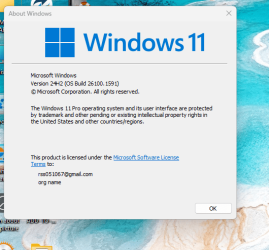
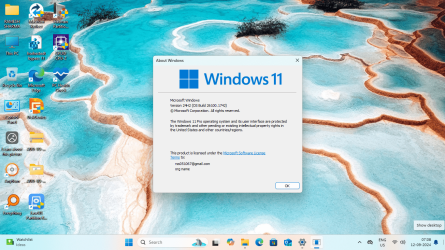
Today I checked for Windows updates on Windows 11 v 24H2 build 26100.1591, after having downloaded cumulative updates , windows build was as follow:-
{Device Specifications }
Device name SHARMA
Processor Intel(R) Core(TM) i3-2100 CPU @ 3.10GHz 3.10 GHz
Installed RAM 4.00 GB (3.89 GB usable)
Device ID 69C0D3D7-2DF0-48D8-A9D2-07A11772F685
Product ID 00330-81485-82337-AA252
System type 64-bit operating system, x64-based processor
Pen and touch No pen or touch input is available for this display
{Windows Specifications}
Edition Windows 11 Pro
Version 24H2
Installed on ‎01-‎09-‎2024
OS build 26100.1742

Experience Windows Feature Experience Pack 1000.26100.18.0

Thanking you all , please have a look at images attached herewith and please post the comments if you wish.
 

Attachments

  • Screenshot 2024-09-12 070639.png
    Screenshot 2024-09-12 070639.png
    109.7 KB · Views: 2
  • Screenshot 2024-09-12 070755.png
    Screenshot 2024-09-12 070755.png
    62.9 KB · Views: 2
  • Screenshot 2024-09-12 070840.png
    Screenshot 2024-09-12 070840.png
    541.3 KB · Views: 2

My Computer My Computer

At a glance

Window 11 v24H2 Build 26100.2033Intel(R) Core(TM) i3-2100 CPU @ 3.10GHz 3.10 GHz4.00 GB (3.89 GB usable)Onboard
OS
Window 11 v24H2 Build 26100.2033
Computer type
PC/Desktop
Manufacturer/Model
ASSEMMBLED
CPU
Intel(R) Core(TM) i3-2100 CPU @ 3.10GHz 3.10 GHz
Motherboard
ZEBRONICS
Memory
4.00 GB (3.89 GB usable)
Graphics Card(s)
Onboard
Sound Card
Onboard
Monitor(s) Displays
LG
Screen Resolution
1366x768
Hard Drives
Toshiba HDD 1 TB
Keyboard
Mechanical
Mouse
Mechanical
Internet Speed
700 kb/s
Browser
Microsoft EDGE, CHROME
Antivirus
Microsoft Defender
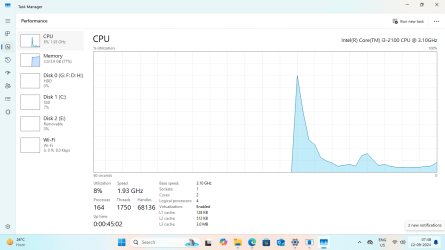
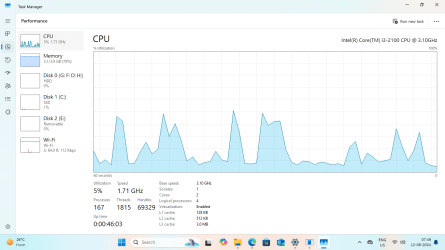
i3-2100 CPU supports SSE 4.2 Okay...
 

My Computer My Computer

At a glance

Windows 7
OS
Windows 7
Device name SHARMA
Processor Intel(R) Core(TM) i3-2100 CPU @ 3.10GHz 3.10 GHz
Installed RAM 4.00 GB (3.89 GB usable)
Ramesh, glad to hear it's working for you on that system. I know it's not going to be a speed demon, but how is it running on that system? Is it at all useable?
 

My Computers My Computers

  • At a glance

    Win11 Pro 25H2 (RTM+)Intel i7-14650HX32 GBNo GPU - Built-in Intel Graphics
    OS
    Win11 Pro 25H2 (RTM+)
    Computer type
    PC/Desktop
    Manufacturer/Model
    Acemagic
    CPU
    Intel i7-14650HX
    Memory
    32 GB
    Graphics Card(s)
    No GPU - Built-in Intel Graphics
    Sound Card
    Integrated
    Monitor(s) Displays
    Varies as machine will often be moved to locations with different monitors
    Screen Resolution
    Varies
    Hard Drives
    1 x 1TB Gen 4 NVMe SSD
    PSU
    120W Power Brick
    Keyboard
    Corsair K70 Max RGB Magnetic Keyboard
    Mouse
    Logitech MX Master 3
    Internet Speed
    1Gb Up / 1 Gb Down
    Browser
    Edge
    Antivirus
    Windows Defender
  • At a glance

    Win11 Pro 25H2 (RTM+)Intel i7-1255U16 GBIntel Iris Xe Graphics
    Operating System
    Win11 Pro 25H2 (RTM+)
    Computer type
    Laptop
    Manufacturer/Model
    Lenovo ThinkBook 13x Gen 2
    CPU
    Intel i7-1255U
    Memory
    16 GB
    Graphics card(s)
    Intel Iris Xe Graphics
    Sound Card
    Realtek® ALC3306-CG codec
    Monitor(s) Displays
    13.3-inch IPS Display
    Screen Resolution
    WQXGA (2560 x 1600)
    Hard Drives
    2 TB 4 x 4 NVMe SSD
    PSU
    USB-C / Thunderbolt 4 Power / Charging
    Keyboard
    Backlit, spill resistant keyboard
    Mouse
    Buttonless Glass Precision Touchpad
    Internet Speed
    1Gb Up / 1Gb Down
    Browser
    Edge
    Antivirus
    Windows Defender
    Other Info
    WiFi 6e / Bluetooth 5.1 / Facial Recognition / Fingerprint Sensor / ToF (Time of Flight) Human Presence Sensor
Hello @hsehestedt ,
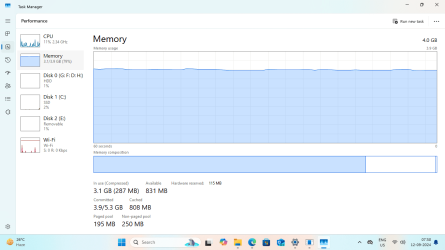
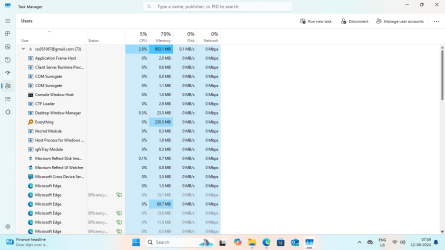
It is smooth and running flawlessly, I have not installed any large programs to test the speed. The RAM is 4GB. It boots within 30 seconds to desktop completely after clicking Windows 11 option in BOOT MENU options in PE Environment.
 

Attachments

  • Screenshot 2024-09-12 074817.png
    Screenshot 2024-09-12 074817.png
    47.7 KB · Views: 2
  • Screenshot 2024-09-12 074920.png
    Screenshot 2024-09-12 074920.png
    58.7 KB · Views: 2
  • Screenshot 2024-09-12 075053.png
    Screenshot 2024-09-12 075053.png
    43.4 KB · Views: 2
  • Screenshot 2024-09-12 075148.png
    Screenshot 2024-09-12 075148.png
    57.1 KB · Views: 2
  • Screenshot 2024-09-12 075923.png
    Screenshot 2024-09-12 075923.png
    48.3 KB · Views: 2
  • Screenshot 2024-09-12 080006.png
    Screenshot 2024-09-12 080006.png
    62.3 KB · Views: 2
  • Screenshot 2024-09-12 080019.png
    Screenshot 2024-09-12 080019.png
    47.9 KB · Views: 2

My Computer My Computer

At a glance

Window 11 v24H2 Build 26100.2033Intel(R) Core(TM) i3-2100 CPU @ 3.10GHz 3.10 GHz4.00 GB (3.89 GB usable)Onboard
OS
Window 11 v24H2 Build 26100.2033
Computer type
PC/Desktop
Manufacturer/Model
ASSEMMBLED
CPU
Intel(R) Core(TM) i3-2100 CPU @ 3.10GHz 3.10 GHz
Motherboard
ZEBRONICS
Memory
4.00 GB (3.89 GB usable)
Graphics Card(s)
Onboard
Sound Card
Onboard
Monitor(s) Displays
LG
Screen Resolution
1366x768
Hard Drives
Toshiba HDD 1 TB
Keyboard
Mechanical
Mouse
Mechanical
Internet Speed
700 kb/s
Browser
Microsoft EDGE, CHROME
Antivirus
Microsoft Defender
Back
Top Bottom