Intermittent lousy Wifi connection . . .


Andy01

Member
Member
Local time
4:13 AM
Posts
35
Location
Finger Lakes NYS
OS
Windows 11
I'm running W11 on an ASUS laptop with Firefox, all auto updates are on.

This problem has been going on a while, but seems to be getting gradually worse. Sometimes my Spectrum WF speed is so slow that pages won't load -- including a speed test page. When it does, I'm often under 1 MBPS. When it's good, it's 70+, which is plenty fast for anything I'm doing. When I was on DSL it ran 5-10, which was also plenty fast for me. I switched to Spectrum in 2019.

Even when my laptop is acting up, my iPhone shows 400-500 MBPS -- so I'm assuming the problem is within the laptop. Disconnecting and reconnecting to Wifi fixes the problem, but usually only temporarily. Also: Sometimes when booting in the morning, the laptop will NOT connect automatically to wifi, which it is supposed to do.

Help?
 

My Computer My Computer

At a glance

Windows 1111th Gen Intel(R) Core(TM) i5-1135G7 @ 2.40GH...36 GB ram
OS
Windows 11
Computer type
Laptop
Manufacturer/Model
ASUS VivoBook, new in June 2024
CPU
11th Gen Intel(R) Core(TM) i5-1135G7 @ 2.40GHz 2.42 G
Memory
36 GB ram
Browser
Firefox
Antivirus
Windows
Couple of things that might be worth trying. Is your ASUS laptop running the latest WiFi drivers? Might be worth you downloading ASUS DriverHub, just do a search for it and it will pop up. Only mention this, because on my MSI laptop and MSI PC, both Intel based, I utilise the Intel Update Driver & Support assistant and it frequently updates my onboard WiFi drivers as well as Bluetooth drivers. For all the other driver updates, I just use CCleaner (paid for) which I personally find hugely effective.

You could also, do a Reset PC and download a fresh copy of Windows 11 OS from the Cloud and select keep personal files. Yes, I realise for a lot of folks, that would be a total PITA, but I've just done this on my desktop PC and it can make a world of difference. It doesn't however delete/replace any current drivers already installed.

You could of course also purchase a WiFi USB dongle, they're pretty cheap, disconnect the onboard WiFi and utilise the dongle to see if that sorts the problem.
 

My Computer My Computer

At a glance

Windows 11 Pro 25H2 26200.8894Intel i5 10400x2 8gb Corsair Vengeance LPX 3600Intel(R) UHD Graphics 630
OS
Windows 11 Pro 25H2 26200.8894
Computer type
PC/Desktop
Manufacturer/Model
MSI
CPU
Intel i5 10400
Motherboard
B560M PRO-VDH WiFi BIOS 1.A1
Memory
x2 8gb Corsair Vengeance LPX 3600
Graphics Card(s)
Intel(R) UHD Graphics 630
Sound Card
Realtek onboard AL897
Monitor(s) Displays
MSI MAG Artymis 242C
Screen Resolution
1920 x 1080
Hard Drives
Samsung 970 Evo Plus 500gb
PSU
EVGA SuperNova 650w G3
Case
Gaming case
Keyboard
MSI GK20
Mouse
MSI Versa 300
Internet Speed
500mbps
Browser
Brave
Antivirus
Bitdefender
Other Info
MSI Herald BE9400 WiFi PCIe
Printer - Brother MFC-L2750DW
Even when my laptop is acting up, my iPhone shows 400-500 MBPS -- so I'm assuming the problem is within the laptop.
Is your iPhone on the same network as your laptop? I would doubt it, so comparing the two is somewhat purposeless.
Your iPhone is via 5G whilst your laptop is thru cable or fibre then Wi-Fi.

May I recommend a few things as a re-install is a bit drastic IMO and way off the fault you are experiencing.

1- from the command prompt enter:

Code:
IPconfig.exe /flushdns

2- Restart your router & your computer.

3- Since you are using Wi-Fi, try another channel as this could the source of co-interference.

4- Clear your current browser cache & Try and test on another browser.

5- use TCP optimizer 4, it might be dated but still works.

6- Reach out to your provider, it's you who are paying and it is not normal to get the download speed you are reporting.

Report back.
 
Last edited:

My Computers My Computers

  • At a glance

    All Branches but ReleaseAMD Ryzen 7 7735HS 3200-4500 Mhz 8 cores x 232 GB DDR5Radeon Graphic / NVIDIA GeForce RTX 4060 8 GB...
    OS
    All Branches but Release
    Computer type
    Laptop
    Manufacturer/Model
    Acer Nitro ANV15-51
    CPU
    AMD Ryzen 7 7735HS 3200-4500 Mhz 8 cores x 2
    Motherboard
    Sportage_RBH
    Memory
    32 GB DDR5
    Graphics Card(s)
    Radeon Graphic / NVIDIA GeForce RTX 4060 8 GB GDDR6
    Sound Card
    AMD/Realtek(R) Audio
    Monitor(s) Displays
    Integrated Monitor (15.3"vis)
    Screen Resolution
    FHD 1920X1080 16:9 144Hz
    Hard Drives
    KINGSTON OM8SEP4512Q-AA 1TB
    Western Digital 256GB
    PSU
    19V DC 6.32 A 120 W
    Cooling
    Dual Fans
    Mouse
    MS Bluetooth
    Internet Speed
    Fiber 1GB Cox -us & 1GB Orange-fr
    Browser
    Edge Canary- Firefox Nightly-Chrome Dev-Chrome Dev
    Antivirus
    Windows Defender
  • At a glance

    Windows 11 BetaAMD A9-94208 GB of DDR4AMD Radeon R5
    Operating System
    Windows 11 Beta
    Computer type
    Laptop
    Manufacturer/Model
    Asus X751BP
    CPU
    AMD A9-9420
    Memory
    8 GB of DDR4
    Graphics card(s)
    AMD Radeon R5
    Screen Resolution
    1600x900
    Hard Drives
    Seagate 1 TB
Is your iPhone on the same network as your laptop? I would doubt it, so comparing the two is somewhat purposeless.
Your iPhone is via 5G whilst your laptop is thru cable or fibre then Wi-Fi.

Good point. I used to have a wifi booster and I was getting 4 signals --the regular 2.4 and 5, plus the boosted 2.4 and 5. My laptop would connect to whatever one it felt like apparently.

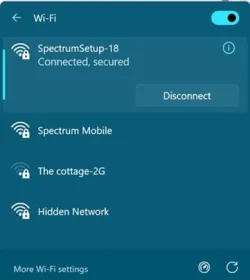
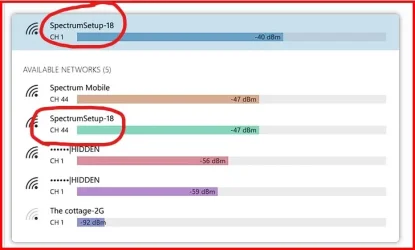
I ditched the booster as I no longer needed it, called Spectrum and they said that the PC will select whichever is the best one for the circumstances (speed or distance . . . ?). Okay. So this is what is available to me, only one really. The top one is what my laptop always connects to. So the next one is what my iPhone uses? (I use wifi calling as I have, at best, only one bar of cell signal here).

"The Cottage" is my neighbor. I have no idea what the "Hidden Network" is.

Is this what I should expect -- so far?

wifi.webp
 

My Computer My Computer

At a glance

Windows 1111th Gen Intel(R) Core(TM) i5-1135G7 @ 2.40GH...36 GB ram
OS
Windows 11
Computer type
Laptop
Manufacturer/Model
ASUS VivoBook, new in June 2024
CPU
11th Gen Intel(R) Core(TM) i5-1135G7 @ 2.40GHz 2.42 G
Memory
36 GB ram
Browser
Firefox
Antivirus
Windows
Can you connect a second router to the first router and test its wifi? I suspect the wifi is acting up. Can you connect the laptop to the router by Ethernet? A USB to Ethernet adapter is cheap. If the laptop works well on Ethernet when it doesn't on wifi, this would confirm where the problem lies.

I have two routers and just connected the WAN port of the second router to a LAN port on the first router.

If you turn the cell signal off** on the phone and use the same wifi and get good speeds this is another good test.

** I turn on aeroplane mode and then reenable wifi.
 

My Computers My Computers

  • At a glance

    Windows 11 Pro 25H2 26200.8894AMD Ryzen 7 5825U with Radeon Graphics16GB
    OS
    Windows 11 Pro 25H2 26200.8894
    Computer type
    Laptop
    Manufacturer/Model
    Acemagic LX15PRO
    CPU
    AMD Ryzen 7 5825U with Radeon Graphics
    Motherboard
    BIOS CT_BI_AMI_LX15PRO_AB8139_A-004
    Memory
    16GB
    Screen Resolution
    1920 x 1080
    Hard Drives
    SSD 2TB
    Internet Speed
    30 Mbps
    Browser
    Brave
    Antivirus
    Webroot SecureAnywhere Complete beta
  • At a glance

    Windows 11 Pro 23H2 22631.2506Atom N450 1.66GHz2GB
    Operating System
    Windows 11 Pro 23H2 22631.2506
    Computer type
    Laptop
    Manufacturer/Model
    HP Mini 210-1090NR PC (bought in late 2009!)
    CPU
    Atom N450 1.66GHz
    Memory
    2GB
    Browser
    Brave
    Antivirus
    Webroot
  • Acer Swift SF114-34 laptop
    OS Windows 11 Pro 26200.8894
    CPU Pentium Silver N6000
    RAM 4GB
    BIOS v1.17
    SSD Samsung 970 EVO Plus SSD 2TB (an upgrade)
I would suggest that you take a look at the RF spectrum in your environment using a tool such as WiFi Analyzer.
See the Microsoft Store--> WiFi Analyzer - Free download and install on Windows | Microsoft Store
Since you used a WiFi booster at one time, this seems to suggest that your overall Radio Frequency environment may be a wee bit crowded. Once installed, you can use the WiFi Analyzer to "see" the other WiFi signals around you, including your own.
Also using this tool will help you to see if other WiFi signals may be using the same channel as your router.

I do RF signal strength surveys around my home a couple times a year (or as needed).
I have found it necessary on a few occasions to change my router's WiFi channel selection to avoid signal interference and maintain my network reliability.

Hope this helps.
 

My Computer My Computer

At a glance

Windows 11 Pro 26200.8875Ryzen 5 5600G24GB
OS
Windows 11 Pro 26200.8875
Computer type
PC/Desktop
Manufacturer/Model
Home Built
CPU
Ryzen 5 5600G
Motherboard
ASUS X470 Prime Pro
Memory
24GB
Monitor(s) Displays
Alienware 2518HF
Screen Resolution
1920 x 1080
Hard Drives
Boot: NVME WDC WDS500G; ASUS M.2 Riser card with 3 additional NVME drives
Various Internal SDD (Samsung and WDC) and HDD drives mostly Western Digital
PSU
Seasonic Focus Gold 650W
Case
Corsair 200R
Cooling
Noctua PWM fans x 3
Keyboard
Corsair K60 SE Pro
Mouse
Corsair Dark Core RGB Pro SE
Internet Speed
500/500
Browser
MS Edge
Antivirus
Malwarebytes Premium
I would suggest that you take a look at the RF spectrum in your environment using a tool such as WiFi Analyzer.
See the Microsoft Store--> WiFi Analyzer - Free download and install on Windows | Microsoft Store
Since you used a WiFi booster at one time, this seems to suggest that your overall Radio Frequency environment may be a wee bit crowded. Once installed, you can use the WiFi Analyzer to "see" the other WiFi signals around you, including your own.
Also using this tool will help you to see if other WiFi signals may be using the same channel as your router.

I do RF signal strength surveys around my home a couple times a year (or as needed).
I have found it necessary on a few occasions to change my router's WiFi channel selection to avoid signal interference and maintain my network reliability.

Hope this helps.

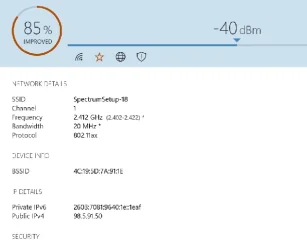
So what do I do with all this? One thing I forgot to mention, not sure if it's relevant or not: I have two TVs with ROKU sticks via wifi -- however they are never both on at the same time.

Wifi 01.webp


Wifi 02.webp
 

My Computer My Computer

At a glance

Windows 1111th Gen Intel(R) Core(TM) i5-1135G7 @ 2.40GH...36 GB ram
OS
Windows 11
Computer type
Laptop
Manufacturer/Model
ASUS VivoBook, new in June 2024
CPU
11th Gen Intel(R) Core(TM) i5-1135G7 @ 2.40GHz 2.42 G
Memory
36 GB ram
Browser
Firefox
Antivirus
Windows
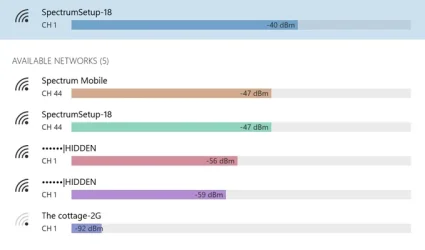
From what I can see in your post, your signal strength levels for both 2.4Ghz and 5Ghz bands are good. I do not usually see any "connection challenges" until the strength drops to more than -60dB.

Your laptop appears to be connected to the 2.4 Ghz signal on channel 1 at -40dB which is very good.
(Keep in mind that the 2.4Ghz band penetrates walls, et cetera much better that the 5Ghz band.)
Were these readings taken at the location where you normally keep your laptop?

Also, if you are inclined to move your laptop around your home, one should take a set of readings at all of those locations, too.
Do you recognize all of these networks? It appears that your network(s) are Spectrum-18 both 2.4 and 5Ghz bands.

In the 2.4 GHz bands here in the North America, the channels 1, 6, and 11 do not overlap.
However, they may become over-crowded with nearby Wi-Fi signals on the same channel.
If you are still experiencing an intermittent condition on 2.4 Ghz, try the 5Ghz band instead. (Unless you are clear across your house and trying to get signal through several walls)

(Also, the "Hidden Networks" are typically backhaul control channels used by your router for traffic shaping and router-to-router communications)
 

My Computer My Computer

At a glance

Windows 11 Pro 26200.8875Ryzen 5 5600G24GB
OS
Windows 11 Pro 26200.8875
Computer type
PC/Desktop
Manufacturer/Model
Home Built
CPU
Ryzen 5 5600G
Motherboard
ASUS X470 Prime Pro
Memory
24GB
Monitor(s) Displays
Alienware 2518HF
Screen Resolution
1920 x 1080
Hard Drives
Boot: NVME WDC WDS500G; ASUS M.2 Riser card with 3 additional NVME drives
Various Internal SDD (Samsung and WDC) and HDD drives mostly Western Digital
PSU
Seasonic Focus Gold 650W
Case
Corsair 200R
Cooling
Noctua PWM fans x 3
Keyboard
Corsair K60 SE Pro
Mouse
Corsair Dark Core RGB Pro SE
Internet Speed
500/500
Browser
MS Edge
Antivirus
Malwarebytes Premium
So what do I do with all this? One thing I forgot to mention, not sure if it's relevant or not: I have two TVs with ROKU sticks via wifi -- however they are never both on at the same time.
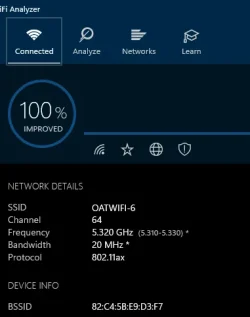
There is something I am not getting here.
This is what I have:
wifi1.webpwifi2.webp

As you can see, my channel is 64 on both.
But you have, on one screen, channel 1 & the other you have channel 44.
I am not sure why the bands are separated.
Have you tried powering your phone off and then try to see if your internet connection is better?
 
Last edited:

My Computers My Computers

  • At a glance

    All Branches but ReleaseAMD Ryzen 7 7735HS 3200-4500 Mhz 8 cores x 232 GB DDR5Radeon Graphic / NVIDIA GeForce RTX 4060 8 GB...
    OS
    All Branches but Release
    Computer type
    Laptop
    Manufacturer/Model
    Acer Nitro ANV15-51
    CPU
    AMD Ryzen 7 7735HS 3200-4500 Mhz 8 cores x 2
    Motherboard
    Sportage_RBH
    Memory
    32 GB DDR5
    Graphics Card(s)
    Radeon Graphic / NVIDIA GeForce RTX 4060 8 GB GDDR6
    Sound Card
    AMD/Realtek(R) Audio
    Monitor(s) Displays
    Integrated Monitor (15.3"vis)
    Screen Resolution
    FHD 1920X1080 16:9 144Hz
    Hard Drives
    KINGSTON OM8SEP4512Q-AA 1TB
    Western Digital 256GB
    PSU
    19V DC 6.32 A 120 W
    Cooling
    Dual Fans
    Mouse
    MS Bluetooth
    Internet Speed
    Fiber 1GB Cox -us & 1GB Orange-fr
    Browser
    Edge Canary- Firefox Nightly-Chrome Dev-Chrome Dev
    Antivirus
    Windows Defender
  • At a glance

    Windows 11 BetaAMD A9-94208 GB of DDR4AMD Radeon R5
    Operating System
    Windows 11 Beta
    Computer type
    Laptop
    Manufacturer/Model
    Asus X751BP
    CPU
    AMD A9-9420
    Memory
    8 GB of DDR4
    Graphics card(s)
    AMD Radeon R5
    Screen Resolution
    1600x900
    Hard Drives
    Seagate 1 TB
From what I can see in your post, your signal strength levels for both 2.4Ghz and 5Ghz bands are good. I do not usually see any "connection challenges" until the strength drops to more than -60dB. Where are you seeing the two separate bands? When I had the booster it did show them but doesn't anymore, it only shows Spectrum 18. FWIW, the problem seems to be within my laptop only, never any issues with phone or TVs.

Your laptop appears to be connected to the 2.4 Ghz signal on channel 1 at -40dB which is very good.
(Keep in mind that the 2.4Ghz band penetrates walls, et cetera much better that the 5Ghz band.)
Were these readings taken at the location where you normally keep your laptop? Yes, except in the summer it's outside a lot, one more wall to penetrate.

Also, if you are inclined to move your laptop around your home, one should take a set of readings at all of those locations, too.
Do you recognize all of these networks? It appears that your network(s) are Spectrum-18 both 2.4 and 5Ghz bands. Yes, except the "Hidden" which you explained.

In the 2.4 GHz bands here in the North America, the channels 1, 6, and 11 do not overlap.
However, they may become over-crowded with nearby Wi-Fi signals on the same channel. My nearest neighbor is "The Cottage," probably 1,000 feet away.

If you are still experiencing an intermittent condition on 2.4 Ghz, try the 5Ghz band instead. (Unless you are clear across your house and trying to get signal through several walls) All it shows is "Spectrum 18" whatever that means. Spectrum told me it would connect automatically to the best option -- but it doesn't show any options like it used to. All of the weak signal problems I've had lately was with the laptop in the same location each time.
 

My Computer My Computer

At a glance

Windows 1111th Gen Intel(R) Core(TM) i5-1135G7 @ 2.40GH...36 GB ram
OS
Windows 11
Computer type
Laptop
Manufacturer/Model
ASUS VivoBook, new in June 2024
CPU
11th Gen Intel(R) Core(TM) i5-1135G7 @ 2.40GHz 2.42 G
Memory
36 GB ram
Browser
Firefox
Antivirus
Windows
Do you have access to your router settings?
The reason that I ask is because when Spectrum told you that "your laptop will automatically connect to the best option", what they really meant was that the device (your laptop) would make a choice of the two Wi-Fi bands provided by your router. Sometimes a device will "train" itself periodically in a Wi-Fi environment where there are two available bands (2.4Ghz and 5Ghz) and this "training" can sometimes create Wi-Fi dropouts which you see as intermittent connectivity.

For example, in my Wi-Fi router this setting allows or disallows the smart signal selection by devices. Note that I keep this setting turned off to prevent Wi-F- re-training by the device itself. This is especially helpful when you know that you need the 2.4Ghz signal to more easily get through walls.

If you do have access to your router settings, you might also consider turning off one of the Wi-Fi- radios, say the 5Ghz, to see if stability improves, worsens or stays the same.
 

Attachments

  • SmartConnectSetting.webp
    SmartConnectSetting.webp
    31.2 KB · Views: 1

My Computer My Computer

At a glance

Windows 11 Pro 26200.8875Ryzen 5 5600G24GB
OS
Windows 11 Pro 26200.8875
Computer type
PC/Desktop
Manufacturer/Model
Home Built
CPU
Ryzen 5 5600G
Motherboard
ASUS X470 Prime Pro
Memory
24GB
Monitor(s) Displays
Alienware 2518HF
Screen Resolution
1920 x 1080
Hard Drives
Boot: NVME WDC WDS500G; ASUS M.2 Riser card with 3 additional NVME drives
Various Internal SDD (Samsung and WDC) and HDD drives mostly Western Digital
PSU
Seasonic Focus Gold 650W
Case
Corsair 200R
Cooling
Noctua PWM fans x 3
Keyboard
Corsair K60 SE Pro
Mouse
Corsair Dark Core RGB Pro SE
Internet Speed
500/500
Browser
MS Edge
Antivirus
Malwarebytes Premium
As far as the two separate bands, they appear in your post #7 above. Channel 1 is the 2.4Ghz band and the Channel 44 is the 5Ghz band.
 

Attachments

  • Two Bands.webp
    Two Bands.webp
    17.4 KB · Views: 1

My Computer My Computer

At a glance

Windows 11 Pro 26200.8875Ryzen 5 5600G24GB
OS
Windows 11 Pro 26200.8875
Computer type
PC/Desktop
Manufacturer/Model
Home Built
CPU
Ryzen 5 5600G
Motherboard
ASUS X470 Prime Pro
Memory
24GB
Monitor(s) Displays
Alienware 2518HF
Screen Resolution
1920 x 1080
Hard Drives
Boot: NVME WDC WDS500G; ASUS M.2 Riser card with 3 additional NVME drives
Various Internal SDD (Samsung and WDC) and HDD drives mostly Western Digital
PSU
Seasonic Focus Gold 650W
Case
Corsair 200R
Cooling
Noctua PWM fans x 3
Keyboard
Corsair K60 SE Pro
Mouse
Corsair Dark Core RGB Pro SE
Internet Speed
500/500
Browser
MS Edge
Antivirus
Malwarebytes Premium
Back
Top Bottom