Solved Internet connection problems


Polonut

Active member
Member
Local time
7:31 PM
Posts
18
OS
Windows 11 Pro
Hi everyone
strange - recently having connection problems. My desktop is connected by a USB wireless adapter. For ages I have had a TP-Link T3u, with no problems. Then intermittent disconnects started. I replaced the USB with a new (same) one, same result.
Next I refitted a very old (Brand unknown) cheap £5 spare, and immediately the problem ceased.
I know that there have been some problems with the T3U reported. Has anyone else had this problem and found an Answer?
Thanks
C
 

My Computer

System One

  • OS
    Windows 11 Pro
    Computer type
    PC/Desktop
    Manufacturer/Model
    Self built
    CPU
    Intel i5-3346
    Motherboard
    gigabyte H61-s2pv rev2.2
    Memory
    8Gb
    Graphics Card(s)
    internal
    Sound Card
    internal
    Monitor(s) Displays
    philips 226e9q
    Screen Resolution
    1920 x 1080
    Hard Drives
    Samsung evo 860 - WD 500Gb - seagate 2 TB
    PSU
    500watt
    Case
    ANTEC
    Cooling
    standard
    Keyboard
    standard querty ps2
    Mouse
    GX Trust REDEX 11
    Internet Speed
    150 full fibre
    Browser
    Google
    Antivirus
    Webroot secureanywhere
I seem to have a lot of laggy internet and poor speeds. But these don't affect my Android 13 phone. Can you coonect by ethernet to see if it's a wifi problem?

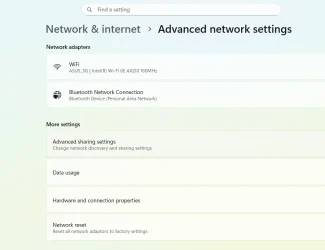
I often run ipconfig /flushdns in a command prompt and it seems to speed things up. You could also try a Network Reset

1771601175877.webp
 

My Computers

System One System Two

  • OS
    Windows 11 Pro 25H2 26200.8524
    Computer type
    Laptop
    Manufacturer/Model
    Acemagic LX15PRO
    CPU
    AMD Ryzen 7 5825U with Radeon Graphics
    Memory
    16GB
    Screen Resolution
    1920 x 1080
    Hard Drives
    SSD 2TB
    Internet Speed
    30 Mbps
    Browser
    Brave
    Antivirus
    Webroot Secure Anywhere
    Other Info
    System 3

    Acer Swift SF114-34 laptop
    OS Windows 11 Pro 26200.8524
    CPU Pentium Silver N6000
    RAM 4GB
    SSD Samsung 970 EVO Plus SSD 2TB (an upgrade)
  • Operating System
    Windows 11 Pro 23H2 22631.2506
    Computer type
    Laptop
    Manufacturer/Model
    HP Mini 210-1090NR PC (bought in late 2009!)
    CPU
    Atom N450 1.66GHz
    Memory
    2GB
    Browser
    Brave
    Antivirus
    Webroot
Thanks for your response
Do not have an ethernet connection available regrettably
Have done your recommended ipconfig /flushdns will let you know if any difference is noted.
Yes I have tried a network reset - no change however
Thanks
C
 

My Computer

System One

  • OS
    Windows 11 Pro
    Computer type
    PC/Desktop
    Manufacturer/Model
    Self built
    CPU
    Intel i5-3346
    Motherboard
    gigabyte H61-s2pv rev2.2
    Memory
    8Gb
    Graphics Card(s)
    internal
    Sound Card
    internal
    Monitor(s) Displays
    philips 226e9q
    Screen Resolution
    1920 x 1080
    Hard Drives
    Samsung evo 860 - WD 500Gb - seagate 2 TB
    PSU
    500watt
    Case
    ANTEC
    Cooling
    standard
    Keyboard
    standard querty ps2
    Mouse
    GX Trust REDEX 11
    Internet Speed
    150 full fibre
    Browser
    Google
    Antivirus
    Webroot secureanywhere
Does your desktop have an ethernet adapter built in? It should have an ethernet port on the back and your router will have several. All you need is an ethernet cable. Even if you have to move your computer to be near the router, this is always a good diagnostic step.

If it has no ethernet adapter, you could buy (very cheaply) a USB to ethernet adapter.
 

My Computers

System One System Two

  • OS
    Windows 11 Pro 25H2 26200.8524
    Computer type
    Laptop
    Manufacturer/Model
    Acemagic LX15PRO
    CPU
    AMD Ryzen 7 5825U with Radeon Graphics
    Memory
    16GB
    Screen Resolution
    1920 x 1080
    Hard Drives
    SSD 2TB
    Internet Speed
    30 Mbps
    Browser
    Brave
    Antivirus
    Webroot Secure Anywhere
    Other Info
    System 3

    Acer Swift SF114-34 laptop
    OS Windows 11 Pro 26200.8524
    CPU Pentium Silver N6000
    RAM 4GB
    SSD Samsung 970 EVO Plus SSD 2TB (an upgrade)
  • Operating System
    Windows 11 Pro 23H2 22631.2506
    Computer type
    Laptop
    Manufacturer/Model
    HP Mini 210-1090NR PC (bought in late 2009!)
    CPU
    Atom N450 1.66GHz
    Memory
    2GB
    Browser
    Brave
    Antivirus
    Webroot
If I were you, I would just buy a modern USB wifi adapter. Yours dates from 2019.
 

My Computers

System One System Two

  • OS
    Windows 11 Pro 25H2 26200.8524
    Computer type
    Laptop
    Manufacturer/Model
    Acemagic LX15PRO
    CPU
    AMD Ryzen 7 5825U with Radeon Graphics
    Memory
    16GB
    Screen Resolution
    1920 x 1080
    Hard Drives
    SSD 2TB
    Internet Speed
    30 Mbps
    Browser
    Brave
    Antivirus
    Webroot Secure Anywhere
    Other Info
    System 3

    Acer Swift SF114-34 laptop
    OS Windows 11 Pro 26200.8524
    CPU Pentium Silver N6000
    RAM 4GB
    SSD Samsung 970 EVO Plus SSD 2TB (an upgrade)
  • Operating System
    Windows 11 Pro 23H2 22631.2506
    Computer type
    Laptop
    Manufacturer/Model
    HP Mini 210-1090NR PC (bought in late 2009!)
    CPU
    Atom N450 1.66GHz
    Memory
    2GB
    Browser
    Brave
    Antivirus
    Webroot
Sheer distance between router and desktop is a problem (Desktop fully capable - has ethernet adapter etc)
However Wireless signal strength ok, usual speed 145Mbps
Will look for more modern adapter
Thanks
C
 

My Computer

System One

  • OS
    Windows 11 Pro
    Computer type
    PC/Desktop
    Manufacturer/Model
    Self built
    CPU
    Intel i5-3346
    Motherboard
    gigabyte H61-s2pv rev2.2
    Memory
    8Gb
    Graphics Card(s)
    internal
    Sound Card
    internal
    Monitor(s) Displays
    philips 226e9q
    Screen Resolution
    1920 x 1080
    Hard Drives
    Samsung evo 860 - WD 500Gb - seagate 2 TB
    PSU
    500watt
    Case
    ANTEC
    Cooling
    standard
    Keyboard
    standard querty ps2
    Mouse
    GX Trust REDEX 11
    Internet Speed
    150 full fibre
    Browser
    Google
    Antivirus
    Webroot secureanywhere
You could also try a Network Reset
Read somewhere that network reset is broken in windows 11, I have not been able to reset my network connections even after running the command, network names, etc remain the same.
Regards
 

My Computer

System One

  • OS
    Windows 11 23H2
    Computer type
    PC/Desktop
    Manufacturer/Model
    Assembled
    CPU
    Intel i7-7700k
    Motherboard
    Asrock Z270 Taichi
    Memory
    16 GB
    Graphics Card(s)
    Intel 630 onboard
    Sound Card
    Onboard
    Monitor(s) Displays
    Benq 1080p
    Screen Resolution
    1920*1080
    Hard Drives
    NVMe, SSD and HDD
    Case
    Cooler Master
    Keyboard
    Asus wireless
    Mouse
    Asus Wireless
    Internet Speed
    75 Mbps
    Browser
    Chrome, Edge, Arc
    Antivirus
    Windows Defender
I was having problems with my TP-Link a few years ago and replaced it with an EDUP and it's been perfect ever since but just recently I switched to a 40' long Ethernet cable. I only use the WiFi for my phone because I sometimes have very poor reception. I think it was a T3U but cannot remember for sure. I just tossed the driver disk out a month ago
 
Last edited:

My Computers

System One System Two

  • OS
    Windows 11 (up to date)
    Computer type
    PC/Desktop
    Manufacturer/Model
    Custom
    CPU
    Intel i5 12400
    Motherboard
    Gigabyte Z690 UA
    Memory
    Corsair Vengeance LPX 16GB
    Graphics Card(s)
    On Board the Z690
    Sound Card
    On Board
    Monitor(s) Displays
    43" Samsung tu7000
    Screen Resolution
    2560 x 1440
    Hard Drives
    SAMSUNG SSD 1TB NVMe M.2
    PSU
    Thermaltake smart 500w 80+
    Case
    LIAN LANCOOL_205M
    Cooling
    Bunch of fans . . . :o) (lights dont work)
    Keyboard
    Unicomp: Ultra Classic White Buckling Spring USB
    Mouse
    M510
    Internet Speed
    50mbps on Ethernet
    Browser
    Fire Fox
    Antivirus
    Windows
    Other Info
    Love this computer but I still prefer Win-7 like I love my old Lazy Boy Recliner . . . it just feels better.
  • Operating System
    WIN-7-64BIT and Win-11 pro for testing on unsupported hardware
    Computer type
    PC/Desktop
    Manufacturer/Model
    Home built
    CPU
    i5-3570K CPU @ 3.40GHz, 3801 Mhz, 4 Core(s), 4 Logical Processor(s)
    Motherboard
    GA-Z77-HD3
    Memory
    16 GB - Crucial Ballistick 4GB PC3-14900 DDR3-1333 MHz
    Graphics card(s)
    NVIDIA GeForce GTX 1050
    Sound Card
    On Board
    Monitor(s) Displays
    ASUS VP278
    Screen Resolution
    1920 x 1080
    Hard Drives
    4 - internal Samsung 2.5" SSD, 1 WD HDD 7200 and some external drives
    PSU
    EVGA 550w
    Case
    Old Gygabyte Tower
    Cooling
    Yes
    Keyboard
    Unicomp - UNIOP4A USB (like the old IBM Model H that I started with)
    Mouse
    M510
    Internet Speed
    50mbps
    Browser
    Firefox
    Antivirus
    Windows
    Other Info
    The only thing it lack is USB-3.2 on the front face but it has 3.0 on the back
Sheer distance between router and desktop is a problem (Desktop fully capable - has ethernet adapter etc)
However Wireless signal strength ok, usual speed 145Mbps
Will look for more modern adapter
Thanks
C
I was suggesting you move the desktop closer to the router temporarily.
 

My Computers

System One System Two

  • OS
    Windows 11 Pro 25H2 26200.8524
    Computer type
    Laptop
    Manufacturer/Model
    Acemagic LX15PRO
    CPU
    AMD Ryzen 7 5825U with Radeon Graphics
    Memory
    16GB
    Screen Resolution
    1920 x 1080
    Hard Drives
    SSD 2TB
    Internet Speed
    30 Mbps
    Browser
    Brave
    Antivirus
    Webroot Secure Anywhere
    Other Info
    System 3

    Acer Swift SF114-34 laptop
    OS Windows 11 Pro 26200.8524
    CPU Pentium Silver N6000
    RAM 4GB
    SSD Samsung 970 EVO Plus SSD 2TB (an upgrade)
  • Operating System
    Windows 11 Pro 23H2 22631.2506
    Computer type
    Laptop
    Manufacturer/Model
    HP Mini 210-1090NR PC (bought in late 2009!)
    CPU
    Atom N450 1.66GHz
    Memory
    2GB
    Browser
    Brave
    Antivirus
    Webroot
Thanks all for ideas and suggestions - much appreciated.
Since original post, have found that the usb port (to which wifi adapter was plugged in) was the culprit. Other devices I tried in that port worked, however the TP-linK T3U did not like that port for some obscure reason.
A quick port swop did the trick/
Thanks again
C
 

My Computer

System One

  • OS
    Windows 11 Pro
    Computer type
    PC/Desktop
    Manufacturer/Model
    Self built
    CPU
    Intel i5-3346
    Motherboard
    gigabyte H61-s2pv rev2.2
    Memory
    8Gb
    Graphics Card(s)
    internal
    Sound Card
    internal
    Monitor(s) Displays
    philips 226e9q
    Screen Resolution
    1920 x 1080
    Hard Drives
    Samsung evo 860 - WD 500Gb - seagate 2 TB
    PSU
    500watt
    Case
    ANTEC
    Cooling
    standard
    Keyboard
    standard querty ps2
    Mouse
    GX Trust REDEX 11
    Internet Speed
    150 full fibre
    Browser
    Google
    Antivirus
    Webroot secureanywhere
Back
Top Bottom