Is sleep ever going to work correctly?


Kojack

Well-known member
Member
Local time
7:21 PM
Posts
230
OS
Windows 11 Home
I read a while ago that Microsoft supposedly fixed the sleep functions on Windows 11. I put my laptop to sleep, put it down and when I come back it's a steaming furnace, and it wont wake up. I have to power down and restart it. Is there any way to fix this so it works correctly?
 

My Computers

System One System Two

  • OS
    Windows 11 Home
    Computer type
    PC/Desktop
    Manufacturer/Model
    Dell XPS 8940
    CPU
    Intel i7 10700
    Motherboard
    Dell
    Memory
    128gb crucial
    Graphics Card(s)
    nVidia RTX 2070 super
    Sound Card
    Dell
    Monitor(s) Displays
    2 24 inch Dell ultrasharp displays one touch enabled for video and photo editing
    Screen Resolution
    1080p
    Hard Drives
    Main Drive- XPG 2tb, Project drive - Kingston 1tb, Scratch drive - Kingston 512gb, Storage drive - Seagate barracuda 8tb
    PSU
    Dell
    Case
    Dell
    Cooling
    Custom Noctua setup
    Keyboard
    Vital Pro keyboard
    Mouse
    Vital Pro mouse
    Internet Speed
    Bell fibe 1.0 gbps
    Browser
    Edge
    Antivirus
    Defender
    Other Info
    Various printers, card readers, scanners etc for creative work. I built a NAS out of my old acer AC100 4 bay hot swap server with Xeon processor.
  • Operating System
    WIndows 11 Home
    Computer type
    Laptop
    Manufacturer/Model
    Dell Inspiron 5406 2 in 1
    CPU
    intel i7 1165G7
    Motherboard
    dell
    Memory
    64gb of Ballistix DD4 ram
    Graphics card(s)
    Iris Xe
    Sound Card
    dell
    Monitor(s) Displays
    14 inch touchscreen, plus a second 14 inch touchscreen via HDMI while on location
    Screen Resolution
    1080p
    Hard Drives
    Main drive - 2tb XPG, Storage drive - 1tb Seagate portable drive
    PSU
    dell plus a compact charger for travel
    Case
    dell
    Cooling
    repasted stock coolers
    Browser
    Edge
    Antivirus
    defender
    Other Info
    Thinking about getting an eGpu for this system to take on the road with us.
Is sleep ever going to work correctly?
Going by the number of posts in this, and multiple other forums across the net, probably no. A real lottery.
 

My Computers

System One System Two

  • OS
    Windows 11 2xH2 (latest update ... forever anal)
    Computer type
    PC/Desktop
    Manufacturer/Model
    HP Slim S01
    CPU
    Intel i5-12400
    Memory
    8GB
    Graphics Card(s)
    NVIDIA GeForce GT730
    Sound Card
    OOBE
    Monitor(s) Displays
    Acer 32"
    Screen Resolution
    1920x1080
    Hard Drives
    512GB KIOXIA NVMe
    1TB SATA SSD
    PSU
    OOBE
    Case
    OOBE
    Cooling
    OOBE
    Keyboard
    BT
    Mouse
    BT
    Browser
    Brave FFox Chrome Opera
    Antivirus
    KIS
  • Operating System
    Windows 11 Pro 2xH2 (latest update ... 4ever anal)
    Computer type
    Laptop
    Manufacturer/Model
    HP Pavillion 15
    CPU
    i7-1165G7 @ 2.80GHz
    Graphics card(s)
    Intel Iris Xe Graphics
    Hard Drives
    Samsung NVMe 512GB
    + numerous/multiple SSD Type C USB enclosures
    Internet Speed
    NBN FTTN 50
    Browser
    Brave
    Antivirus
    KIS
Going by the number of posts in this, and multiple other forums across the net, probably no. A real lottery.
That's what I figured.
 

My Computers

System One System Two

  • OS
    Windows 11 Home
    Computer type
    PC/Desktop
    Manufacturer/Model
    Dell XPS 8940
    CPU
    Intel i7 10700
    Motherboard
    Dell
    Memory
    128gb crucial
    Graphics Card(s)
    nVidia RTX 2070 super
    Sound Card
    Dell
    Monitor(s) Displays
    2 24 inch Dell ultrasharp displays one touch enabled for video and photo editing
    Screen Resolution
    1080p
    Hard Drives
    Main Drive- XPG 2tb, Project drive - Kingston 1tb, Scratch drive - Kingston 512gb, Storage drive - Seagate barracuda 8tb
    PSU
    Dell
    Case
    Dell
    Cooling
    Custom Noctua setup
    Keyboard
    Vital Pro keyboard
    Mouse
    Vital Pro mouse
    Internet Speed
    Bell fibe 1.0 gbps
    Browser
    Edge
    Antivirus
    Defender
    Other Info
    Various printers, card readers, scanners etc for creative work. I built a NAS out of my old acer AC100 4 bay hot swap server with Xeon processor.
  • Operating System
    WIndows 11 Home
    Computer type
    Laptop
    Manufacturer/Model
    Dell Inspiron 5406 2 in 1
    CPU
    intel i7 1165G7
    Motherboard
    dell
    Memory
    64gb of Ballistix DD4 ram
    Graphics card(s)
    Iris Xe
    Sound Card
    dell
    Monitor(s) Displays
    14 inch touchscreen, plus a second 14 inch touchscreen via HDMI while on location
    Screen Resolution
    1080p
    Hard Drives
    Main drive - 2tb XPG, Storage drive - 1tb Seagate portable drive
    PSU
    dell plus a compact charger for travel
    Case
    dell
    Cooling
    repasted stock coolers
    Browser
    Edge
    Antivirus
    defender
    Other Info
    Thinking about getting an eGpu for this system to take on the road with us.
I read a while ago that Microsoft supposedly fixed the sleep functions on Windows 11. I put my laptop to sleep, put it down and when I come back it's a steaming furnace, and it wont wake up. I have to power down and restart it. Is there any way to fix this so it works correctly?
When my laptop acted like that with S0 modern standby sleep I had to ditch the latest NVIDIA drivers from their site and go back to the Dell factory NVIDIA and Intel drivers. No more issues with sleep once I stick with the Dell factory GPU drivers. I have the 5080 GPU.
 

My Computers

System One System Two

  • OS
    Windows 11 25H2
    Computer type
    Laptop
    Manufacturer/Model
    Alienware 18 Area-51
    CPU
    Intel Core Ultra 9 275HX (24-Core)
    Motherboard
    Alienware
    Memory
    64GB DDR5 6400MT/s
    Graphics Card(s)
    NVIDIA GeForce RTX 5080 and Intel UHD Graphics
    Sound Card
    Onboard, Realtek high-performance Audio chips (ALC3329 & ALC1708))
    Monitor(s) Displays
    300HZ 18-inch QHD 500 nit Comfort View+
    Screen Resolution
    2560 x 1600
    Hard Drives
    2TB NVMe M.2 PCIe Gen 5 SSD
    Case
    Magnesium Alloy
    Cooling
    Advanced Cryo-Tech Quad-Fan Cooling system & large vapor chamber
    Keyboard
    Cherry MX ultra low profile mechanical keyboard with per key AlienFX RGB lighting
    Mouse
    Logitech MX Master 4
    Browser
    Vivaldi (main), Firefox, Chrome, Edge
    Antivirus
    MS Defender and Malwarebytes Free
  • Operating System
    Windows 11 25H2
    Computer type
    Laptop
    Manufacturer/Model
    Microsoft Surface Laptop 7
    CPU
    Qualcomm Snapdragon X Elite (12 Core) ARM based CPU
    Motherboard
    Microsoft Corp.
    Memory
    16GB LPDDR5
    Graphics card(s)
    Qualcomm Adreno X1-85
    Sound Card
    Omnisonic speakers with Dolby Atmos spatial sound
    Monitor(s) Displays
    120 Hz 13.8-inch 600 nit PixelSense Flow touchscreen
    Screen Resolution
    2304x1536
    Hard Drives
    1TB NVMe Gen 4 SSD
    Case
    Anodized Aluminum
    Cooling
    Traditional active cooling fan system
    Keyboard
    Mechanical QWERTY, backlit when in use
    Mouse
    Logitech MX Master 4 and Surface Arc Mouse
    Browser
    Vivaldi (main), Firefox, Chrome, Edge
    Antivirus
    MS Defender and Malwarebytes Free
I read a while ago that Microsoft supposedly fixed the sleep functions on Windows 11. I put my laptop to sleep, put it down and when I come back it's a steaming furnace, and it wont wake up. I have to power down and restart it. Is there any way to fix this so it works correctly?
It seems that the older the hardware, the more of a problem there is. My two systems are working fine with S0, Modern Standby.
 

My Computers

System One System Two

  • OS
    Windows 11 Pro
    Computer type
    Laptop
    Manufacturer/Model
    Dell XPS 16 DA16260
    CPU
    Intel Series 3 Core Ultra X9 388H
    Memory
    64GB LPDDR5x 9600 MT/s
    Graphics Card(s)
    Intel Arc graphics B390 Panther Lake
    Monitor(s) Displays
    16" 3.2K Tandem OLED Infinity Edge
    Screen Resolution
    3200 x 2000 16:10 236 PPI
    Hard Drives
    1 Terabyte M.2 PCIe NVMe SSD
    Case
    Black Anodized Aluminum
    Cooling
    Vapor Chamber Cooling
    Mouse
    None
    Internet Speed
    942 Mbps Netgear Mesh + 2 Satellites
    Browser
    Microsoft Edge (Chromium)
    Antivirus
    Windows Security (Defender)
    Other Info
    NPU delivering 67 TOPS
    Microsoft 365 subscription
    Microsoft Office 365
    Microsoft OneDrive 1TB Cloud
    Microsoft Visual Studio
    Microsoft Visual Studio Code
    Microsoft Sysinternals Suite
    Microsoft BitLocker
    Microsoft Copilot
    Dell Support Assist
    Dell Command | Update
    Macrium Reflect X subscription
    1Password Password Manager
    Amazon Kindle for PC
    Lightroom/Photoshop subscription
    Interactive Brokers Trader Workstation
  • Operating System
    Windows 11 Pro
    Computer type
    Laptop
    Manufacturer/Model
    Microsoft Surface Laptop 7
    CPU
    Snapdragon® X Elite (12 Core) with Hexagon NPU delivering 45 TOPS
    Memory
    32GB LPDDR5x 8448 MT/s
    Graphics card(s)
    Integrated Adreno GPU
    Sound Card
    Omnisonic speakers with Dolby Atmos spatial sound
    Monitor(s) Displays
    13.8″ PixelSense Flow touchscreen 120 Hz 600 NIT
    Screen Resolution
    2304 × 1536 (201 PPI), 3:2 aspect ratio
    Hard Drives
    1 TB PCIe NVMe Gen 4 SSD
    Case
    Black Anodized Aluminum
    Cooling
    Vapor Chamber Cooling
    Mouse
    None
    Internet Speed
    942 Mbps Netgear Mesh + 2 Satellites
    Browser
    Microsoft Edge (Chromium)
    Antivirus
    Windows Security (Defender)
    Other Info
    Microsoft 365 subscription (Office)
    Microsoft Office 365
    Microsoft OneDrive 1TB Cloud
    Microsoft Visual Studio 2026
    Microsoft Visual Studio Code
    Interactive Brokers Trader Workstation
    Lightroom/Photoshop subscription
    1Password Password Manager
    Microsoft Sysinternals
    Amazon Kindle for PC
    Microsoft BitLocker
    Microsoft Copilot
It seems that the older the hardware, the more of a problem there is. My two systems are working fine with S0, Modern Standby.
Well I am either getting a ProArt P14 or Surface laptop Ultra this fall, I hope they fare better in the sleep department.
 

My Computers

System One System Two

  • OS
    Windows 11 Home
    Computer type
    PC/Desktop
    Manufacturer/Model
    Dell XPS 8940
    CPU
    Intel i7 10700
    Motherboard
    Dell
    Memory
    128gb crucial
    Graphics Card(s)
    nVidia RTX 2070 super
    Sound Card
    Dell
    Monitor(s) Displays
    2 24 inch Dell ultrasharp displays one touch enabled for video and photo editing
    Screen Resolution
    1080p
    Hard Drives
    Main Drive- XPG 2tb, Project drive - Kingston 1tb, Scratch drive - Kingston 512gb, Storage drive - Seagate barracuda 8tb
    PSU
    Dell
    Case
    Dell
    Cooling
    Custom Noctua setup
    Keyboard
    Vital Pro keyboard
    Mouse
    Vital Pro mouse
    Internet Speed
    Bell fibe 1.0 gbps
    Browser
    Edge
    Antivirus
    Defender
    Other Info
    Various printers, card readers, scanners etc for creative work. I built a NAS out of my old acer AC100 4 bay hot swap server with Xeon processor.
  • Operating System
    WIndows 11 Home
    Computer type
    Laptop
    Manufacturer/Model
    Dell Inspiron 5406 2 in 1
    CPU
    intel i7 1165G7
    Motherboard
    dell
    Memory
    64gb of Ballistix DD4 ram
    Graphics card(s)
    Iris Xe
    Sound Card
    dell
    Monitor(s) Displays
    14 inch touchscreen, plus a second 14 inch touchscreen via HDMI while on location
    Screen Resolution
    1080p
    Hard Drives
    Main drive - 2tb XPG, Storage drive - 1tb Seagate portable drive
    PSU
    dell plus a compact charger for travel
    Case
    dell
    Cooling
    repasted stock coolers
    Browser
    Edge
    Antivirus
    defender
    Other Info
    Thinking about getting an eGpu for this system to take on the road with us.
Personally I don't consider S0 a 'sleep mode' it's more correctly described as a low power standby mode. For me, S3 sleep works reliably. When I do have issues resuming, it has invariably been related to Nvidia display drivers.
 

My Computer

System One

  • OS
    Windows 11 25H2
    Computer type
    PC/Desktop
    Manufacturer/Model
    EVGA home brew
    CPU
    Broadwell-e 6850K 4.5ghz @1.36v
    Motherboard
    EVGA X99 FTW K
    Memory
    32GB Corsair LPM 3600 C16
    Graphics Card(s)
    EVGA RTX 3080Ti FTW
    Sound Card
    Asus Centurion true 7.1 headset. (5 speakers in each earpeice)
    Monitor(s) Displays
    LG C4 55"
    Screen Resolution
    4K 144hz
    Hard Drives
    Various models of SSDs ~10TB No HDDs installed.
    PSU
    be quiet! BN516 Straight Power 12-1000w 80 Plus Platinum
    Case
    Corsair 780T modified to dual 200mm intake fans
    Cooling
    Corsair H110i
    Keyboard
    Corsair K95 Platinum
    Mouse
    Corsair M65 RGB Elite
    Internet Speed
    50Mbs
Well I am either getting a ProArt P14 or Surface laptop Ultra this fall, I hope they fare better in the sleep department.
My big issue with my Surface Laptop 7 currently is the IR Camera won't wake after sleep or reboot to activate Windows Hello. From what I read they need a firmware update but MS is in no hurry to fix it.
 

My Computers

System One System Two

  • OS
    Windows 11 25H2
    Computer type
    Laptop
    Manufacturer/Model
    Alienware 18 Area-51
    CPU
    Intel Core Ultra 9 275HX (24-Core)
    Motherboard
    Alienware
    Memory
    64GB DDR5 6400MT/s
    Graphics Card(s)
    NVIDIA GeForce RTX 5080 and Intel UHD Graphics
    Sound Card
    Onboard, Realtek high-performance Audio chips (ALC3329 & ALC1708))
    Monitor(s) Displays
    300HZ 18-inch QHD 500 nit Comfort View+
    Screen Resolution
    2560 x 1600
    Hard Drives
    2TB NVMe M.2 PCIe Gen 5 SSD
    Case
    Magnesium Alloy
    Cooling
    Advanced Cryo-Tech Quad-Fan Cooling system & large vapor chamber
    Keyboard
    Cherry MX ultra low profile mechanical keyboard with per key AlienFX RGB lighting
    Mouse
    Logitech MX Master 4
    Browser
    Vivaldi (main), Firefox, Chrome, Edge
    Antivirus
    MS Defender and Malwarebytes Free
  • Operating System
    Windows 11 25H2
    Computer type
    Laptop
    Manufacturer/Model
    Microsoft Surface Laptop 7
    CPU
    Qualcomm Snapdragon X Elite (12 Core) ARM based CPU
    Motherboard
    Microsoft Corp.
    Memory
    16GB LPDDR5
    Graphics card(s)
    Qualcomm Adreno X1-85
    Sound Card
    Omnisonic speakers with Dolby Atmos spatial sound
    Monitor(s) Displays
    120 Hz 13.8-inch 600 nit PixelSense Flow touchscreen
    Screen Resolution
    2304x1536
    Hard Drives
    1TB NVMe Gen 4 SSD
    Case
    Anodized Aluminum
    Cooling
    Traditional active cooling fan system
    Keyboard
    Mechanical QWERTY, backlit when in use
    Mouse
    Logitech MX Master 4 and Surface Arc Mouse
    Browser
    Vivaldi (main), Firefox, Chrome, Edge
    Antivirus
    MS Defender and Malwarebytes Free
Personally I don't consider S0 a 'sleep mode' it's more correctly described as a low power standby mode. For me, S3 sleep works reliably. When I do have issues resuming, it has invariably been related to Nvidia display drivers.
BINGO!
I was having all sorts of issues with S3 sleep, and I always suspected the Nvidia drivers. Since I don't often need the performance of the RTX-4060 board, I finally removed it and started using the Intel UND 770 built-in graphics on my i5-14500 processor. All the sleep problems have vanished, the computer wakes up much faster, and it hasn't hung or misbehaved since I reconfigured!

I'd love to be able to use my Nvidia GPU for certain applications, but until the get their crap together, it's a shelf queen!
 

My Computers

System One System Two

  • OS
    Win 11 Pro 25H2, Build 26200.8655
    Computer type
    PC/Desktop
    Manufacturer/Model
    Home Brew
    CPU
    Intel Core i5 14500
    Motherboard
    Gigabyte B760M G P WIFI
    Memory
    64GB DDR4
    Graphics Card(s)
    GeForce RTX 4060
    Sound Card
    Chipset Realtek
    Monitor(s) Displays
    LG 45" Ultragear, Acer 24" 1080p
    Screen Resolution
    5120x1440, 1920x1080
    Hard Drives
    Crucial P310 2TB 2280 PCIe Gen4 3D NAND NVMe M.2 SSD (O/S)
    Silicon Power 2TB US75 NVMe PCIe Gen4 M.2 2280 SSD (backup)
    Crucial BX500 2TB 3D NAND (2nd backup)
    Seagate 4TB Ironwolf, rotating HDD archive files
    External off-line backup Drives: 2 NVMe 4TB drives in external enclosures
    PSU
    Thermaltake Toughpower GF3 750W
    Case
    LIAN LI LANCOOL 216 E-ATX PC Case
    Cooling
    Lots of fans!
    Keyboard
    Microsoft Comfort Curve 2000
    Mouse
    Logitech G305
    Internet Speed
    Verizon FiOS 1GB
    Browser
    Firefox
    Antivirus
    Malware Bytes & Windows Defender Security
  • Operating System
    Win 11 Pro 25H2, Build 26200.8524
    Computer type
    PC/Desktop
    Manufacturer/Model
    Home Brew
    CPU
    Intel Core i5 14400
    Motherboard
    Gigabyte B760M DS3H AX
    Memory
    32GB DDR5
    Graphics card(s)
    Intel 700 Embedded GPU
    Sound Card
    Realtek Embedded
    Monitor(s) Displays
    27" HP 1080p
    Screen Resolution
    1920x1080
    Hard Drives
    Crucial P310 2TB 2280 PCIe Gen4 eD NAND PCIe SSD
    Samsung EVO 990 2TB NVMe Gen4 SSD
    Samsung 2TB SATA SSD
    PSU
    Thermaltake Smart BM3 650W
    Case
    Okinos Micro ATX Case
    Cooling
    Fans
    Keyboard
    Microsoft Comfort Curve 2000
    Mouse
    Logitech G305
    Internet Speed
    Verizon FiOS 1GB
    Browser
    Firefox
    Antivirus
    Malware Bytes & Windows Defender Security
My big issue with my Surface Laptop 7 currently is the IR Camera won't wake after sleep or reboot to activate Windows Hello. From what I read they need a firmware update but MS is in no hurry to fix it.
I have the same Surface Laptop 7 as you do. Your recommendation was one of the helpful reasons for my purchase. The IR camera works fine when waking from S0 sleep for me. Mine was delivered 6 months ago. I wonder if there could be any difference in firmware.
 

My Computers

System One System Two

  • OS
    Windows 11 Pro
    Computer type
    Laptop
    Manufacturer/Model
    Dell XPS 16 DA16260
    CPU
    Intel Series 3 Core Ultra X9 388H
    Memory
    64GB LPDDR5x 9600 MT/s
    Graphics Card(s)
    Intel Arc graphics B390 Panther Lake
    Monitor(s) Displays
    16" 3.2K Tandem OLED Infinity Edge
    Screen Resolution
    3200 x 2000 16:10 236 PPI
    Hard Drives
    1 Terabyte M.2 PCIe NVMe SSD
    Case
    Black Anodized Aluminum
    Cooling
    Vapor Chamber Cooling
    Mouse
    None
    Internet Speed
    942 Mbps Netgear Mesh + 2 Satellites
    Browser
    Microsoft Edge (Chromium)
    Antivirus
    Windows Security (Defender)
    Other Info
    NPU delivering 67 TOPS
    Microsoft 365 subscription
    Microsoft Office 365
    Microsoft OneDrive 1TB Cloud
    Microsoft Visual Studio
    Microsoft Visual Studio Code
    Microsoft Sysinternals Suite
    Microsoft BitLocker
    Microsoft Copilot
    Dell Support Assist
    Dell Command | Update
    Macrium Reflect X subscription
    1Password Password Manager
    Amazon Kindle for PC
    Lightroom/Photoshop subscription
    Interactive Brokers Trader Workstation
  • Operating System
    Windows 11 Pro
    Computer type
    Laptop
    Manufacturer/Model
    Microsoft Surface Laptop 7
    CPU
    Snapdragon® X Elite (12 Core) with Hexagon NPU delivering 45 TOPS
    Memory
    32GB LPDDR5x 8448 MT/s
    Graphics card(s)
    Integrated Adreno GPU
    Sound Card
    Omnisonic speakers with Dolby Atmos spatial sound
    Monitor(s) Displays
    13.8″ PixelSense Flow touchscreen 120 Hz 600 NIT
    Screen Resolution
    2304 × 1536 (201 PPI), 3:2 aspect ratio
    Hard Drives
    1 TB PCIe NVMe Gen 4 SSD
    Case
    Black Anodized Aluminum
    Cooling
    Vapor Chamber Cooling
    Mouse
    None
    Internet Speed
    942 Mbps Netgear Mesh + 2 Satellites
    Browser
    Microsoft Edge (Chromium)
    Antivirus
    Windows Security (Defender)
    Other Info
    Microsoft 365 subscription (Office)
    Microsoft Office 365
    Microsoft OneDrive 1TB Cloud
    Microsoft Visual Studio 2026
    Microsoft Visual Studio Code
    Interactive Brokers Trader Workstation
    Lightroom/Photoshop subscription
    1Password Password Manager
    Microsoft Sysinternals
    Amazon Kindle for PC
    Microsoft BitLocker
    Microsoft Copilot
Well I am either getting a ProArt P14 or Surface laptop Ultra this fall, I hope they fare better in the sleep department.
I upgraded my primary system just five weeks ago. I stayed with Dell and went with the new XPS 16 with the Panther Lake processor. You can see my specs in My Computers below.
 

My Computers

System One System Two

  • OS
    Windows 11 Pro
    Computer type
    Laptop
    Manufacturer/Model
    Dell XPS 16 DA16260
    CPU
    Intel Series 3 Core Ultra X9 388H
    Memory
    64GB LPDDR5x 9600 MT/s
    Graphics Card(s)
    Intel Arc graphics B390 Panther Lake
    Monitor(s) Displays
    16" 3.2K Tandem OLED Infinity Edge
    Screen Resolution
    3200 x 2000 16:10 236 PPI
    Hard Drives
    1 Terabyte M.2 PCIe NVMe SSD
    Case
    Black Anodized Aluminum
    Cooling
    Vapor Chamber Cooling
    Mouse
    None
    Internet Speed
    942 Mbps Netgear Mesh + 2 Satellites
    Browser
    Microsoft Edge (Chromium)
    Antivirus
    Windows Security (Defender)
    Other Info
    NPU delivering 67 TOPS
    Microsoft 365 subscription
    Microsoft Office 365
    Microsoft OneDrive 1TB Cloud
    Microsoft Visual Studio
    Microsoft Visual Studio Code
    Microsoft Sysinternals Suite
    Microsoft BitLocker
    Microsoft Copilot
    Dell Support Assist
    Dell Command | Update
    Macrium Reflect X subscription
    1Password Password Manager
    Amazon Kindle for PC
    Lightroom/Photoshop subscription
    Interactive Brokers Trader Workstation
  • Operating System
    Windows 11 Pro
    Computer type
    Laptop
    Manufacturer/Model
    Microsoft Surface Laptop 7
    CPU
    Snapdragon® X Elite (12 Core) with Hexagon NPU delivering 45 TOPS
    Memory
    32GB LPDDR5x 8448 MT/s
    Graphics card(s)
    Integrated Adreno GPU
    Sound Card
    Omnisonic speakers with Dolby Atmos spatial sound
    Monitor(s) Displays
    13.8″ PixelSense Flow touchscreen 120 Hz 600 NIT
    Screen Resolution
    2304 × 1536 (201 PPI), 3:2 aspect ratio
    Hard Drives
    1 TB PCIe NVMe Gen 4 SSD
    Case
    Black Anodized Aluminum
    Cooling
    Vapor Chamber Cooling
    Mouse
    None
    Internet Speed
    942 Mbps Netgear Mesh + 2 Satellites
    Browser
    Microsoft Edge (Chromium)
    Antivirus
    Windows Security (Defender)
    Other Info
    Microsoft 365 subscription (Office)
    Microsoft Office 365
    Microsoft OneDrive 1TB Cloud
    Microsoft Visual Studio 2026
    Microsoft Visual Studio Code
    Interactive Brokers Trader Workstation
    Lightroom/Photoshop subscription
    1Password Password Manager
    Microsoft Sysinternals
    Amazon Kindle for PC
    Microsoft BitLocker
    Microsoft Copilot
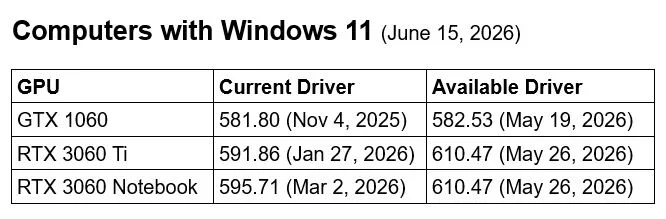
My 2 desktop computers with Windows 11 Pro have Nvidia GPUs (GTX 1060 6GB, and RTX 3060Ti). Neither one has sleep problems. My only laptop with a Nvidia GPU has a Notebook RTX 3060. It has Windows 11 Pro. It has no problems with sleep.

My only computer that has a sleep problem has a GTX 560 GPU. It has Windows 10 Home. I disabled sleep and let it go into hibernation instead. After it goes into hibernation all I have to do is touch a key on the keyboard or move the mouse to wake the computer.

2026-06-15 10_30_57-Nvidia drivers.docx - Word.webp
 
Last edited:

My Computers

System One System Two

  • OS
    Windows 11 Pro 25H2 (26200.6901)
    Computer type
    Laptop
    Manufacturer/Model
    ASUS TUF Gaming A15 (2022)
    CPU
    AMD Ryzen 7 6800H with Radeon 680M GPU (486MB RAM)
    Memory
    Crucial DDR5-4800 (2400MHz) 32GB (2 x 16GB)
    Graphics Card(s)
    NVIDIA RTX 3060 Laptop (6GB RAM)
    Sound Card
    n/a
    Monitor(s) Displays
    15.6-inch
    Screen Resolution
    1920x1080 300Hz
    Hard Drives
    2 x Samsung 990 Evo Plus (2TB M.2 NVME SSD)
    PSU
    n/a
    Mouse
    Wireless Mouse M510
    Internet Speed
    2100Mbps/300Mbps
    Browser
    Firefox
    Antivirus
    Malwarebytes
  • Operating System
    Windows 11 Pro 25H2 (26200.8246)
    Computer type
    PC/Desktop
    Manufacturer/Model
    Custom build
    CPU
    AMD Ryzen 7 5700X3D
    Motherboard
    ASUS ROG Strix B550-F Gaming WiFi II
    Memory
    G.SKILL Flare X 32GB (2x16GB) DDR4
    Graphics card(s)
    ASUS ROG-STRIX-RTX3060TI-08G-V2-GAMING (RTX 3060-Ti, 8GB RAM)
    Monitor(s) Displays
    Samsung G50D IPS 27"
    Screen Resolution
    1440p/180Hz
    Hard Drives
    SAMSUNG 990 EVO Plus (2TB] M.2 NVME SSD
    SAMSUNG 990 EVO Plus (4TB) M.2 NVME SSD
    PSU
    Corsair RM750x (750 watts)
    Case
    Cooler Master MasterCase 5
    Cooling
    Scythe Mugen 6
    Keyboard
    Logitech K520 (MK540 keyboard/mouse combo)
    Mouse
    Logitech M310 (MK540 keyboard/mouse combo)
    Internet Speed
    2100 Mbps down / 300 Mbps up
    Browser
    Firefox, Edge, Chrome
    Antivirus
    Malwarebytes (Premium)
    Other Info
    ASUS Blu-ray Burner BW-16D1HT (SATA) || Western Digital Easystore 20TB USB 3.0 external hard drive used with Acronis True Image 2025 backup software || HP OfficeJet Pro 6975 Printer/Scanner
My 2 desktop computers with Windows 11 Pro have Nvidia GPUs (GTX 1060 6GB, and RTX 3060Ti). Neither one has sleep problems. My only laptop with a Nvidia GPU has a Notebook RTX 3060. It has Windows 11 Pro. It has no problems with sleep.

My only computer that has a sleep problem has a GTX 560 GPU. It has Windows 10 Home. I disabled sleep and let it go into hibernation instead. After it goes into hibernation all I have to do is touch a key on the keyboard or move the mouse to wake the computer. Note
After numerous discussions and topics on laptop GPU (mainly NVIDIA) issues it seems certain brands are more prone to issues especially sleep if you stray from the factory laptop GPU drivers to the generic NVIDIA site drivers. Dell and some other laptop brands tweak and test their GPU drivers to integrate with their specific hardware and software so some machines don't play nice with generic latest and greatest drivers. I found that out first hand and just stick with factory now. I know they're older but I don't get any more compatibility issues that way and NVIDIA drivers these days seem notorious for causing issues.
 

My Computers

System One System Two

  • OS
    Windows 11 25H2
    Computer type
    Laptop
    Manufacturer/Model
    Alienware 18 Area-51
    CPU
    Intel Core Ultra 9 275HX (24-Core)
    Motherboard
    Alienware
    Memory
    64GB DDR5 6400MT/s
    Graphics Card(s)
    NVIDIA GeForce RTX 5080 and Intel UHD Graphics
    Sound Card
    Onboard, Realtek high-performance Audio chips (ALC3329 & ALC1708))
    Monitor(s) Displays
    300HZ 18-inch QHD 500 nit Comfort View+
    Screen Resolution
    2560 x 1600
    Hard Drives
    2TB NVMe M.2 PCIe Gen 5 SSD
    Case
    Magnesium Alloy
    Cooling
    Advanced Cryo-Tech Quad-Fan Cooling system & large vapor chamber
    Keyboard
    Cherry MX ultra low profile mechanical keyboard with per key AlienFX RGB lighting
    Mouse
    Logitech MX Master 4
    Browser
    Vivaldi (main), Firefox, Chrome, Edge
    Antivirus
    MS Defender and Malwarebytes Free
  • Operating System
    Windows 11 25H2
    Computer type
    Laptop
    Manufacturer/Model
    Microsoft Surface Laptop 7
    CPU
    Qualcomm Snapdragon X Elite (12 Core) ARM based CPU
    Motherboard
    Microsoft Corp.
    Memory
    16GB LPDDR5
    Graphics card(s)
    Qualcomm Adreno X1-85
    Sound Card
    Omnisonic speakers with Dolby Atmos spatial sound
    Monitor(s) Displays
    120 Hz 13.8-inch 600 nit PixelSense Flow touchscreen
    Screen Resolution
    2304x1536
    Hard Drives
    1TB NVMe Gen 4 SSD
    Case
    Anodized Aluminum
    Cooling
    Traditional active cooling fan system
    Keyboard
    Mechanical QWERTY, backlit when in use
    Mouse
    Logitech MX Master 4 and Surface Arc Mouse
    Browser
    Vivaldi (main), Firefox, Chrome, Edge
    Antivirus
    MS Defender and Malwarebytes Free
After numerous discussions and topics on laptop GPU (mainly NVIDIA) issues it seems certain brands are more prone to issues especially sleep if you stray from the factory laptop GPU drivers to the generic NVIDIA site drivers. Dell and some other laptop brands tweak and test their GPU drivers to integrate with their specific hardware and software so some machines don't play nice with generic latest and greatest drivers. I found that out first hand and just stick with factory now. I know they're older but I don't get any more compatibility issues that way and NVIDIA drivers these days seem notorious for causing issues.
I agree that in specific cases people may have to stick with laptop OEM GPU drivers for best stability. However, that is not a general rule.

With my main laptop I use the Nvidia app to recommend GPU driver updates.
Also, my other laptop has an AMD GPU. I use the Adrenalin app to recommend GPU driver updates.

BTW, both AMD and Nvidia recommend laptop owners stick with graphic drivers on the laptop support website. I suspect their lawyers told them to say that.
 

My Computers

System One System Two

  • OS
    Windows 11 Pro 25H2 (26200.6901)
    Computer type
    Laptop
    Manufacturer/Model
    ASUS TUF Gaming A15 (2022)
    CPU
    AMD Ryzen 7 6800H with Radeon 680M GPU (486MB RAM)
    Memory
    Crucial DDR5-4800 (2400MHz) 32GB (2 x 16GB)
    Graphics Card(s)
    NVIDIA RTX 3060 Laptop (6GB RAM)
    Sound Card
    n/a
    Monitor(s) Displays
    15.6-inch
    Screen Resolution
    1920x1080 300Hz
    Hard Drives
    2 x Samsung 990 Evo Plus (2TB M.2 NVME SSD)
    PSU
    n/a
    Mouse
    Wireless Mouse M510
    Internet Speed
    2100Mbps/300Mbps
    Browser
    Firefox
    Antivirus
    Malwarebytes
  • Operating System
    Windows 11 Pro 25H2 (26200.8246)
    Computer type
    PC/Desktop
    Manufacturer/Model
    Custom build
    CPU
    AMD Ryzen 7 5700X3D
    Motherboard
    ASUS ROG Strix B550-F Gaming WiFi II
    Memory
    G.SKILL Flare X 32GB (2x16GB) DDR4
    Graphics card(s)
    ASUS ROG-STRIX-RTX3060TI-08G-V2-GAMING (RTX 3060-Ti, 8GB RAM)
    Monitor(s) Displays
    Samsung G50D IPS 27"
    Screen Resolution
    1440p/180Hz
    Hard Drives
    SAMSUNG 990 EVO Plus (2TB] M.2 NVME SSD
    SAMSUNG 990 EVO Plus (4TB) M.2 NVME SSD
    PSU
    Corsair RM750x (750 watts)
    Case
    Cooler Master MasterCase 5
    Cooling
    Scythe Mugen 6
    Keyboard
    Logitech K520 (MK540 keyboard/mouse combo)
    Mouse
    Logitech M310 (MK540 keyboard/mouse combo)
    Internet Speed
    2100 Mbps down / 300 Mbps up
    Browser
    Firefox, Edge, Chrome
    Antivirus
    Malwarebytes (Premium)
    Other Info
    ASUS Blu-ray Burner BW-16D1HT (SATA) || Western Digital Easystore 20TB USB 3.0 external hard drive used with Acronis True Image 2025 backup software || HP OfficeJet Pro 6975 Printer/Scanner
i gave up on trying to understand this sleep garbage tbh. i have a relative that owns an MSI AiO desktop and it does not support s3. so, with s0 i tried setting it to go to sleep and it will turn off the display but then immediately come back on... ALWAYS. so i set it to hibernate... and it does so (properly). that person doesn't like hibernate because of the length of time it takes to resume.

then i found this. i set it to sleep the PC after 15 mins of idle/inactivity and set Schedule Repeat. works just like s3 sleep. goes to sleep, stays in sleep and resumes/wakes instantly when keyboard is invoked. no clue what it does differently...


My Computer

System One

  • OS
    Windows 11 Pro
I agree that in specific cases people may have to stick with laptop OEM GPU drivers for best stability. However, that is not a general rule.

With my main laptop I use the Nvidia app to recommend GPU driver updates.
Also, my other laptop has an AMD GPU. I use the Adrenalin app to recommend GPU driver updates.

BTW, both AMD and Nvidia recommend laptop owners stick with graphic drivers on the laptop support website. I suspect their lawyers told them to say that.
I'll never forget the Dell Support Tech woman giving me a big I told you so on my two month old PC at the time when she saw the NVIDIA app latest driver I was using that broke sleep LOL. What could I say she was right.
 

My Computers

System One System Two

  • OS
    Windows 11 25H2
    Computer type
    Laptop
    Manufacturer/Model
    Alienware 18 Area-51
    CPU
    Intel Core Ultra 9 275HX (24-Core)
    Motherboard
    Alienware
    Memory
    64GB DDR5 6400MT/s
    Graphics Card(s)
    NVIDIA GeForce RTX 5080 and Intel UHD Graphics
    Sound Card
    Onboard, Realtek high-performance Audio chips (ALC3329 & ALC1708))
    Monitor(s) Displays
    300HZ 18-inch QHD 500 nit Comfort View+
    Screen Resolution
    2560 x 1600
    Hard Drives
    2TB NVMe M.2 PCIe Gen 5 SSD
    Case
    Magnesium Alloy
    Cooling
    Advanced Cryo-Tech Quad-Fan Cooling system & large vapor chamber
    Keyboard
    Cherry MX ultra low profile mechanical keyboard with per key AlienFX RGB lighting
    Mouse
    Logitech MX Master 4
    Browser
    Vivaldi (main), Firefox, Chrome, Edge
    Antivirus
    MS Defender and Malwarebytes Free
  • Operating System
    Windows 11 25H2
    Computer type
    Laptop
    Manufacturer/Model
    Microsoft Surface Laptop 7
    CPU
    Qualcomm Snapdragon X Elite (12 Core) ARM based CPU
    Motherboard
    Microsoft Corp.
    Memory
    16GB LPDDR5
    Graphics card(s)
    Qualcomm Adreno X1-85
    Sound Card
    Omnisonic speakers with Dolby Atmos spatial sound
    Monitor(s) Displays
    120 Hz 13.8-inch 600 nit PixelSense Flow touchscreen
    Screen Resolution
    2304x1536
    Hard Drives
    1TB NVMe Gen 4 SSD
    Case
    Anodized Aluminum
    Cooling
    Traditional active cooling fan system
    Keyboard
    Mechanical QWERTY, backlit when in use
    Mouse
    Logitech MX Master 4 and Surface Arc Mouse
    Browser
    Vivaldi (main), Firefox, Chrome, Edge
    Antivirus
    MS Defender and Malwarebytes Free
i have found on Windows systems to get sleep working
disable 'fast startup' in power options
and also disable hibernation > powercfg -h off
a restart will be required after changing these settings.

then sleep seems to work as it should on the systems i have here.
best of luck Steve ..
 

My Computers

System One System Two

  • OS
    Debian 13 KDE .. Windows 11 Home
    Computer type
    PC/Desktop
    Manufacturer/Model
    HP 24" AiO
    CPU
    Ryzen 7 5825u
    Motherboard
    HP
    Memory
    64GB DDR4 3200
    Graphics Card(s)
    Ryzen 7 5825u
    Sound Card
    RealTek
    Monitor(s) Displays
    24" HP AiO
    Screen Resolution
    1920 x 1080 @60 Hz
    Hard Drives
    1TB WD Blue SN580 M2 SSD Partitioned.
    2x 1TB USB HDD External Backup/Storage.
    PSU
    90W external power brick
    Case
    24" All in One
    Cooling
    Default Air Cooling
    Keyboard
    HP WiFi UK extended
    Mouse
    HP WiFi 3 Button
    Internet Speed
    1GB full fibre
    Browser
    Edge & Firefox
    Antivirus
    AVG Internet Security/Windows Defender
    Other Info
    Mainly Open Source Software
  • Operating System
    Ubuntu 22.04.5 LTS
    Computer type
    Laptop
    Manufacturer/Model
    Dell 13" Latitude 2017
    CPU
    i5 7200u
    Motherboard
    Dell
    Memory
    16GB DDR4
    Graphics card(s)
    Intel
    Sound Card
    Intel
    Monitor(s) Displays
    13" Dell Laptop
    Hard Drives
    250GB Crucial 2.5" SSD
    Mouse
    Generic WiFi 3 button
    Internet Speed
    WiFi only
    Browser
    Firefox
    Antivirus
    ClamAV TK
    Other Info
    Mainly Open Source Software
i have found on Windows systems to get sleep working
disable 'fast startup' in power options
and also disable hibernation > powercfg -h off
a restart will be required after changing these settings.

then sleep seems to work as it should on the systems i have here.
best of luck Steve ..
I've always had fast start-up and hibernation disabled on my machines as I have no need for either. As a matter of fact my two newer machines were set that way already by default.
 

My Computers

System One System Two

  • OS
    Windows 11 25H2
    Computer type
    Laptop
    Manufacturer/Model
    Alienware 18 Area-51
    CPU
    Intel Core Ultra 9 275HX (24-Core)
    Motherboard
    Alienware
    Memory
    64GB DDR5 6400MT/s
    Graphics Card(s)
    NVIDIA GeForce RTX 5080 and Intel UHD Graphics
    Sound Card
    Onboard, Realtek high-performance Audio chips (ALC3329 & ALC1708))
    Monitor(s) Displays
    300HZ 18-inch QHD 500 nit Comfort View+
    Screen Resolution
    2560 x 1600
    Hard Drives
    2TB NVMe M.2 PCIe Gen 5 SSD
    Case
    Magnesium Alloy
    Cooling
    Advanced Cryo-Tech Quad-Fan Cooling system & large vapor chamber
    Keyboard
    Cherry MX ultra low profile mechanical keyboard with per key AlienFX RGB lighting
    Mouse
    Logitech MX Master 4
    Browser
    Vivaldi (main), Firefox, Chrome, Edge
    Antivirus
    MS Defender and Malwarebytes Free
  • Operating System
    Windows 11 25H2
    Computer type
    Laptop
    Manufacturer/Model
    Microsoft Surface Laptop 7
    CPU
    Qualcomm Snapdragon X Elite (12 Core) ARM based CPU
    Motherboard
    Microsoft Corp.
    Memory
    16GB LPDDR5
    Graphics card(s)
    Qualcomm Adreno X1-85
    Sound Card
    Omnisonic speakers with Dolby Atmos spatial sound
    Monitor(s) Displays
    120 Hz 13.8-inch 600 nit PixelSense Flow touchscreen
    Screen Resolution
    2304x1536
    Hard Drives
    1TB NVMe Gen 4 SSD
    Case
    Anodized Aluminum
    Cooling
    Traditional active cooling fan system
    Keyboard
    Mechanical QWERTY, backlit when in use
    Mouse
    Logitech MX Master 4 and Surface Arc Mouse
    Browser
    Vivaldi (main), Firefox, Chrome, Edge
    Antivirus
    MS Defender and Malwarebytes Free
My machines are either On or Off! Period!
 

My Computers

System One System Two

  • OS
    Windows 11 Pro
    Computer type
    PC/Desktop
    Manufacturer/Model
    ASUS ROG Strix
  • Operating System
    Windows 11 Pro
    Computer type
    Laptop
    Manufacturer/Model
    ASUS VivoBook
I upgraded my primary system just five weeks ago. I stayed with Dell and went with the new XPS 16 with the Panther Lake processor. You can see my specs in My Computers below.
How do you like the new XPS Gary? I was looking at the 14 inch model with the same specs you have.
 

My Computers

System One System Two

  • OS
    Windows 11 Home
    Computer type
    PC/Desktop
    Manufacturer/Model
    Dell XPS 8940
    CPU
    Intel i7 10700
    Motherboard
    Dell
    Memory
    128gb crucial
    Graphics Card(s)
    nVidia RTX 2070 super
    Sound Card
    Dell
    Monitor(s) Displays
    2 24 inch Dell ultrasharp displays one touch enabled for video and photo editing
    Screen Resolution
    1080p
    Hard Drives
    Main Drive- XPG 2tb, Project drive - Kingston 1tb, Scratch drive - Kingston 512gb, Storage drive - Seagate barracuda 8tb
    PSU
    Dell
    Case
    Dell
    Cooling
    Custom Noctua setup
    Keyboard
    Vital Pro keyboard
    Mouse
    Vital Pro mouse
    Internet Speed
    Bell fibe 1.0 gbps
    Browser
    Edge
    Antivirus
    Defender
    Other Info
    Various printers, card readers, scanners etc for creative work. I built a NAS out of my old acer AC100 4 bay hot swap server with Xeon processor.
  • Operating System
    WIndows 11 Home
    Computer type
    Laptop
    Manufacturer/Model
    Dell Inspiron 5406 2 in 1
    CPU
    intel i7 1165G7
    Motherboard
    dell
    Memory
    64gb of Ballistix DD4 ram
    Graphics card(s)
    Iris Xe
    Sound Card
    dell
    Monitor(s) Displays
    14 inch touchscreen, plus a second 14 inch touchscreen via HDMI while on location
    Screen Resolution
    1080p
    Hard Drives
    Main drive - 2tb XPG, Storage drive - 1tb Seagate portable drive
    PSU
    dell plus a compact charger for travel
    Case
    dell
    Cooling
    repasted stock coolers
    Browser
    Edge
    Antivirus
    defender
    Other Info
    Thinking about getting an eGpu for this system to take on the road with us.
Back
Top Bottom