- Local time
- 11:52 PM
- Posts
- 642
- Location
- Zuid-Holland, NL
- OS
- Win 11 Pro 25H2 Build 26200.9168, Zorin OS Pro
Looking at your system eventview log; I can see that;
- You are using an ASUS Prime B530M-A motherboard.
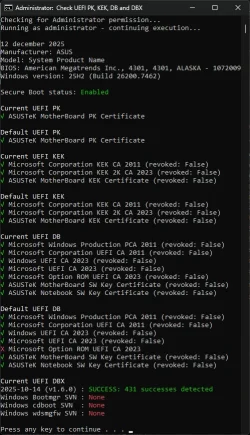
- You're secure boot certificate has been updated but not fully applied it yet. (TMP-WMI error: 1801) If you are using secure boot you may follow this guide to fix it; How to check if your Secure Boot certs are updated. (two methods)
Further I see one major problem. One of your disk shows controller errors. That's the controller on your SSD/HDD. It occurred on 11-12-2025 (yesterday) between 19:07-19:30. It has the following name; \Device\Harddisk10\DR10. Maybe it's a external SSD/HDD. It happend only once. Maybe you can remember what you did/noticed arround that time.
I also had the same TMP-WMI error some time ago. What I did was the following; To make sure that CA2023 is installed; Open a CMD box as admin; execute the following commands;
Query the status first:
reg query HKEY_LOCAL_MACHINE\SYSTEM\CurrentControlSet\Control\SecureBoot\Servicing /v UEFICA2023Status
reg query HKEY_LOCAL_MACHINE\SYSTEM\CurrentControlSet\Control\SecureBoot\Servicing /v WindowsUEFICA2023Capable
If the see the following settings; you're good. Then run the scripts I mentioned above.
UEFICA2023Status REG_SZ Updated
WindowsUEFICA2023Capable REG_DWORD 0x2
Note:
0x0 – Windows UEFI CA 2023 certificate is not in the DB (or key does not exist).
0x1 – Windows UEFI CA 2023 certificate is in the DB.
0x2 – Windows UEFI CA 2023 certificate is in the DB and the system is starting from the 2023 signed boot manager.
When Status = NotStarted and Capable = 0x0 or 0x1 your CA2023 certificate is not yet fully installed then run the following commands;
reg add HKEY_LOCAL_MACHINE\SYSTEM\CurrentControlSet\Control\SecureBoot /v AvailableUpdates /t REG_DWORD /d 0x5944 /f
schtasks /run /tn "\Microsoft\Windows\PI\Secure-Boot-Update"
Run the last line a couple of times to force that script to get that certificate from Microsoft.
Query the status again. Keep trying until you get the green status.
When that is the case execute the following command to make sure the request is: None;
reg add HKEY_LOCAL_MACHINE\SYSTEM\CurrentControlSet\Control\SecureBoot /v AvailableUpdates /t REG_DWORD /d 0x0 /f
It is maybe wise to filter your system logbook for errors; There were 8 critical improper shutdowns. But some errors (many!) that keep on occurring; NetBT an Service Control Manager. Worth investigating how to get rid of those errors.
NetBT points out that IP: interface with IP-adres 192.168.1.18 is not allowed by 192.168.1.17 (your PC?) inside WORKGROUP. Your internal network should allow 192.168.1.* (IP is coming from your modem, most of them are starting with an internal IP address; 192.168.*.*) For some reason a device with 192.168.1.17 is banned.
My Computers
-
At a glance
Win 11 Pro 25H2 Build 26200.9168, Zorin OS ProIntel® Core™ i7-12700KF 12th Gen. (S1700)32GB DDR5 5600-36 Vengeance (2x16)PCIe4.0 Asus NVIDIA RTX3060Ti- OS
- Win 11 Pro 25H2 Build 26200.9168, Zorin OS Pro
- Computer type
- PC/Desktop
- Manufacturer/Model
- Self built
- CPU
- Intel® Core™ i7-12700KF 12th Gen. (S1700)
- Motherboard
- ASUS Prime Z690-A, BIOS v4505 (Z690 Intel Chipset)
- Memory
- 32GB DDR5 5600-36 Vengeance (2x16)
- Graphics Card(s)
- PCIe4.0 Asus NVIDIA RTX3060Ti
- Sound Card
- Onboard; Realtek
- Monitor(s) Displays
- 34" LG 34UC79G-B Curved 21:9 144Hz
- Screen Resolution
- 2560x1080 (No HDR)
- Hard Drives
- 250Gb Samsung 870PRO NVMe (Win 11 Pro)
1Tb Samsung 980PRO NVMe
1Tb Samsung 970EVO NVMe
2Tb Samsung 990PRO NVMe with heatsink.
4Tb WDC WD40EZRZ Blue SATA (Int.)
4Tb WDC WD40EZRZ Blue SATA (Int.)
3Tb WDC WD30EFRZ Red SATA (Int.)
256Gb Samsung 840PRO SSD (RHEL 9,5)
256Gb Samsung 850PRO SSD (Zorin OS Pro 18)
- PSU
- Coolermaster 850W V2 Gold with internal 12cm exaust fan
- Case
- Be-Quiet Pure Base 600.
- Cooling
- 3x Be-Quiet! 12/14cm "Silent Wings 4" casefans, 1x Arctic Freezer i35 CPU towerblock with fan.
- Keyboard
- Steelseries APEX 7 keyboard.
- Mouse
- Logitech G-502 Hero
- Internet Speed
- 1Gb
- Browser
- Brave
- Antivirus
- F-Secure
- Other Info
- No Noise system.
256Gb Kingston Travler USB 3.0 drive.
64Gb Sandisk USB 3.2 drive. (Ventoy)
8Gb Philips USB 3.0 drive. (Win. Inst.)
8Gb Philips USB 3.0 drive. (Rescue disk)
2Tb WD USB 3.0 Passport drive.
USB Ext. 500Gb WD SATA drive.
External USB 3.0 C.A. CD/DVD* burner.
-
At a glance
Windows 11 Pro 25H2Intel® Core™ i7-6700K 6th Gen. (S1151)32Gb DDR4 2400 Corsair Vengeance (4x8)ASUS GeForce GTX1080- Operating System
- Windows 11 Pro 25H2
- Computer type
- PC/Desktop
- Manufacturer/Model
- Selfbuild
- CPU
- Intel® Core™ i7-6700K 6th Gen. (S1151)
- Motherboard
- ASUS Maximus VIII Ranger (Intel Chipset Z170)
- Memory
- 32Gb DDR4 2400 Corsair Vengeance (4x8)
- Graphics card(s)
- ASUS GeForce GTX1080
- Sound Card
- Onboard; Realtek
- Monitor(s) Displays
- LG IPS277L 27" WideLED, IPS
- Screen Resolution
- 1920x1080
- Hard Drives
- Samsung 850 Pro SSD
- PSU
- Zalman ZM600-HP with internal exhaust fan. Heatpipes & Modular cables.
- Case
- Cooler Master Aero
- Cooling
- Scythe Mugen 4 dual fan towerblock.
- Keyboard
- Red Dragon
- Mouse
- Red Dragon
- Internet Speed
- 1Gb
- Browser
- Chrome
- Antivirus
- F-Secure