Issues with Ethernet Disconnecting


i disabled hardware acceleration ( my new video card asked it be enabled), I don't like it again,,, tried many years ago, again, no more, not for me. That might have been the only issues I think I had. Network drops, may still remain. Hope note.
 

My Computer My Computer

At a glance

Win11i9-1390064 GBNvidia RTX 5070 TI OC
OS
Win11
Computer type
PC/Desktop
Manufacturer/Model
Asus Home built
CPU
i9-13900
Motherboard
ASUS Strix Z790-H
Memory
64 GB
Graphics Card(s)
Nvidia RTX 5070 TI OC
Monitor(s) Displays
Sony 55"
Hard Drives
SSD
PSU
850 watt EVGA
Case
Cooler Master Haf 932
Cooling
CoolerMaster
Keyboard
RedDragon
Mouse
CoolerMaster
Internet Speed
300/300
Antivirus
Defender
Other Info
VR, Virtual Reality
I found the issue with the stopping and going black,, the latest video cards have issues when using 2 display out ports at the same time.. mine is on both a display and VR. I am going to change the HDMI to display port out, so both will be DP ports out. New Nvidia 500 series are is all jacked up! it isn't the network.
 

My Computer My Computer

At a glance

Win11i9-1390064 GBNvidia RTX 5070 TI OC
OS
Win11
Computer type
PC/Desktop
Manufacturer/Model
Asus Home built
CPU
i9-13900
Motherboard
ASUS Strix Z790-H
Memory
64 GB
Graphics Card(s)
Nvidia RTX 5070 TI OC
Monitor(s) Displays
Sony 55"
Hard Drives
SSD
PSU
850 watt EVGA
Case
Cooler Master Haf 932
Cooling
CoolerMaster
Keyboard
RedDragon
Mouse
CoolerMaster
Internet Speed
300/300
Antivirus
Defender
Other Info
VR, Virtual Reality
I found the issue with the stopping and going black,, the latest video cards have issues when using 2 display out ports at the same time.. mine is on both a display and VR. I am going to change the HDMI to display port out, so both will be DP ports out. New Nvidia 500 series are is all jacked up! it isn't the network.
Not sure if the problem is limited to the new NVIDIA cards. My RX3070 seems to be affected the same way after updating the drivers. Internet speeds won't even show in task manager despite the fact that the board is getting Ethernet. I need to look into it more but I had to update my Intel drivers for Ethernet. Not sure if that helps or not.
 

My Computer My Computer

At a glance

WIN 11, WIN 10, WIN 8.1, WIN 7 U, WIN 7 PRO, ...Intel i7 6900K and i9-7960X / AMD 3800X (8 core)128 GB CORSAIR DOMINATOR PLATINUM (B DIE)NVIDIA 1070 and RTX 3070
OS
WIN 11, WIN 10, WIN 8.1, WIN 7 U, WIN 7 PRO, WIN 7 HOME (32 Bit), LINUX MINT
Computer type
PC/Desktop
Manufacturer/Model
DIY, ASUS, and DELL
CPU
Intel i7 6900K and i9-7960X / AMD 3800X (8 core)
Motherboard
ASUS X99E-WS USB 3.1 and ASUS X299 SAGE
Memory
128 GB CORSAIR DOMINATOR PLATINUM (B DIE)
Graphics Card(s)
NVIDIA 1070 and RTX 3070
Sound Card
Crystal Sound (onboard)
Monitor(s) Displays
single Samsung 30" 4K and 8" aux monitor
Screen Resolution
4K and something equally attrocious. I'll be working on this.
Hard Drives
A, B, C, D, E, F, G, H, I, J, K, L, M, N, O, P, Q, R, S, T, U, V, W

Ports X, Y, and Z are reserved for USB access and removable drives.

Drive types consist of the following: Various mechanical hard drives bearing the brand names, Seagate, Toshiba, and Western Digital. Various NVMe drives bearing the brand names Kingston, Intel, Silicon Power, Crucial, Western Digital, and Team Group. Various SATA SSDs bearing various different brand names.

RAID arrays included:

LSI RAID 10 (WD Velociraptors) 1115.72 GB
LSI RAID 10 (WD SSDS) 463.80 GB

INTEL RAID 0 (KINGSTON HYPER X) System 447.14 GB
INTEL RAID 1 TOSHIBA ENTERPRIZE class Data 2794.52 GB
INTEL RAID 1 SEAGATE HYBRID 931.51 GB
PSU
SEVERAL. I prefer my Corsair Platinum HX1000i but I also like EVGA power supplies
Case
ThermalTake Level 10 GT (among others)
Cooling
Noctua is my favorite and I use it in my main. I also own various other coolers.
Keyboard
all kinds.
Mouse
all kinds
Internet Speed
360 mbps - 1 gbps (depending)
Browser
FIREFOX
Antivirus
KASPERSKY (no apologies)
Other Info
Gave Dell touch screen with Windows 11 to daughter and got me an OTVOC. Being a PC builder I own many desktop PCs as well. I am a father of five providing PCs, laptops, and tablets for all my family, most of which I have modified, rebuilt, or simply built from scratch. I do not own a cell phone, never have, never will.
Update - Doing a factory reset on the modem has not stopped the issue. Will now be trying the switch
Is there a possibility that doing a factory reset of the modem would fix the issue?
The factory reset didn't fix the problem. Will now be trying the switch board reset.
 

My Computer My Computer

At a glance

Windows 1113th Gen Intel Core i5-13600KF, 14 Core32 GB Patriot Memory (PDP SystemsNVIDIA GeForce RTX3060
OS
Windows 11
Computer type
PC/Desktop
Manufacturer/Model
CLX
CPU
13th Gen Intel Core i5-13600KF, 14 Core
Motherboard
Micro-Star International PRO @690-P DDR4 (MS-7D36)
Memory
32 GB Patriot Memory (PDP Systems
Graphics Card(s)
NVIDIA GeForce RTX3060
Sound Card
Realtek High Definition Audio
Monitor(s) Displays
ASUS and ONN
Screen Resolution
1920x1080
Hard Drives
2x Kingston 1 TB SSD, 4 TB HDD
Browser
Opera
Antivirus
Windows Defender / Malwarebytes
You might have a faulty modem or switch
 

My Computer My Computer

At a glance

Windows 11 Home X-lite versionIntel Core i5 (3rd Gen) 3570 / 3.4 GHz32 GB of 1600 MHz non-ECC DDR3 SDRAMIntel HD Graphics 2500 Dynamic Video Memory
OS
Windows 11 Home X-lite version
Computer type
PC/Desktop
Manufacturer/Model
Dell OptiPlex 9010
CPU
Intel Core i5 (3rd Gen) 3570 / 3.4 GHz
Motherboard
Intel Q77 Express
Memory
32 GB of 1600 MHz non-ECC DDR3 SDRAM
Graphics Card(s)
Intel HD Graphics 2500 Dynamic Video Memory
Monitor(s) Displays
22" veiwsonic
You might have a faulty modem or switch
Yeah, that's basically what I've been dreading as those are the most costly things to replace (outside of a fully new computer)
 

My Computer My Computer

At a glance

Windows 1113th Gen Intel Core i5-13600KF, 14 Core32 GB Patriot Memory (PDP SystemsNVIDIA GeForce RTX3060
OS
Windows 11
Computer type
PC/Desktop
Manufacturer/Model
CLX
CPU
13th Gen Intel Core i5-13600KF, 14 Core
Motherboard
Micro-Star International PRO @690-P DDR4 (MS-7D36)
Memory
32 GB Patriot Memory (PDP Systems
Graphics Card(s)
NVIDIA GeForce RTX3060
Sound Card
Realtek High Definition Audio
Monitor(s) Displays
ASUS and ONN
Screen Resolution
1920x1080
Hard Drives
2x Kingston 1 TB SSD, 4 TB HDD
Browser
Opera
Antivirus
Windows Defender / Malwarebytes
Yeah, that's basically what I've been dreading as those are the most costly things to replace (outside of a fully new computer)
You might be able to get a deal with your ISP for a new one. :-)
 

My Computer My Computer

At a glance

WIN 11, WIN 10, WIN 8.1, WIN 7 U, WIN 7 PRO, ...Intel i7 6900K and i9-7960X / AMD 3800X (8 core)128 GB CORSAIR DOMINATOR PLATINUM (B DIE)NVIDIA 1070 and RTX 3070
OS
WIN 11, WIN 10, WIN 8.1, WIN 7 U, WIN 7 PRO, WIN 7 HOME (32 Bit), LINUX MINT
Computer type
PC/Desktop
Manufacturer/Model
DIY, ASUS, and DELL
CPU
Intel i7 6900K and i9-7960X / AMD 3800X (8 core)
Motherboard
ASUS X99E-WS USB 3.1 and ASUS X299 SAGE
Memory
128 GB CORSAIR DOMINATOR PLATINUM (B DIE)
Graphics Card(s)
NVIDIA 1070 and RTX 3070
Sound Card
Crystal Sound (onboard)
Monitor(s) Displays
single Samsung 30" 4K and 8" aux monitor
Screen Resolution
4K and something equally attrocious. I'll be working on this.
Hard Drives
A, B, C, D, E, F, G, H, I, J, K, L, M, N, O, P, Q, R, S, T, U, V, W

Ports X, Y, and Z are reserved for USB access and removable drives.

Drive types consist of the following: Various mechanical hard drives bearing the brand names, Seagate, Toshiba, and Western Digital. Various NVMe drives bearing the brand names Kingston, Intel, Silicon Power, Crucial, Western Digital, and Team Group. Various SATA SSDs bearing various different brand names.

RAID arrays included:

LSI RAID 10 (WD Velociraptors) 1115.72 GB
LSI RAID 10 (WD SSDS) 463.80 GB

INTEL RAID 0 (KINGSTON HYPER X) System 447.14 GB
INTEL RAID 1 TOSHIBA ENTERPRIZE class Data 2794.52 GB
INTEL RAID 1 SEAGATE HYBRID 931.51 GB
PSU
SEVERAL. I prefer my Corsair Platinum HX1000i but I also like EVGA power supplies
Case
ThermalTake Level 10 GT (among others)
Cooling
Noctua is my favorite and I use it in my main. I also own various other coolers.
Keyboard
all kinds.
Mouse
all kinds
Internet Speed
360 mbps - 1 gbps (depending)
Browser
FIREFOX
Antivirus
KASPERSKY (no apologies)
Other Info
Gave Dell touch screen with Windows 11 to daughter and got me an OTVOC. Being a PC builder I own many desktop PCs as well. I am a father of five providing PCs, laptops, and tablets for all my family, most of which I have modified, rebuilt, or simply built from scratch. I do not own a cell phone, never have, never will.

My Computer My Computer

At a glance

Windows 1113th Gen Intel Core i5-13600KF, 14 Core32 GB Patriot Memory (PDP SystemsNVIDIA GeForce RTX3060
OS
Windows 11
Computer type
PC/Desktop
Manufacturer/Model
CLX
CPU
13th Gen Intel Core i5-13600KF, 14 Core
Motherboard
Micro-Star International PRO @690-P DDR4 (MS-7D36)
Memory
32 GB Patriot Memory (PDP Systems
Graphics Card(s)
NVIDIA GeForce RTX3060
Sound Card
Realtek High Definition Audio
Monitor(s) Displays
ASUS and ONN
Screen Resolution
1920x1080
Hard Drives
2x Kingston 1 TB SSD, 4 TB HDD
Browser
Opera
Antivirus
Windows Defender / Malwarebytes
I have tried running the network diagnostics tests, but it can't pick up on any issues when my internet is normally plugged in, and it doesn't allow a diagnostic test when it says "the ethernet cable isn't plugged in". So the diagnostics has been severely ineffective.
I managed to solve the issue by disabling "priority and WLAN" setting in the advanced options of myRealtek PCIe GbE Family Controller.
 

My Computer My Computer

At a glance

Windows 11
OS
Windows 11
Computer type
PC/Desktop
Manufacturer/Model
Lenovo
Did you ever resolve this issue? I am having the exact same issue you described with My Laptop, desktop, and my sons PS5 which are all connected to ethernet. Wifi never drops out. I have had my ISP for 4 years and had zero issues with the mesh wifi/ethernet system that they provided. About 4 months ago the issue started out of no where on both my computers. I changed my ethernet cables and it didn't help. My ISP came out and replaced the 4 year old Plume mesh system with a brand new one. This fixed the problem for about 2 months then it started again. The ISP came out again and changed all my ethernet cables and said if it doesn't resolve to just buy my own Mesh wifi system and try that. So I bought a Deco 7 system last week and it worked fine for 1 week and then the Ethernet drop outs started again. Now I am on the phone with my ISP to ask them to come out once again to hopefully replace the modem this time because that is the only thing that hasn't been replaced.
 

My Computer My Computer

At a glance

Win 11
OS
Win 11
Computer type
PC/Desktop
Manufacturer/Model
HP
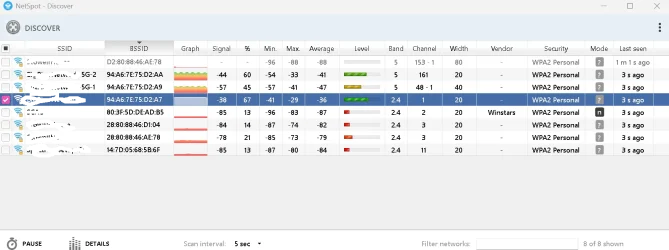
Download Netspot network monitor and checkout your network and your neighbors. What channel are you using? Anybody else using the same channel. What's your signal to noise ratio? Lower numbers are better. Depending on how you have your router configured it will pick the be Signal of st channel at that time it's rebooted. I've always owned my modem and router. I have better equipment than my internet provider offers and I do the updates.

That's my 2.4 band with signal of -38 nice that I have the best signal in the neighborhood.

1781626631835.webp
 

My Computer My Computer

At a glance

Windows 11 & Zorin ProIntel® Core™ Ultra 9 Processor 275HX 2.7 GHz32 gbNVIDIA® GeForce RTX™ 5060 Laptop GPU
OS
Windows 11 & Zorin Pro
Computer type
Laptop
Manufacturer/Model
Asus Rog Strix G16
CPU
Intel® Core™ Ultra 9 Processor 275HX 2.7 GHz
Motherboard
AsusteK Computer
Memory
32 gb
Graphics Card(s)
NVIDIA® GeForce RTX™ 5060 Laptop GPU
Sound Card
Realtek High Definition Audio
Monitor(s) Displays
Laptop 16 inch
Screen Resolution
2560 X 1600
Hard Drives
Boot: Samsung 9100 NVME 2 TB Microsoft Storage Controller: Standard NVM Express Driver: Microsoft 6/21/2006. No SATA/AHCI on my motherboard or in bios
Mouse
Pad
Browser
Google Chrome
Antivirus
Microsoft
Other Info
Printer: HP Color LaserJet MFP M477dw
i disabled hardware acceleration ( my new video card asked it be enabled), I don't like it again,,, tried many years ago, again, no more, not for me. That might have been the only issues I think I had. Network drops, may still remain. Hope note.
I have 2 Asus 790's one does it the other does not. Only fix is to put a network pci card in it. Or when browsing (only happens when browsing), pull the rj-45 connector out a hair and snap it back in, when it loses the connection. Asus basically told those of us with the issue to F-Off. The Internet is full of posts from those with the chipset with this issue. The risk of damage and issues from taking it apart is too mucH! Too many parts can get ruined.
 

My Computer My Computer

At a glance

Win11i9-1390064 GBNvidia RTX 5070 TI OC
OS
Win11
Computer type
PC/Desktop
Manufacturer/Model
Asus Home built
CPU
i9-13900
Motherboard
ASUS Strix Z790-H
Memory
64 GB
Graphics Card(s)
Nvidia RTX 5070 TI OC
Monitor(s) Displays
Sony 55"
Hard Drives
SSD
PSU
850 watt EVGA
Case
Cooler Master Haf 932
Cooling
CoolerMaster
Keyboard
RedDragon
Mouse
CoolerMaster
Internet Speed
300/300
Antivirus
Defender
Other Info
VR, Virtual Reality
We use Startech USB to Ethernet adapters on a gigabit connection and they work great.
 

My Computer My Computer

At a glance

Windows 11 25H212th Gen i9 -12900K64GBIntel UHD Graphics
OS
Windows 11 25H2
Computer type
PC/Desktop
Manufacturer/Model
Dell
CPU
12th Gen i9 -12900K
Memory
64GB
Graphics Card(s)
Intel UHD Graphics
Monitor(s) Displays
Dual Dell U2717D
Screen Resolution
2560x1440
Hard Drives
2TB Lexar SSD, 2TB Crucial SSD, 2TB Kingston SSD

Latest Support Threads

Back
Top Bottom