
Solved Issues with Windows Security Defender Antivirus


buconova

Member
Local time
12:16 AM
Posts
16
OS
Windows 11
Hello,


A few days ago, I noticed that the "Cloud-delivered protection" and "Automatic sample submission" options in Defender are greyed out, with the message "This setting is managed by your administrator" displayed in red above them. Incidentally, I *am* the administrator—please see the attached image.


I have two operating systems running Windows 11; the settings are fine on the second one, but not on my primary system, and this is bothering me. I would appreciate help on how to fix this. Resetting the Defender application itself doesn't solve the issue, nor does reinstalling the system via Windows Update. I’ve already tried a few things—including using AI—but without success. It appears to be a setting that is locked in the registry.


Please help.
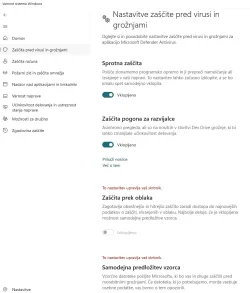
AV.webp
 
Windows Build/Version
Windows 11 28000

My Computer My Computer

At a glance

Windows 11Intel16GBFX 580 8GB
OS
Windows 11
Computer type
PC/Desktop
Manufacturer/Model
noname
CPU
Intel
Motherboard
Gigabyte
Memory
16GB
Graphics Card(s)
FX 580 8GB
Monitor(s) Displays
Samsung 32"
Screen Resolution
1080
Hard Drives
M.2 Gen4
PSU
500W
Cooling
Silent
Keyboard
Fujitsu white
Mouse
hofer/lidl
Internet Speed
1000/20
Browser
Chrome
Antivirus
Windows
Other Info
I am single ;)
Are you encountering the "Some settings are managed by your organization" message on your Windows device? This video provides a detailed walk-through to help you fix this common issue.


My Computer My Computer

At a glance

Windows 11AMD Ryzen 7 5700GMicron Technology DDR4-3200 16GBNVIDIA GeForce RTX 3060
OS
Windows 11
Computer type
PC/Desktop
Manufacturer/Model
HP Pavilion
CPU
AMD Ryzen 7 5700G
Motherboard
Erica6
Memory
Micron Technology DDR4-3200 16GB
Graphics Card(s)
NVIDIA GeForce RTX 3060
Sound Card
Realtek ALC671
Monitor(s) Displays
Samsung SyncMaster U28E590
Screen Resolution
3840 x 2160
Hard Drives
SAMSUNG MZVLQ1T0HALB-000H1
Thanks for the reply, but this script does not resolve the issue. Please advise on further steps and provide assistance.

Correction

This script does solve the problem, but only until the computer is restarted. I infer from this that something changes upon reboot—so, how can I find out what changes and how, and then remove or modify it?
 
Last edited:

My Computer My Computer

At a glance

Windows 11Intel16GBFX 580 8GB
OS
Windows 11
Computer type
PC/Desktop
Manufacturer/Model
noname
CPU
Intel
Motherboard
Gigabyte
Memory
16GB
Graphics Card(s)
FX 580 8GB
Monitor(s) Displays
Samsung 32"
Screen Resolution
1080
Hard Drives
M.2 Gen4
PSU
500W
Cooling
Silent
Keyboard
Fujitsu white
Mouse
hofer/lidl
Internet Speed
1000/20
Browser
Chrome
Antivirus
Windows
Other Info
I am single ;)
Did you run the script?

Run the following command from the admin command prompt.

Code:
gpresult /h %USERPROFILE%\Desktop\gpreport.html

Double-click gpreport.html from your desktop to open it with a web browser and check which policies set to your computer.
 

My Computer My Computer

At a glance

Windows 11AMD Ryzen 7 5700GMicron Technology DDR4-3200 16GBNVIDIA GeForce RTX 3060
OS
Windows 11
Computer type
PC/Desktop
Manufacturer/Model
HP Pavilion
CPU
AMD Ryzen 7 5700G
Motherboard
Erica6
Memory
Micron Technology DDR4-3200 16GB
Graphics Card(s)
NVIDIA GeForce RTX 3060
Sound Card
Realtek ALC671
Monitor(s) Displays
Samsung SyncMaster U28E590
Screen Resolution
3840 x 2160
Hard Drives
SAMSUNG MZVLQ1T0HALB-000H1
There are no policies set. It says N/A everywhere under 'Applied Group Policy Objects'.
 

My Computer My Computer

At a glance

Windows 11Intel16GBFX 580 8GB
OS
Windows 11
Computer type
PC/Desktop
Manufacturer/Model
noname
CPU
Intel
Motherboard
Gigabyte
Memory
16GB
Graphics Card(s)
FX 580 8GB
Monitor(s) Displays
Samsung 32"
Screen Resolution
1080
Hard Drives
M.2 Gen4
PSU
500W
Cooling
Silent
Keyboard
Fujitsu white
Mouse
hofer/lidl
Internet Speed
1000/20
Browser
Chrome
Antivirus
Windows
Other Info
I am single ;)
If your computer is personal (not work or school), this happens for two reasons: either you used optimization utilities to disable telemetry, or it is the result of hidden malware (viruses) that specifically disables cloud protection functions to avoid detection.
Run PowerShell as an Administrator.
Code:
reg delete "HKLM\SOFTWARE\Policies\Microsoft\Windows Defender" /f; Set-MpPreference -UILockdown 0
(After completion, a message indicating successful completion should appear.)
Restart the computer.
 

My Computer My Computer

At a glance

Windows 11 Insider Experimental (26H2)Intel Core i5-1140032Gb (DDR4 SDRAM)Intel(R) UHD Graphics 730
OS
Windows 11 Insider Experimental (26H2)
Computer type
PC/Desktop
Manufacturer/Model
Gigabyte Technology Co., Ltd.
CPU
Intel Core i5-11400
Motherboard
Z590 AORUS PRO AX
Memory
32Gb (DDR4 SDRAM)
Graphics Card(s)
Intel(R) UHD Graphics 730
Sound Card
Realtek USB Audio
Monitor(s) Displays
LG 27US500-W 4K UHD UltraFine™
Screen Resolution
3840x2160
Hard Drives
Samsung SSD 980 PRO 1TB
WDC WD7501AALS
PSU
Montech CENTURY, 650W, 80+ Gold
Case
Cougar Airface ECO RGB
Cooling
ID-COOLING SE-224-XTS BLACK
Keyboard
Microsoft SideWinder X6 Keyboard
Mouse
Microsoft SideWinder Mouse
Internet Speed
Internet speed of 1 Gbit/s
Browser
Vivaldi browser
Antivirus
Windows Defender
PS C:\Windows\system32> reg delete "HKLM\SOFTWARE\Policies\Microsoft\Windows Defender" /f; Set-MpPreference -UILockdown 0
ERROR: Access is denied.
PS C:\Windows\system32>

So yes, it was a virus—or rather, a remnant of one; my passwords were stolen several months ago, causing some damage. At the time, Google warned me that my passwords had been compromised and advised me to change them. I lost €80 at a local lottery site, where the culprit used my money to buy instant-win tickets, and they also activated an extra paid package costing €7 on my ISP account; however, they couldn't do anything on accounts where I had 2FA enabled. Since this happened months ago, traces of the virus likely remain in the registry or system, locking my Defender settings upon reboot. I need to track down the culprit responsible for the locking and registry modifications; so far, I’ve discovered several unauthorized exclusions added to Defender, including TEMP, PowerShell.exe, and the entire C:\ drive. ;)

Thanks everyone—any smart advice or insights regarding these symptoms would be appreciated. Thanks.
 

My Computer My Computer

At a glance

Windows 11Intel16GBFX 580 8GB
OS
Windows 11
Computer type
PC/Desktop
Manufacturer/Model
noname
CPU
Intel
Motherboard
Gigabyte
Memory
16GB
Graphics Card(s)
FX 580 8GB
Monitor(s) Displays
Samsung 32"
Screen Resolution
1080
Hard Drives
M.2 Gen4
PSU
500W
Cooling
Silent
Keyboard
Fujitsu white
Mouse
hofer/lidl
Internet Speed
1000/20
Browser
Chrome
Antivirus
Windows
Other Info
I am single ;)
If one's windows is compromised and one KNOWS he is compromised, I would do no less than an immediate clean install of windows. JMO.
You have no way of knowing how much damage has been done, how much of your information hackers have obtained, or what malware is lurking in your files that might be triggered again. I would also change passwords for all sites that involve my financial data in any way. Banks, credit cards, Paypal, Amazon, any place that has payment info stored.
Did you give someone remote access to your device?
 

My Computers My Computers

  • At a glance

    Windows 11 Pro 25H2 26200.9457i9-10900 10 core 20 threads32 gbnone-Intel UHD Graphics 630
    OS
    Windows 11 Pro 25H2 26200.9457
    Computer type
    PC/Desktop
    Manufacturer/Model
    Dell Optiplex 7080
    CPU
    i9-10900 10 core 20 threads
    Motherboard
    DELL 0J37VM
    Memory
    32 gb
    Graphics Card(s)
    none-Intel UHD Graphics 630
    Sound Card
    Integrated Realtek
    Monitor(s) Displays
    Benq 27
    Screen Resolution
    2560x1440
    Hard Drives
    2x1tb Solidigm m.2 nvme /External drives 512gb Samsung m.2 sata+2tb Kingston m2.nvme
    PSU
    500w
    Case
    MT
    Cooling
    Dell Premium
    Keyboard
    Logitech wired
    Mouse
    Logitech wireless
    Internet Speed
    so slow I'm too embarrassed to tell
    Browser
    #1 Edge #2 Firefox
    Antivirus
    Defender+MWB Premium
  • At a glance

    Windows 11 Pro 24H2 26200.9457AMD Ryzen 7 6800U32 gbintegrated
    Operating System
    Windows 11 Pro 24H2 26200.9457
    Computer type
    PC/Desktop
    Manufacturer/Model
    Beelink Mini PC SER5
    CPU
    AMD Ryzen 7 6800U
    Memory
    32 gb
    Graphics card(s)
    integrated
    Sound Card
    integrated
    Monitor(s) Displays
    Benq 27
    Screen Resolution
    2560x1440
    Hard Drives
    1TB Crucial nvme
    Keyboard
    Logitech wired
    Mouse
    Logitech wireless
    Internet Speed
    still too embarrassed to tell
    Browser
    Firefox
    Antivirus
    Defender
  • System 3 is non compliant Dell 9020 i7-4770/24gb ram Win11 PRO 26200.9457
Yes, after a reboot, the entry—which had been successfully deleted from the registry—reappears.

So, we are looking for the culprit that writes it back upon reboot.


A clean install is pretty much out of the question; after all, months have passed since the infection, and nothing was detected during that time—except for this current issue with the registry or Defender. I might consider a clean install eventually, but not right now. Thanks.
 

My Computer My Computer

At a glance

Windows 11Intel16GBFX 580 8GB
OS
Windows 11
Computer type
PC/Desktop
Manufacturer/Model
noname
CPU
Intel
Motherboard
Gigabyte
Memory
16GB
Graphics Card(s)
FX 580 8GB
Monitor(s) Displays
Samsung 32"
Screen Resolution
1080
Hard Drives
M.2 Gen4
PSU
500W
Cooling
Silent
Keyboard
Fujitsu white
Mouse
hofer/lidl
Internet Speed
1000/20
Browser
Chrome
Antivirus
Windows
Other Info
I am single ;)
@buconova Press Win + R, type gpedit.msc and press Enter
1. Go to: Computer Configuration → Administrative Templates → Windows Components → Microsoft Defender Antivirus → MAPS
2. On the right, you'll see policy settings. Note:
Join Microsoft MAPS (this is Cloud Protection)
Submit sample files if further analysis is required
3. Double-click on each of these parameters, change their state to Not Configured and click OK.
4. Restart your computer or refresh the policies by opening a command prompt and entering gpupdate /force.
 

My Computer My Computer

At a glance

Windows 11 Insider Experimental (26H2)Intel Core i5-1140032Gb (DDR4 SDRAM)Intel(R) UHD Graphics 730
OS
Windows 11 Insider Experimental (26H2)
Computer type
PC/Desktop
Manufacturer/Model
Gigabyte Technology Co., Ltd.
CPU
Intel Core i5-11400
Motherboard
Z590 AORUS PRO AX
Memory
32Gb (DDR4 SDRAM)
Graphics Card(s)
Intel(R) UHD Graphics 730
Sound Card
Realtek USB Audio
Monitor(s) Displays
LG 27US500-W 4K UHD UltraFine™
Screen Resolution
3840x2160
Hard Drives
Samsung SSD 980 PRO 1TB
WDC WD7501AALS
PSU
Montech CENTURY, 650W, 80+ Gold
Case
Cougar Airface ECO RGB
Cooling
ID-COOLING SE-224-XTS BLACK
Keyboard
Microsoft SideWinder X6 Keyboard
Mouse
Microsoft SideWinder Mouse
Internet Speed
Internet speed of 1 Gbit/s
Browser
Vivaldi browser
Antivirus
Windows Defender
A clean install is pretty much out of the question;
Your choice. You asked for opinions and I gave mine.
You didn't answer my question. Did you give someone remote access to your computer?
 

My Computers My Computers

  • At a glance

    Windows 11 Pro 25H2 26200.9457i9-10900 10 core 20 threads32 gbnone-Intel UHD Graphics 630
    OS
    Windows 11 Pro 25H2 26200.9457
    Computer type
    PC/Desktop
    Manufacturer/Model
    Dell Optiplex 7080
    CPU
    i9-10900 10 core 20 threads
    Motherboard
    DELL 0J37VM
    Memory
    32 gb
    Graphics Card(s)
    none-Intel UHD Graphics 630
    Sound Card
    Integrated Realtek
    Monitor(s) Displays
    Benq 27
    Screen Resolution
    2560x1440
    Hard Drives
    2x1tb Solidigm m.2 nvme /External drives 512gb Samsung m.2 sata+2tb Kingston m2.nvme
    PSU
    500w
    Case
    MT
    Cooling
    Dell Premium
    Keyboard
    Logitech wired
    Mouse
    Logitech wireless
    Internet Speed
    so slow I'm too embarrassed to tell
    Browser
    #1 Edge #2 Firefox
    Antivirus
    Defender+MWB Premium
  • At a glance

    Windows 11 Pro 24H2 26200.9457AMD Ryzen 7 6800U32 gbintegrated
    Operating System
    Windows 11 Pro 24H2 26200.9457
    Computer type
    PC/Desktop
    Manufacturer/Model
    Beelink Mini PC SER5
    CPU
    AMD Ryzen 7 6800U
    Memory
    32 gb
    Graphics card(s)
    integrated
    Sound Card
    integrated
    Monitor(s) Displays
    Benq 27
    Screen Resolution
    2560x1440
    Hard Drives
    1TB Crucial nvme
    Keyboard
    Logitech wired
    Mouse
    Logitech wireless
    Internet Speed
    still too embarrassed to tell
    Browser
    Firefox
    Antivirus
    Defender
  • System 3 is non compliant Dell 9020 i7-4770/24gb ram Win11 PRO 26200.9457
Your choice. You asked for opinions and I gave mine.
You didn't answer my question. Did you give someone remote access to your computer?
Yeah, thanks for the input. If I wanted to solve this with a clean install, I would have done so without asking for advice ;) As for remote access—no, I didn't; I probably picked up a Trojan or whatever from some file I downloaded from the internet ;)
 

My Computer My Computer

At a glance

Windows 11Intel16GBFX 580 8GB
OS
Windows 11
Computer type
PC/Desktop
Manufacturer/Model
noname
CPU
Intel
Motherboard
Gigabyte
Memory
16GB
Graphics Card(s)
FX 580 8GB
Monitor(s) Displays
Samsung 32"
Screen Resolution
1080
Hard Drives
M.2 Gen4
PSU
500W
Cooling
Silent
Keyboard
Fujitsu white
Mouse
hofer/lidl
Internet Speed
1000/20
Browser
Chrome
Antivirus
Windows
Other Info
I am single ;)
You could try an offline scan.
 

My Computers My Computers

  • At a glance

    Win 11 ProAMD Ryzen™ 7 7730U24GB Dual-Channel DDR4 @ 1596MHz (22-22-22-52)512MB ATI AMD Radeon Graphics (ASUStek Comput...
    OS
    Win 11 Pro
    Computer type
    Laptop
    Manufacturer/Model
    ASUS Vivobook
    CPU
    AMD Ryzen™ 7 7730U
    Motherboard
    M1605YA
    Memory
    24GB Dual-Channel DDR4 @ 1596MHz (22-22-22-52)
    Graphics Card(s)
    512MB ATI AMD Radeon Graphics (ASUStek Computer Inc)
    Monitor(s) Displays
    Generic PnP Monitor (1920x1200@60Hz) - P1 PLUS (1920x1080@59Hz)
    Screen Resolution
    1920 X 1200
    Hard Drives
    953GB Western Digital WD
    PSU
    45 Watts
    Mouse
    Lenovo Bluetooth.
    Internet Speed
    500 Mbps
    Browser
    Edge
    Antivirus
    Defender
  • At a glance

    Windows 11AMD Ryzen 7 5800H / 3.2 GHz32 GB DDR4 SDRAM 3200 MHzNVIDIA GeForce RTX 3060 6 GB GDDR6 SDRAM
    Operating System
    Windows 11
    Computer type
    Laptop
    Manufacturer/Model
    ACER NITRO
    CPU
    AMD Ryzen 7 5800H / 3.2 GHz
    Motherboard
    CZ Scala_CAS (FP6)
    Memory
    32 GB DDR4 SDRAM 3200 MHz
    Graphics card(s)
    NVIDIA GeForce RTX 3060 6 GB GDDR6 SDRAM
    Sound Card
    Realtek Audio. NVIDIA High Definition Audio
    Monitor(s) Displays
    15.6" LED backlight 1920 x 1080 (Full HD) 144 Hz
    Screen Resolution
    1920 x 1080 (Full HD)
    Hard Drives
    Samsung 970 Evo Plus 2TB NVMe M.2
    PSU
    180 Watt, 19.5 V
    Mouse
    Lenovo Bluetooth
    Internet Speed
    500 Mbps
    Browser
    Edge
    Antivirus
    Defender
Using Google's AI, we identified what caused the infection, when and how it happened, and what changes were made to the registry to blind Defender; that issue is now resolved. Since no damage was detected between the infection date (June 17) and today, there may not have actually been any. A thorough analysis of the dates revealed that the password theft I mentioned earlier occurred back in January and was unrelated to this incident. So... mission accomplished—and hopefully successfully. On the day of the infection, Defender did flag a program I’d downloaded from GitHub—ScreenToGIF—but apparently from a profile that included a small snippet of JavaScript. While the script itself wasn't dangerous, it linked to Node.exe and two other files: one with an unusually long name and no extension in System32, and another named "KernelSetupUpdate." Everything was connected via a Bulgarian website. However, I had a scan exclusion set in Defender for the entire C: drive the whole time—though I do usually keep most suspicious programs on the D: or E: drives. A cunning virus—or rather, malware, I suppose ;) Consider this matter RESOLVED ;) Thanks and best regards.
 

My Computer My Computer

At a glance

Windows 11Intel16GBFX 580 8GB
OS
Windows 11
Computer type
PC/Desktop
Manufacturer/Model
noname
CPU
Intel
Motherboard
Gigabyte
Memory
16GB
Graphics Card(s)
FX 580 8GB
Monitor(s) Displays
Samsung 32"
Screen Resolution
1080
Hard Drives
M.2 Gen4
PSU
500W
Cooling
Silent
Keyboard
Fujitsu white
Mouse
hofer/lidl
Internet Speed
1000/20
Browser
Chrome
Antivirus
Windows
Other Info
I am single ;)
Back
Top Bottom




