UPDATE 9/29:
 www.elevenforum.com
Important: Secure Boot certificates used by most Windows devices are set to expire starting in June 2026. This might affect the ability of certain personal and business devices to boot securely if not updated in time. To avoid disruption, we recommend reviewing the guidance and taking action to update certificates in advance. For details and preparation steps, see Windows Secure Boot certificate expiration and CA updates.
 www.elevenforum.com
To learn more about Windows update terminology, see types of Windows updates and monthly quality update types. For an overview, see the update history page for Windows 11, version 24H2.
Stay informed! Follow @WindowsUpdate for the latest updates from the Windows Release Health Dashboard.
Windows Updates do not include updates for Microsoft Store apps.
If you're an enterprise user, see Microsoft Store apps - Configuration Manager.
If you're a consumer user, see Get updates for apps and games in Microsoft Store.
For more information about security vulnerabilities, see the Security Update Guide website and the September 2025 Security Updates.
Symptoms
We are aware of an edge case affecting hotpatched devices that have installed the September 2025 Hotpatch update (KB5065474) or the September 2025 security update (KB5065426). These devices might experience failures with PowerShell Direct (PSDirect) connections when the host and guest virtual machines (VMs) are both not fully updated.
When a patched guest VM attempts to connect to an unpatched host (or vice versa), the system is expected to fall back to a legacy handshake and clean up the socket gracefully. However, this fallback mechanism fails intermittently, resulting in socket cleanup issues. The connection failure might appear random, and users might observe Event ID 4625 logged in the Security Event log within Windows Event Viewer.
Workaround:
This issue is addressed in KB5066360. If your hotpatched device is experiencing issues with PSDirect connection, we recommend updating both the host and guest VM with these updates.
Symptoms
After installing this Windows update released on or after September 9, 2025, you might fail to connect to shared files and folders using the Server Message Block (SMB) v1 protocol on NetBIOS over TCP/IP (NetBT). This issue can occur if either the SMB client or the SMB server has the September 2025 security update installed.
Note: The SMBv1 protocol is deprecated and no longer installed by default in modern versions of Windows and Windows Server. Deployments that use newer versions of the protocol, SMBv2 or SMBv3, are not affected by this problem.
Workaround
This issue is addressed in KB5065789.
Symptoms
Some Digital TV and Blu-ray/DVD apps might not play protected content as expected after installing the August 29, 2025, Windows non-security preview update (KB5064081), or later updates.
Apps that use Enhanced Video Renderer with HDCP enforcement or Digital Rights Management (DRM) for digital audio might show copyright protection errors, frequent playback interruptions, unexpected stops, or black screens.
Streaming services are not affected.
Workaround
The non-security September 2025 Windows preview update (KB5065789) and later updates address problems affecting certain applications that use the Enhanced Video Renderer (EVR) with HDCP (High-bandwidth Digital Content Protection) enforcement. The non-security October Windows preview update (KB5067036) includes additional improvements to address problems affecting applications using Digital Rights Media (DRM) for digital audio.
Symptoms
After installing the August 2025 non-security preview update (KB5064081) or later updates, you might notice that the password icon is not visible in the sign-in options on the lock screen. If you hover over the space where the icon should appear, you’ll see that the password button is still available. Select this placeholder to open the password text box and enter your password. After entering your password, you can sign in normally.
Workaround
Microsoft is working to resolve this issue and will provide information when it’s available.
Microsoft combines the latest servicing stack update (SSU) for your operating system with the latest cumulative update (LCU). For general information about SSUs, see Servicing stack updates and Servicing Stack Updates (SSU): Frequently Asked Questions.
Install this update
To install this update, use one of the following Windows and Microsoft release channels.
1 This latest cumulative update includes updates for AI components. Even though the AI component updates are included in the update, the AI components are only applicable to Windows Copilot+ PCs and will not install on Windows PC or Windows Server.
If you want to remove the LCU
To remove the LCU after installing the combined SSU and LCU package, use the DISM/Remove-Package command line option with the LCU package name as the argument. You can find the package name by using this command: DISM /online /get-packages.
Running Windows Update Standalone Installer (wusa.exe) with the /uninstall switch on the combined package will not work because the combined package contains the SSU. You cannot remove the SSU from the system after installation.
File information
For a list of the files provided in this update, download the file information for cumulative update 5065426.
For a list of the files provided in the servicing stack update, download the file information for the SSU (KB5064531) - version 26100.5074.
 support.microsoft.com
Check Windows Updates
ISO from Microsoft:
 www.elevenforum.com
UUP Dump:
64-bit ISO download:

ARM64 ISO download:
 www.elevenforum.com
KB5065789 Windows 11 Cumulative Update Preview build 26100.6725 (24H2) and 26200.6725 (25H2) - Sep. 29
UPDATE 10/14: https://www.elevenforum.com/t/kb5066835-windows-11-cumulative-update-build-26100-6899-24h2-and-26200-6899-25h2-oct-14.40890/ Microsoft Support: September 29, 2025—KB5065789 (OS Builds 26200.6725 and 26100.6725) Preview Windows Secure Boot certificate expiration Important: Secure...
www.elevenforum.com
Microsoft Support:
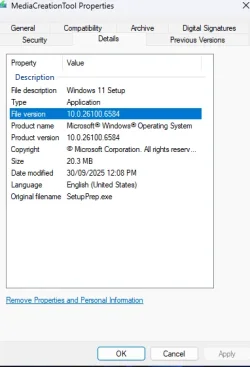
September 9, 2025 - KB5065426 (OS Build 26100.6584)
Windows Secure Boot certificate expirationImportant: Secure Boot certificates used by most Windows devices are set to expire starting in June 2026. This might affect the ability of certain personal and business devices to boot securely if not updated in time. To avoid disruption, we recommend reviewing the guidance and taking action to update certificates in advance. For details and preparation steps, see Windows Secure Boot certificate expiration and CA updates.
Updating Microsoft Secure Boot keys before expiration in June 2026
https://support.microsoft.com/en-us/topic/if-you-re-prevented-from-updating-secure-boot-certificates-e01cc486-8721-457f-9bc7-5cb801c1759e UPDATE 4/02: https://support.microsoft.com/en-us/topic/secure-boot-certificate-update-status-in-the-windows-security-app-5ce39986-7dd2-4852-8c21-ef30dd04f046...
www.elevenforum.com
To learn more about Windows update terminology, see types of Windows updates and monthly quality update types. For an overview, see the update history page for Windows 11, version 24H2.
Stay informed! Follow @WindowsUpdate for the latest updates from the Windows Release Health Dashboard.
Windows Updates do not include updates for Microsoft Store apps.
If you're an enterprise user, see Microsoft Store apps - Configuration Manager.
If you're a consumer user, see Get updates for apps and games in Microsoft Store.
Change log
| Change date | Change description |
|---|---|
| September 24, 2025 | Update: The fix is included in the September 2025 Security Update (KB5065426). [Kernel] Fixed: This update addresses an issue that could cause an unexpected system state on some platforms due to an incorrect interrupt state. |
Highlights
- This update addresses security issues for your Windows operating system.
Improvements
This security update contains fixes and quality improvements from KB5064081 (released August 29, 2025). The following summary outlines key issues addressed by this update. Also, included are available new features. The bold text within the brackets indicates the item or area of the change.- [App compatibility (known issue)] Fixed: Addresses an issue that caused non-admin users to receive unexpected User Account Control (UAC) prompts when MSI installers perform certain custom actions. These actions might include configuration or repair operations in the foreground or background, during the initial installation of an application.
This issue could prevent non-admin users from running apps that perform MSI repairs, including Office Professional Plus 2010 and multiple applications from Autodesk (including AutoCAD). This fix reduces the scope for requiring UAC prompts for MSI repairs and enables IT admins to disable UAC prompts for specific apps by adding them to an allowlist.
For more information, see Unexpected UAC prompts when running MSI repair operations after installing the August 2025 Windows security update. - [File server] This update enabled auditing SMB client compatibility for SMB Server signing as well as SMB Server EPA. This allows customers to assess their environment and identify any potential device or software incompatibility issues before deploying the hardening measures that are already supported by SMB Server. For detailed guidance, see CVE-2025-55234.
- [Input]
- Fixed: This update addresses an issue that caused certain apps to stop responding input in some input method scenarios.
- Fixed: This update addresses an issue that caused some Internet Information Services (IIS) modules to disappear from IIS Manager, preventing users from configuring IIS using the IIS Manager interface.
- [Kernel] Fixed: This update addresses an issue that could cause an unexpected system state on some platforms due to an incorrect interrupt state.
- [Networking (known issue)] Fixed: This update addresses an issue that affects audio in apps using the Network Device Interface (NDI). Audio stutters when Display Capture is on in OBS Studio Application. This can occur after installing KB5063878.
For more information about security vulnerabilities, see the Security Update Guide website and the September 2025 Security Updates.
AI Components
This release updates the following AI components:| AI Component | Version |
|---|---|
| Image Search | 1.2508.906.0 |
| Content Extraction | 1.2508.906.0 |
| Semantic Analysis | 1.2508.906.0 |
| Settings Model | 1.2508.906.0 |
Windows 11 servicing stack update (KB5064531)- 26100.5074
This update makes quality improvements to the servicing stack, which is the component that installs Windows updates. Servicing stack updates (SSU) ensure that you have a robust and reliable servicing stack so that your devices can receive and install Microsoft updates. To learn more about SSUs, see Simplifying on-premises deployment of servicing stack updates.Known issues in this update
1 PSDirect connections failing in hotpatched devices
Symptoms
We are aware of an edge case affecting hotpatched devices that have installed the September 2025 Hotpatch update (KB5065474) or the September 2025 security update (KB5065426). These devices might experience failures with PowerShell Direct (PSDirect) connections when the host and guest virtual machines (VMs) are both not fully updated.
When a patched guest VM attempts to connect to an unpatched host (or vice versa), the system is expected to fall back to a legacy handshake and clean up the socket gracefully. However, this fallback mechanism fails intermittently, resulting in socket cleanup issues. The connection failure might appear random, and users might observe Event ID 4625 logged in the Security Event log within Windows Event Viewer.
Workaround:
This issue is addressed in KB5066360. If your hotpatched device is experiencing issues with PSDirect connection, we recommend updating both the host and guest VM with these updates.
2 SMBv1 protocol connectivity
Symptoms
After installing this Windows update released on or after September 9, 2025, you might fail to connect to shared files and folders using the Server Message Block (SMB) v1 protocol on NetBIOS over TCP/IP (NetBT). This issue can occur if either the SMB client or the SMB server has the September 2025 security update installed.
Note: The SMBv1 protocol is deprecated and no longer installed by default in modern versions of Windows and Windows Server. Deployments that use newer versions of the protocol, SMBv2 or SMBv3, are not affected by this problem.
Workaround
This issue is addressed in KB5065789.
3 Problems playing protected content in some BluRay/DVD/Digital TV apps
Symptoms
Some Digital TV and Blu-ray/DVD apps might not play protected content as expected after installing the August 29, 2025, Windows non-security preview update (KB5064081), or later updates.
Apps that use Enhanced Video Renderer with HDCP enforcement or Digital Rights Management (DRM) for digital audio might show copyright protection errors, frequent playback interruptions, unexpected stops, or black screens.
Streaming services are not affected.
Workaround
The non-security September 2025 Windows preview update (KB5065789) and later updates address problems affecting certain applications that use the Enhanced Video Renderer (EVR) with HDCP (High-bandwidth Digital Content Protection) enforcement. The non-security October Windows preview update (KB5067036) includes additional improvements to address problems affecting applications using Digital Rights Media (DRM) for digital audio.
4 Password icon might be missing or invisible in the lock screen sign-in options
Symptoms
After installing the August 2025 non-security preview update (KB5064081) or later updates, you might notice that the password icon is not visible in the sign-in options on the lock screen. If you hover over the space where the icon should appear, you’ll see that the password button is still available. Select this placeholder to open the password text box and enter your password. After entering your password, you can sign in normally.
Workaround
Microsoft is working to resolve this issue and will provide information when it’s available.
How to get this update
Before you install this updateMicrosoft combines the latest servicing stack update (SSU) for your operating system with the latest cumulative update (LCU). For general information about SSUs, see Servicing stack updates and Servicing Stack Updates (SSU): Frequently Asked Questions.
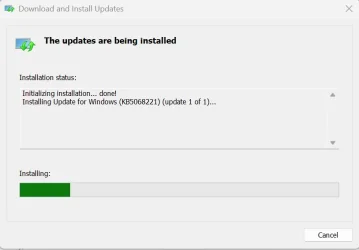
Install this update
To install this update, use one of the following Windows and Microsoft release channels.
| Available | Next Step |
|---|---|

| This update downloads and installs automatically from Windows Update and Microsoft Update. |
| Yes 1 | Before you install this update To get the standalone package(s) for this update, go to the Microsoft Update Catalog website. This KB contains one or more MSU files that require installation in a specific order. Install this update Method 1: Install all MSU files together Download all MSU files for KB5065426 from Microsoft Update Catalog and place them in the same folder (for example, C:/Packages). Use Deployment Image Servicing and Management (DISM.exe) to install the target update. DISM will use the folder specified in PackagePath to discover and install one or more prerequisite MSU files as needed. Updating Windows PC To apply this update to a running Windows PC, run the following command from an elevated Command Prompt: DISM /Online /Add-Package /PackagePath:c:\packages\Windows11.0-KB5065426-x64.msuOr, run the following command from an elevated Windows PowerShell prompt: Add-WindowsPackage -Online -PackagePath "c:\packages\Windows11.0-KB5065426-x64.msu"Or use Windows Update Standalone Installer to install the target update. Updating Windows Installation media To apply this update to Windows Installation media, see Update Windows installation media with Dynamic Update. Note: When downloading other Dynamic Update packages, ensure they match the same month as this KB. If the SafeOS Dynamic Update or Setup Dynamic Update is not available for the same month as this KB, use the most recently published version of each. To add this update to a mounted image, run the following command from an elevated Command Prompt: DISM /Image:mountdir /Add-Package /PackagePath:Windows11.0-KB5065426-x64.msuOr, run the following command from an elevated Windows PowerShell prompt: Add-WindowsPackage -Path "c:\offline" -PackagePath "Windows11.0-KB5065426-x64.msu" -PreventPendingMethod 2: Install each MSU file individually, in order Download and install each MSU file individually either using DISM or Windows Update Standalone Installer in the following order:
|
If you want to remove the LCU
To remove the LCU after installing the combined SSU and LCU package, use the DISM/Remove-Package command line option with the LCU package name as the argument. You can find the package name by using this command: DISM /online /get-packages.
Running Windows Update Standalone Installer (wusa.exe) with the /uninstall switch on the combined package will not work because the combined package contains the SSU. You cannot remove the SSU from the system after installation.
File information
For a list of the files provided in this update, download the file information for cumulative update 5065426.
For a list of the files provided in the servicing stack update, download the file information for the SSU (KB5064531) - version 26100.5074.
Source:
September 9, 2025—KB5065426 (OS Build 26100.6584) | Microsoft Support
September 9, 2025—KB5065426 (OS Build 26100.6584)
support.microsoft.com
Check Windows Updates
ISO from Microsoft:
Download Official Windows 11 ISO file from Microsoft
This tutorial will show you how to download an official Windows Server or Windows 11 64-bit or ARM64 ISO file from Microsoft. Microsoft provides ISO files for Windows Server and Windows 11 to download. You can use these ISO files to clean install or in-place upgrade Windows 11. The Flight Hub...
www.elevenforum.com
UUP Dump:
64-bit ISO download:
Select language for Windows 11, version 24H2 (26100.6584) amd64
Select language for Windows 11, version 24H2 (26100.6584) amd64 on UUP dump. UUP dump lets you download Unified Update Platform files, like Windows Insider updates, directly from Windows Update.
uupdump.net
ARM64 ISO download:
Select language for Windows 11, version 24H2 (26100.6584) arm64
Select language for Windows 11, version 24H2 (26100.6584) arm64 on UUP dump. UUP dump lets you download Unified Update Platform files, like Windows Insider updates, directly from Windows Update.
uupdump.net
UUP Dump - Download Windows Insider ISO
UUP Dump is the most practical and easy way to get ISO images of any Insider Windows 10 or Windows 11 version, as soon as Microsoft has released a new build. UUP Dump creates a download configuration file according to your choices, downloads necessary files directly from Microsoft servers, and...
www.elevenforum.com
Last edited: