Win Update KB5079473 Windows 11 Cumulative Update build 26100.8037 (24H2) and 26200.8037 (25H2) - March 10


UPDATE 3/21:


 Microsoft Support:

March 10, 2026 - KB5079473 (OS Builds 26200.8037 and 26100.8037)​

This cumulative update for Windows 11, version 25H2 and 24H2 (KB5079473), includes the latest security fixes and improvements, along with non-security updates from last month’s optional preview release. To learn more about differences between security updates, optional non-security preview updates, out-of-band (OOB) updates, and continuous innovation, see Windows monthly updates explained. For information on Windows update terminology, see the different types of Windows software updates.

To view the latest updates about this release, visit the Windows release health dashboard or the update history page for Windows 11, version 25H2 and 24H2.


Announcements and messages

This section provides key notifications related to this release, including announcements, change logs, and end-of-support notices.

Windows Secure Boot certificate expiration​

Important: Secure Boot certificates used by most Windows devices are set to expire starting in June 2026. This might affect the ability of certain personal and business devices to boot securely if not updated in time. To avoid disruption, we recommend reviewing the guidance and taking action to update certificates in advance. For details and preparation steps, see Windows Secure Boot certificate expiration and CA updates.


Change log​

Change dateChange description
March 19, 2026Known issue added: "Signing in with a Microsoft account might fail for Microsoft Teams Free and other apps"
March 10, 2026This update does not include any changes.

Improvements

This security update contains fixes and quality improvements from KB5077181 (released February 10, 2026). The following summary outlines key issues addressed by this update. Also, included are available new features. The bold text within the brackets indicates the item or area of the change.
  • [Secure Boot] With this update, Windows quality updates include additional high confidence device targeting data, increasing coverage of devices eligible to automatically receive new Secure Boot certificates. Devices receive the new certificates only after demonstrating sufficient successful update signals, maintaining a controlled and phased rollout.
  • [File Explorer] Improved: This update improves File Explorer search reliability when searching across multiple drives or "This PC".
  • [Windows Defender Application Control] Improved: This update improves how Windows Defender Application Control (WDAC) handles COM objects allowlisting policies. COM objects were blocked when the endpoint security policy was set higher than the allowlisting policy. With this update, COM objects are allowed as expected.
  • [Windows System Image Manager] Improved: This update improves the reliability of choosing trusted catalog files. It adds a warning dialog that helps you confirm that the file you select comes from a trusted source.
If you've already installed previous updates, your device will download and install only the new updates included in this package.

For more information about security vulnerabilities, see the Security Update Guide and the March 2026 Security Updates.

AI Components

This release updates the following AI components:

AI ComponentVersion
Image Search1.2602.1451.0
Content Extraction1.2602.1451.0
Semantic Analysis1.2602.1451.0
Settings Model1.2602.1451.0

Windows 11 servicing stack update (KB5083532)- 26100.8035​

This update makes quality improvements to the servicing stack, which is the component that installs Windows updates. Servicing stack updates (SSU) ensure that you have a robust and reliable servicing stack so that your devices can receive and install Microsoft updates. To learn more about SSUs, see Simplifying on-premises deployment of servicing stack updates.

Known issues in this update

1 Signing in with a Microsoft account might fail for Microsoft Teams Free and other apps

Symptom

After installing this update, you might experience an issue signing into apps with a Microsoft account. Even when the device has a working internet connection, an error might appear during sign in that indicates a lack of internet connection and prevents access to Microsoft services and apps such as Microsoft Teams Free and OneDrive.

Note: Only sign ins using Microsoft accounts are affected. Businesses using Microsoft Entra ID for app authentication will not experience this issue.
Other applications affected include, but are not limited to, Microsoft Edge, Excel, Word, and Microsoft 365 Copilot. Whenever a feature in these applications requires signing into a Microsoft account, a similar error message can be encountered.

Workaround

This issue occurs when the device enters a specific network connectivity state and might resolve on its own. If you encounter this issue, restart the device while keeping it connected to the internet. This should repair the device connectivity state and prevent the issue from occurring.

Warning: If the device is restarted without an active internet connection, it might return to a connectivity state where the issue can occur again.

Microsoft is working to release a resolution for this issue in the next few days. Additional information will be shared as soon as it becomes available.

How to get this update

Before you install this update

Microsoft combines the latest servicing stack update (SSU) for your operating system with the latest cumulative update (LCU). For general information about SSUs, see Servicing stack updates and Servicing Stack Updates (SSU): Frequently Asked Questions.

Install this update

To install this update, use one of the following Windows and Microsoft release channels.

AvailableNext Step
Included
This update downloads and installs automatically from Windows Update and Microsoft Update.

Arm64 instructions

Before you install this update, the standalone package(s) for this update is available from the Microsoft Update Catalog website. This KB contains one or more MSU files that require installation in a specific order.

You can install this update using Method 1 (install all MSU files together) or Method 2 (install each MSU file individually, in order).

Method 1: Install all MSU files together

Download all MSU files for KB5079473 from Microsoft Update Catalog and place them in the same folder (for example, C:/Packages). Use Deployment Image Servicing and Management (DISM.exe) to install the target update. DISM will use the folder specified in PackagePath to discover and install one or more prerequisite MSU files as needed.

Updating Windows PC

To apply this update to a running Windows PC, run the following command from an elevated Command Prompt:

DISM /Online /Add-Package /PackagePath:c:\packages\Windows11.0-KB5079473-arm64.msu

Or, run the following command from an elevated Windows PowerShell prompt:

Add-WindowsPackage -Online -PackagePath "c:\packages\Windows11.0-KB5079473-arm64.msu"

Or use Windows Update Standalone Installer to install the target update.

Updating Windows Installation media

To apply this update to Windows Installation media, see Update Windows installation media with Dynamic Update.

Note: When downloading other Dynamic Update packages, ensure they match the same month as this KB. If the SafeOS Dynamic Update or Setup Dynamic Update is not available for the same month as this KB, use the most recently published version of each.

To add this update to a mounted image, run the following command from an elevated Command Prompt:

DISM /Image:mountdir /Add-Package /PackagePath:Windows11.0-KB5079473-arm64.msu

Or, run the following command from an elevated Windows PowerShell prompt:

Add-WindowsPackage -Path "c:\offline" -PackagePath "Windows11.0-KB5079473-arm64.msu" -PreventPending

Method 2: Install each MSU file individually, in order

Download and install each MSU file individually either using DISM or Windows Update Standalone Installer in the following order:
  1. windows11.0-kb5043080-arm64 - Download link will be available soon.
  2. windows11.0-kb5079473-arm64 - Download link will be available soon.
Note: This latest cumulative update includes updates for AI components. Even though the AI component updates are included in the update, the AI components are only applicable to Windows Copilot+ PCs and will not install on Windows PC or Windows Server.

x64 instructions

Before you install this update, the standalone package(s) for this update is available from the Microsoft Update Catalog website. This KB contains one or more MSU files that require installation in a specific order.
You can install this update using Method 1 (install all MSU files together) or Method 2 (install each MSU file individually, in order).

Method 1: Install all MSU files together

Download all MSU files for KB5079473 from Microsoft Update Catalog and place them in the same folder (for example, C:/Packages). Use Deployment Image Servicing and Management (DISM.exe) to install the target update. DISM will use the folder specified in PackagePath to discover and install one or more prerequisite MSU files as needed.

Updating Windows PC

To apply this update to a running Windows PC, run the following command from an elevated Command Prompt:

DISM /Online /Add-Package /PackagePath:c:\packages\Windows11.0-KB5079473-x64.msu

Or, run the following command from an elevated Windows PowerShell prompt:

Add-WindowsPackage -Online -PackagePath "c:\packages\Windows11.0-KB5079473-x64.msu"

Or use Windows Update Standalone Installer to install the target update.

Updating Windows Installation media

To apply this update to Windows Installation media, see Update Windows installation media with Dynamic Update.

Note: When downloading other Dynamic Update packages, ensure they match the same month as this KB. If the SafeOS Dynamic Update or Setup Dynamic Update is not available for the same month as this KB, use the most recently published version of each.

To add this update to a mounted image, run the following command from an elevated Command Prompt:

DISM /Image:mountdir /Add-Package /PackagePath:Windows11.0-KB5079473-x64.msu

Or, run the following command from an elevated Windows PowerShell prompt:

Add-WindowsPackage -Path "c:\offline" -PackagePath "Windows11.0-KB5079473-x64.msu" -PreventPending

Method 2: Install each MSU file individually, in order

Download and install each MSU file individually either using DISM or Windows Update Standalone Installer in the following order:
  1. windows11.0-kb5043080-x64 - Download link will be available soon.
  2. windows11.0-kb5079473-x64 - Download link will be available soon.
Note: This latest cumulative update includes updates for AI components. Even though the AI component updates are included in the update, the AI components are only applicable to Windows Copilot+ PCs and will not install on Windows PC or Windows Server.

If you want to remove the LCU

Before you decide to remove the LCU, see Understanding the risks: Why you should not uninstall security updates.

To remove the LCU after installing the combined SSU and LCU package, use the DISM/Remove-Package command line option with the LCU package name as the argument. You can find the package name by using this command: DISM /online /get-packages.

Running Windows Update Standalone Installer (wusa.exe) with the /uninstall switch on the combined package will not work because the combined package contains the SSU. You cannot remove the SSU from the system after installation.

File information

For a list of the files provided in this update, download the file information for cumulative update 5079473.

For a list of the files provided in the servicing stack update, download the file information for the SSU (KB5083532) - version 26100.8035.


 Source:


Check Windows Updates


ISO from Microsoft Media Creation Tool (MCT):


UUP Dump:

64-bit ISO download:

ARM64 ISO download:

 
Last edited:

MX Master 3 and 4, my favorite mice.
I tried a 4 and didn't like it! It's longer in length and more slippery with the smooth plastic materials! 🤷‍♂️
 

My Computers

System One System Two

  • OS
    Windows 11 Pro
    Computer type
    PC/Desktop
    Manufacturer/Model
    ASUS ROG Strix
  • Operating System
    Windows 11 Pro
    Computer type
    Laptop
    Manufacturer/Model
    ASUS VivoBook
I tried a 4 and didn't like it! It's longer in length and more slippery with the smooth plastic materials! 🤷‍♂️
I'm a fan, it's just as comfortable for me. I even use it with the little 13.5 " Surface laptop when it's on the desktop lol.
 

My Computers

System One System Two

  • OS
    Windows 11 25H2
    Computer type
    Laptop
    Manufacturer/Model
    Alienware 18 Area-51
    CPU
    Intel Core Ultra 9 275HX (24-Core)
    Motherboard
    Alienware
    Memory
    64GB DDR5 6400MT/s
    Graphics Card(s)
    NVIDIA GeForce RTX 5080 and Intel UHD Graphics
    Sound Card
    Onboard, Realtek high-performance Audio chips (ALC3329 & ALC1708))
    Monitor(s) Displays
    300HZ 18-inch QHD 500 nit Comfort View+
    Screen Resolution
    2560 x 1600
    Hard Drives
    2TB NVMe M.2 PCIe Gen 5 SSD
    Case
    Magnesium Alloy
    Cooling
    Advanced Cryo-Tech Quad-Fan Cooling system & large vapor chamber
    Keyboard
    Cherry MX ultra low profile mechanical keyboard with per key AlienFX RGB lighting
    Mouse
    Logitech MX Master 4
    Browser
    Vivaldi (main), Firefox, Chrome, Edge
    Antivirus
    MS Defender and Malwarebytes Free
  • Operating System
    Windows 11 25H2
    Computer type
    Laptop
    Manufacturer/Model
    Microsoft Surface Laptop 7
    CPU
    Qualcomm Snapdragon X Elite (12 Core) ARM based CPU
    Motherboard
    Microsoft Corp.
    Memory
    16GB LPDDR5
    Graphics card(s)
    Qualcomm Adreno X1-85
    Sound Card
    Omnisonic speakers with Dolby Atmos spatial sound
    Monitor(s) Displays
    120 Hz 13.8-inch 600 nit PixelSense Flow touchscreen
    Screen Resolution
    2304x1536
    Hard Drives
    1TB NVMe Gen 4 SSD
    Case
    Anodized Aluminum
    Cooling
    Traditional active cooling fan system
    Keyboard
    Mechanical QWERTY, backlit when in use
    Mouse
    Logitech MX Master 4 and Surface Arc Mouse
    Browser
    Vivaldi (main), Firefox, Chrome, Edge
    Antivirus
    MS Defender and Malwarebytes Free

My Computers

System One System Two

  • OS
    Win 11 Pro (25H2 RP)
    Computer type
    Laptop
    Manufacturer/Model
    Acer AN515-54
    CPU
    Intel(R) Core(TM) i5-9300H CPU @ 2.40GHz 2.40 GHz
    Memory
    32GB
    Graphics Card(s)
    Nvidia GeForce GTX 1650, Intel UHD 630
    Monitor(s) Displays
    Acer CB272D
    Screen Resolution
    1920x1080
    Hard Drives
    256GB and 1T SSD
    Internet Speed
    500MB
    Browser
    Edge (Stable)
    Antivirus
    Microsoft Defender
  • Operating System
    Win 11 Pro (RP)
    Computer type
    Laptop
    Manufacturer/Model
    Lenovo Legion 5 16IAX10 - Type 83NX
    CPU
    Intel(R) Core(TM) Ultra 9 275HX (2.70 GHz)
    Memory
    32GB DDR5-5600
    Graphics card(s)
    NVIDIA® GeForce RTX™ 5060 8GB
    Monitor(s) Displays
    Acer CB272D
    Screen Resolution
    1920x1080 75Hz
    Hard Drives
    WD Green SN3000 (2TB)
    Samsung Portable T5 (2TB)
    Keyboard
    Logi MX Keys
    Mouse
    Logi MX Anywhere 3
    Internet Speed
    500MB
    Browser
    Edge
    Antivirus
    MS Defender
I use MX Master 3's, exclusively. I'm convinced there's no other mouse on earth that my hand will like! :cool:
(Never buy a white one!!! They show the grime, like, yesterday!!!)

View attachment 165904
Yeah - that bad boy looks like the real deal alright! :cool:
 

My Computers

System One System Two

  • OS
    Windows 11 Pro 25H2 26200.8457
    Computer type
    PC/Desktop
    Manufacturer/Model
    Dell Tower Plus EBT2250, DOB: 06/15/2025
    CPU
    Intel® Core™ Ultra 7 265 1.8GHz to 5.3GHz (Arrow Lake)
    Motherboard
    Dell Inc. 02D3NT A00 (U3E1)
    Memory
    SK Hynix 32GB DDR5 5600 Desktop RAM UDIMM Non-ECC PC5-5600B
    Graphics Card(s)
    Dell NVIDIA® GeForce RTX™ 4060 8GB GDDR6 & (iGPU) Integrated Intel® UHD Graphics
    Sound Card
    Chipset Realtek High-Definition Audio with Dolby Atmos
    Monitor(s) Displays
    Dell Ultra Sharp U2515H 25-Inch Screen LED-Lit
    Screen Resolution
    2560 X 1440
    Hard Drives
    Samsung (NVMe PM9C1a 1024GB) M.2 PCIe NVMe Solid State Drive (OS), with Samsung Piccolo (S4LY022) 6-Core 4 Channel Controller.

    Samsung T7 500GB SSD, USB-C External Drive
    PSU
    Dell 460W
    Case
    Dell Tower Plus EBT 2250
    Cooling
    Fan
    Keyboard
    Dell Wired Keyboard - KB216
    Mouse
    Logitech M510
    Internet Speed
    Intel Killer E3100G 2.5 Gigabit Ethernet Controller
    Browser
    Microsoft Edge
    Antivirus
    Microsoft Windows Security
    Other Info
    The Samsung NVMe PM9C1a 1024GB SSD does not use a Phison NAND controller. Instead, it uses Samsung's in-house developed Piccolo (S4LY022) 6-Core 4 Channel Controller. The PM9C1a utilizes a controller built using Samsung's 5-nanometer process and seventh-generation V-NAND technology. 🤔
  • Operating System
    Windows 11 Pro 25H2 26200.8457
    Computer type
    Laptop
    Manufacturer/Model
    Dell Inspiron 15 7000 (7591) 2-in-1, DOB: 11/30/2019
    CPU
    10th Generation Intel Core i7-10510U Processor (8MB Cache, up to 4.9 GHz) Comet Lake
    Motherboard
    Dell 0NNW5N
    Memory
    16GB DDR4 RAM
    Graphics card(s)
    NVIDIA® GeForce® MX250 with 2GB GDDR5 graphics memory
    Sound Card
    Chipset Realtek ALC3254 🤔🤣
    Monitor(s) Displays
    Dell 15.6-inch UHD Truelife Touch Narrow Border WVA Display with Active Pen support
    Screen Resolution
    3840 x 2160
    Hard Drives
    Intel NVME 512GB SSD with 32GB Intel Optane Memory, M.2 80mm PCIe 3.0 RAID

    SanDisk 256GB Extreme microSDXC UHS-I Memory Card
    PSU
    Dell 4-Cell Battery, 68 Whr (Integrated), 90 Watt AC Adapter
    Case
    Dell Inspiron 15 7000 2-in-1 (7591)
    Cooling
    Standard Dell Case Fan & Havit HV-F2056 USB Powered (3 Fans) Laptop Cooling Pad.
    Keyboard
    Dell
    Mouse
    Logitech Wireless Mouse M650L
    Internet Speed
    Wireless/Wired connectivity (WiFi 6 - 802.11 ax)
    Browser
    Microsoft Edge
    Antivirus
    Microsoft Windows Security
    Other Info
    From Dell: 512GB NVME Solid State Drive accelerated by 32GB Intel Optane Memory are the fastest as compared to NAND SSDs. Intel Optane H10 with SSD offers speedy storage and accelerates opening your programs.
MX Master 3 for me (I have 4x all black) even though I'm left handed :LOL:
I taught myself to use my right hand as its a shame they never made a molded left hand mouse even though there are quiet a few of us out there. 😢
I actually prefer to use my right hand now. (Wife is right handed and loves it)
However with a basic NON Molded mouse I can use it comfortably in either hand.
 

My Computer

System One

  • OS
    Windows 11 Pro
    Computer type
    PC/Desktop
    Manufacturer/Model
    Custom Build
    CPU
    Intel Core i9 12900KF
    Motherboard
    ASUS ROG Maximus Z690 Hero
    Memory
    Corsair 64GB DDR5 Vengeance C40 5200Mhz
    Graphics Card(s)
    ASUS GeForce RTX 3090 ROG Strix OC 24GB
    Sound Card
    OnBoard
    Monitor(s) Displays
    Acer Predator XB323UGP 32" QHD G-SYNC-C 144Hz 1MS IPS LED
    Screen Resolution
    2560 x 1440
    Hard Drives
    1x Samsung 980 Pro Series Gen4 250GB M.2 NVMe
    1x Samsung 980 Pro Series Gen4 500GB M.2 NVMe
    2x Samsung 980 Pro Series Gen4 2TB M.2 NVMe
    PSU
    Corsair AX1200i 1200W 80PLUS Titanium Modular
    Case
    Corsair 4000D Black Case w/ Tempered Glass Side Panel
    Cooling
    Noctua NH-U12A Chromax Black CPU Cooler, 4x Noctua 120mm Fans
    Keyboard
    Logitech MK545
    Mouse
    Logitech MX Master 3
    Internet Speed
    Fixed Wireless 150mbps/75mbps
    Browser
    Firefox
    Antivirus
    Kaspersky
    Other Info
    Thrustmaster TS-PC RACER
    Fanatec CSL Elite Pedals with the Load Cell Kit
    Yamaha Amp with Bose Speakers

My Computer

System One

  • OS
    26200.8037
    Computer type
    PC/Desktop
    CPU
    i5-11400F
    Motherboard
    Gigabyte
    Memory
    32GB
    Graphics Card(s)
    Geforce GT-1030
    Keyboard
    Logitech K400
    Mouse
    Logitech M720
    Internet Speed
    600 Mb
    Browser
    Edge
I'm right-handed and thankfully both my System One and System Two laptops came with right-handed touchpads. :wink:
 

My Computers

System One System Two

  • OS
    Windows 11 Pro
    Computer type
    Laptop
    Manufacturer/Model
    Dell XPS 16 DA16260
    CPU
    Intel Series 3 Core Ultra X9 388H
    Memory
    64GB LPDDR5x 9600 MT/s
    Graphics Card(s)
    Intel Arc graphics B390 Panther Lake
    Monitor(s) Displays
    16" 3.2K Tandem OLED Infinity Edge
    Screen Resolution
    3200 x 2000 16:10 236 PPI
    Hard Drives
    1 Terabyte M.2 PCIe NVMe SSD
    Case
    Black Anodized Aluminum
    Cooling
    Vapor Chamber Cooling
    Mouse
    None
    Internet Speed
    942 Mbps Netgear Mesh + 2 Satellites
    Browser
    Microsoft Edge (Chromium)
    Antivirus
    Windows Security (Defender)
    Other Info
    NPU delivering 67 TOPS
    Microsoft 365 subscription
    Microsoft OneDrive 1TB Cloud
    Microsoft Visual Studio
    Microsoft Visual Studio Code
    Microsoft Sysinternals Suite
    Microsoft BitLocker
    Microsoft Copilot
    Dell Support Assist
    Dell Command | Update
    Macrium Reflect X subscription
    1Password Password Manager
    Amazon Kindle for PC
    Lightroom/Photoshop subscription
    Interactive Brokers Trader Workstation
  • Operating System
    Windows 11 Pro
    Computer type
    Laptop
    Manufacturer/Model
    Microsoft Surface Laptop 7
    CPU
    Snapdragon® X Elite (12 Core) with Hexagon NPU delivering 45 TOPS
    Memory
    32GB LPDDR5x 8448 MT/s
    Graphics card(s)
    Integrated Adreno GPU
    Sound Card
    Omnisonic speakers with Dolby Atmos spatial sound
    Monitor(s) Displays
    13.8″ PixelSense Flow touchscreen 120 Hz 600 NIT
    Screen Resolution
    2304 × 1536 (201 PPI), 3:2 aspect ratio
    Hard Drives
    1 TB PCIe NVMe Gen 4 SSD
    Case
    Black Anodized Aluminum
    Cooling
    Vapor Chamber Cooling
    Mouse
    None
    Internet Speed
    942 Mbps Netgear Mesh + 2 Satellites
    Browser
    Microsoft Edge (Chromium)
    Antivirus
    Windows Security (Defender)
    Other Info
    Microsoft 365 subscription (Office)
    Microsoft OneDrive 1TB Cloud
    Microsoft Visual Studio 2026
    Microsoft Visual Studio Code
    Interactive Brokers Trader Workstation
    Lightroom/Photoshop subscription
    1Password Password Manager
    Microsoft Sysinternals
    Amazon Kindle for PC
    Microsoft BitLocker
    Microsoft Copilot
Just installed this yesterday evening and got a BSOD about 15 minutes ago. Not happy. First one I've seen in quite some time.
 

My Computers

System One System Two

  • OS
    Windows 11 Pro
    Computer type
    PC/Desktop
    Manufacturer/Model
    Custom
    CPU
    AMD Ryzen 7 9800X3D
    Motherboard
    Gigabyte X870 Aorus Elite WiFi7 Motherboard
    Memory
    64GB
    Graphics Card(s)
    AMD Radeon RX 9070XT
    Sound Card
    Realtek ALC1220 HD Audio
    Monitor(s) Displays
    Dell Alienware AW3425DW 34.2" Curved OLED Gaming Monitor
    Screen Resolution
    3440x1440
    Hard Drives
    Kingston KC3000 M.2 NVMe Gen4 SSD 2TB
    WD Black SN850X NVMe SSD 4TB
    Crucial T500 M.2 2280 NVMe PCIe 4.0 SSD 4TB
    Kingston KC3000 M.2 NVMe Gen4 SSD 4TB
    PSU
    1000W Gigabyte UD1000GM 80 PLUS Gold
    Case
    Phanteks Enthoo Pro 2 D-RGB Tempered Glass Full Tower Black
    Internet Speed
    750Mbps
    Browser
    Firefox / Chrome / Edge / Brave
    Antivirus
    Kaspersky Standard
  • Operating System
    Windows 11 Pro
    Computer type
    Laptop
    Manufacturer/Model
    Lenovo
    CPU
    QuadCore Intel Core i5-10210U, 3100 MHz
    Motherboard
    Lenovo ThinkPad E15
    Memory
    16GB (2x8)
    Graphics card(s)
    Intel(R) UHD Graphics
    Sound Card
    Conexant CX8070 @ Intel Comet Point-LP PCH
    Monitor(s) Displays
    Lenovo N156HCA-EAB
    Screen Resolution
    1920 x 1080
    Hard Drives
    SAMSUNG MZVLB256HBHQ-000L7
    ST2000LM007-1R8174
    Internet Speed
    750 Mbps
    Browser
    Chrome / Edge / Firefox / Brave
    Antivirus
    Bitdefender Total Security
Just installed this yesterday evening and got a BSOD about 15 minutes ago. Not happy. First one I've seen in quite some time.
That could have nothing to do with the current release. I've installed this on four machines so far, and none of them have experienced a BSOD before or after. Three of the four machines are only one year old and have never had a BSOD, even through some of the rockier updates.
 

My Computers

System One System Two

  • OS
    Win 11 Pro 25H2, Build 26200.8524
    Computer type
    PC/Desktop
    Manufacturer/Model
    Home Brew
    CPU
    Intel Core i5 14500
    Motherboard
    Gigabyte B760M G P WIFI
    Memory
    64GB DDR4
    Graphics Card(s)
    GeForce RTX 4060
    Sound Card
    Chipset Realtek
    Monitor(s) Displays
    LG 45" Ultragear, Acer 24" 1080p
    Screen Resolution
    5120x1440, 1920x1080
    Hard Drives
    Crucial P310 2TB 2280 PCIe Gen4 3D NAND NVMe M.2 SSD (O/S)
    Silicon Power 2TB US75 NVMe PCIe Gen4 M.2 2280 SSD (backup)
    Crucial BX500 2TB 3D NAND (2nd backup)
    Seagate 4TB Ironwolf, rotating HDD archive files
    External off-line backup Drives: 2 NVMe 4TB drives in external enclosures
    PSU
    Thermaltake Toughpower GF3 750W
    Case
    LIAN LI LANCOOL 216 E-ATX PC Case
    Cooling
    Lots of fans!
    Keyboard
    Microsoft Comfort Curve 2000
    Mouse
    Logitech G305
    Internet Speed
    Verizon FiOS 1GB
    Browser
    Firefox
    Antivirus
    Malware Bytes & Windows Defender Security
  • Operating System
    Win 11 Pro 25H2, Build 26200.8524
    Computer type
    PC/Desktop
    Manufacturer/Model
    Home Brew
    CPU
    Intel Core i5 14400
    Motherboard
    Gigabyte B760M DS3H AX
    Memory
    32GB DDR5
    Graphics card(s)
    Intel 700 Embedded GPU
    Sound Card
    Realtek Embedded
    Monitor(s) Displays
    27" HP 1080p
    Screen Resolution
    1920x1080
    Hard Drives
    Crucial P310 2TB 2280 PCIe Gen4 eD NAND PCIe SSD
    Samsung EVO 990 2TB NVMe Gen4 SSD
    Samsung 2TB SATA SSD
    PSU
    Thermaltake Smart BM3 650W
    Case
    Okinos Micro ATX Case
    Cooling
    Fans
    Keyboard
    Microsoft Comfort Curve 2000
    Mouse
    Logitech G305
    Internet Speed
    Verizon FiOS 1GB
    Browser
    Firefox
    Antivirus
    Malware Bytes & Windows Defender Security
@echo off
setlocal enabledelayedexpansion

:: Definição do arquivo de log na Área de Trabalho
set "LOGFILE=%USERPROFILE%\Desktop\Manutencao_Sistema_Log.txt"

echo ================================================= > "%LOGFILE%"
echo RELATORIO DE MANUTENCAO DO SISTEMA - %DATE% %TIME% >> "%LOGFILE%"
echo ================================================= >> "%LOGFILE%"
echo. >> "%LOGFILE%"

echo [!] Script iniciado. O log sera aberto ao final.
echo Aguarde a conclusao de cada etapa...

:: --- CheckHealth ---
echo [1/6] Executando CheckHealth...
DISM /Online /Cleanup-Image /CheckHealth >> "%LOGFILE%" 2>&1
if %errorlevel% neq 0 goto :error

:: --- ScanHealth ---
echo [2/6] Executando ScanHealth (Isso pode demorar)...
DISM /Online /Cleanup-Image /ScanHealth >> "%LOGFILE%" 2>&1
if %errorlevel% neq 0 goto :error

:: --- AnalyzeComponentStore (Antes) ---
echo [3/6] Analisando Store de Componentes...
DISM /Online /Cleanup-Image /AnalyzeComponentStore >> "%LOGFILE%" 2>&1
if %errorlevel% neq 0 goto :error

:: --- StartComponentCleanup ---
echo [4/6] Iniciando Limpeza de Componentes...
DISM /Online /Cleanup-Image /StartComponentCleanup >> "%LOGFILE%" 2>&1
if %errorlevel% neq 0 goto :error

:: --- AnalyzeComponentStore (Depois) ---
echo [5/6] Reanalisando Store de Componentes (Pos-limpeza)...
DISM /Online /Cleanup-Image /AnalyzeComponentStore >> "%LOGFILE%" 2>&1
if %errorlevel% neq 0 goto :error

:: --- SFC Scannow ---
echo [6/6] Iniciando SFC Scannow...
SFC /Scannow >> "%LOGFILE%" 2>&1
if %errorlevel% neq 0 goto :error

echo.
echo [+] Processo concluido com sucesso!
echo Log finalizado em: %DATE% %TIME% >> "%LOGFILE%"
start notepad "%LOGFILE%"
pause
exit /b 0

:error
set "ERR_CODE=%errorlevel%"
echo.
echo [X] ERRO DETECTADO! Codigo: %ERR_CODE%
echo [X] Abrindo log para verificacao...
echo. >> "%LOGFILE%"
echo ########## ERRO DETECTADO ########## >> "%LOGFILE%"
echo O comando anterior falhou com o codigo: %ERR_CODE% >> "%LOGFILE%"
echo Interrompido em: %DATE% %TIME% >> "%LOGFILE%"
start notepad "%LOGFILE%"
pause
exit /b %ERR_CODE%
 

My Computer

System One

  • OS
    MS Windows 11 25H2
    Computer type
    PC/Desktop
    Manufacturer/Model
    Pirate
    CPU
    XEON 2680 V4
    Motherboard
    Machinist X99
    Memory
    16GB
    Graphics Card(s)
    GTX1650 Super
    Sound Card
    onboard
    Monitor(s) Displays
    24''
    Screen Resolution
    FULLHD
    Hard Drives
    120GB, 1TB
    PSU
    CoolerMaster 700W
    Case
    Tower
    Cooling
    Default
    Keyboard
    Default
    Mouse
    Default
    Internet Speed
    1MB
    Browser
    Many
    Antivirus
    Many
    Other Info
    nothing
FIX:
1) SFC /Scannow >> "%LOGFILE%" 2>&1 <---- remove this ---> your log will be very wide
2) SFC /Scannow <---- use only this
 

My Computer

System One

  • OS
    MS Windows 11 25H2
    Computer type
    PC/Desktop
    Manufacturer/Model
    Pirate
    CPU
    XEON 2680 V4
    Motherboard
    Machinist X99
    Memory
    16GB
    Graphics Card(s)
    GTX1650 Super
    Sound Card
    onboard
    Monitor(s) Displays
    24''
    Screen Resolution
    FULLHD
    Hard Drives
    120GB, 1TB
    PSU
    CoolerMaster 700W
    Case
    Tower
    Cooling
    Default
    Keyboard
    Default
    Mouse
    Default
    Internet Speed
    1MB
    Browser
    Many
    Antivirus
    Many
    Other Info
    nothing
"Estimated remaining life" drive C:\ is now 92%. Couple days it was 93%. big games (1.7GB) can cause this ?
40% temperature is normal for this drive ? Hard noise ? I have the computer from July 2021.
 
Last edited:

My Computer

System One

  • OS
    26200.8037
    Computer type
    PC/Desktop
    CPU
    i5-11400F
    Motherboard
    Gigabyte
    Memory
    32GB
    Graphics Card(s)
    Geforce GT-1030
    Keyboard
    Logitech K400
    Mouse
    Logitech M720
    Internet Speed
    600 Mb
    Browser
    Edge
"Estimated remaining life" drive C:\ is now 92%. Couple days it was 93%. big games (1.7GB) can cause this ?
40% temperature is normal for this drive ? Hard noise ? I have the computer from July 2021.
At some point the count has to decrement, it was likely sitting close to the threshold and just happened to decrement between the two observations. I'd only be concerned if it kept counting down a percent in a couple of days multiple times in a row.

My primary drive that has all the activity except for backup runs or archive storage on it is at 98% after a year of use. Obviously at some point it counted down from 100%, if I happened to look twice in a short period of days, I could have seen it go from one increment to the next lower one, it's gotta' happen sometime.

1773851688784.webp

FWIW, my primary backup drive that gets around 2TB written to it every week is still sitting at 100%.


1773851704646.webp
 

My Computers

System One System Two

  • OS
    Win 11 Pro 25H2, Build 26200.8524
    Computer type
    PC/Desktop
    Manufacturer/Model
    Home Brew
    CPU
    Intel Core i5 14500
    Motherboard
    Gigabyte B760M G P WIFI
    Memory
    64GB DDR4
    Graphics Card(s)
    GeForce RTX 4060
    Sound Card
    Chipset Realtek
    Monitor(s) Displays
    LG 45" Ultragear, Acer 24" 1080p
    Screen Resolution
    5120x1440, 1920x1080
    Hard Drives
    Crucial P310 2TB 2280 PCIe Gen4 3D NAND NVMe M.2 SSD (O/S)
    Silicon Power 2TB US75 NVMe PCIe Gen4 M.2 2280 SSD (backup)
    Crucial BX500 2TB 3D NAND (2nd backup)
    Seagate 4TB Ironwolf, rotating HDD archive files
    External off-line backup Drives: 2 NVMe 4TB drives in external enclosures
    PSU
    Thermaltake Toughpower GF3 750W
    Case
    LIAN LI LANCOOL 216 E-ATX PC Case
    Cooling
    Lots of fans!
    Keyboard
    Microsoft Comfort Curve 2000
    Mouse
    Logitech G305
    Internet Speed
    Verizon FiOS 1GB
    Browser
    Firefox
    Antivirus
    Malware Bytes & Windows Defender Security
  • Operating System
    Win 11 Pro 25H2, Build 26200.8524
    Computer type
    PC/Desktop
    Manufacturer/Model
    Home Brew
    CPU
    Intel Core i5 14400
    Motherboard
    Gigabyte B760M DS3H AX
    Memory
    32GB DDR5
    Graphics card(s)
    Intel 700 Embedded GPU
    Sound Card
    Realtek Embedded
    Monitor(s) Displays
    27" HP 1080p
    Screen Resolution
    1920x1080
    Hard Drives
    Crucial P310 2TB 2280 PCIe Gen4 eD NAND PCIe SSD
    Samsung EVO 990 2TB NVMe Gen4 SSD
    Samsung 2TB SATA SSD
    PSU
    Thermaltake Smart BM3 650W
    Case
    Okinos Micro ATX Case
    Cooling
    Fans
    Keyboard
    Microsoft Comfort Curve 2000
    Mouse
    Logitech G305
    Internet Speed
    Verizon FiOS 1GB
    Browser
    Firefox
    Antivirus
    Malware Bytes & Windows Defender Security
"Estimated remaining life" drive C:\ is now 92%. Couple days it was 93%. big games (1.7GB) can cause this ?
40% temperature is normal for this drive ? Hard noise ? I have the computer from July 2021.
The 92% is not the estimated drive life.

It only means you have written 8% of the vendor stated nominal write endurance.

Now here is the thing, in reality, the actual write endurance is nearly always much higher than the nominal write endurance.
Real life tests have shown drives often do 2 or even 3 times the nominal writes.

The vendor nominal endurance is really a scam so if your drive failed in its warrranty period and you had written more than the nominal writes, they would say tough luck.

Its a bit like the car warranties scam where they guarantee for 3 years or 60000 miles whichever comes first. I used to do around 30000 miles per year, so warranty was effectively only valid for 2 years.

Regarding 93% changing to 92%, that is simply an artifact of only displaying the ratio to zero decimal places.

Now here is another thing - it is quite rare these days for a drive to actually fail for excess writing unless you have serious mega usage.

Drives often fail for much more mundane reasons e.g. electronic interface component failure (overheating being main reason).

No amount of software can predict such failures.

It is a bit like tyres - you can measure the wear and know when to change it. However you can never predict when you are going to get a puncture. That is why you have a spare or emergency remediation.

So in the end, you should always assume the drive is going to fail (NOT IF) and make sure you frequently (as a minimum) back up critical data.

PS at your current write usage, it will take about 60 years to even reach nominal write usage. The pc (or in my case - myself) will die long before that lol.
 

My Computer

System One

  • OS
    Windows 11 Pro + Win11 Canary VM.
    Computer type
    Laptop
    Manufacturer/Model
    ASUS Zenbook 14
    CPU
    I9 13th gen i9-13900H 2.60 GHZ
    Motherboard
    Yep, Laptop has one.
    Memory
    16 GB soldered
    Graphics Card(s)
    Integrated Intel Iris XE
    Sound Card
    Realtek built in
    Monitor(s) Displays
    laptop OLED screen
    Screen Resolution
    2880x1800 touchscreen
    Hard Drives
    1 TB NVME SSD (only weakness is only one slot)
    PSU
    Internal + 65W thunderbolt USB4 charger
    Case
    Yep, got one
    Cooling
    Stella Artois (UK pint cans - 568 ml) - extra cost.
    Keyboard
    Built in UK keybd
    Mouse
    Bluetooth , wireless dongled, wired
    Internet Speed
    900 mbs (ethernet), wifi 6 typical 350-450 mb/s both up and down
    Browser
    Edge
    Antivirus
    Defender
    Other Info
    TPM 2.0, 2xUSB4 thunderbolt, 1xUsb3 (usb a), 1xUsb-c, hdmi out, 3.5 mm audio out/in combo, ASUS backlit trackpad (inc. switchable number pad)

    Macrium Reflect Home V8
    Office 365 Family (6 users each 1TB onedrive space)
    Hyper-V (a vm runs almost as fast as my older laptop)
"Estimated remaining life" drive C:\ is now 92%. Couple days it was 93%. big games (1.7GB) can cause this ?
40% temperature is normal for this drive ? Hard noise ? I have the computer from July 2021.
Such difference is more likely a result of rounding to nearest integer value, but the real difference may be less than 1%. You need to gather some statistics, when this estimation will decrease again by 1-2% and then make a conclusion. It may be not too soon, however.
 

My Computer

System One

  • OS
    Windows 11 Pro 25H2
    Computer type
    Laptop
    Manufacturer/Model
    Lenovo Legion 5-15ARH05
    CPU
    AMD Rysen 5 4600H
    Memory
    32 GB (2 x 16 GB Samsung SO-DIMM DDR4-3200)
    Graphics Card(s)
    GeForce GTX 1650 Ti, 4 GB GDDR6
    Screen Resolution
    1920x1080
    Hard Drives
    SSD M.2 512 GB SAMSUNG MZALQ512; SSD M.2 1 TB Seagate FireCuda 530
    Mouse
    Logitech M650L in Bluetooth mode
The 92% is not the estimated drive life.

It only means you have written 8% of the vendor stated nominal write endurance.
Obviously, we know that. There's no way that they could realistically predict the actual write cycle endurance. That figure is highly dependent on the operating environment of the drive. Things like operating temperature and lack of free space change that number, there's no way they can predict those factors.

The health status percentage is a known figure that you can at least do a comparative look at how much activity the drive has had. Of course, when it gets down to 0%, it's probably not going to be much help anymore. :lmao:
 

My Computers

System One System Two

  • OS
    Win 11 Pro 25H2, Build 26200.8524
    Computer type
    PC/Desktop
    Manufacturer/Model
    Home Brew
    CPU
    Intel Core i5 14500
    Motherboard
    Gigabyte B760M G P WIFI
    Memory
    64GB DDR4
    Graphics Card(s)
    GeForce RTX 4060
    Sound Card
    Chipset Realtek
    Monitor(s) Displays
    LG 45" Ultragear, Acer 24" 1080p
    Screen Resolution
    5120x1440, 1920x1080
    Hard Drives
    Crucial P310 2TB 2280 PCIe Gen4 3D NAND NVMe M.2 SSD (O/S)
    Silicon Power 2TB US75 NVMe PCIe Gen4 M.2 2280 SSD (backup)
    Crucial BX500 2TB 3D NAND (2nd backup)
    Seagate 4TB Ironwolf, rotating HDD archive files
    External off-line backup Drives: 2 NVMe 4TB drives in external enclosures
    PSU
    Thermaltake Toughpower GF3 750W
    Case
    LIAN LI LANCOOL 216 E-ATX PC Case
    Cooling
    Lots of fans!
    Keyboard
    Microsoft Comfort Curve 2000
    Mouse
    Logitech G305
    Internet Speed
    Verizon FiOS 1GB
    Browser
    Firefox
    Antivirus
    Malware Bytes & Windows Defender Security
  • Operating System
    Win 11 Pro 25H2, Build 26200.8524
    Computer type
    PC/Desktop
    Manufacturer/Model
    Home Brew
    CPU
    Intel Core i5 14400
    Motherboard
    Gigabyte B760M DS3H AX
    Memory
    32GB DDR5
    Graphics card(s)
    Intel 700 Embedded GPU
    Sound Card
    Realtek Embedded
    Monitor(s) Displays
    27" HP 1080p
    Screen Resolution
    1920x1080
    Hard Drives
    Crucial P310 2TB 2280 PCIe Gen4 eD NAND PCIe SSD
    Samsung EVO 990 2TB NVMe Gen4 SSD
    Samsung 2TB SATA SSD
    PSU
    Thermaltake Smart BM3 650W
    Case
    Okinos Micro ATX Case
    Cooling
    Fans
    Keyboard
    Microsoft Comfort Curve 2000
    Mouse
    Logitech G305
    Internet Speed
    Verizon FiOS 1GB
    Browser
    Firefox
    Antivirus
    Malware Bytes & Windows Defender Security
My life cycle is @10%. Going down. 🙄
 

My Computer

System One

  • OS
    Windows 11 Education
    Computer type
    PC/Desktop
    CPU
    Intel® Core™ i9-13900K Desktop Processor 16 (8P+8E)
    Motherboard
    Asus TUF Gaming Z790-PLUS WIFI D4
    Memory
    G.Skill Ripjaws V Series 32gb (2x16gb) DDR4 3600mhz
    Graphics Card(s)
    Asus Dual Geforce Rtx™ 3060 TI Edition 8gb Gddr6
    Monitor(s) Displays
    BenQ EW3270U 31.5” 3840x2160 UHD 16:9 HDR LED 4K LG 27UK850-W 27'' 4K UHD IPS LED Monitor with HDR10
    Screen Resolution
    3840x2160
    Hard Drives
    Samsung 990 with heatsink PRO PCIe 4.0 Gen 4 NVMe® SSD 1TB
    WD_BLACK SN850X NVMe M.2 2280 1TB PCI-Express 4.0
    Crucial T500 2TB Gen4
    Samsung 970 Evo M.2 2280 2tb Pcie Gen3. X4
    PSU
    Corsair AXi Series AX860i Digital 860W 80 PLUS PSU
    Case
    Fractal Meshify C ATX Mid Tower Case
    Keyboard
    Logi MX Keys
    Mouse
    Logi M705
    Internet Speed
    400 mbs
    Browser
    Firefox
    Antivirus
    Eset NOD32
    Other Info
    Love fast boots
There are programs can destroy SSDs slowly.
 

My Computer

System One

  • OS
    26200.8037
    Computer type
    PC/Desktop
    CPU
    i5-11400F
    Motherboard
    Gigabyte
    Memory
    32GB
    Graphics Card(s)
    Geforce GT-1030
    Keyboard
    Logitech K400
    Mouse
    Logitech M720
    Internet Speed
    600 Mb
    Browser
    Edge

My Computers

System One System Two

  • OS
    Win 11 Pro 25H2, Build 26200.8524
    Computer type
    PC/Desktop
    Manufacturer/Model
    Home Brew
    CPU
    Intel Core i5 14500
    Motherboard
    Gigabyte B760M G P WIFI
    Memory
    64GB DDR4
    Graphics Card(s)
    GeForce RTX 4060
    Sound Card
    Chipset Realtek
    Monitor(s) Displays
    LG 45" Ultragear, Acer 24" 1080p
    Screen Resolution
    5120x1440, 1920x1080
    Hard Drives
    Crucial P310 2TB 2280 PCIe Gen4 3D NAND NVMe M.2 SSD (O/S)
    Silicon Power 2TB US75 NVMe PCIe Gen4 M.2 2280 SSD (backup)
    Crucial BX500 2TB 3D NAND (2nd backup)
    Seagate 4TB Ironwolf, rotating HDD archive files
    External off-line backup Drives: 2 NVMe 4TB drives in external enclosures
    PSU
    Thermaltake Toughpower GF3 750W
    Case
    LIAN LI LANCOOL 216 E-ATX PC Case
    Cooling
    Lots of fans!
    Keyboard
    Microsoft Comfort Curve 2000
    Mouse
    Logitech G305
    Internet Speed
    Verizon FiOS 1GB
    Browser
    Firefox
    Antivirus
    Malware Bytes & Windows Defender Security
  • Operating System
    Win 11 Pro 25H2, Build 26200.8524
    Computer type
    PC/Desktop
    Manufacturer/Model
    Home Brew
    CPU
    Intel Core i5 14400
    Motherboard
    Gigabyte B760M DS3H AX
    Memory
    32GB DDR5
    Graphics card(s)
    Intel 700 Embedded GPU
    Sound Card
    Realtek Embedded
    Monitor(s) Displays
    27" HP 1080p
    Screen Resolution
    1920x1080
    Hard Drives
    Crucial P310 2TB 2280 PCIe Gen4 eD NAND PCIe SSD
    Samsung EVO 990 2TB NVMe Gen4 SSD
    Samsung 2TB SATA SSD
    PSU
    Thermaltake Smart BM3 650W
    Case
    Okinos Micro ATX Case
    Cooling
    Fans
    Keyboard
    Microsoft Comfort Curve 2000
    Mouse
    Logitech G305
    Internet Speed
    Verizon FiOS 1GB
    Browser
    Firefox
    Antivirus
    Malware Bytes & Windows Defender Security
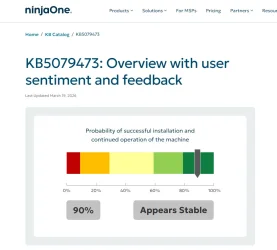
Okay, let's get back to the mess. As you can see, update KB5079473 is proving to be the most stable and best-designed to date. Therefore, I would recommend downloading the ISO of version 26200.8037, performing a clean install, and starting with this version and using online or manual updates. The next update on Wednesday will be KB5079391 26200.8106, which is just as well-made as the previous one. Personally, as soon as I install the final version, I'm going to use scripts to block Microsoft and forget about updates for a long time, because these last two updates have already provided the stability I was waiting for.
 

Attachments

  • 002.webp
    002.webp
    37.8 KB · Views: 1

My Computer

System One

  • OS
    Windows 11 25H2
    Computer type
    PC/Desktop
    Manufacturer/Model
    MSI Z270 GAMING M7

Latest Support Threads

Back
Top Bottom