Win Update KB5121767 Windows 11 Out-of-band Update build 26100.8894 (24H2) and 26200.8894 (25H2) - July 18


 Microsoft Support:

This out-of-band (OOB) update for Windows 11, version 25H2 and Windows 11, version 24H2 (KB5121767) is cumulative. It includes all improvements from previous security and non-security updates, along with an additional fix.

Improvements

This OOB update includes the following improvement:
  • [System Performance] This update addresses an issue affecting a limited number of devices with an Intel Innovation Platform Framework (Intel IPF) driver that could cause changes in performance, power consumption, or system behavior after installing recent Windows updates. A limited number of Dell devices that were temporarily prevented from receiving the July 2026 security update KB5101650 can now install this OOB update. This OOB update is only recommended for devices affected by this issue. If your device is not affected, no action is required.

    Note
    If you have turned on Get the latest updates as soon as they're available in Windows Update settings (Settings > Windows Update), you will automatically receive this OOB update. If the toggle is off on your device, you can install the update by going to Settings > Windows Update and selecting Download & Install. This OOB update is also available from the Microsoft Update Catalog.

Component updates

Servicing stack update (SSU) Includes KB5120102 (Build 26100.8872), which improves the reliability of the Windows update installation process. To learn more about SSUs, see Simplifying on-premises deployment of servicing stack updates.

AI components Updated to version 1.2605.856.0 (Image Search, Content Extraction, Semantic Analysis, Settings Model).

How to get this update

Before you install this update

Microsoft now combines the latest servicing stack update (SSU) for your operating system with the latest cumulative update (LCU). For general information about SSUs, see Servicing stack updates and Servicing Stack Updates (SSU): Frequently Asked Questions.

Install this update

To install this update, use one of the following Windows and Microsoft release channels.

Available​
Next Step​
Included
This update is an optional update. To install this optional update, go to Settings > Windows Update > Advanced options > Optional updates.
IncludedBefore you install this update

To get the standalone package(s) for this update, go to the Microsoft Update Catalog website. This KB contains one or more MSU files that require installation in a specific order.

File Information

For a list of the files provided in this update, download the file information for cumulative update KB5121767.

For a list of the files provided in the servicing stack update, download the file information for the SSU (KB5120102) - version 26100.8872.


 Source:


Check Windows Updates


UUP Dump:

64-bit ISO download:

ARM64 ISO download:

 
Last edited:

It is over...

1784439229950.webp
 

My Computer My Computer

At a glance

Windows 11Intel® Xeon® X5690 3.47GHz Six-CoreG.Skill PC3-12800 1600MHz 24GBNVIDIA GeForce GTX 1050
OS
Windows 11
Computer type
PC/Desktop
Manufacturer/Model
Asus/Custom Build
CPU
Intel® Xeon® X5690 3.47GHz Six-Core
Motherboard
Asus P6T Deluxe v2
Memory
G.Skill PC3-12800 1600MHz 24GB
Graphics Card(s)
NVIDIA GeForce GTX 1050
Sound Card
SoundMAX ADI AD2000B HD Audio
Monitor(s) Displays
Acer T232HL Touch Screen
Screen Resolution
1920 x 1080 @ 60Hz
Hard Drives
6 Crucial MX500 SSD 1TB each.
PSU
Thermaltake Toughpower Gold 850W
Case
Thermaltake Armor VA8000SWA
Cooling
Thermaltake Air Cooling System
Keyboard
Illuminated Multimedia LED Keyboard
Mouse
M16 Dual Mode Illuminated Mouse - Bluetooth / 2.4 GHz Mode
Internet Speed
800 Mbps
Browser
Edge / Opera / Vivaldi / Chrome / Firefox / Brave
Antivirus
Windows Defender Security
Not seeing that here, working fine
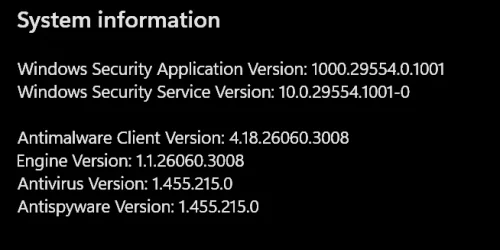
Did you get the same update of the Windows Security Application?
The machines with the same Build 26200.8894 that still have the older Security Application version do not have the problem.
This one below is also in R.P. with same build 26200.8894 and the older security application and does not have the problem. 🤷‍♂️

1784442159380.webp
 

My Computer My Computer

At a glance

Windows 11 Pro 25H2Intel I9-9900K64GBNVIDIA RTX 2060
OS
Windows 11 Pro 25H2
Computer type
PC/Desktop
Manufacturer/Model
Dell XPS 8930
CPU
Intel I9-9900K
Memory
64GB
Graphics Card(s)
NVIDIA RTX 2060
Sound Card
NVIDIA High Definition Audio
Monitor(s) Displays
4k Samsung
Screen Resolution
3840 x 2160
Hard Drives
512GB NVMe, ADATA SU 800, 2TB HDD
Did you get the same update of the Windows Security Application?
The machines with the same Build 26200.8894 that still have the older Security Application version do not have the problem.
This one below does not have the problem. 🤷‍♂️

View attachment 177042
I got this last week
 

Attachments

  • Screenshot 2026-07-19 072520.webp
    Screenshot 2026-07-19 072520.webp
    20.6 KB · Views: 1

My Computer My Computer

At a glance

Windows 11 Pro 25H2 (RP channel)AMD Ryzen 7 9800X3D 8-core64GB Corsair Titanium 6000/CL30MSI Suprim 5080 SOC
OS
Windows 11 Pro 25H2 (RP channel)
Computer type
PC/Desktop
Manufacturer/Model
MSI
CPU
AMD Ryzen 7 9800X3D 8-core
Motherboard
MEG X870E Godlike
Memory
64GB Corsair Titanium 6000/CL30
Graphics Card(s)
MSI Suprim 5080 SOC
Sound Card
Soundblaster AE-9
Monitor(s) Displays
ASUS TUF Gaming VG289Q
Screen Resolution
3840x2160
Hard Drives
Samsung 9100 Pro 4TB (gen 5 x4, system drive/games)
Samsung 990 Pro 2TB
Samsung 980 Pro 2TB
Samsung 870 Evo 4TB
Samsung 870 Evo 2TB
Samsung T9 4TB
PSU
Seasonic PX-2200
Case
Bequiet! Dark Base Pro 901
Cooling
Noctua NH-D15S Chromax black
Keyboard
Logitech G915 X (wired)
Mouse
Logitech G903 with PowerPlay charger
Internet Speed
900Mb/sec
Browser
Microsoft Edge
Antivirus
Windows Defender
I got this last week
That is the older Security Application, and it still works with the older defender schema.
With the new Security application 29628 they get out of sync with the defender schema and cause the problem.
You can check with Copilot about this issue. 😎🤷‍♂️

1784443478185.webp
 
Last edited:

My Computer My Computer

At a glance

Windows 11 Pro 25H2Intel I9-9900K64GBNVIDIA RTX 2060
OS
Windows 11 Pro 25H2
Computer type
PC/Desktop
Manufacturer/Model
Dell XPS 8930
CPU
Intel I9-9900K
Memory
64GB
Graphics Card(s)
NVIDIA RTX 2060
Sound Card
NVIDIA High Definition Audio
Monitor(s) Displays
4k Samsung
Screen Resolution
3840 x 2160
Hard Drives
512GB NVMe, ADATA SU 800, 2TB HDD
That is the older Security Application, and it still works with the older defender schema.
With the new Security application 29628 they get out of sync with the defender schema and cause the problem.
You can check with Copilot about this issue. 😎🤷‍♂️
No I got this Security update last week, I'm using Release Preview
That is the older Security Application, and it still works with the older defender schema.
With the new Security application 29628 they get out of sync with the defender schema and cause the problem.
You can check with Copilot about this issue. 😎🤷‍♂️

View attachment 177045
When did you get this update? I've not had it, maybe it was pulled
 

My Computer My Computer

At a glance

Windows 11 Pro 25H2 (RP channel)AMD Ryzen 7 9800X3D 8-core64GB Corsair Titanium 6000/CL30MSI Suprim 5080 SOC
OS
Windows 11 Pro 25H2 (RP channel)
Computer type
PC/Desktop
Manufacturer/Model
MSI
CPU
AMD Ryzen 7 9800X3D 8-core
Motherboard
MEG X870E Godlike
Memory
64GB Corsair Titanium 6000/CL30
Graphics Card(s)
MSI Suprim 5080 SOC
Sound Card
Soundblaster AE-9
Monitor(s) Displays
ASUS TUF Gaming VG289Q
Screen Resolution
3840x2160
Hard Drives
Samsung 9100 Pro 4TB (gen 5 x4, system drive/games)
Samsung 990 Pro 2TB
Samsung 980 Pro 2TB
Samsung 870 Evo 4TB
Samsung 870 Evo 2TB
Samsung T9 4TB
PSU
Seasonic PX-2200
Case
Bequiet! Dark Base Pro 901
Cooling
Noctua NH-D15S Chromax black
Keyboard
Logitech G915 X (wired)
Mouse
Logitech G903 with PowerPlay charger
Internet Speed
900Mb/sec
Browser
Microsoft Edge
Antivirus
Windows Defender
No I got this Security update last week, I'm using Release Preview

When did you get this update? I've not had it, maybe it was pulled
I got the new security application together with the Build update today on R.P. channel, but only on one machine.
Microsoft is still doing A/B testing with this Security Application; it does not go to all machines.
Copilot can explain what is going on with this mess. 😂😵‍💫🤷‍♂️
The application needs to match the defender schema used by the specific build. Up to now, they only fixed that problem on build 29617.1000 with the security application 29617. 😵‍💫🤷‍♂️
 

My Computer My Computer

At a glance

Windows 11 Pro 25H2Intel I9-9900K64GBNVIDIA RTX 2060
OS
Windows 11 Pro 25H2
Computer type
PC/Desktop
Manufacturer/Model
Dell XPS 8930
CPU
Intel I9-9900K
Memory
64GB
Graphics Card(s)
NVIDIA RTX 2060
Sound Card
NVIDIA High Definition Audio
Monitor(s) Displays
4k Samsung
Screen Resolution
3840 x 2160
Hard Drives
512GB NVMe, ADATA SU 800, 2TB HDD
I have this version installed for some reason:

1784446055202.webp
 

My Computers My Computers

  • At a glance

    Windows 11 25H2Intel i9 14900KF64GB Corsair Vengeance RGBMSI 4090 Suprim X
    OS
    Windows 11 25H2
    Computer type
    PC/Desktop
    Manufacturer/Model
    Custom Built
    CPU
    Intel i9 14900KF
    Motherboard
    ASUS Z790 ProArt Creator WiFi
    Memory
    64GB Corsair Vengeance RGB
    Graphics Card(s)
    MSI 4090 Suprim X
    Sound Card
    Onboard
    Monitor(s) Displays
    1 x Asus 24". 1 x Asus 32"
    Screen Resolution
    1920 x 1080 & 2560 x 1440
    Hard Drives
    Multiple
    PSU
    Corsair 1200HX
    Case
    Corsair 7000D RGB
    Cooling
    Corsair H150I Capellix XT
    Keyboard
    Corsair K70 RGB PRO
    Mouse
    Corsair M55 RGB Pro
    Internet Speed
    1000Mbps
    Browser
    Edge
    Antivirus
    Windows Default
  • At a glance

    Windows 11 25H2Intel i7 6800K32GB DDR4 (Corsair)ASUS GTX 1080ti
    Operating System
    Windows 11 25H2
    Computer type
    PC/Desktop
    Manufacturer/Model
    Custom Built
    CPU
    Intel i7 6800K
    Motherboard
    ASUS Z99 Deluxe
    Memory
    32GB DDR4 (Corsair)
    Graphics card(s)
    ASUS GTX 1080ti
    Sound Card
    Onboard
    Monitor(s) Displays
    1x Viewsonic 24" 1x LG 19"
    Screen Resolution
    1920 x 1080 & 1600 x 900
    Hard Drives
    3 x SATA SSD
    PSU
    650W Gigabyte Bronze
    Case
    Coolermaster HAF-X
    Cooling
    Noctua NH-15 Chroma black
    Keyboard
    Generic RGB
    Mouse
    Microsoft Basic
    Internet Speed
    1000Mbps
    Browser
    Edge
    Antivirus
    Windows Default

My Computer My Computer

At a glance

Windows 11 Pro 25H2Intel I9-9900K64GBNVIDIA RTX 2060
OS
Windows 11 Pro 25H2
Computer type
PC/Desktop
Manufacturer/Model
Dell XPS 8930
CPU
Intel I9-9900K
Memory
64GB
Graphics Card(s)
NVIDIA RTX 2060
Sound Card
NVIDIA High Definition Audio
Monitor(s) Displays
4k Samsung
Screen Resolution
3840 x 2160
Hard Drives
512GB NVMe, ADATA SU 800, 2TB HDD

My Computer My Computer

At a glance

Windows 11 Pro 25H2 26200.8894Intel Core i7-8700KCorsair 32GB 4x DDR4-2998 / PC4-23900 DDR4 SD...AMD RX570
OS
Windows 11 Pro 25H2 26200.8894
Computer type
PC/Desktop
Manufacturer/Model
Self built midi tower
CPU
Intel Core i7-8700K
Motherboard
Gigabyte Z390GX
Memory
Corsair 32GB 4x DDR4-2998 / PC4-23900 DDR4 SDRAM UDIMM
Graphics Card(s)
AMD RX570
Sound Card
Sound Blaster Z
Monitor(s) Displays
2x IIyama Prolite X2380HS
Screen Resolution
1920x1080
Hard Drives
Samsung SSD 970 EVO Plus NVMe 1TB
Samsung SSD 970 EVO Plus NVMe 500GB
PSU
Seasonic 550W
Cooling
Noctua fans
Keyboard
Logitech G213
Mouse
Logitech Marble Mouse
Browser
Chrome
Antivirus
Norton
Other Info
Video/Audio editting machine

Attachments

  • 1784448947609.webp
    1784448947609.webp
    14.5 KB · Views: 2

My Computers My Computers

  • At a glance

    Windows 11 25H2Intel i9 14900KF64GB Corsair Vengeance RGBMSI 4090 Suprim X
    OS
    Windows 11 25H2
    Computer type
    PC/Desktop
    Manufacturer/Model
    Custom Built
    CPU
    Intel i9 14900KF
    Motherboard
    ASUS Z790 ProArt Creator WiFi
    Memory
    64GB Corsair Vengeance RGB
    Graphics Card(s)
    MSI 4090 Suprim X
    Sound Card
    Onboard
    Monitor(s) Displays
    1 x Asus 24". 1 x Asus 32"
    Screen Resolution
    1920 x 1080 & 2560 x 1440
    Hard Drives
    Multiple
    PSU
    Corsair 1200HX
    Case
    Corsair 7000D RGB
    Cooling
    Corsair H150I Capellix XT
    Keyboard
    Corsair K70 RGB PRO
    Mouse
    Corsair M55 RGB Pro
    Internet Speed
    1000Mbps
    Browser
    Edge
    Antivirus
    Windows Default
  • At a glance

    Windows 11 25H2Intel i7 6800K32GB DDR4 (Corsair)ASUS GTX 1080ti
    Operating System
    Windows 11 25H2
    Computer type
    PC/Desktop
    Manufacturer/Model
    Custom Built
    CPU
    Intel i7 6800K
    Motherboard
    ASUS Z99 Deluxe
    Memory
    32GB DDR4 (Corsair)
    Graphics card(s)
    ASUS GTX 1080ti
    Sound Card
    Onboard
    Monitor(s) Displays
    1x Viewsonic 24" 1x LG 19"
    Screen Resolution
    1920 x 1080 & 1600 x 900
    Hard Drives
    3 x SATA SSD
    PSU
    650W Gigabyte Bronze
    Case
    Coolermaster HAF-X
    Cooling
    Noctua NH-15 Chroma black
    Keyboard
    Generic RGB
    Mouse
    Microsoft Basic
    Internet Speed
    1000Mbps
    Browser
    Edge
    Antivirus
    Windows Default
Then you should also get the problem with the wrong notification if you are on R.P. with build 26200.8894 and with that Security Application version

View attachment 177052
It is annoying that this still has not been fixed, or even acknowledge by MS as an issue
 

My Computers My Computers

  • At a glance

    Windows 11 25H2Intel i9 14900KF64GB Corsair Vengeance RGBMSI 4090 Suprim X
    OS
    Windows 11 25H2
    Computer type
    PC/Desktop
    Manufacturer/Model
    Custom Built
    CPU
    Intel i9 14900KF
    Motherboard
    ASUS Z790 ProArt Creator WiFi
    Memory
    64GB Corsair Vengeance RGB
    Graphics Card(s)
    MSI 4090 Suprim X
    Sound Card
    Onboard
    Monitor(s) Displays
    1 x Asus 24". 1 x Asus 32"
    Screen Resolution
    1920 x 1080 & 2560 x 1440
    Hard Drives
    Multiple
    PSU
    Corsair 1200HX
    Case
    Corsair 7000D RGB
    Cooling
    Corsair H150I Capellix XT
    Keyboard
    Corsair K70 RGB PRO
    Mouse
    Corsair M55 RGB Pro
    Internet Speed
    1000Mbps
    Browser
    Edge
    Antivirus
    Windows Default
  • At a glance

    Windows 11 25H2Intel i7 6800K32GB DDR4 (Corsair)ASUS GTX 1080ti
    Operating System
    Windows 11 25H2
    Computer type
    PC/Desktop
    Manufacturer/Model
    Custom Built
    CPU
    Intel i7 6800K
    Motherboard
    ASUS Z99 Deluxe
    Memory
    32GB DDR4 (Corsair)
    Graphics card(s)
    ASUS GTX 1080ti
    Sound Card
    Onboard
    Monitor(s) Displays
    1x Viewsonic 24" 1x LG 19"
    Screen Resolution
    1920 x 1080 & 1600 x 900
    Hard Drives
    3 x SATA SSD
    PSU
    650W Gigabyte Bronze
    Case
    Coolermaster HAF-X
    Cooling
    Noctua NH-15 Chroma black
    Keyboard
    Generic RGB
    Mouse
    Microsoft Basic
    Internet Speed
    1000Mbps
    Browser
    Edge
    Antivirus
    Windows Default
I don't have a Dell so I will skip this one. :rolleyes:
 

My Computer My Computer

At a glance

Windows 11 25H2 Home11th Generation Intel Core i712GB
OS
Windows 11 25H2 Home
Computer type
Laptop
Manufacturer/Model
HP ENVY Laptop 17m-ch1xxx
CPU
11th Generation Intel Core i7
Memory
12GB
Monitor(s) Displays
17.3” FHD Display
Thanks @Brink - I do have optional updates checked, but they say you learn something new every day; I had no idea this option would offer updates that are system agnostic, and as your notes pointed out, it is NOT required for non-Intel based platforms.
Now I wonder whether past PC issues may have been caused by an incorrect assumption on my part that at the very least these optional updates would use some sort of intelligence to know whether they are relevant given my system specs MUST be known to the WU system.
Clearly not.
Is there actually any potential for system issues if I've been installing updates that are not meant for my PC?
 

My Computer My Computer

At a glance

Win 11 23H2 EnterpriseRyzen 9800X3DG.Skill Trident Z RGB 6200MT CL30MSI RTX 5090 Suprim SoC
OS
Win 11 23H2 Enterprise
Computer type
PC/Desktop
Manufacturer/Model
Self-Built
CPU
Ryzen 9800X3D
Motherboard
MSI MAG X870 Tomahawk WiFi
Memory
G.Skill Trident Z RGB 6200MT CL30
Graphics Card(s)
MSI RTX 5090 Suprim SoC
Sound Card
Sound Blaster G8
Monitor(s) Displays
LG C2 42 Main Desktop, 3x Gigabyte FI32Q in a triple array for gaming simulations
Screen Resolution
3840x2160, 2560x1440 (3)
Hard Drives
WD SN850X 2TB M.2 NVME (OS Drive), WD SN850X 2TB M.2 NVME, 2x Crucial 2TB SSD, Crucial 1TB SSD, Seagate Barracuda 2TB HDD
PSU
NZXT C1200 Gold ATX 3.1-Fully Modular/Low-Noise-1200 Watts-12V-2x6 Connector-Zero Fan Mode-100% Japanese Capacitors
Case
NZXT H7
Cooling
EK AIO Elite 360mm Elite
Keyboard
Razer Huntsman V3 Pro
Mouse
Logitech G502X
Internet Speed
1GB
Browser
Edge Chromium
Antivirus
Windows Defender
Thanks @Brink - I do have optional updates checked, but they say you learn something new every day; I had no idea this option would offer updates that are system agnostic, and as your notes pointed out, it is NOT required for non-Intel based platforms.
Now I wonder whether past PC issues may have been caused by an incorrect assumption on my part that at the very least these optional updates would use some sort of intelligence to know whether they are relevant given my system specs MUST be known to the WU system.
Clearly not.
Is there actually any potential for system issues if I've been installing updates that are not meant for my PC?

It shouldn't matter. This is just another cumulative update that just happens to include a fix for the Dell issue. If you don't have an affected Dell PC, then the update can be optional, but won't hurt anything if installed.
 

My Computers My Computers

  • At a glance

    Windows 11 Pro for WorkstationsIntel i7-8700K 5 GHz64 GB (4x16GB) G.SKILL TridentZ RGB DDR4 3600...ASUS ROG-STRIX-GTX1080TI-O11G-GAMING (11GB GD...
    OS
    Windows 11 Pro for Workstations
    Computer type
    PC/Desktop
    Manufacturer/Model
    Custom self build
    CPU
    Intel i7-8700K 5 GHz
    Motherboard
    ASUS ROG Maximus XI Formula Z390
    Memory
    64 GB (4x16GB) G.SKILL TridentZ RGB DDR4 3600 MHz (F4-3600C18D-32GTZR)
    Graphics Card(s)
    ASUS ROG-STRIX-GTX1080TI-O11G-GAMING (11GB GDDR5X)
    Sound Card
    Integrated Digital Audio (S/PDIF)
    Monitor(s) Displays
    2 x Samsung Odyssey G75 27"
    Screen Resolution
    2560x1440
    Hard Drives
    1TB Samsung 990 PRO M.2,
    4TB Samsung 990 PRO M.2,
    TerraMaster F8 SSD Plus NAS
    PSU
    Seasonic Prime Titanium 850W
    Case
    Thermaltake Core P3 wall mounted
    Cooling
    Corsair Hydro H115i
    Keyboard
    Amazon Basics Wired Full Keyboard MD005
    Mouse
    Logitech MX Master 4
    Internet Speed
    2 Gbps Download and 100 Mbps Upload
    Browser
    Chrome and Edge
    Antivirus
    Microsoft Defender
    Other Info
    Logitech Z625 speaker system,
    Logitech BRIO 4K Pro webcam,
    HP Color LaserJet Pro MFP M477fdn,
    CyberPower CP1500PFCLCD
    Galaxy S23 Plus phone
  • At a glance

    Windows 11 ProSnapdragon X Elite (12 core) 3.42 GHz16 GB LPDDR5x-7467 MHz
    Operating System
    Windows 11 Pro
    Computer type
    Laptop
    Manufacturer/Model
    Surface Laptop 7 Copilot+ PC
    CPU
    Snapdragon X Elite (12 core) 3.42 GHz
    Memory
    16 GB LPDDR5x-7467 MHz
    Monitor(s) Displays
    15" HDR
    Screen Resolution
    2496 x 1664
    Hard Drives
    1 TB SSD
    Internet Speed
    Wi-Fi 7 and Bluetooth 5.4
    Browser
    Chrome and Edge
    Antivirus
    Microsoft Defender
Thanks @Brink - I do have optional updates checked, but they say you learn something new every day; I had no idea this option would offer updates that are system agnostic, and as your notes pointed out, it is NOT required for non-Intel based platforms.
Now I wonder whether past PC issues may have been caused by an incorrect assumption on my part that at the very least these optional updates would use some sort of intelligence to know whether they are relevant given my system specs MUST be known to the WU system.
Clearly not.
Is there actually any potential for system issues if I've been installing updates that are not meant for my PC?
I had that setting off on my Wife's NUC , but she got it anyway.
 

My Computers My Computers

  • At a glance

    Windows11 Pro 26200.8894Intel Core i9 14900F (24 -Core, 68 MB Total C...32GB DDR5RTX 4080 Super w/610.74
    OS
    Windows11 Pro 26200.8894
    Computer type
    PC/Desktop
    Manufacturer/Model
    Dell Alienware Aurora R16
    CPU
    Intel Core i9 14900F (24 -Core, 68 MB Total Cache)
    Motherboard
    Dell Alienware
    Memory
    32GB DDR5
    Graphics Card(s)
    RTX 4080 Super w/610.74
    Sound Card
    Realtec
    Monitor(s) Displays
    Corsair XENEON 32QHD165
    Screen Resolution
    2560 X 1440
    Hard Drives
    1-2TB Samsung 990 Pro PCIe NVMe M2 SSD
    1-4TB Samsung 990 Pro PCIe NVMe M2 SSD
    PSU
    1000 Watt Platinum Dell
    Case
    Alienware
    Cooling
    Liquid Closed Loop
    Keyboard
    Corsair Strafe RGB
    Mouse
    Logitech MK270 Wireless
    Internet Speed
    100Gb's Down-20 Up
    Browser
    Firefox 152.0.6
    Antivirus
    Defender
    Other Info
    Very Quiet And Fast
    CyberPower UPS CP1500PFCLCD
  • At a glance

    PClinuxOS Mate (2025.7)13th Gen Inter(R) Core(TM) i3-1315U64 GB DDR4 @3200 MHz.Internal
    Operating System
    PClinuxOS Mate (2025.7)
    Computer type
    PC/Desktop
    Manufacturer/Model
    Intel
    CPU
    13th Gen Inter(R) Core(TM) i3-1315U
    Motherboard
    Intel
    Memory
    64 GB DDR4 @3200 MHz.
    Graphics card(s)
    Internal
    Sound Card
    None
    Monitor(s) Displays
    Dell 2419HGCF
    Screen Resolution
    1920 X 1080
    Hard Drives
    SAMSUNG 980 PRO SSD 2TB, PCIe 4.0 M.2 2280
    PSU
    Chicony 30 Watt
    Case
    Small
    Keyboard
    Dell
    Mouse
    Razor
    Internet Speed
    1GB
    Browser
    Slimjet
It shouldn't matter. This is just another cumulative update that just happens to include a fix for the Dell issue. If you don't have an affected Dell PC, then the update can be optional, but won't hurt anything if installed.
why would they push an out of bound update on to all machines that aren't Dell if it didn't cause issues ?

just before this came out - one of the people I offer my limited support too, had her W11 25H2 fully patched HP laptop boot up asking for the bitlocker key, fortunately she could retrieve and got windows to boot - whereupon it asked for it all over again

we've turned that off now - the only person it does anything for is the owner getting messed about

could some of the fixes in

KB5121767​

been related to bitlocker magically messing up your life?

Oh, and on yet another HP machine that just got this update, attachments that are in an email sent twice this morning and then 5 hours later are not turning up on a real version of Outlook 2019 - and trying to view the mail crashes Outlook multiple times - even after a reboot to get KB5121776 fully installed - but they are there on a Dell Win 10 machine running Outlook 2007 and both the body of the mail works and the attachment opens !
 
Last edited:

My Computer My Computer

At a glance

Win11
OS
Win11
I came home form work yestiddy seeing my 'puter wanted a restart from Windows Update. No Dell here; a Lenovo...
 

My Computers My Computers

  • At a glance

    Win 11 Pro (25H2 RP)Intel(R) Core(TM) i5-9300H CPU @ 2.40GHz 2.40...32GBNvidia GeForce GTX 1650, Intel UHD 630
    OS
    Win 11 Pro (25H2 RP)
    Computer type
    Laptop
    Manufacturer/Model
    Acer AN515-54
    CPU
    Intel(R) Core(TM) i5-9300H CPU @ 2.40GHz 2.40 GHz
    Memory
    32GB
    Graphics Card(s)
    Nvidia GeForce GTX 1650, Intel UHD 630
    Monitor(s) Displays
    Acer CB272D
    Screen Resolution
    1920x1080
    Hard Drives
    256GB and 1T SSD
    Internet Speed
    500MB
    Browser
    Edge (Stable)
    Antivirus
    Microsoft Defender
  • At a glance

    Win 11 Pro (RP)Intel(R) Core(TM) Ultra 9 275HX (2.70 GHz)32GB DDR5-5600NVIDIA® GeForce RTX™ 5060 8GB
    Operating System
    Win 11 Pro (RP)
    Computer type
    Laptop
    Manufacturer/Model
    Lenovo Legion 5 16IAX10 - Type 83NX
    CPU
    Intel(R) Core(TM) Ultra 9 275HX (2.70 GHz)
    Memory
    32GB DDR5-5600
    Graphics card(s)
    NVIDIA® GeForce RTX™ 5060 8GB
    Monitor(s) Displays
    Acer CB272D
    Screen Resolution
    1920x1080 75Hz
    Hard Drives
    WD Green SN3000 (2TB)
    Samsung Portable T5 (2TB)
    Keyboard
    Logi MX Keys
    Mouse
    Logi MX Anywhere 3
    Internet Speed
    500MB
    Browser
    Edge
    Antivirus
    MS Defender
why would they push an out of bound update on to all machines that aren't Dell if it didn't cause issues ?

just before this came out - one of the people I offer my limited support too, had her W11 25H2 fully patched HP laptop boot up asking for the bitlocker key, fortunately she could retrieve and got windows to boot - whereupon it asked for it all over again

we've turned that off now - the only person it does anything for is the owner getting messed about

could some of the fixes in

KB5121767​

been related to bitlocker magically messing up your life?

Oh, and on yet another HP machine that just got this update, attachments that are in the email sent twice this morning are not turning up on a real version of Outlook 2019 - and trying to view the mail crashes Outlook multiple times - even after a reboot to get KB5121776 fully installed - but they are there on a Dell Win 10 machine running Outlook 2007 and both the body of the mail works and the attachment opens !

I find that if it's considered a cumulative update (out-of-band or not), it will usually automatically install even if you have "Get the latest" turned off.
 

My Computers My Computers

  • At a glance

    Windows 11 Pro for WorkstationsIntel i7-8700K 5 GHz64 GB (4x16GB) G.SKILL TridentZ RGB DDR4 3600...ASUS ROG-STRIX-GTX1080TI-O11G-GAMING (11GB GD...
    OS
    Windows 11 Pro for Workstations
    Computer type
    PC/Desktop
    Manufacturer/Model
    Custom self build
    CPU
    Intel i7-8700K 5 GHz
    Motherboard
    ASUS ROG Maximus XI Formula Z390
    Memory
    64 GB (4x16GB) G.SKILL TridentZ RGB DDR4 3600 MHz (F4-3600C18D-32GTZR)
    Graphics Card(s)
    ASUS ROG-STRIX-GTX1080TI-O11G-GAMING (11GB GDDR5X)
    Sound Card
    Integrated Digital Audio (S/PDIF)
    Monitor(s) Displays
    2 x Samsung Odyssey G75 27"
    Screen Resolution
    2560x1440
    Hard Drives
    1TB Samsung 990 PRO M.2,
    4TB Samsung 990 PRO M.2,
    TerraMaster F8 SSD Plus NAS
    PSU
    Seasonic Prime Titanium 850W
    Case
    Thermaltake Core P3 wall mounted
    Cooling
    Corsair Hydro H115i
    Keyboard
    Amazon Basics Wired Full Keyboard MD005
    Mouse
    Logitech MX Master 4
    Internet Speed
    2 Gbps Download and 100 Mbps Upload
    Browser
    Chrome and Edge
    Antivirus
    Microsoft Defender
    Other Info
    Logitech Z625 speaker system,
    Logitech BRIO 4K Pro webcam,
    HP Color LaserJet Pro MFP M477fdn,
    CyberPower CP1500PFCLCD
    Galaxy S23 Plus phone
  • At a glance

    Windows 11 ProSnapdragon X Elite (12 core) 3.42 GHz16 GB LPDDR5x-7467 MHz
    Operating System
    Windows 11 Pro
    Computer type
    Laptop
    Manufacturer/Model
    Surface Laptop 7 Copilot+ PC
    CPU
    Snapdragon X Elite (12 core) 3.42 GHz
    Memory
    16 GB LPDDR5x-7467 MHz
    Monitor(s) Displays
    15" HDR
    Screen Resolution
    2496 x 1664
    Hard Drives
    1 TB SSD
    Internet Speed
    Wi-Fi 7 and Bluetooth 5.4
    Browser
    Chrome and Edge
    Antivirus
    Microsoft Defender
I installed the "KB5121767" patch,
and I DON'T have a Dell computer.
I have a White Box ( Built PC)
MSI mb/AMD CPU.

And there has been a Big Difference in performance
For the better!

And there are NO issues with the patch.
At least for my system.
 

My Computer My Computer

At a glance

Win 11 Pro
OS
Win 11 Pro
Computer type
PC/Desktop
Manufacturer/Model
MSI/AMD
Installed here this morning on a system will zero DELL components
 

My Computer My Computer

At a glance

Windows 11 Pro 25H2 (RP channel)AMD Ryzen 7 9800X3D 8-core64GB Corsair Titanium 6000/CL30MSI Suprim 5080 SOC
OS
Windows 11 Pro 25H2 (RP channel)
Computer type
PC/Desktop
Manufacturer/Model
MSI
CPU
AMD Ryzen 7 9800X3D 8-core
Motherboard
MEG X870E Godlike
Memory
64GB Corsair Titanium 6000/CL30
Graphics Card(s)
MSI Suprim 5080 SOC
Sound Card
Soundblaster AE-9
Monitor(s) Displays
ASUS TUF Gaming VG289Q
Screen Resolution
3840x2160
Hard Drives
Samsung 9100 Pro 4TB (gen 5 x4, system drive/games)
Samsung 990 Pro 2TB
Samsung 980 Pro 2TB
Samsung 870 Evo 4TB
Samsung 870 Evo 2TB
Samsung T9 4TB
PSU
Seasonic PX-2200
Case
Bequiet! Dark Base Pro 901
Cooling
Noctua NH-D15S Chromax black
Keyboard
Logitech G915 X (wired)
Mouse
Logitech G903 with PowerPlay charger
Internet Speed
900Mb/sec
Browser
Microsoft Edge
Antivirus
Windows Defender

Latest Support Threads

Back
Top Bottom