Microsoft Support:
Changes and improvements gradually being rolled out
[Accessibility - Mouse indicator]
- We're introducing a sleeker new animation for the Mouse indicator. You can enable this animation under Accessibility settings. We've also added the option to keep the indicator activated until you press the Esc key.

Change Mouse Indicator Activation Method in Windows 11
This tutorial will show you how to change activating the mouse indicator with a single or double Ctrl key press for your account in Windows 11. The mouse pointer, which is sometimes referred to as the cursor, is a bitmap that specifies a focus point on the screen for user input with the mouse... www.elevenforum.com

Enable or Disable Keep Mouse Indicator Visible until Dismissed in Windows 11
This tutorial will show you how to turn on or off keeping the mouse indicator visible until dismissed for your account in Windows 11. The mouse pointer, which is sometimes referred to as the cursor, is a bitmap that specifies a focus point on the screen for user input with the mouse. Windows...
www.elevenforum.com
[Magnifier]
- A new contrast theme toggle for a lower-glare screen. If bright screens are uncomfortable, many people use color inversion to reduce glare. However, inversion changes everything on screen, including photos, charts, and videos. With this update, we're introducing a new contrast theme toggle in Magnifier.
- Reduce glare with a single toggle. Turn on a contrast theme directly from the Magnifier toolbar for a more comfortable viewing experience.
- Choose the contrast theme that works best for you. The dark theme is applied by default, and you can choose which contrast theme the toggle uses under Settings > Accessibility > Magnifier.
- Photos, videos, and charts keep their original colors. Unlike color inversion, the contrast theme recolors the interface without touching your photos, charts, or videos, so they keep their real colors.
- Color inversion is still here. This isn't a replacement. If you use inversion today, it works exactly as it always has. The contrast theme is a separate, purpose-built option to reduce glare when you want a darker interface without inverting colors.

Turn On or Off Invert Colors while Magnifier is On in Windows 11
This tutorial will show you how to turn on or off invert screen colors while Magnifier is turned on for your account in Windows 10 and Windows 11. Magnifier makes part or all of your screen bigger so you can see words and images better. Inverted colors may reduce eye strain or make text more...
www.elevenforum.com
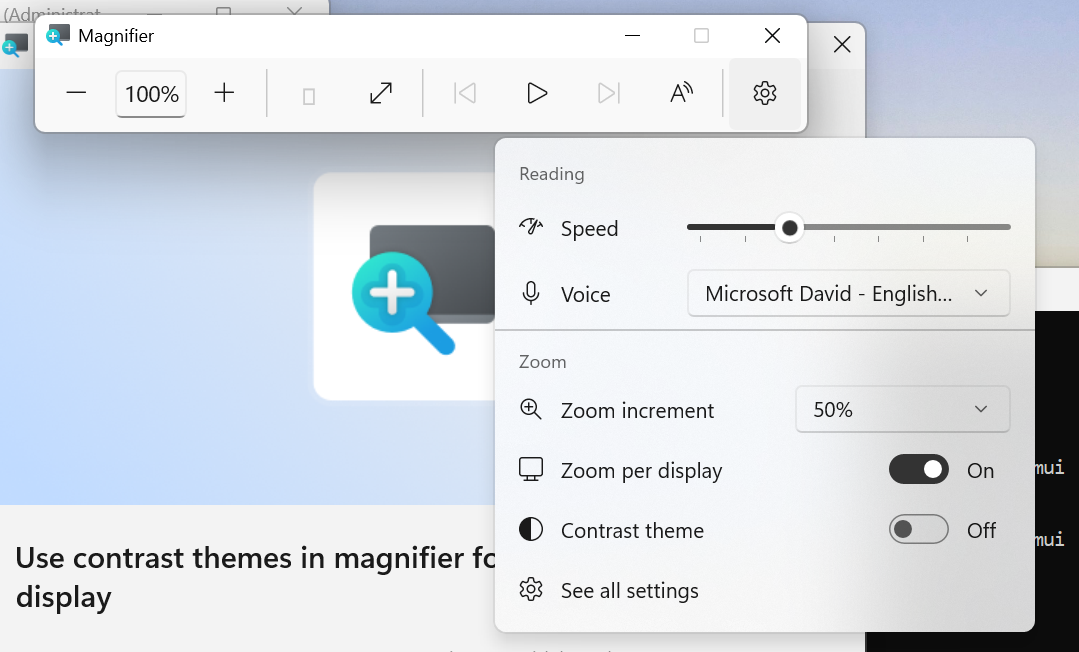
UI showing the new contrast theme toggle in Magnifier.
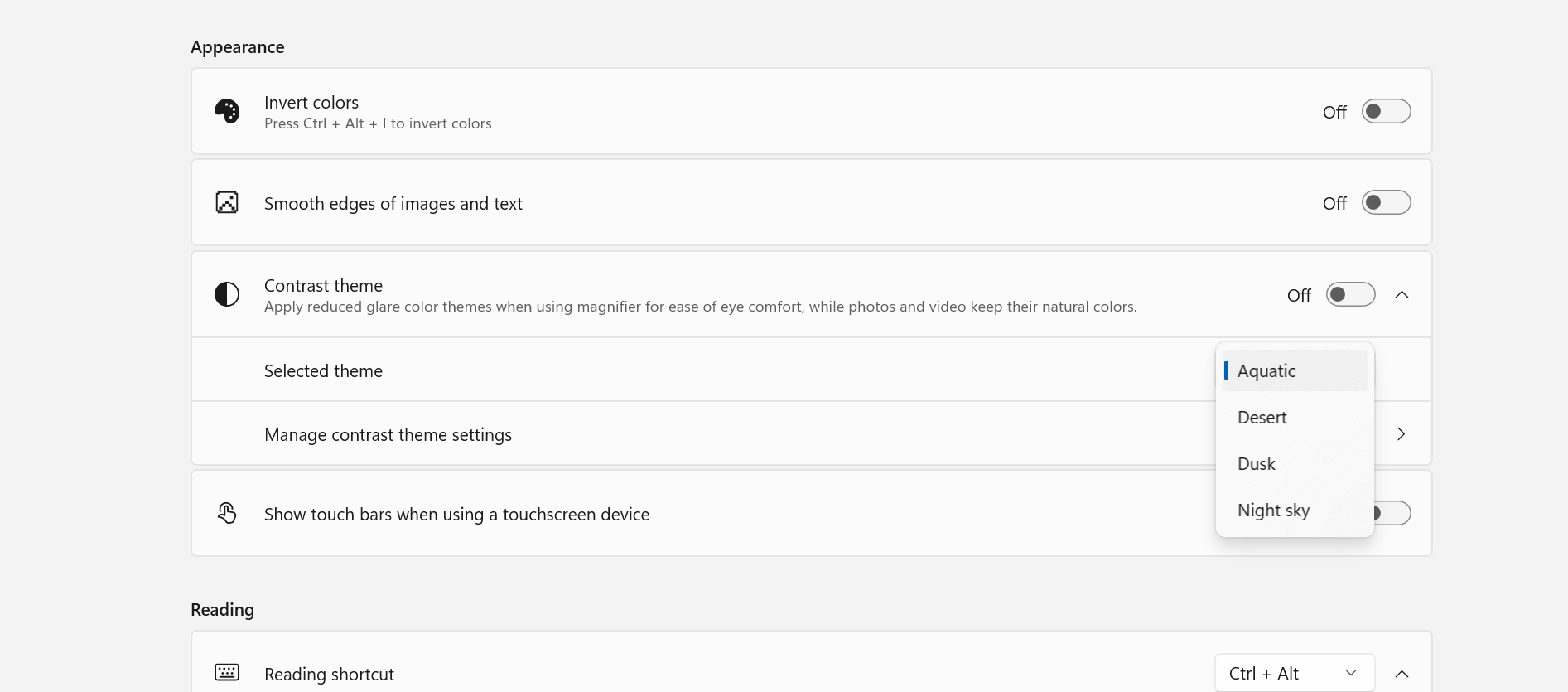
UI showing contrast theme settings for Magnifier.
[Cloud rebuild]
- We're updating Cloud rebuild, the recovery option that restores a Windows 11 PC to a clean, known-good state by performing a full OS reinstall, with two additions.
- Cloud rebuild can now sanitize the device's drives as part of the rebuild. When you start a rebuild in WinRE, choose Remove files if you're keeping the PC, or Remove & sanitize files before recycling, returning, or reassigning it. The sanitize option uses the storage hardware's erase capability to securely erase data before Windows is reinstalled and is irreversible.
- IT administrators can now configure and start a Cloud rebuild remotely through the Recovery CSP, using either the currently installed build or a target build you specify.

Cloud Rebuild Windows 11
This tutorial will show you how to use Cloud rebuild to perform a full clean reinstall of Windows 11 from WinRE. Starting with Windows 11 build 26300.8772 (Experimental 26H2) and build 26220.9343 (Beta 25H2) for Insiders, Microsoft is introducing Cloud rebuild, a new recovery option that...
www.elevenforum.com

UI showing new Cloud rebuild file removal options.

[Live Captions]
- We're improving Live Captions with a new Include Screen Reader audio setting, which is off by default. With the setting off, Live Captions won't transcribe audio from screen readers such as Narrator, JAWS, and NVDA, keeping captions focused on microphone and system audio.

Enable or Disable Include Screen Reader Audio in Live Captions on Windows 11
This tutorial will show you how to turn on or off including screen reader audio with Live Captions for your account in Windows 11. Live captions helps everyone, including people who are deaf or hard-of-hearing, better understand audio by providing automatic transcription. Captions are...
www.elevenforum.com
[Hyper-V]
- Fixed an issue where some applications that used HCS-managed virtual machines experienced issues when sharing host folders with Linux VMs using Plan9. Folders shared from the Windows host using Plan9 didn't appear or couldn't be accessed in the guest environment.
[Other]
- Fixed an issue where backing up using File History unexpectedly failed with an error saying, "No usable drives found."
Reminders for Windows Insiders in the Experimental channel
- Updates are based on Windows 11, version 26H2 via an enablement package (Build 26340.9502).
- Many features are rolled out using Controlled Feature Rollout technology, starting with a subset of Insiders and ramping up over time. We monitor feedback to see how they land before pushing them out to everyone in this channel.
- The desktop watermark shown at the lower right corner of the desktop is normal for Windows Insider pre-release builds.
- Features and experiences included in these builds might never get released as we try out different concepts and get feedback. Features might change over time, be removed, or replaced and never get released beyond Windows Insiders. Some of these features and experiences could show up in future Windows releases when they're ready.
- Some features in active development we preview with Windows Insiders might not be fully localized, and localization will happen over time as features are finalized. As you see issues with localization in your language, report those issues to us via Feedback Hub.
- Check out Flight Hub for a complete look at what build is in which Insider channel.
Source:

Windows 11 Insider Experimental Preview Build 26340.9502 - Windows Insider Program
Release notes for Windows 11 Insider Experimental Preview Build 26340.9502
learn.microsoft.com

Announcing new builds for 18 September 2026
Hello Windows Insiders, Today, we’re releasing new Windows 11 Insider Preview builds to the Beta and Experimental channels. New builds this week Select your channel below to view its release notes: Beta:
 blogs.windows.com
Check Windows Updates
UUP Dump:
64-bit ISO download:

Select language for Windows 11 Insider Preview Feature Update (26340.9502) amd64
Select language for Windows 11 Insider Preview Feature Update (26340.9502) amd64 on UUP dump. UUP dump lets you download Unified Update Platform files, like Windows Insider updates, directly from Windows Update.
uupdump.net
ARM64 ISO download:
Select language for Windows 11 Insider Preview Feature Update (26340.9502) arm64
Select language for Windows 11 Insider Preview Feature Update (26340.9502) arm64 on UUP dump. UUP dump lets you download Unified Update Platform files, like Windows Insider updates, directly from Windows Update.
uupdump.net

UUP Dump - Download Windows Insider ISO
UUP Dump is the most practical and easy way to get ISO images of any Insider Windows 10 or Windows 11 version, as soon as Microsoft has released a new build. UUP Dump creates a download configuration file according to your choices, downloads necessary files directly from Microsoft servers, and...
www.elevenforum.com
Last edited: