Win Update KB5127648 Windows 11 Cumulative Update build 26100.9711 (24H2), 26200.9711 (25H2), 26300.9711 (26H2) - Oct. 13


 Microsoft Support:

Announcements and messages​

This section provides key notifications related to this release, including announcements, change logs, and end-of-support notices.

Important: Windows 11, version 24H2 Home and Pro has reached end of updates. The October 2026 monthly security update is the last update available for these editions. Devices running these editions will no longer receive monthly security and non-security preview updates containing protections from the latest security threats. To stay protected and up to date, we recommend you upgrade to the latest version of Windows 11.

Windows Secure Boot certificate expiration
Secure Boot certificate updates remain in progress as Microsoft transitions devices from certificates that began expiring in 2026 to newer certificates. Devices that have not yet received the newer certificates can continue to start and receive standard Windows updates. Microsoft will continue delivering the newer Secure Boot certificates to eligible devices through Windows Update.


Improvements​

This update includes improvements from the following previously released updates:
The following summary outlines key quality improvements addressed by this update. The bold text within the brackets indicates the item or area of the change.
  • [Security updates] This update provides security improvements. For more information about the security vulnerabilities resolved by this update, see the Security Update Guide.
  • [Secure Boot] This update continues the deployment of updated Secure Boot certificates using the latest high-confidence targeting data to identify eligible devices that are ready to automatically receive the new certificates. Deployment through Windows Update remains ongoing across supported devices.
  • [Windows Explorer (Known issue)] Fixed This update fixes an issue that affects Windows Explorer in multi-user environments, such as Azure Virtual Desktop and FSLogix. After sign-in, Explorer.exe might fail to start or repeatedly crash, causing a black screen.
  • [Audio (known issue)] Fixed This update fixes an issue that affects AC-3 audio playback in some applications.
  • [Always On VPN] This update fixes an issue that affects Always On VPN connections after installing KB5124008. When automatic protocol selection or protocol fallback was configured, affected VPN connections could remain stuck in a Connecting state or fail to connect after an initial connection attempt failed. In some cases, subsequent connection attempts could display the error, "The specified port is already in use."
  • [Storage Spaces] This update fixes an issue that affects tiered Storage Spaces Direct virtual disks. Some virtual disks might fail to come online after installing certain security updates, making dependent clustered workloads unavailable.
  • [Date and Time] This update introduces the new (UTC-05:00) Manitoba time zone to support Manitoba’s November 1, 2026, time zone change.
  • [ReFS security] This update adds auditing and optional policy controls for ReFS volumes on externally attached storage devices. Auditing is enabled by default, while enforcement controls remain disabled by default to give administrators time to evaluate and prepare for future security hardening changes. To learn more, see KB5130741.

  • [Printing] This update resolves an issue where printing could fail in some applications and on devices using RAW or Generic Text Only printer drivers after installing the August 2026 security update.
  • [Gaming] This update fixes an issue that could cause mouse input to stutter in some games.
  • [Windows Hello] This update fixes an issue where fingerprint sign-in might not work after a cold boot on some devices.
If you've already installed previous updates, your device will download and install only the new updates included in this package.

Components updates​

AI components
This release updates the following AI components to version 1.2608.951.0: Image Search, Content Extraction, Semantic Analysis, and Settings Model. To learn more, see Release information for AI components.

Servicing stack update
Includes KB5127647 (Build 26100.9703), which improves the reliability of the Windows update installation process. To learn more about SSUs, see Servicing stack updates.

Known issues in this update​

Symptoms

After installing the September 2026 non-security preview update KB5124010, or later updates, non-admin users might be unable to establish Remote Desktop connections to remote devices that have Administrator protection enabled. Attempts to connect might fail with error 0xC000000D and display the message, “The token that was passed to the function is invalid.” This issue primarily affects enterprise-managed remote devices used as Remote Desktop hosts with Administrator protection enabled, regardless of how the feature was enabled.

Note: If your organization uses Windows security baselines, published through the Microsoft Security Compliance Toolkit, Administrator protection is enabled by default in Windows 11, version 24H2, 25H2, and 26H2 security baselines, unless your organization has configured the policy differently.

Resolution

IT administrators can mitigate this issue on devices affected by the Remote Desktop connection failure by using their existing policy management method to temporarily turn off Administrator protection. Reset the User Account Control Type Of Admin Approval Mode policy in Microsoft Intune or Group Policy. For more information, see Administrator protection on Windows 11.

Next steps: Microsoft is working to address this issue in a future Windows update and will provide more information when it is available.

Symptoms

After installing the September 8, 2026, Windows security update (KB5124012), some USB Audio Class 1.0 devices might fail to start or produce audio. Affected devices might experience one or more of the following symptoms:
  • The device displays an error in Device Manager: "This device cannot start (Code 10).”
  • No audio output.
  • Volume controls are unresponsive or remain at zero.
  • Sound settings are unresponsive or unavailable.
Some devices might function in standard stereo configurations but fail when using multichannel audio features, including 8-channel or 3D audio modes. Some customers have reported that they're able to restore audio in these cases by switching to 2-channel mode.

This issue is limited to USB Audio Class 1.0 devices.

Resolution

This issue is partially resolved in the out-of-band (OOB) update released on September 14, 2026, (KB5129195). This OOB update resolves the symptoms experienced on devices using 8-channel or 3D audio modes. Microsoft is working to address the other symptoms and will provide more information when it is available.

IT administrators who need an immediate workaround for the symptoms not addressed yet by the OOB update should contact Microsoft Support for Business for assistance.

How to get this update​

Deployment​

If you deploy dynamic updates such as this update to an existing Windows image, ensure the boot.stl file is included as part of the installation media. Failure to include the file might prevent devices from successfully starting from the installation media and can result in error code 0xc0430001.

Note: The boot.stl file is used during Secure Boot validation and must match the Windows version and architecture of the image you are updating.

To ensure the boot.stl file is included as part of the installation media, do one of the following:
  • Use the Update WinPE script to update an existing Windows image. (Recommended)
  • Manually copy the boot.stl file from the device Windows\Boot\EFI folder to the corresponding folder on your installation media before deploying the update.
For information about how to apply Dynamic Update packages to existing Windows images, see Update Windows installation media with Dynamic Update.

Install this update​

To install this update, use one of the following Windows and Microsoft release channels.

Available​
Next Step​
Available
This update downloads and installs automatically from Windows Update and Microsoft Update.
Available
To install this update, download the standalone package(s) for this update from the Microsoft Update Catalog. This update contains MSU files that require installation in a specific order. Follow the Arm64 installation instructions or x64 installation instructions, as appropriate.

File information​

For a list of the files provided in this update, download the file information for cumulative update KB5127648.

For a list of the files provided in the servicing stack update, download the file information for the SSU KB5127647 - (Build 26100.9703).


 Source:


Check Windows Updates


UUP Dump:

64-bit ISO download:

ARM64 ISO download:

 
Last edited:
I did that as well. I tried like everything. (googled some information) So just tried the update again and it just installs to like 17% and then it gives me Install error - 0x80070057. Anyone have any other ideas?
 

My Computer My Computer

At a glance

Windows 11 Home
OS
Windows 11 Home
Computer type
Laptop
Manufacturer/Model
Dell
Dumb question I know but...I've forgotten to at least try to run windows update troubleshooter in the past and when I tried it...it worked! :) Give that a shot if you haven't already.

You could also try renaming (or deleting Catroot2)

Ren %Systemroot%\System32\catroot2 catroot2.old
Tried the troubleshooter twice already and it tells me this message:
The Windows Update diagnostic failed to run
I'm sorry. I was unable to run the Windows Update diagnostic. I might need to transfer you to an agent to help solve your problem.
 

My Computer My Computer

At a glance

Windows 11 Home
OS
Windows 11 Home
Computer type
Laptop
Manufacturer/Model
Dell
Tried the troubleshooter twice already and it tells me this message:
The Windows Update diagnostic failed to run
I'm sorry. I was unable to run the Windows Update diagnostic. I might need to transfer you to an agent to help solve your problem.
And Catroot2? Have you deleted (or renamed it) and rebooted?
 

My Computer My Computer

At a glance

Windows 11 25H2AMD 9950X3d264GB Corsair vengeance DDR5 (6000 MHz) CL30AMD 9070XT
OS
Windows 11 25H2
Computer type
PC/Desktop
Manufacturer/Model
N/A
CPU
AMD 9950X3d2
Motherboard
Asus x870E Extreme
Memory
64GB Corsair vengeance DDR5 (6000 MHz) CL30
Graphics Card(s)
AMD 9070XT
Sound Card
Realtek
Monitor(s) Displays
N/A
Screen Resolution
1440p
PSU
Thermaltake 1200w
Case
Asus View 71 TG RGB
Cooling
Custom Cooling loop With an Alphacool 13339 VPP Apex Pump and EK Quantum surface radiator
Internet Speed
Xfinity 2300 mbps
Antivirus
Norton

My Computers My Computers

  • At a glance

    Windows 11 ProIntel Core i9 14900K 5800/4500 P/E96GB (2x48) G.skill Ripjaws 6800Asus ROG Strix 4070 Ti OC
    OS
    Windows 11 Pro
    Computer type
    PC/Desktop
    Manufacturer/Model
    DIY Photoshop/Audio/Game/tinker
    CPU
    Intel Core i9 14900K 5800/4500 P/E
    Motherboard
    Asus ROG Maximus Z790 Dark Hero
    Memory
    96GB (2x48) G.skill Ripjaws 6800
    Graphics Card(s)
    Asus ROG Strix 4070 Ti OC
    Sound Card
    B&W 606 S3 speakers; Audiolabs 7000a integrated amp; RSL 10S Mk2 sub
    Monitor(s) Displays
    Eizo CG2730 ColorEdge, ViewSonic VP2768
    Screen Resolution
    2560 x 1440 x 2
    Hard Drives
    nvme: 4TB WDC SN850X, 1TB SN850, 2TB SK-Hynix P41
    Spinners: Sabrent USB-C DS-SC5B 5-bay docking station, 6TB WDC Black, 6TB Ironwolf Pro 2x 2TB WDC Black
    PSU
    850W Seasonic Vertex PX-850
    Case
    FD North XL Mesh, Black Walnut
    Cooling
    EK Nucleus black 360 AIO w/Phanteks T30 fans; 2 Noctua NF-A14 Chromax ; T30 and Thermalright M-2 for memory
    Keyboard
    Keychron Q3 Max TKL w/GMK Redsuns Red Samuri keycaps
    Mouse
    Logitech G305 wireless gaming
    Internet Speed
    575 Mb/s down | 25 Mb/s up
    Browser
    Firefox
    Antivirus
    Defender, Macrium Reflect X
    Other Info
    Phangkey Amaterasu V2 Desk Mat
  • At a glance

    Apple M1
    Computer type
    Laptop
    Manufacturer/Model
    💻 Apple 13" Macbook Pro 2020
    CPU
    Apple M1
    Screen Resolution
    2560x1600
    Browser
    Firefox
  • Iphone 13 Pro Max

My Computers My Computers

  • At a glance

    Windows 11 26H2Intel i9 14900KF64GB Corsair Vengeance RGBMSI 4090 Suprim X
    OS
    Windows 11 26H2
    Computer type
    PC/Desktop
    Manufacturer/Model
    Custom Built
    CPU
    Intel i9 14900KF
    Motherboard
    ASUS Z790 ProArt Creator WiFi
    Memory
    64GB Corsair Vengeance RGB
    Graphics Card(s)
    MSI 4090 Suprim X
    Sound Card
    Onboard
    Monitor(s) Displays
    1 x Asus 24". 1 x Asus 32"
    Screen Resolution
    1920 x 1080 & 2560 x 1440 (4K DSR)
    Hard Drives
    Multiple
    PSU
    Corsair 1200HX
    Case
    Corsair 7000D RGB
    Cooling
    Corsair H150I Capellix XT
    Keyboard
    Corsair K70 RGB PRO
    Mouse
    Corsair M55 RGB Pro
    Internet Speed
    1000Mbps
    Browser
    Edge
    Antivirus
    Windows Default
  • At a glance

    Windows 11 26H2Intel i9 11900K32GB DDR4 (Corsair)ASUS GTX 1080ti
    Operating System
    Windows 11 26H2
    Computer type
    PC/Desktop
    Manufacturer/Model
    Custom Built
    CPU
    Intel i9 11900K
    Motherboard
    ASUS ROG Strix Z590 Gaming E
    Memory
    32GB DDR4 (Corsair)
    Graphics card(s)
    ASUS GTX 1080ti
    Sound Card
    Onboard
    Monitor(s) Displays
    1x Viewsonic 24" 1x Samsung 17"
    Screen Resolution
    1920 x 1080 & 1366 x 768
    Hard Drives
    3 x SATA SSD
    PSU
    650W Gigabyte Bronze
    Case
    Fractel
    Cooling
    Noctua NH-D14
    Keyboard
    Generic RGB
    Mouse
    Microsoft Basic
    Internet Speed
    1000Mbps
    Browser
    Edge
    Antivirus
    Windows Default
Mine was non-compliant but staged. I manually ran the following in powershell

1. reg add HKEY_LOCAL_MACHINE\SYSTEM\CurrentControlSet\Control\Secureboot /v AvailableUpdates /t REG_DWORD /d 0x200 /f
2. Start-ScheduledTask -TaskName "\Microsoft\Windows\PI\Secure-Boot-Update"

All is well now. I didn't even have to reboot.

View attachment 186543
Same here. Showed as Firmware as 9.0 but the boot manager and staged was 12.0. Running the commands updated it to being compliant.
 

My Computer My Computer

At a glance

Windows 11 25H2Broadwell-e 6850K 4.5ghz @1.36v32GB Corsair LPM 3600 C16EVGA RTX 3080Ti FTW
OS
Windows 11 25H2
Computer type
PC/Desktop
Manufacturer/Model
EVGA home brew
CPU
Broadwell-e 6850K 4.5ghz @1.36v
Motherboard
EVGA X99 FTW K
Memory
32GB Corsair LPM 3600 C16
Graphics Card(s)
EVGA RTX 3080Ti FTW
Sound Card
Asus Centurion true 7.1 headset. (5 speakers in each earpeice)
Monitor(s) Displays
LG C4 55"
Screen Resolution
4K 144hz
Hard Drives
Various models of SSDs ~10TB No HDDs installed.
PSU
be quiet! BN516 Straight Power 12-1000w 80 Plus Platinum
Case
Corsair 780T modified to dual 200mm intake fans
Cooling
Corsair H110i
Keyboard
Corsair K95 Platinum
Mouse
Corsair M65 RGB Elite
Internet Speed
50Mbs
So your restore health had the error everyone else's has but it works for you now without doing anything else but updating to this build?


My RestoreHealth was working after the September update, but it was very slow.
I hardly ever use it, but I never saw an error from it.
 

My Computers My Computers

  • At a glance

    Win 11 Home ♦♦♦26300.9711 ♦♦♦♦♦♦♦26H2AMD Ryzen 7 3700XG.Skill (F4-3200C14D-16GTZKW)EVGA RTX 2070 (08G-P4-2171-KR)
    OS
    Win 11 Home ♦♦♦26300.9711 ♦♦♦♦♦♦♦26H2
    Computer type
    PC/Desktop
    Manufacturer/Model
    Built by Ghot® [May 2020]
    CPU
    AMD Ryzen 7 3700X
    Motherboard
    Asus Pro WS X570-ACE (BIOS 5302)
    Memory
    G.Skill (F4-3200C14D-16GTZKW)
    Graphics Card(s)
    EVGA RTX 2070 (08G-P4-2171-KR)
    Sound Card
    Realtek ALC1220P / ALC S1220A
    Monitor(s) Displays
    Dell U3011 30"
    Screen Resolution
    2560 x 1600
    Hard Drives
    2x Samsung 860 EVO 500GB,
    WD 4TB Black FZBX - SATA III,
    WD 8TB Black FZBX - SATA III,
    DRW-24B1ST CD/DVD Burner
    PSU
    PC Power & Cooling 750W Quad EPS12V
    Case
    Cooler Master ATCS 840 Tower
    Cooling
    CM Hyper 212 EVO (push/pull)
    Keyboard
    Ducky DK9008 Shine II Blue LED
    Mouse
    Logitech Optical M-100
    Internet Speed
    300/300
    Browser
    Firefox (latest)
    Antivirus
    Bitdefender Total Security
    Other Info
    Speakers: Klipsch Pro Media 2.1
  • At a glance

    Windows XP Pro 32bit w/SP3AMD Athlon 64 X2 5000+ (OC'd @ 3.2Ghz)TWIN2X2048-6400C4DHX (2 x 1GB, DDR2 800)EVGA 256-P2-N758-TR GeForce 8600GT SSC
    Operating System
    Windows XP Pro 32bit w/SP3
    Computer type
    PC/Desktop
    Manufacturer/Model
    Built by Ghot® (not in use)
    CPU
    AMD Athlon 64 X2 5000+ (OC'd @ 3.2Ghz)
    Motherboard
    ASUS M2N32-SLI Deluxe Wireless Edition
    Memory
    TWIN2X2048-6400C4DHX (2 x 1GB, DDR2 800)
    Graphics card(s)
    EVGA 256-P2-N758-TR GeForce 8600GT SSC
    Sound Card
    Onboard
    Monitor(s) Displays
    ViewSonic G90FB Black 19" Professional (CRT)
    Screen Resolution
    up to 2048 x 1536
    Hard Drives
    WD 36GB 10,000rpm Raptor SATA
    Seagate 80GB 7200rpm SATA
    Lite-On LTR-52246S CD/RW
    Lite-On LH-18A1P CD/DVD Burner
    PSU
    PC Power & Cooling Silencer 750 Quad EPS12V
    Case
    Generic Beige case, 80mm fans
    Cooling
    ZALMAN 9500A 92mm CPU Cooler
    Keyboard
    Logitech Classic Keybooard 200
    Mouse
    Logitech Optical M-BT96a
    Internet Speed
    300/300
    Browser
    Firefox 3.x ??
    Antivirus
    Symantec (Norton)
    Other Info
    Still assembled, still runs. Haven't turned it on for 15 years?
Unfortunately, Security Center only tracks if you have the CA 2023 certs installed.

It doesn't care about SVN changes, which can impact users who make bootable USB recovery drives. Revocation of the CA 2011 is still optional, so there's no top-level visibility about DBX settings. It would be helpful if MS expanded this status view, or made a standalone GUI to report on Secure Boot settings.

This page and msinfo32 don't provide a complete picture.
@garlin,
Could you explain this?
1791962119661.webp
 

My Computer My Computer

At a glance

Windows 11 Pro 25H2Intel I9-9900K64GBNVIDIA RTX 2060
OS
Windows 11 Pro 25H2
Computer type
PC/Desktop
Manufacturer/Model
Dell XPS 8930
CPU
Intel I9-9900K
Memory
64GB
Graphics Card(s)
NVIDIA RTX 2060
Sound Card
NVIDIA High Definition Audio
Monitor(s) Displays
4k Samsung
Screen Resolution
3840 x 2160
Hard Drives
512GB NVMe, ADATA SU 800, 2TB HDD
Ran garlins script and got this (on both machines) Also had to manually update the SVN on both machines. Is this a problem with the DBX reporting unsigned or just an error in the reporting.
 

Attachments

  • Capture.webp
    Capture.webp
    28.4 KB · Views: 1

My Computers My Computers

  • At a glance

    Win 11 Pro 26H2Intel Ultra i7 270K PlusKingston Fury Renegrade 2x24 8400 M/tuMSI - GeForce RTX 5070 12 GB GAMING TRIO OC
    OS
    Win 11 Pro 26H2
    Computer type
    PC/Desktop
    Manufacturer/Model
    User Built
    CPU
    Intel Ultra i7 270K Plus
    Motherboard
    Asrock Taichi Z890
    Memory
    Kingston Fury Renegrade 2x24 8400 M/tu
    Graphics Card(s)
    MSI - GeForce RTX 5070 12 GB GAMING TRIO OC
    Sound Card
    Headphone DAC
    Monitor(s) Displays
    AOC QD OLED 4K 32" + Eizo 32" FlexScan 4K
    Screen Resolution
    3840x2160
    Hard Drives
    1x 9100 Pro 2TB Nvme 1x 990 Pro 2TB 1X 1TB 990 Pro 1TB
    PSU
    Be Quiet Pure Power 13 1K Watt ATX 3.1
    Case
    Corsair 5000T Air Flow
    Cooling
    Arctic Freezer 3 360 Pro
    Keyboard
    Cherry G80-3000N
    Mouse
    Corsair
    Internet Speed
    1Gbps
    Browser
    Firefox x64
    Antivirus
    Defender
    Other Info
    Backup software MR ver 10
  • At a glance

    Win 11 Pro 26H2Ultra i7 270K PlusKingston Fury 2x16 7200 M/tuMSI RTX 4070 Super OC 12 GB
    Operating System
    Win 11 Pro 26H2
    Computer type
    PC/Desktop
    Manufacturer/Model
    User Built
    CPU
    Ultra i7 270K Plus
    Motherboard
    Asus Z890 Strix - F
    Memory
    Kingston Fury 2x16 7200 M/tu
    Graphics card(s)
    MSI RTX 4070 Super OC 12 GB
    Sound Card
    Onboard
    Monitor(s) Displays
    KVM switch to AOC 4K 32" QD OLED
    Screen Resolution
    3840x2160
    Hard Drives
    Samsung 990 Pro 4TB+9100 Pro 2TB +990 Pro 1TB
    PSU
    Super Flower Ledex 3 ATX 3.1 850 Watts
    Case
    Corsair 500d
    Cooling
    Noctua D15 Cromax
On my test system this update would not install, got this error: 0x80028017
 

My Computers My Computers

  • At a glance

    Windows 11 26H2Intel i9 14900KF64GB Corsair Vengeance RGBMSI 4090 Suprim X
    OS
    Windows 11 26H2
    Computer type
    PC/Desktop
    Manufacturer/Model
    Custom Built
    CPU
    Intel i9 14900KF
    Motherboard
    ASUS Z790 ProArt Creator WiFi
    Memory
    64GB Corsair Vengeance RGB
    Graphics Card(s)
    MSI 4090 Suprim X
    Sound Card
    Onboard
    Monitor(s) Displays
    1 x Asus 24". 1 x Asus 32"
    Screen Resolution
    1920 x 1080 & 2560 x 1440 (4K DSR)
    Hard Drives
    Multiple
    PSU
    Corsair 1200HX
    Case
    Corsair 7000D RGB
    Cooling
    Corsair H150I Capellix XT
    Keyboard
    Corsair K70 RGB PRO
    Mouse
    Corsair M55 RGB Pro
    Internet Speed
    1000Mbps
    Browser
    Edge
    Antivirus
    Windows Default
  • At a glance

    Windows 11 26H2Intel i9 11900K32GB DDR4 (Corsair)ASUS GTX 1080ti
    Operating System
    Windows 11 26H2
    Computer type
    PC/Desktop
    Manufacturer/Model
    Custom Built
    CPU
    Intel i9 11900K
    Motherboard
    ASUS ROG Strix Z590 Gaming E
    Memory
    32GB DDR4 (Corsair)
    Graphics card(s)
    ASUS GTX 1080ti
    Sound Card
    Onboard
    Monitor(s) Displays
    1x Viewsonic 24" 1x Samsung 17"
    Screen Resolution
    1920 x 1080 & 1366 x 768
    Hard Drives
    3 x SATA SSD
    PSU
    650W Gigabyte Bronze
    Case
    Fractel
    Cooling
    Noctua NH-D14
    Keyboard
    Generic RGB
    Mouse
    Microsoft Basic
    Internet Speed
    1000Mbps
    Browser
    Edge
    Antivirus
    Windows Default
What's happening to File History with this update ?
 

My Computers My Computers

  • At a glance

    Windows 11 Pro 25H2Intel Core Ultra 5 125H32GBIntegrated Intel ARC
    OS
    Windows 11 Pro 25H2
    Computer type
    PC/Desktop
    Manufacturer/Model
    Asus NUC 14 Pro +
    CPU
    Intel Core Ultra 5 125H
    Motherboard
    NUC14RVS
    Memory
    32GB
    Graphics Card(s)
    Integrated Intel ARC
    Sound Card
    Integrated
    Monitor(s) Displays
    DELL U2719D
    Screen Resolution
    2560x1440
    Hard Drives
    SSD Crucial T500 - 4TB
    SSD Integral - 1TB
    PSU
    Integrated
    Case
    Integrated
    Cooling
    Integrated
    Keyboard
    Dell WK717
    Mouse
    Logitech M650L
    Internet Speed
    Orange / Fiber @ 1 gbps
    Browser
    Edge
    Antivirus
    Integrated (WD)
    Other Info
    Routers/Mesh TP-Link BE550 + TP-Link AX53
    Phone Google Pixel 7 @ Android 16 & Orange 4G
  • At a glance

    Windows 10 Pro x64Intel Core i3-322012GBnVidia GT1030 GDDR5
    Operating System
    Windows 10 Pro x64
    Computer type
    PC/Desktop
    Manufacturer/Model
    Home made
    CPU
    Intel Core i3-3220
    Motherboard
    Intel DH77EB
    Memory
    12GB
    Graphics card(s)
    nVidia GT1030 GDDR5
    Sound Card
    Asus Xonar DX
    Monitor(s) Displays
    Sony FW-43BZ35F @ Android TV 9
    Screen Resolution
    3840x2160
    Hard Drives
    SSD Sandisk - 240GB
    HDD WD - 1.5TB
    PSU
    Antec Earthwatts 380W
    Case
    Lian-Li PC-C37
    Cooling
    Stock cooler
    Keyboard
    Logitech K400
    Browser
    Edge
    Antivirus
    Integrated (WD)

My Computers My Computers

  • At a glance

    Windows 11 26H2Intel i9 14900KF64GB Corsair Vengeance RGBMSI 4090 Suprim X
    OS
    Windows 11 26H2
    Computer type
    PC/Desktop
    Manufacturer/Model
    Custom Built
    CPU
    Intel i9 14900KF
    Motherboard
    ASUS Z790 ProArt Creator WiFi
    Memory
    64GB Corsair Vengeance RGB
    Graphics Card(s)
    MSI 4090 Suprim X
    Sound Card
    Onboard
    Monitor(s) Displays
    1 x Asus 24". 1 x Asus 32"
    Screen Resolution
    1920 x 1080 & 2560 x 1440 (4K DSR)
    Hard Drives
    Multiple
    PSU
    Corsair 1200HX
    Case
    Corsair 7000D RGB
    Cooling
    Corsair H150I Capellix XT
    Keyboard
    Corsair K70 RGB PRO
    Mouse
    Corsair M55 RGB Pro
    Internet Speed
    1000Mbps
    Browser
    Edge
    Antivirus
    Windows Default
  • At a glance

    Windows 11 26H2Intel i9 11900K32GB DDR4 (Corsair)ASUS GTX 1080ti
    Operating System
    Windows 11 26H2
    Computer type
    PC/Desktop
    Manufacturer/Model
    Custom Built
    CPU
    Intel i9 11900K
    Motherboard
    ASUS ROG Strix Z590 Gaming E
    Memory
    32GB DDR4 (Corsair)
    Graphics card(s)
    ASUS GTX 1080ti
    Sound Card
    Onboard
    Monitor(s) Displays
    1x Viewsonic 24" 1x Samsung 17"
    Screen Resolution
    1920 x 1080 & 1366 x 768
    Hard Drives
    3 x SATA SSD
    PSU
    650W Gigabyte Bronze
    Case
    Fractel
    Cooling
    Noctua NH-D14
    Keyboard
    Generic RGB
    Mouse
    Microsoft Basic
    Internet Speed
    1000Mbps
    Browser
    Edge
    Antivirus
    Windows Default
Should i just do reinstall windows using windows update where i keep all my files and things where it say fix problems using windows update where it reinstalls my current version.? Felt like i tried everything to fix this issue. Not sure if me reinstalling windows using the update feature will fix it?
I have used this feature several times in the near past and all were successful. So you may go ahead. But it took a long time to do the reinstallation keeping everything intact.
 

My Computers My Computers

  • At a glance

    Windows 11 Pro build 26200.8524Intel i7-4790Teams DDR3-1600 4x4 GBMSI Nvidia GeForce GTX 1050Ti
    OS
    Windows 11 Pro build 26200.8524
    Computer type
    PC/Desktop
    Manufacturer/Model
    Home Built
    CPU
    Intel i7-4790
    Motherboard
    Asus H97 Pro Gamer with add-on TPM1.2 module
    Memory
    Teams DDR3-1600 4x4 GB
    Graphics Card(s)
    MSI Nvidia GeForce GTX 1050Ti
    Sound Card
    Realtek ALC1150
    Monitor(s) Displays
    Dell P2425D
    Screen Resolution
    2560 by 1440 pixels
    Hard Drives
    Corsair NVMe M.2 Core XT 1000 GB (Windows 11 v.25H2); Samsung SATA Evo 870 500 GB (Windows 11 v.25H2);
    PSU
    Corsair HX850
    Case
    Gigabyte Solo 210
    Cooling
    Zalman CNPS7X Tower
    Keyboard
    Microsoft AIO Wireless (includes touchpad)
    Mouse
    HP S1000 Plus Wireless
    Internet Speed
    500 Mb fiber optic
    Browser
    Chrome; MS Edge
    Antivirus
    Windows Defender
  • At a glance

    MacOS 12 MontereyIntel Core i58 GBIntel integrated
    Operating System
    MacOS 12 Monterey
    Computer type
    Laptop
    Manufacturer/Model
    Apple Macbook Air
    CPU
    Intel Core i5
    Memory
    8 GB
    Graphics card(s)
    Intel integrated
    Screen Resolution
    1440 by 900 pixels
    Hard Drives
    128 GB
    Keyboard
    Built-in
    Mouse
    Microsoft Wireless
    Internet Speed
    802.11 ac
    Browser
    Chrome; Safari
    Antivirus
    N/A
I'm now getting this message intermittently on reboot. Thought this was supposed to have been fixed?

Screenshot 2026-10-14 121125.webp
 

My Computers My Computers

  • At a glance

    Windows 11 Home 26H2 RPIntel I3-1010016 GBNvidia GT 1030
    OS
    Windows 11 Home 26H2 RP
    Computer type
    PC/Desktop
    Manufacturer/Model
    Self-build
    CPU
    Intel I3-10100
    Motherboard
    MSI H410M-PRO
    Memory
    16 GB
    Graphics Card(s)
    Nvidia GT 1030
    Sound Card
    Motherboard default
    Monitor(s) Displays
    Philips 27 inch
    Screen Resolution
    1920x1080
    Hard Drives
    Samsung EVO 970 NVMe SSD 256 Gb
    Samsung QVO 870 SATA SSD 2 Tb
    PSU
    ATX 450W
    Keyboard
    Logitech
    Mouse
    Logitech Wireless
    Internet Speed
    930 Mb down / 120 Mb up
    Browser
    Edge
    Antivirus
    Windows Defender
    Other Info
    Microsoft Office 2021 Plus
  • At a glance

    Windows 11 HomeIntel i3-810016 GbNvidia GT 720
    Operating System
    Windows 11 Home
    Computer type
    PC/Desktop
    Manufacturer/Model
    Self-build
    CPU
    Intel i3-8100
    Motherboard
    Gigabyte Z370 D3
    Memory
    16 Gb
    Graphics card(s)
    Nvidia GT 720
    Sound Card
    Motherboard default
    Monitor(s) Displays
    Philips 27-inch
    Screen Resolution
    1920x1080
    Hard Drives
    Samsung 960 NVMe SSD 256 Gb
    Seagate 2 Tb HDD
    PSU
    ATX 450W
    Keyboard
    Microsoft
    Mouse
    Logitech Wireless
    Internet Speed
    930 Mb down / 120 Mb up
    Browser
    Edge
    Antivirus
    Windows Defender
I'm now getting this message intermittently on reboot. Thought this was supposed to have been fixed?

View attachment 186579
I noticed the same notification. I use MalwareBytes as well as Defender. I hit update and got the response that all is updated anyway,
 

My Computers My Computers

  • At a glance

    Win 11 ProIntel(R) Core(TM) i5-10400F CPU @ 2.90GHzTotal 48GB (Corsair VENGEANCE® LPX 32GB (2 x ...MSI NVIDIA GeForce RTX 3060 Ti
    OS
    Win 11 Pro
    Computer type
    PC/Desktop
    Manufacturer/Model
    ABS (Newegg)
    CPU
    Intel(R) Core(TM) i5-10400F CPU @ 2.90GHz
    Motherboard
    ASUSTeK COMPUTER INC. PRIME B560M-A AC Rev 1.xx
    Memory
    Total 48GB (Corsair VENGEANCE® LPX 32GB (2 x 16GB) DDR4 DRAM 3600MHz + (2x8GB) DDR4 DRAM 3000MHz)
    Graphics Card(s)
    MSI NVIDIA GeForce RTX 3060 Ti
    Sound Card
    Realtek Digital Output (Realtek(R) Audio)
    Monitor(s) Displays
    Viewsonic VS 2725 -2k 27"
    Screen Resolution
    2560x1440 100hz
    Hard Drives
    T-FORCE TM8FP800 1TB + a couple SATA SSDs
    PSU
    Gigabyte P650E
    Case
    DeepCool Matrexx 50 mid-tower
    Cooling
    Assassin X 120 Refined SE and 5 Thermalright TL-C12C case fans
    Keyboard
    Redragon K655 or K720
    Mouse
    CoolerMaster MM711 or Redragon M612
    Internet Speed
    Starlink: speed varies
    Browser
    Brave (default), Chrome (for ATG), Edge (for ATMS)
    Antivirus
    MalwareBytes + Windows Defender
    Other Info
    An assortment of "land fill, obsolete" computers all running Linux Mint 22 (at the moment).
  • At a glance

    Linux Mint 22.2 Cinnamoni5 459016 GBIntel(R) HD Graphics 4600
    Operating System
    Linux Mint 22.2 Cinnamon
    Computer type
    PC/Desktop
    Manufacturer/Model
    Hewlett-Packard HP ProDesk 600 G1 SFF
    CPU
    i5 4590
    Motherboard
    HP
    Memory
    16 GB
    Graphics card(s)
    Intel(R) HD Graphics 4600
    Sound Card
    Realtek High Definition Audio
    Monitor(s) Displays
    Generic 24"
    Hard Drives
    Samsung SSD 860 EVO 500GB
    Hitachi HUA722010CLA330
    WDC WD40EZAZ-19SF3B0
    PSU
    Factory 240 watt
    Case
    Low Profile Desktop
    Cooling
    Factory cooling
    Keyboard
    HP
    Mouse
    HP
    Internet Speed
    Starlink
    Browser
    Brave
    Antivirus
    ?
    Other Info
    This is my media server
1791978076172.webp


Well gee I got the change to locate the taskbar top, bottom, right or left. But I mean c'mon MS how much more code would have been needed to make the taskbar HIDE IN ANY position?? Really was it that much effort?
I didn't get an option, this time, to change the start menu's size. Talk about lazy....jesus.
 

My Computer My Computer

At a glance

Windows 11 Pro 23H2Intel(R) Core(TM) i9-12900HK32gbIntel(R) Iris(R) Xe Graphics
OS
Windows 11 Pro 23H2
Computer type
PC/Desktop
Manufacturer/Model
MinisForum
CPU
Intel(R) Core(TM) i9-12900HK
Memory
32gb
Graphics Card(s)
Intel(R) Iris(R) Xe Graphics
Sound Card
Realtek 888
Monitor(s) Displays
Acer
Screen Resolution
1920x1080
Hard Drives
1TB SSD
Keyboard
Logitech
Mouse
Logitech MX Master 2X
Internet Speed
1GB
Browser
Firefox
Antivirus
Windows Defender
My main PC all updated to 26300.9711. I updated mine a slightly different method using the 26H2 repair version option just for something to do. All good, no issues, no erroneous pop ups. Also did a full purge of previous Windows installations, updated MS Office etc.
 

My Computers My Computers

  • At a glance

    W11 Pro 26H2 26300.9711 W.F.E 1000.26100.372.0Intel i5 10400x2 8gb Corsair Vengeance LPX 3600Intel(R) UHD Graphics 630
    OS
    W11 Pro 26H2 26300.9711 W.F.E 1000.26100.372.0
    Computer type
    PC/Desktop
    Manufacturer/Model
    MSI
    CPU
    Intel i5 10400
    Motherboard
    B560M PRO-VDH WiFi BIOS 1.A1
    Memory
    x2 8gb Corsair Vengeance LPX 3600
    Graphics Card(s)
    Intel(R) UHD Graphics 630
    Sound Card
    Realtek onboard AL897
    Monitor(s) Displays
    MSI MAG Artymis 242C
    Screen Resolution
    1920 x 1080
    Hard Drives
    Samsung 970 Evo Plus 500gb
    PSU
    EVGA SuperNova 650w G3
    Case
    Gaming case
    Keyboard
    MSI GK20
    Mouse
    MSI Versa 300
    Internet Speed
    500mbps
    Browser
    Brave
    Antivirus
    Bitdefender
    Other Info
    MSI Herald BE9400 WiFi PCIe
    Printer - Brother MFC-L2750DW
  • At a glance

    Windows 11 Home 25H2 26300.955012th Gen Intel(R) Core(TM) i3-1215U8GBIntel(R) UHD Graphics (128 MB)
    Operating System
    Windows 11 Home 25H2 26300.9550
    Computer type
    Laptop
    Manufacturer/Model
    MSI Modern 14 C12M 637UK
    CPU
    12th Gen Intel(R) Core(TM) i3-1215U
    Motherboard
    Micro-Star International Co., Ltd. MS-14J1 (U3E1)
    Memory
    8GB
    Graphics card(s)
    Intel(R) UHD Graphics (128 MB)
    Sound Card
    Intel Smart Sound Technology for Bluetooth Audio
    Internet Speed
    500mbps
    Browser
    Brave
    Antivirus
    BitDefender
Installed without the hitch, old-ish problems remain:

1791983055936.webp


Code:
C:\Windows\System32>Dism /Online /Cleanup-Image /ScanHealth

Deployment Image Servicing and Management tool
Version: 10.0.26100.9549

Image Version: 10.0.26300.9711

[==========================100.0%==========================] The component store is repairable.
The operation completed successfully.

C:\Windows\System32>Dism /Online /Cleanup-Image /RestoreHealth

Deployment Image Servicing and Management tool
Version: 10.0.26100.9549

Image Version: 10.0.26300.9711

[==========================100.0%==========================]
Error: 0x800f0915

The repair content could not be found anywhere.
Check the internet connectivity or use the "Source" option to specify the location of the files that are required to restore the image. For more information on specifying a source location, see https://go.microsoft.com/fwlink/?LinkId=243077.

The DISM log file can be found at C:\WINDOWS\Logs\DISM\dism.log

C:\Windows\System32>

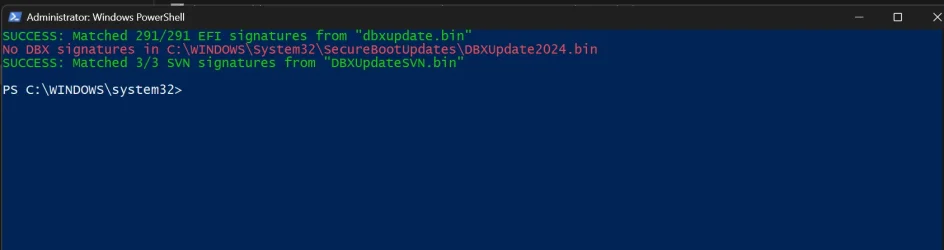
Also this (but I know this will be sorted in the next Garlin's release):

Code:
...\SecureBoot-CA-2023-Updates>Check-DBX.bat
PowerShell 7.6.7
SUCCESS: Matched 291/291 EFI signatures from "dbxupdate.bin"
No DBX signatures in C:\Windows\System32\SecureBootUpdates\DBXUpdate2024.bin
FAILED: Missing 1/3 SVN signatures from "DBXUpdateSVN.bin"
 

My Computer My Computer

At a glance

Windows 11 Home 25H2Intel Core i7-11700KHyperX XMP RGB 48GB (2x8GB, 2x16GB)NVIDIA GeForce RTX 3070 Ti (8 GB)
OS
Windows 11 Home 25H2
Computer type
PC/Desktop
Manufacturer/Model
HP OMEN 30L GT13-1056na
CPU
Intel Core i7-11700K
Motherboard
OasisOC (Z590)
Memory
HyperX XMP RGB 48GB (2x8GB, 2x16GB)
Graphics Card(s)
NVIDIA GeForce RTX 3070 Ti (8 GB)
Sound Card
ALC3866-CG (on-board)
Monitor(s) Displays
HP OMEN 32
Screen Resolution
QHD
Hard Drives
WD Black 1TB PCIe NVMe
Samsung 980 Pro 1TB PCIe NVMe
Seagate 2TB 7200
PSU
Internal 800 W
Case
30L
Cooling
120mm AIO liquid cooling system
Keyboard
Logitech Craft
Mouse
Logitech MX Master 2S
Internet Speed
FTTC
Browser
FireFox Quantum
Antivirus
Windows Defender
Other Info
Logitech MX Sound
Logitech Spotlight
WD My Book Home Edition 2TB (Caviard, WD2002FAEX-007BA0)
Synology DS124 16TB (WD Red Pro, WD161KFGX-68AFPN0)
WD My Cloud 8TB (WD Red Pro, WD8005FFBX-68CAKN0)
WD My Cloud 4TB (WD Red, WD40EFRX-68WT0N0)
New known issue below added. See first post for more details. :alien:

Remote Desktop connections might fail for non-admin users with error 0xC000000D
 

My Computers My Computers

  • At a glance

    Windows 11 Pro for WorkstationsIntel i7-8700K 5 GHz64 GB (4x16GB) G.SKILL TridentZ RGB DDR4 3600...ASUS ROG-STRIX-GTX1080TI-O11G-GAMING (11GB GD...
    OS
    Windows 11 Pro for Workstations
    Computer type
    PC/Desktop
    Manufacturer/Model
    Custom self build
    CPU
    Intel i7-8700K 5 GHz
    Motherboard
    ASUS ROG Maximus XI Formula Z390
    Memory
    64 GB (4x16GB) G.SKILL TridentZ RGB DDR4 3600 MHz (F4-3600C18D-32GTZR)
    Graphics Card(s)
    ASUS ROG-STRIX-GTX1080TI-O11G-GAMING (11GB GDDR5X)
    Sound Card
    Integrated Digital Audio (S/PDIF)
    Monitor(s) Displays
    2 x Samsung Odyssey G75 27"
    Screen Resolution
    2560x1440
    Hard Drives
    1TB Samsung 990 PRO M.2,
    4TB Samsung 990 PRO M.2,
    TerraMaster F8 SSD Plus NAS
    PSU
    Seasonic Prime Titanium 850W
    Case
    Thermaltake Core P3 wall mounted
    Cooling
    Corsair Hydro H115i
    Keyboard
    Amazon Basics Wired Full Keyboard MD005
    Mouse
    Logitech MX Master 4
    Internet Speed
    2 Gbps Download and 100 Mbps Upload
    Browser
    Chrome and Edge
    Antivirus
    Microsoft Defender
    Other Info
    Logitech Z625 speaker system,
    Logitech BRIO 4K Pro webcam,
    HP Color LaserJet Pro MFP M477fdn,
    CyberPower CP1500PFCLCD
    Galaxy S23 Plus phone
  • At a glance

    Windows 11 ProSnapdragon X Elite (12 core) 3.42 GHz16 GB LPDDR5x-7467 MHz
    Operating System
    Windows 11 Pro
    Computer type
    Laptop
    Manufacturer/Model
    Surface Laptop 7 Copilot+ PC
    CPU
    Snapdragon X Elite (12 core) 3.42 GHz
    Memory
    16 GB LPDDR5x-7467 MHz
    Monitor(s) Displays
    15" HDR
    Screen Resolution
    2496 x 1664
    Hard Drives
    1 TB SSD
    Internet Speed
    Wi-Fi 7 and Bluetooth 5.4
    Browser
    Chrome and Edge
    Antivirus
    Microsoft Defender
I'm now getting this message intermittently on reboot. Thought this was supposed to have been fixed?

View attachment 186579
Windows was mistakenly reporting virus protection was turned off, but the specific notification you are seeing means your system has simply missed its recent background update. I just got the same notice this morning on my two beta build machines but not for this build. 🤷🏽‍♂️
 

My Computers My Computers

  • At a glance

    Windows 11 26H2Intel Core Ultra 9 275HX (24-Core)64GB DDR5 6400MT/sNVIDIA GeForce RTX 5080 and Intel UHD Graphics
    OS
    Windows 11 26H2
    Computer type
    Laptop
    Manufacturer/Model
    Alienware 18 Area-51
    CPU
    Intel Core Ultra 9 275HX (24-Core)
    Motherboard
    Alienware
    Memory
    64GB DDR5 6400MT/s
    Graphics Card(s)
    NVIDIA GeForce RTX 5080 and Intel UHD Graphics
    Sound Card
    Onboard, Realtek high-performance Audio chips (ALC3329 & ALC1708))
    Monitor(s) Displays
    300HZ 18-inch QHD 500 nit Comfort View+
    Screen Resolution
    2560 x 1600
    Hard Drives
    2TB NVMe M.2 PCIe Gen 5 SSD
    Case
    Magnesium Alloy
    Cooling
    Advanced Cryo-Tech Quad-Fan Cooling system & large vapor chamber
    Keyboard
    Cherry MX ultra low profile mechanical keyboard with per key AlienFX RGB lighting
    Mouse
    Logitech MX Master 4
    Browser
    Vivaldi (main), Firefox, Chrome, Edge
    Antivirus
    MS Defender and Malwarebytes Free
  • At a glance

    Windows 11 26H2Qualcomm Snapdragon X Elite (12 Core) ARM bas...16GB LPDDR5Qualcomm Adreno X1-85
    Operating System
    Windows 11 26H2
    Computer type
    Laptop
    Manufacturer/Model
    Microsoft Surface Laptop 7
    CPU
    Qualcomm Snapdragon X Elite (12 Core) ARM based CPU
    Motherboard
    Microsoft Corp.
    Memory
    16GB LPDDR5
    Graphics card(s)
    Qualcomm Adreno X1-85
    Sound Card
    Omnisonic speakers with Dolby Atmos spatial sound
    Monitor(s) Displays
    120 Hz 13.8-inch 600 nit PixelSense Flow touchscreen
    Screen Resolution
    2304x1536
    Hard Drives
    1TB NVMe Gen 4 SSD
    Case
    Anodized Aluminum
    Cooling
    Traditional active cooling fan system
    Keyboard
    Mechanical QWERTY, backlit when in use
    Mouse
    Logitech MX Master 4 and Surface Arc Mouse
    Browser
    Vivaldi (main), Firefox, Chrome, Edge
    Antivirus
    MS Defender and Malwarebytes Free
Back
Top Bottom