Known and Resolved issues for Windows 11 version 26H2


 Windows message center:

Windows 11 version 26H2 End of Servicing on October 10, 2028

Current status as of September 29, 2026

Windows 11, version 26H2 has reached general availability. This new version contains all the recently announced features in Windows 11, versions 25H2 and 24H2 and will be delivered using servicing technology, providing a fast installation experience.

The rollout is phased and will expand over the next few months. Starting today, version 26H2 is available on eligible Windows 11, version 25H2 and version 24H2 devices for users who have turned on the setting Get the latest updates as soon as they’re available. If the update is ready for your device, it will download and install automatically, and a single restart will complete the process.

For more details on how to install Windows 11, version 26H2, watch this video.


 Known issues


Summary​
Originating update​
Status​
Last updated​
Devices might experience a black screen or desktop loading issues after sign-in
Microsoft has received reports of this issue occurring in some virtual desktop environments.
N/AResolved
KB5127648
2026-10-13
09:54 PT
Remote Desktop connections might fail for non-admin users with error 0xC000000D
This issue affects non-admin users connecting through Remote Desktop with Administrator protection enabled.
OS Build 26200.9550
KB5124010
2026-09-22
Mitigated2026-10-13
09:54 PT
Applications which require AC-3 audio decoding might close unexpectedly
This issue is more likely to occur in legacy applications, and unlikely for many modern applications.
OS Build 26200.9550
KB5124010
2026-09-22
Resolved
KB5127648
2026-10-13
09:54 PT
Domain-joined devices might lose their secure trust relationship with the domain
Some Credential Guard protected machine accounts might be unable to sign in interactively will valid domain credentials.
N/AResolved
KB5124010
2026-10-08
17:44 PT
USB audio devices might fail to start or produce no sound
Some USB Audio Class 1.0 devices display Code 10 or fail in multichannel audio modes after installing the Sept. 8 update
N/AMitigated2026-09-29
13:05 PT


 Resolved issues


Summary​
Originating update​
Status​
Date resolved​
Devices might experience a black screen or desktop loading issues after sign-in
Microsoft has received reports of this issue occurring in some virtual desktop environments.
N/AResolved
KB5127648
2026-10-13
09:54 PT
Applications which require AC-3 audio decoding might close unexpectedly
This issue is more likely to occur in legacy applications, and unlikely for many modern applications.
OS Build 26200.9550
KB5124010
2026-09-22
Resolved
KB5127648
2026-10-13
09:54 PT
Domain-joined devices might lose their secure trust relationship with the domain
Some Credential Guard protected machine accounts might be unable to sign in interactively will valid domain credentials.
N/AResolved
KB5124010
2026-09-22
10:00 PT
 
Last edited:
If you’re running in PowerShell (where the prompt has the word “PS”), then you need to provide a relative or full pathname for the batch file.
Code:
.\Repair_My_BootWIM.bat E:

\folder\path\Repair_My_BootWIM.bat E:
 

My Computer My Computer

At a glance

Windows 7
OS
Windows 7
If you’re running in PowerShell (where the prompt has the word “PS”), then you need to provide a relative or full pathname for the batch file.
Code:
.\Repair_My_BootWIM.bat E:

\folder\path\Repair_My_BootWIM.bat E:
I am using the CMD Command Prompt.
Should I enter it into this path?
if ($args.Count -eq 0) {
'Usage: Repair_My_BootWIM.bat [DriveLetter]'
exit 0
\folder\path\Repair_My_BootWIM.bat E:
 

My Computer My Computer

At a glance

Window 11
OS
Window 11
Computer type
Laptop
Manufacturer/Model
Dell
1. Extract or save the batch to a folder.
2. From your command window, "cd" into that folder.
3. Run ".\Repair_My_BootWIM.bat D:"

In this example, you've already prepared an USB thumb drive that boots. And it's plugged in as drive letter D:
 

My Computer My Computer

At a glance

Windows 7
OS
Windows 7

My Computers My Computers

  • At a glance

    Windows 11 Pro 25H2 build: (26200.7623)32GB
    OS
    Windows 11 Pro 25H2 build: (26200.7623)
    Computer type
    Laptop
    Manufacturer/Model
    Microsoft Surface Pro
    Memory
    32GB
  • At a glance

    Microsoft 25H2 ProIntel Core Ultra 764GBIntel Integrated Graphics
    Operating System
    Microsoft 25H2 Pro
    Computer type
    Laptop
    Manufacturer/Model
    Dell Pro 14 - PC14250
    CPU
    Intel Core Ultra 7
    Memory
    64GB
    Graphics card(s)
    Intel Integrated Graphics
    Hard Drives
    Micron 1TB SSD
I cannot run the Repair_My_BootWIM.bat file correctly.
I keep receiving the following message:
"The specified file cannot be found."
Please help me understand where and what changes need to be made to the Repair_My_BootWIM.bat file.
 

My Computer My Computer

At a glance

Window 11
OS
Window 11
Computer type
Laptop
Manufacturer/Model
Dell
I cannot run the Repair_My_BootWIM.bat file correctly.
I keep receiving the following message:
"The specified file cannot be found."
Please help me understand where and what changes need to be made to the Repair_My_BootWIM.bat file.
My apologies. The ZIP file I posted had a corrupted version of the script.

Try this fixed ZIP file.
 

Attachments

My Computer My Computer

At a glance

Windows 7
OS
Windows 7
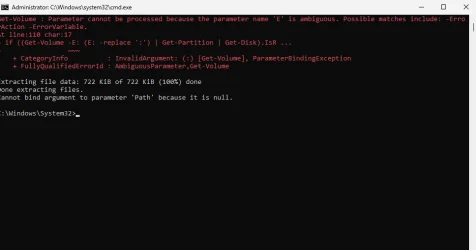
I am sending Repair_My_BootWIM.bat with my changes.
And a screenshot.
Repair_My_BootWIM.bat still isn't working.
 

Attachments

  • Repair_My_BootWIM.7z
    Repair_My_BootWIM.7z
    2.2 KB · Views: 10
  • Repair_My_BootWIM.webp
    Repair_My_BootWIM.webp
    26.8 KB · Views: 1

My Computer My Computer

At a glance

Window 11
OS
Window 11
Computer type
Laptop
Manufacturer/Model
Dell
You're not supposed to edit the batch file. The script is supposed to accept whatever drive letter is provided on the command line.
 

My Computer My Computer

At a glance

Windows 7
OS
Windows 7
UPDATE 10/13:
New mitigated issue below. See first post for more details. :alien:

Remote Desktop connections might fail for non-admin users with error 0xC000000D
This issue affects non-admin users connecting through Remote Desktop with Administrator protection enabled.

UPDATE 10/13:
New resolved issues below. See first post for more details. :alien:

Devices might experience a black screen or desktop loading issues after sign-in
Microsoft has received reports of this issue occurring in some virtual desktop environments.

Applications which require AC-3 audio decoding might close unexpectedly
This issue is more likely to occur in legacy applications, and unlikely for many modern applications.
 

My Computers My Computers

  • At a glance

    Windows 11 Pro for WorkstationsIntel i7-8700K 5 GHz64 GB (4x16GB) G.SKILL TridentZ RGB DDR4 3600...ASUS ROG-STRIX-GTX1080TI-O11G-GAMING (11GB GD...
    OS
    Windows 11 Pro for Workstations
    Computer type
    PC/Desktop
    Manufacturer/Model
    Custom self build
    CPU
    Intel i7-8700K 5 GHz
    Motherboard
    ASUS ROG Maximus XI Formula Z390
    Memory
    64 GB (4x16GB) G.SKILL TridentZ RGB DDR4 3600 MHz (F4-3600C18D-32GTZR)
    Graphics Card(s)
    ASUS ROG-STRIX-GTX1080TI-O11G-GAMING (11GB GDDR5X)
    Sound Card
    Integrated Digital Audio (S/PDIF)
    Monitor(s) Displays
    2 x Samsung Odyssey G75 27"
    Screen Resolution
    2560x1440
    Hard Drives
    1TB Samsung 990 PRO M.2,
    4TB Samsung 990 PRO M.2,
    TerraMaster F8 SSD Plus NAS
    PSU
    Seasonic Prime Titanium 850W
    Case
    Thermaltake Core P3 wall mounted
    Cooling
    Corsair Hydro H115i
    Keyboard
    Amazon Basics Wired Full Keyboard MD005
    Mouse
    Logitech MX Master 4
    Internet Speed
    2 Gbps Download and 100 Mbps Upload
    Browser
    Chrome and Edge
    Antivirus
    Microsoft Defender
    Other Info
    Logitech Z625 speaker system,
    Logitech BRIO 4K Pro webcam,
    HP Color LaserJet Pro MFP M477fdn,
    CyberPower CP1500PFCLCD
    Galaxy S23 Plus phone
  • At a glance

    Windows 11 ProSnapdragon X Elite (12 core) 3.42 GHz16 GB LPDDR5x-7467 MHz
    Operating System
    Windows 11 Pro
    Computer type
    Laptop
    Manufacturer/Model
    Surface Laptop 7 Copilot+ PC
    CPU
    Snapdragon X Elite (12 core) 3.42 GHz
    Memory
    16 GB LPDDR5x-7467 MHz
    Monitor(s) Displays
    15" HDR
    Screen Resolution
    2496 x 1664
    Hard Drives
    1 TB SSD
    Internet Speed
    Wi-Fi 7 and Bluetooth 5.4
    Browser
    Chrome and Edge
    Antivirus
    Microsoft Defender
You're not supposed to edit the batch file. The script is supposed to accept whatever drive letter is provided on the command line.
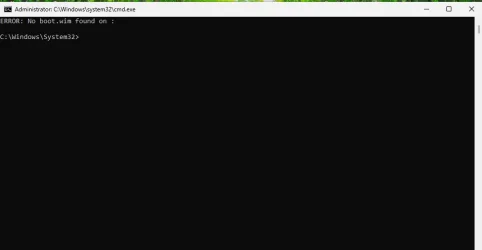
I ran Repair_My_BootWIM.bat as an administrator.
Without editing it.
And the error persists, just like before switching to the new Repair_My_BootWIM.bat.
 

Attachments

  • 14.10.2026.webp
    14.10.2026.webp
    7.6 KB · Views: 1

My Computer My Computer

At a glance

Window 11
OS
Window 11
Computer type
Laptop
Manufacturer/Model
Dell
Back
Top Bottom