

silvatel
Member
- Local time
- 7:49 PM
- Posts
- 6
- OS
- Windows 11 Home 22H2 build 22621.1413
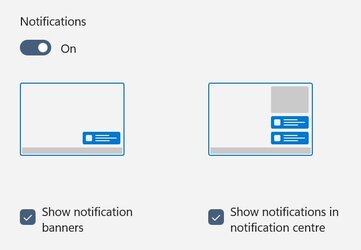
I used to get notifications stacked up on the right of the screen. They're now delivered individually, very slowly, in the bottom right. This is rather irritating. I checked notifications settings and it looks like you can choose between individual or stacked, but clicking the pictures does nothing (see attached). Has anyone else had this issue and found a way to fix it, please?
- Windows Build/Version
- Windows 11 Home 22H2 build 22621.1413
Attachments
My Computer
At a glance
Windows 11 Home 22H2 build 22621.1413AMD Rysen 5 3500U8GBRadeon Vega mobile
- OS
- Windows 11 Home 22H2 build 22621.1413
- Computer type
- Laptop
- Manufacturer/Model
- HP14
- CPU
- AMD Rysen 5 3500U
- Motherboard
- HP
- Memory
- 8GB
- Graphics Card(s)
- Radeon Vega mobile
- Screen Resolution
- 1920x1080
- Hard Drives
- 256GB SSD
- Mouse
- Wireless Logitech
- Internet Speed
- 36Mbps download FTTC TalkTalk
- Browser
- Firefox
- Antivirus
- Windows Defender
- Other Info
- HP14 Win11 laptop, old HP15 Win10 laptop, old Lenovo Win10 desktop, Linux Mint 11" notebook






