Laptop Restart/Crash Help Requested


Skeet1983

Well-known member
Member
Local time
1:50 AM
Posts
71
OS
Windows 11 Version 25H2
Hi guys. I have a gaming laptop, that has restarted on it's own 2 times in the past 7 days. I guess that it was a crash, but today was the first time I saw it happen. There was no error message displayed, but I did go into Windows Event Viewer, and it said that it was a Kernel-Power crash/restart, with Event ID 41. Should I be concerned about this, and is there a fix for this issue? My laptop is running Windows 11 64-bit. Here are laptop specs:

- Windows 11 64-bit, Version 22H2, OS Build 22621.2861
- 64GB System RAM
- Nvidia RTX 3080 Graphics Card w/ 16GB VRAM
- AMD Ryzen 9 5900HX @ 3.30 GHz
- 2x 4TB SSD's (Primary SSD with OS has about 300GB remaining)

Thoughts and help appreciated :)
 
Windows Build/Version
Windows 11 64-bit, Version 22H2, OS Build 22621.2861

My Computers My Computers

  • At a glance

    Windows 11 Version 25H2Processor: AMD Ryzen 7 8745HX with Radeon Gra...32 GBNvidia GeForce RTX 5060 8 GB
    OS
    Windows 11 Version 25H2
    Computer type
    Laptop
    Manufacturer/Model
    Lenovo Legion 5 Pro 16ADR10
    CPU
    Processor: AMD Ryzen 7 8745HX with Radeon Graphics
    Memory
    32 GB
    Graphics Card(s)
    Nvidia GeForce RTX 5060 8 GB
    Screen Resolution
    2560*1600
    Hard Drives
    2x 4TB NVME SSD's, both M2 2280 Form Factor
    Browser
    Microsoft Edge
    Antivirus
    Microsoft/Windows Defender
  • At a glance

    Windows 10 Home 64-Bit (Version 2004)AMD Ryzen 9 5900HX 3.30 GHz16 GBNvidia GeForce RTX 3080 16GB VRAM
    Operating System
    Windows 10 Home 64-Bit (Version 2004)
    Computer type
    Laptop
    Manufacturer/Model
    XoticPC (Xotic PC GP17)
    CPU
    AMD Ryzen 9 5900HX 3.30 GHz
    Memory
    16 GB
    Graphics card(s)
    Nvidia GeForce RTX 3080 16GB VRAM
Yes, you should be concerned.
Follow the instructions and start a new thread in the BSOD section of the Forum
BSOD - Posting Instructions
 

My Computer My Computer

At a glance

Windows 11 Pro Insider 64 bit 25H2 26200.5742Intel Core i7 9700K 3.6016 GBnVidia GEForce RTX 2060 Super
OS
Windows 11 Pro Insider 64 bit 25H2 26200.5742
Computer type
PC/Desktop
Manufacturer/Model
Gigabyte Z390 UD
CPU
Intel Core i7 9700K 3.60
Motherboard
Gigabyte Z390 UD
Memory
16 GB
Graphics Card(s)
nVidia GEForce RTX 2060 Super
Sound Card
onboard
Monitor(s) Displays
Two 27" Dell 4K monitors
Screen Resolution
3840 x 2160
Hard Drives
M.2 NVME SSD, 500 GB; Two 2TB Mechanical HDD's
PSU
850w PSU
Case
Cyberpower PC
Cooling
Water cooled
Keyboard
Backlit Cyberpower gaming keyboard
Mouse
Backlit Cyberpower gaming mouse
Internet Speed
1 GB mbps
Browser
Brave
Antivirus
Windows Security
Hi guys. I have a gaming laptop, that has restarted on it's own 2 times in the past 7 days. I guess that it was a crash, but today was the first time I saw it happen. There was no error message displayed, but I did go into Windows Event Viewer, and it said that it was a Kernel-Power crash/restart, with Event ID 41. Should I be concerned about this, and is there a fix for this issue? My laptop is running Windows 11 64-bit. Here are laptop specs:

- Windows 11 64-bit, Version 22H2, OS Build 22621.2861
- 64GB System RAM
- Nvidia RTX 3080 Graphics Card w/ 16GB VRAM
- AMD Ryzen 9 5900HX @ 3.30 GHz
- 2x 4TB SSD's (Primary SSD with OS has about 300GB remaining)

Thoughts and help appreciated :)
You can go through the checklist at the following site for some information that may help. Also, follow Spunk's suggestion for additional help.


My Computer My Computer

At a glance

Windows 11 ProfessionalIntel Core i5-940032GBIntegrated Intel UHD Graphics 630
OS
Windows 11 Professional
Computer type
PC/Desktop
Manufacturer/Model
Microcenter B677
CPU
Intel Core i5-9400
Motherboard
ASRock H310CM-HDV/M.2
Memory
32GB
Graphics Card(s)
Integrated Intel UHD Graphics 630
Sound Card
Intel Kaby Lake - High Definition Audio / cAVS (Audio, Voice, Speech) [A0]
Monitor(s) Displays
LG Model: GSM59F1
Screen Resolution
2560x1080
Case
Lian Li 205M
Antivirus
Kaspersky AV

My Computers My Computers

  • At a glance

    Windows 11 Version 25H2Processor: AMD Ryzen 7 8745HX with Radeon Gra...32 GBNvidia GeForce RTX 5060 8 GB
    OS
    Windows 11 Version 25H2
    Computer type
    Laptop
    Manufacturer/Model
    Lenovo Legion 5 Pro 16ADR10
    CPU
    Processor: AMD Ryzen 7 8745HX with Radeon Graphics
    Memory
    32 GB
    Graphics Card(s)
    Nvidia GeForce RTX 5060 8 GB
    Screen Resolution
    2560*1600
    Hard Drives
    2x 4TB NVME SSD's, both M2 2280 Form Factor
    Browser
    Microsoft Edge
    Antivirus
    Microsoft/Windows Defender
  • At a glance

    Windows 10 Home 64-Bit (Version 2004)AMD Ryzen 9 5900HX 3.30 GHz16 GBNvidia GeForce RTX 3080 16GB VRAM
    Operating System
    Windows 10 Home 64-Bit (Version 2004)
    Computer type
    Laptop
    Manufacturer/Model
    XoticPC (Xotic PC GP17)
    CPU
    AMD Ryzen 9 5900HX 3.30 GHz
    Memory
    16 GB
    Graphics card(s)
    Nvidia GeForce RTX 3080 16GB VRAM

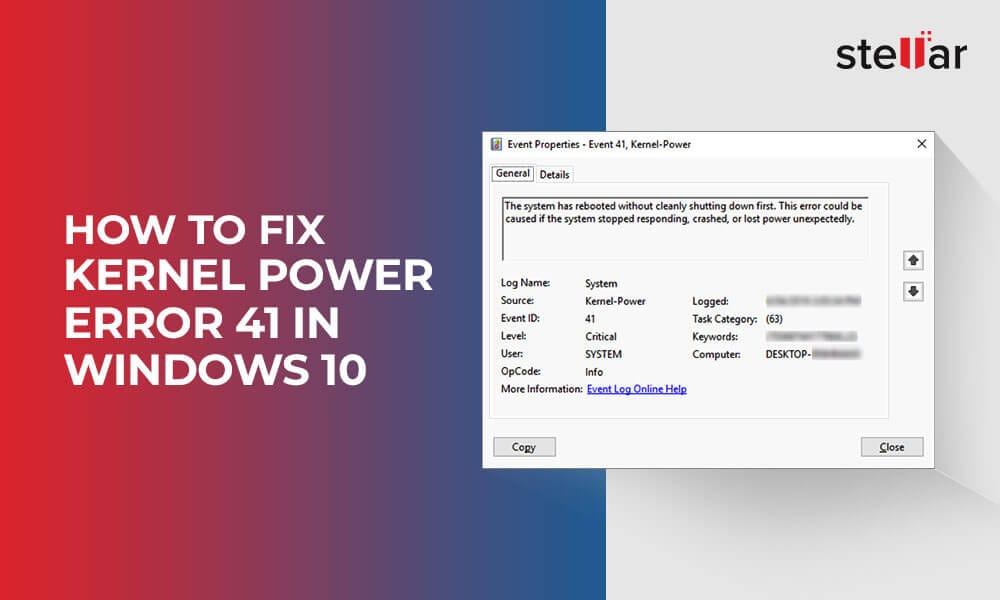
The event 41 kernel power means that there is something happened unexpectedly that blocked Windows from turning off properly, and there is a message saying that “The system has rebooted without cleanly shutting down first. Here's why Kernel Power Error 41 happens and how to fix it.
 

My Computer My Computer

At a glance

Windows 11AMD Ryzen 7 5700GMicron Technology DDR4-3200 16GBNVIDIA GeForce RTX 3060
OS
Windows 11
Computer type
PC/Desktop
Manufacturer/Model
HP Pavilion
CPU
AMD Ryzen 7 5700G
Motherboard
Erica6
Memory
Micron Technology DDR4-3200 16GB
Graphics Card(s)
NVIDIA GeForce RTX 3060
Sound Card
Realtek ALC671
Monitor(s) Displays
Samsung SyncMaster U28E590
Screen Resolution
3840 x 2160
Hard Drives
SAMSUNG MZVLQ1T0HALB-000H1
Please perform the following steps:

1) Run Tuneup plus > post a share link


2) Post a link for the motherboard website


3) The BIOS Version/Date American Megatrends International, LLC. N.1.21ELU06, 6/22/2021

Check for a BIOS upgrade


4) Uninstall the Nvidia GPU drivers using DDU > reinstall from the Nvidia website


5) Reinstall these AMD drivers:

a) Chipset drivers

b) Audio-CoProcesser-Driver

amdacpbus Audio Coprocessr Driver for DSP c:\windows\system32\driverstore\filerepository\amdacpbus.inf_amd64_6742ef4ed72f99c3\amdacpbus.sys


Code:
C:\Windows\System32\DriverStore\FileRepository\amdacpbus.inf_amd64_6742ef4ed72f99c3\amdacpbus.sys, 2.89.0000.0072 (English), 1/5/2021 09:27:46, 9243584 bytes

Code:
Name    NVIDIA GeForce RTX 3080 Laptop GPU
PNP Device ID    PCI\VEN_10DE&DEV_249C&SUBSYS_11141D05&REV_A1\4&18A5DB89&0&0009
Adapter Type    NVIDIA GeForce RTX 3080 Laptop GPU, NVIDIA compatible
Adapter Description    NVIDIA GeForce RTX 3080 Laptop GPU
Adapter RAM    (1,048,576) bytes
Installed Drivers    C:\Windows\System32\DriverStore\FileRepository\nvtfig.inf_amd64_f070a0c66c044d2b\nvldumdx.dll,C:\Windows\System32\DriverStore\FileRepository\nvtfig.inf_amd64_f070a0c66c044d2b\nvldumdx.dll,C:\Windows\System32\DriverStore\FileRepository\nvtfig.inf_amd64_f070a0c66c044d2b\nvldumdx.dll,C:\Windows\System32\DriverStore\FileRepository\nvtfig.inf_amd64_f070a0c66c044d2b\nvldumdx.dll
Driver Version    31.0.15.3713
INF File    oem5.inf (Section082 section)
Driver    C:\WINDOWS\SYSTEM32\DRIVERSTORE\FILEREPOSITORY\NVTFIG.INF_AMD64_F070A0C66C044D2B\NVLDDMKM.SYS (31.0.15.3713, 56.42 MB (59,157,640 bytes), 8/31/2023 2:42 PM)
 

My Computer My Computer

At a glance

Windows 10Intel(R) Core(TM) i7-4800MQ CPU @ 2.70GHz16 GB Total: Manufacturer : Samsung MemoryTyp...NVIDIA Quadro K3100M; Intel(R) HD Graphics 4600
OS
Windows 10
Computer type
Laptop
Manufacturer/Model
HP
CPU
Intel(R) Core(TM) i7-4800MQ CPU @ 2.70GHz
Motherboard
Product : 190A Version : KBC Version 94.56
Memory
16 GB Total: Manufacturer : Samsung MemoryType : DDR3 FormFactor : SODIMM Capacity : 8GB Speed : 1600
Graphics Card(s)
NVIDIA Quadro K3100M; Intel(R) HD Graphics 4600
Sound Card
IDT High Definition Audio CODEC; PNP Device ID HDAUDIO\FUNC_01&VEN_111D&DEV_76E0
Hard Drives
Model Hitachi HTS727575A9E364
Antivirus
Microsoft Defender
Other Info
Mobile Workstation

Latest Support Threads

Back
Top Bottom