
Navigation
Install the app
How to install the app on iOS
Follow along with the video below to see how to install our site as a web app on your home screen.
Note: This feature may not be available in some browsers.
More options
Style variation
System
Light
Dark
You are using an out of date browser. It may not display this or other websites correctly.
You should upgrade or use an alternative browser.
You should upgrade or use an alternative browser.
Solved Latest Macrium Reflect 8 updates
- Thread starter Bree
- Start date


- Local time
- 6:08 AM
- Posts
- 8,919
- OS
- Windows 11 Pro + Win11 Canary VM.
This is all getting blown out of proportion. People are making a mountain out of a molehill.
1) It is not just a Macrium Reflect issue but applies to any Winpe system not set up to manage revocations.
2) You can simply temporarily turn off secure boot from bios if you need to boot from any winpe device that is impacted by the revocations. Then reset it after finishing with whatever winpe toool being used.
It takes me less than 30 seconds to turn secure boot on or off, and boot from any winpe tool.
1) It is not just a Macrium Reflect issue but applies to any Winpe system not set up to manage revocations.
2) You can simply temporarily turn off secure boot from bios if you need to boot from any winpe device that is impacted by the revocations. Then reset it after finishing with whatever winpe toool being used.
It takes me less than 30 seconds to turn secure boot on or off, and boot from any winpe tool.
My Computer
At a glance
Windows 11 Pro + Win11 Canary VM.I9 13th gen i9-13900H 2.60 GHZ16 GB solderedIntegrated Intel Iris XE
- OS
- Windows 11 Pro + Win11 Canary VM.
- Computer type
- Laptop
- Manufacturer/Model
- ASUS Zenbook 14
- CPU
- I9 13th gen i9-13900H 2.60 GHZ
- Motherboard
- Yep, Laptop has one.
- Memory
- 16 GB soldered
- Graphics Card(s)
- Integrated Intel Iris XE
- Sound Card
- Realtek built in
- Monitor(s) Displays
- laptop OLED screen
- Screen Resolution
- 2880x1800 touchscreen
- Hard Drives
- 1 TB NVME SSD (only weakness is only one slot)
- PSU
- Internal + 65W thunderbolt USB4 charger
- Case
- Yep, got one
- Cooling
- Stella Artois (UK pint cans - 568 ml) - extra cost.
- Keyboard
- Built in UK keybd
- Mouse
- Bluetooth , wireless dongled, wired
- Internet Speed
- 900 mbs (ethernet), wifi 6 typical 350-450 mb/s both up and down
- Browser
- Edge
- Antivirus
- Defender
- Other Info
- TPM 2.0, 2xUSB4 thunderbolt, 1xUsb3 (usb a), 1xUsb-c, hdmi out, 3.5 mm audio out/in combo, ASUS backlit trackpad (inc. switchable number pad)
Macrium Reflect Home V8
Office 365 Family (6 users each 1TB onedrive space)
Hyper-V (a vm runs almost as fast as my older laptop)

I had the same, so I set it to high again even though it was set to high in edit default settings> advanced and pushed the slider to highestWell, I take that back.... this update didn't fix that problem.
When the priority is set to High... it still drops back to one notch lower on the next backup.
View attachment 69907
View attachment 69905
But at least now it says: High Priority.
It worked for me, and as you say if I did it through the screen in your screenshot it still wouldn't go to highest
My Computers
-
At a glance
Windows 11 Pro13th Gen Core i9 13900HX32GB DDR5 @4800MHz 2x16GBGeforce RTX 4090HX 16GB- OS
- Windows 11 Pro
- Computer type
- Laptop
- Manufacturer/Model
- Alienware M18 R1
- CPU
- 13th Gen Core i9 13900HX
- Memory
- 32GB DDR5 @4800MHz 2x16GB
- Graphics Card(s)
- Geforce RTX 4090HX 16GB
- Sound Card
- Nvidia HD / Realtek ALC3254
- Monitor(s) Displays
- 18" QHD+
- Screen Resolution
- 25660 X 1600
- Hard Drives
- C: KIOXIA (Toshiba) 2TB KXG80ZNV2T04 NVMe PCIe M.2 SSD
D: KIOXIA (Toshiba) 2TB KXG80ZNV2T04 NVMe PCIe M.2 SSD
- Case
- Dark Metallic Moon
- Keyboard
- Alienware M Series per-key AlienFX RGB
- Mouse
- Alienware AW610M
- Browser
- Chrome and Firefox
- Antivirus
- Norton
- Other Info
- Killer E3000 Ethernet Controller
Killer Killer AX1690 Wi-Fi Network Adaptor Wi-Fi 6E
Bluetooth 5.2
Alienware Z01G Graphic Amplifier
-
At a glance
Windows 11 Pro10th Gen i-9 10900 K32Gb Dual Channel DDR4 @ 8843MHzNvidia RTX 2080 Super- Operating System
- Windows 11 Pro
- Computer type
- Laptop
- Manufacturer/Model
- Alienware Area 51m R2
- CPU
- 10th Gen i-9 10900 K
- Memory
- 32Gb Dual Channel DDR4 @ 8843MHz
- Graphics card(s)
- Nvidia RTX 2080 Super
- Sound Card
- Nvidia
- Screen Resolution
- 1920 x 1080
- Hard Drives
- Hard Drive C: Samsung 2TB SSD PM981a NVMe
Hard Drive D:Samsung 2TB SSD 970 EVO Plus
- Mouse
- Alienware 610M
- Browser
- Chrome
- Antivirus
- Norton

default settings> advanced and pushed the slider to highest
Worked. Have a cookie.

Wanna know the sad part?
I looked in Default settings > Advanced the other day, and never saw the slider on the right side. LOL
I guess it wasn't big enough.
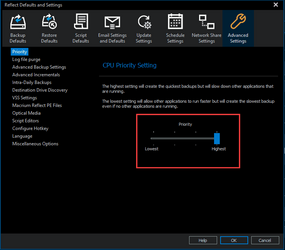
Last edited:
My Computers
-
At a glance
Win 11 Home 26H2 26300.9711AMD Ryzen 7 3700XG.Skill (F4-3200C14D-16GTZKW)EVGA RTX 2070 (08G-P4-2171-KR)- OS
- Win 11 Home 26H2 26300.9711
- Computer type
- PC/Desktop
- Manufacturer/Model
- Built by Ghot® [May 2020]
- CPU
- AMD Ryzen 7 3700X
- Motherboard
- Asus Pro WS X570-ACE (BIOS 5302)
- Memory
- G.Skill (F4-3200C14D-16GTZKW)
- Graphics Card(s)
- EVGA RTX 2070 (08G-P4-2171-KR)
- Sound Card
- Realtek ALC1220P / ALC S1220A
- Monitor(s) Displays
- Dell U3011 30"
- Screen Resolution
- 2560 x 1600
- Hard Drives
- 2x Samsung 860 EVO 500GB,
WD 4TB Black FZBX - SATA III,
WD 8TB Black FZBX - SATA III,
DRW-24B1ST CD/DVD Burner
- PSU
- PC Power & Cooling 750W Quad EPS12V
- Case
- Cooler Master ATCS 840 Tower
- Cooling
- CM Hyper 212 EVO (push/pull)
- Keyboard
- Ducky DK9008 Shine II Blue LED
- Mouse
- Logitech Optical M-100
- Internet Speed
- 300/300
- Browser
- Firefox (latest)
- Antivirus
- Bitdefender Total Security
- Other Info
- Speakers: Klipsch Pro Media 2.1
-
At a glance
Windows XP Pro 32bit w/SP3AMD Athlon 64 X2 5000+ (OC'd @ 3.2Ghz)TWIN2X2048-6400C4DHX (2 x 1GB, DDR2 800)EVGA 256-P2-N758-TR GeForce 8600GT SSC- Operating System
- Windows XP Pro 32bit w/SP3
- Computer type
- PC/Desktop
- Manufacturer/Model
- Built by Ghot® (not in use)
- CPU
- AMD Athlon 64 X2 5000+ (OC'd @ 3.2Ghz)
- Motherboard
- ASUS M2N32-SLI Deluxe Wireless Edition
- Memory
- TWIN2X2048-6400C4DHX (2 x 1GB, DDR2 800)
- Graphics card(s)
- EVGA 256-P2-N758-TR GeForce 8600GT SSC
- Sound Card
- Onboard
- Monitor(s) Displays
- ViewSonic G90FB Black 19" Professional (CRT)
- Screen Resolution
- up to 2048 x 1536
- Hard Drives
- WD 36GB 10,000rpm Raptor SATA
Seagate 80GB 7200rpm SATA
Lite-On LTR-52246S CD/RW
Lite-On LH-18A1P CD/DVD Burner
- PSU
- PC Power & Cooling Silencer 750 Quad EPS12V
- Case
- Generic Beige case, 80mm fans
- Cooling
- ZALMAN 9500A 92mm CPU Cooler
- Keyboard
- Logitech Classic Keybooard 200
- Mouse
- Logitech Optical M-BT96a
- Internet Speed
- 300/300
- Browser
- Firefox 3.x ??
- Antivirus
- Symantec (Norton)
- Other Info
- Still assembled, still runs. Haven't turned it on for 15 years?
Glad your sorted my friendWorked. Have a cookie.
Wanna know the sad part?
I looked in Default settings > Advanced the other day, and never saw the slider on the right side. LOL
I guess it wasn't big enough.
View attachment 70403
My Computers
-
At a glance
Windows 11 Pro13th Gen Core i9 13900HX32GB DDR5 @4800MHz 2x16GBGeforce RTX 4090HX 16GB- OS
- Windows 11 Pro
- Computer type
- Laptop
- Manufacturer/Model
- Alienware M18 R1
- CPU
- 13th Gen Core i9 13900HX
- Memory
- 32GB DDR5 @4800MHz 2x16GB
- Graphics Card(s)
- Geforce RTX 4090HX 16GB
- Sound Card
- Nvidia HD / Realtek ALC3254
- Monitor(s) Displays
- 18" QHD+
- Screen Resolution
- 25660 X 1600
- Hard Drives
- C: KIOXIA (Toshiba) 2TB KXG80ZNV2T04 NVMe PCIe M.2 SSD
D: KIOXIA (Toshiba) 2TB KXG80ZNV2T04 NVMe PCIe M.2 SSD
- Case
- Dark Metallic Moon
- Keyboard
- Alienware M Series per-key AlienFX RGB
- Mouse
- Alienware AW610M
- Browser
- Chrome and Firefox
- Antivirus
- Norton
- Other Info
- Killer E3000 Ethernet Controller
Killer Killer AX1690 Wi-Fi Network Adaptor Wi-Fi 6E
Bluetooth 5.2
Alienware Z01G Graphic Amplifier
-
At a glance
Windows 11 Pro10th Gen i-9 10900 K32Gb Dual Channel DDR4 @ 8843MHzNvidia RTX 2080 Super- Operating System
- Windows 11 Pro
- Computer type
- Laptop
- Manufacturer/Model
- Alienware Area 51m R2
- CPU
- 10th Gen i-9 10900 K
- Memory
- 32Gb Dual Channel DDR4 @ 8843MHz
- Graphics card(s)
- Nvidia RTX 2080 Super
- Sound Card
- Nvidia
- Screen Resolution
- 1920 x 1080
- Hard Drives
- Hard Drive C: Samsung 2TB SSD PM981a NVMe
Hard Drive D:Samsung 2TB SSD 970 EVO Plus
- Mouse
- Alienware 610M
- Browser
- Chrome
- Antivirus
- Norton

Aw, c'mon, man! Size isn't supposed to matter.I guess it wasn't big enough.

My Computers
-
At a glance
11 Pro 24H2 26100.2454i7-9700 @ 3.00GHz32GBDDR4 @ 2666MHzIntel HD 630 Graphics onboard- OS
- 11 Pro 24H2 26100.2454
- Computer type
- PC/Desktop
- Manufacturer/Model
- Lenovo ThinkCentre M920S SFF
- CPU
- i7-9700 @ 3.00GHz
- Motherboard
- Lenovo 3132
- Memory
- 32GBDDR4 @ 2666MHz
- Graphics Card(s)
- Intel HD 630 Graphics onboard
- Sound Card
- Realtek HD Audio
- Monitor(s) Displays
- LG E2442
- Screen Resolution
- 1920x1080
- Hard Drives
- 1 x Samsung 970 EVO PLUS 500GB NVMe SSD, 1 x WD_BLACK SN770
250GB NVMe SSD (OS and programs), 1 x WD_BLACK SN770
500GB NVMe SSD (Data)
- Case
- Lenovo SFF
- Keyboard
- Cherry Stream TKL JK-8600US-2 Wired
- Mouse
- LogiTech M510 wireless
- Internet Speed
- Fast (for fixed wireless!)
- Browser
- Chrome, sometimes Firefox
- Antivirus
- Malwarebytes Premium & Defender (working together beautifully!)
-
At a glance
11 Pro 24H2 26100.2454i5-8400 @ 2.80GHz32GB DDR4 @ 2600MHzIntel HD 630 Graphics onboard- Operating System
- 11 Pro 24H2 26100.2454
- Computer type
- PC/Desktop
- Manufacturer/Model
- Lenovo ThinkCentre M920S SFF
- CPU
- i5-8400 @ 2.80GHz
- Motherboard
- Lenovo 3132
- Memory
- 32GB DDR4 @ 2600MHz
- Graphics card(s)
- Intel HD 630 Graphics onboard
- Sound Card
- Realtek High Definition Audio onboard
- Monitor(s) Displays
- LG FULL HD (1920x1080@59Hz)
- Screen Resolution
- 1920 x 1080
- Hard Drives
- 1 x Samsung 970 EVO PLUS NVMe; 1 x Samsung 980 NVMe SSD
- Case
- Lenovo Think Centre SFF
- Keyboard
- Cherry Stream TKL JK-8600US-2 Wired
- Mouse
- LogiTech M510 wireless
- Internet Speed
- Fast (for fixed wireless!)
- Browser
- Chrome
- Antivirus
- Malwarebytes Premium and MS Defender, beautiful together

New MR update 8.0.7675
My Computers
-
At a glance
Windows11 Pro 26300.9807Intel Core i9 14900F (24 -Core, 68 MB Total C...32GB DDR5RTX 4080 Super w/581.94- OS
- Windows11 Pro 26300.9807
- Computer type
- PC/Desktop
- Manufacturer/Model
- Dell Alienware Aurora R16
- CPU
- Intel Core i9 14900F (24 -Core, 68 MB Total Cache)
- Motherboard
- Dell Alienware
- Memory
- 32GB DDR5
- Graphics Card(s)
- RTX 4080 Super w/581.94
- Sound Card
- Realtec
- Monitor(s) Displays
- Corsair XENEON 32QHD165
- Screen Resolution
- 2560 X 1440
- Hard Drives
- 1-2TB Samsung 990 Pro PCIe NVMe M2 SSD
1-4TB Samsung 990 Pro PCIe NVMe M2 SSD
- PSU
- 1000 Watt Platinum Dell
- Case
- Alienware
- Cooling
- Liquid Closed Loop
- Keyboard
- Corsair Strafe RGB
- Mouse
- Logitech MK270 Wireless
- Internet Speed
- 100Gb's Down-20 Up
- Browser
- Firefox 158.0
- Antivirus
- Defender
- Other Info
- Very Quiet And Fast
CyberPower UPS CP1500PFCLCD
-
At a glance
MX-Linux13th Gen Inter(R) Core(TM) i3-1315U64 GB DDR4 @3200 MHz.Internal- Operating System
- MX-Linux
- Computer type
- PC/Desktop
- Manufacturer/Model
- Intel
- CPU
- 13th Gen Inter(R) Core(TM) i3-1315U
- Motherboard
- Intel
- Memory
- 64 GB DDR4 @3200 MHz.
- Graphics card(s)
- Internal
- Sound Card
- None
- Monitor(s) Displays
- Dell 2419HGCF
- Screen Resolution
- 1920 X 1080
- Hard Drives
- SAMSUNG 980 PRO SSD 2TB, PCIe 4.0 M.2 2280
- PSU
- Chicony 30 Watt
- Case
- Small
- Keyboard
- Dell
- Mouse
- Razor
- Internet Speed
- 1GB
- Browser
- Slimjet

- Local time
- 7:08 AM
- Posts
- 2,930
- OS
- W11 Pro and Insider Dev
Tnx, just showed up

My Computer
At a glance
W11 Pro and Insider DevAMD Ryzen 9 7900x2x16GB Kingston 6000MHz, Cl 32 @ 6200MHz Cl30Gigabyte Rx 6600XT Gaming OC 8G Pro
- OS
- W11 Pro and Insider Dev
- Computer type
- PC/Desktop
- Manufacturer/Model
- Home brewed
- CPU
- AMD Ryzen 9 7900x
- Motherboard
- ASROCK b650 PRO RS
- Memory
- 2x16GB Kingston 6000MHz, Cl 32 @ 6200MHz Cl30
- Graphics Card(s)
- Gigabyte Rx 6600XT Gaming OC 8G Pro
- Sound Card
- MB, Realtek Ac1220p
- Monitor(s) Displays
- 3 x 27"
- Screen Resolution
- 1080p
- Hard Drives
- Kingston KC3000. 1TBSamsung 970 evo Plus 500GB, Crucial P1 NVMe 1TB, Lexar NVMe 2 TB, Silicon Power M.2 SATA 500GB
- PSU
- Seasonic 750W
- Case
- Custom Raidmax
- Cooling
- Arctic Liquid Freezer III 360mm
- Internet Speed
- 20/19 mbps

My Computers
-
At a glance
Windows 11 HomeAMD Athlon Silver 3050U8GBRadeon Graphics- OS
- Windows 11 Home
- Computer type
- Laptop
- Manufacturer/Model
- Acer Aspire 3 A315-23-R9VY
- CPU
- AMD Athlon Silver 3050U
- Memory
- 8GB
- Graphics Card(s)
- Radeon Graphics
- Monitor(s) Displays
- laptop screen
- Screen Resolution
- 1366x768 native resolution, up to 2560x1440 with Radeon Virtual Super Resolution
- Hard Drives
- 1TB Samsung EVO 870 SSD (from April 2026: 250GB EVO 850)
- Internet Speed
- 150 Mbps
- Browser
- Edge, Firefox
- Antivirus
- Defender
- Other Info
- UPDATE - 11 April 2026: due to lid hinges starting to break up this laptop has been retired from active duty. The OS with all software and files has been migrated to my System Seven in 'Other systems' to carry on as my general purpose 'main machine'.
I've now clean installed 25H2 and used Garlin's scripts to update Secure Boot to CA 2023 and revoke the PCA 2011 certificates. It's new role is to test secure boot issues.
Info for 2021-2026:
fully 'Windows 11 ready' laptop. Windows 10 C: partition migrated from my old unsupported 'main machine' then upgraded to 11. A test migration ran Insider builds for 2 months. When 11 was released on 5th October 2021 it was re-imaged back to 10 and was offered the upgrade in Windows Update on 20th October. Windows Update offered the 22H2 Feature Update on 20th September 2022. It got the 23H2 Feature Update on 4th November 2023 through Windows Update, 24H2 on 3rd October 2024 through Windows Update by setting the Target Release Version for 24H2, and 25H2 on 30th September 2025 through Windows Update by setting the Target Release Version for 25H2.
-
At a glance
Windows 11 ProIntel® Core™ i5-520M8GB(integrated graphics) Intel HD Graphics- Operating System
- Windows 11 Pro
- Computer type
- Laptop
- Manufacturer/Model
- Dell Latitude E4310
- CPU
- Intel® Core™ i5-520M
- Motherboard
- 0T6M8G
- Memory
- 8GB
- Graphics card(s)
- (integrated graphics) Intel HD Graphics
- Screen Resolution
- 1366x768
- Hard Drives
- 500GB Crucial MX500 SSD
- Browser
- Firefox, Edge
- Antivirus
- Defender
- Other Info
- unsupported machine: Legacy bios, MBR, TPM 1.2, upgraded from W10 to W11 using W10/W11 hybrid install media workaround.
In-place upgrade to 22H2 using ISO and a workaround.
Feature Update to 23H2 by manually installing the Enablement Package.
In-place upgrade to 24H2 using hybrid 23H2/24H2 install media.
Upgraded to 25H2 by Enablement Package.
Upgraded to 26H2 by Enablement Package.
Also running Insider Experimental 263xx and 29xxx builds and Windows 10 as native boot .vhdx.
-
My SYSTEM THREE is a Dell Latitude 5410, i7-10610U, 32GB RAM, 512GB NVMe ssd, supported device running Windows 11 Pro.
My SYSTEM FOUR was a 2-in-1 convertible Lenovo Yoga 11e (1st gen) type 20DA, Celeron N2930, 8GB RAM, 256GB ssd. Unsupported device. This has now been sold. It has been replaced by my System Eight.
My SYSTEM FIVE is a Dell Latitude 3190 2-in-1, Pentium Silver N5030, 8GB RAM, 1TB NVMe ssd, supported device running Windows 11 Pro, plus Insider Beta, Experimental 263xx and 29xxx builds (and a few others) as a native boot .vhdx.
My SYSTEM SIX is a Dell Latitude 5550, Core Ultra 7 165H, 64GB RAM, 1TB NVMe SSD, supported device, Windows 11 Pro, Hyper-V host machine. Updated to 25H2 on 30th September 2025.
My SYSTEM SEVEN is a Lenovo Thinkpad T580, 1920x1080 touchscreen, Intel Core i7-8650U, 16GB RAM, 512GB NVMe SSD + 2nd 512GB NVMe SSD, a supported device for Windows 11. This is my current general purpose 'main machine'. The installed Windows 11 Home from my System One has been migrated to this machine. As its new home has an existing digital licence for Pro I've been able to upgrade the migrated OS from Home to Pro.
29 Sept. 2026 Feature Update to 26H2 through Windows Update.
My SYSTEM EIGHT is a 2-in-1 convertible Lenovo Yoga 11e (5th gen) type 20LN, Celeron N4120, 8GB RAM, 512GB NVMe ssd, a supported device for Windows 11. Currently running Windows 11 Pro, plus Insider Beta, Experimental 263xx and 29xxx builds as native boot vhdx.
Oddly, on my fully compliant 11 Pro 22H2 2283, a reboot was required, while on my non-compliant with the same version, no reboot notice apeared. Anybody have any idea why one and not the other? Oh, the previous versions of MR were the same, too, and both are licensed.
My Computers
-
At a glance
11 Pro 24H2 26100.2454i7-9700 @ 3.00GHz32GBDDR4 @ 2666MHzIntel HD 630 Graphics onboard- OS
- 11 Pro 24H2 26100.2454
- Computer type
- PC/Desktop
- Manufacturer/Model
- Lenovo ThinkCentre M920S SFF
- CPU
- i7-9700 @ 3.00GHz
- Motherboard
- Lenovo 3132
- Memory
- 32GBDDR4 @ 2666MHz
- Graphics Card(s)
- Intel HD 630 Graphics onboard
- Sound Card
- Realtek HD Audio
- Monitor(s) Displays
- LG E2442
- Screen Resolution
- 1920x1080
- Hard Drives
- 1 x Samsung 970 EVO PLUS 500GB NVMe SSD, 1 x WD_BLACK SN770
250GB NVMe SSD (OS and programs), 1 x WD_BLACK SN770
500GB NVMe SSD (Data)
- Case
- Lenovo SFF
- Keyboard
- Cherry Stream TKL JK-8600US-2 Wired
- Mouse
- LogiTech M510 wireless
- Internet Speed
- Fast (for fixed wireless!)
- Browser
- Chrome, sometimes Firefox
- Antivirus
- Malwarebytes Premium & Defender (working together beautifully!)
-
At a glance
11 Pro 24H2 26100.2454i5-8400 @ 2.80GHz32GB DDR4 @ 2600MHzIntel HD 630 Graphics onboard- Operating System
- 11 Pro 24H2 26100.2454
- Computer type
- PC/Desktop
- Manufacturer/Model
- Lenovo ThinkCentre M920S SFF
- CPU
- i5-8400 @ 2.80GHz
- Motherboard
- Lenovo 3132
- Memory
- 32GB DDR4 @ 2600MHz
- Graphics card(s)
- Intel HD 630 Graphics onboard
- Sound Card
- Realtek High Definition Audio onboard
- Monitor(s) Displays
- LG FULL HD (1920x1080@59Hz)
- Screen Resolution
- 1920 x 1080
- Hard Drives
- 1 x Samsung 970 EVO PLUS NVMe; 1 x Samsung 980 NVMe SSD
- Case
- Lenovo Think Centre SFF
- Keyboard
- Cherry Stream TKL JK-8600US-2 Wired
- Mouse
- LogiTech M510 wireless
- Internet Speed
- Fast (for fixed wireless!)
- Browser
- Chrome
- Antivirus
- Malwarebytes Premium and MS Defender, beautiful together

Maybe one had background services running and the other didn't?Oddly, on my fully compliant 11 Pro 22H2 2283, a reboot was required, while on my non-compliant with the same version, no reboot notice apeared. Anybody have any idea why one and not the other? Oh, the previous versions of MR were the same, too, and both are licensed.
My Computers
-
At a glance
Win 11 Pro (26H2 Experimental Preview)Intel(R) Core(TM) i5-9300H CPU @ 2.40GHz 2.40...32GBNvidia GeForce GTX 1650, Intel UHD 630- OS
- Win 11 Pro (26H2 Experimental Preview)
- Computer type
- Laptop
- Manufacturer/Model
- Acer AN515-54
- CPU
- Intel(R) Core(TM) i5-9300H CPU @ 2.40GHz 2.40 GHz
- Memory
- 32GB
- Graphics Card(s)
- Nvidia GeForce GTX 1650, Intel UHD 630
- Monitor(s) Displays
- Acer CB272D
- Screen Resolution
- 1920x1080
- Hard Drives
- 256GB and 1T SSD
- Internet Speed
- 500MB
- Browser
- Edge (Stable)
- Antivirus
- Microsoft Defender
-
At a glance
Win 11 Pro (26H2 RP)Intel(R) Core(TM) Ultra 9 275HX (2.70 GHz)32GB DDR5-5600NVIDIA® GeForce RTX™ 5060 8GB- Operating System
- Win 11 Pro (26H2 RP)
- Computer type
- Laptop
- Manufacturer/Model
- Lenovo Legion 5 16IAX10 - Type 83NX
- CPU
- Intel(R) Core(TM) Ultra 9 275HX (2.70 GHz)
- Memory
- 32GB DDR5-5600
- Graphics card(s)
- NVIDIA® GeForce RTX™ 5060 8GB
- Monitor(s) Displays
- Acer CB272D
- Screen Resolution
- 1920x1080 75Hz
- Hard Drives
- WD Green SN3000 (2TB)
Samsung Portable T5 (2TB)
- Keyboard
- Logi MX Keys
- Mouse
- Logi MX Anywhere 3
- Internet Speed
- 500MB
- Browser
- Edge
- Antivirus
- MS Defender

- Local time
- 2:08 AM
- Posts
- 936
- Location
- This side of the Atlantic
- OS
- Multi-boot Windows 11 & 10 - RTM, RP, Beta, Dev and Canary
I would love to know how to choose the RE version of Windows for the Rescue Media. I have several multi-boot versions from RTM all the way to Canary on the same drive, different partitions. It always chooses the Canary. I cannot find any way to tell it to use the RTM. Very frustrating.
Last edited:
My Computer
At a glance
Multi-boot Windows 11 & 10 - RTM, RP, Beta, D...11th Gen i9-11900KF @ 3.50GHz, 8 cores/16 log...32GBNVIDIA GeForce RTX 3080 w/10GB GDDR5X mem
- OS
- Multi-boot Windows 11 & 10 - RTM, RP, Beta, Dev and Canary
- Computer type
- PC/Desktop
- Manufacturer/Model
- Alienware R12
- CPU
- 11th Gen i9-11900KF @ 3.50GHz, 8 cores/16 logical proc.
- Motherboard
- Alienware 07HV66 (U3E1)
- Memory
- 32GB
- Graphics Card(s)
- NVIDIA GeForce RTX 3080 w/10GB GDDR5X mem
- Sound Card
- Realtek High Definition Audio
- Monitor(s) Displays
- Samsung 27" Curved C27F591
- Screen Resolution
- 1920 x 1080 x 60 hertz
- Hard Drives
- 1TB NVMe PM961 NVMe SSD SAMSUNG (Boot),
2TB Seagate ST2000DM001-1ER164 (SATA),
1TB Samsung SSD 850 EVO,
1TB Seagate ST1000DM003-1ER162,
1TB WD Elements 10A8 USB Device,
1TB BUFFALO HD-PNTU3 USB Device,
1TB x4 Seagate BUP Slim SCSI Disk Device
- PSU
- 850W PSU Liquid Cooled Chassis - CyberPower 1500 UPS
- Case
- Alienware Mid-Tower (Dell)
- Cooling
- Liquid Cooled - 3 fan - Top exhaust
- Keyboard
- Logitech K800 Wireless
- Mouse
- Logitech MX Master Wireless
- Internet Speed
- 1 Gigabit
- Browser
- FF, Chrome, Opera, Edge
- Antivirus
- Defender, MBAM, SuperAntiSpyware
- Other Info
- Blueray R/W Optical,
Canon MX410 series Printer/Fax/Scanner/Copier,
Altec 5.1 Speakers L-R, Mid Base Boom,
Macrium Home Premium, Revo Pro, Screenspresso Pro
@dbartenstein Aha! That was probably it. The one that required a restart is my daily driver, and had a couple of things running in the background; the other is my test machine, and it was running with all apps quiet.
My Computers
-
At a glance
11 Pro 24H2 26100.2454i7-9700 @ 3.00GHz32GBDDR4 @ 2666MHzIntel HD 630 Graphics onboard- OS
- 11 Pro 24H2 26100.2454
- Computer type
- PC/Desktop
- Manufacturer/Model
- Lenovo ThinkCentre M920S SFF
- CPU
- i7-9700 @ 3.00GHz
- Motherboard
- Lenovo 3132
- Memory
- 32GBDDR4 @ 2666MHz
- Graphics Card(s)
- Intel HD 630 Graphics onboard
- Sound Card
- Realtek HD Audio
- Monitor(s) Displays
- LG E2442
- Screen Resolution
- 1920x1080
- Hard Drives
- 1 x Samsung 970 EVO PLUS 500GB NVMe SSD, 1 x WD_BLACK SN770
250GB NVMe SSD (OS and programs), 1 x WD_BLACK SN770
500GB NVMe SSD (Data)
- Case
- Lenovo SFF
- Keyboard
- Cherry Stream TKL JK-8600US-2 Wired
- Mouse
- LogiTech M510 wireless
- Internet Speed
- Fast (for fixed wireless!)
- Browser
- Chrome, sometimes Firefox
- Antivirus
- Malwarebytes Premium & Defender (working together beautifully!)
-
At a glance
11 Pro 24H2 26100.2454i5-8400 @ 2.80GHz32GB DDR4 @ 2600MHzIntel HD 630 Graphics onboard- Operating System
- 11 Pro 24H2 26100.2454
- Computer type
- PC/Desktop
- Manufacturer/Model
- Lenovo ThinkCentre M920S SFF
- CPU
- i5-8400 @ 2.80GHz
- Motherboard
- Lenovo 3132
- Memory
- 32GB DDR4 @ 2600MHz
- Graphics card(s)
- Intel HD 630 Graphics onboard
- Sound Card
- Realtek High Definition Audio onboard
- Monitor(s) Displays
- LG FULL HD (1920x1080@59Hz)
- Screen Resolution
- 1920 x 1080
- Hard Drives
- 1 x Samsung 970 EVO PLUS NVMe; 1 x Samsung 980 NVMe SSD
- Case
- Lenovo Think Centre SFF
- Keyboard
- Cherry Stream TKL JK-8600US-2 Wired
- Mouse
- LogiTech M510 wireless
- Internet Speed
- Fast (for fixed wireless!)
- Browser
- Chrome
- Antivirus
- Malwarebytes Premium and MS Defender, beautiful together

Open MR and select Rescue Media => Select Device => Advanced => Choose Base WIMI would love to know how to choose the RE version of Windows for the Rescue Media,
MR will offer to download any WIM that is not already downloaded from MS
My Computer
At a glance
Windows 11 Pro 26H2 (Build 26300.9807)Intel Core Ultra 9 285 5.6 GHz32.00 GBIntel Integrated Graphics (128 MB)
- OS
- Windows 11 Pro 26H2 (Build 26300.9807)
- Computer type
- PC/Desktop
- Manufacturer/Model
- Dell Pro Max Tower T2 FCT2250
- CPU
- Intel Core Ultra 9 285 5.6 GHz
- Motherboard
- 64-bit operating system, x64-based processor
- Memory
- 32.00 GB
- Graphics Card(s)
- Intel Integrated Graphics (128 MB)
- Sound Card
- Realtek Audio
- Monitor(s) Displays
- Dell P2714H Monitor
- Screen Resolution
- 1920 x 1080
- Hard Drives
- 1 x 512GB M.2 XG10d SED KIOXIA PCIe solid state drive (Internal)
1 x 2TB Seagate ST2000DM008-2UB102 HDD (Internal)
1 x 4TB Seagate STGX4000400 External HDD
1 x 6TB WD Elements AE 2689 External HDD
- PSU
- 500 Watts
- Cooling
- Air
- Keyboard
- Microsoft Wired Keyboard 600
- Mouse
- Microsoft USB Basic Optical Mouse v2.0
- Browser
- Firefox
- Antivirus
- Windows Defender + Malwarebytes Premium
- Other Info
- BaseBoard Manufacturer Dell Inc.
BaseBoard Product 022RY57
BaseBoard Version A01
- Local time
- 2:08 AM
- Posts
- 936
- Location
- This side of the Atlantic
- OS
- Multi-boot Windows 11 & 10 - RTM, RP, Beta, Dev and Canary
Thanks, but that's not my question. I'm not trying to get the most current PE Wim, trying to get MR to use the current RTM RE.Open MR and select Rescue Media => Select Device => Advanced => Choose Base WIM
MR will offer to download any WIM that is not already downloaded from MS
My Computer
At a glance
Multi-boot Windows 11 & 10 - RTM, RP, Beta, D...11th Gen i9-11900KF @ 3.50GHz, 8 cores/16 log...32GBNVIDIA GeForce RTX 3080 w/10GB GDDR5X mem
- OS
- Multi-boot Windows 11 & 10 - RTM, RP, Beta, Dev and Canary
- Computer type
- PC/Desktop
- Manufacturer/Model
- Alienware R12
- CPU
- 11th Gen i9-11900KF @ 3.50GHz, 8 cores/16 logical proc.
- Motherboard
- Alienware 07HV66 (U3E1)
- Memory
- 32GB
- Graphics Card(s)
- NVIDIA GeForce RTX 3080 w/10GB GDDR5X mem
- Sound Card
- Realtek High Definition Audio
- Monitor(s) Displays
- Samsung 27" Curved C27F591
- Screen Resolution
- 1920 x 1080 x 60 hertz
- Hard Drives
- 1TB NVMe PM961 NVMe SSD SAMSUNG (Boot),
2TB Seagate ST2000DM001-1ER164 (SATA),
1TB Samsung SSD 850 EVO,
1TB Seagate ST1000DM003-1ER162,
1TB WD Elements 10A8 USB Device,
1TB BUFFALO HD-PNTU3 USB Device,
1TB x4 Seagate BUP Slim SCSI Disk Device
- PSU
- 850W PSU Liquid Cooled Chassis - CyberPower 1500 UPS
- Case
- Alienware Mid-Tower (Dell)
- Cooling
- Liquid Cooled - 3 fan - Top exhaust
- Keyboard
- Logitech K800 Wireless
- Mouse
- Logitech MX Master Wireless
- Internet Speed
- 1 Gigabit
- Browser
- FF, Chrome, Opera, Edge
- Antivirus
- Defender, MBAM, SuperAntiSpyware
- Other Info
- Blueray R/W Optical,
Canon MX410 series Printer/Fax/Scanner/Copier,
Altec 5.1 Speakers L-R, Mid Base Boom,
Macrium Home Premium, Revo Pro, Screenspresso Pro
I would love to know how to choose the RE version of Windows for the Rescue Media. I have several multi-boot versions from RTM all the way to Canary on the same drive, different partitions. It always chooses the Canary. I cannot find any way to tell it to use the RTM. Very frustrating.
My Computers
-
At a glance
Win 11 Home 26H2 26300.9711AMD Ryzen 7 3700XG.Skill (F4-3200C14D-16GTZKW)EVGA RTX 2070 (08G-P4-2171-KR)- OS
- Win 11 Home 26H2 26300.9711
- Computer type
- PC/Desktop
- Manufacturer/Model
- Built by Ghot® [May 2020]
- CPU
- AMD Ryzen 7 3700X
- Motherboard
- Asus Pro WS X570-ACE (BIOS 5302)
- Memory
- G.Skill (F4-3200C14D-16GTZKW)
- Graphics Card(s)
- EVGA RTX 2070 (08G-P4-2171-KR)
- Sound Card
- Realtek ALC1220P / ALC S1220A
- Monitor(s) Displays
- Dell U3011 30"
- Screen Resolution
- 2560 x 1600
- Hard Drives
- 2x Samsung 860 EVO 500GB,
WD 4TB Black FZBX - SATA III,
WD 8TB Black FZBX - SATA III,
DRW-24B1ST CD/DVD Burner
- PSU
- PC Power & Cooling 750W Quad EPS12V
- Case
- Cooler Master ATCS 840 Tower
- Cooling
- CM Hyper 212 EVO (push/pull)
- Keyboard
- Ducky DK9008 Shine II Blue LED
- Mouse
- Logitech Optical M-100
- Internet Speed
- 300/300
- Browser
- Firefox (latest)
- Antivirus
- Bitdefender Total Security
- Other Info
- Speakers: Klipsch Pro Media 2.1
-
At a glance
Windows XP Pro 32bit w/SP3AMD Athlon 64 X2 5000+ (OC'd @ 3.2Ghz)TWIN2X2048-6400C4DHX (2 x 1GB, DDR2 800)EVGA 256-P2-N758-TR GeForce 8600GT SSC- Operating System
- Windows XP Pro 32bit w/SP3
- Computer type
- PC/Desktop
- Manufacturer/Model
- Built by Ghot® (not in use)
- CPU
- AMD Athlon 64 X2 5000+ (OC'd @ 3.2Ghz)
- Motherboard
- ASUS M2N32-SLI Deluxe Wireless Edition
- Memory
- TWIN2X2048-6400C4DHX (2 x 1GB, DDR2 800)
- Graphics card(s)
- EVGA 256-P2-N758-TR GeForce 8600GT SSC
- Sound Card
- Onboard
- Monitor(s) Displays
- ViewSonic G90FB Black 19" Professional (CRT)
- Screen Resolution
- up to 2048 x 1536
- Hard Drives
- WD 36GB 10,000rpm Raptor SATA
Seagate 80GB 7200rpm SATA
Lite-On LTR-52246S CD/RW
Lite-On LH-18A1P CD/DVD Burner
- PSU
- PC Power & Cooling Silencer 750 Quad EPS12V
- Case
- Generic Beige case, 80mm fans
- Cooling
- ZALMAN 9500A 92mm CPU Cooler
- Keyboard
- Logitech Classic Keybooard 200
- Mouse
- Logitech Optical M-BT96a
- Internet Speed
- 300/300
- Browser
- Firefox 3.x ??
- Antivirus
- Symantec (Norton)
- Other Info
- Still assembled, still runs. Haven't turned it on for 15 years?
It will always use the latest WinRE.wim that it can find, and it looks in the recovery partitions of all volumes....I would love to know how to choose the RE version of Windows for the Rescue Media. I have several multi-boot versions from RTM all the way to Canary on the same drive, different partitions. It always chooses the Canary. I cannot find any way to tell it to use the RTM. Very frustrating.
Windows Recovery Environment (WinRE)
Files for the Windows Recovery rescue environment are pre-existing and located on the local file system.
The following folders, and sub-folders are searched for file WinRE.wim
If multiple copies of WinRE.wim are found then each WIM is examined and the WIM that contains the most recent Windows OS is copied to the Staging Area.
C:\Windows\System32\Recovery <ALL VOLUMES>\Recovery
Rescue Media Builder - Knowledgebase 8.0 - Macrium Reflect Knowledgebase
It would seem that your only option is to turn off the recovery environment for all other versions except RTM. That should ensure it's the only WinRE.wim that the rescue media builder would find.
My Computers
-
At a glance
Windows 11 HomeAMD Athlon Silver 3050U8GBRadeon Graphics- OS
- Windows 11 Home
- Computer type
- Laptop
- Manufacturer/Model
- Acer Aspire 3 A315-23-R9VY
- CPU
- AMD Athlon Silver 3050U
- Memory
- 8GB
- Graphics Card(s)
- Radeon Graphics
- Monitor(s) Displays
- laptop screen
- Screen Resolution
- 1366x768 native resolution, up to 2560x1440 with Radeon Virtual Super Resolution
- Hard Drives
- 1TB Samsung EVO 870 SSD (from April 2026: 250GB EVO 850)
- Internet Speed
- 150 Mbps
- Browser
- Edge, Firefox
- Antivirus
- Defender
- Other Info
- UPDATE - 11 April 2026: due to lid hinges starting to break up this laptop has been retired from active duty. The OS with all software and files has been migrated to my System Seven in 'Other systems' to carry on as my general purpose 'main machine'.
I've now clean installed 25H2 and used Garlin's scripts to update Secure Boot to CA 2023 and revoke the PCA 2011 certificates. It's new role is to test secure boot issues.
Info for 2021-2026:
fully 'Windows 11 ready' laptop. Windows 10 C: partition migrated from my old unsupported 'main machine' then upgraded to 11. A test migration ran Insider builds for 2 months. When 11 was released on 5th October 2021 it was re-imaged back to 10 and was offered the upgrade in Windows Update on 20th October. Windows Update offered the 22H2 Feature Update on 20th September 2022. It got the 23H2 Feature Update on 4th November 2023 through Windows Update, 24H2 on 3rd October 2024 through Windows Update by setting the Target Release Version for 24H2, and 25H2 on 30th September 2025 through Windows Update by setting the Target Release Version for 25H2.
-
At a glance
Windows 11 ProIntel® Core™ i5-520M8GB(integrated graphics) Intel HD Graphics- Operating System
- Windows 11 Pro
- Computer type
- Laptop
- Manufacturer/Model
- Dell Latitude E4310
- CPU
- Intel® Core™ i5-520M
- Motherboard
- 0T6M8G
- Memory
- 8GB
- Graphics card(s)
- (integrated graphics) Intel HD Graphics
- Screen Resolution
- 1366x768
- Hard Drives
- 500GB Crucial MX500 SSD
- Browser
- Firefox, Edge
- Antivirus
- Defender
- Other Info
- unsupported machine: Legacy bios, MBR, TPM 1.2, upgraded from W10 to W11 using W10/W11 hybrid install media workaround.
In-place upgrade to 22H2 using ISO and a workaround.
Feature Update to 23H2 by manually installing the Enablement Package.
In-place upgrade to 24H2 using hybrid 23H2/24H2 install media.
Upgraded to 25H2 by Enablement Package.
Upgraded to 26H2 by Enablement Package.
Also running Insider Experimental 263xx and 29xxx builds and Windows 10 as native boot .vhdx.
-
My SYSTEM THREE is a Dell Latitude 5410, i7-10610U, 32GB RAM, 512GB NVMe ssd, supported device running Windows 11 Pro.
My SYSTEM FOUR was a 2-in-1 convertible Lenovo Yoga 11e (1st gen) type 20DA, Celeron N2930, 8GB RAM, 256GB ssd. Unsupported device. This has now been sold. It has been replaced by my System Eight.
My SYSTEM FIVE is a Dell Latitude 3190 2-in-1, Pentium Silver N5030, 8GB RAM, 1TB NVMe ssd, supported device running Windows 11 Pro, plus Insider Beta, Experimental 263xx and 29xxx builds (and a few others) as a native boot .vhdx.
My SYSTEM SIX is a Dell Latitude 5550, Core Ultra 7 165H, 64GB RAM, 1TB NVMe SSD, supported device, Windows 11 Pro, Hyper-V host machine. Updated to 25H2 on 30th September 2025.
My SYSTEM SEVEN is a Lenovo Thinkpad T580, 1920x1080 touchscreen, Intel Core i7-8650U, 16GB RAM, 512GB NVMe SSD + 2nd 512GB NVMe SSD, a supported device for Windows 11. This is my current general purpose 'main machine'. The installed Windows 11 Home from my System One has been migrated to this machine. As its new home has an existing digital licence for Pro I've been able to upgrade the migrated OS from Home to Pro.
29 Sept. 2026 Feature Update to 26H2 through Windows Update.
My SYSTEM EIGHT is a 2-in-1 convertible Lenovo Yoga 11e (5th gen) type 20LN, Celeron N4120, 8GB RAM, 512GB NVMe ssd, a supported device for Windows 11. Currently running Windows 11 Pro, plus Insider Beta, Experimental 263xx and 29xxx builds as native boot vhdx.
I updated now, but when I saw the security warning and the advice to update urgently, I got a little worriedSo I searched for this security problem and found this on a German website

A new update to version 8.1.7675 is available for Macrium Reflect. This is primarily a security update. “This update applies a security patch to psmounterex.sys. We recommend that you install this version to ensure the security of your system.”
Macrium Reflect 8.1.7675 als Sicherheitsupdate CVE-2023-43896 und weitere Korrekturen
Für Macrium Reflect steht ein neues Update auf die Version 8.1.7675 bereit. Hierbei handelt es sich hauptsächlich um ein Sicherheitsupdate.
www.deskmodder.de
A new update to version 8.1.7675 is available for Macrium Reflect. This is primarily a security update. “This update applies a security patch to psmounterex.sys. We recommend that you install this version to ensure the security of your system.”
My Computer
At a glance
windows 11 23H2Intel Core i5-12400DDR4 Ram,16GB (2 x 8GB) 3200MHz CL16
- OS
- windows 11 23H2
- Computer type
- PC/Desktop
- CPU
- Intel Core i5-12400
- Motherboard
- GIGABYTE B660
- Memory
- DDR4 Ram,16GB (2 x 8GB) 3200MHz CL16
- Hard Drives
- Samsung 980 500GB M.2 NVME
- Local time
- 2:08 AM
- Posts
- 936
- Location
- This side of the Atlantic
- OS
- Multi-boot Windows 11 & 10 - RTM, RP, Beta, Dev and Canary
It would seem so since the build it shows is 25967, the current Canary. And oddly enough using that results in an unsigned WIM. For now I used the PE 11.It will always use the latest WinRE.wim that it can find, and it looks in the recovery partitions of all volumes....
Rescue Media Builder - Knowledgebase 8.0 - Macrium Reflect Knowledgebase
knowledgebase.macrium.com
It would seem that your only option is to turn off the recovery environment for all other versions except RTM. That should ensure it's the only WinRE.wim that the rescue media builder would find.
My Computer
At a glance
Multi-boot Windows 11 & 10 - RTM, RP, Beta, D...11th Gen i9-11900KF @ 3.50GHz, 8 cores/16 log...32GBNVIDIA GeForce RTX 3080 w/10GB GDDR5X mem
- OS
- Multi-boot Windows 11 & 10 - RTM, RP, Beta, Dev and Canary
- Computer type
- PC/Desktop
- Manufacturer/Model
- Alienware R12
- CPU
- 11th Gen i9-11900KF @ 3.50GHz, 8 cores/16 logical proc.
- Motherboard
- Alienware 07HV66 (U3E1)
- Memory
- 32GB
- Graphics Card(s)
- NVIDIA GeForce RTX 3080 w/10GB GDDR5X mem
- Sound Card
- Realtek High Definition Audio
- Monitor(s) Displays
- Samsung 27" Curved C27F591
- Screen Resolution
- 1920 x 1080 x 60 hertz
- Hard Drives
- 1TB NVMe PM961 NVMe SSD SAMSUNG (Boot),
2TB Seagate ST2000DM001-1ER164 (SATA),
1TB Samsung SSD 850 EVO,
1TB Seagate ST1000DM003-1ER162,
1TB WD Elements 10A8 USB Device,
1TB BUFFALO HD-PNTU3 USB Device,
1TB x4 Seagate BUP Slim SCSI Disk Device
- PSU
- 850W PSU Liquid Cooled Chassis - CyberPower 1500 UPS
- Case
- Alienware Mid-Tower (Dell)
- Cooling
- Liquid Cooled - 3 fan - Top exhaust
- Keyboard
- Logitech K800 Wireless
- Mouse
- Logitech MX Master Wireless
- Internet Speed
- 1 Gigabit
- Browser
- FF, Chrome, Opera, Edge
- Antivirus
- Defender, MBAM, SuperAntiSpyware
- Other Info
- Blueray R/W Optical,
Canon MX410 series Printer/Fax/Scanner/Copier,
Altec 5.1 Speakers L-R, Mid Base Boom,
Macrium Home Premium, Revo Pro, Screenspresso Pro

As to Macrium requiring a restart after patching. There is a setting in Macrium.

My Computer
At a glance
Windows 11 Pro x64 Version V25H2i7-8700KG.Skill Trident Z 3200MHz F4-3200C16D-16GTZ (...Intel UHD Graphics 630
- OS
- Windows 11 Pro x64 Version V25H2
- Computer type
- PC/Desktop
- Manufacturer/Model
- Custom
- CPU
- i7-8700K
- Motherboard
- Asus Maximus X Code - Z370
- Memory
- G.Skill Trident Z 3200MHz F4-3200C16D-16GTZ (2) 32GB
- Graphics Card(s)
- Intel UHD Graphics 630
- Sound Card
- Integrated ROG SupremeFX
- Monitor(s) Displays
- Asus VP279 27", Samsung BX2431 24"
- Screen Resolution
- 1920 x 1080
- Hard Drives
- Samsung M.2 NVMe 960 EVO 500GB Boot,
Samsung 840 EVO 250GB (System Copy Drive),
Samsung 860 EVO 1TB (Primary Data Drive),
WD Black 500GB (Data Copy Drive)
ICY Dock 5.25 2.5/3.5 Bays MB971SP-B
- PSU
- Corsair RM 650i +Gold
- Case
- Phanteks Enthroo Primo
- Cooling
- Corsair Hydro H150i, 360mm Rad & Five Corsair 140mm Pro ML Case Fans
- Keyboard
- das Keyboard MX Brown Mechanical Switches Model DASKMKPROSIL-3G7-r1.0
- Mouse
- Logitech MX Master 3 Wireless & Bluetooth
- Internet Speed
- 500Mb +
- Browser
- Chrome (Pri), Firefox (Sec)
- Antivirus
- Malwarebytes Premium, SuperAntiSpyware Pro (Licensed)
- Other Info
- Microsoft LifeCam HD,
APC Back-UPS Pro 1500,
Macrium (Licensed),
Microsoft 365,
Wise Disk Cleaner,
Crystal Disk Info,
Screenpresso (Licensed),
AnyDesk (Licensed),
Similar threads

- Replies
- 703
- Views
- 107K
Latest Support Threads
-
BlackX UEFI bootkit exploits Baton Drop flaw to bypass Secure Boot
- Started by Banjoman301
- Replies: 5
-
Someone, anyone, please deliver me from Edge Version 156.0.4314.42 I got today
- Started by barreleye
- Replies: 18
-
NTFS formatted USB Disk Drive becomes unformatted after ejecting
- Started by stevenvh
- Replies: 10
-
 Call Of Duty 2, (DVD retail version) Need help please! "Windows 11, 26H2"
- Started by Rob18034
- Replies: 3
-

Latest Tutorials
-
 Apps Enable or Disable Energy Saver for Copilot Web Browsing in Windows 11
- Started by Brink
- Replies: 0
-
 Accessibility Enable or Disable Magnifier Win + Plus Keyboard Shortcut in Windows 11
- Started by Brink
- Replies: 2
-
 Apps Enable or Disable Preload Pages for Faster Browsing and Searching in Copilot on Windows 11
- Started by Brink
- Replies: 0
-
 Apps Enable or Disable Graphics Hardware Acceleration in Copilot Web Browsing on Windows 11
- Started by Brink
- Replies: 0
-
 Browsers and Mail Enable or Disable Import Edge Browsing Data in Copilot on Windows 11
- Started by Brink
- Replies: 0