Latest Microsoft Edge released for Windows


Microsoft_Edge_wallpaper.jpg


 Microsoft Edge (Stable)

microsoft_edge_chromium.png

Version: 149.0.4022.52
Release date: June 04, 2026

Release notes Release notes for Microsoft Edge Stable Channel

Microsoft website: Download

Microsoft Store: Download

Full offline MSI installer


 Microsoft Edge Beta

Updated monthly

microsoft_edge_beta.png

Version: 149.0.4022.52
Release date: June 04, 2026

Release notes Release notes for Microsoft Edge Beta Channel

Download


 Microsoft Edge Dev

Updated weekly

microsoft_edge_dev.png

Version: 150.0.4064.2
Release date: June 04, 2026

Download


 Microsoft Edge Canary

Updated daily

Microsoft_Edge-Canary.png

Version: 150.0.4077.0
Release date: June 05, 2026

Download
 
Last edited:
That feature is in the current version -if enabled- so no need to wait.
If you are using the sidebar, an additional 'screenshot' icon will be present.
I saw the Flag on Canary and checked that out on my stable version (117). On the Stable version, you have to enable the Flag.
Fortunately, the Flag was there (on the Stable version). I hope they add the scrolling screenshot. I would uninstall one of my extensions.

Thanks :thumbsup:..
 

My Computer

System One

  • OS
    Win 11 Enterprise
    Computer type
    Laptop
    CPU
    i7
    Hard Drives
    SSD
  • Like
Reactions: OAT
New Microsoft Edge Dev 119.0.2116.0 version released. See first post for more details. :-)
 

My Computers

System One System Two

  • OS
    Windows 11 Pro for Workstations
    Computer type
    PC/Desktop
    Manufacturer/Model
    Custom self build
    CPU
    Intel i7-8700K 5 GHz
    Motherboard
    ASUS ROG Maximus XI Formula Z390
    Memory
    64 GB (4x16GB) G.SKILL TridentZ RGB DDR4 3600 MHz (F4-3600C18D-32GTZR)
    Graphics Card(s)
    ASUS ROG-STRIX-GTX1080TI-O11G-GAMING (11GB GDDR5X)
    Sound Card
    Integrated Digital Audio (S/PDIF)
    Monitor(s) Displays
    2 x Samsung Odyssey G75 27"
    Screen Resolution
    2560x1440
    Hard Drives
    1TB Samsung 990 PRO M.2,
    4TB Samsung 990 PRO M.2,
    TerraMaster F8 SSD Plus NAS
    PSU
    Seasonic Prime Titanium 850W
    Case
    Thermaltake Core P3 wall mounted
    Cooling
    Corsair Hydro H115i
    Keyboard
    Amazon Basics Wired Full Keyboard MD005
    Mouse
    Logitech MX Master 4
    Internet Speed
    2 Gbps Download and 100 Mbps Upload
    Browser
    Chrome and Edge
    Antivirus
    Microsoft Defender
    Other Info
    Logitech Z625 speaker system,
    Logitech BRIO 4K Pro webcam,
    HP Color LaserJet Pro MFP M477fdn,
    CyberPower CP1500PFCLCD
    Galaxy S23 Plus phone
  • Operating System
    Windows 11 Pro
    Computer type
    Laptop
    Manufacturer/Model
    Surface Laptop 7 Copilot+ PC
    CPU
    Snapdragon X Elite (12 core) 3.42 GHz
    Memory
    16 GB LPDDR5x-7467 MHz
    Monitor(s) Displays
    15" HDR
    Screen Resolution
    2496 x 1664
    Hard Drives
    1 TB SSD
    Internet Speed
    Wi-Fi 7 and Bluetooth 5.4
    Browser
    Chrome and Edge
    Antivirus
    Microsoft Defender
New Microsoft Edge Canary 119.0.2125.0 version released. See first post for more details. :-)
 

My Computers

System One System Two

  • OS
    Windows 11 Pro for Workstations
    Computer type
    PC/Desktop
    Manufacturer/Model
    Custom self build
    CPU
    Intel i7-8700K 5 GHz
    Motherboard
    ASUS ROG Maximus XI Formula Z390
    Memory
    64 GB (4x16GB) G.SKILL TridentZ RGB DDR4 3600 MHz (F4-3600C18D-32GTZR)
    Graphics Card(s)
    ASUS ROG-STRIX-GTX1080TI-O11G-GAMING (11GB GDDR5X)
    Sound Card
    Integrated Digital Audio (S/PDIF)
    Monitor(s) Displays
    2 x Samsung Odyssey G75 27"
    Screen Resolution
    2560x1440
    Hard Drives
    1TB Samsung 990 PRO M.2,
    4TB Samsung 990 PRO M.2,
    TerraMaster F8 SSD Plus NAS
    PSU
    Seasonic Prime Titanium 850W
    Case
    Thermaltake Core P3 wall mounted
    Cooling
    Corsair Hydro H115i
    Keyboard
    Amazon Basics Wired Full Keyboard MD005
    Mouse
    Logitech MX Master 4
    Internet Speed
    2 Gbps Download and 100 Mbps Upload
    Browser
    Chrome and Edge
    Antivirus
    Microsoft Defender
    Other Info
    Logitech Z625 speaker system,
    Logitech BRIO 4K Pro webcam,
    HP Color LaserJet Pro MFP M477fdn,
    CyberPower CP1500PFCLCD
    Galaxy S23 Plus phone
  • Operating System
    Windows 11 Pro
    Computer type
    Laptop
    Manufacturer/Model
    Surface Laptop 7 Copilot+ PC
    CPU
    Snapdragon X Elite (12 core) 3.42 GHz
    Memory
    16 GB LPDDR5x-7467 MHz
    Monitor(s) Displays
    15" HDR
    Screen Resolution
    2496 x 1664
    Hard Drives
    1 TB SSD
    Internet Speed
    Wi-Fi 7 and Bluetooth 5.4
    Browser
    Chrome and Edge
    Antivirus
    Microsoft Defender
Anyone have a reg file for that?
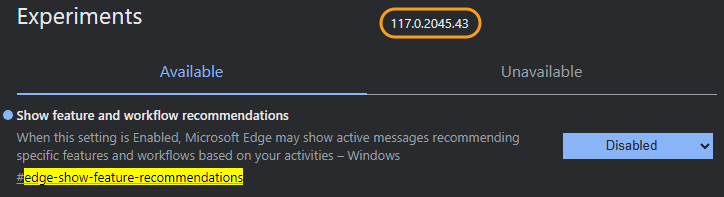
Don't you have this flag? What version is your Edge?
This flag is available on the latest Stable version (117).

s1.png
 

My Computer

System One

  • OS
    Win 11 Enterprise
    Computer type
    Laptop
    CPU
    i7
    Hard Drives
    SSD
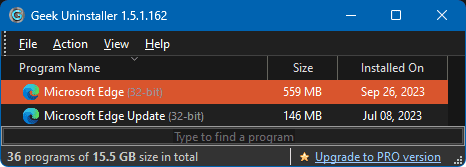
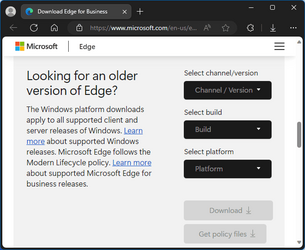
After update in Edge 117.0.2045.43 and after wakeup from sleep Edge will not start until I reboot. Is there any way to rollback Edge?
 

My Computers

System One System Two

  • OS
    Windows 11
    Computer type
    Laptop
    Manufacturer/Model
    Dell Inspiron 16 - 5640
    CPU
    13th Gen Intel(R) Core(TM) i5-1334U 1.30 GHz
    Memory
    16GB
    Graphics Card(s)
    NVIDIA GeForce MX570A
    Screen Resolution
    1920x1200
    Hard Drives
    M.2 2230 PCIe NVMe Class 35 solidstate
    drive 500 GB M.2, PCLe, NVMe, SSD
  • Operating System
    Windows 11
    Computer type
    Laptop
    Manufacturer/Model
    Dell Inspiron 15 3510
    CPU
    Intel Pentium N5030
    Memory
    4 GB

My Computer

System One

  • OS
    Win 11 Enterprise
    Computer type
    Laptop
    CPU
    i7
    Hard Drives
    SSD
Thanks atinfo. Guess this laptop needed a good night rest because the weird problem went away this morning! Sometimes things just don't make sense. Maybe I did too many updates too close to each other. Usually, I do the regular updates and then check things out before doing another like Edge update. But, I'm getting old and forgetful. :mad:
 

My Computers

System One System Two

  • OS
    Windows 11
    Computer type
    Laptop
    Manufacturer/Model
    Dell Inspiron 16 - 5640
    CPU
    13th Gen Intel(R) Core(TM) i5-1334U 1.30 GHz
    Memory
    16GB
    Graphics Card(s)
    NVIDIA GeForce MX570A
    Screen Resolution
    1920x1200
    Hard Drives
    M.2 2230 PCIe NVMe Class 35 solidstate
    drive 500 GB M.2, PCLe, NVMe, SSD
  • Operating System
    Windows 11
    Computer type
    Laptop
    Manufacturer/Model
    Dell Inspiron 15 3510
    CPU
    Intel Pentium N5030
    Memory
    4 GB
New Microsoft Edge Canary 119.0.2126.0 version released. See first post for more details. :-)
 

My Computers

System One System Two

  • OS
    Windows 11 Pro for Workstations
    Computer type
    PC/Desktop
    Manufacturer/Model
    Custom self build
    CPU
    Intel i7-8700K 5 GHz
    Motherboard
    ASUS ROG Maximus XI Formula Z390
    Memory
    64 GB (4x16GB) G.SKILL TridentZ RGB DDR4 3600 MHz (F4-3600C18D-32GTZR)
    Graphics Card(s)
    ASUS ROG-STRIX-GTX1080TI-O11G-GAMING (11GB GDDR5X)
    Sound Card
    Integrated Digital Audio (S/PDIF)
    Monitor(s) Displays
    2 x Samsung Odyssey G75 27"
    Screen Resolution
    2560x1440
    Hard Drives
    1TB Samsung 990 PRO M.2,
    4TB Samsung 990 PRO M.2,
    TerraMaster F8 SSD Plus NAS
    PSU
    Seasonic Prime Titanium 850W
    Case
    Thermaltake Core P3 wall mounted
    Cooling
    Corsair Hydro H115i
    Keyboard
    Amazon Basics Wired Full Keyboard MD005
    Mouse
    Logitech MX Master 4
    Internet Speed
    2 Gbps Download and 100 Mbps Upload
    Browser
    Chrome and Edge
    Antivirus
    Microsoft Defender
    Other Info
    Logitech Z625 speaker system,
    Logitech BRIO 4K Pro webcam,
    HP Color LaserJet Pro MFP M477fdn,
    CyberPower CP1500PFCLCD
    Galaxy S23 Plus phone
  • Operating System
    Windows 11 Pro
    Computer type
    Laptop
    Manufacturer/Model
    Surface Laptop 7 Copilot+ PC
    CPU
    Snapdragon X Elite (12 core) 3.42 GHz
    Memory
    16 GB LPDDR5x-7467 MHz
    Monitor(s) Displays
    15" HDR
    Screen Resolution
    2496 x 1664
    Hard Drives
    1 TB SSD
    Internet Speed
    Wi-Fi 7 and Bluetooth 5.4
    Browser
    Chrome and Edge
    Antivirus
    Microsoft Defender
:thumbsup:

Your avatar shows you're younger than me.
Well, I am only 82 until three weeks from now, then 83, but I must admit; there are older folks about.
 

My Computers

System One System Two

  • OS
    Windows 11
    Computer type
    Laptop
    Manufacturer/Model
    Dell Inspiron 16 - 5640
    CPU
    13th Gen Intel(R) Core(TM) i5-1334U 1.30 GHz
    Memory
    16GB
    Graphics Card(s)
    NVIDIA GeForce MX570A
    Screen Resolution
    1920x1200
    Hard Drives
    M.2 2230 PCIe NVMe Class 35 solidstate
    drive 500 GB M.2, PCLe, NVMe, SSD
  • Operating System
    Windows 11
    Computer type
    Laptop
    Manufacturer/Model
    Dell Inspiron 15 3510
    CPU
    Intel Pentium N5030
    Memory
    4 GB
New Microsoft Edge Canary 119.0.2128.0 version released. See first post for more details. :-)
 

My Computers

System One System Two

  • OS
    Windows 11 Pro for Workstations
    Computer type
    PC/Desktop
    Manufacturer/Model
    Custom self build
    CPU
    Intel i7-8700K 5 GHz
    Motherboard
    ASUS ROG Maximus XI Formula Z390
    Memory
    64 GB (4x16GB) G.SKILL TridentZ RGB DDR4 3600 MHz (F4-3600C18D-32GTZR)
    Graphics Card(s)
    ASUS ROG-STRIX-GTX1080TI-O11G-GAMING (11GB GDDR5X)
    Sound Card
    Integrated Digital Audio (S/PDIF)
    Monitor(s) Displays
    2 x Samsung Odyssey G75 27"
    Screen Resolution
    2560x1440
    Hard Drives
    1TB Samsung 990 PRO M.2,
    4TB Samsung 990 PRO M.2,
    TerraMaster F8 SSD Plus NAS
    PSU
    Seasonic Prime Titanium 850W
    Case
    Thermaltake Core P3 wall mounted
    Cooling
    Corsair Hydro H115i
    Keyboard
    Amazon Basics Wired Full Keyboard MD005
    Mouse
    Logitech MX Master 4
    Internet Speed
    2 Gbps Download and 100 Mbps Upload
    Browser
    Chrome and Edge
    Antivirus
    Microsoft Defender
    Other Info
    Logitech Z625 speaker system,
    Logitech BRIO 4K Pro webcam,
    HP Color LaserJet Pro MFP M477fdn,
    CyberPower CP1500PFCLCD
    Galaxy S23 Plus phone
  • Operating System
    Windows 11 Pro
    Computer type
    Laptop
    Manufacturer/Model
    Surface Laptop 7 Copilot+ PC
    CPU
    Snapdragon X Elite (12 core) 3.42 GHz
    Memory
    16 GB LPDDR5x-7467 MHz
    Monitor(s) Displays
    15" HDR
    Screen Resolution
    2496 x 1664
    Hard Drives
    1 TB SSD
    Internet Speed
    Wi-Fi 7 and Bluetooth 5.4
    Browser
    Chrome and Edge
    Antivirus
    Microsoft Defender
Don't you have this flag? What version is your Edge?
This flag is available on the latest Stable version (117).

View attachment 72245
I asked for a registry file that can be applied along with other Edge reg files that I have for customizing it's behavior. Some examples:
Code:
; Keep Edge from pre-loading
[HKEY_LOCAL_MACHINE\SOFTWARE\Policies\Microsoft\Edge]
"NewTabPagePrerenderEnabled"=dword:00000000
"StartupBoostEnabled"=dword:00000000
"RestoreOnStartup"=dword:00000001
; Hide stupid HubSidebar on left
"HubsSidebarEnabled"=dword:00000000
;Suppres default browser prompt
"DefaultBrowserSettingEnabled"=dword:00000000
;Disable Microsoft Edge Desktop Search Bar for All Users
"WebWidgetAllowed"=dword:00000000
 

My Computer

System One

  • OS
    Windows 11
    Computer type
    Laptop
    Manufacturer/Model
    Thinkpad L460
    CPU
    Skylake Gen 6
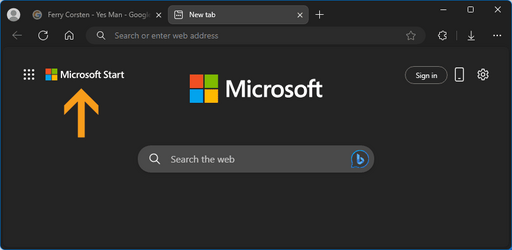
What is this new piece of cake which MS has cooked for us? I turned "Show greeting" off, and this one appeared!
Microsoft Start! Does it mean MS started :lie: its nose more into our browser?
s1.png
 

My Computer

System One

  • OS
    Win 11 Enterprise
    Computer type
    Laptop
    CPU
    i7
    Hard Drives
    SSD
New Microsoft Edge Canary 119.0.2130.0 version released. See first post for more details. :-)
 

My Computers

System One System Two

  • OS
    Windows 11 Pro for Workstations
    Computer type
    PC/Desktop
    Manufacturer/Model
    Custom self build
    CPU
    Intel i7-8700K 5 GHz
    Motherboard
    ASUS ROG Maximus XI Formula Z390
    Memory
    64 GB (4x16GB) G.SKILL TridentZ RGB DDR4 3600 MHz (F4-3600C18D-32GTZR)
    Graphics Card(s)
    ASUS ROG-STRIX-GTX1080TI-O11G-GAMING (11GB GDDR5X)
    Sound Card
    Integrated Digital Audio (S/PDIF)
    Monitor(s) Displays
    2 x Samsung Odyssey G75 27"
    Screen Resolution
    2560x1440
    Hard Drives
    1TB Samsung 990 PRO M.2,
    4TB Samsung 990 PRO M.2,
    TerraMaster F8 SSD Plus NAS
    PSU
    Seasonic Prime Titanium 850W
    Case
    Thermaltake Core P3 wall mounted
    Cooling
    Corsair Hydro H115i
    Keyboard
    Amazon Basics Wired Full Keyboard MD005
    Mouse
    Logitech MX Master 4
    Internet Speed
    2 Gbps Download and 100 Mbps Upload
    Browser
    Chrome and Edge
    Antivirus
    Microsoft Defender
    Other Info
    Logitech Z625 speaker system,
    Logitech BRIO 4K Pro webcam,
    HP Color LaserJet Pro MFP M477fdn,
    CyberPower CP1500PFCLCD
    Galaxy S23 Plus phone
  • Operating System
    Windows 11 Pro
    Computer type
    Laptop
    Manufacturer/Model
    Surface Laptop 7 Copilot+ PC
    CPU
    Snapdragon X Elite (12 core) 3.42 GHz
    Memory
    16 GB LPDDR5x-7467 MHz
    Monitor(s) Displays
    15" HDR
    Screen Resolution
    2496 x 1664
    Hard Drives
    1 TB SSD
    Internet Speed
    Wi-Fi 7 and Bluetooth 5.4
    Browser
    Chrome and Edge
    Antivirus
    Microsoft Defender
What is this new piece of cake which MS has cooked for us? I turned "Show greeting" off, and this one appeared!
Microsoft Start! Does it mean MS started :lie: its nose more into our browser?

View attachment 72511
That's been that way for a little while now. I remember seeing it a few weeks ago when I was playing with New Tab settings.
 

My Computers

System One System Two

  • OS
    Win 11 Pro (25H2 RP)
    Computer type
    Laptop
    Manufacturer/Model
    Acer AN515-54
    CPU
    Intel(R) Core(TM) i5-9300H CPU @ 2.40GHz 2.40 GHz
    Memory
    32GB
    Graphics Card(s)
    Nvidia GeForce GTX 1650, Intel UHD 630
    Monitor(s) Displays
    Acer CB272D
    Screen Resolution
    1920x1080
    Hard Drives
    256GB and 1T SSD
    Internet Speed
    500MB
    Browser
    Edge (Stable)
    Antivirus
    Microsoft Defender
  • Operating System
    Win 11 Pro (RP)
    Computer type
    Laptop
    Manufacturer/Model
    Lenovo Legion 5 16IAX10 - Type 83NX
    CPU
    Intel(R) Core(TM) Ultra 9 275HX (2.70 GHz)
    Memory
    32GB DDR5-5600
    Graphics card(s)
    NVIDIA® GeForce RTX™ 5060 8GB
    Monitor(s) Displays
    Acer CB272D
    Screen Resolution
    1920x1080 75Hz
    Hard Drives
    WD Green SN3000 (2TB)
    Samsung Portable T5 (2TB)
    Keyboard
    Logi MX Keys
    Mouse
    Logi MX Anywhere 3
    Internet Speed
    500MB
    Browser
    Edge
    Antivirus
    MS Defender
New Microsoft Edge Stable 117.0.2045.47 version released. See first post for more details. :-)
 

My Computers

System One System Two

  • OS
    Windows 11 Pro for Workstations
    Computer type
    PC/Desktop
    Manufacturer/Model
    Custom self build
    CPU
    Intel i7-8700K 5 GHz
    Motherboard
    ASUS ROG Maximus XI Formula Z390
    Memory
    64 GB (4x16GB) G.SKILL TridentZ RGB DDR4 3600 MHz (F4-3600C18D-32GTZR)
    Graphics Card(s)
    ASUS ROG-STRIX-GTX1080TI-O11G-GAMING (11GB GDDR5X)
    Sound Card
    Integrated Digital Audio (S/PDIF)
    Monitor(s) Displays
    2 x Samsung Odyssey G75 27"
    Screen Resolution
    2560x1440
    Hard Drives
    1TB Samsung 990 PRO M.2,
    4TB Samsung 990 PRO M.2,
    TerraMaster F8 SSD Plus NAS
    PSU
    Seasonic Prime Titanium 850W
    Case
    Thermaltake Core P3 wall mounted
    Cooling
    Corsair Hydro H115i
    Keyboard
    Amazon Basics Wired Full Keyboard MD005
    Mouse
    Logitech MX Master 4
    Internet Speed
    2 Gbps Download and 100 Mbps Upload
    Browser
    Chrome and Edge
    Antivirus
    Microsoft Defender
    Other Info
    Logitech Z625 speaker system,
    Logitech BRIO 4K Pro webcam,
    HP Color LaserJet Pro MFP M477fdn,
    CyberPower CP1500PFCLCD
    Galaxy S23 Plus phone
  • Operating System
    Windows 11 Pro
    Computer type
    Laptop
    Manufacturer/Model
    Surface Laptop 7 Copilot+ PC
    CPU
    Snapdragon X Elite (12 core) 3.42 GHz
    Memory
    16 GB LPDDR5x-7467 MHz
    Monitor(s) Displays
    15" HDR
    Screen Resolution
    2496 x 1664
    Hard Drives
    1 TB SSD
    Internet Speed
    Wi-Fi 7 and Bluetooth 5.4
    Browser
    Chrome and Edge
    Antivirus
    Microsoft Defender
Edge 117.0.2045.47 just came out. I wonder. Hope it fixed my little problem with starting Edge after sleep. Minor problem that bugs me.
 

My Computers

System One System Two

  • OS
    Windows 11
    Computer type
    Laptop
    Manufacturer/Model
    Dell Inspiron 16 - 5640
    CPU
    13th Gen Intel(R) Core(TM) i5-1334U 1.30 GHz
    Memory
    16GB
    Graphics Card(s)
    NVIDIA GeForce MX570A
    Screen Resolution
    1920x1200
    Hard Drives
    M.2 2230 PCIe NVMe Class 35 solidstate
    drive 500 GB M.2, PCLe, NVMe, SSD
  • Operating System
    Windows 11
    Computer type
    Laptop
    Manufacturer/Model
    Dell Inspiron 15 3510
    CPU
    Intel Pentium N5030
    Memory
    4 GB

Latest Support Threads

Back
Top Bottom