Latest Samsung 990 Pro firmware


idainc

Well-known member
Member
Local time
5:08 AM
Posts
237
OS
windows 11 64
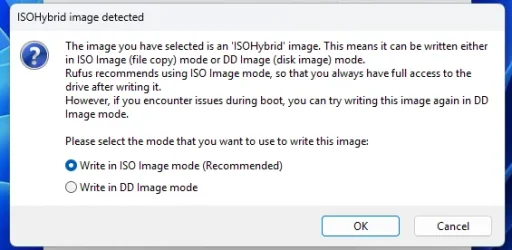
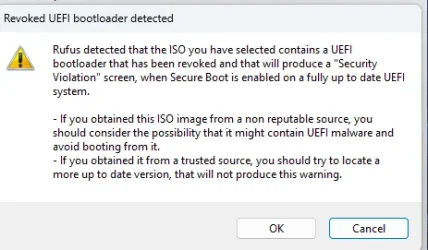
For unknown reasons I was not able to update the firmware from within Magician. I downloaded the ISO form the Samsung site and created a bootable USB and received the sttched screens. Now I'm lost and I dont want to fry anything.

Can someone point me in the right direction ? Thanks.
 

Attachments
  • Screenshot 2026-03-30 105353.webp
    Screenshot 2026-03-30 105353.webp
    23 KB · Views: 3
  • Screenshot 2026-03-30 105421.webp
    Screenshot 2026-03-30 105421.webp
    25.1 KB · Views: 4

My Computer

System One

  • OS
    windows 11 64
    Computer type
    PC/Desktop
    Manufacturer/Model
    HP
    CPU
    i7-12700T
    Memory
    32 GB
    Graphics Card(s)
    Nvidia GeForce 1650 / Intel 770
    Screen Resolution
    1920 / 1080
    Hard Drives
    Samsubg 990 Pro 1TB
    Case
    All in One
    Keyboard
    USB
    Mouse
    USB
    Internet Speed
    600 MBS
    Browser
    Chrome
    Antivirus
    MS
I've used Samsung Magician for years for monitoring, updating and upgrading to a newer Samsung drive. I updated the firmware on 2 drives recently no problems... Is it the latest version 9.0.1? . I would uninstall it and download a new copy first....,
 

My Computer

System One

  • OS
    Windows 11 & Zorin Pro
    Computer type
    Laptop
    Manufacturer/Model
    Asus Rog Strix G16
    CPU
    Intel® Core™ Ultra 9 Processor 275HX 2.7 GHz
    Motherboard
    AsusteK Computer
    Memory
    32 gb
    Graphics Card(s)
    NVIDIA® GeForce RTX™ 5060 Laptop GPU
    Sound Card
    Realtek High Definition Audio
    Monitor(s) Displays
    Laptop 16 inch
    Screen Resolution
    2560 X 1600
    Hard Drives
    Boot: Samsung 9100 NVME 2 TB Microsoft Storage Controller: Standard NVM Express Driver: Microsoft 6/21/2006. No SATA/AHCI on my motherboard or in bios
    Mouse
    Pad
    Browser
    Google Chrome
    Antivirus
    Microsoft
    Other Info
    Printer: HP Color LaserJet MFP M477dw
Disable Secure boot until you've done the firmware update
 

My Computer

System One

  • OS
    Windows 11 Pro 25H2 (RP channel)
    Computer type
    PC/Desktop
    Manufacturer/Model
    MSI
    CPU
    AMD Ryzen 7 9800X3D 8-core
    Motherboard
    MEG X870E Godlike
    Memory
    64GB Corsair Titanium 6000/CL30
    Graphics Card(s)
    MSI Suprim 5080 SOC
    Sound Card
    Soundblaster AE-9
    Monitor(s) Displays
    ASUS TUF Gaming VG289Q
    Screen Resolution
    3840x2160
    Hard Drives
    Samsung 9100 Pro 4TB (gen 5 x4, system drive/games)
    Samsung 990 Pro 2TB
    Samsung 980 Pro 2TB
    Samsung 870 Evo 4TB
    Samsung 870 Evo 2TB
    Samsung T9 4TB
    PSU
    Seasonic PX-2200
    Case
    Bequiet! Dark Base Pro 901
    Cooling
    Noctua NH-D15S Chromax black
    Keyboard
    Logitech G915 X (wired)
    Mouse
    Logitech G903 with PowerPlay charger
    Internet Speed
    900Mb/sec
    Browser
    Microsoft Edge
    Antivirus
    Windows Defender
Disable Secure boot until you've done the firmware update
I reviewed this with Samsung. My bios does not have the ability to disable Secure Boot from the screen I am presented when I hit ESC on booting. I did not realize that I could access the UEFI screen thorugh recovery.

Once i have secure boot disbled should I use the Magician screen to do the update or use a Rufus USB ?

Samsung did ask what issues I was having with the drive and there are none. THye volunteered that there would be no performance improvement after the update.
 

My Computer

System One

  • OS
    windows 11 64
    Computer type
    PC/Desktop
    Manufacturer/Model
    HP
    CPU
    i7-12700T
    Memory
    32 GB
    Graphics Card(s)
    Nvidia GeForce 1650 / Intel 770
    Screen Resolution
    1920 / 1080
    Hard Drives
    Samsubg 990 Pro 1TB
    Case
    All in One
    Keyboard
    USB
    Mouse
    USB
    Internet Speed
    600 MBS
    Browser
    Chrome
    Antivirus
    MS
What version of Samsung Magician do you have? Click on 'update' in the upper right corner of Samsung Magician. It needs to be on the latest version to work.... I did not turn secure boot off to update the firmware of either of my machines. I do however have bit locker turned off...


Yes, it is highly recommended to suspend or turn off BitLocker encryption before updating Samsung NVMe SSD firmware. While not always mandatory, doing so prevents firmware updates from being blocked, avoids triggering BitLocker recovery screens, and mitigates risks of data loss or becoming locked out. [1, 2, 3]


Key Recommendations:
  • Suspend/Disable BitLocker: Temporarily turn off BitLocker through the Control Panel before updating.
  • Backup Data: Always back up important data before any firmware update.
  • Re-enable Protection: Resume BitLocker protection immediately after the firmware update is completed.
  • Keep Recovery Key: Ensure you have your BitLocker recovery key handy, as firmware changes can prompt for it. [1, 2, 4, 5, 6]
If using Samsung Magician, it may run properly without disabling it, but suspending it reduces the risk of errors. [1]

AI can make mistakes, so double-check responses
[1] Samsung - NVME SSD - How to update firmware if Magician fails | OlavDocs
[2] https://learn.microsoft.com/en-us/answers/questions/3852772/is-there-a-way-to-suspend-bitlocker-key-before-upd
[3] [4] Disabling BitLocker to permit firmware updates
[5] How to prevent bitlocker start-up after windows updates? - Microsoft Q&A
[6] https://learn.microsoft.com/en-us/answers/questions/3825943/should-i-enable-bitlocker-or-not
 

My Computer

System One

  • OS
    Windows 11 & Zorin Pro
    Computer type
    Laptop
    Manufacturer/Model
    Asus Rog Strix G16
    CPU
    Intel® Core™ Ultra 9 Processor 275HX 2.7 GHz
    Motherboard
    AsusteK Computer
    Memory
    32 gb
    Graphics Card(s)
    NVIDIA® GeForce RTX™ 5060 Laptop GPU
    Sound Card
    Realtek High Definition Audio
    Monitor(s) Displays
    Laptop 16 inch
    Screen Resolution
    2560 X 1600
    Hard Drives
    Boot: Samsung 9100 NVME 2 TB Microsoft Storage Controller: Standard NVM Express Driver: Microsoft 6/21/2006. No SATA/AHCI on my motherboard or in bios
    Mouse
    Pad
    Browser
    Google Chrome
    Antivirus
    Microsoft
    Other Info
    Printer: HP Color LaserJet MFP M477dw
Steps so far –

Made a rufus of the ISO

Turned off secure boot

Attempted to do the update through Magician

Turned on Secure boot still no joy

Made another usb with the Samsung recommended boot usb unetbootin

Tried a usb boot both with secure boot enabled and disabled.

Bit locker was off in all cases.

I’m sort of at a loss. The PC is reading all the USB ports I tried and still no joy.

I wonder if its posible that the ISO may generate somethign in its bootable form that prevents it form being read ?
 

My Computer

System One

  • OS
    windows 11 64
    Computer type
    PC/Desktop
    Manufacturer/Model
    HP
    CPU
    i7-12700T
    Memory
    32 GB
    Graphics Card(s)
    Nvidia GeForce 1650 / Intel 770
    Screen Resolution
    1920 / 1080
    Hard Drives
    Samsubg 990 Pro 1TB
    Case
    All in One
    Keyboard
    USB
    Mouse
    USB
    Internet Speed
    600 MBS
    Browser
    Chrome
    Antivirus
    MS
What kind of error do you get when you try to do the firmware update with Samsung Magician? I have that same drive nvme 990 pro 2 tb that I updated this month with Samsung Magician. I found another thread of yours on July 4, 2025 where you had problems with VMD controller was that ever resolved?
 

My Computer

System One

  • OS
    Windows 11 & Zorin Pro
    Computer type
    Laptop
    Manufacturer/Model
    Asus Rog Strix G16
    CPU
    Intel® Core™ Ultra 9 Processor 275HX 2.7 GHz
    Motherboard
    AsusteK Computer
    Memory
    32 gb
    Graphics Card(s)
    NVIDIA® GeForce RTX™ 5060 Laptop GPU
    Sound Card
    Realtek High Definition Audio
    Monitor(s) Displays
    Laptop 16 inch
    Screen Resolution
    2560 X 1600
    Hard Drives
    Boot: Samsung 9100 NVME 2 TB Microsoft Storage Controller: Standard NVM Express Driver: Microsoft 6/21/2006. No SATA/AHCI on my motherboard or in bios
    Mouse
    Pad
    Browser
    Google Chrome
    Antivirus
    Microsoft
    Other Info
    Printer: HP Color LaserJet MFP M477dw
The VMD error was never resolved. This is the same drive. Thedrive magically appeared to have upgraded itself through Magician.

I'm considering asking for a warranty replacement. Its not even a year old. Apparently this PC, a two year old HP AIO, has a bios that although its set to boot to the usb if it doesnt see it there it reverts to the NVME. I tried a few slots and formatted the drive repeatedly. The drive is OK but the software on it form Samsung is defective.
 

Attachments

  • Screenshot 2026-03-30 153702.webp
    Screenshot 2026-03-30 153702.webp
    3.6 KB · Views: 2

My Computer

System One

  • OS
    windows 11 64
    Computer type
    PC/Desktop
    Manufacturer/Model
    HP
    CPU
    i7-12700T
    Memory
    32 GB
    Graphics Card(s)
    Nvidia GeForce 1650 / Intel 770
    Screen Resolution
    1920 / 1080
    Hard Drives
    Samsubg 990 Pro 1TB
    Case
    All in One
    Keyboard
    USB
    Mouse
    USB
    Internet Speed
    600 MBS
    Browser
    Chrome
    Antivirus
    MS
You need to put the USB into a drive and do a restart and use the esc or F2 or whatever key is needed to enter your bios. Next change the order of the boot squence so the USB is first. Save the change and exit bios to allow it to do a restart and boot using the USB. If the USB doesn't show up in bios it's not bootable. Only valid bootable USB's will show up. I learned this the hard way...
 

My Computer

System One

  • OS
    Windows 11 & Zorin Pro
    Computer type
    Laptop
    Manufacturer/Model
    Asus Rog Strix G16
    CPU
    Intel® Core™ Ultra 9 Processor 275HX 2.7 GHz
    Motherboard
    AsusteK Computer
    Memory
    32 gb
    Graphics Card(s)
    NVIDIA® GeForce RTX™ 5060 Laptop GPU
    Sound Card
    Realtek High Definition Audio
    Monitor(s) Displays
    Laptop 16 inch
    Screen Resolution
    2560 X 1600
    Hard Drives
    Boot: Samsung 9100 NVME 2 TB Microsoft Storage Controller: Standard NVM Express Driver: Microsoft 6/21/2006. No SATA/AHCI on my motherboard or in bios
    Mouse
    Pad
    Browser
    Google Chrome
    Antivirus
    Microsoft
    Other Info
    Printer: HP Color LaserJet MFP M477dw
You need to put the USB into a drive and do a restart and use the esc or F2 or whatever key is needed to enter your bios. Next change the order of the boot squence so the USB is first. Save the change and exit bios to allow it to do a restart and boot using the USB. If the USB doesn't show up in bios it's not bootable.
Thanks. I did exactly that and both pieces of software failed. I wiped the drive several times and wrote files to it repeatedly to be certain the drive was working. Thers nothing wrong with the drive. I think Ive exhausted all the possibilities. What I found unusual was that the NVME update failed repeatedly through Magician and then suddenly it updated.
 

My Computer

System One

  • OS
    windows 11 64
    Computer type
    PC/Desktop
    Manufacturer/Model
    HP
    CPU
    i7-12700T
    Memory
    32 GB
    Graphics Card(s)
    Nvidia GeForce 1650 / Intel 770
    Screen Resolution
    1920 / 1080
    Hard Drives
    Samsubg 990 Pro 1TB
    Case
    All in One
    Keyboard
    USB
    Mouse
    USB
    Internet Speed
    600 MBS
    Browser
    Chrome
    Antivirus
    MS
Maybe you can get it replaced from Samsung, It's an expensive drive . Good luck
 

My Computer

System One

  • OS
    Windows 11 & Zorin Pro
    Computer type
    Laptop
    Manufacturer/Model
    Asus Rog Strix G16
    CPU
    Intel® Core™ Ultra 9 Processor 275HX 2.7 GHz
    Motherboard
    AsusteK Computer
    Memory
    32 gb
    Graphics Card(s)
    NVIDIA® GeForce RTX™ 5060 Laptop GPU
    Sound Card
    Realtek High Definition Audio
    Monitor(s) Displays
    Laptop 16 inch
    Screen Resolution
    2560 X 1600
    Hard Drives
    Boot: Samsung 9100 NVME 2 TB Microsoft Storage Controller: Standard NVM Express Driver: Microsoft 6/21/2006. No SATA/AHCI on my motherboard or in bios
    Mouse
    Pad
    Browser
    Google Chrome
    Antivirus
    Microsoft
    Other Info
    Printer: HP Color LaserJet MFP M477dw
Yes, you can run chkdsk on an NVMe SSD to fix file system corruption, but it is generally recommended to use only the parameter () rather than the parameter. While safe to run, causes unnecessary wear by scanning for bad sectors, which NVMe drives manage automatically. [1, 2]


Key Considerations for on NVMe:
  • Safe Commands: Use to fix file system errors, or just for a read-only check.
  • Avoid : Avoid using frequently, as it forces a surface scan, which is unnecessary and puts wear on flash storage.
  • Built-in Management: NVMe drives (and SSDs) automatically detect and remap bad sectors.
  • Alternatives: For checking the actual health of an NVMe, it is better to use the manufacturer's SSD utility (e.g., Samsung Magician) or S.M.A.R.T. tools like CrystalDiskInfo. [1, 2, 3, 4, 5]
How to Run It:
  1. Open Command Prompt as Administrator.
  2. Type (replace with your drive letter).
  3. Restart your computer if asked to schedule the check. [5, 6]
AI can make mistakes, so double-check responses
[1] How safe is it to run CHKDSK on an SSD?
[2] https://www.askwoody.com/forums/topic/use-of-chkdsk-on-ssd/
[3] The value of running CHKDSK on an SSD?
 
Last edited:

My Computer

System One

  • OS
    Windows 11 & Zorin Pro
    Computer type
    Laptop
    Manufacturer/Model
    Asus Rog Strix G16
    CPU
    Intel® Core™ Ultra 9 Processor 275HX 2.7 GHz
    Motherboard
    AsusteK Computer
    Memory
    32 gb
    Graphics Card(s)
    NVIDIA® GeForce RTX™ 5060 Laptop GPU
    Sound Card
    Realtek High Definition Audio
    Monitor(s) Displays
    Laptop 16 inch
    Screen Resolution
    2560 X 1600
    Hard Drives
    Boot: Samsung 9100 NVME 2 TB Microsoft Storage Controller: Standard NVM Express Driver: Microsoft 6/21/2006. No SATA/AHCI on my motherboard or in bios
    Mouse
    Pad
    Browser
    Google Chrome
    Antivirus
    Microsoft
    Other Info
    Printer: HP Color LaserJet MFP M477dw
I’ll probably have to buy a new one from them and return this for credit. And the new one has to have the new firmware. Between it originally rejecting then accepting it and now an iso that’s not generating readable results I’ve about had enough. I’ve been building machines since 1988 and this is an odd problem. Thank you for you replies.
 

My Computer

System One

  • OS
    windows 11 64
    Computer type
    PC/Desktop
    Manufacturer/Model
    HP
    CPU
    i7-12700T
    Memory
    32 GB
    Graphics Card(s)
    Nvidia GeForce 1650 / Intel 770
    Screen Resolution
    1920 / 1080
    Hard Drives
    Samsubg 990 Pro 1TB
    Case
    All in One
    Keyboard
    USB
    Mouse
    USB
    Internet Speed
    600 MBS
    Browser
    Chrome
    Antivirus
    MS
Update - I spoke with Samsung and they're happy to take the drive back and flash it for me which for a single user / single PC doesnt work. It would take a month or so. I inquired about doing a trans ship and they rejected that too. I'm running an HP AIO that doesnt have the ability to disable raid so for the moment I'm SOL.
 

My Computer

System One

  • OS
    windows 11 64
    Computer type
    PC/Desktop
    Manufacturer/Model
    HP
    CPU
    i7-12700T
    Memory
    32 GB
    Graphics Card(s)
    Nvidia GeForce 1650 / Intel 770
    Screen Resolution
    1920 / 1080
    Hard Drives
    Samsubg 990 Pro 1TB
    Case
    All in One
    Keyboard
    USB
    Mouse
    USB
    Internet Speed
    600 MBS
    Browser
    Chrome
    Antivirus
    MS
Quite by accident I discovered a way to update the firmware that doesnt require another PC or sending it back to Samsung.

1. Make a Windows To Go 64gb USB with Rufus.
2. Remove the 990 Pro and install it into an NVME USB enclosure.
3. Boot the Windows USB and download and install the latest Samsung Magician.
4. Flash the firmware and reinstall the 990.

This bypasses the Intel RST controller.
 

My Computer

System One

  • OS
    windows 11 64
    Computer type
    PC/Desktop
    Manufacturer/Model
    HP
    CPU
    i7-12700T
    Memory
    32 GB
    Graphics Card(s)
    Nvidia GeForce 1650 / Intel 770
    Screen Resolution
    1920 / 1080
    Hard Drives
    Samsubg 990 Pro 1TB
    Case
    All in One
    Keyboard
    USB
    Mouse
    USB
    Internet Speed
    600 MBS
    Browser
    Chrome
    Antivirus
    MS
Back
Top Bottom