Location Services question


click click

Well-known member
Local time
8:05 PM
Posts
54
OS
Windows 11
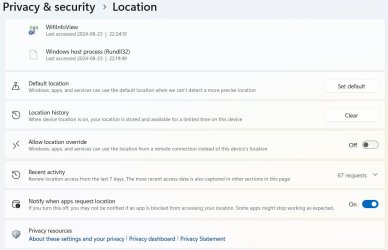
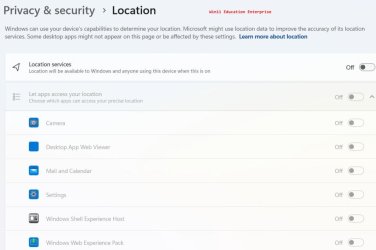
After updating to 26100.1000 for LTSC I'm still not sure whether the missing permission buttons for individual apps using location services is a bug or not. According to this, Microsoft is trying to improve their "security". They are blocking the wlan functions since you can detect the location based on the ssids. Currently, some programs that use those functions such as getting a list of access points will no longer work as before unless permitted. The problem right now is that you cannot select which apps are allowed permission to access the location service functions. Permissions for the service is either on or off for everything. See attached for the difference between Win11 Education Enterprise and Windows 11 Enterprise LTSC What's your take on the missing buttons?
 

Attachments
  • Educ.jpg
    Educ.jpg
    38 KB · Views: 3
  • W11locationServices.jpg
    W11locationServices.jpg
    43.5 KB · Views: 3

My Computer My Computer

At a glance

Windows 11Skylake Gen 6
OS
Windows 11
Computer type
Laptop
Manufacturer/Model
Thinkpad L460
CPU
Skylake Gen 6
No comments about this? Is it only me with this issue?
 

My Computer My Computer

At a glance

Windows 11Skylake Gen 6
OS
Windows 11
Computer type
Laptop
Manufacturer/Model
Thinkpad L460
CPU
Skylake Gen 6
No comments about this? Is it only me with this issue?
You are not but this has been implemented a while back on Insiders versions.
@Brink has something very useful to turn on & off the location service.


Are you telling us you don't have this option?

Screenshot 2024-08-30 153726.jpg

And at the bottom:

Screenshot 2024-08-30 154009.jpg


🤣
 
Last edited:

My Computers My Computers

  • At a glance

    All Branches but ReleaseAMD Ryzen 7 7735HS 3200-4500 Mhz 8 cores x 232 GB DDR5Radeon Graphic / NVIDIA GeForce RTX 4060 8 GB...
    OS
    All Branches but Release
    Computer type
    Laptop
    Manufacturer/Model
    Acer Nitro ANV15-51
    CPU
    AMD Ryzen 7 7735HS 3200-4500 Mhz 8 cores x 2
    Motherboard
    Sportage_RBH
    Memory
    32 GB DDR5
    Graphics Card(s)
    Radeon Graphic / NVIDIA GeForce RTX 4060 8 GB GDDR6
    Sound Card
    AMD/Realtek(R) Audio
    Monitor(s) Displays
    Integrated Monitor (15.3"vis)
    Screen Resolution
    FHD 1920X1080 16:9 144Hz
    Hard Drives
    KINGSTON OM8SEP4512Q-AA 1TB
    Western Digital 256GB
    PSU
    19V DC 6.32 A 120 W
    Cooling
    Dual Fans
    Mouse
    MS Bluetooth
    Internet Speed
    Fiber 1GB Cox -us & 1GB Orange-fr
    Browser
    Edge Canary- Firefox Nightly-Chrome Dev-Chrome Dev
    Antivirus
    Windows Defender
  • At a glance

    Windows 11 BetaAMD A9-94208 GB of DDR4AMD Radeon R5
    Operating System
    Windows 11 Beta
    Computer type
    Laptop
    Manufacturer/Model
    Asus X751BP
    CPU
    AMD A9-9420
    Memory
    8 GB of DDR4
    Graphics card(s)
    AMD Radeon R5
    Screen Resolution
    1600x900
    Hard Drives
    Seagate 1 TB
Are you telling us you don't have this option?
I have that option, but the on/off buttons for the apps for allowing/disallowing an app are missing. I have 2 Apps that won't run unless I turn off location services completely. Did you not look at the 2 images that I posted? One is for Enterprise Education and the other is Enterprise LTSC. At the bottom, I have
 

Attachments

  • location.jpg
    location.jpg
    65.2 KB · Views: 1

My Computer My Computer

At a glance

Windows 11Skylake Gen 6
OS
Windows 11
Computer type
Laptop
Manufacturer/Model
Thinkpad L460
CPU
Skylake Gen 6
I have that option, but the on/off buttons for the apps for allowing/disallowing an app are missing.
Desktop apps don't get individual on/off switches:

Desktop apps are a specific type of app that won’t ask for separate permission to discover your device location information and won’t appear in the list that allows you to choose apps that can use your location. What are desktop apps? They’re usually downloaded from the internet or installed with some type of media (such as a CD, DVD, or USB storage device). They’re launched using an .EXE or .DLL file, and they typically run on your device, unlike web-based apps (which run in the cloud).

Windows location service and privacy
 

My Computer My Computer

At a glance

Windows 11
OS
Windows 11
Computer type
Laptop
  • Like
Reactions: OAT
Desktop apps don't get individual on/off switches:
That doesn't make sense. Then why are they even listed in Let desktop apps access your location?. I am being forced by windows to turn on location services so the I can use the following apps Homedale and WifiInfoView. All my previous windows had location services turned off and both spps functioned without problems.
 

My Computer My Computer

At a glance

Windows 11Skylake Gen 6
OS
Windows 11
Computer type
Laptop
Manufacturer/Model
Thinkpad L460
CPU
Skylake Gen 6
I just checked the Enterprise Education settings and it looks like you are correct that the apps where the buttons apply are all store related. The difference is you can turn location services off in EDUC and my 2 3rd party apps still function whereas on LTSC, they don't and are blocked from running.
 

My Computer My Computer

At a glance

Windows 11Skylake Gen 6
OS
Windows 11
Computer type
Laptop
Manufacturer/Model
Thinkpad L460
CPU
Skylake Gen 6

Latest Support Threads

Back
Top Bottom