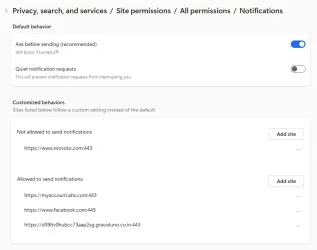
Great suggestions. I’m getting an education here. Hat-tip to echo2446 for post #17. Here’s what I saw at edge://settings/privacy/sitePermissions/allPermissions/notifications
View attachment 146407
It’s the last line so I deleted only that allowance by clicking the three dots to the right and delete. That got rid of it from Windows Settings/System/Notifications. The offending notification line is no longer seen. I’d like to assure myself that whatever (website?) added that notification is also gone from Edge History or anywhere. I took a look at:
Edge Settings > Privacy > Site permissions > All permissions
It looks like these are set to defaults, in most cases “Ask First” or “Blocked.” Those that are allowed are I think are pretty normal or default. Take a look at the attached pdf for what's seen there just in case I’m wrong.
I also went into disk cleanup and deleted temporary internet files.
Under Edge/Privacy…/Clear browsing data,.. I deleted Browsing History, download history, cookies and other site data, cashed images and files, site permissions, all for the past 24 hours since that’s when this happened.
I also re-ran the latest Microsoft Malicious Software Removal Tool.
I like Stigg’s idea of using restore point, but I’d rather not be that draconian provided these few manual steps result in reasonable confidence that there is nothing lingering in my system.
Anything else I should do?