Looks Like I'm Infected.


“Your important data on risk”
“Some error was found”

I see time was spent on the English, by whoever created this…
This has to be simple adware and I would assume you have zero viruses. You didn’t click on “Secure now” or “Fix error” did you?
Definitely and from an Indian domain .co.in
 

My Computer

System One

  • OS
    windows 11 Pro
    Computer type
    Laptop
    Manufacturer/Model
    Dell XPS 15 9510
    CPU
    11th Gen Intel(R) Core(TM) i7-11800H @ 2.30GHz (16 CPUs
    Memory
    16 GB
    Graphics Card(s)
    NVIDIA GeForce RTX 3050 Ti
    Hard Drives
    512GB Solid State Drive
    Browser
    Firefox
Anytime you see something similar to the first posts image, it is almost always browser notifications. These are not actual infections, but scareware.

Malwarebytes has a good write up here:


Always easy to solve.

Turn off notifications from within your browser and windows itself.


You can turn off the notifications for just edge, chrome, whatever browser you use.

As well as within chrome and edge:

Chrome:


Edge:

 
Last edited:

My Computers

System One System Two

  • OS
    Windows 11 Pro
    Computer type
    PC/Desktop
    Manufacturer/Model
    Custom Built
    CPU
    Ryzen 7 5700 X3D
    Motherboard
    MSI MPG B550 GAMING PLUS
    Memory
    64 GB DDR4 3600mhz Gskill Ripjaws V
    Graphics Card(s)
    RTX 4070 Super , 12GB VRAM Asus EVO Overclock
    Monitor(s) Displays
    Gigabyte M27Q (rev. 2.0) 2560 x 1440 @ 170hz HDR
    Hard Drives
    2TB Samsung nvme ssd
    4TB Western Digital nvme ssd
    PSU
    CORSAIR RMx SHIFT Series™ RM750x 80 PLUS Gold Fully Modular ATX Power Supply
    Case
    CORSAIR 3500X ARGB Mid-Tower ATX PC Case – Black
    Cooling
    ID-COOLING FROSTFLOW X 240 CPU Water Cooler
    Keyboard
    Logitech G213
    Mouse
    Logitech G203
    Internet Speed
    1.2gbps Fiber 😎
  • Operating System
    Chrome OS
    Computer type
    Laptop
    Manufacturer/Model
    HP Chromebook
    CPU
    Intel Pentium Quad Core
    Memory
    4GB LPDDR4
    Monitor(s) Displays
    14 Inch HD SVA anti glare micro edge display
    Hard Drives
    64 GB emmc
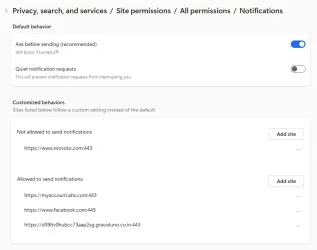
Great suggestions. I’m getting an education here. Hat-tip to echo2446 for post #17. Here’s what I saw at edge://settings/privacy/sitePermissions/allPermissions/notifications
removed it.webp
It’s the last line so I deleted only that allowance by clicking the three dots to the right and delete. That got rid of it from Windows Settings/System/Notifications. The offending notification line is no longer seen. I’d like to assure myself that whatever (website?) added that notification is also gone from Edge History or anywhere. I took a look at:
Edge Settings > Privacy > Site permissions > All permissions
It looks like these are set to defaults, in most cases “Ask First” or “Blocked.” Those that are allowed are I think are pretty normal or default. Take a look at the attached pdf for what's seen there just in case I’m wrong.
I also went into disk cleanup and deleted temporary internet files.
Under Edge/Privacy…/Clear browsing data,.. I deleted Browsing History, download history, cookies and other site data, cashed images and files, site permissions, all for the past 24 hours since that’s when this happened.
I also re-ran the latest Microsoft Malicious Software Removal Tool.
I like Stigg’s idea in post #8 of using restore point, but I’d rather not be that draconian provided these few manual steps result in reasonable confidence that there is nothing lingering in my system.

Anything else I should do?

 

Attachments

My Computer

System One

  • OS
    Windows 11 Pro, version 25H2 (OS Build 26200.7840)
    Computer type
    PC/Desktop
    Manufacturer/Model
    ASUS user built
    CPU
    i5-13500
    Motherboard
    ASUS Prime B760M-A AX D4
    Memory
    G.SKILL F4-3200C16D-16GVKB
    Graphics Card(s)
    on board
    Sound Card
    on board
    Monitor(s) Displays
    two monitors
    Screen Resolution
    1080p
    Hard Drives
    SSD for OS: Samsung 980 PRO 1TB, NVMe
    PSU
    FSP AURUM S 400, 400W ATX 2.31
    Case
    Antec Sonata II
    Mouse
    ANKER A7852M
    Internet Speed
    200Mbps up/dn
    Browser
    Edge
    Antivirus
    OS Native
Great suggestions. I’m getting an education here. Hat-tip to echo2446 for post #17. Here’s what I saw at edge://settings/privacy/sitePermissions/allPermissions/notifications
View attachment 146407
It’s the last line so I deleted only that allowance by clicking the three dots to the right and delete. That got rid of it from Windows Settings/System/Notifications. The offending notification line is no longer seen. I’d like to assure myself that whatever (website?) added that notification is also gone from Edge History or anywhere. I took a look at:
Edge Settings > Privacy > Site permissions > All permissions
It looks like these are set to defaults, in most cases “Ask First” or “Blocked.” Those that are allowed are I think are pretty normal or default. Take a look at the attached pdf for what's seen there just in case I’m wrong.
I also went into disk cleanup and deleted temporary internet files.
Under Edge/Privacy…/Clear browsing data,.. I deleted Browsing History, download history, cookies and other site data, cashed images and files, site permissions, all for the past 24 hours since that’s when this happened.
I also re-ran the latest Microsoft Malicious Software Removal Tool.
I like Stigg’s idea of using restore point, but I’d rather not be that draconian provided these few manual steps result in reasonable confidence that there is nothing lingering in my system.

Anything else I should do?
Sounds good to me. I wouldn't bother with a restore point. If you go into the site settings and remove any websites you don't recognize that should be enough, however I would just keep notifications disabled. Check your extensions etc.

If you really want to be sure you can reset the whole browser.
 

My Computers

System One System Two

  • OS
    Windows 11 Pro
    Computer type
    PC/Desktop
    Manufacturer/Model
    Custom Built
    CPU
    Ryzen 7 5700 X3D
    Motherboard
    MSI MPG B550 GAMING PLUS
    Memory
    64 GB DDR4 3600mhz Gskill Ripjaws V
    Graphics Card(s)
    RTX 4070 Super , 12GB VRAM Asus EVO Overclock
    Monitor(s) Displays
    Gigabyte M27Q (rev. 2.0) 2560 x 1440 @ 170hz HDR
    Hard Drives
    2TB Samsung nvme ssd
    4TB Western Digital nvme ssd
    PSU
    CORSAIR RMx SHIFT Series™ RM750x 80 PLUS Gold Fully Modular ATX Power Supply
    Case
    CORSAIR 3500X ARGB Mid-Tower ATX PC Case – Black
    Cooling
    ID-COOLING FROSTFLOW X 240 CPU Water Cooler
    Keyboard
    Logitech G213
    Mouse
    Logitech G203
    Internet Speed
    1.2gbps Fiber 😎
  • Operating System
    Chrome OS
    Computer type
    Laptop
    Manufacturer/Model
    HP Chromebook
    CPU
    Intel Pentium Quad Core
    Memory
    4GB LPDDR4
    Monitor(s) Displays
    14 Inch HD SVA anti glare micro edge display
    Hard Drives
    64 GB emmc
Install the following:

Free Antivirus 2025 | Download Free Antivirus & Virus Scan | 100% Free & Easy Install - run a full scan

Download HitmanPro and HitmanPro.Alert Malware Removal and Protection Tools. - offline 64 scanner, run a full scan

Free Virus Removal Tool - Online Virus Scan | Kaspersky - Kaspersky Virus Removal Tool, run a full scan

https://www.eset.com/afr/online-scanner/ - ESET Online Scanner, run a full scan

For Home users - this are some of the top tier free cleaning options - which usually find all currently known threats (be it malware, adware, rootkits, viruses, PUA and such). Unless your BIOS is infected (less than 1% chance - for typical home user - unless you're a influential VIP worth targeting).
 

My Computer

System One

  • OS
    WinDOS 25H2
    Computer type
    Laptop
    CPU
    Intel & AMD
    Memory
    SO-DIMM SK Hynix 15.8 GB Dual-Channel DDR4-2666 (2 x 8 GB) 1329MHz (19-19-19-43)
    Graphics Card(s)
    nVidia RTX 2060 6GB Mobile GPU (TU106M)
    Sound Card
    Onbord Realtek ALC1220
    Screen Resolution
    1920 x 1080
    Hard Drives
    1x Samsung PM981 NVMe PCIe M.2 512GB / 1x Seagate Expansion ST1000LM035 1TB
Back
Top Bottom