M.2 install question (s)


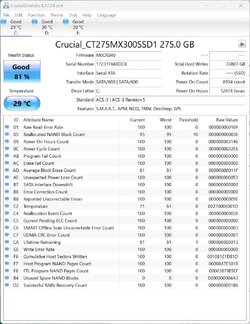
CrystalDiskInfo says SSD at 81%

Event Viewer indicates two Kernel-Power in the last 24 hours.

Screenshot 2023-02-11 144105.jpg


I can think of 3 odd events over the last 2 weeks.
1) When returning to my computer after a few hours I found it mysteriously had booted into BIOS. Closing BIOS the PC booted into the desktop normally.
2) When returning to my computer after a few hours I expected it to be in sleep mode but found a blank screen & no response to keyboard. Rebooting it went straight into BIOS. Exiting BIOS the PC just looped back to BIOS again & again. After unplugging/plugging the computer it booted normally.
3) Yesterday, when returning to my computer after a few hours I expected it to be in sleep mode but found a blank screen & no response to keyboard. Exiting BIOS the PC just looped back to BIOS again & again. After unplugging/plugging the computer it just repeated looped back to BIOS again & again. I unplugged the computer's power overnight & tried again this morning to find it booted normally & has each time today.
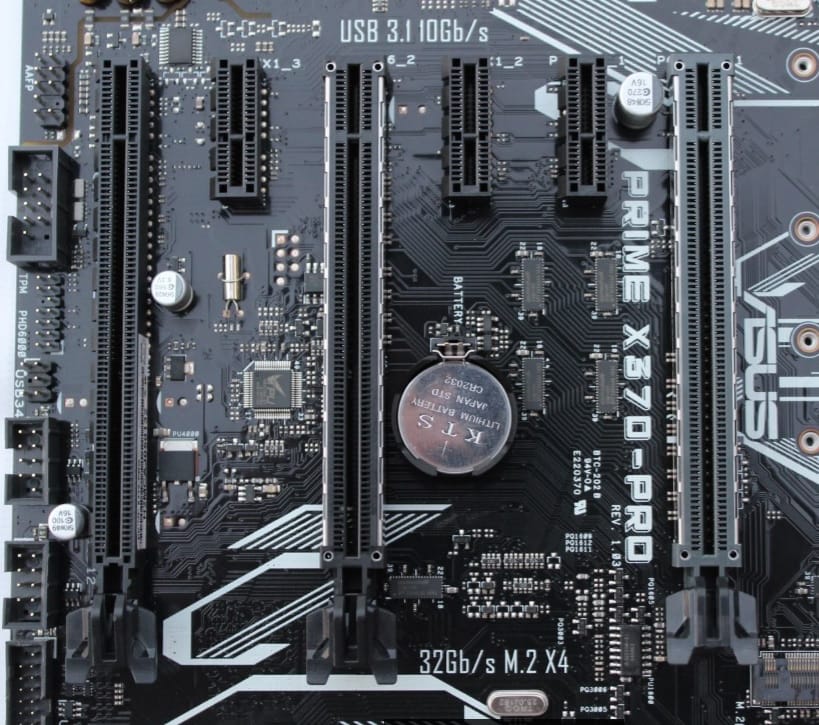
Replace the CMOS battery on the mobo.

40.jpg
 
Last edited:

My Computers My Computers

  • At a glance

    11 Homei7 13650HX16GB DDR5GeForce RTX 4060 Mobile
    OS
    11 Home
    Computer type
    Laptop
    Manufacturer/Model
    Asus TUF Gaming F16 (2024)
    CPU
    i7 13650HX
    Memory
    16GB DDR5
    Graphics Card(s)
    GeForce RTX 4060 Mobile
    Sound Card
    Eastern Electric MiniMax DAC Supreme; Emotiva UMC-200; Astell & Kern AK240
    Monitor(s) Displays
    Sony Bravia XR-55X90J
    Screen Resolution
    3840×2160
    Hard Drives
    512GB SSD internal
    37TB external
    PSU
    Li-ion
    Cooling
    2× Arc Flow Fans, 4× exhaust vents, 5× heatpipes
    Keyboard
    Logitech K800
    Mouse
    Logitech G402
    Internet Speed
    30Mbit/s up, 500Mbit/s down
    Browser
    FF
    Antivirus
    What's an antivirus?
  • At a glance

    11 Homei5 1135G716GB DDR4Intel Iris Xe
    Operating System
    11 Home
    Computer type
    Laptop
    Manufacturer/Model
    Medion S15450
    CPU
    i5 1135G7
    Memory
    16GB DDR4
    Graphics card(s)
    Intel Iris Xe
    Sound Card
    Eastern Electric MiniMax DAC Supreme; Emotiva UMC-200; Astell & Kern AK240
    Monitor(s) Displays
    Sony Bravia XR-55X90J
    Screen Resolution
    3840×2160
    Hard Drives
    2TB SSD internal
    37TB external
    PSU
    Li-ion
    Keyboard
    Logitech K800
    Mouse
    Logitech G402
    Internet Speed
    30Mbit/s up, 500Mbit/s down
    Browser
    FF
Battery on order.
 

My Computer My Computer

At a glance

Windows 11 Pro Version 25H2 (OS Build 26200.9...AMD Ryzen 9-3900X 12-Core 3.80Ghz16Gb Corsair DDR4 3466 MhzAsus DUAL-RTX2070-O8G-EVO-V2
OS
Windows 11 Pro Version 25H2 (OS Build 26200.9168)
Computer type
PC/Desktop
Manufacturer/Model
Custom built
CPU
AMD Ryzen 9-3900X 12-Core 3.80Ghz
Motherboard
Asus Prime X370-Pro
Memory
16Gb Corsair DDR4 3466 Mhz
Graphics Card(s)
Asus DUAL-RTX2070-O8G-EVO-V2
Sound Card
On Motherboard
Monitor(s) Displays
ASUS PA329C
Screen Resolution
3840x2160
Hard Drives
Samsung 980 SSD 1TB PCle 3.0x4, NVMe M.2 2280
Hitachi Deskstar 2Tb 7200 RPM 32MB Cache
Seagate Barracuda 500Gb 7200 RPM
PSU
Seasonic X750 Gold
Case
Antec C100
Cooling
CRYORIG H7 Tower Cooler
Keyboard
Macally USB
Mouse
Microsoft Basic Optical Mouse - USB
Internet Speed
350 Mbs
Browser
Firefox
Antivirus
PC Matic
I also have an ASUS Prime X370-Pro motherboard. Since you say your BIOS is up to date then it is already configured to support Windows 11. That means by default TPM is already enabled.

I pre-ordered this motherboard in 2017 and installed Windows 10 Pro on a 500GB Samsung 960 EVO M.2 NVME SSD. I needed more space so I replaced that with a 2GB XPG SX8200 Pro M.2 NVME SSD. I added a second M.2 M.2 NVME SSD by putting it on a PCIe card.

When I installed Windows 10 Pro all I had to do was select the M.2 drive.

When I had two hard drives and an SSD the Disk Manager listed the drives: as
Disk0: 1TB SATA HDD
Disk1: 2TB SATA HDD
Disk2: 500GB SSD (boot)

After I removed the two hard drives and added the 2nd SSD the Disk Manager listed the drives:
Disk0: 2TB SSD (boot)
Disk1: 2TB SSD
I'm considering this SAMSUNG 980 SSD 1TB PCle 3.0x4, NVMe M.2 2280. As it is installed near the CPU did you need a heatsink?
 

My Computer My Computer

At a glance

Windows 11 Pro Version 25H2 (OS Build 26200.9...AMD Ryzen 9-3900X 12-Core 3.80Ghz16Gb Corsair DDR4 3466 MhzAsus DUAL-RTX2070-O8G-EVO-V2
OS
Windows 11 Pro Version 25H2 (OS Build 26200.9168)
Computer type
PC/Desktop
Manufacturer/Model
Custom built
CPU
AMD Ryzen 9-3900X 12-Core 3.80Ghz
Motherboard
Asus Prime X370-Pro
Memory
16Gb Corsair DDR4 3466 Mhz
Graphics Card(s)
Asus DUAL-RTX2070-O8G-EVO-V2
Sound Card
On Motherboard
Monitor(s) Displays
ASUS PA329C
Screen Resolution
3840x2160
Hard Drives
Samsung 980 SSD 1TB PCle 3.0x4, NVMe M.2 2280
Hitachi Deskstar 2Tb 7200 RPM 32MB Cache
Seagate Barracuda 500Gb 7200 RPM
PSU
Seasonic X750 Gold
Case
Antec C100
Cooling
CRYORIG H7 Tower Cooler
Keyboard
Macally USB
Mouse
Microsoft Basic Optical Mouse - USB
Internet Speed
350 Mbs
Browser
Firefox
Antivirus
PC Matic

My Computers My Computers

  • At a glance

    Win7,Win11i7-97002x16gb 3600mhz
    OS
    Win7,Win11
    Computer type
    PC/Desktop
    CPU
    i7-9700
    Motherboard
    gigabyte b365m ds3h
    Memory
    2x16gb 3600mhz
    Monitor(s) Displays
    benq gw2480
    PSU
    bequiet pure power 11 400CM
    Cooling
    cryorig m9i
  • At a glance

    win7,win11i5-84002x8gb 3200
    Operating System
    win7,win11
    Computer type
    PC/Desktop
    CPU
    i5-8400
    Motherboard
    gigabyte b365m ds3h
    Memory
    2x8gb 3200
    PSU
    xfx pro 450
Havent they got them in your local poundshop?
I'm sure they do. I'm handicapped & have trouble getting out to shop. Battery will arrive tomorrow. That's soon enough.
 

My Computer My Computer

At a glance

Windows 11 Pro Version 25H2 (OS Build 26200.9...AMD Ryzen 9-3900X 12-Core 3.80Ghz16Gb Corsair DDR4 3466 MhzAsus DUAL-RTX2070-O8G-EVO-V2
OS
Windows 11 Pro Version 25H2 (OS Build 26200.9168)
Computer type
PC/Desktop
Manufacturer/Model
Custom built
CPU
AMD Ryzen 9-3900X 12-Core 3.80Ghz
Motherboard
Asus Prime X370-Pro
Memory
16Gb Corsair DDR4 3466 Mhz
Graphics Card(s)
Asus DUAL-RTX2070-O8G-EVO-V2
Sound Card
On Motherboard
Monitor(s) Displays
ASUS PA329C
Screen Resolution
3840x2160
Hard Drives
Samsung 980 SSD 1TB PCle 3.0x4, NVMe M.2 2280
Hitachi Deskstar 2Tb 7200 RPM 32MB Cache
Seagate Barracuda 500Gb 7200 RPM
PSU
Seasonic X750 Gold
Case
Antec C100
Cooling
CRYORIG H7 Tower Cooler
Keyboard
Macally USB
Mouse
Microsoft Basic Optical Mouse - USB
Internet Speed
350 Mbs
Browser
Firefox
Antivirus
PC Matic
Getting an M2 drive to clone your OS onto will speed things up, and you can probably use the original drive for something else. Also it will make you feel better, to boot.
 

My Computers My Computers

  • At a glance

    W11 pro betaAthlon 3000G16Gb Crucial DDR4 2400onboard cpu
    OS
    W11 pro beta
    Computer type
    PC/Desktop
    Manufacturer/Model
    home built
    CPU
    Athlon 3000G
    Motherboard
    Asrock A320M-HDV r4.0
    Memory
    16Gb Crucial DDR4 2400
    Graphics Card(s)
    onboard cpu
    Sound Card
    onboard
    Monitor(s) Displays
    LG 22EA53
    Screen Resolution
    1920 x 1080
    Hard Drives
    WD black SN750 M2 500Gb
    PSU
    500W Seasonic core 80+gold non modular
    Case
    Fractal Design Define R2
    Cooling
    front 2 x 120mm rear 100mm stock psu
    Internet Speed
    135/20
    Browser
    Firefox and edge
    Antivirus
    Windows Security and free Malwarebytes
  • At a glance

    W11 pro 64 beta (from W10 pro system builder ...Ryzen 7 5700G4 x 8Gb Corsair Vengeance LPX 3000 DDR4onboard cpu
    Operating System
    W11 pro 64 beta (from W10 pro system builder pack)
    Computer type
    PC/Desktop
    Manufacturer/Model
    homebuilt
    CPU
    Ryzen 7 5700G
    Motherboard
    MSI B450 tomahawk max II
    Memory
    4 x 8Gb Corsair Vengeance LPX 3000 DDR4
    Graphics card(s)
    onboard cpu
    Sound Card
    motherboard
    Monitor(s) Displays
    AOC 27
    Screen Resolution
    2560 x 1440
    Hard Drives
    WD 1Tb Black M2 SN850X on Asus hyper M2 X16 max V2 card
    PSU
    Be Quiet 400 semi modular 80+gold
    Case
    Coolermaster Silencio 650
    Cooling
    140mm front, 120 rear Akasa Vegas Chroma AM
    Internet Speed
    135/20
    Browser
    edge/Firefox
    Antivirus
    WD plus Malwarebytes free
Getting an M2 drive to clone your OS onto will speed things up, and you can probably use the original drive for something else. Also it will make you feel better, to boot.
Can't clone because I need to do a clean install.
I've been on the Windows Insider program & wanted to opt out because of glitches. Even though I selected to do so Microsoft failed to put me into the new stable Windows 11 last fall & kept me in the Windows Insider program. I was told the only way out was to do a clean install. :(
 

My Computer My Computer

At a glance

Windows 11 Pro Version 25H2 (OS Build 26200.9...AMD Ryzen 9-3900X 12-Core 3.80Ghz16Gb Corsair DDR4 3466 MhzAsus DUAL-RTX2070-O8G-EVO-V2
OS
Windows 11 Pro Version 25H2 (OS Build 26200.9168)
Computer type
PC/Desktop
Manufacturer/Model
Custom built
CPU
AMD Ryzen 9-3900X 12-Core 3.80Ghz
Motherboard
Asus Prime X370-Pro
Memory
16Gb Corsair DDR4 3466 Mhz
Graphics Card(s)
Asus DUAL-RTX2070-O8G-EVO-V2
Sound Card
On Motherboard
Monitor(s) Displays
ASUS PA329C
Screen Resolution
3840x2160
Hard Drives
Samsung 980 SSD 1TB PCle 3.0x4, NVMe M.2 2280
Hitachi Deskstar 2Tb 7200 RPM 32MB Cache
Seagate Barracuda 500Gb 7200 RPM
PSU
Seasonic X750 Gold
Case
Antec C100
Cooling
CRYORIG H7 Tower Cooler
Keyboard
Macally USB
Mouse
Microsoft Basic Optical Mouse - USB
Internet Speed
350 Mbs
Browser
Firefox
Antivirus
PC Matic
I also have an ASUS Prime X370-Pro motherboard. Since you say your BIOS is up to date then it is already configured to support Windows 11. That means by default TPM is already enabled.

I pre-ordered this motherboard in 2017 and installed Windows 10 Pro on a 500GB Samsung 960 EVO M.2 NVME SSD. I needed more space so I replaced that with a 2GB XPG SX8200 Pro M.2 NVME SSD. I added a second M.2 M.2 NVME SSD by putting it on a PCIe card.

When I installed Windows 10 Pro all I had to do was select the M.2 drive.

When I had two hard drives and an SSD the Disk Manager listed the drives: as
Disk0: 1TB SATA HDD
Disk1: 2TB SATA HDD
Disk2: 500GB SSD (boot)

After I removed the two hard drives and added the 2nd SSD the Disk Manager listed the drives:
Disk0: 2TB SSD (boot)
Disk1: 2TB SSD
In Asus Prime X370-Pro BIOS / Boot section, should AMI Native NVMe Driver Support be Enabled once new SAMSUNG 980 SSD 1TB PCle 3.0x4, NVMe M.2 2280 is installed?
 

My Computer My Computer

At a glance

Windows 11 Pro Version 25H2 (OS Build 26200.9...AMD Ryzen 9-3900X 12-Core 3.80Ghz16Gb Corsair DDR4 3466 MhzAsus DUAL-RTX2070-O8G-EVO-V2
OS
Windows 11 Pro Version 25H2 (OS Build 26200.9168)
Computer type
PC/Desktop
Manufacturer/Model
Custom built
CPU
AMD Ryzen 9-3900X 12-Core 3.80Ghz
Motherboard
Asus Prime X370-Pro
Memory
16Gb Corsair DDR4 3466 Mhz
Graphics Card(s)
Asus DUAL-RTX2070-O8G-EVO-V2
Sound Card
On Motherboard
Monitor(s) Displays
ASUS PA329C
Screen Resolution
3840x2160
Hard Drives
Samsung 980 SSD 1TB PCle 3.0x4, NVMe M.2 2280
Hitachi Deskstar 2Tb 7200 RPM 32MB Cache
Seagate Barracuda 500Gb 7200 RPM
PSU
Seasonic X750 Gold
Case
Antec C100
Cooling
CRYORIG H7 Tower Cooler
Keyboard
Macally USB
Mouse
Microsoft Basic Optical Mouse - USB
Internet Speed
350 Mbs
Browser
Firefox
Antivirus
PC Matic
I'm considering this SAMSUNG 980 SSD 1TB PCle 3.0x4, NVMe M.2 2280. As it is installed near the CPU did you need a heatsink?
ASUS Support said no need for heatsink for Gen 3 version.
 

My Computer My Computer

At a glance

Windows 11 Pro Version 25H2 (OS Build 26200.9...AMD Ryzen 9-3900X 12-Core 3.80Ghz16Gb Corsair DDR4 3466 MhzAsus DUAL-RTX2070-O8G-EVO-V2
OS
Windows 11 Pro Version 25H2 (OS Build 26200.9168)
Computer type
PC/Desktop
Manufacturer/Model
Custom built
CPU
AMD Ryzen 9-3900X 12-Core 3.80Ghz
Motherboard
Asus Prime X370-Pro
Memory
16Gb Corsair DDR4 3466 Mhz
Graphics Card(s)
Asus DUAL-RTX2070-O8G-EVO-V2
Sound Card
On Motherboard
Monitor(s) Displays
ASUS PA329C
Screen Resolution
3840x2160
Hard Drives
Samsung 980 SSD 1TB PCle 3.0x4, NVMe M.2 2280
Hitachi Deskstar 2Tb 7200 RPM 32MB Cache
Seagate Barracuda 500Gb 7200 RPM
PSU
Seasonic X750 Gold
Case
Antec C100
Cooling
CRYORIG H7 Tower Cooler
Keyboard
Macally USB
Mouse
Microsoft Basic Optical Mouse - USB
Internet Speed
350 Mbs
Browser
Firefox
Antivirus
PC Matic
ASUS Support said no need for heatsink for Gen 3 version.
That also means it will fit easily.

If you have the MS Insider software then you would be better to clean install and then see if you still have a problem. Do you have mounting screws for an NVMe drive? If not you will need one at least. They usually come with the motherboard.
 

My Computers My Computers

  • At a glance

    Windows 11 Pro 22H2Intel i7-13700KF @ 5.4GHzG-Skill F4-3200C16-16GVK x 2 (32GB total)GeForce RTX 3060 Ti Ventus 2X 8G OCV1 LHR
    OS
    Windows 11 Pro 22H2
    Computer type
    PC/Desktop
    Manufacturer/Model
    Bob the Builder
    CPU
    Intel i7-13700KF @ 5.4GHz
    Motherboard
    MSI MPG Z790 Edge WiFi DDR4
    Memory
    G-Skill F4-3200C16-16GVK x 2 (32GB total)
    Graphics Card(s)
    GeForce RTX 3060 Ti Ventus 2X 8G OCV1 LHR
    Sound Card
    Realtek® ALC4080 (mobo chipset)
    Monitor(s) Displays
    Philips 28 inch Display 288E2UAE
    Screen Resolution
    3840 x 2160 (16 x 9)
    Hard Drives
    Samsung 980 Pro NVMe M2 500GB, Samsung 980 NVMe M2 500GB, Samsung 2.5" SSD 1TB, Seagate 2.5" ST5000 5TB, Seagate Barracuda NVMe M2 1TB, Samsung MZVL2512HCJQ OEM NVMe M2 1TB
    PSU
    MSI MPG R850GF PSU (850W)
    Case
    Fractal Design Define 7 Compact ATX
    Cooling
    CoolerMaster MA610P
    Keyboard
    HAVIT mechanical keyboard HV-KB390L TKL
    Mouse
    Logitech M350 Pebble Mouse BT + wireless
    Internet Speed
    50 x 20 megabits / second fibre
    Browser
    Microsoft Edge
    Antivirus
    Microsoft
    Other Info
    Intel Ethernet 1226-V 2.5GHz @ 1GHz
    Intel Wi-Fi 6E AX210
    ASUS router RT-AX86U with Wi-Fi 6
    Logitech BRIO webcam
    Macrium Reflect 8.1 paid for backups etc.
  • At a glance

    Win 11 Pro 22H2Intel i7-1195G716 GBIris Xe graphics
    Operating System
    Win 11 Pro 22H2
    Computer type
    Laptop
    Manufacturer/Model
    MSI SUMMIT E16 FLIP EVO A11MT-013AU
    CPU
    Intel i7-1195G7
    Memory
    16 GB
    Graphics card(s)
    Iris Xe graphics
    Sound Card
    Realtek High Definition Audio
    Monitor(s) Displays
    16" 120Hz Pen Touch panel
    Screen Resolution
    2560 x 1600 (16 x 10)
    Hard Drives
    Samsung NVMe 980 Pro 1TB
    PSU
    Delta Electronics ADP-65SD B, HP 1HE08AA
    Keyboard
    Full Keyboard
    Mouse
    Logitech M350 Pebble Mouse BT + wireless
    Internet Speed
    50 x 20 megabits / second fibre
    Browser
    Firefox
    Antivirus
    Microsoft
    Other Info
    Killer Wi-Fi 6E 1675x (210NGW)
    MSI Pen
    Web Cam with Windows Hello Face
    Fingerprint Reader
    ASUS router RT-AX86U with Wi-Fi 6
    Macrium Reflect 8 paid for backups etc.
That also means it will fit easily.

If you have the MS Insider software then you would be better to clean install and then see if you still have a problem. Do you have mounting screws for an NVMe drive? If not you will need one at least. They usually come with the motherboard.
Thanks. I have saved MB hardware from past builds. I hate having to clean install, but I've had some odd issues with Insider version.

AMI Native NVMe Driver Support is listed in my BIOS/Boot as disabled. Also, in BIOS/Advanced NVMe RAID mode is Disabled. Should either of these be enabled?
 

My Computer My Computer

At a glance

Windows 11 Pro Version 25H2 (OS Build 26200.9...AMD Ryzen 9-3900X 12-Core 3.80Ghz16Gb Corsair DDR4 3466 MhzAsus DUAL-RTX2070-O8G-EVO-V2
OS
Windows 11 Pro Version 25H2 (OS Build 26200.9168)
Computer type
PC/Desktop
Manufacturer/Model
Custom built
CPU
AMD Ryzen 9-3900X 12-Core 3.80Ghz
Motherboard
Asus Prime X370-Pro
Memory
16Gb Corsair DDR4 3466 Mhz
Graphics Card(s)
Asus DUAL-RTX2070-O8G-EVO-V2
Sound Card
On Motherboard
Monitor(s) Displays
ASUS PA329C
Screen Resolution
3840x2160
Hard Drives
Samsung 980 SSD 1TB PCle 3.0x4, NVMe M.2 2280
Hitachi Deskstar 2Tb 7200 RPM 32MB Cache
Seagate Barracuda 500Gb 7200 RPM
PSU
Seasonic X750 Gold
Case
Antec C100
Cooling
CRYORIG H7 Tower Cooler
Keyboard
Macally USB
Mouse
Microsoft Basic Optical Mouse - USB
Internet Speed
350 Mbs
Browser
Firefox
Antivirus
PC Matic
Thanks. I have saved MB hardware from past builds. I hate having to clean install, but I've had some odd issues with Insider version.

AMI Native NVMe Driver Support is listed in my BIOS/Boot as disabled. Also, in BIOS/Advanced NVMe RAID mode is Disabled. Should either of these be enabled?
Native NVMe driver support sounds essential. I would leave Raid turned off.
 

My Computers My Computers

  • At a glance

    Windows 11 Pro 22H2Intel i7-13700KF @ 5.4GHzG-Skill F4-3200C16-16GVK x 2 (32GB total)GeForce RTX 3060 Ti Ventus 2X 8G OCV1 LHR
    OS
    Windows 11 Pro 22H2
    Computer type
    PC/Desktop
    Manufacturer/Model
    Bob the Builder
    CPU
    Intel i7-13700KF @ 5.4GHz
    Motherboard
    MSI MPG Z790 Edge WiFi DDR4
    Memory
    G-Skill F4-3200C16-16GVK x 2 (32GB total)
    Graphics Card(s)
    GeForce RTX 3060 Ti Ventus 2X 8G OCV1 LHR
    Sound Card
    Realtek® ALC4080 (mobo chipset)
    Monitor(s) Displays
    Philips 28 inch Display 288E2UAE
    Screen Resolution
    3840 x 2160 (16 x 9)
    Hard Drives
    Samsung 980 Pro NVMe M2 500GB, Samsung 980 NVMe M2 500GB, Samsung 2.5" SSD 1TB, Seagate 2.5" ST5000 5TB, Seagate Barracuda NVMe M2 1TB, Samsung MZVL2512HCJQ OEM NVMe M2 1TB
    PSU
    MSI MPG R850GF PSU (850W)
    Case
    Fractal Design Define 7 Compact ATX
    Cooling
    CoolerMaster MA610P
    Keyboard
    HAVIT mechanical keyboard HV-KB390L TKL
    Mouse
    Logitech M350 Pebble Mouse BT + wireless
    Internet Speed
    50 x 20 megabits / second fibre
    Browser
    Microsoft Edge
    Antivirus
    Microsoft
    Other Info
    Intel Ethernet 1226-V 2.5GHz @ 1GHz
    Intel Wi-Fi 6E AX210
    ASUS router RT-AX86U with Wi-Fi 6
    Logitech BRIO webcam
    Macrium Reflect 8.1 paid for backups etc.
  • At a glance

    Win 11 Pro 22H2Intel i7-1195G716 GBIris Xe graphics
    Operating System
    Win 11 Pro 22H2
    Computer type
    Laptop
    Manufacturer/Model
    MSI SUMMIT E16 FLIP EVO A11MT-013AU
    CPU
    Intel i7-1195G7
    Memory
    16 GB
    Graphics card(s)
    Iris Xe graphics
    Sound Card
    Realtek High Definition Audio
    Monitor(s) Displays
    16" 120Hz Pen Touch panel
    Screen Resolution
    2560 x 1600 (16 x 10)
    Hard Drives
    Samsung NVMe 980 Pro 1TB
    PSU
    Delta Electronics ADP-65SD B, HP 1HE08AA
    Keyboard
    Full Keyboard
    Mouse
    Logitech M350 Pebble Mouse BT + wireless
    Internet Speed
    50 x 20 megabits / second fibre
    Browser
    Firefox
    Antivirus
    Microsoft
    Other Info
    Killer Wi-Fi 6E 1675x (210NGW)
    MSI Pen
    Web Cam with Windows Hello Face
    Fingerprint Reader
    ASUS router RT-AX86U with Wi-Fi 6
    Macrium Reflect 8 paid for backups etc.
Native NVMe driver support sounds essential. I would leave Raid turned off.
Ami Native nvme drive only applies to when you are in the BIOS. Would recommend you leave it on if you need to access the drive in the bios. Once you boot to windows the windows standard nvme drive takes over, unless you have selected the raid driver in bios in which case the windows amd raid driver is used, which at least on intel counterpart, isn’t a bad choice even if you are not using raid.
 

My Computers My Computers

  • At a glance

    Windows 11 ProIntel Core i9 14900K 5800/4500 P/E96GB (2x48) G.skill Ripjaws 6800Asus ROG Strix 4070 Ti OC
    OS
    Windows 11 Pro
    Computer type
    PC/Desktop
    Manufacturer/Model
    DIY Photoshop/Audio/Game/tinker
    CPU
    Intel Core i9 14900K 5800/4500 P/E
    Motherboard
    Asus ROG Maximus Z790 Dark Hero
    Memory
    96GB (2x48) G.skill Ripjaws 6800
    Graphics Card(s)
    Asus ROG Strix 4070 Ti OC
    Sound Card
    B&W 606 S3 speakers; Audiolabs 7000a integrated amp; RSL 10S Mk2 sub
    Monitor(s) Displays
    Eizo CG2730 ColorEdge, ViewSonic VP2768
    Screen Resolution
    2560 x 1440 x 2
    Hard Drives
    nvme: WDC SN850X 4TB, SN850 1TB, SK-Hynix 2 TB P41
    Spinners: Sabrent USB-C DS-SC5B 5-bay docking station, 6TB WDC Black, 6TB Ironwolf Pro 2x 2TB WDC Black
    PSU
    850W Seasonic Vertex PX-850
    Case
    FD North XL Mesh, Black Walnut
    Cooling
    EK Nucleus black 360 AIO w/Phanteks T30 fans; 2 Noctua NF-A14 Chromax ; T30 for memory
    Keyboard
    Keychron Q3 Max TKL w/GMK Redsuns Red Samuri keycaps
    Mouse
    Logitech G305 wireless gaming
    Internet Speed
    575 Mb/s down | 25 Mb/s up
    Browser
    Firefox
    Antivirus
    Defender, Macrium Reflect X
    Other Info
    Phangkey Amaterasu V2 Desk Mat
  • At a glance

    Apple M1
    Computer type
    Laptop
    Manufacturer/Model
    💻 Apple 13" Macbook Pro 2020 (m1)

    CPU
    Apple M1
    Screen Resolution
    2560x1600
    Browser
    Firefox
Ami Native nvme drive only applies to when you are in the BIOS. Would recommend you leave it on if you need to access the drive in the bios. Once you boot to windows the windows standard nvme drive takes over, unless you have selected the raid driver in bios in which case the windows amd raid driver is used, which at least on intel counterpart, isn’t a bad choice even if you are not using raid.
I intend to do a clean install of Windows 11 Pro on the new unformatted SAMSUNG 980 SSD 1TB PCle 3.0x4, NVMe M.2 2280 drive.
BTW - I could format the new drive using my current Windows OS, then proceed to BIOS booting with Windows USB install drive.

While in BIOS, preparing to install Windows, would I enable AMI Native NVMe Driver Support, then after Windows install disable AMI?
 

My Computer My Computer

At a glance

Windows 11 Pro Version 25H2 (OS Build 26200.9...AMD Ryzen 9-3900X 12-Core 3.80Ghz16Gb Corsair DDR4 3466 MhzAsus DUAL-RTX2070-O8G-EVO-V2
OS
Windows 11 Pro Version 25H2 (OS Build 26200.9168)
Computer type
PC/Desktop
Manufacturer/Model
Custom built
CPU
AMD Ryzen 9-3900X 12-Core 3.80Ghz
Motherboard
Asus Prime X370-Pro
Memory
16Gb Corsair DDR4 3466 Mhz
Graphics Card(s)
Asus DUAL-RTX2070-O8G-EVO-V2
Sound Card
On Motherboard
Monitor(s) Displays
ASUS PA329C
Screen Resolution
3840x2160
Hard Drives
Samsung 980 SSD 1TB PCle 3.0x4, NVMe M.2 2280
Hitachi Deskstar 2Tb 7200 RPM 32MB Cache
Seagate Barracuda 500Gb 7200 RPM
PSU
Seasonic X750 Gold
Case
Antec C100
Cooling
CRYORIG H7 Tower Cooler
Keyboard
Macally USB
Mouse
Microsoft Basic Optical Mouse - USB
Internet Speed
350 Mbs
Browser
Firefox
Antivirus
PC Matic
I intend to do a clean install of Windows 11 Pro on the new unformatted SAMSUNG 980 SSD 1TB PCle 3.0x4, NVMe M.2 2280 drive.
BTW - I could format the new drive using my current Windows OS, then proceed to BIOS booting with Windows USB install drive.

While in BIOS, preparing to install Windows, would I enable AMI Native NVMe Driver Support, then after Windows install disable AMI?
I have the same ASUS Prime X370-Pro motherboard. I never heard of native NVME driver support. I didn't do any of that when I first installed Windows 10 Pro in 2017. I just left the 500GB Samsung 960 EVO NVME M.2 SSD unallocated and let the Windows setup partition and format the SSD.

Last year because of a problem in networking I had to do a clean reinstall on a 2TB MPG SX8200 Pro NVME M.2 SSD. This time when I ran Windows 10 setup I deleted all partitions and let the setup automatically create all partitions it needed.

Since this computer fully supports Windows 11 I may install Windows 11 on it some time this year.
 

My Computers My Computers

  • At a glance

    Windows 11 Pro 25H2 (26200.6901)AMD Ryzen 7 6800H with Radeon 680M GPU (486MB...Crucial DDR5-4800 (2400MHz) 32GB (2 x 16GB)NVIDIA RTX 3060 Laptop (6GB RAM)
    OS
    Windows 11 Pro 25H2 (26200.6901)
    Computer type
    Laptop
    Manufacturer/Model
    ASUS TUF Gaming A15 (2022)
    CPU
    AMD Ryzen 7 6800H with Radeon 680M GPU (486MB RAM)
    Memory
    Crucial DDR5-4800 (2400MHz) 32GB (2 x 16GB)
    Graphics Card(s)
    NVIDIA RTX 3060 Laptop (6GB RAM)
    Sound Card
    n/a
    Monitor(s) Displays
    15.6-inch
    Screen Resolution
    1920x1080 300Hz
    Hard Drives
    2 x Samsung 990 Evo Plus (2TB M.2 NVME SSD)
    PSU
    n/a
    Mouse
    Wireless Mouse M510
    Internet Speed
    2100Mbps/300Mbps
    Browser
    Firefox
    Antivirus
    Malwarebytes
  • At a glance

    Windows 11 Pro 25H2 (26200.8246)AMD Ryzen 7 5700X3DG.SKILL Flare X 32GB (2x16GB) DDR4ASUS ROG-STRIX-RTX3060TI-08G-V2-GAMING (RTX 3...
    Operating System
    Windows 11 Pro 25H2 (26200.8246)
    Computer type
    PC/Desktop
    Manufacturer/Model
    Custom build
    CPU
    AMD Ryzen 7 5700X3D
    Motherboard
    ASUS ROG Strix B550-F Gaming WiFi II
    Memory
    G.SKILL Flare X 32GB (2x16GB) DDR4
    Graphics card(s)
    ASUS ROG-STRIX-RTX3060TI-08G-V2-GAMING (RTX 3060-Ti, 8GB RAM)
    Monitor(s) Displays
    Samsung G50D IPS 27"
    Screen Resolution
    1440p/180Hz
    Hard Drives
    SAMSUNG 990 EVO Plus (2TB] M.2 NVME SSD
    SAMSUNG 990 EVO Plus (4TB) M.2 NVME SSD
    PSU
    Corsair RM750x (750 watts)
    Case
    Cooler Master MasterCase 5
    Cooling
    Scythe Mugen 6
    Keyboard
    Logitech K520 (MK540 keyboard/mouse combo)
    Mouse
    Logitech M310 (MK540 keyboard/mouse combo)
    Internet Speed
    2100 Mbps down / 300 Mbps up
    Browser
    Firefox, Edge, Chrome
    Antivirus
    Malwarebytes (Premium)
    Other Info
    ASUS Blu-ray Burner BW-16D1HT (SATA) || Western Digital Easystore 20TB USB 3.0 external hard drive used with Acronis True Image 2025 backup software || HP OfficeJet Pro 6975 Printer/Scanner
@SIW2

Your SS in #16 shows CDInfo at 8.12.12. They're up to 8.17.14 now, at least. The latest works just the same as my past versions, so I guess there's no rush to update. Just FYI.

Dan
 
Last edited:

My Computers My Computers

  • At a glance

    11 Pro 24H2 26100.2454i7-9700 @ 3.00GHz32GBDDR4 @ 2666MHzIntel HD 630 Graphics onboard
    OS
    11 Pro 24H2 26100.2454
    Computer type
    PC/Desktop
    Manufacturer/Model
    Lenovo ThinkCentre M920S SFF
    CPU
    i7-9700 @ 3.00GHz
    Motherboard
    Lenovo 3132
    Memory
    32GBDDR4 @ 2666MHz
    Graphics Card(s)
    Intel HD 630 Graphics onboard
    Sound Card
    Realtek HD Audio
    Monitor(s) Displays
    LG E2442
    Screen Resolution
    1920x1080
    Hard Drives
    1 x Samsung 970 EVO PLUS 500GB NVMe SSD, 1 x WD_BLACK SN770
    250GB NVMe SSD (OS and programs), 1 x WD_BLACK SN770
    500GB NVMe SSD (Data)
    Case
    Lenovo SFF
    Keyboard
    Cherry Stream TKL JK-8600US-2 Wired
    Mouse
    LogiTech M510 wireless
    Internet Speed
    Fast (for fixed wireless!)
    Browser
    Chrome, sometimes Firefox
    Antivirus
    Malwarebytes Premium & Defender (working together beautifully!)
  • At a glance

    11 Pro 24H2 26100.2454i5-8400 @ 2.80GHz32GB DDR4 @ 2600MHzIntel HD 630 Graphics onboard
    Operating System
    11 Pro 24H2 26100.2454
    Computer type
    PC/Desktop
    Manufacturer/Model
    Lenovo ThinkCentre M920S SFF
    CPU
    i5-8400 @ 2.80GHz
    Motherboard
    Lenovo 3132
    Memory
    32GB DDR4 @ 2600MHz
    Graphics card(s)
    Intel HD 630 Graphics onboard
    Sound Card
    Realtek High Definition Audio onboard
    Monitor(s) Displays
    LG FULL HD (1920x1080@59Hz)
    Screen Resolution
    1920 x 1080
    Hard Drives
    1 x Samsung 970 EVO PLUS NVMe; 1 x Samsung 980 NVMe SSD
    Case
    Lenovo Think Centre SFF
    Keyboard
    Cherry Stream TKL JK-8600US-2 Wired
    Mouse
    LogiTech M510 wireless
    Internet Speed
    Fast (for fixed wireless!)
    Browser
    Chrome
    Antivirus
    Malwarebytes Premium and MS Defender, beautiful together
@SIW2

Your SS in #17 shows CDInfo at 8.12.12. They're up to 8.17.14 now, at least. The latest works just the same as my past versions, so I guess there's no rush to update. Just FYI.

Dan
Here's the latest.
 

Attachments

  • Screenshot 2023-02-18 123518.jpg
    Screenshot 2023-02-18 123518.jpg
    178.3 KB · Views: 3

My Computer My Computer

At a glance

Windows 11 Pro Version 25H2 (OS Build 26200.9...AMD Ryzen 9-3900X 12-Core 3.80Ghz16Gb Corsair DDR4 3466 MhzAsus DUAL-RTX2070-O8G-EVO-V2
OS
Windows 11 Pro Version 25H2 (OS Build 26200.9168)
Computer type
PC/Desktop
Manufacturer/Model
Custom built
CPU
AMD Ryzen 9-3900X 12-Core 3.80Ghz
Motherboard
Asus Prime X370-Pro
Memory
16Gb Corsair DDR4 3466 Mhz
Graphics Card(s)
Asus DUAL-RTX2070-O8G-EVO-V2
Sound Card
On Motherboard
Monitor(s) Displays
ASUS PA329C
Screen Resolution
3840x2160
Hard Drives
Samsung 980 SSD 1TB PCle 3.0x4, NVMe M.2 2280
Hitachi Deskstar 2Tb 7200 RPM 32MB Cache
Seagate Barracuda 500Gb 7200 RPM
PSU
Seasonic X750 Gold
Case
Antec C100
Cooling
CRYORIG H7 Tower Cooler
Keyboard
Macally USB
Mouse
Microsoft Basic Optical Mouse - USB
Internet Speed
350 Mbs
Browser
Firefox
Antivirus
PC Matic
I have the same ASUS Prime X370-Pro motherboard. I never heard of native NVME driver support. I didn't do any of that when I first installed Windows 10 Pro in 2017. I just left the 500GB Samsung 960 EVO NVME M.2 SSD unallocated and let the Windows setup partition and format the SSD.

Last year because of a problem in networking I had to do a clean reinstall on a 2TB MPG SX8200 Pro NVME M.2 SSD. This time when I ran Windows 10 setup I deleted all partitions and let the setup automatically create all partitions it needed.

Since this computer fully supports Windows 11 I may install Windows 11 on it some time this year.
Thanks! Pays to look before you leap.
 

My Computer My Computer

At a glance

Windows 11 Pro Version 25H2 (OS Build 26200.9...AMD Ryzen 9-3900X 12-Core 3.80Ghz16Gb Corsair DDR4 3466 MhzAsus DUAL-RTX2070-O8G-EVO-V2
OS
Windows 11 Pro Version 25H2 (OS Build 26200.9168)
Computer type
PC/Desktop
Manufacturer/Model
Custom built
CPU
AMD Ryzen 9-3900X 12-Core 3.80Ghz
Motherboard
Asus Prime X370-Pro
Memory
16Gb Corsair DDR4 3466 Mhz
Graphics Card(s)
Asus DUAL-RTX2070-O8G-EVO-V2
Sound Card
On Motherboard
Monitor(s) Displays
ASUS PA329C
Screen Resolution
3840x2160
Hard Drives
Samsung 980 SSD 1TB PCle 3.0x4, NVMe M.2 2280
Hitachi Deskstar 2Tb 7200 RPM 32MB Cache
Seagate Barracuda 500Gb 7200 RPM
PSU
Seasonic X750 Gold
Case
Antec C100
Cooling
CRYORIG H7 Tower Cooler
Keyboard
Macally USB
Mouse
Microsoft Basic Optical Mouse - USB
Internet Speed
350 Mbs
Browser
Firefox
Antivirus
PC Matic
if you set crystal disk to display 10[DEC] you will be able to understand it better

Function>Advanced Feature>Raw values>10[DEC]

then you can read the values in the right pane
 

My Computers My Computers

  • At a glance

    Win7,Win11i7-97002x16gb 3600mhz
    OS
    Win7,Win11
    Computer type
    PC/Desktop
    CPU
    i7-9700
    Motherboard
    gigabyte b365m ds3h
    Memory
    2x16gb 3600mhz
    Monitor(s) Displays
    benq gw2480
    PSU
    bequiet pure power 11 400CM
    Cooling
    cryorig m9i
  • At a glance

    win7,win11i5-84002x8gb 3200
    Operating System
    win7,win11
    Computer type
    PC/Desktop
    CPU
    i5-8400
    Motherboard
    gigabyte b365m ds3h
    Memory
    2x8gb 3200
    PSU
    xfx pro 450
I intend to do a clean install of Windows 11 Pro on the new unformatted SAMSUNG 980 SSD 1TB PCle 3.0x4, NVMe M.2 2280 drive.
BTW - I could format the new drive using my current Windows OS, then proceed to BIOS booting with Windows USB install drive.

While in BIOS, preparing to install Windows, would I enable AMI Native NVMe Driver Support, then after Windows install disable AMI?

AMI native nvme support is only for drive access within the BIOS. It doesn't matter for Windows. I have native AMI nvme support turned on but use both Intel RST (which supports nvme) and Microsoft nvme drivers in Windows. So I would just leave it enabled in BIOS.
 

My Computers My Computers

  • At a glance

    Windows 11 ProIntel Core i9 14900K 5800/4500 P/E96GB (2x48) G.skill Ripjaws 6800Asus ROG Strix 4070 Ti OC
    OS
    Windows 11 Pro
    Computer type
    PC/Desktop
    Manufacturer/Model
    DIY Photoshop/Audio/Game/tinker
    CPU
    Intel Core i9 14900K 5800/4500 P/E
    Motherboard
    Asus ROG Maximus Z790 Dark Hero
    Memory
    96GB (2x48) G.skill Ripjaws 6800
    Graphics Card(s)
    Asus ROG Strix 4070 Ti OC
    Sound Card
    B&W 606 S3 speakers; Audiolabs 7000a integrated amp; RSL 10S Mk2 sub
    Monitor(s) Displays
    Eizo CG2730 ColorEdge, ViewSonic VP2768
    Screen Resolution
    2560 x 1440 x 2
    Hard Drives
    nvme: WDC SN850X 4TB, SN850 1TB, SK-Hynix 2 TB P41
    Spinners: Sabrent USB-C DS-SC5B 5-bay docking station, 6TB WDC Black, 6TB Ironwolf Pro 2x 2TB WDC Black
    PSU
    850W Seasonic Vertex PX-850
    Case
    FD North XL Mesh, Black Walnut
    Cooling
    EK Nucleus black 360 AIO w/Phanteks T30 fans; 2 Noctua NF-A14 Chromax ; T30 for memory
    Keyboard
    Keychron Q3 Max TKL w/GMK Redsuns Red Samuri keycaps
    Mouse
    Logitech G305 wireless gaming
    Internet Speed
    575 Mb/s down | 25 Mb/s up
    Browser
    Firefox
    Antivirus
    Defender, Macrium Reflect X
    Other Info
    Phangkey Amaterasu V2 Desk Mat
  • At a glance

    Apple M1
    Computer type
    Laptop
    Manufacturer/Model
    💻 Apple 13" Macbook Pro 2020 (m1)

    CPU
    Apple M1
    Screen Resolution
    2560x1600
    Browser
    Firefox

Latest Support Threads

Back
Top Bottom