
Macrium Reflect vs. EaseUS Todo Backup Home


Glad you sorted it @cereberus I was unimpressed with Easeus and uninstalled it, so back to my usual backup and restore option that has never let me down yet, fingers crossed.
So I decided to write a simple guide how to use Easeus, but when I did a restore, it crapped out.

I think there is a bug whereby it does not like multiple bcd boot entries. I delete all boot entries rather than default OS, and that worked.

Good job it was in a vm, not my main OS!

So far, I have only managed to get one out of four restores to work, even booting from a usb drive rather than pre-os.

To me, it is a real shame, as I always found the old version of Easeus Todo to be rock solid, and was my always my "2nd choice tool".

I will probably get shot as the messenger, but people need to test this new version thoroughly, and I STRONGLY recommend making a full image backup of pc first with one of the competitor's tools like Macrium Reflect or AOMEI Backupper first.
 

My Computer My Computer

At a glance

Windows 11 Pro + Win11 Canary VM.I9 13th gen i9-13900H 2.60 GHZ16 GB solderedIntegrated Intel Iris XE
OS
Windows 11 Pro + Win11 Canary VM.
Computer type
Laptop
Manufacturer/Model
ASUS Zenbook 14
CPU
I9 13th gen i9-13900H 2.60 GHZ
Motherboard
Yep, Laptop has one.
Memory
16 GB soldered
Graphics Card(s)
Integrated Intel Iris XE
Sound Card
Realtek built in
Monitor(s) Displays
laptop OLED screen
Screen Resolution
2880x1800 touchscreen
Hard Drives
1 TB NVME SSD (only weakness is only one slot)
PSU
Internal + 65W thunderbolt USB4 charger
Case
Yep, got one
Cooling
Stella Artois (UK pint cans - 568 ml) - extra cost.
Keyboard
Built in UK keybd
Mouse
Bluetooth , wireless dongled, wired
Internet Speed
900 mbs (ethernet), wifi 6 typical 350-450 mb/s both up and down
Browser
Edge
Antivirus
Defender
Other Info
TPM 2.0, 2xUSB4 thunderbolt, 1xUsb3 (usb a), 1xUsb-c, hdmi out, 3.5 mm audio out/in combo, ASUS backlit trackpad (inc. switchable number pad)

Macrium Reflect Home V8
Office 365 Family (6 users each 1TB onedrive space)
Hyper-V (a vm runs almost as fast as my older laptop)
Thanks for the info @cereberus that is good to know. I reformatted my usb and it worked fine now I have re-installed Todo everything else worked fine, I have not done a restore with it but I did check the backup and everything is where it should be. Todo is my 3rd choice behind Aomei and of course Macrium. btw I only have one bcd boot entry
 

My Computers My Computers

  • At a glance

    Windows 11 Pro13th Gen Core i9 13900HX32GB DDR5 @4800MHz 2x16GBGeforce RTX 4090HX 16GB
    OS
    Windows 11 Pro
    Computer type
    Laptop
    Manufacturer/Model
    Alienware M18 R1
    CPU
    13th Gen Core i9 13900HX
    Memory
    32GB DDR5 @4800MHz 2x16GB
    Graphics Card(s)
    Geforce RTX 4090HX 16GB
    Sound Card
    Nvidia HD / Realtek ALC3254
    Monitor(s) Displays
    18" QHD+
    Screen Resolution
    25660 X 1600
    Hard Drives
    C: KIOXIA (Toshiba) 2TB KXG80ZNV2T04 NVMe PCIe M.2 SSD
    D: KIOXIA (Toshiba) 2TB KXG80ZNV2T04 NVMe PCIe M.2 SSD
    Case
    Dark Metallic Moon
    Keyboard
    Alienware M Series per-key AlienFX RGB
    Mouse
    Alienware AW610M
    Browser
    Chrome and Firefox
    Antivirus
    Norton
    Other Info
    Killer E3000 Ethernet Controller
    Killer Killer AX1690 Wi-Fi Network Adaptor Wi-Fi 6E
    Bluetooth 5.2
    Alienware Z01G Graphic Amplifier
  • At a glance

    Windows 11 Pro10th Gen i-9 10900 K32Gb Dual Channel DDR4 @ 8843MHzNvidia RTX 2080 Super
    Operating System
    Windows 11 Pro
    Computer type
    Laptop
    Manufacturer/Model
    Alienware Area 51m R2
    CPU
    10th Gen i-9 10900 K
    Memory
    32Gb Dual Channel DDR4 @ 8843MHz
    Graphics card(s)
    Nvidia RTX 2080 Super
    Sound Card
    Nvidia
    Screen Resolution
    1920 x 1080
    Hard Drives
    Hard Drive C: Samsung 2TB SSD PM981a NVMe
    Hard Drive D:Samsung 2TB SSD 970 EVO Plus
    Mouse
    Alienware 610M
    Browser
    Chrome
    Antivirus
    Norton
My free license is still sat in my inbox. I can’t see me moving away from Macrium, it just does what it says on the tin and has never let me down
 

My Computer My Computer

At a glance

Windows 11 Pro Beta, 11 Dev, W11 CanaryAMD Ryzen™ 9 5900HX32GBNVIDIA® GeForce RTX™ 3070 8GB GDDR6
OS
Windows 11 Pro Beta, 11 Dev, W11 Canary
Computer type
Laptop
Manufacturer/Model
Dell Alienware M15 Ryzen Edition R6
CPU
AMD Ryzen™ 9 5900HX
Memory
32GB
Graphics Card(s)
NVIDIA® GeForce RTX™ 3070 8GB GDDR6
Hard Drives
1 x Samsung 980 Pro 1TB
1 x Samsung 970 Evo Plus 1TB
This is weird. The USB recovery disk I created on my R9 3900x-X570 pc is giving BSOD on boot up. I tried and installed EaseUS on my old 4790k PC and created a USB recovery disk there and it is booting up fine. When I tried the same USB on my 3900x PC, it booted up fine.
Hey, Robot, I have something similar with Macrium Reflect:

If I make Rescue Media from this desktop, it won't boot and I finally get an error report. If I make the Rescue Media on my laptop, plug it into this desktop, it boots just fine.

I have no clue why this happens; tests include shutting down, uninstalling and reinstalling Macrium Reflect, using different Flash Drives, etc. Still no joy with Rescue Media built on this desktop.

And the kicker is that if I'm going to do a clean install and create an ISO Flash Drive on this desktop, it boots just fine.
 

My Computers My Computers

  • At a glance

    Windows 11 23H2 22631.2861Intel(R) Core(TM) i7-10700 CPU @ 2.90GHz 2.90...16384 MBytesIntel UHD Graphics 630
    OS
    Windows 11 23H2 22631.2861
    Computer type
    PC/Desktop
    Manufacturer/Model
    HP Envy TE01-1xxx
    CPU
    Intel(R) Core(TM) i7-10700 CPU @ 2.90GHz 2.90 GHz
    Motherboard
    16.0GB Dual-Channel Unknown @ 1463MHz (21-21-21-47)
    Memory
    16384 MBytes
    Graphics Card(s)
    Intel UHD Graphics 630
    Sound Card
    Realtek High Definition Audio
    Monitor(s) Displays
    Monitor 1 - Acer 27" Monitor 2 - Acer 27"
    Screen Resolution
    1920 x 1080
    Hard Drives
    WDC PC SN530 SDBPNPZ-512G-1006 (SSD)
    Seagate ST1000DM003-1SB102
    Seagate BUP Slim SCSI Disk Device (SSD)
    PSU
    HP
    Case
    HP
    Cooling
    Standard
    Keyboard
    Logitech Wave K350
    Mouse
    Logitech M705
    Internet Speed
    500 mbps
    Browser
    Firefox
    Antivirus
    Windows Defender
    Other Info
    That's all Folks!
  • At a glance

    Windows 11Intel Core i7 (10th gen) 1070016 GBIntel UHD Graphics 630
    Operating System
    Windows 11
    Computer type
    PC/Desktop
    Manufacturer/Model
    HP
    CPU
    Intel Core i7 (10th gen) 10700
    Motherboard
    Intel
    Memory
    16 GB
    Graphics card(s)
    Intel UHD Graphics 630
    Sound Card
    Built-in
    Monitor(s) Displays
    Acer 27" & Samsung 24"
    Screen Resolution
    1920 x
    Hard Drives
    SSD (512 GB)
    HDD (1 TB)
    Seagate
    PSU
    Intel i7 10th Generation
    Case
    HP
    Cooling
    HP/Intel?
    Keyboard
    Logitech Wave K350
    Mouse
    Logitech M705
    Internet Speed
    50 mbps
    Browser
    Firefox 90.2
    Antivirus
    Windows Defender
    Other Info
    Headphone/Microphone Combo
    SuperSpeed USB Type-A (4 on front)
    HP 3-in-One Card Readr
    SuperSpeed USB Type-C
    DVD Writer
Hey, Robot, I have something similar with Macrium Reflect:

If I make Rescue Media from this desktop, it won't boot and I finally get an error report. If I make the Rescue Media on my laptop, plug it into this desktop, it boots just fine.

I have no clue why this happens; tests include shutting down, uninstalling and reinstalling Macrium Reflect, using different Flash Drives, etc. Still no joy with Rescue Media built on this desktop.

And the kicker is that if I'm going to do a clean install and create an ISO Flash Drive on this desktop, it boots just fine.

It sounds to me like you are missing a driver on desktop Rescue usb drive, but it exists on drive created on laptop.

It is usually related to to storage drivers (optane drivers are a pain for this).

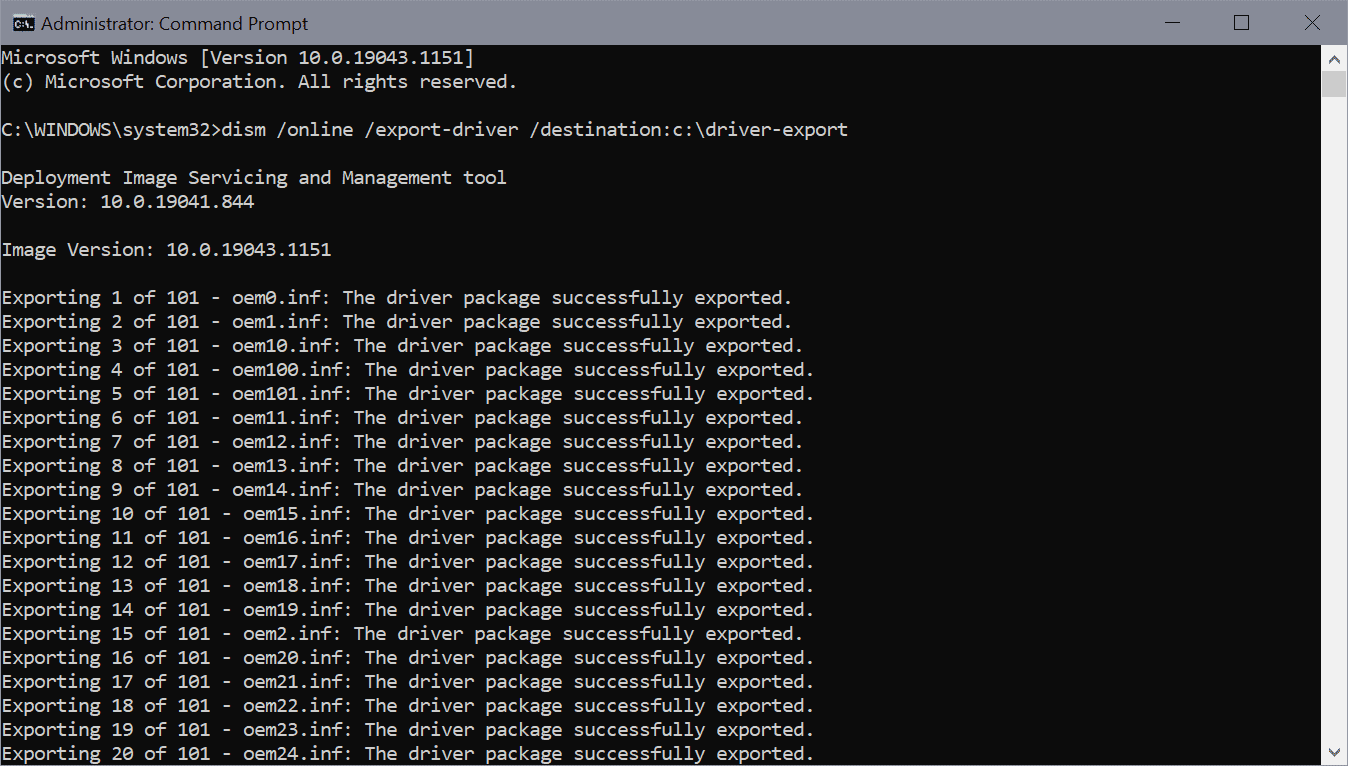
If you export the drivers from the desktop, you can add them to Drivers folder on Rescue Drive.


I manually inject drivers into boot.wim in sources folder on Rescue Drive.


My Computer My Computer

At a glance

Windows 11 Pro + Win11 Canary VM.I9 13th gen i9-13900H 2.60 GHZ16 GB solderedIntegrated Intel Iris XE
OS
Windows 11 Pro + Win11 Canary VM.
Computer type
Laptop
Manufacturer/Model
ASUS Zenbook 14
CPU
I9 13th gen i9-13900H 2.60 GHZ
Motherboard
Yep, Laptop has one.
Memory
16 GB soldered
Graphics Card(s)
Integrated Intel Iris XE
Sound Card
Realtek built in
Monitor(s) Displays
laptop OLED screen
Screen Resolution
2880x1800 touchscreen
Hard Drives
1 TB NVME SSD (only weakness is only one slot)
PSU
Internal + 65W thunderbolt USB4 charger
Case
Yep, got one
Cooling
Stella Artois (UK pint cans - 568 ml) - extra cost.
Keyboard
Built in UK keybd
Mouse
Bluetooth , wireless dongled, wired
Internet Speed
900 mbs (ethernet), wifi 6 typical 350-450 mb/s both up and down
Browser
Edge
Antivirus
Defender
Other Info
TPM 2.0, 2xUSB4 thunderbolt, 1xUsb3 (usb a), 1xUsb-c, hdmi out, 3.5 mm audio out/in combo, ASUS backlit trackpad (inc. switchable number pad)

Macrium Reflect Home V8
Office 365 Family (6 users each 1TB onedrive space)
Hyper-V (a vm runs almost as fast as my older laptop)
It sounds to me like you are missing a driver on desktop Rescue usb drive, but it exists on drive created on laptop.

It is usually related to to storage drivers (optane drivers are a pain for this).

If you export the drivers from the desktop, you can add them to Drivers folder on Rescue Drive.


I manually inject drivers into boot.wim in sources folder on Rescue Drive.

Thanks, @cereberus. I'll check that out when I get home; have to go do my running around in a bit.
 

My Computers My Computers

  • At a glance

    Windows 11 23H2 22631.2861Intel(R) Core(TM) i7-10700 CPU @ 2.90GHz 2.90...16384 MBytesIntel UHD Graphics 630
    OS
    Windows 11 23H2 22631.2861
    Computer type
    PC/Desktop
    Manufacturer/Model
    HP Envy TE01-1xxx
    CPU
    Intel(R) Core(TM) i7-10700 CPU @ 2.90GHz 2.90 GHz
    Motherboard
    16.0GB Dual-Channel Unknown @ 1463MHz (21-21-21-47)
    Memory
    16384 MBytes
    Graphics Card(s)
    Intel UHD Graphics 630
    Sound Card
    Realtek High Definition Audio
    Monitor(s) Displays
    Monitor 1 - Acer 27" Monitor 2 - Acer 27"
    Screen Resolution
    1920 x 1080
    Hard Drives
    WDC PC SN530 SDBPNPZ-512G-1006 (SSD)
    Seagate ST1000DM003-1SB102
    Seagate BUP Slim SCSI Disk Device (SSD)
    PSU
    HP
    Case
    HP
    Cooling
    Standard
    Keyboard
    Logitech Wave K350
    Mouse
    Logitech M705
    Internet Speed
    500 mbps
    Browser
    Firefox
    Antivirus
    Windows Defender
    Other Info
    That's all Folks!
  • At a glance

    Windows 11Intel Core i7 (10th gen) 1070016 GBIntel UHD Graphics 630
    Operating System
    Windows 11
    Computer type
    PC/Desktop
    Manufacturer/Model
    HP
    CPU
    Intel Core i7 (10th gen) 10700
    Motherboard
    Intel
    Memory
    16 GB
    Graphics card(s)
    Intel UHD Graphics 630
    Sound Card
    Built-in
    Monitor(s) Displays
    Acer 27" & Samsung 24"
    Screen Resolution
    1920 x
    Hard Drives
    SSD (512 GB)
    HDD (1 TB)
    Seagate
    PSU
    Intel i7 10th Generation
    Case
    HP
    Cooling
    HP/Intel?
    Keyboard
    Logitech Wave K350
    Mouse
    Logitech M705
    Internet Speed
    50 mbps
    Browser
    Firefox 90.2
    Antivirus
    Windows Defender
    Other Info
    Headphone/Microphone Combo
    SuperSpeed USB Type-A (4 on front)
    HP 3-in-One Card Readr
    SuperSpeed USB Type-C
    DVD Writer
I tried EaseUs and couldn't really get on with it, I prefer Macrium for Images and Aomei for file and folder backups. There was absolutely nothing wrong with EaseUs Todo seemed to work well
i couldn't agree more
 

My Computer My Computer

At a glance

Windows 11 ProCore i5 Gen 1132 GBintel Iris Xe Graphics
OS
Windows 11 Pro
Computer type
PC/Desktop
Manufacturer/Model
Intel NUC 11
CPU
Core i5 Gen 11
Motherboard
Intel
Memory
32 GB
Graphics Card(s)
intel Iris Xe Graphics
Sound Card
Realtek High Definition Audio
Monitor(s) Displays
Samsung Curve 24 inch
Screen Resolution
1920 X 1080
Hard Drives
SSD NMVE Adata 521GB
Mouse
Robot Wireless
Internet Speed
20 Mbps
Browser
Microsoft Edge and Google Chrome
Antivirus
Bitdefender
So I decided to write a simple guide how to use Easeus, but when I did a restore, it crapped out.

I think there is a bug whereby it does not like multiple bcd boot entries. I delete all boot entries rather than default OS, and that worked.

Good job it was in a vm, not my main OS!

So far, I have only managed to get one out of four restores to work, even booting from a usb drive rather than pre-os.

To me, it is a real shame, as I always found the old version of Easeus Todo to be rock solid, and was my always my "2nd choice tool".

I will probably get shot as the messenger, but people need to test this new version thoroughly, and I STRONGLY recommend making a full image backup of pc first with one of the competitor's tools like Macrium Reflect or AOMEI Backupper first.
Hi Cerebus,
Thank you so much for describing your experience with EaseUS Todo Backup Home.
Actually, Todo Backup Home can handle multiple bcd boot entries in the process of restore without any issues. In your case, if the restored disk does not boot, I strongly suggest you have a check by "BCDedit" command line to see if all your BCD boot entries point to the correct drive letter. However, if you have no idea of how to do it, I would like to arrange for our technician team to set up a remote session to help you out.

Please let me know if you have more issues when using this tool and comments from other forum members are welcomed too. I will try to reply. : )
 

My Computer My Computer

At a glance

Windows 11, Windows 10, Mac OSi5 11400Kinston 8G
OS
Windows 11, Windows 10, Mac OS
Computer type
PC/Desktop
CPU
i5 11400
Motherboard
ASUS H510
Memory
Kinston 8G
Hi Cerebus,
Thank you so much for describing your experience with EaseUS Todo Backup Home.
Actually, Todo Backup Home can handle multiple bcd boot entries in the process of restore without any issues. In your case, if the restored disk does not boot, I strongly suggest you have a check by "BCDedit" command line to see if all your BCD boot entries point to the correct drive letter. However, if you have no idea of how to do it, I would like to arrange for our technician team to set up a remote session to help you out.

Please let me know if you have more issues when using this tool and comments from other forum members are welcomed too. I will try to reply. : )
I disagree with this response. There is nothing wrong with my bcd, and it has nothing to do with drive letters.

Backup and restore works fine with Macrium Reflect, and all boot entries worked fine after restore.

After using Easeus, pc refused to boot - my first and default entry is my host OS which is akways C drive. As a minimum,,the restore should have been able to boot to my host OS.

Anyway, I have uninstalled it as the tool is too limiting and cannot even do something basic as restore multiple partitions at same time - you either have to restore all partitions, or only one at a time.

To do incremental and differential backups is very non intuitive, and only done via schedule. I never worked how to do one simply on demand.

Thank you for offer of help, but in the end the tool is too limited, and not suited for my use.
 

My Computer My Computer

At a glance

Windows 11 Pro + Win11 Canary VM.I9 13th gen i9-13900H 2.60 GHZ16 GB solderedIntegrated Intel Iris XE
OS
Windows 11 Pro + Win11 Canary VM.
Computer type
Laptop
Manufacturer/Model
ASUS Zenbook 14
CPU
I9 13th gen i9-13900H 2.60 GHZ
Motherboard
Yep, Laptop has one.
Memory
16 GB soldered
Graphics Card(s)
Integrated Intel Iris XE
Sound Card
Realtek built in
Monitor(s) Displays
laptop OLED screen
Screen Resolution
2880x1800 touchscreen
Hard Drives
1 TB NVME SSD (only weakness is only one slot)
PSU
Internal + 65W thunderbolt USB4 charger
Case
Yep, got one
Cooling
Stella Artois (UK pint cans - 568 ml) - extra cost.
Keyboard
Built in UK keybd
Mouse
Bluetooth , wireless dongled, wired
Internet Speed
900 mbs (ethernet), wifi 6 typical 350-450 mb/s both up and down
Browser
Edge
Antivirus
Defender
Other Info
TPM 2.0, 2xUSB4 thunderbolt, 1xUsb3 (usb a), 1xUsb-c, hdmi out, 3.5 mm audio out/in combo, ASUS backlit trackpad (inc. switchable number pad)

Macrium Reflect Home V8
Office 365 Family (6 users each 1TB onedrive space)
Hyper-V (a vm runs almost as fast as my older laptop)
I disagree with this response. There is nothing wrong with my bcd, and it has nothing to do with drive letters.

Backup and restore works fine with Macrium Reflect, and all boot entries worked fine after restore.

After using Easeus, pc refused to boot - my first and default entry is my host OS which is akways C drive. As a minimum,,the restore should have been able to boot to my host OS.

Anyway, I have uninstalled it as the tool is too limiting and cannot even do something basic as restore multiple partitions at same time - you either have to restore all partitions, or only one at a time.

To do incremental and differential backups is very non intuitive, and only done via schedule. I never worked how to do one simply on demand.

Thank you for offer of help, but in the end the tool is too limited, and not suited for my use.
I can only respond -- Ditto
 

My Computer My Computer

At a glance

Windows 10/11
OS
Windows 10/11
Out of all the features of an image backup application, there is one that I place head and shoulders above everything.
Answer = RELIABILITY

You have to be able to trust that whatever application you are using, it is able to do the job for you in your time of need.
If you can't trust it, or have doubts about it, then you may as well get rid of it.

Note: I don't put my trust in just one backup application. I always have at least two. At present, I am running three on my computers.
 

My Computers My Computers

  • At a glance

    Windows 11 ProIntel Core i9-10900XCorsair 64 GB (4 x 16 GB) CMW64GX4M4C3000C15 ...GIGABYTE GeForce GTX 1660 Super Mini ITX 6 GB OC
    OS
    Windows 11 Pro
    Computer type
    PC/Desktop
    Manufacturer/Model
    Stigg's Build
    CPU
    Intel Core i9-10900X
    Motherboard
    GIGABYTE X299X DESIGNARE 10G
    Memory
    Corsair 64 GB (4 x 16 GB) CMW64GX4M4C3000C15 Vengeance RGB Pro 3000Mhz DDR4
    Graphics Card(s)
    GIGABYTE GeForce GTX 1660 Super Mini ITX 6 GB OC
    Sound Card
    Realtek ALC1220
    Monitor(s) Displays
    Samsung 27" FHD LED FreeSync Gaming Monitor (LS27F350FHEXXY)
    Screen Resolution
    1920 x 1080
    Hard Drives
    Samsung 970 Pro Series 1TB M.2 2280 NVMe SSD
    Western Digital Red Pro WD8003FFBX-68B9AN0 8 TB, 7200 RPM, SATA-III
    Western Digital Red Pro WD8003FFBX-68B9AN0 8 TB, 7200 RPM, SATA-III
    PSU
    Corsair HX1200 1200W 80 Plus Platinum
    Case
    Fractal Design Define 7 Black Solid Case
    Cooling
    Noctua NH-D15 Chromax Black
    Keyboard
    Razer Ornata V2
    Mouse
    Razer DeathAdder Essential
    Internet Speed
    FTTN 100Mbps / 40Mbps
    Browser
    Mozilla Firefox
    Antivirus
    N/A
    Other Info
    Logitech BRIO 4k Ultra HD USB-C Webcam
  • At a glance

    Windows 10 ProCore i7-8750HSK Hynix 32 GB (2 x 16 GB) HMA82GS6CJR8N-VK 1...NVIDIA GeForce GTX 1070
    Operating System
    Windows 10 Pro
    Computer type
    Laptop
    Manufacturer/Model
    ASUS ROG Zephyrus M GM501GS
    CPU
    Core i7-8750H
    Motherboard
    Zephyrus M GM501GS
    Memory
    SK Hynix 32 GB (2 x 16 GB) HMA82GS6CJR8N-VK 16 GB DDR4-2666 DDR4 SDRAM
    Graphics card(s)
    NVIDIA GeForce GTX 1070
    Sound Card
    Realtek ALC294
    Monitor(s) Displays
    AU Optronics B156HAN07.1 [15.6" LCD]
    Screen Resolution
    1920 x 1080
    Hard Drives
    Samsung MZVKW512HMJP-00000 512 GB, PCI-E 3.0 x4
    Samsung SSD 860 QVO 4TB 4 TB, SATA-III
    PSU
    N/A
    Case
    N/A
    Cooling
    N/A
    Keyboard
    PC/AT Enhanced PS2 Keyboard (101/102-Key)
    Mouse
    Razer DeathAdder Essential
    Internet Speed
    FTTN 100Mbps / 40Mbps
    Browser
    Mozilla Firefox
    Antivirus
    N/A
    Other Info
    USB2.0 HD UVC Webcam
I disagree with this response. There is nothing wrong with my bcd, and it has nothing to do with drive letters.

Backup and restore works fine with Macrium Reflect, and all boot entries worked fine after restore.

After using Easeus, pc refused to boot - my first and default entry is my host OS which is akways C drive. As a minimum,,the restore should have been able to boot to my host OS.

Anyway, I have uninstalled it as the tool is too limiting and cannot even do something basic as restore multiple partitions at same time - you either have to restore all partitions, or only one at a time.

To do incremental and differential backups is very non intuitive, and only done via schedule. I never worked how to do one simply on demand.

Thank you for offer of help, but in the end the tool is too limited, and not suited for my use.
Yes. Can't agree more with your opinion on Todo Backup Home. That complies with most of the improvement suggestions we've received for this round of collection. There is yet a lot to do to make it a better competitor to Macrirum Reflect, especially the help content, the GUI for advanced users, and some lagging functions. We are on the way to making it better.

However, performing not well in some aspects doesn't mean it's not a good product, even if Macrium Reflect has some drawbacks. That's what we insist and we are still confident in the general performance of EaseUS Todo Backup Home.

Anyway, thanks a lot for your time testing and commenting on this thread! I've marked all the points you've mentioned and will send them to our product team. Thanks again!
 

My Computer My Computer

At a glance

Windows 11, Windows 10, Mac OSi5 11400Kinston 8G
OS
Windows 11, Windows 10, Mac OS
Computer type
PC/Desktop
CPU
i5 11400
Motherboard
ASUS H510
Memory
Kinston 8G
I can only respond -- Ditto
Thanks for expressing your opinion, which will motivate us to address the product issues. : )
 

My Computer My Computer

At a glance

Windows 11, Windows 10, Mac OSi5 11400Kinston 8G
OS
Windows 11, Windows 10, Mac OS
Computer type
PC/Desktop
CPU
i5 11400
Motherboard
ASUS H510
Memory
Kinston 8G
It's funny, I was discussing some backup imaging software the other day at work and a coworker asked me,
"How long has it been since you have actually needed to restore an image backup of a system because of a problem you experienced on your computer?"

It's funny because I honestly cannot remember the last time I restored an image backup. When i play on my little mini test PC, I restore that from time to time as I explicitly like to try some other OS's and such on it, but on my day to day driver, I haven't restored anything since I built the machine nearly 16 months ago. I only backup my workstation every few months with Macrium anyway. My data files are elsewhere, so if I lose everything on my desktop, it's not really going to be an issue.
 

My Computers My Computers

  • At a glance

    Windows 11 ProIntel Core i5-8279u32GB DDR4 2666MhzIntel Iris Plus 655
    OS
    Windows 11 Pro
    Computer type
    PC/Desktop
    Manufacturer/Model
    Beelink SEI8
    CPU
    Intel Core i5-8279u
    Motherboard
    AZW SEI
    Memory
    32GB DDR4 2666Mhz
    Graphics Card(s)
    Intel Iris Plus 655
    Sound Card
    Intel SST
    Monitor(s) Displays
    Asus ProArt PA278QV
    Screen Resolution
    2560x1440
    Hard Drives
    512GB NVMe
    PSU
    NA
    Case
    NA
    Cooling
    NA
    Keyboard
    NA
    Mouse
    NA
    Internet Speed
    500/50
    Browser
    Edge
    Antivirus
    Defender
    Other Info
    Mini PC used for testing Windows 11.
  • At a glance

    Windows 10 ProRyzen 9 5900x64GB DDR4-3600EVGA GeForce 3080 FT3 Ultra
    Operating System
    Windows 10 Pro
    Computer type
    PC/Desktop
    Manufacturer/Model
    Custom
    CPU
    Ryzen 9 5900x
    Motherboard
    Asus Rog Strix X570-E Gaming
    Memory
    64GB DDR4-3600
    Graphics card(s)
    EVGA GeForce 3080 FT3 Ultra
    Sound Card
    Onboard
    Monitor(s) Displays
    ASUS TUF Gaming VG27AQ. ASUS ProArt Display PA278QV 27” WQHD
    Screen Resolution
    2560x1440
    Hard Drives
    2TB WD SN850 PCI-E Gen 4 NVMe
    2TB Sandisk Ultra 2.5" SATA SSD
    PSU
    Seasonic Focus 850
    Case
    Fractal Meshify S2 in White
    Cooling
    Dark Rock Pro CPU cooler, 3 x 140mm case fans
    Keyboard
    Corsiar K65 RGB Lux
    Mouse
    Logitech G9 Laser Mouse
    Internet Speed
    500/50
    Browser
    Chrome
    Antivirus
    Defender.
It's funny, I was discussing some backup imaging software the other day at work and a coworker asked me,
"How long has it been since you have actually needed to restore an image backup of a system because of a problem you experienced on your computer?"

It's funny because I honestly cannot remember the last time I restored an image backup. When i play on my little mini test PC, I restore that from time to time as I explicitly like to try some other OS's and such on it, but on my day to day driver, I haven't restored anything since I built the machine nearly 16 months ago. I only backup my workstation every few months with Macrium anyway. My data files are elsewhere, so if I lose everything on my desktop, it's not really going to be an issue.
It depends a lot on what you do. If you JUST use release versions of windows, you should not expect to restore very often. The primary use is to protect against drive failures, or a bad update.

If you use pc for mainly personal stuff, just backing up important data is probably ok asauming time to reinstall apps is not an issue.

However, if you mostly use pc for work related activities (where time is important), image backups help you recover very quickly.

Image backups are insurance. Like all things in life, if you are not uinsured, sooner or later, you will get bitten LOL.
 

My Computer My Computer

At a glance

Windows 11 Pro + Win11 Canary VM.I9 13th gen i9-13900H 2.60 GHZ16 GB solderedIntegrated Intel Iris XE
OS
Windows 11 Pro + Win11 Canary VM.
Computer type
Laptop
Manufacturer/Model
ASUS Zenbook 14
CPU
I9 13th gen i9-13900H 2.60 GHZ
Motherboard
Yep, Laptop has one.
Memory
16 GB soldered
Graphics Card(s)
Integrated Intel Iris XE
Sound Card
Realtek built in
Monitor(s) Displays
laptop OLED screen
Screen Resolution
2880x1800 touchscreen
Hard Drives
1 TB NVME SSD (only weakness is only one slot)
PSU
Internal + 65W thunderbolt USB4 charger
Case
Yep, got one
Cooling
Stella Artois (UK pint cans - 568 ml) - extra cost.
Keyboard
Built in UK keybd
Mouse
Bluetooth , wireless dongled, wired
Internet Speed
900 mbs (ethernet), wifi 6 typical 350-450 mb/s both up and down
Browser
Edge
Antivirus
Defender
Other Info
TPM 2.0, 2xUSB4 thunderbolt, 1xUsb3 (usb a), 1xUsb-c, hdmi out, 3.5 mm audio out/in combo, ASUS backlit trackpad (inc. switchable number pad)

Macrium Reflect Home V8
Office 365 Family (6 users each 1TB onedrive space)
Hyper-V (a vm runs almost as fast as my older laptop)
However, if you mostly use pc for work related activities (where time is important), image backups help you recover very quickly.

Image backups are insurance. Like all things in life, if you are not uinsured, sooner or later, you will get bitten LOL.
Yeah, i get that. And I'll continue to use Macrium to take those images.

It was just funny when I talked about it, as we all seem to spend a good amount of time between the different apps and imaging schedules and the like....I was just curious if others were restoring them quite regularly or if it was one of those things we do very infrequently.

In my case too, I have several different machines. So I have the luxury of having a mini pc that I test with.
 

My Computers My Computers

  • At a glance

    Windows 11 ProIntel Core i5-8279u32GB DDR4 2666MhzIntel Iris Plus 655
    OS
    Windows 11 Pro
    Computer type
    PC/Desktop
    Manufacturer/Model
    Beelink SEI8
    CPU
    Intel Core i5-8279u
    Motherboard
    AZW SEI
    Memory
    32GB DDR4 2666Mhz
    Graphics Card(s)
    Intel Iris Plus 655
    Sound Card
    Intel SST
    Monitor(s) Displays
    Asus ProArt PA278QV
    Screen Resolution
    2560x1440
    Hard Drives
    512GB NVMe
    PSU
    NA
    Case
    NA
    Cooling
    NA
    Keyboard
    NA
    Mouse
    NA
    Internet Speed
    500/50
    Browser
    Edge
    Antivirus
    Defender
    Other Info
    Mini PC used for testing Windows 11.
  • At a glance

    Windows 10 ProRyzen 9 5900x64GB DDR4-3600EVGA GeForce 3080 FT3 Ultra
    Operating System
    Windows 10 Pro
    Computer type
    PC/Desktop
    Manufacturer/Model
    Custom
    CPU
    Ryzen 9 5900x
    Motherboard
    Asus Rog Strix X570-E Gaming
    Memory
    64GB DDR4-3600
    Graphics card(s)
    EVGA GeForce 3080 FT3 Ultra
    Sound Card
    Onboard
    Monitor(s) Displays
    ASUS TUF Gaming VG27AQ. ASUS ProArt Display PA278QV 27” WQHD
    Screen Resolution
    2560x1440
    Hard Drives
    2TB WD SN850 PCI-E Gen 4 NVMe
    2TB Sandisk Ultra 2.5" SATA SSD
    PSU
    Seasonic Focus 850
    Case
    Fractal Meshify S2 in White
    Cooling
    Dark Rock Pro CPU cooler, 3 x 140mm case fans
    Keyboard
    Corsiar K65 RGB Lux
    Mouse
    Logitech G9 Laser Mouse
    Internet Speed
    500/50
    Browser
    Chrome
    Antivirus
    Defender.
I have the luxury of having a mini pc that I test with.
IMHO, test restores on the host machine are the ones that count, not so much test restores on a test machine. Moreover, not all backups are created equal, and that's in a literal sense, some backups may not restore at all or not restore completely.

For those reasons, I myself use multiple, different backup tools on multiple, different backup media. There are still no guarantees, I guess, but sufficient risk reduction to let me sleep at night.

I think it's an individual choice, like how much car insurance one is willing to pay for.
 

My Computer My Computer

At a glance

Windows 10 Pro
OS
Windows 10 Pro
IMHO, test restores on the host machine are the ones that count, not so much test restores on a test machine. Moreover, not all backups are created equal, and that's in a literal sense, some backups may not restore at all or not restore completely.

For those reasons, I myself use multiple, different backup tools on multiple, different backup media. There are still no guarantees, I guess, but sufficient risk reduction to let me sleep at night.

I think it's an individual choice, like how much car insurance one is willing to pay for.

I should rephrase what I meant by my test machine.

I essentially have 2 personal desktop workstation boxes that I use at home
  1. My full sized desktop, running Window 10. It's where all of my VM's are setup, my games, etc.. I like to ensure this one is always working. And when I am done working and just want to play a video game, it's great knowing that it will just turn on and run. This one runs a Ryzen 5900x, with 64GB of RAM and 4TB of NVme/SSD.
  2. My mini sized pc desktop, running Windows 11. Its low power so I use it for most email, forums, web surfing, etc.. It's an 8th gen Core i5, 32GB of RAM and 2 x 500GB NVMe/SSD.

Neither of these above boxes have anything really important stored on them. My email is in the cloud (gmail), my bookmarks are all stored in Chrome, my personal files that are important that aren't cloud safe go to a file server in my house, other files and such go to OneDrive so they are easily accessible from both the above boxes, as well as my Mac laptop and my work computer in the office.

So, when I experiment and play with new software and such I have the ability to do so on my mini pc running Windows 11. I back this one up a bit more frequently as
  1. It's small in size, not much data
  2. If I want to play with a new OS or something, it's a safe area that won't put my main desktop at risk
I find that I occasionally restore to my mini pc, or try it out an insider release or something else.
 

My Computers My Computers

  • At a glance

    Windows 11 ProIntel Core i5-8279u32GB DDR4 2666MhzIntel Iris Plus 655
    OS
    Windows 11 Pro
    Computer type
    PC/Desktop
    Manufacturer/Model
    Beelink SEI8
    CPU
    Intel Core i5-8279u
    Motherboard
    AZW SEI
    Memory
    32GB DDR4 2666Mhz
    Graphics Card(s)
    Intel Iris Plus 655
    Sound Card
    Intel SST
    Monitor(s) Displays
    Asus ProArt PA278QV
    Screen Resolution
    2560x1440
    Hard Drives
    512GB NVMe
    PSU
    NA
    Case
    NA
    Cooling
    NA
    Keyboard
    NA
    Mouse
    NA
    Internet Speed
    500/50
    Browser
    Edge
    Antivirus
    Defender
    Other Info
    Mini PC used for testing Windows 11.
  • At a glance

    Windows 10 ProRyzen 9 5900x64GB DDR4-3600EVGA GeForce 3080 FT3 Ultra
    Operating System
    Windows 10 Pro
    Computer type
    PC/Desktop
    Manufacturer/Model
    Custom
    CPU
    Ryzen 9 5900x
    Motherboard
    Asus Rog Strix X570-E Gaming
    Memory
    64GB DDR4-3600
    Graphics card(s)
    EVGA GeForce 3080 FT3 Ultra
    Sound Card
    Onboard
    Monitor(s) Displays
    ASUS TUF Gaming VG27AQ. ASUS ProArt Display PA278QV 27” WQHD
    Screen Resolution
    2560x1440
    Hard Drives
    2TB WD SN850 PCI-E Gen 4 NVMe
    2TB Sandisk Ultra 2.5" SATA SSD
    PSU
    Seasonic Focus 850
    Case
    Fractal Meshify S2 in White
    Cooling
    Dark Rock Pro CPU cooler, 3 x 140mm case fans
    Keyboard
    Corsiar K65 RGB Lux
    Mouse
    Logitech G9 Laser Mouse
    Internet Speed
    500/50
    Browser
    Chrome
    Antivirus
    Defender.
OK (y)

I maintain a dedicated test machine too (and a couple of other old machines that I sometimes use for testing) What I found wrt to backup and restore is what happens on one machine cannot always serve as a proxy for what happens on another machine, i.e. the processes do not always replicate exactly on machines that are configured differently.

FWIW, I think that's the source of much of the postings here, even if the same backup software is used. That may also be the source of why one backup software is more (or less) consistent among machines than another backup software.
 

My Computer My Computer

At a glance

Windows 10 Pro
OS
Windows 10 Pro
Image backups are insurance. Like all things in life, if you are not uinsured, sooner or later, you will get bitten LOL.
A good analogy... I took advantage of the generous giveaway of EaseUS.
I tested it, but after three failed attempts to create restore media, I lost confidence and gave up.
I will continue to use Macrium which I have used on several occasions to successfully restore.
 

My Computer My Computer

At a glance

windows 11 Pro11th Gen Intel(R) Core(TM) i7-11800H @ 2.30GH...16 GBNVIDIA GeForce RTX 3050 Ti
OS
windows 11 Pro
Computer type
Laptop
Manufacturer/Model
Dell XPS 15 9510
CPU
11th Gen Intel(R) Core(TM) i7-11800H @ 2.30GHz (16 CPUs
Memory
16 GB
Graphics Card(s)
NVIDIA GeForce RTX 3050 Ti
Hard Drives
512GB Solid State Drive
Browser
Firefox

Latest Support Threads

Back
Top Bottom




