- Local time
- 12:36 AM
- Posts
- 401
- OS
- Windows 11 Pro
This worked on my Windows 11 ARM laptop w/ the latest Windows update and Macrium Reflect X (MRX) v10.0.8843 installed.
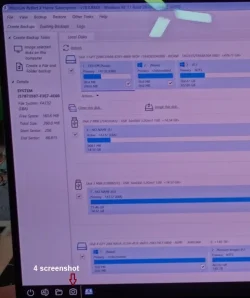
I tested my MRX image & after choosing the "Macrium Reflect System Recovery" on the boot screen I was booted (after the MRX logo) to the Macrium Reflect Restore Window with a small message error (attached) in front saying:
"taskbar.exe - Application Error
The Application was unable to start correctly (0xc0000017)
Click to close the application”
SOoo I browsed several forums & websites & I tried some of them… none worked for my setup.
So next I filed a Support request for this one.
Macrium was quick to reply & had questions & a RFI so I submitted the testing information.
After that he had me test the "Macrium Reflect System Recovery" with Secure boot on & off, it made no difference.
So next we tested the MRX Rescue Media I use an older created one that failed w/ the same error.
Next, I created a new one following his (Francisco) exact instructions & it worked.
So, I plugged in the 2TB MRX image storage drive & it ran like butter. I didn’t do a restore but got to where the last choice was “Finish”, satisfied it’ll work now.
The most important tip from Francisco was when creating the Rescue Media, which I hadn’t done was: Open Macrium Reflect with administrator privileges.
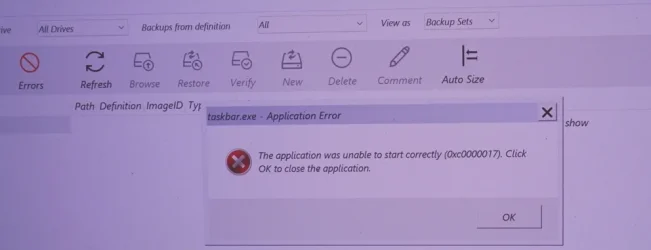
I tested my MRX image & after choosing the "Macrium Reflect System Recovery" on the boot screen I was booted (after the MRX logo) to the Macrium Reflect Restore Window with a small message error (attached) in front saying:
"taskbar.exe - Application Error
The Application was unable to start correctly (0xc0000017)
Click to close the application”
SOoo I browsed several forums & websites & I tried some of them… none worked for my setup.
So next I filed a Support request for this one.
Macrium was quick to reply & had questions & a RFI so I submitted the testing information.
After that he had me test the "Macrium Reflect System Recovery" with Secure boot on & off, it made no difference.
So next we tested the MRX Rescue Media I use an older created one that failed w/ the same error.
Next, I created a new one following his (Francisco) exact instructions & it worked.
So, I plugged in the 2TB MRX image storage drive & it ran like butter. I didn’t do a restore but got to where the last choice was “Finish”, satisfied it’ll work now.
The most important tip from Francisco was when creating the Rescue Media, which I hadn’t done was: Open Macrium Reflect with administrator privileges.
My Computers
-
At a glance
Windows 11 Proi7-12900K @ 3.2 GHz2/16 GB Critical DDR5GeForce RTX 3060 Ti- OS
- Windows 11 Pro
- Computer type
- PC/Desktop
- Manufacturer/Model
- Self made in 2023
- CPU
- i7-12900K @ 3.2 GHz
- Motherboard
- ASUS ROG Maximus Z790 APEX
- Memory
- 2/16 GB Critical DDR5
- Graphics Card(s)
- GeForce RTX 3060 Ti
- Sound Card
- On board sound
- Monitor(s) Displays
- 27 inch LED
- Hard Drives
- 1 TB Samsung SSD w/ 3 partitions
250 GB Samsung SSD for WSE 2016 BU OS
1 TB Samsung SSD (Storage)
- PSU
- RM850x SHIFT 80 PLUS Gold Fully Modular
- Case
- Fractal Design Define 7 Compact - Mid Tower
- Browser
- EDGE
-
At a glance
Windows 11 Pro x2Core i5-1135G716GB M.2 2280 NVMe SSDIntegrated - Intel Iris Xe Graphics- Operating System
- Windows 11 Pro x2
- Computer type
- Laptop
- Manufacturer/Model
- LG gram 15, 15.6" Laptop
- CPU
- Core i5-1135G7
- Motherboard
- LG
- Memory
- 16GB M.2 2280 NVMe SSD
- Graphics card(s)
- Integrated - Intel Iris Xe Graphics
- Sound Card
- Onboard sound
- Monitor(s) Displays
- 15.6" IPS Display
- Screen Resolution
- Full HD 1920 x 1080
- Hard Drives
- 512 GB
- Browser
- EDGE