Mass Storage Device USB Device Problem


When I disconnected this externals still I'm getting notification about this Mass...
 

My Computer My Computer

At a glance

Windows 11 x64 proCoffee Lake-S HexaCore Intel Core i7-8700K, 3...G Skill Trident Z RGB F4-3200C16-8GTZ - 32GBnVIDIA GeForce GTX 1050 Ti
OS
Windows 11 x64 pro
Computer type
PC/Desktop
Manufacturer/Model
made it
CPU
Coffee Lake-S HexaCore Intel Core i7-8700K, 3700 MHz
Motherboard
ASRock Z370 Taichi
Memory
G Skill Trident Z RGB F4-3200C16-8GTZ - 32GB
Graphics Card(s)
nVIDIA GeForce GTX 1050 Ti
Sound Card
on motherboard
Monitor(s) Displays
LG L226W (Digital)
Screen Resolution
1680x1050
Hard Drives
SSD Samsung 970 and SanDisk SDSSDH3240G
If you say you have no 'storage devices' connected.
Can test this:

Disable the USB selective suspend feature
- On your keyboard, press the Windows logo key, then press R to bring up the Run box.
- Type control and press Enter.
- Click Power Options when View by Large icons selected.
- Select Change plan settings of Balanced(recommended) or High if it was set on that.
- Click Change advanced power settings.
- Double-click USB settings > USB selective suspend setting.
- Click Enabled, then select Disabled from the drop-down
- Click Apply > OK to save your settings.

When you disable that in usb settings, are you still getting notifications.
 

My Computer My Computer

At a glance

Windows 11
OS
Windows 11
Computer type
PC/Desktop
When my externals are disconnected, notification about Mass...Is still coming and the worse is that every time is sound too
 

My Computer My Computer

At a glance

Windows 11 x64 proCoffee Lake-S HexaCore Intel Core i7-8700K, 3...G Skill Trident Z RGB F4-3200C16-8GTZ - 32GBnVIDIA GeForce GTX 1050 Ti
OS
Windows 11 x64 pro
Computer type
PC/Desktop
Manufacturer/Model
made it
CPU
Coffee Lake-S HexaCore Intel Core i7-8700K, 3700 MHz
Motherboard
ASRock Z370 Taichi
Memory
G Skill Trident Z RGB F4-3200C16-8GTZ - 32GB
Graphics Card(s)
nVIDIA GeForce GTX 1050 Ti
Sound Card
on motherboard
Monitor(s) Displays
LG L226W (Digital)
Screen Resolution
1680x1050
Hard Drives
SSD Samsung 970 and SanDisk SDSSDH3240G
After doing few times what it advice me antspants (post #6) and what Tester said in post #22 looks that it's fixed.
I really appreciate Your help Guys. Thanks so much.
 

My Computer My Computer

At a glance

Windows 11 x64 proCoffee Lake-S HexaCore Intel Core i7-8700K, 3...G Skill Trident Z RGB F4-3200C16-8GTZ - 32GBnVIDIA GeForce GTX 1050 Ti
OS
Windows 11 x64 pro
Computer type
PC/Desktop
Manufacturer/Model
made it
CPU
Coffee Lake-S HexaCore Intel Core i7-8700K, 3700 MHz
Motherboard
ASRock Z370 Taichi
Memory
G Skill Trident Z RGB F4-3200C16-8GTZ - 32GB
Graphics Card(s)
nVIDIA GeForce GTX 1050 Ti
Sound Card
on motherboard
Monitor(s) Displays
LG L226W (Digital)
Screen Resolution
1680x1050
Hard Drives
SSD Samsung 970 and SanDisk SDSSDH3240G
Good to hear. Cheers 👍
 

My Computers My Computers

  • At a glance

    Windows 11 Pro 25H2 Build 26200.9168Intel(R) Core(TM) i7-4770K CPU @ 3.50GHz32.0 GB of I forget and the box is in storage.Gigabyte nVidia GeForce GTX 1660 Super OC 6GB
    OS
    Windows 11 Pro 25H2 Build 26200.9168
    Computer type
    PC/Desktop
    Manufacturer/Model
    Sin-built 2013
    CPU
    Intel(R) Core(TM) i7-4770K CPU @ 3.50GHz
    Motherboard
    ASUS ROG Maximus VI Formula
    Memory
    32.0 GB of I forget and the box is in storage.
    Graphics Card(s)
    Gigabyte nVidia GeForce GTX 1660 Super OC 6GB
    Sound Card
    ROG SupremeFX Formula 8-Channel High Definition Audio
    Monitor(s) Displays
    5 x LG 25MS500-B - 1 x 24MK430H-B - 1 x Wacom Pro 22" Touch Screen Tablet
    Screen Resolution
    All over the place
    Hard Drives
    Too many to list. OS on Samsung 1TB 870 QVO SATA
    PSU
    Silverstone 1500
    Case
    NZXT Phantom 820 Full-Tower Case
    Cooling
    Noctua NH-D15 Elite Class Dual Tower CPU Cooler / 6 x EziDIY 120mm / 2 x Corsair 140mm somethings / 1 x 140mm Thermaltake something / 2 x 200mm Corsair.
    Keyboard
    Corsair K95 / Logitech diNovo Edge Wireless
    Mouse
    Logitech: G402 / G502 / Mx Masters / Mx Air Cordless
    Internet Speed
    2000/500Mbps
    Browser
    All sorts
    Antivirus
    Kaspersky Premium
    Other Info
    ㅤㅤㅤㅤㅤㅤㅤㅤㅤㅤㅤㅤㅤㅤㅤㅤㅤㅤㅤㅤㅤㅤㅤㅤㅤㅤㅤㅤㅤㅤㅤㅤㅤㅤㅤㅤㅤㅤㅤㅤ⠀⠀⠀⠀⠀⠀⠀⠀⠀⠀
    TP-Link BE9300 WiFi 7 Bluetooth 5.4 (Archer TBE550E)
    TP-Link TX201 V1 2.5GB Lan

    Grandstream HT812 - VoIP
    ASUS DSL-AX82U - Mesh
    ASUS RT-AC68U - Mesh
    ASUS RT-BE88U Router

    Brother MFC-L2880DW Printer

    I’m on a horse.
  • At a glance

    Windows 11 Pro 25H2 Build 26200.9168 (Wifes)13th Generation Intel® Core™ i5-1340P Process...16GB LPDDR5-52001x Intel® Iris® Xe Graphics
    Operating System
    Windows 11 Pro 25H2 Build 26200.9168 (Wifes)
    Computer type
    Laptop
    Manufacturer/Model
    LENOVO Yoga 7 14IRL8 - Type 82YL
    CPU
    13th Generation Intel® Core™ i5-1340P Processor(Core™ i5-1340P)
    Memory
    16GB LPDDR5-5200
    Graphics card(s)
    1x Intel® Iris® Xe Graphics
    Sound Card
    Optimized with Dolby Atmos®
    Screen Resolution
    QHD 2880 x 1800 OLED
    Hard Drives
    M.2 512 GB SSD PCIe
    Mouse
    Logiteck MX Master 3S
    Internet Speed
    2000/500
    Antivirus
    Defender / Malwarebytes
    Other Info
    …still on a horse.


    Wireless Network: Wi-Fi 6E 2x2 AX; Bluetooth® 5.1 or above
    Ports: 1x 1 Novo button; 2 in 1 Audio Combo jack; Micro SD Card Reader; HDMI 1.4b; 2 x USB Type-C (TBT4)
    USB 3.2 Gen 2 DP 1.4a
    PD 3.0); 1 x USB 3.2 Gen1 Type A
    Camera
    1x 1080P FHD IR/RGB Hybrid with Privacy Shutter and Dual Array Microphone
    Graphics
    1x Intel® Iris® Xe Graphics
    Monitor
    14" WUXGA
    Form Factor
    Convertible Notebook
  • Windows 11 Pro 25H2 Build 26200.9168 (Wifes)

    Yoga 7 2-in-1 14IML9 - Type 83DJ

    Processor: Intel® Core™ Ultra 7 155H Processor(Core™ Ultra 7 155H)

    Memory: 32GB LPD5X-7467

    Hard Drive: 1 TB SSD PCIe

    Wireless Network: 1x Wi-Fi 6E 2x2 AX; Bluetooth® 5.1 or above

    Ports: 1 x HDMI 2.1 TMDS; 1 x Novo Button; 1 x Combo Audio Jack
    2 x USB-C (USB 4.0)
    1 x USB-A 3.2 Gen 1

    Camera: 1080P FHD IR Hybrid with Dual Microphone

    Graphics: Intel® Arc™ Graphics

    Monitor: 14" 2.8K

    ...Where's my horse?
if you could please:

If your problem is solved, please go to the top right of Post #1 and click on the green button “Mark As Solved”

Thank you 🙏


IMG_4561.jpeg
 

My Computers My Computers

  • At a glance

    Windows 11 Pro 25H2 Build 26200.9168Intel(R) Core(TM) i7-4770K CPU @ 3.50GHz32.0 GB of I forget and the box is in storage.Gigabyte nVidia GeForce GTX 1660 Super OC 6GB
    OS
    Windows 11 Pro 25H2 Build 26200.9168
    Computer type
    PC/Desktop
    Manufacturer/Model
    Sin-built 2013
    CPU
    Intel(R) Core(TM) i7-4770K CPU @ 3.50GHz
    Motherboard
    ASUS ROG Maximus VI Formula
    Memory
    32.0 GB of I forget and the box is in storage.
    Graphics Card(s)
    Gigabyte nVidia GeForce GTX 1660 Super OC 6GB
    Sound Card
    ROG SupremeFX Formula 8-Channel High Definition Audio
    Monitor(s) Displays
    5 x LG 25MS500-B - 1 x 24MK430H-B - 1 x Wacom Pro 22" Touch Screen Tablet
    Screen Resolution
    All over the place
    Hard Drives
    Too many to list. OS on Samsung 1TB 870 QVO SATA
    PSU
    Silverstone 1500
    Case
    NZXT Phantom 820 Full-Tower Case
    Cooling
    Noctua NH-D15 Elite Class Dual Tower CPU Cooler / 6 x EziDIY 120mm / 2 x Corsair 140mm somethings / 1 x 140mm Thermaltake something / 2 x 200mm Corsair.
    Keyboard
    Corsair K95 / Logitech diNovo Edge Wireless
    Mouse
    Logitech: G402 / G502 / Mx Masters / Mx Air Cordless
    Internet Speed
    2000/500Mbps
    Browser
    All sorts
    Antivirus
    Kaspersky Premium
    Other Info
    ㅤㅤㅤㅤㅤㅤㅤㅤㅤㅤㅤㅤㅤㅤㅤㅤㅤㅤㅤㅤㅤㅤㅤㅤㅤㅤㅤㅤㅤㅤㅤㅤㅤㅤㅤㅤㅤㅤㅤㅤ⠀⠀⠀⠀⠀⠀⠀⠀⠀⠀
    TP-Link BE9300 WiFi 7 Bluetooth 5.4 (Archer TBE550E)
    TP-Link TX201 V1 2.5GB Lan

    Grandstream HT812 - VoIP
    ASUS DSL-AX82U - Mesh
    ASUS RT-AC68U - Mesh
    ASUS RT-BE88U Router

    Brother MFC-L2880DW Printer

    I’m on a horse.
  • At a glance

    Windows 11 Pro 25H2 Build 26200.9168 (Wifes)13th Generation Intel® Core™ i5-1340P Process...16GB LPDDR5-52001x Intel® Iris® Xe Graphics
    Operating System
    Windows 11 Pro 25H2 Build 26200.9168 (Wifes)
    Computer type
    Laptop
    Manufacturer/Model
    LENOVO Yoga 7 14IRL8 - Type 82YL
    CPU
    13th Generation Intel® Core™ i5-1340P Processor(Core™ i5-1340P)
    Memory
    16GB LPDDR5-5200
    Graphics card(s)
    1x Intel® Iris® Xe Graphics
    Sound Card
    Optimized with Dolby Atmos®
    Screen Resolution
    QHD 2880 x 1800 OLED
    Hard Drives
    M.2 512 GB SSD PCIe
    Mouse
    Logiteck MX Master 3S
    Internet Speed
    2000/500
    Antivirus
    Defender / Malwarebytes
    Other Info
    …still on a horse.


    Wireless Network: Wi-Fi 6E 2x2 AX; Bluetooth® 5.1 or above
    Ports: 1x 1 Novo button; 2 in 1 Audio Combo jack; Micro SD Card Reader; HDMI 1.4b; 2 x USB Type-C (TBT4)
    USB 3.2 Gen 2 DP 1.4a
    PD 3.0); 1 x USB 3.2 Gen1 Type A
    Camera
    1x 1080P FHD IR/RGB Hybrid with Privacy Shutter and Dual Array Microphone
    Graphics
    1x Intel® Iris® Xe Graphics
    Monitor
    14" WUXGA
    Form Factor
    Convertible Notebook
  • Windows 11 Pro 25H2 Build 26200.9168 (Wifes)

    Yoga 7 2-in-1 14IML9 - Type 83DJ

    Processor: Intel® Core™ Ultra 7 155H Processor(Core™ Ultra 7 155H)

    Memory: 32GB LPD5X-7467

    Hard Drive: 1 TB SSD PCIe

    Wireless Network: 1x Wi-Fi 6E 2x2 AX; Bluetooth® 5.1 or above

    Ports: 1 x HDMI 2.1 TMDS; 1 x Novo Button; 1 x Combo Audio Jack
    2 x USB-C (USB 4.0)
    1 x USB-A 3.2 Gen 1

    Camera: 1080P FHD IR Hybrid with Dual Microphone

    Graphics: Intel® Arc™ Graphics

    Monitor: 14" 2.8K

    ...Where's my horse?
Hi,
I came back because the problem came back, but now I know where the problem comes from.

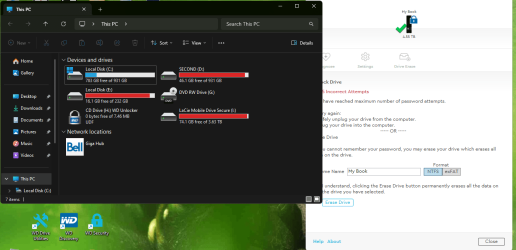
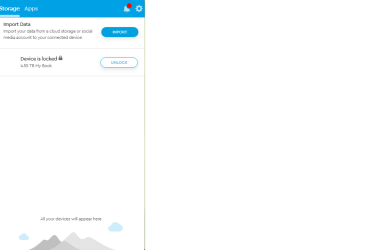
I have 2 WD External hard drives and I put a password on one of them and when I tried to use it after some time it turned out that I forgot my password. There is a limit of attempts (5X). But there is a chance to repeat this, after manually unplugging the HD and after a short time reconnecting it to the computer and then I have five new attempts. In my case, this disconnection did nothing. It seems that my external HD is recognized as still connected and I get a message to disconnect and try again. It doesn't matter how many times I hang up, it's still the same. Another option is to format your hard drive. My hard drive is 4.7GB, which means I have to do everything I can to fix it. I didn't mention that I found a piece of paper with my password on it and I would be able to open it. I didn't point out that disable and uninstall doesn't help. It always comes back
 
Last edited:

My Computer My Computer

At a glance

Windows 11 x64 proCoffee Lake-S HexaCore Intel Core i7-8700K, 3...G Skill Trident Z RGB F4-3200C16-8GTZ - 32GBnVIDIA GeForce GTX 1050 Ti
OS
Windows 11 x64 pro
Computer type
PC/Desktop
Manufacturer/Model
made it
CPU
Coffee Lake-S HexaCore Intel Core i7-8700K, 3700 MHz
Motherboard
ASRock Z370 Taichi
Memory
G Skill Trident Z RGB F4-3200C16-8GTZ - 32GB
Graphics Card(s)
nVIDIA GeForce GTX 1050 Ti
Sound Card
on motherboard
Monitor(s) Displays
LG L226W (Digital)
Screen Resolution
1680x1050
Hard Drives
SSD Samsung 970 and SanDisk SDSSDH3240G
I'm sending some images
There are three pictures and this cd drive with 7.46MB capacity is the hard drive. In the same time in WD Drive Utilities it show actual capacity and name this as a hard drive

WD 1.png
 

Attachments

  • WD 2.png
    WD 2.png
    8.2 KB · Views: 3
  • WD 3.png
    WD 3.png
    71.7 KB · Views: 3

My Computer My Computer

At a glance

Windows 11 x64 proCoffee Lake-S HexaCore Intel Core i7-8700K, 3...G Skill Trident Z RGB F4-3200C16-8GTZ - 32GBnVIDIA GeForce GTX 1050 Ti
OS
Windows 11 x64 pro
Computer type
PC/Desktop
Manufacturer/Model
made it
CPU
Coffee Lake-S HexaCore Intel Core i7-8700K, 3700 MHz
Motherboard
ASRock Z370 Taichi
Memory
G Skill Trident Z RGB F4-3200C16-8GTZ - 32GB
Graphics Card(s)
nVIDIA GeForce GTX 1050 Ti
Sound Card
on motherboard
Monitor(s) Displays
LG L226W (Digital)
Screen Resolution
1680x1050
Hard Drives
SSD Samsung 970 and SanDisk SDSSDH3240G
Hi,
I came back because the problem came back, but now I know where the problem comes from.

I have 2 WD External hard drives and I put a password on one of them and when I tried to use it after some time it turned out that I forgot my password. There is a limit of attempts (5X). But there is a chance to repeat this, after manually unplugging the HD and after a short time reconnecting it to the computer and then I have five new attempts. In my case, this disconnection did nothing. It seems that my external HD is recognized as still connected and I get a message to disconnect and try again. It doesn't matter how many times I hang up, it's still the same. Another option is to format your hard drive. My hard drive is 4.7GB, which means I have to do everything I can to fix it. I didn't mention that I found a piece of paper with my password on it and I would be able to open it. I didn't point out that disable and uninstall doesn't help. It always comes back
You MIGHT be able to unmount/Remount it, but if that doesn't work, ask WD.

THis is not a WINDOWS problem, it's a problem w the security/PW in the HDD firmware.
 

My Computer My Computer

At a glance

Win 10
OS
Win 10
Computer type
Laptop
Manufacturer/Model
hp

Latest Support Threads

Back
Top Bottom