Solved MBR to GPT and back again?


fixer

Well-known member
Member
VIP
Local time
6:04 PM
Posts
420
OS
Windows 11 Pro
My LAN essentially consists of a WIn11 laptop and a Win10 PC. 95% of use is on the laptop but all files are stored on the PC. The PC has 120GB SSD housing Windows 10 and all software and a 1TB HDD with all data files, system images and a few VMs. There are other drives on the LAN, mostly used for backups. I'm thinking of upgrading the PC to Win11, the first step of which would have to be converting the SSD to GPT without loss of data.

If I go ahead with this I would be expecting problems which may or may not be fixable. If they are not fixable, and to remain operational I would need to restore the current system image to the SSD, converting it back to MBR from GPT. I use the paid version of Macrium Reflect Home and have a very high level of confidence in it on normal use, but do the MR users here think it would cope with this?
 

My Computers My Computers

  • At a glance

    Windows 11 Proi716Gb
    OS
    Windows 11 Pro
    Computer type
    Laptop
    Manufacturer/Model
    Lafite 14
    CPU
    i7
    Memory
    16Gb
    Internet Speed
    150Mbps/39Mbps
    Browser
    Firefox
    Antivirus
    Defender
  • At a glance

    Win 11 Proi58Gb
    Operating System
    Win 11 Pro
    Computer type
    PC/Desktop
    Manufacturer/Model
    PC Specialist
    CPU
    i5
    Memory
    8Gb
    Internet Speed
    150Mbps/39Mbps
    Browser
    Firefox
    Antivirus
    Defender
    Other Info
    Incompatible Win 10 Pro PC upgraded to Win 11 Pro
My LAN essentially consists of a WIn11 laptop and a Win10 PC. 95% of use is on the laptop but all files are stored on the PC. The PC has 120GB SSD housing Windows 10 and all software and a 1TB HDD with all data files, system images and a few VMs. There are other drives on the LAN, mostly used for backups. I'm thinking of upgrading the PC to Win11, the first step of which would have to be converting the SSD to GPT without loss of data.

If I go ahead with this I would be expecting problems which may or may not be fixable. If they are not fixable, and to remain operational I would need to restore the current system image to the SSD, converting it back to MBR from GPT. I use the paid version of Macrium Reflect Home and have a very high level of confidence in it on normal use, but do the MR users here think it would it cope with this?
Provided you have all partitions backed up from SSD, it should work fine.

You may need to convert SSD back to mbr manually before doing restore. All you have to do is select command icon at bottom of Reflect Home page and use diskpart to wipe drive and convert to mbr (be careful you do not wipe hdd though).
 

My Computer My Computer

At a glance

Windows 11 Pro + Win11 Canary VM.I9 13th gen i9-13900H 2.60 GHZ16 GB solderedIntegrated Intel Iris XE
OS
Windows 11 Pro + Win11 Canary VM.
Computer type
Laptop
Manufacturer/Model
ASUS Zenbook 14
CPU
I9 13th gen i9-13900H 2.60 GHZ
Motherboard
Yep, Laptop has one.
Memory
16 GB soldered
Graphics Card(s)
Integrated Intel Iris XE
Sound Card
Realtek built in
Monitor(s) Displays
laptop OLED screen
Screen Resolution
2880x1800 touchscreen
Hard Drives
1 TB NVME SSD (only weakness is only one slot)
PSU
Internal + 65W thunderbolt USB4 charger
Case
Yep, got one
Cooling
Stella Artois (UK pint cans - 568 ml) - extra cost.
Keyboard
Built in UK keybd
Mouse
Bluetooth , wireless dongled, wired
Internet Speed
900 mbs (ethernet), wifi 6 typical 350-450 mb/s both up and down
Browser
Edge
Antivirus
Defender
Other Info
TPM 2.0, 2xUSB4 thunderbolt, 1xUsb3 (usb a), 1xUsb-c, hdmi out, 3.5 mm audio out/in combo, ASUS backlit trackpad (inc. switchable number pad)

Macrium Reflect Home V8
Office 365 Family (6 users each 1TB onedrive space)
Hyper-V (a vm runs almost as fast as my older laptop)
I hadn't realised how cheap small SSDs are nowadays so, for a modest outlay I could just clone the SSD and avoid all the risks. Might be my best option.
 

My Computers My Computers

  • At a glance

    Windows 11 Proi716Gb
    OS
    Windows 11 Pro
    Computer type
    Laptop
    Manufacturer/Model
    Lafite 14
    CPU
    i7
    Memory
    16Gb
    Internet Speed
    150Mbps/39Mbps
    Browser
    Firefox
    Antivirus
    Defender
  • At a glance

    Win 11 Proi58Gb
    Operating System
    Win 11 Pro
    Computer type
    PC/Desktop
    Manufacturer/Model
    PC Specialist
    CPU
    i5
    Memory
    8Gb
    Internet Speed
    150Mbps/39Mbps
    Browser
    Firefox
    Antivirus
    Defender
    Other Info
    Incompatible Win 10 Pro PC upgraded to Win 11 Pro
What you want to do can be done.

There are a number of programs that will do this. Among them are MiniTool Partition Wizard, DiskPart, and EaseUS Partition Wizard.

Again there are other programs available.
 

My Computer My Computer

At a glance

Linux Arch (Windows 11 in a VM)
OS
Linux Arch (Windows 11 in a VM)
If you have a backup image, you have nothing to worry about. There's only one way to find out. Just go ahead and let us know what happened.

My program of choice for this task is MiniTool Partition Wizard. But I am not sure if free version will be able to do it. Mine is a pro version.

I think there was a free license giveaway of Easus Partition software on this forum recently. It may work also.
 

My Computers My Computers

  • At a glance

    Windows 11 ProAMD Ryzen 7 9800X3D32GB DDR5 CL30 Kingston FuryASUS Prime Radeon RX 9060 XT OC Edition 16GB
    OS
    Windows 11 Pro
    Computer type
    PC/Desktop
    CPU
    AMD Ryzen 7 9800X3D
    Motherboard
    MSI PRO B850-P Wifi
    Memory
    32GB DDR5 CL30 Kingston Fury
    Graphics Card(s)
    ASUS Prime Radeon RX 9060 XT OC Edition 16GB
    Monitor(s) Displays
    LG Ultrawide 34" + LG 27" 1080p
    Screen Resolution
    3440x1440
    Hard Drives
    Main Boot Drive : 512GB Adata XPG RGB Gen3x4 NVMe M.2 SSD
    PSU
    EVGA 750 Watts 80+ Gold
    Case
    Deepcool Genome II
    Cooling
    Thermalright Burst Assassin 120
    Internet Speed
    1Gbps
    Browser
    Chrome
    Antivirus
    "Moderna"
  • At a glance

    Windows 11 Proi7-4790K16GB Corsair Vengeance ProMSI R9 290
    Operating System
    Windows 11 Pro
    Computer type
    PC/Desktop
    CPU
    i7-4790K
    Motherboard
    ASRock Xtreme6 Z97
    Memory
    16GB Corsair Vengeance Pro
    Graphics card(s)
    MSI R9 290
    Monitor(s) Displays
    LG Ultrawide 34"
    Screen Resolution
    3440x1440
    Hard Drives
    500GB Adata SSD (OS Only)
    PSU
    Thermaltake 475 Watts 80 Bronze
    Case
    Thermaltake Commander I Snow Edition
    Cooling
    Deep Cool Archer Air Cooler
    Keyboard
    Armageddon MKA-5R RGB-Hornet
    Mouse
    Logitech G402
    Internet Speed
    1Gbps
    Browser
    Chrome
    Antivirus
    Moderna :)
Here's the ISO of the Partition Wizard 11 bootable media...
(Scans 100% clean locally and at Virustotal)


Just use RUFUS to put it on a USB stick.
 

My Computers My Computers

  • At a glance

    Win 11 Home ♦♦♦26200.8655 ♦♦♦♦♦♦♦25H2AMD Ryzen 7 3700XG.Skill (F4-3200C14D-16GTZKW)EVGA RTX 2070 (08G-P4-2171-KR)
    OS
    Win 11 Home ♦♦♦26200.8655 ♦♦♦♦♦♦♦25H2
    Computer type
    PC/Desktop
    Manufacturer/Model
    Built by Ghot® [May 2020]
    CPU
    AMD Ryzen 7 3700X
    Motherboard
    Asus Pro WS X570-ACE (BIOS 5302)
    Memory
    G.Skill (F4-3200C14D-16GTZKW)
    Graphics Card(s)
    EVGA RTX 2070 (08G-P4-2171-KR)
    Sound Card
    Realtek ALC1220P / ALC S1220A
    Monitor(s) Displays
    Dell U3011 30"
    Screen Resolution
    2560 x 1600
    Hard Drives
    2x Samsung 860 EVO 500GB,
    WD 4TB Black FZBX - SATA III,
    WD 8TB Black FZBX - SATA III,
    DRW-24B1ST CD/DVD Burner
    PSU
    PC Power & Cooling 750W Quad EPS12V
    Case
    Cooler Master ATCS 840 Tower
    Cooling
    CM Hyper 212 EVO (push/pull)
    Keyboard
    Ducky DK9008 Shine II Blue LED
    Mouse
    Logitech Optical M-100
    Internet Speed
    300/300
    Browser
    Firefox (latest)
    Antivirus
    Bitdefender Total Security
    Other Info
    Speakers: Klipsch Pro Media 2.1
  • At a glance

    Windows XP Pro 32bit w/SP3AMD Athlon 64 X2 5000+ (OC'd @ 3.2Ghz)TWIN2X2048-6400C4DHX (2 x 1GB, DDR2 800)EVGA 256-P2-N758-TR GeForce 8600GT SSC
    Operating System
    Windows XP Pro 32bit w/SP3
    Computer type
    PC/Desktop
    Manufacturer/Model
    Built by Ghot® (not in use)
    CPU
    AMD Athlon 64 X2 5000+ (OC'd @ 3.2Ghz)
    Motherboard
    ASUS M2N32-SLI Deluxe Wireless Edition
    Memory
    TWIN2X2048-6400C4DHX (2 x 1GB, DDR2 800)
    Graphics card(s)
    EVGA 256-P2-N758-TR GeForce 8600GT SSC
    Sound Card
    Onboard
    Monitor(s) Displays
    ViewSonic G90FB Black 19" Professional (CRT)
    Screen Resolution
    up to 2048 x 1536
    Hard Drives
    WD 36GB 10,000rpm Raptor SATA
    Seagate 80GB 7200rpm SATA
    Lite-On LTR-52246S CD/RW
    Lite-On LH-18A1P CD/DVD Burner
    PSU
    PC Power & Cooling Silencer 750 Quad EPS12V
    Case
    Generic Beige case, 80mm fans
    Cooling
    ZALMAN 9500A 92mm CPU Cooler
    Keyboard
    Logitech Classic Keybooard 200
    Mouse
    Logitech Optical M-BT96a
    Internet Speed
    300/300
    Browser
    Firefox 3.x ??
    Antivirus
    Symantec (Norton)
    Other Info
    Still assembled, still runs. Haven't turned it on for 15 years?
Why not just use the built-in mbr2gpt command? Only the system drive containing the OS needs to be converted, not the data drive.
 

My Computers My Computers

  • At a glance

    Windows 11AMD Ryzen 7 3800XT32GBEVGA GeForce GTX 1080 Ti
    OS
    Windows 11
    Computer type
    PC/Desktop
    Manufacturer/Model
    Homebuilt
    CPU
    AMD Ryzen 7 3800XT
    Motherboard
    ASUS ROG Crosshair VII Hero (WiFi)
    Memory
    32GB
    Graphics Card(s)
    EVGA GeForce GTX 1080 Ti
  • At a glance

    Windows 11 EducationIntel i7-8550U32GBNvidia Geforce MX150
    Operating System
    Windows 11 Education
    Computer type
    Laptop
    Manufacturer/Model
    Dell Inspiron 7773
    CPU
    Intel i7-8550U
    Memory
    32GB
    Graphics card(s)
    Nvidia Geforce MX150
    Sound Card
    Realtek
    Monitor(s) Displays
    17"
    Screen Resolution
    1920 x 1080
    Hard Drives
    Toshiba 512GB NVMe SSD
    SK Hynix 512GB SATA SSD
    Internet Speed
    Fast!
My LAN essentially consists of a WIn11 laptop and a Win10 PC. 95% of use is on the laptop but all files are stored on the PC. The PC has 120GB SSD housing Windows 10 and all software and a 1TB HDD with all data files, system images and a few VMs. There are other drives on the LAN, mostly used for backups. I'm thinking of upgrading the PC to Win11, the first step of which would have to be converting the SSD to GPT without loss of data.

If I go ahead with this I would be expecting problems which may or may not be fixable. If they are not fixable, and to remain operational I would need to restore the current system image to the SSD, converting it back to MBR from GPT. I use the paid version of Macrium Reflect Home and have a very high level of confidence in it on normal use, but do the MR users here think it would cope with this?

I did this before Windows 11, using the built-in utility as NavtLCDR mentions without a problem, for non system drives when I was on a rig that could not boot from GPT. As long as you're backed up, should be fine, as everyone has said.

My advice, though? Grab a new SSD, clean it and set it up as GPT and clean install Windows 11 and set it up again with all your apps. You'll be better off going that route in the long run.
 

My Computers My Computers

  • At a glance

    Windows 11 23H2 Current buildAMD Ryzen 9 3950X4 * 32 GB - Corsair Vengeance 3600 MHzEVGA GeForce RTX 3080 Ti XC3 ULTRA GAMING (12...
    OS
    Windows 11 23H2 Current build
    Computer type
    PC/Desktop
    Manufacturer/Model
    HomeBrew
    CPU
    AMD Ryzen 9 3950X
    Motherboard
    MSI MEG X570 GODLIKE
    Memory
    4 * 32 GB - Corsair Vengeance 3600 MHz
    Graphics Card(s)
    EVGA GeForce RTX 3080 Ti XC3 ULTRA GAMING (12G-P5-3955-KR)
    Sound Card
    Realtek® ALC1220 Codec
    Monitor(s) Displays
    2x Eve Spectrum ES07D03 4K Gaming Monitor (Matte) | Eve Spectrum ES07DC9 4K Gaming Monitor (Glossy)
    Screen Resolution
    3x 3840 x 2160
    Hard Drives
    3x Samsung 980 Pro NVMe PCIe 4 M.2 2 TB SSD (MZ-V8P2T0B/AM) } 3x Sabrent Rocket NVMe 4.0 1 TB SSD (USB)
    PSU
    PC Power & Cooling’s Silencer Series 1050 Watt, 80 Plus Platinum
    Case
    Fractal Design Define 7 XL Dark ATX Full Tower Case
    Cooling
    Arctic Liquid Freezer III 420 RGB + Air 3x 140mm case fans (pull front) + 1x 120 mm (push back) and 1 x 120 mm (pull bottom)
    Keyboard
    SteelSeries Apex Pro Wired Gaming Keyboard
    Mouse
    Logitech MX Master 3S | MX Master 3 for Business
    Internet Speed
    AT&T LightSpeed Gigabit Duplex Ftth
    Browser
    Nightly (default) + Firefox (stable), Chrome, Edge , Arc
    Antivirus
    Defender + MB 5 Beta
  • At a glance

    ChromeOS Flex Dev Channel (current)Intel(R) Core(TM) i5-6300U CPU @ 2.40GHz, 250...16 GBIntel(R) HD Graphics 520
    Operating System
    ChromeOS Flex Dev Channel (current)
    Computer type
    Laptop
    Manufacturer/Model
    Dell Latitude E5470
    CPU
    Intel(R) Core(TM) i5-6300U CPU @ 2.40GHz, 2501 Mhz, 2 Core(s), 4 Logical Processor(s)
    Motherboard
    Dell
    Memory
    16 GB
    Graphics card(s)
    Intel(R) HD Graphics 520
    Sound Card
    Intel(R) HD Graphics 520 + RealTek Audio
    Monitor(s) Displays
    Dell laptop display 15"
    Screen Resolution
    1920 * 1080
    Hard Drives
    Toshiba 128GB M.2 22300 drive
    INTEL Cherryville 520 Series SSDSC2CW180A 180 GB SATA III SSD
    PSU
    Dell
    Case
    Dell
    Cooling
    Dell
    Keyboard
    Dell
    Mouse
    Logitech MX Master 3S (shared w. Sys 1) | Dell TouchPad
    Internet Speed
    AT&T LightSpeed Gigabit Duplex Ftth
Great inputs - thanks everyone. I'm not in any rush with this, just want to take a step at a time as cannot afford for PC to be down for more than half a day. ATM I've just added PW11 to my Ventoy stick and am satisfied it can do what I want. Now need a suitable window for next step of converting PC's SSD to GPT and checking everything is still OK.
 

My Computers My Computers

  • At a glance

    Windows 11 Proi716Gb
    OS
    Windows 11 Pro
    Computer type
    Laptop
    Manufacturer/Model
    Lafite 14
    CPU
    i7
    Memory
    16Gb
    Internet Speed
    150Mbps/39Mbps
    Browser
    Firefox
    Antivirus
    Defender
  • At a glance

    Win 11 Proi58Gb
    Operating System
    Win 11 Pro
    Computer type
    PC/Desktop
    Manufacturer/Model
    PC Specialist
    CPU
    i5
    Memory
    8Gb
    Internet Speed
    150Mbps/39Mbps
    Browser
    Firefox
    Antivirus
    Defender
    Other Info
    Incompatible Win 10 Pro PC upgraded to Win 11 Pro
SSD converted from MBR to GPT using mbr2gpt offline. No issues at all so far. All backed up with MR. Want to get some advice from PCSpecialist before trying to upgrade to Win 11 as PC doesn't meet Win 11 spec. Can't afford any serious system problems. Donkey's years since I last did any of this stuff so taking my time about it.
 

My Computers My Computers

  • At a glance

    Windows 11 Proi716Gb
    OS
    Windows 11 Pro
    Computer type
    Laptop
    Manufacturer/Model
    Lafite 14
    CPU
    i7
    Memory
    16Gb
    Internet Speed
    150Mbps/39Mbps
    Browser
    Firefox
    Antivirus
    Defender
  • At a glance

    Win 11 Proi58Gb
    Operating System
    Win 11 Pro
    Computer type
    PC/Desktop
    Manufacturer/Model
    PC Specialist
    CPU
    i5
    Memory
    8Gb
    Internet Speed
    150Mbps/39Mbps
    Browser
    Firefox
    Antivirus
    Defender
    Other Info
    Incompatible Win 10 Pro PC upgraded to Win 11 Pro
Want to get some advice from PCSpecialist before trying to upgrade to Win 11 as PC doesn't meet Win 11 spec. Can't afford any serious system problems.
To upgrade an unsupported device to Windows 11 you'll need to use a workaround to bypass the system checks during setup. I've not yet found a machine that cannot run 11, no matter how inappropriate.
 

My Computers My Computers

  • At a glance

    Windows 11 HomeAMD Athlon Silver 3050U8GBRadeon Graphics
    OS
    Windows 11 Home
    Computer type
    Laptop
    Manufacturer/Model
    Acer Aspire 3 A315-23-R9VY
    CPU
    AMD Athlon Silver 3050U
    Memory
    8GB
    Graphics Card(s)
    Radeon Graphics
    Monitor(s) Displays
    laptop screen
    Screen Resolution
    1366x768 native resolution, up to 2560x1440 with Radeon Virtual Super Resolution
    Hard Drives
    1TB Samsung EVO 870 SSD (from April 2026: 250GB EVO 850)
    Internet Speed
    150 Mbps
    Browser
    Edge, Firefox
    Antivirus
    Defender
    Other Info
    fully 'Windows 11 ready' laptop. Windows 10 C: partition migrated from my old unsupported 'main machine' then upgraded to 11. A test migration ran Insider builds for 2 months. When 11 was released on 5th October 2021 it was re-imaged back to 10 and was offered the upgrade in Windows Update on 20th October. Windows Update offered the 22H2 Feature Update on 20th September 2022. It got the 23H2 Feature Update on 4th November 2023 through Windows Update, 24H2 on 3rd October 2024 through Windows Update by setting the Target Release Version for 24H2, and 25H2 on 30th September 2025 through Windows Update by setting the Target Release Version for 25H2.

    UPDATE - 11 April 2026: due to mechanical deterioration this PC has been retired from active duty. The OS with all software and files has been migrated to my System Seven in 'Other systems' to carry on as my general purpose 'main machine'.
  • At a glance

    Windows 11 ProIntel® Core™ i5-520M8GB(integrated graphics) Intel HD Graphics
    Operating System
    Windows 11 Pro
    Computer type
    Laptop
    Manufacturer/Model
    Dell Latitude E4310
    CPU
    Intel® Core™ i5-520M
    Motherboard
    0T6M8G
    Memory
    8GB
    Graphics card(s)
    (integrated graphics) Intel HD Graphics
    Screen Resolution
    1366x768
    Hard Drives
    500GB Crucial MX500 SSD
    Browser
    Firefox, Edge
    Antivirus
    Defender
    Other Info
    unsupported machine: Legacy bios, MBR, TPM 1.2, upgraded from W10 to W11 using W10/W11 hybrid install media workaround.

    In-place upgrade to 22H2 using ISO and a workaround.
    Feature Update to 23H2 by manually installing the Enablement Package.
    In-place upgrade to 24H2 using hybrid 23H2/24H2 install media.
    Upgraded to 25H2 by Enablement Package.

    Also running Insider Dev, and Canary builds and Windows 10 as native boot .vhdx.
  • My SYSTEM THREE is a Dell Latitude 5410, i7-10610U, 32GB RAM, 512GB NVMe ssd, supported device running Windows 11 Pro.

    My SYSTEM FOUR is a 2-in-1 convertible Lenovo Yoga 11e 20DA, Celeron N2930, 8GB RAM, 256GB ssd. Unsupported device: currently running Win10 Pro, plus Win11 Pro RTM and Insider Dev, Beta, and RP 24H2 as native boot vhdx.

    My SYSTEM FIVE is a Dell Latitude 3190 2-in-1, Pentium Silver N5030, 8GB RAM, 1TB NVMe ssd, supported device running Windows 11 Pro, plus Insider Beta, Dev, and Canary builds (and a few others) as a native boot .vhdx.

    My SYSTEM SIX is a Dell Latitude 5550, Core Ultra 7 165H, 64GB RAM, 1TB NVMe SSD, supported device, Windows 11 Pro 24H2, Hyper-V host machine. Updated to 25H2 on 30th September 2025.

    My SYSTEM SEVEN is a Lenovo Thinkpad T580, Intel Core i7-8650U, 16GB RAM, 512GB NVMe SSD + 2nd 512GB NVMe SSD, a supported device for Windows 11. This is my current general purpose 'main machine'. The installed Windows 11 Home from my System One has been migrated to this machine.
To upgrade an unsupported device to Windows 11 you'll need to use a workaround to bypass the system checks during setup. I've not yet found a machine that cannot run 11, no matter how inappropriate.
Yes, been doing a fair bit of reading on this. I have previously upgraded an old laptop and it was ok but that was to 21H2. However seems 22H2 has rather changed the situation and I'm now seriously questioning the advisability of going further. This is on makeuseof.com and I'd welcome any views, particularly the second paragraph -

Installing Windows 11 22H2 on Unsupported Hardware​

It is easy to bypass the Windows 11 system hardware requirements when you want to perform a clean install. However, to perform an upgrade, you’ll need to modify the appraiserress.dll file and then run the setup.

While the upgrade is possible for now, the lack of future automatic Windows updates makes maintaining the PC a complicated task. If upgrading to Windows 11 is not a must, you can stick to Windows 10 on older hardware, which will continue to receive support until late 2025.
 

My Computers My Computers

  • At a glance

    Windows 11 Proi716Gb
    OS
    Windows 11 Pro
    Computer type
    Laptop
    Manufacturer/Model
    Lafite 14
    CPU
    i7
    Memory
    16Gb
    Internet Speed
    150Mbps/39Mbps
    Browser
    Firefox
    Antivirus
    Defender
  • At a glance

    Win 11 Proi58Gb
    Operating System
    Win 11 Pro
    Computer type
    PC/Desktop
    Manufacturer/Model
    PC Specialist
    CPU
    i5
    Memory
    8Gb
    Internet Speed
    150Mbps/39Mbps
    Browser
    Firefox
    Antivirus
    Defender
    Other Info
    Incompatible Win 10 Pro PC upgraded to Win 11 Pro
Hi,
Really unsupported hardware why care about gpt disks ?
Bypass it just like the rest
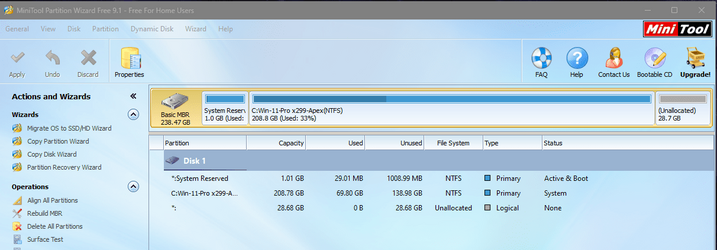
Only thing you really need to do in increase the size of you system reserved partition so ms updates will stop creating a new one when the prior is to small.
System reserved partition 1gb and you're done for a long while.

1675952727253.png
 

My Computer My Computer

At a glance

Win-7-10-11Pro's10900k & 9940x & 5930kTrident-Z Royal 4000c16 2x16gb & Trident-Z 36...Titan Xp & 1080ti FTW3 & evga 980ti gaming
OS
Win-7-10-11Pro's
Computer type
PC/Desktop
Manufacturer/Model
Acer 17" Nitro 7840sn/ 2x16gb 5600c40/ 4060/ stock 1tb-os/ 4tb sn850x
CPU
10900k & 9940x & 5930k
Motherboard
z490-Apex & x299-Apex & x99-Sabertooth
Memory
Trident-Z Royal 4000c16 2x16gb & Trident-Z 3600c16 4x8gb & 3200c14 4x8gb
Graphics Card(s)
Titan Xp & 1080ti FTW3 & evga 980ti gaming
Sound Card
Onboard Realtek x3
Monitor(s) Displays
1-AOC G2460PG 24"G-Sync 144Hz/ 2nd 1-ASUS VG248QE 24"/ 3rd LG 43" series
Screen Resolution
1920-1080 not sure what the t.v is besides 43" class scales from 1920-1080 perfectly
Hard Drives
2-WD-sn850x 4tb/ 970evo+500gb/ 980 pro 2tb.
PSU
1000p2 & 1200p2 & 850p2
Case
D450 x2 & 1 Test bench in cherry Entertainment center
Cooling
Custom water loops x3 with 2x mora 360mm rads only 980ti gaming air cooled
Keyboard
G710+x3
Mouse
Redragon x3
Internet Speed
xfinity gigabyte
Browser
Firefox
Antivirus
mbam pro
While the upgrade is possible for now, the lack of future automatic Windows updates makes maintaining the PC a complicated task.
So far every unsupported device that I have on 22H2 gets all the cumulative updates, etc. automatically through Windows Update, just like my supported devices. It will only be the next Feature Update that won't be offered to an unsupported device. An in-place upgrade with the workaround once a year is not exactly an onerous task.
 

My Computers My Computers

  • At a glance

    Windows 11 HomeAMD Athlon Silver 3050U8GBRadeon Graphics
    OS
    Windows 11 Home
    Computer type
    Laptop
    Manufacturer/Model
    Acer Aspire 3 A315-23-R9VY
    CPU
    AMD Athlon Silver 3050U
    Memory
    8GB
    Graphics Card(s)
    Radeon Graphics
    Monitor(s) Displays
    laptop screen
    Screen Resolution
    1366x768 native resolution, up to 2560x1440 with Radeon Virtual Super Resolution
    Hard Drives
    1TB Samsung EVO 870 SSD (from April 2026: 250GB EVO 850)
    Internet Speed
    150 Mbps
    Browser
    Edge, Firefox
    Antivirus
    Defender
    Other Info
    fully 'Windows 11 ready' laptop. Windows 10 C: partition migrated from my old unsupported 'main machine' then upgraded to 11. A test migration ran Insider builds for 2 months. When 11 was released on 5th October 2021 it was re-imaged back to 10 and was offered the upgrade in Windows Update on 20th October. Windows Update offered the 22H2 Feature Update on 20th September 2022. It got the 23H2 Feature Update on 4th November 2023 through Windows Update, 24H2 on 3rd October 2024 through Windows Update by setting the Target Release Version for 24H2, and 25H2 on 30th September 2025 through Windows Update by setting the Target Release Version for 25H2.

    UPDATE - 11 April 2026: due to mechanical deterioration this PC has been retired from active duty. The OS with all software and files has been migrated to my System Seven in 'Other systems' to carry on as my general purpose 'main machine'.
  • At a glance

    Windows 11 ProIntel® Core™ i5-520M8GB(integrated graphics) Intel HD Graphics
    Operating System
    Windows 11 Pro
    Computer type
    Laptop
    Manufacturer/Model
    Dell Latitude E4310
    CPU
    Intel® Core™ i5-520M
    Motherboard
    0T6M8G
    Memory
    8GB
    Graphics card(s)
    (integrated graphics) Intel HD Graphics
    Screen Resolution
    1366x768
    Hard Drives
    500GB Crucial MX500 SSD
    Browser
    Firefox, Edge
    Antivirus
    Defender
    Other Info
    unsupported machine: Legacy bios, MBR, TPM 1.2, upgraded from W10 to W11 using W10/W11 hybrid install media workaround.

    In-place upgrade to 22H2 using ISO and a workaround.
    Feature Update to 23H2 by manually installing the Enablement Package.
    In-place upgrade to 24H2 using hybrid 23H2/24H2 install media.
    Upgraded to 25H2 by Enablement Package.

    Also running Insider Dev, and Canary builds and Windows 10 as native boot .vhdx.
  • My SYSTEM THREE is a Dell Latitude 5410, i7-10610U, 32GB RAM, 512GB NVMe ssd, supported device running Windows 11 Pro.

    My SYSTEM FOUR is a 2-in-1 convertible Lenovo Yoga 11e 20DA, Celeron N2930, 8GB RAM, 256GB ssd. Unsupported device: currently running Win10 Pro, plus Win11 Pro RTM and Insider Dev, Beta, and RP 24H2 as native boot vhdx.

    My SYSTEM FIVE is a Dell Latitude 3190 2-in-1, Pentium Silver N5030, 8GB RAM, 1TB NVMe ssd, supported device running Windows 11 Pro, plus Insider Beta, Dev, and Canary builds (and a few others) as a native boot .vhdx.

    My SYSTEM SIX is a Dell Latitude 5550, Core Ultra 7 165H, 64GB RAM, 1TB NVMe SSD, supported device, Windows 11 Pro 24H2, Hyper-V host machine. Updated to 25H2 on 30th September 2025.

    My SYSTEM SEVEN is a Lenovo Thinkpad T580, Intel Core i7-8650U, 16GB RAM, 512GB NVMe SSD + 2nd 512GB NVMe SSD, a supported device for Windows 11. This is my current general purpose 'main machine'. The installed Windows 11 Home from my System One has been migrated to this machine.
On the basis I can restore a Win 10 image should I need to I decided to go ahead using Rufus and the options to skip the Win 11 checks. However for whatever reason the Win 11 install isn't giving me the option to keep both my apps and files, only my files. That's no good for me so have had to revert to my Win 10 setup.
 

My Computers My Computers

  • At a glance

    Windows 11 Proi716Gb
    OS
    Windows 11 Pro
    Computer type
    Laptop
    Manufacturer/Model
    Lafite 14
    CPU
    i7
    Memory
    16Gb
    Internet Speed
    150Mbps/39Mbps
    Browser
    Firefox
    Antivirus
    Defender
  • At a glance

    Win 11 Proi58Gb
    Operating System
    Win 11 Pro
    Computer type
    PC/Desktop
    Manufacturer/Model
    PC Specialist
    CPU
    i5
    Memory
    8Gb
    Internet Speed
    150Mbps/39Mbps
    Browser
    Firefox
    Antivirus
    Defender
    Other Info
    Incompatible Win 10 Pro PC upgraded to Win 11 Pro
Hi,
Typically I copy and paste the files off the usb onto my desktop
After I right click setup.exe and select properties
Check the box to Unblock and apply/ okay.
Then run setup.exe as administrator and it should offer to keep personal files and apps.
 
Last edited:

My Computer My Computer

At a glance

Win-7-10-11Pro's10900k & 9940x & 5930kTrident-Z Royal 4000c16 2x16gb & Trident-Z 36...Titan Xp & 1080ti FTW3 & evga 980ti gaming
OS
Win-7-10-11Pro's
Computer type
PC/Desktop
Manufacturer/Model
Acer 17" Nitro 7840sn/ 2x16gb 5600c40/ 4060/ stock 1tb-os/ 4tb sn850x
CPU
10900k & 9940x & 5930k
Motherboard
z490-Apex & x299-Apex & x99-Sabertooth
Memory
Trident-Z Royal 4000c16 2x16gb & Trident-Z 3600c16 4x8gb & 3200c14 4x8gb
Graphics Card(s)
Titan Xp & 1080ti FTW3 & evga 980ti gaming
Sound Card
Onboard Realtek x3
Monitor(s) Displays
1-AOC G2460PG 24"G-Sync 144Hz/ 2nd 1-ASUS VG248QE 24"/ 3rd LG 43" series
Screen Resolution
1920-1080 not sure what the t.v is besides 43" class scales from 1920-1080 perfectly
Hard Drives
2-WD-sn850x 4tb/ 970evo+500gb/ 980 pro 2tb.
PSU
1000p2 & 1200p2 & 850p2
Case
D450 x2 & 1 Test bench in cherry Entertainment center
Cooling
Custom water loops x3 with 2x mora 360mm rads only 980ti gaming air cooled
Keyboard
G710+x3
Mouse
Redragon x3
Internet Speed
xfinity gigabyte
Browser
Firefox
Antivirus
mbam pro
Hi,
Typically I copy and paste the files off the usb onto my desktop
After I right click setup.exe and select properties
Check the box to Unblock and apply/ okay.
Then run setup.exe as administrator and it should offer to keep personal files and apps.
Thanks for that. ATM I'm part way through a minimum install of my apps and my most important app is up and running ok. Maybe I just don't need all that accumulated stuff on the previous Win 10 - soon find out! :LOL:
 

My Computers My Computers

  • At a glance

    Windows 11 Proi716Gb
    OS
    Windows 11 Pro
    Computer type
    Laptop
    Manufacturer/Model
    Lafite 14
    CPU
    i7
    Memory
    16Gb
    Internet Speed
    150Mbps/39Mbps
    Browser
    Firefox
    Antivirus
    Defender
  • At a glance

    Win 11 Proi58Gb
    Operating System
    Win 11 Pro
    Computer type
    PC/Desktop
    Manufacturer/Model
    PC Specialist
    CPU
    i5
    Memory
    8Gb
    Internet Speed
    150Mbps/39Mbps
    Browser
    Firefox
    Antivirus
    Defender
    Other Info
    Incompatible Win 10 Pro PC upgraded to Win 11 Pro
Just to wrap this up the upgrade of the 9 yr old PC to Win 11 has worked just fine - feels just like a new system. System 2 spec updated.
 

My Computers My Computers

  • At a glance

    Windows 11 Proi716Gb
    OS
    Windows 11 Pro
    Computer type
    Laptop
    Manufacturer/Model
    Lafite 14
    CPU
    i7
    Memory
    16Gb
    Internet Speed
    150Mbps/39Mbps
    Browser
    Firefox
    Antivirus
    Defender
  • At a glance

    Win 11 Proi58Gb
    Operating System
    Win 11 Pro
    Computer type
    PC/Desktop
    Manufacturer/Model
    PC Specialist
    CPU
    i5
    Memory
    8Gb
    Internet Speed
    150Mbps/39Mbps
    Browser
    Firefox
    Antivirus
    Defender
    Other Info
    Incompatible Win 10 Pro PC upgraded to Win 11 Pro
Hi,
Good going :cool:
 

My Computer My Computer

At a glance

Win-7-10-11Pro's10900k & 9940x & 5930kTrident-Z Royal 4000c16 2x16gb & Trident-Z 36...Titan Xp & 1080ti FTW3 & evga 980ti gaming
OS
Win-7-10-11Pro's
Computer type
PC/Desktop
Manufacturer/Model
Acer 17" Nitro 7840sn/ 2x16gb 5600c40/ 4060/ stock 1tb-os/ 4tb sn850x
CPU
10900k & 9940x & 5930k
Motherboard
z490-Apex & x299-Apex & x99-Sabertooth
Memory
Trident-Z Royal 4000c16 2x16gb & Trident-Z 3600c16 4x8gb & 3200c14 4x8gb
Graphics Card(s)
Titan Xp & 1080ti FTW3 & evga 980ti gaming
Sound Card
Onboard Realtek x3
Monitor(s) Displays
1-AOC G2460PG 24"G-Sync 144Hz/ 2nd 1-ASUS VG248QE 24"/ 3rd LG 43" series
Screen Resolution
1920-1080 not sure what the t.v is besides 43" class scales from 1920-1080 perfectly
Hard Drives
2-WD-sn850x 4tb/ 970evo+500gb/ 980 pro 2tb.
PSU
1000p2 & 1200p2 & 850p2
Case
D450 x2 & 1 Test bench in cherry Entertainment center
Cooling
Custom water loops x3 with 2x mora 360mm rads only 980ti gaming air cooled
Keyboard
G710+x3
Mouse
Redragon x3
Internet Speed
xfinity gigabyte
Browser
Firefox
Antivirus
mbam pro
@ThrashZone
can run W11 (natively) from this old 2016 laptop -- Even running as a VM the performance is still fine (CPU well out of those required for W11) . I run serveral W11 versions from an external SSD connected via sata->USBC / USB3/USB3.1 connector. No reason whatsoever to junk a perfectly working laptop -- and if it goes "missing" on travels --well it's far better than losing a brand new top of the line one. I've seen more than my fare share of dubious practices at Airport security queues etc etc.

Screenshot_20230301_095406.png


And the built in graphics :

Screenshot_20230301_100250.png


cheers
jimbo
 

My Computer My Computer

At a glance

Windows XP,11 Linux Fedora Rawhide pre-releas...2 X Intel i7
OS
Windows XP,11 Linux Fedora Rawhide pre-release 45
Computer type
PC/Desktop
CPU
2 X Intel i7
Screen Resolution
4KUHD X 2

Latest Support Threads

Back
Top Bottom