Memory integrity - can't get rid of the yellow triangle


Haydon

Well-known member
Power User
VIP
Local time
4:33 PM
Posts
1,990
OS
Windows 10 Pro
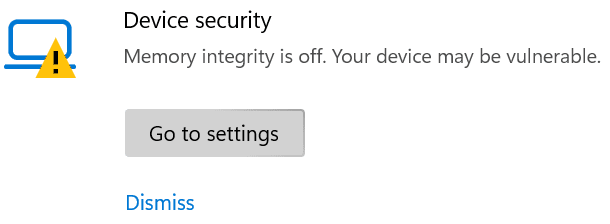
W11 Home > Windows Security > Device security (the yellow triangle also appears in the taskbar)

Screenshot_20221225_065816.png

If I click on the 'Go to Settings' button, I get the following pop up window

Screenshot_20221225_065859.png

If I click on the 'OK' button, the pop up window in the above disappears, but the yellow triangle remains.

If I click on dismiss (I don't think the issue is a problem for me)

Screenshot_20221225_065816.png

... a UAC window pops up and regardless of whether I click on Yes, No, x (in the top right corner) the UAC window pops up again and again for a total of 3 times before it goes away but the yellow triangle remains.

How do I get rid of the yellow triangle?
 

Attachments
  • Screenshot_20221225_065816.png
    Screenshot_20221225_065816.png
    4.5 KB · Views: 2

My Computer My Computer

At a glance

Windows 10 Pro
OS
Windows 10 Pro
I have a 3 year old ASUS laptop that has trouble with this setting. If I turn it on then the machine has problems with shutting down. It looks like it is shut down but not quite. However, I have been able to Dismiss the warnings. I'm just going to leave it alone now.
 

My Computers My Computers

  • At a glance

    Windows 11 Pro 22H2Intel i7-13700KF @ 5.4GHzG-Skill F4-3200C16-16GVK x 2 (32GB total)GeForce RTX 3060 Ti Ventus 2X 8G OCV1 LHR
    OS
    Windows 11 Pro 22H2
    Computer type
    PC/Desktop
    Manufacturer/Model
    Bob the Builder
    CPU
    Intel i7-13700KF @ 5.4GHz
    Motherboard
    MSI MPG Z790 Edge WiFi DDR4
    Memory
    G-Skill F4-3200C16-16GVK x 2 (32GB total)
    Graphics Card(s)
    GeForce RTX 3060 Ti Ventus 2X 8G OCV1 LHR
    Sound Card
    Realtek® ALC4080 (mobo chipset)
    Monitor(s) Displays
    Philips 28 inch Display 288E2UAE
    Screen Resolution
    3840 x 2160 (16 x 9)
    Hard Drives
    Samsung 980 Pro NVMe M2 500GB, Samsung 980 NVMe M2 500GB, Samsung 2.5" SSD 1TB, Seagate 2.5" ST5000 5TB, Seagate Barracuda NVMe M2 1TB, Samsung MZVL2512HCJQ OEM NVMe M2 1TB
    PSU
    MSI MPG R850GF PSU (850W)
    Case
    Fractal Design Define 7 Compact ATX
    Cooling
    CoolerMaster MA610P
    Keyboard
    HAVIT mechanical keyboard HV-KB390L TKL
    Mouse
    Logitech M350 Pebble Mouse BT + wireless
    Internet Speed
    50 x 20 megabits / second fibre
    Browser
    Microsoft Edge
    Antivirus
    Microsoft
    Other Info
    Intel Ethernet 1226-V 2.5GHz @ 1GHz
    Intel Wi-Fi 6E AX210
    ASUS router RT-AX86U with Wi-Fi 6
    Logitech BRIO webcam
    Macrium Reflect 8.1 paid for backups etc.
  • At a glance

    Win 11 Pro 22H2Intel i7-1195G716 GBIris Xe graphics
    Operating System
    Win 11 Pro 22H2
    Computer type
    Laptop
    Manufacturer/Model
    MSI SUMMIT E16 FLIP EVO A11MT-013AU
    CPU
    Intel i7-1195G7
    Memory
    16 GB
    Graphics card(s)
    Iris Xe graphics
    Sound Card
    Realtek High Definition Audio
    Monitor(s) Displays
    16" 120Hz Pen Touch panel
    Screen Resolution
    2560 x 1600 (16 x 10)
    Hard Drives
    Samsung NVMe 980 Pro 1TB
    PSU
    Delta Electronics ADP-65SD B, HP 1HE08AA
    Keyboard
    Full Keyboard
    Mouse
    Logitech M350 Pebble Mouse BT + wireless
    Internet Speed
    50 x 20 megabits / second fibre
    Browser
    Firefox
    Antivirus
    Microsoft
    Other Info
    Killer Wi-Fi 6E 1675x (210NGW)
    MSI Pen
    Web Cam with Windows Hello Face
    Fingerprint Reader
    ASUS router RT-AX86U with Wi-Fi 6
    Macrium Reflect 8 paid for backups etc.

@Haydon


Just clicking on the 'Dismiss' option should turn off the warning (remove the warning triangle).
 

My Computers My Computers

  • At a glance

    macOS 14.x (plus Windows 11, Debian, FreeBSD ...Apple M1 Max (T6001) - 8 performance 2 effici...32GB LPDDR5Apple M1 Max (32-core)
    OS
    macOS 14.x (plus Windows 11, Debian, FreeBSD for ARM64)
    Computer type
    Laptop
    Manufacturer/Model
    MacBook Pro M1 MAX
    CPU
    Apple M1 Max (T6001) - 8 performance 2 efficiency cores
    Memory
    32GB LPDDR5
    Graphics Card(s)
    Apple M1 Max (32-core)
    Hard Drives
    a) 1TB SSD + + 1TB SD Card + external SSD Drives
    Browser
    1. Safari 2. DuckDuckGo
    Antivirus
    -
  • At a glance

    Windows 11 Pro, plus VirtualBox VMs: various ...i732GB
    Operating System
    Windows 11 Pro, plus VirtualBox VMs: various Windows & Linux
    Computer type
    Laptop
    Manufacturer/Model
    Microsoft Surface Laptop Studio
    CPU
    i7
    Memory
    32GB
    Hard Drives
    1TB SSD, plus external SSDs for Virtual Machines etc.
    Browser
    1. MS Edge 2. DuckDuckGo
    Antivirus
    Defender

My Computers My Computers

  • At a glance

    Windows 11 ProAMD Ryzen 9 8945HS32GB DDR5 SO-DIMMIntegrated AMD Radeon 780M (4.00 GHz)
    OS
    Windows 11 Pro
    Computer type
    PC/Desktop
    Manufacturer/Model
    GMKtec K11
    CPU
    AMD Ryzen 9 8945HS
    Memory
    32GB DDR5 SO-DIMM
    Graphics Card(s)
    Integrated AMD Radeon 780M (4.00 GHz)
    Monitor(s) Displays
    Benq 2250HM
    Screen Resolution
    1920 x 1080
    Hard Drives
    1 TB PCIe 4.0 NVMe M.2 SSD
  • At a glance

    Windows 11 HomeIntel® Core™ Ultra 7 - 255H processor16 GB LPDDR5 SDRAMIntel Arc 140T onboard graphics
    Operating System
    Windows 11 Home
    Computer type
    Laptop
    Manufacturer/Model
    ASUS Zenbook 14 OLED 14" Laptop - UX3405CA-QL192W
    CPU
    Intel® Core™ Ultra 7 - 255H processor
    Memory
    16 GB LPDDR5 SDRAM
    Graphics card(s)
    Intel Arc 140T onboard graphics
    Screen Resolution
    1920 x 1200 (16:10 WUXGA resolution) OLED Touchscreen
    Hard Drives
    1TB SSD
Just clicking on the 'Dismiss' option should turn off the warning (remove the warning triangle).

Clicking 'dismiss' does not get rid of the yellow triangle, read the OP carefully.
 

My Computer My Computer

At a glance

Windows 10 Pro
OS
Windows 10 Pro
@wiganken Thanks for the tip!

My TPM disappeared in thin air, how the heck is that possible?
I'll sniff around ...

Screenshot_20221226_084544.png
 

My Computer My Computer

At a glance

Windows 10 Pro
OS
Windows 10 Pro

My Computers My Computers

  • At a glance

    Win 11 ProAMD Ryzen™ 7 7730U24GB Dual-Channel DDR4 @ 1596MHz (22-22-22-52)512MB ATI AMD Radeon Graphics (ASUStek Comput...
    OS
    Win 11 Pro
    Computer type
    Laptop
    Manufacturer/Model
    ASUS Vivobook
    CPU
    AMD Ryzen™ 7 7730U
    Motherboard
    M1605YA
    Memory
    24GB Dual-Channel DDR4 @ 1596MHz (22-22-22-52)
    Graphics Card(s)
    512MB ATI AMD Radeon Graphics (ASUStek Computer Inc)
    Monitor(s) Displays
    Generic PnP Monitor (1920x1200@60Hz) - P1 PLUS (1920x1080@59Hz)
    Screen Resolution
    1920 X 1200
    Hard Drives
    953GB Western Digital WD
    PSU
    45 Watts
    Mouse
    Lenovo Bluetooth.
    Internet Speed
    500 Mbps
    Browser
    Edge
    Antivirus
    Defender
  • At a glance

    Windows 11AMD Ryzen 7 5800H / 3.2 GHz32 GB DDR4 SDRAM 3200 MHzNVIDIA GeForce RTX 3060 6 GB GDDR6 SDRAM
    Operating System
    Windows 11
    Computer type
    Laptop
    Manufacturer/Model
    ACER NITRO
    CPU
    AMD Ryzen 7 5800H / 3.2 GHz
    Motherboard
    CZ Scala_CAS (FP6)
    Memory
    32 GB DDR4 SDRAM 3200 MHz
    Graphics card(s)
    NVIDIA GeForce RTX 3060 6 GB GDDR6 SDRAM
    Sound Card
    Realtek Audio. NVIDIA High Definition Audio
    Monitor(s) Displays
    15.6" LED backlight 1920 x 1080 (Full HD) 144 Hz
    Screen Resolution
    1920 x 1080 (Full HD)
    Hard Drives
    Samsung 970 Evo Plus 2TB NVMe M.2
    PSU
    180 Watt, 19.5 V
    Mouse
    Lenovo Bluetooth
    Internet Speed
    500 Mbps
    Browser
    Edge
    Antivirus
    Defender
Check if TPM is ok in device manager. If ok then try a Windows Security app repair and/or reset.

Thanks, I tried them all and also sfc /scannow (clean) and DISM /Online /Cleanup-Image /RestoreHealth (clean) to no avail.

How do I reconcile the two screenshots below? Device Manager says TPM is OK, Windows Security says Security Processor (TPM) is not OK.

I'd rather not re-install W11 for a trifle.

From Device Manager
Screenshot_20221226_020701.png

From Windows Security
Screenshot_20221226_084544.png
 

My Computer My Computer

At a glance

Windows 10 Pro
OS
Windows 10 Pro
You could try Settings > System > Recovery> Reset this PC and keep all your files. I have not tried it so I don't know how good an option that is.
 

My Computers My Computers

  • At a glance

    Windows 11 Pro 22H2Intel i7-13700KF @ 5.4GHzG-Skill F4-3200C16-16GVK x 2 (32GB total)GeForce RTX 3060 Ti Ventus 2X 8G OCV1 LHR
    OS
    Windows 11 Pro 22H2
    Computer type
    PC/Desktop
    Manufacturer/Model
    Bob the Builder
    CPU
    Intel i7-13700KF @ 5.4GHz
    Motherboard
    MSI MPG Z790 Edge WiFi DDR4
    Memory
    G-Skill F4-3200C16-16GVK x 2 (32GB total)
    Graphics Card(s)
    GeForce RTX 3060 Ti Ventus 2X 8G OCV1 LHR
    Sound Card
    Realtek® ALC4080 (mobo chipset)
    Monitor(s) Displays
    Philips 28 inch Display 288E2UAE
    Screen Resolution
    3840 x 2160 (16 x 9)
    Hard Drives
    Samsung 980 Pro NVMe M2 500GB, Samsung 980 NVMe M2 500GB, Samsung 2.5" SSD 1TB, Seagate 2.5" ST5000 5TB, Seagate Barracuda NVMe M2 1TB, Samsung MZVL2512HCJQ OEM NVMe M2 1TB
    PSU
    MSI MPG R850GF PSU (850W)
    Case
    Fractal Design Define 7 Compact ATX
    Cooling
    CoolerMaster MA610P
    Keyboard
    HAVIT mechanical keyboard HV-KB390L TKL
    Mouse
    Logitech M350 Pebble Mouse BT + wireless
    Internet Speed
    50 x 20 megabits / second fibre
    Browser
    Microsoft Edge
    Antivirus
    Microsoft
    Other Info
    Intel Ethernet 1226-V 2.5GHz @ 1GHz
    Intel Wi-Fi 6E AX210
    ASUS router RT-AX86U with Wi-Fi 6
    Logitech BRIO webcam
    Macrium Reflect 8.1 paid for backups etc.
  • At a glance

    Win 11 Pro 22H2Intel i7-1195G716 GBIris Xe graphics
    Operating System
    Win 11 Pro 22H2
    Computer type
    Laptop
    Manufacturer/Model
    MSI SUMMIT E16 FLIP EVO A11MT-013AU
    CPU
    Intel i7-1195G7
    Memory
    16 GB
    Graphics card(s)
    Iris Xe graphics
    Sound Card
    Realtek High Definition Audio
    Monitor(s) Displays
    16" 120Hz Pen Touch panel
    Screen Resolution
    2560 x 1600 (16 x 10)
    Hard Drives
    Samsung NVMe 980 Pro 1TB
    PSU
    Delta Electronics ADP-65SD B, HP 1HE08AA
    Keyboard
    Full Keyboard
    Mouse
    Logitech M350 Pebble Mouse BT + wireless
    Internet Speed
    50 x 20 megabits / second fibre
    Browser
    Firefox
    Antivirus
    Microsoft
    Other Info
    Killer Wi-Fi 6E 1675x (210NGW)
    MSI Pen
    Web Cam with Windows Hello Face
    Fingerprint Reader
    ASUS router RT-AX86U with Wi-Fi 6
    Macrium Reflect 8 paid for backups etc.

My Computer My Computer

At a glance

Windows 10 Pro
OS
Windows 10 Pro
You listed no system specs so I don't know how to help.
 

My Computers My Computers

  • At a glance

    Windows 11 Pro 24H2 (Build 26100.4770)Intel Core 9 Ultra 285K64G (4x16) DDR5 Corsair RGB Dominator Platinu...Radeon (XFX Mercury) RX 9070XT OC (with Magne...
    OS
    Windows 11 Pro 24H2 (Build 26100.4770)
    Computer type
    PC/Desktop
    Manufacturer/Model
    Custom built
    CPU
    Intel Core 9 Ultra 285K
    Motherboard
    Gigabyte Aorus Z890 Xtreme AI Top
    Memory
    64G (4x16) DDR5 Corsair RGB Dominator Platinum (6400Mhz)
    Graphics Card(s)
    Radeon (XFX Mercury) RX 9070XT OC (with Magnetic Fans)
    Sound Card
    Onboard (DTS:X® Ultra Audio: ESS ES9280A DAC)
    Monitor(s) Displays
    27-inch Eizo Color Edge - CG2700X
    Screen Resolution
    3840 x 2160
    Hard Drives
    4 Samsung NVM 990 Pro drives: 1TB (OS), 2TB, 2 X 4TB.
    PSU
    Seasonic TX-1300 (1300 Watts)
    Case
    Cooler Master H500M
    Cooling
    Corsair Link Titan 280 RX RGB
    Keyboard
    Logitech Craft
    Mouse
    Logitech MX Master 3S
    Internet Speed
    1TB Download. 512mb Upload
    Browser
    Microsoft Edge Chromium
    Antivirus
    Windows Security
    Other Info
    System used for gaming, photography, music, school.
  • At a glance

    Windows 11 Pro 24H2 (Build 26100.4061)Intel Core i9-9900K32gig (4 x 8) Corsair Dominator Platinum DDR4...Radeon XFX Merc 7900XT (20gig)
    Operating System
    Windows 11 Pro 24H2 (Build 26100.4061)
    Computer type
    PC/Desktop
    Manufacturer/Model
    Custom built
    CPU
    Intel Core i9-9900K
    Motherboard
    Gigabyte Z390 Aorus Xtreme
    Memory
    32gig (4 x 8) Corsair Dominator Platinum DDR4 3600Mhz (B-Die)
    Graphics card(s)
    Radeon XFX Merc 7900XT (20gig)
    Sound Card
    Onboard
    Monitor(s) Displays
    24-Inch NEC PA242W
    Screen Resolution
    2880 x 1800
    Hard Drives
    2 X NVME, 1 X SATA SSD
    PSU
    EVGA Super Nova 1000 P2 (1000 Watt)
    Case
    Phantek Enthoo Luxe
    Cooling
    Corsair H115i Elite AIO Cooler
    Keyboard
    Logitech Keys
    Mouse
    Logitech MX Master 3
    Internet Speed
    1TB Download. 512mb Upload
    Browser
    Microsoft Edge Chromium
    Antivirus
    Windows Security
    Other Info
    Backup System
 

My Computer My Computer

At a glance

Windows 11Ryzen 5 5600T-Force Vulcan Z - 32 GB (2x16) @ 3600 MHzSapphire RX 7600
OS
Windows 11
Computer type
PC/Desktop
CPU
Ryzen 5 5600
Motherboard
MSI B550 Tomahawk
Memory
T-Force Vulcan Z - 32 GB (2x16) @ 3600 MHz
Graphics Card(s)
Sapphire RX 7600
Monitor(s) Displays
Sansui ES-G27F2Q
Screen Resolution
2560 x 1440P
Hard Drives
XPG SX8200 240GB M.2 PCIe Gen3x4 NVMe
Samsung 850 EVO 250 GB
Adata SU800 1 TB
WD Black SN750 500GB
PSU
EVGA SuperNOVA 650 G3
Case
Deepcool CK500WH
Cooling
Thermalright Frozen Warframe 240 SE, plus 3 140 MM case fans (2 in front, 1 in rear)
Keyboard
Logitech G213 Prodigy
Mouse
Logitech ERGO M575

Latest Support Threads

Back
Top Bottom