- Local time
- 3:13 PM
- Posts
- 487
- OS
- Windows 11 22H2 Pro (X-lite Micro 11 version)
Removing Edge doesn't break Windows Update, but you do have to break WU to keep Edge from coming back like a wart, (which usually happens at the most inconvenient possible time), so I guess we were both right.It used to be true.
Maybe these new scripts take care of that.
I just block it in the firewall (Bitdefender).
That takes care of it.

My Computer
At a glance
Windows 11 22H2 Pro (X-lite Micro 11 version)i7 13850HX (20 cores, 28 threads)32GB DDR5Intel UHD/ RTX 1000 ADA
- OS
- Windows 11 22H2 Pro (X-lite Micro 11 version)
- Computer type
- Laptop
- Manufacturer/Model
- Dell/ Precision 7680
- CPU
- i7 13850HX (20 cores, 28 threads)
- Motherboard
- Dell
- Memory
- 32GB DDR5
- Graphics Card(s)
- Intel UHD/ RTX 1000 ADA
- Sound Card
- Realtek
- Monitor(s) Displays
- 4K UHD Touchscreen
- Screen Resolution
- 3840 x 2400
- Hard Drives
- Samsung 512GB system drive
WD Blue 1TB game drive
- PSU
- 240W AC adapter, 1800W when docked
- Internet Speed
- 1 gigabit symmetrical
- Browser
- Firefox, Librewolf
- Antivirus
- None. Manully configured so nobody except me can change any critical system files. (Don't ask how, it's probably against some rule somewhere)


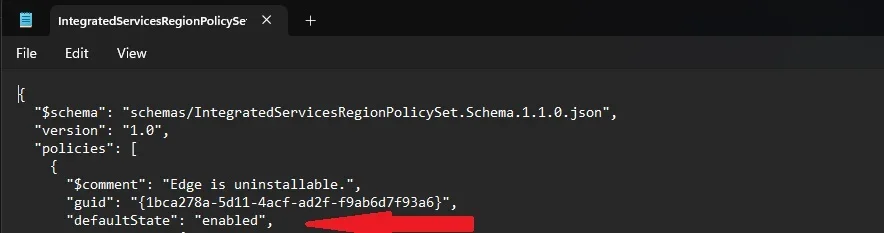

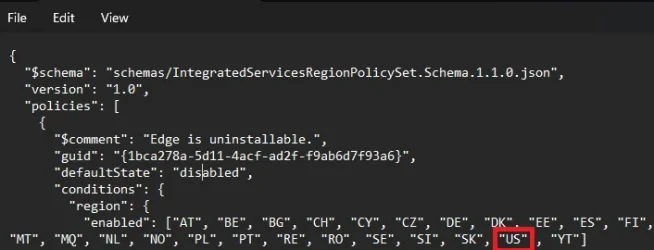


 I thought it would be from initial set up and language chosen maybe as well as location?