Microsoft Office 2024 or Microsoft 365


loopypenguin92

New member
Local time
6:55 PM
Posts
8
OS
Windows 11
Will there be another perpetual, offline version of Microsoft Office released? Or is everything switching to the cloud-based Microsoft 365?
 

My Computer

System One

  • OS
    Windows 11
    Computer type
    PC/Desktop
    Manufacturer/Model
    HP
Ars and Mary Jo say they've committed to at least one more standalone release.


My Computer

System One

  • OS
    Windows 11 Pro 25H2
    Computer type
    PC/Desktop
    Manufacturer/Model
    Intel NUC12WSHi7
    CPU
    12th Gen Core i7-1260P
    Motherboard
    NUC12WSBi7
    Memory
    64 GB Micron PC4-25600
    Graphics Card(s)
    Intel Iris Xe Graphics
    Sound Card
    on-board Realtek HD Audio
    Monitor(s) Displays
    Dell U3219Q
    Screen Resolution
    3840 x 2160
    Hard Drives
    Samsung SSD 990 PRO 1TB
    Crucial MX500 2 TB
    Antivirus
    Microsoft Defender
I have subscribed to MIcrosoft Office for many years. Usually it cost just over $100 annually. Last time I was charged $144. I just managed my account and it said I would be charged $270 next year. Is that big increase because of their One Drive and Copilot? Those are two things I don't need or want.

I can buy the stand alone version for way cheaper, but even then I don't know if I want to do that. I have had to drop Outlook recently because it stopped working for non-microsoft e-mail addresses and I don't know if I want to go back to it.

Ak
 

My Computer

System One

  • OS
    Window 11 Pro
    Computer type
    PC/Desktop
    CPU
    AMD 8700G
    Motherboard
    Asus ROG Strix X670E-E Wifi
    Memory
    G.Skill DDR5 2x32GB EXPO 6000 32-38-38-96
    Graphics Card(s)
    Radeon 5700 XT Gold
    Hard Drives
    Samsung 990 PRO SSD 1 TB
    PSU
    Corsair 860i
    Case
    Cooler Master Haf X
    Cooling
    Corsair H100i
    Keyboard
    Logitech G19
    Mouse
    Logitech G700s
    Internet Speed
    1 GPS up and 1 GPS down
    Browser
    Edge
    Antivirus
    Defender
    Other Info
    Systen currently being built
I have the standalone LTS Office 2024 package (suite?) and it was dirt cheap compared to the O365 version!
 

My Computer

System One

  • OS
    Win11 Pro 25H2 Latest GA build
    Computer type
    PC/Desktop
    Manufacturer/Model
    Powerspec
    CPU
    Intel(R) Core(TM) i9-14900KF 3.20 GHz
    Motherboard
    MSI PRO Z690-A WIFI (latest BIOS)
    Memory
    G.Skill DDR5-5600 / PC5-44800 DDR5 SDRAM UDIMM
    Graphics Card(s)
    GIGABYTE GeForce RTX 4070 Ti WINDFORCE OC 12G (GV-N407TWF3OC-12GD)
    Sound Card
    OnBoard
    Monitor(s) Displays
    Dell - various (3)
    Screen Resolution
    1920x1080
    Hard Drives
    SSD/HDD/NVME
    PSU
    850 Watt 80+ Gold Modular
    Case
    PowerSpec/Lian Li ATX 205 Mesh
    Cooling
    Coolermaster MASTERLIQUID ML240L V2 RGB
    Keyboard
    Logi MX Keys S
    Mouse
    MX Master 3S
    Internet Speed
    600 mbps
    Browser
    various (Opera, Vivaldi, Edge, Brave, Chrome)
    Antivirus
    anitmalwarebytes; superantispyware; defender
    Other Info
    Windows Feature Experience Pack 1000.26100.36.0
@alkaufmann
I have subscribed to MIcrosoft Office for many years. Usually it cost just over $100 annually. Last time I was charged $144. I just managed my account and it said I would be charged $270 next year. Is that big increase because of their One Drive and Copilot? Those are two things I don't need or want.

I can buy the stand alone version for way cheaper, but even then I don't know if I want to do that. I have had to drop Outlook recently because it stopped working for non-microsoft e-mail addresses and I don't know if I want to go back to it.

Ak

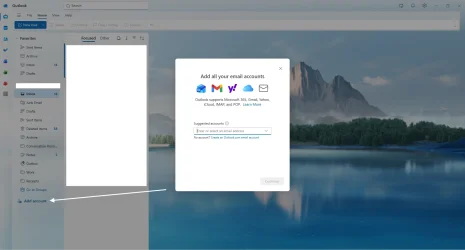
It looks like Outlook still supports other providers, just have to click "Add Account"
1775674216638.webp
 

My Computer

System One

  • OS
    Windows 11
    Computer type
    PC/Desktop
    Manufacturer/Model
    HP
Microsoft 365 Basic: $? > $19.99/year
Microsoft 365 Personal: $69.99 > $99.99/year
Microsoft 365 Family: $99.99 > $129.99/year
Microsoft 365 Premium: $? > $199.99/year

There was a lawsuit about this
Microsoft is facing legal action from the Australian Competition and Consumer Commission (ACCC) for allegedly misleading roughly 2.7 million subscribers into paying higher prices for Microsoft 365, bundling it with Copilot AI without clearly disclosing cheaper, non-AI alternatives. The suit alleges users were forced into higher-priced plans during auto-renewal.

I don't have Microsoft 365. Could someone with Microsoft 365 see if there is an option to select the Classic Plan?

Microsoft 365 Classic is a lower-cost, "no-AI" subscription, generally priced at $69.99/year (Personal) or $99.99/year (Family) as of late 2025. It provides core desktop apps (Word, Excel, PowerPoint, Outlook) and 1TB of OneDrive storage without Copilot AI features, offering savings of $30-$40 annually over standard plans.

Key Details of Microsoft 365 Classic

* Pricing: Approximately $69.99/year for Personal and $99.99/year for Family (USD).
* Features: Includes premium desktop apps, 1TB OneDrive cloud storage, and security features.
* Difference: Lacks the advanced AI capabilities (Copilot) included in standard Microsoft 365 subscriptions.
* How to Obtain: It is not always publicly listed. It is typically found as a "hidden" option when you go to cancel or change your current subscription, often displayed as a "stay and save" option.

How to Find/Switch to the Classic Plan

* Go to the Microsoft 365 subscription management page.
* Select "Manage" and then "Cancel subscription" (you will be given options to switch before finalizing).
* Look for the "Classic" plan option in the list of alternatives.
* Switch to the plan; it requires automatic renewal to be enabled.

Note: Availability can vary based on region, account eligibility, and existing subscription type
 

My Computers

System One System Two

  • OS
    Windows 11 Pro 25H2 (26200.6901)
    Computer type
    Laptop
    Manufacturer/Model
    ASUS TUF Gaming A15 (2022)
    CPU
    AMD Ryzen 7 6800H with Radeon 680M GPU (486MB RAM)
    Memory
    Crucial DDR5-4800 (2400MHz) 32GB (2 x 16GB)
    Graphics Card(s)
    NVIDIA RTX 3060 Laptop (6GB RAM)
    Sound Card
    n/a
    Monitor(s) Displays
    15.6-inch
    Screen Resolution
    1920x1080 300Hz
    Hard Drives
    2 x Samsung 990 Evo Plus (2TB M.2 NVME SSD)
    PSU
    n/a
    Mouse
    Wireless Mouse M510
    Internet Speed
    2100Mbps/300Mbps
    Browser
    Firefox
    Antivirus
    Malwarebytes
  • Operating System
    Windows 11 Pro 25H2 (26200.8246)
    Computer type
    PC/Desktop
    Manufacturer/Model
    Custom build
    CPU
    AMD Ryzen 7 5700X3D
    Motherboard
    ASUS ROG Strix B550-F Gaming WiFi II
    Memory
    G.SKILL Flare X 32GB (2x16GB) DDR4
    Graphics card(s)
    ASUS ROG-STRIX-RTX3060TI-08G-V2-GAMING (RTX 3060-Ti, 8GB RAM)
    Monitor(s) Displays
    Samsung G50D IPS 27"
    Screen Resolution
    1440p/180Hz
    Hard Drives
    SAMSUNG 990 EVO Plus (2TB] M.2 NVME SSD
    SAMSUNG 990 EVO Plus (4TB) M.2 NVME SSD
    PSU
    Corsair RM750x (750 watts)
    Case
    Cooler Master MasterCase 5
    Cooling
    Scythe Mugen 6
    Keyboard
    Logitech K520 (MK540 keyboard/mouse combo)
    Mouse
    Logitech M310 (MK540 keyboard/mouse combo)
    Internet Speed
    2100 Mbps down / 300 Mbps up
    Browser
    Firefox, Edge, Chrome
    Antivirus
    Malwarebytes (Premium)
    Other Info
    ASUS Blu-ray Burner BW-16D1HT (SATA) || Western Digital Easystore 20TB USB 3.0 external hard drive used with Acronis True Image 2025 backup software || HP OfficeJet Pro 6975 Printer/Scanner
@alkaufmann


It looks like Outlook still supports other providers, just have to click "Add Account"
View attachment 168122
All my non Microspft e-mail accounts were working fine for years until they suddenly stopped working. I tried to set them up, even asked ChatGPT to help set up the accounts. Eventually I gave up and went to T******bird. ChatGTP commented that it will work better for me and it had no problem setting up the all my e-mail accounts.

Ak
 

My Computer

System One

  • OS
    Window 11 Pro
    Computer type
    PC/Desktop
    CPU
    AMD 8700G
    Motherboard
    Asus ROG Strix X670E-E Wifi
    Memory
    G.Skill DDR5 2x32GB EXPO 6000 32-38-38-96
    Graphics Card(s)
    Radeon 5700 XT Gold
    Hard Drives
    Samsung 990 PRO SSD 1 TB
    PSU
    Corsair 860i
    Case
    Cooler Master Haf X
    Cooling
    Corsair H100i
    Keyboard
    Logitech G19
    Mouse
    Logitech G700s
    Internet Speed
    1 GPS up and 1 GPS down
    Browser
    Edge
    Antivirus
    Defender
    Other Info
    Systen currently being built
I have had to drop Outlook recently because it stopped working for non-microsoft e-mail addresses and I don't know if I want to go back to it.
Don't.

The reason why it stopped working probably would be a need to change settings. Microsoft now require all email - whether from MS servers/domains or not - to go through MS Exchange servers i.e. Micrsosft will "see" every bit of email you get and send, whether to/from MS based accounts. That alone in itself is a reason to stop using o/Outlook for non-MS domain-named emails!!

The othre reason is that changes to mail server settings may be have been required

However, there are some domain named email addresses that will never work in o/Outlook because those service providers won't/can't conform to MS o/Outlook email client requirements

EDIT "Services" like ChatGPT are sadly deficient in understanding these machinations, which I think suits MS down to the ground. It drives users to MS email accounts through which MS can invoke its marketing tactics.
 

My Computers

System One System Two

  • OS
    Windows 11 2xH2 (latest update ... forever anal)
    Computer type
    PC/Desktop
    Manufacturer/Model
    HP Slim S01
    CPU
    Intel i5-12400
    Memory
    8GB
    Graphics Card(s)
    NVIDIA GeForce GT730
    Sound Card
    OOBE
    Monitor(s) Displays
    Acer 32"
    Screen Resolution
    1920x1080
    Hard Drives
    512GB KIOXIA NVMe
    1TB SATA SSD
    PSU
    OOBE
    Case
    OOBE
    Cooling
    OOBE
    Keyboard
    BT
    Mouse
    BT
    Browser
    Brave FFox Chrome Opera
    Antivirus
    KIS
  • Operating System
    Windows 11 Pro 2xH2 (latest update ... 4ever anal)
    Computer type
    Laptop
    Manufacturer/Model
    HP Pavillion 15
    CPU
    i7-1165G7 @ 2.80GHz
    Graphics card(s)
    Intel Iris Xe Graphics
    Hard Drives
    Samsung NVMe 512GB
    + numerous/multiple SSD Type C USB enclosures
    Internet Speed
    NBN FTTN 50
    Browser
    Brave
    Antivirus
    KIS
Outlook in Ofc 2021 (so I would bet Ofc 2024 too) does support all email providers. I have @outlook @gmail @yahoo, and @myisp acounts set up in mine. Gmail and yahoo both now require you to use an app password in place of your email account password.
 

My Computers

System One System Two

  • OS
    Windows 11 Pro 25H2
    Computer type
    PC/Desktop
    Manufacturer/Model
    Dell Optiplex 7080
    CPU
    i9-10900 10 core 20 threads
    Motherboard
    DELL 0J37VM
    Memory
    32 gb
    Graphics Card(s)
    none-Intel UHD Graphics 630
    Sound Card
    Integrated Realtek
    Monitor(s) Displays
    Benq 27
    Screen Resolution
    2560x1440
    Hard Drives
    2x1tb Solidigm m.2 nvme /External drives 512gb Samsung m.2 sata+2tb Kingston m2.nvme
    PSU
    500w
    Case
    MT
    Cooling
    Dell Premium
    Keyboard
    Logitech wired
    Mouse
    Logitech wireless
    Internet Speed
    so slow I'm too embarrassed to tell
    Browser
    #1 Edge #2 Firefox
    Antivirus
    Defender+MWB Premium
  • Operating System
    Windows 11 Pro 24H2 26200.8457
    Computer type
    PC/Desktop
    Manufacturer/Model
    Beelink Mini PC SER5
    CPU
    AMD Ryzen 7 6800U
    Memory
    32 gb
    Graphics card(s)
    integrated
    Sound Card
    integrated
    Monitor(s) Displays
    Benq 27
    Screen Resolution
    2560x1440
    Hard Drives
    1TB Crucial nvme
    Keyboard
    Logitech wired
    Mouse
    Logitech wireless
    Internet Speed
    still too embarrassed to tell
    Browser
    Firefox
    Antivirus
    Defender
    Other Info
    System 3 is non compliant Dell 9020 i7-4770/24gb ram Win11 PRO 26200.8457
Microsoft now require all email - whether from MS servers/domains or not - to go through MS Exchange servers i.e. Micrsosft will "see" every bit of email you get and send, whether to/from MS based accounts.

lol, whut?
 

My Computer

System One

  • OS
    Windows 11 Pro 25H2
    Computer type
    PC/Desktop
    Manufacturer/Model
    Intel NUC12WSHi7
    CPU
    12th Gen Core i7-1260P
    Motherboard
    NUC12WSBi7
    Memory
    64 GB Micron PC4-25600
    Graphics Card(s)
    Intel Iris Xe Graphics
    Sound Card
    on-board Realtek HD Audio
    Monitor(s) Displays
    Dell U3219Q
    Screen Resolution
    3840 x 2160
    Hard Drives
    Samsung SSD 990 PRO 1TB
    Crucial MX500 2 TB
    Antivirus
    Microsoft Defender

My Computer

System One

  • OS
    Windows 11 Pro 25H2
    Computer type
    PC/Desktop
    Manufacturer/Model
    Intel NUC12WSHi7
    CPU
    12th Gen Core i7-1260P
    Motherboard
    NUC12WSBi7
    Memory
    64 GB Micron PC4-25600
    Graphics Card(s)
    Intel Iris Xe Graphics
    Sound Card
    on-board Realtek HD Audio
    Monitor(s) Displays
    Dell U3219Q
    Screen Resolution
    3840 x 2160
    Hard Drives
    Samsung SSD 990 PRO 1TB
    Crucial MX500 2 TB
    Antivirus
    Microsoft Defender
Okay so not Exchange.
Just to be clear. With New Outlook for Windows everything is in the Microsoft Cloud. Any emails (IMAP and POP included), Contacts, Calendar, Task, you name it. New Outlook for Windows does not sync with your hosting service. It only syncs with the Microsoft Cloud. The Microsoft Cloud then syncs with whoever has the actual source data, if it's not Microsoft itself already.

Why? Microsoft says it makes everything better, faster, more reliable, etc. But you're not being paranoid if you think maybe Microsoft saw Google harvesting all that valuable information from the data people stored on their servers and wanted a piece of the action.
 

My Computer

System One

  • OS
    Windows 10, Windows 11
    Computer type
    PC/Desktop
Why? Microsoft says it makes everything better, faster, more reliable, etc.
Mails gathered from other accounts are the food to train AI systems. The more food, the better, for MS, of course.
 

My Computer

System One

  • OS
    Windows 11 Pro 25H2
    Computer type
    Laptop
    Manufacturer/Model
    Lenovo Legion 5-15ARH05
    CPU
    AMD Rysen 5 4600H
    Memory
    32 GB (2 x 16 GB Samsung SO-DIMM DDR4-3200)
    Graphics Card(s)
    GeForce GTX 1650 Ti, 4 GB GDDR6
    Screen Resolution
    1920x1080
    Hard Drives
    SSD M.2 512 GB SAMSUNG MZALQ512; SSD M.2 1 TB Seagate FireCuda 530
    Mouse
    Logitech M650L in Bluetooth mode
License for Office 2024 ProPlus LTSC is under $20 for "telephone" activation which is now done online. I do several of these a week. I buy my keys at Gamers-Outlet. Installer File is here.

First, using Control Panel>Uninstall a program, uninstall previous versions of Office and Office 365 including OneNote. Go into Apps and make sure it's all gone from there too.

There's a little bit of a learning procedure if you've never done it before. Involves buying the license, downloading and running the Office 2024 ProPlus LTSC installer, waiting a couple of minutes blind before it takes off. Pick the language. Wait until it says done. Once installed, open Word go to Account and click change the product key. Paste the one you bought for $18. Not done activating yet - there's more fun. Close Word, reopen and the Activation screen comes up with a series of numbers. Several sets of 7 numbers. Keep Word and this window open because you will need the numbers.

Ignore the country and phone number step - no longer need to call the phone number for activation. It will text you a link to the activation site. Easier on the computer -> go to Microsoft Support , solve the dumb puzzle, sign in with a Microsoft account (any MS account - not necessarily the one owned by the computer owner). Click "sign in another way" to sign in with your password if you aren't doing the Passkey or face thing.

Then follow the steps according to what you want to activate. When you get to page, you'll know it. This is where you enter the numbers from the activation screen in Word. Put them in the web page carefully and hit submit and it returns with a different set of numbers. Several sets of 6 numbers this time and these numbers get entered in the still open activation screen in Word. You didn't close it, did you? Entered carefully, hit submit and it will say something like "Thank you your copy of Office is activated".

You now own Office 2024 - no subscription.

I think that's pretty accurate for the steps of "telephone activation" but it's by memory so be forgiving. :p
 

My Computers

System One System Two

  • OS
    Windows 11 25H2
    Computer type
    Laptop
    Manufacturer/Model
    Lenovo Yoga 7 14ITL5 (82BH00DLUS)
    CPU
    Intel Core™ i7-1165G7 (4C / 8T, 2.8 / 4.7GHz, 12MB)
    Memory
    12GB Soldered DDR4-3200
    Graphics Card(s)
    Integrated Intel® Iris® Xe Graphics
    Monitor(s) Displays
    14" FHD (1920x1080) IPS 300nits Glossy, 72% NTSC, AGC Dragontrail™ Glass, Touch
    Screen Resolution
    1920x1080
    Hard Drives
    500 GB SSD
    Case
    Aluminum
    Cooling
    Single-fan
    Keyboard
    Backlit, internal
    Mouse
    Logitech M535
    Internet Speed
    With this laptop I usually test around 200/200 connected to UniFi UAP-AC-PRO ceiling units.
    Browser
    Chrome
    Antivirus
    Windows Security and my brain.
    Other Info
    I use this laptop mainly from my recliner. It's purpose is scheduling computer and TV services, closing TV work orders, remote customer support, research and recreation.

    Printers in the office room on my main floor were both acquired from business customers who upgraded equipment, had me handle the upgrade and then haul away the replaced hardware. I have not purchased a printer for myself in 15 years.

    Main: HP LaserJet P3010 (black & white, hardwired, networked)
    Aux: HP Color LaserJet MFP M281fdw (color laser, fax, hardwired, networked)

    Internet in my house is routed through a TP-Link AC3200 with radios disabled. Wireless access points are two (2) strategically-located UniFi UAP-AC-PRO ceiling units which cover my whole house including basement and front/back yards. Netgear gigabit switches and CAT6 cabling are used for wired purposes.
  • Operating System
    Windows 10 22H2
    Computer type
    PC/Desktop
    Manufacturer/Model
    Dell Optiplex 3010
    CPU
    Intel(R) Core(TM) i5-3470 CPU @ 3.20GHz 3.20 GHz
    Memory
    16 GB DDR3
    Graphics card(s)
    Intel(R) HD Graphics 2500
    Sound Card
    Onboard
    Monitor(s) Displays
    ACER KG271 (x2)
    Screen Resolution
    1920x1080
    Hard Drives
    WD 500GB SSD
    Keyboard
    Old Dell wireless
    Mouse
    Old Dell wired
    Internet Speed
    500/500
    Browser
    Chrome
    Antivirus
    Windows Security and my brain
    Other Info
    This computer was acquired from a customer who cleaned out her office. I upgraded it and now use it in my downstairs computer-repair office.

    My home office printer is an old HP LaserJet 3015. I acquired this after a customer passed away and his wife sold their house and downsized. She gave me all his equipment. I still help her with her tech issues.
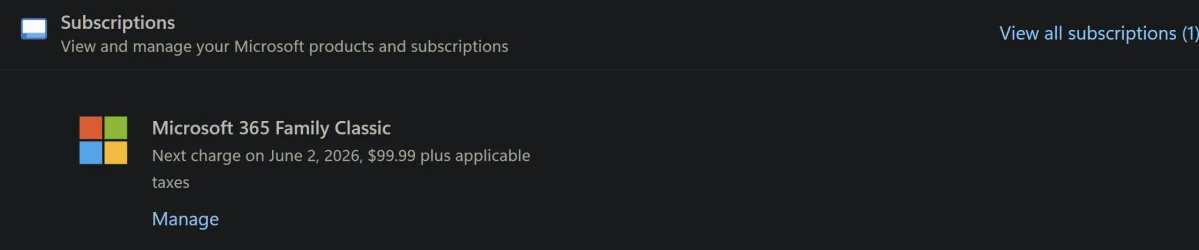
I subscribe to Microsoft 365. I opted to stay with family classic for $99.99.

1775781280925.webp
 

My Computers

System One System Two

  • OS
    Windows 11 Pro
    Computer type
    Laptop
    Manufacturer/Model
    Dell XPS 16 DA16260
    CPU
    Intel Series 3 Core Ultra X9 388H
    Memory
    64GB LPDDR5x 9600 MT/s
    Graphics Card(s)
    Intel Arc graphics B390 Panther Lake
    Monitor(s) Displays
    16" 3.2K Tandem OLED Infinity Edge
    Screen Resolution
    3200 x 2000 16:10 236 PPI
    Hard Drives
    1 Terabyte M.2 PCIe NVMe SSD
    Case
    Black Anodized Aluminum
    Cooling
    Vapor Chamber Cooling
    Mouse
    None
    Internet Speed
    942 Mbps Netgear Mesh + 2 Satellites
    Browser
    Microsoft Edge (Chromium)
    Antivirus
    Windows Security (Defender)
    Other Info
    NPU delivering 67 TOPS
    Microsoft 365 subscription
    Microsoft OneDrive 1TB Cloud
    Microsoft Visual Studio
    Microsoft Visual Studio Code
    Microsoft Sysinternals Suite
    Microsoft BitLocker
    Microsoft Copilot
    Dell Support Assist
    Dell Command | Update
    Macrium Reflect X subscription
    1Password Password Manager
    Amazon Kindle for PC
    Lightroom/Photoshop subscription
    Interactive Brokers Trader Workstation
  • Operating System
    Windows 11 Pro
    Computer type
    Laptop
    Manufacturer/Model
    Microsoft Surface Laptop 7
    CPU
    Snapdragon® X Elite (12 Core) with Hexagon NPU delivering 45 TOPS
    Memory
    32GB LPDDR5x 8448 MT/s
    Graphics card(s)
    Integrated Adreno GPU
    Sound Card
    Omnisonic speakers with Dolby Atmos spatial sound
    Monitor(s) Displays
    13.8″ PixelSense Flow touchscreen 120 Hz 600 NIT
    Screen Resolution
    2304 × 1536 (201 PPI), 3:2 aspect ratio
    Hard Drives
    1 TB PCIe NVMe Gen 4 SSD
    Case
    Black Anodized Aluminum
    Cooling
    Vapor Chamber Cooling
    Mouse
    None
    Internet Speed
    942 Mbps Netgear Mesh + 2 Satellites
    Browser
    Microsoft Edge (Chromium)
    Antivirus
    Windows Security (Defender)
    Other Info
    Microsoft 365 subscription (Office)
    Microsoft OneDrive 1TB Cloud
    Microsoft Visual Studio 2026
    Microsoft Visual Studio Code
    Interactive Brokers Trader Workstation
    Lightroom/Photoshop subscription
    1Password Password Manager
    Microsoft Sysinternals
    Amazon Kindle for PC
    Microsoft BitLocker
    Microsoft Copilot
All my non Microspft e-mail accounts were working fine for years until they suddenly stopped working. I tried to set them up, even asked ChatGPT to help set up the accounts. Eventually I gave up and went to T******bird. ChatGTP commented that it will work better for me and it had no problem setting up the all my e-mail accounts.

Ak
I tried to set up a new Mac Mini M4 today with MS Office so I could just import my pst folders from my old Outlook and surprise, surprise MS pulled the plug in being able to import pst files. My solution was T-bird. It successfully imported all my Outlook pst files without issues and set up my gmail IMAP addresses without having to use any app-specific passwords. Bye-bye Outlook.
 

My Computers

System One System Two

  • OS
    Windows 11 Pro
    Computer type
    PC/Desktop
    Manufacturer/Model
    Dell 8940 XPS
    CPU
    10th Gen Intel(R) Core(TM) i7-10700, 2.90GHz
    Motherboard
    Dell 0KV3RP (U3E1)
    Memory
    32GB, 2x16GB, DDR4, 2933Mhz
    Graphics Card(s)
    NVIDIA(R) GeForce(R) RTX 2060 SUPER(TM) 8GB GDDR6
    Sound Card
    Onboard, Realtek Codec, NVIDIA Hi Def Audio, Intel Display Audio
    Monitor(s) Displays
    Dell UltraSharp U3415W
    Screen Resolution
    3440x1440
    Hard Drives
    2TB M.2 PCIe NVMe SSD; 2TB Samsung SSD 860 EVO; 2TB Samsung SSD 860 EVO 2
    PSU
    500 W Dell
    Case
    Night Sky Bezel Chassis
    Cooling
    Dell
    Keyboard
    Logi Wireless
    Mouse
    Logi Wireless
    Internet Speed
    111 Mbps Download, 132 Mbps Upload
    Browser
    Edge, Chrome
    Antivirus
    Windows Defender, MalwareBytes
  • Operating System
    Windows 11 Pro
    Computer type
    PC/Desktop
    Manufacturer/Model
    Falcon Northwest Talon
    CPU
    Intel 13900K Core I9 24 Core LGA 1700
    Motherboard
    Asus ROG Z970 Maximus Hero
    Memory
    32GB (2x16) Kingston Fury Beast 6000MHZ DDR5
    Graphics card(s)
    nVidia 4090 Founders Edition
    Sound Card
    Motherboard
    Monitor(s) Displays
    Alienware 34” Curved OLED
    Screen Resolution
    4K
    Hard Drives
    SSD M.2 Kingston Renegade Fury 4 TB x 2; Western Digital Red Pro 8 TB SATA III
    PSU
    1000W ECGA Platinum Modular ATX
    Case
    Falcon NW Custom
    Cooling
    AIO Falcon NW 280mm Liquid Cooler
    Keyboard
    Logitech Pro Gamer
    Mouse
    Logitech G502
    Internet Speed
    111 Mbps Download, 132 Mbps Upload
    Browser
    Edge, Chrome
    Antivirus
    Windows Defender, MalwareBytes
    Other Info
    Noise Blocker Fans
I've used Outlook for decades. The newest Microsoft 365 Office does not include Outlook Classic and now I have to install Outlook Classic separately.
 

My Computers

System One System Two

  • OS
    Windows 11 Pro
    Computer type
    Laptop
    Manufacturer/Model
    Dell XPS 16 DA16260
    CPU
    Intel Series 3 Core Ultra X9 388H
    Memory
    64GB LPDDR5x 9600 MT/s
    Graphics Card(s)
    Intel Arc graphics B390 Panther Lake
    Monitor(s) Displays
    16" 3.2K Tandem OLED Infinity Edge
    Screen Resolution
    3200 x 2000 16:10 236 PPI
    Hard Drives
    1 Terabyte M.2 PCIe NVMe SSD
    Case
    Black Anodized Aluminum
    Cooling
    Vapor Chamber Cooling
    Mouse
    None
    Internet Speed
    942 Mbps Netgear Mesh + 2 Satellites
    Browser
    Microsoft Edge (Chromium)
    Antivirus
    Windows Security (Defender)
    Other Info
    NPU delivering 67 TOPS
    Microsoft 365 subscription
    Microsoft OneDrive 1TB Cloud
    Microsoft Visual Studio
    Microsoft Visual Studio Code
    Microsoft Sysinternals Suite
    Microsoft BitLocker
    Microsoft Copilot
    Dell Support Assist
    Dell Command | Update
    Macrium Reflect X subscription
    1Password Password Manager
    Amazon Kindle for PC
    Lightroom/Photoshop subscription
    Interactive Brokers Trader Workstation
  • Operating System
    Windows 11 Pro
    Computer type
    Laptop
    Manufacturer/Model
    Microsoft Surface Laptop 7
    CPU
    Snapdragon® X Elite (12 Core) with Hexagon NPU delivering 45 TOPS
    Memory
    32GB LPDDR5x 8448 MT/s
    Graphics card(s)
    Integrated Adreno GPU
    Sound Card
    Omnisonic speakers with Dolby Atmos spatial sound
    Monitor(s) Displays
    13.8″ PixelSense Flow touchscreen 120 Hz 600 NIT
    Screen Resolution
    2304 × 1536 (201 PPI), 3:2 aspect ratio
    Hard Drives
    1 TB PCIe NVMe Gen 4 SSD
    Case
    Black Anodized Aluminum
    Cooling
    Vapor Chamber Cooling
    Mouse
    None
    Internet Speed
    942 Mbps Netgear Mesh + 2 Satellites
    Browser
    Microsoft Edge (Chromium)
    Antivirus
    Windows Security (Defender)
    Other Info
    Microsoft 365 subscription (Office)
    Microsoft OneDrive 1TB Cloud
    Microsoft Visual Studio 2026
    Microsoft Visual Studio Code
    Interactive Brokers Trader Workstation
    Lightroom/Photoshop subscription
    1Password Password Manager
    Microsoft Sysinternals
    Amazon Kindle for PC
    Microsoft BitLocker
    Microsoft Copilot
It is not just a simple choice. The choice depends on your situtation.

If you only want one installation, then buying it is really most suitable, bearing in mind you need to rebuy every 3 years ago if you want latest version.

If you want multiple installation (say 3 or more - only 2 is a bit borderline) then leasing is probably a better deal.

For a family version, you can get up to 6 installations per person for 6 persons each person getting 1 TB of I onedrive cloudspace. Of course, it is always up to date.

If you are running a small business, then MS365 is really a no brainer.

Nobody knows if paid versions will eventually discontinue, but I imagine MS would introduce an entry level MS365 version e.g. one licence only without additional onedrive space.
 

My Computer

System One

  • OS
    Windows 11 Pro + Win11 Canary VM.
    Computer type
    Laptop
    Manufacturer/Model
    ASUS Zenbook 14
    CPU
    I9 13th gen i9-13900H 2.60 GHZ
    Motherboard
    Yep, Laptop has one.
    Memory
    16 GB soldered
    Graphics Card(s)
    Integrated Intel Iris XE
    Sound Card
    Realtek built in
    Monitor(s) Displays
    laptop OLED screen
    Screen Resolution
    2880x1800 touchscreen
    Hard Drives
    1 TB NVME SSD (only weakness is only one slot)
    PSU
    Internal + 65W thunderbolt USB4 charger
    Case
    Yep, got one
    Cooling
    Stella Artois (UK pint cans - 568 ml) - extra cost.
    Keyboard
    Built in UK keybd
    Mouse
    Bluetooth , wireless dongled, wired
    Internet Speed
    900 mbs (ethernet), wifi 6 typical 350-450 mb/s both up and down
    Browser
    Edge
    Antivirus
    Defender
    Other Info
    TPM 2.0, 2xUSB4 thunderbolt, 1xUsb3 (usb a), 1xUsb-c, hdmi out, 3.5 mm audio out/in combo, ASUS backlit trackpad (inc. switchable number pad)

    Macrium Reflect Home V8
    Office 365 Family (6 users each 1TB onedrive space)
    Hyper-V (a vm runs almost as fast as my older laptop)
Our Microsoft 365 family subscription, for $99 annually, with Office and 1TB of OneDrive for everyone, is an incredible bargain.
 

My Computers

System One System Two

  • OS
    Windows 11 Pro
    Computer type
    Laptop
    Manufacturer/Model
    Dell XPS 16 DA16260
    CPU
    Intel Series 3 Core Ultra X9 388H
    Memory
    64GB LPDDR5x 9600 MT/s
    Graphics Card(s)
    Intel Arc graphics B390 Panther Lake
    Monitor(s) Displays
    16" 3.2K Tandem OLED Infinity Edge
    Screen Resolution
    3200 x 2000 16:10 236 PPI
    Hard Drives
    1 Terabyte M.2 PCIe NVMe SSD
    Case
    Black Anodized Aluminum
    Cooling
    Vapor Chamber Cooling
    Mouse
    None
    Internet Speed
    942 Mbps Netgear Mesh + 2 Satellites
    Browser
    Microsoft Edge (Chromium)
    Antivirus
    Windows Security (Defender)
    Other Info
    NPU delivering 67 TOPS
    Microsoft 365 subscription
    Microsoft OneDrive 1TB Cloud
    Microsoft Visual Studio
    Microsoft Visual Studio Code
    Microsoft Sysinternals Suite
    Microsoft BitLocker
    Microsoft Copilot
    Dell Support Assist
    Dell Command | Update
    Macrium Reflect X subscription
    1Password Password Manager
    Amazon Kindle for PC
    Lightroom/Photoshop subscription
    Interactive Brokers Trader Workstation
  • Operating System
    Windows 11 Pro
    Computer type
    Laptop
    Manufacturer/Model
    Microsoft Surface Laptop 7
    CPU
    Snapdragon® X Elite (12 Core) with Hexagon NPU delivering 45 TOPS
    Memory
    32GB LPDDR5x 8448 MT/s
    Graphics card(s)
    Integrated Adreno GPU
    Sound Card
    Omnisonic speakers with Dolby Atmos spatial sound
    Monitor(s) Displays
    13.8″ PixelSense Flow touchscreen 120 Hz 600 NIT
    Screen Resolution
    2304 × 1536 (201 PPI), 3:2 aspect ratio
    Hard Drives
    1 TB PCIe NVMe Gen 4 SSD
    Case
    Black Anodized Aluminum
    Cooling
    Vapor Chamber Cooling
    Mouse
    None
    Internet Speed
    942 Mbps Netgear Mesh + 2 Satellites
    Browser
    Microsoft Edge (Chromium)
    Antivirus
    Windows Security (Defender)
    Other Info
    Microsoft 365 subscription (Office)
    Microsoft OneDrive 1TB Cloud
    Microsoft Visual Studio 2026
    Microsoft Visual Studio Code
    Interactive Brokers Trader Workstation
    Lightroom/Photoshop subscription
    1Password Password Manager
    Microsoft Sysinternals
    Amazon Kindle for PC
    Microsoft BitLocker
    Microsoft Copilot

Latest Support Threads

Back
Top Bottom