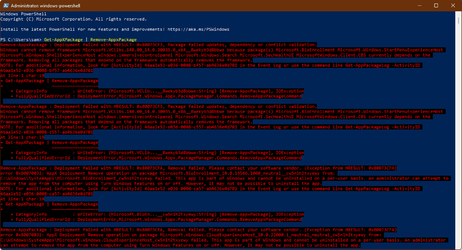
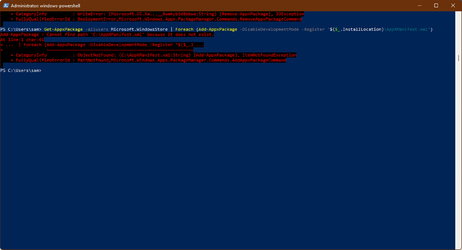
Hello and Happy Thanksgiving to you all. Microsoft Store is seriously broken on my system, I have no idea how but it is. Image 001 shows that the icon is blank and if it's clicked much like waiting around for the perfect woman, nothing happens. Image 002 is the result in Powershell when removing the store and all other apps. Image 003 is the result in Powershell when reinstalling the Microsoft Store. I've also tried downloading the .APPX files directly but once downloaded there's nothing to open/load them with. Along with that, I was guessing as to which ones to download because the ones referenced are not available in the list provided. So that's my issue, and again with all due respect to every one of you please don't send me "refresh/reset the app" or "right-click uninstall." All the general home user stuff has been tried already. So those that I didn't offend with my last couple of sentences, I would greatly appreciate some direction. Thanks in advance. - Izzy
Attachments


My Computer
At a glance
Windows 11 HomeAMD Ryzen 7 8840HSKingston FURY Impact 32GB (2x16GB) 5600MT/s DDR5AMD Radeon 780M Graphics
- OS
- Windows 11 Home
- Computer type
- Laptop
- Manufacturer/Model
- Dell Inspiron 7445 2in1
- CPU
- AMD Ryzen 7 8840HS
- Motherboard
- 0MT90K
- Memory
- Kingston FURY Impact 32GB (2x16GB) 5600MT/s DDR5
- Graphics Card(s)
- AMD Radeon 780M Graphics
- Sound Card
- AMD High Definition Audio Device
- Monitor(s) Displays
- Dell 27"
- Screen Resolution
- 2560x1440
- Hard Drives
- EG6 KIOXIA 1TB (NVMe)
- PSU
- 6-Cell 97WHr Integrated
- Case
- Platinum Silver
- Keyboard
- Arteck 5.1
- Mouse
- Logitech M650
- Internet Speed
- 1000 | 25
- Browser
- Google Chrome
- Antivirus
- Windows Defender
- Other Info
- If you listen cartefully, you can hear me not caring.