Minisforum 790 pro mini unattended install


My answer file works correctly, though due to the first reboot & removing the usb to prevent the looping it fails to invoke runoncex & setupcomplete.cmd's
Interesting. Both work flawlessly for me even if I unplug the drive. How are you processing those files? I put them in a $OEM$ folder so that they are copied over to the internal drive.
 

My Computers

System One System Two

  • OS
    Win11 Pro 25H2 (RTM+)
    Computer type
    PC/Desktop
    Manufacturer/Model
    Acemagic
    CPU
    Intel i7-14650HX
    Memory
    32 GB
    Graphics Card(s)
    No GPU - Built-in Intel Graphics
    Sound Card
    Integrated
    Monitor(s) Displays
    Varies as machine will often be moved to locations with different monitors
    Screen Resolution
    Varies
    Hard Drives
    1 x 1TB Gen 4 NVMe SSD
    PSU
    120W Power Brick
    Keyboard
    Corsair K70 Max RGB Magnetic Keyboard
    Mouse
    Logitech MX Master 3
    Internet Speed
    1Gb Up / 1 Gb Down
    Browser
    Edge
    Antivirus
    Windows Defender
  • Operating System
    Win11 Pro 25H2 (RTM+)
    Computer type
    Laptop
    Manufacturer/Model
    Lenovo ThinkBook 13x Gen 2
    CPU
    Intel i7-1255U
    Memory
    16 GB
    Graphics card(s)
    Intel Iris Xe Graphics
    Sound Card
    Realtek® ALC3306-CG codec
    Monitor(s) Displays
    13.3-inch IPS Display
    Screen Resolution
    WQXGA (2560 x 1600)
    Hard Drives
    2 TB 4 x 4 NVMe SSD
    PSU
    USB-C / Thunderbolt 4 Power / Charging
    Keyboard
    Backlit, spill resistant keyboard
    Mouse
    Buttonless Glass Precision Touchpad
    Internet Speed
    1Gb Up / 1Gb Down
    Browser
    Edge
    Antivirus
    Windows Defender
    Other Info
    WiFi 6e / Bluetooth 5.1 / Facial Recognition / Fingerprint Sensor / ToF (Time of Flight) Human Presence Sensor
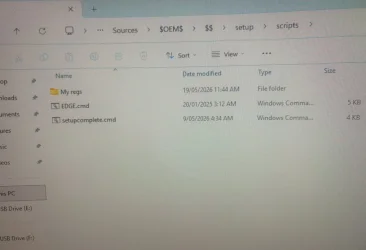
Yes I use the $OEM$ structure also & have since vista never been an issue on many pc's until this one!

$OEM$.webp
 

My Computer

System One

  • OS
    Win 10
    Computer type
    PC/Desktop
    Manufacturer/Model
    HP
%WINDIR%\Setup\Scripts\SetupComplete.cmd: This script runs with local system permissions and starts immediately after the user sees the desktop.
This setting is disabled when using OEM product keys, except on Enterprise editions and Windows Server operating systems.
I presume that applies to a DM key in the firmware
 

My Computers

System One System Two

  • OS
    Win7,Win11
    Computer type
    PC/Desktop
    CPU
    i7-9700
    Motherboard
    gigabyte b365m ds3h
    Memory
    2x16gb 3600mhz
    Monitor(s) Displays
    benq gw2480
    PSU
    bequiet pure power 11 400CM
    Cooling
    cryorig m9i
  • Operating System
    win7,win11
    Computer type
    PC/Desktop
    CPU
    i5-8400
    Motherboard
    gigabyte b365m ds3h
    Memory
    2x8gb 3200
    PSU
    xfx pro 450
Yes I use the $OEM$ structure also & have since vista never been an issue on many pc's until this one!

View attachment 171928

Thanks for the additional detail. Let me do some additional research and get back to you. Unfortunately, I'm going to be tied up the rest of the day today. I shipped a Mini PC and laptop to my sister half way across the country and she is eager to get it all setyup today, so I'll be playing phone support for the next few hours :-).

Look for an update from me either tonight or in the morning.

Sorry you are having difficulties with this. I've spent many irritated hours trying to troubleshoot and fix problems like this myself.
 

My Computers

System One System Two

  • OS
    Win11 Pro 25H2 (RTM+)
    Computer type
    PC/Desktop
    Manufacturer/Model
    Acemagic
    CPU
    Intel i7-14650HX
    Memory
    32 GB
    Graphics Card(s)
    No GPU - Built-in Intel Graphics
    Sound Card
    Integrated
    Monitor(s) Displays
    Varies as machine will often be moved to locations with different monitors
    Screen Resolution
    Varies
    Hard Drives
    1 x 1TB Gen 4 NVMe SSD
    PSU
    120W Power Brick
    Keyboard
    Corsair K70 Max RGB Magnetic Keyboard
    Mouse
    Logitech MX Master 3
    Internet Speed
    1Gb Up / 1 Gb Down
    Browser
    Edge
    Antivirus
    Windows Defender
  • Operating System
    Win11 Pro 25H2 (RTM+)
    Computer type
    Laptop
    Manufacturer/Model
    Lenovo ThinkBook 13x Gen 2
    CPU
    Intel i7-1255U
    Memory
    16 GB
    Graphics card(s)
    Intel Iris Xe Graphics
    Sound Card
    Realtek® ALC3306-CG codec
    Monitor(s) Displays
    13.3-inch IPS Display
    Screen Resolution
    WQXGA (2560 x 1600)
    Hard Drives
    2 TB 4 x 4 NVMe SSD
    PSU
    USB-C / Thunderbolt 4 Power / Charging
    Keyboard
    Backlit, spill resistant keyboard
    Mouse
    Buttonless Glass Precision Touchpad
    Internet Speed
    1Gb Up / 1Gb Down
    Browser
    Edge
    Antivirus
    Windows Defender
    Other Info
    WiFi 6e / Bluetooth 5.1 / Facial Recognition / Fingerprint Sensor / ToF (Time of Flight) Human Presence Sensor
Doing more reading & testing there is no possible way for a UEFI system to read bootfix.bin so there will never be a prompt
to boot a win 11 OS if the boot order is correct it will just boot.
The only alternative is to use an UEFI bootloader a 3rd party program like Refind, I haven't worked through this option yet though.
 

My Computer

System One

  • OS
    Win 10
    Computer type
    PC/Desktop
    Manufacturer/Model
    HP
I performed several installations overnight, fully unattended with setupcomplete.cmd working flawlessly. My testing was with Win 11 25H2 26200.8246 and 26200.8521. Worked perfectly so I'm not sure what to say.

I even went so far as to have the setupcomplete.cmd to install all my drivers and turn on BitLocker with a predefined recovery key that I supplied to it and even that all works flawlessly.
 

My Computers

System One System Two

  • OS
    Win11 Pro 25H2 (RTM+)
    Computer type
    PC/Desktop
    Manufacturer/Model
    Acemagic
    CPU
    Intel i7-14650HX
    Memory
    32 GB
    Graphics Card(s)
    No GPU - Built-in Intel Graphics
    Sound Card
    Integrated
    Monitor(s) Displays
    Varies as machine will often be moved to locations with different monitors
    Screen Resolution
    Varies
    Hard Drives
    1 x 1TB Gen 4 NVMe SSD
    PSU
    120W Power Brick
    Keyboard
    Corsair K70 Max RGB Magnetic Keyboard
    Mouse
    Logitech MX Master 3
    Internet Speed
    1Gb Up / 1 Gb Down
    Browser
    Edge
    Antivirus
    Windows Defender
  • Operating System
    Win11 Pro 25H2 (RTM+)
    Computer type
    Laptop
    Manufacturer/Model
    Lenovo ThinkBook 13x Gen 2
    CPU
    Intel i7-1255U
    Memory
    16 GB
    Graphics card(s)
    Intel Iris Xe Graphics
    Sound Card
    Realtek® ALC3306-CG codec
    Monitor(s) Displays
    13.3-inch IPS Display
    Screen Resolution
    WQXGA (2560 x 1600)
    Hard Drives
    2 TB 4 x 4 NVMe SSD
    PSU
    USB-C / Thunderbolt 4 Power / Charging
    Keyboard
    Backlit, spill resistant keyboard
    Mouse
    Buttonless Glass Precision Touchpad
    Internet Speed
    1Gb Up / 1Gb Down
    Browser
    Edge
    Antivirus
    Windows Defender
    Other Info
    WiFi 6e / Bluetooth 5.1 / Facial Recognition / Fingerprint Sensor / ToF (Time of Flight) Human Presence Sensor
I performed several installations overnight, fully unattended with setupcomplete.cmd working flawlessly. My testing was with Win 11 25H2 26200.8246 and 26200.8521. Worked perfectly so I'm not sure what to say.

I even went so far as to have the setupcomplete.cmd to install all my drivers and turn on BitLocker with a predefined recovery key that I supplied to it and even that all works flawlessly.
What brand of pc did you install on?
I know my autountended.xml & setupcomplete.cmd are both sound as they work on other pc's.
Even doing a regular manual install this miniforum still does a reboot loop unless you pull the stick at 1st restart.
Tested F7 boot from usb, boots though continues to boot from usb not just once as it's suppose to!
 

My Computer

System One

  • OS
    Win 10
    Computer type
    PC/Desktop
    Manufacturer/Model
    HP
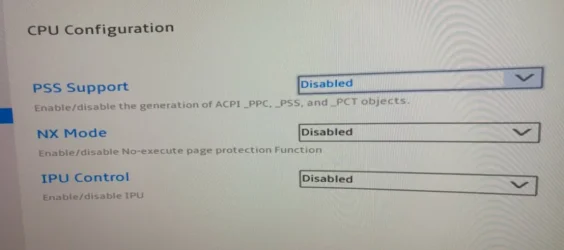
Ok I think I may have found the problem it appears to be in the Bios CPU config pages all were by default enabled, have now disabled these.
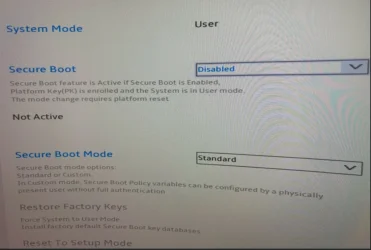
I always had secure boot disabled.
Hope it helps someone else that has experienced this issue!
 

Attachments

  • Bios CPU.webp
    Bios CPU.webp
    43.5 KB · Views: 1
  • Bios Sec.webp
    Bios Sec.webp
    79.4 KB · Views: 1

My Computer

System One

  • OS
    Win 10
    Computer type
    PC/Desktop
    Manufacturer/Model
    HP
Hmmm, I'm not clear on why that would make a difference. I install unattended, including the setupcomplete.cmd both with and without secure boot enabled. I've done this on laptops from HP, ASUS, Lenovo, and Chuwi as well as Mini PCs from Aoostar, AceMagic/AceMagician, AOC, Kamrui, MoreFine, Intel (now ASUS), and VMs running under Hyper-V and VMware Workstation Pro.
 

My Computers

System One System Two

  • OS
    Win11 Pro 25H2 (RTM+)
    Computer type
    PC/Desktop
    Manufacturer/Model
    Acemagic
    CPU
    Intel i7-14650HX
    Memory
    32 GB
    Graphics Card(s)
    No GPU - Built-in Intel Graphics
    Sound Card
    Integrated
    Monitor(s) Displays
    Varies as machine will often be moved to locations with different monitors
    Screen Resolution
    Varies
    Hard Drives
    1 x 1TB Gen 4 NVMe SSD
    PSU
    120W Power Brick
    Keyboard
    Corsair K70 Max RGB Magnetic Keyboard
    Mouse
    Logitech MX Master 3
    Internet Speed
    1Gb Up / 1 Gb Down
    Browser
    Edge
    Antivirus
    Windows Defender
  • Operating System
    Win11 Pro 25H2 (RTM+)
    Computer type
    Laptop
    Manufacturer/Model
    Lenovo ThinkBook 13x Gen 2
    CPU
    Intel i7-1255U
    Memory
    16 GB
    Graphics card(s)
    Intel Iris Xe Graphics
    Sound Card
    Realtek® ALC3306-CG codec
    Monitor(s) Displays
    13.3-inch IPS Display
    Screen Resolution
    WQXGA (2560 x 1600)
    Hard Drives
    2 TB 4 x 4 NVMe SSD
    PSU
    USB-C / Thunderbolt 4 Power / Charging
    Keyboard
    Backlit, spill resistant keyboard
    Mouse
    Buttonless Glass Precision Touchpad
    Internet Speed
    1Gb Up / 1Gb Down
    Browser
    Edge
    Antivirus
    Windows Defender
    Other Info
    WiFi 6e / Bluetooth 5.1 / Facial Recognition / Fingerprint Sensor / ToF (Time of Flight) Human Presence Sensor
Hmmm, I'm not clear on why that would make a difference. I install unattended, including the setupcomplete.cmd both with and without secure boot enabled. I've done this on laptops from HP, ASUS, Lenovo, and Chuwi as well as Mini PCs from Aoostar, AceMagic/AceMagician, AOC, Kamrui, MoreFine, Intel (now ASUS), and VMs running under Hyper-V and VMware Workstation Pro.
Hi man, secure boot not the issue at all, something do 100% with those CPU settings that I'm not clear with, though very happy I have this box working as it should!
 

My Computer

System One

  • OS
    Win 10
    Computer type
    PC/Desktop
    Manufacturer/Model
    HP
Yeah, that's a new one for me but I'm really glad you figured it out as well.

Just curious, what led you to those settings? I don't think that I would have figured that one out in a million years. That was an amazing find by you.
 

My Computers

System One System Two

  • OS
    Win11 Pro 25H2 (RTM+)
    Computer type
    PC/Desktop
    Manufacturer/Model
    Acemagic
    CPU
    Intel i7-14650HX
    Memory
    32 GB
    Graphics Card(s)
    No GPU - Built-in Intel Graphics
    Sound Card
    Integrated
    Monitor(s) Displays
    Varies as machine will often be moved to locations with different monitors
    Screen Resolution
    Varies
    Hard Drives
    1 x 1TB Gen 4 NVMe SSD
    PSU
    120W Power Brick
    Keyboard
    Corsair K70 Max RGB Magnetic Keyboard
    Mouse
    Logitech MX Master 3
    Internet Speed
    1Gb Up / 1 Gb Down
    Browser
    Edge
    Antivirus
    Windows Defender
  • Operating System
    Win11 Pro 25H2 (RTM+)
    Computer type
    Laptop
    Manufacturer/Model
    Lenovo ThinkBook 13x Gen 2
    CPU
    Intel i7-1255U
    Memory
    16 GB
    Graphics card(s)
    Intel Iris Xe Graphics
    Sound Card
    Realtek® ALC3306-CG codec
    Monitor(s) Displays
    13.3-inch IPS Display
    Screen Resolution
    WQXGA (2560 x 1600)
    Hard Drives
    2 TB 4 x 4 NVMe SSD
    PSU
    USB-C / Thunderbolt 4 Power / Charging
    Keyboard
    Backlit, spill resistant keyboard
    Mouse
    Buttonless Glass Precision Touchpad
    Internet Speed
    1Gb Up / 1Gb Down
    Browser
    Edge
    Antivirus
    Windows Defender
    Other Info
    WiFi 6e / Bluetooth 5.1 / Facial Recognition / Fingerprint Sensor / ToF (Time of Flight) Human Presence Sensor
After I found all my ssd's were good, then followed your diskpart suggestion for booting, that was good too, although my original one based on Rufus was sound. I knew it had to be something in the bios, though the CPU settings were not clear to me! Minisforum tech support were vague to say the least.
After having this now for over a year its good to have it working to my liking. Thank you everyone that made suggestions too (y)
 

My Computer

System One

  • OS
    Win 10
    Computer type
    PC/Desktop
    Manufacturer/Model
    HP
Back
Top Bottom