MiniTool Partition Wizard


For the average user, Pro Annual license doesn't add much that the Free version doesn't already let you do:
  • Change Cluster Size
  • Convert NTFS to FAT
  • Copy System Partition
  • Change Partition Type ID
  • Change Serial Number
  • Convert OS Disk to GPT Disk
  • Copy System Disk
  • Migrate OS to SSD/HDD
  • Dynamic Disk Management featureset
  • Win-PE Based Bootable Media
 

My Computers

System One System Two

  • OS
    11 Home
    Computer type
    Laptop
    Manufacturer/Model
    Asus TUF Gaming F16 (2024)
    CPU
    i7 13650HX
    Memory
    16GB DDR5
    Graphics Card(s)
    GeForce RTX 4060 Mobile
    Sound Card
    Eastern Electric MiniMax DAC Supreme; Emotiva UMC-200; Astell & Kern AK240
    Monitor(s) Displays
    Sony Bravia XR-55X90J
    Screen Resolution
    3840×2160
    Hard Drives
    512GB SSD internal
    37TB external
    PSU
    Li-ion
    Cooling
    2× Arc Flow Fans, 4× exhaust vents, 5× heatpipes
    Keyboard
    Logitech K800
    Mouse
    Logitech G402
    Internet Speed
    30Mbit/s up, 500Mbit/s down
    Browser
    FF
    Antivirus
    What's an antivirus?
  • Operating System
    11 Home
    Computer type
    Laptop
    Manufacturer/Model
    Medion S15450
    CPU
    i5 1135G7
    Memory
    16GB DDR4
    Graphics card(s)
    Intel Iris Xe
    Sound Card
    Eastern Electric MiniMax DAC Supreme; Emotiva UMC-200; Astell & Kern AK240
    Monitor(s) Displays
    Sony Bravia XR-55X90J
    Screen Resolution
    3840×2160
    Hard Drives
    2TB SSD internal
    37TB external
    PSU
    Li-ion
    Keyboard
    Logitech K800
    Mouse
    Logitech G402
    Internet Speed
    30Mbit/s up, 500Mbit/s down
    Browser
    FF

My Computers

System One System Two

  • OS
    Windows 11 Pro
    Computer type
    PC/Desktop
    Manufacturer/Model
    Stigg's Build
    CPU
    Intel Core i9-10900X
    Motherboard
    GIGABYTE X299X DESIGNARE 10G
    Memory
    Corsair 64 GB (4 x 16 GB) CMW64GX4M4C3000C15 Vengeance RGB Pro 3000Mhz DDR4
    Graphics Card(s)
    GIGABYTE GeForce GTX 1660 Super Mini ITX 6 GB OC
    Sound Card
    Realtek ALC1220
    Monitor(s) Displays
    Samsung 27" FHD LED FreeSync Gaming Monitor (LS27F350FHEXXY)
    Screen Resolution
    1920 x 1080
    Hard Drives
    Samsung 970 Pro Series 1TB M.2 2280 NVMe SSD
    Western Digital Red Pro WD8003FFBX-68B9AN0 8 TB, 7200 RPM, SATA-III
    Western Digital Red Pro WD8003FFBX-68B9AN0 8 TB, 7200 RPM, SATA-III
    PSU
    Corsair HX1200 1200W 80 Plus Platinum
    Case
    Fractal Design Define 7 Black Solid Case
    Cooling
    Noctua NH-D15 Chromax Black
    Keyboard
    Razer Ornata V2
    Mouse
    Razer DeathAdder Essential
    Internet Speed
    FTTN 100Mbps / 40Mbps
    Browser
    Mozilla Firefox
    Antivirus
    N/A
    Other Info
    Logitech BRIO 4k Ultra HD USB-C Webcam
  • Operating System
    Windows 10 Pro
    Computer type
    Laptop
    Manufacturer/Model
    ASUS ROG Zephyrus M GM501GS
    CPU
    Core i7-8750H
    Motherboard
    Zephyrus M GM501GS
    Memory
    SK Hynix 32 GB (2 x 16 GB) HMA82GS6CJR8N-VK 16 GB DDR4-2666 DDR4 SDRAM
    Graphics card(s)
    NVIDIA GeForce GTX 1070
    Sound Card
    Realtek ALC294
    Monitor(s) Displays
    AU Optronics B156HAN07.1 [15.6" LCD]
    Screen Resolution
    1920 x 1080
    Hard Drives
    Samsung MZVKW512HMJP-00000 512 GB, PCI-E 3.0 x4
    Samsung SSD 860 QVO 4TB 4 TB, SATA-III
    PSU
    N/A
    Case
    N/A
    Cooling
    N/A
    Keyboard
    PC/AT Enhanced PS2 Keyboard (101/102-Key)
    Mouse
    Razer DeathAdder Essential
    Internet Speed
    FTTN 100Mbps / 40Mbps
    Browser
    Mozilla Firefox
    Antivirus
    N/A
    Other Info
    USB2.0 HD UVC Webcam

My Computers

System One System Two

  • OS
    Windows 11 Pro 25H2 Build 26200.8524
    Computer type
    PC/Desktop
    Manufacturer/Model
    Sin-built 2013
    CPU
    Intel(R) Core(TM) i7-4770K CPU @ 3.50GHz
    Motherboard
    ASUS ROG Maximus VI Formula
    Memory
    32.0 GB of I forget and the box is in storage.
    Graphics Card(s)
    Gigabyte nVidia GeForce GTX 1660 Super OC 6GB
    Sound Card
    Onboard thingy
    Monitor(s) Displays
    5 x LG 25MS500-B - 1 x 24MK430H-B - 1 x Wacom Pro 22" Touch Screen Tablet
    Screen Resolution
    All over the place
    Hard Drives
    Too many to list.
    OS on Samsung 1TB 870 QVO SATA
    PSU
    Silverstone 1500
    Case
    NZXT Phantom 820 Full-Tower Case
    Cooling
    Noctua NH-D15 Elite Class Dual Tower CPU Cooler / 6 x EziDIY 120mm / 2 x Corsair 140mm somethings / 1 x 140mm Thermaltake something / 2 x 200mm Corsair.
    Keyboard
    Corsair K95 / Logitech diNovo Edge Wireless
    Mouse
    Logitech: G402 / G502 / Mx Masters / Mx Air Cordless
    Internet Speed
    2000/500Mbps
    Browser
    All sorts
    Antivirus
    Kaspersky Premium
    Other Info
    ㅤㅤㅤㅤㅤㅤㅤㅤㅤㅤㅤㅤㅤㅤㅤㅤㅤㅤㅤㅤㅤㅤㅤㅤㅤㅤㅤㅤㅤㅤㅤㅤㅤㅤㅤㅤㅤㅤㅤㅤ⠀⠀⠀⠀⠀⠀⠀⠀⠀⠀
    TP-Link BE9300 WiFi 7 Bluetooth 5.4 (Archer TBE550E)
    TP-Link TX201 V1 2.5GB Lan

    Grandstream HT812 - VoIP
    ASUS DSL-AX82U - Mesh
    ASUS RT-AC68U - Mesh
    ASUS RT-BE88U Router

    Brother MFC-L2880DW Printer

    I’m on a horse.
  • Operating System
    Windows 11 Pro 25H2 Build 26200.8524
    Computer type
    Laptop
    Manufacturer/Model
    LENOVO Yoga 7 14IRL8 - 7i EVO OLED 14" Touchscreen i5 12 Core 16GB/512GB
    CPU
    Intel Core 12th Gen i5-1240P Processor (1.7 - 4.4GHz)
    Memory
    16GB LPDDR5 RAM
    Graphics card(s)
    Intel Iris Xe Graphics Processor
    Sound Card
    Optimized with Dolby Atmos®
    Screen Resolution
    QHD 2880 x 1800 OLED
    Hard Drives
    M.2 512GB
    Antivirus
    Defender / Malwarebytes
    Other Info
    …still on a horse.
I received a very prompt reply from MiniTool. They have been very helpful and I appreciate it. Here is an excerpt:

If a PE file exists in the C:\Boot\winpe_10_64 directory [created by Partition Wizard], our boot media generator will directly use that file to create the bootable drive.

If not found [t]here, it will copy files from the C:\Windows\System32\Recovery\ directory.

If still not found, it will download the PE version matching the current system from the official Microsoft website.

However, Microsoft has not publicly released the ADK 28000 version. Therefore, the software cannot download this PE file from Microsoft's official website. Instead, it downloads the PE for Windows 11 2[5]H2 (i.e., 10.0.26100.1).

If you already possess a ready-made PE file for version 10.1.28000.1, you can copy it to the C:\Boot\winpe_10_64\ directory. Then, you can recreate the bootable media, and it will automatically utilize this file when creating the bootable drive.


So, I did a lot of internet searching which is incredibly aggravating. I found this:

Announcing Windows 11 Insider Preview Build 28000 (Canary Channel)

This confirms that 28000 is not for general use. MS really should put that clearly in its description.

I also discovered that I did not have winre.wim in my C:\Windows\System32\Recovery\ directory nor my C:\Recovery\WindowsRE directory

I used this series of steps to find winre.wim and then I just copied it to those two folders. I know that is not the whole solution, but I cannot find coherent instructions how to go any further.


Find the RECOVERY partition on your drive. It will contain a Recovery\WindowsRE folder, inside of which you'll find winre.wim.
You may have to use the attrib command to make the files visible.

Open an administrator command prompt and use diskpart to give the RECOVERY partition a drive letter.

diskpart

list disk

select disk # (probably disk 0)

list partition

select partition # (likely partition 4 - it will show as type Recovery and be around 700mb in size)

assign letter=x (to assign the partition a drive letter)

exit

Next, in Windows Explorer to C:\windows\system32\recovery DELETE or RENAME the file ReAgent.xml

Go back to the elevated command prompt

reagentc /disable (just in case it's enabled with the wrong image, likely not)

reagentc /setreimage /path x:\recovery\windowsre /target C:\windows\system32\recovery

reagentc /enable

diskpart

list disk

select disk # (probably disk 0)

list partition

select partition # (likely partition 4 - it will show as type Recovery and be around 700mb in size)

remove letter=x (to remove the partition a drive letter)

exit

BTW the setreimage command did not seem to work, which is why I just copied the files using file explorer.
 

My Computer

System One

  • OS
    Windows 11

MiniTool Partition Wizard Version 13.5 (December 09, 2025)
  • Declutter your drives by removing duplicate files from PCs and removable drives, keeping them well organized and ready for new data.
  • Experience a refreshed interface with refined icons, clearer visuals, and smoother interaction.
  • Enjoy enhanced software stability and faster performance with overall optimizations.
Version History

Edition Comparison

MiniTool Partition Wizard Downloads
 

My Computers

System One System Two

  • OS
    Windows 11 Pro
    Computer type
    PC/Desktop
    Manufacturer/Model
    Stigg's Build
    CPU
    Intel Core i9-10900X
    Motherboard
    GIGABYTE X299X DESIGNARE 10G
    Memory
    Corsair 64 GB (4 x 16 GB) CMW64GX4M4C3000C15 Vengeance RGB Pro 3000Mhz DDR4
    Graphics Card(s)
    GIGABYTE GeForce GTX 1660 Super Mini ITX 6 GB OC
    Sound Card
    Realtek ALC1220
    Monitor(s) Displays
    Samsung 27" FHD LED FreeSync Gaming Monitor (LS27F350FHEXXY)
    Screen Resolution
    1920 x 1080
    Hard Drives
    Samsung 970 Pro Series 1TB M.2 2280 NVMe SSD
    Western Digital Red Pro WD8003FFBX-68B9AN0 8 TB, 7200 RPM, SATA-III
    Western Digital Red Pro WD8003FFBX-68B9AN0 8 TB, 7200 RPM, SATA-III
    PSU
    Corsair HX1200 1200W 80 Plus Platinum
    Case
    Fractal Design Define 7 Black Solid Case
    Cooling
    Noctua NH-D15 Chromax Black
    Keyboard
    Razer Ornata V2
    Mouse
    Razer DeathAdder Essential
    Internet Speed
    FTTN 100Mbps / 40Mbps
    Browser
    Mozilla Firefox
    Antivirus
    N/A
    Other Info
    Logitech BRIO 4k Ultra HD USB-C Webcam
  • Operating System
    Windows 10 Pro
    Computer type
    Laptop
    Manufacturer/Model
    ASUS ROG Zephyrus M GM501GS
    CPU
    Core i7-8750H
    Motherboard
    Zephyrus M GM501GS
    Memory
    SK Hynix 32 GB (2 x 16 GB) HMA82GS6CJR8N-VK 16 GB DDR4-2666 DDR4 SDRAM
    Graphics card(s)
    NVIDIA GeForce GTX 1070
    Sound Card
    Realtek ALC294
    Monitor(s) Displays
    AU Optronics B156HAN07.1 [15.6" LCD]
    Screen Resolution
    1920 x 1080
    Hard Drives
    Samsung MZVKW512HMJP-00000 512 GB, PCI-E 3.0 x4
    Samsung SSD 860 QVO 4TB 4 TB, SATA-III
    PSU
    N/A
    Case
    N/A
    Cooling
    N/A
    Keyboard
    PC/AT Enhanced PS2 Keyboard (101/102-Key)
    Mouse
    Razer DeathAdder Essential
    Internet Speed
    FTTN 100Mbps / 40Mbps
    Browser
    Mozilla Firefox
    Antivirus
    N/A
    Other Info
    USB2.0 HD UVC Webcam
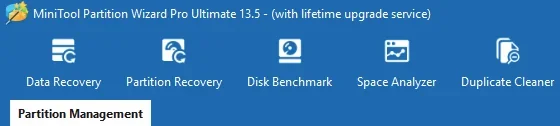
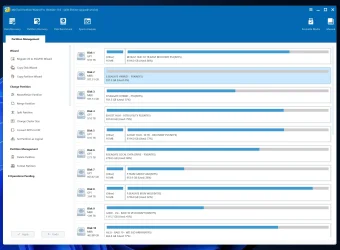
I love this partition manager. I think it's one of the best. But I don't think a duplicate cleaner belongs in a partition manager application. There are plenty of cleaning tools, including free ones that have duplicate cleaners.

MiniTool Partition Manager (With Lifetime Upgrade Service) 03.webp

On another note... My v13.5 WinPE ISO is quite a bit smaller than the v13.0 one.
 

My Computers

System One System Two

  • OS
    Windows 11 Pro
    Computer type
    PC/Desktop
    Manufacturer/Model
    Stigg's Build
    CPU
    Intel Core i9-10900X
    Motherboard
    GIGABYTE X299X DESIGNARE 10G
    Memory
    Corsair 64 GB (4 x 16 GB) CMW64GX4M4C3000C15 Vengeance RGB Pro 3000Mhz DDR4
    Graphics Card(s)
    GIGABYTE GeForce GTX 1660 Super Mini ITX 6 GB OC
    Sound Card
    Realtek ALC1220
    Monitor(s) Displays
    Samsung 27" FHD LED FreeSync Gaming Monitor (LS27F350FHEXXY)
    Screen Resolution
    1920 x 1080
    Hard Drives
    Samsung 970 Pro Series 1TB M.2 2280 NVMe SSD
    Western Digital Red Pro WD8003FFBX-68B9AN0 8 TB, 7200 RPM, SATA-III
    Western Digital Red Pro WD8003FFBX-68B9AN0 8 TB, 7200 RPM, SATA-III
    PSU
    Corsair HX1200 1200W 80 Plus Platinum
    Case
    Fractal Design Define 7 Black Solid Case
    Cooling
    Noctua NH-D15 Chromax Black
    Keyboard
    Razer Ornata V2
    Mouse
    Razer DeathAdder Essential
    Internet Speed
    FTTN 100Mbps / 40Mbps
    Browser
    Mozilla Firefox
    Antivirus
    N/A
    Other Info
    Logitech BRIO 4k Ultra HD USB-C Webcam
  • Operating System
    Windows 10 Pro
    Computer type
    Laptop
    Manufacturer/Model
    ASUS ROG Zephyrus M GM501GS
    CPU
    Core i7-8750H
    Motherboard
    Zephyrus M GM501GS
    Memory
    SK Hynix 32 GB (2 x 16 GB) HMA82GS6CJR8N-VK 16 GB DDR4-2666 DDR4 SDRAM
    Graphics card(s)
    NVIDIA GeForce GTX 1070
    Sound Card
    Realtek ALC294
    Monitor(s) Displays
    AU Optronics B156HAN07.1 [15.6" LCD]
    Screen Resolution
    1920 x 1080
    Hard Drives
    Samsung MZVKW512HMJP-00000 512 GB, PCI-E 3.0 x4
    Samsung SSD 860 QVO 4TB 4 TB, SATA-III
    PSU
    N/A
    Case
    N/A
    Cooling
    N/A
    Keyboard
    PC/AT Enhanced PS2 Keyboard (101/102-Key)
    Mouse
    Razer DeathAdder Essential
    Internet Speed
    FTTN 100Mbps / 40Mbps
    Browser
    Mozilla Firefox
    Antivirus
    N/A
    Other Info
    USB2.0 HD UVC Webcam
Just to wrap up my issue from above in case anyone is interested:

I got very prompt and very helpful answers from MiniTool.
Here is the "condensed" version:

Go to this path (C:\Boot\winpe_10_64\) and delete the file "winre.wim"
After that, you can use MiniTool Partition Wizard to create the bootable media again to use Windows 11 PE.

If a PE file exists in the C:\Boot\winpe_10_64 directory, MiniTools' boot media generator will directly use that file to create the bootable
[usb] drive. If not found [t]here, it will copy files from the C:\Windows\System32\Recovery\ directory. If still not found, it will download the PE version matching the current system from the official Microsoft website. However, Microsoft has not publicly released the ADK 28000 version. Therefore, the software cannot download this PE file from Microsoft's official website. Instead, it downloads the PE for Windows 11 24H2 (i.e., 10.0.26100.1). If you already possess a ready-made PE file for winre.wim you can copy it to the C:\Boot\winpe_10_64\ directory. Then, you can recreate the bootable media, and it will automatically utilize this file when creating the bootable drive.

Regarding properly assigning the WinRE (winre.wim) location:
Even if winre.wim exists in
[some] folder, Windows will not recognize it until you explicitly register the location using the reagentc /setreimage command [and then re-enable the recovery partition].

Steps to properly set the WinRE location:
1. Ensure WinRE is disabled first using command
reagentc /disable

2. Create or verify the folder path:

Recommended standard path is

C:\Windows\System32\Recovery

Ensure winre.wim is inside that folder.

3. Register the WinRE location
reagentc /setreimage /path C:\Windows\System32\Recovery

(You should see a message: "Directory set successfully")

4. Re-enable WinRE
reagentc /enable

5. Verify
reagentc /info

You should now see something like:

Windows RE status: Enabled
Windows RE location:
\\?\GLOBALROOT\device\harddisk0\partition3\Recovery\WindowsRE


[When disabled] WinRE should not be kept in both C:\Windows\System32\Recovery and C:\Recovery\WindowsRE
Only one registered location is required, normally the Recovery partition.

[The C:\Windows\System32\Recovery folder is where it resides when disabled.]
[It might also be found in C:\Windows\WinSxS if you have upgraded your OS.]


The “Recovery image location” field in reagentc /info will always appear blank on modern Windows versions.
This field was only used for an old feature (custom recovery images) that Microsoft removed.
So an empty value is normal and does not affect WinRE functionality.

Windows
[will] also store a second copy of winre.wim at:

C:\Windows\System32\Recovery

[When it is disabled.]
This is also normal — Windows keeps it as a backup.

The blank “Recovery image location” is normal behavior in newer Windows versions.


To Summarize:
If the OS is setup properly, winre.wim resides in the hidden recover partition.
reagentc /disable moves the winre.wim from the hidden recovery partition to C:\Windows\System32\Recovery folder.
You can copy it from there to C:\Boot\winpe_10_64\ and then run MiniTools utility to create rescue media and it will use that version of Windows PE.
If your winre.wim is missing and you cannot find it in C:\Windows\System32\Recovery or C:\Recovery\WindowsRE or C:\Windows\WinSxS
you can force the MiniTools utility to download it from MS and rebuild the rescue media.
Afterwards, you should move it into its proper place in the recovery partition by issuing the command
reagentc /disable
copy it into the C:\Windows\System32\Recovery folder
Set the location it gets moved to when disabled with
reagentc /setreimage /path C:\Windows\System32\Recovery
Re-enable it with the command
reagentc /enable
you can verify the operation with command
reagentc /info

You can verify that it works with command
reagentc /disable
and then it should re-appear in C:\Windows\System32\Recovery folder.

Remember to re-enable and verify it afterwards.


Each time the OS updates, the winre.wim in the recovery partition updates.
If you want to download it yourself from MS without MiniTools, you have to make sure you get the Windows ISO that matches the version of your OS and then dig into the ISO and extract it. It is do-able, but it is time consuming and convoluted. I recommend using MiniTools instead.

HTH the next person.
 

My Computer

System One

  • OS
    Windows 11
Thanks a lot for this. I'll provide an alternative to a part just in case. My post has little to do with MiniTool Partition Wizard, it's about repairing WinRE if needed.

Steps to properly set the WinRE location:
1. Ensure WinRE is disabled first using command
reagentc /disable

2. Create or verify the folder path:

Recommended standard path is

C:\Windows\System32\Recovery

Ensure winre.wim is inside that folder.

3. Register the WinRE location
reagentc /setreimage /path C:\Windows\System32\Recovery

(You should see a message: "Directory set successfully")

4. Re-enable WinRE
reagentc /enable

5. Verify
reagentc /info

You should now see something like:

Windows RE status: Enabled
Windows RE location:
\\?\GLOBALROOT\device\harddisk0\partition3\Recovery\WindowsRE

I think the quoted works if Windows still recognizes and uses the Recovery partition, but this isn't always so.

I have just now converted my Windows 10 Legacy-MBR to UEFI-GPT. MBR2GPT created the ESP between C: (2nd partition) and the Recovery partition (previous 3rd partition), ignoring converting the MBR System Reserved partition (1st partition), that I had enlarged from 50 to 300 MB using any 3rd party product. Probably this was what caused this error (copied from the MBR2GPT output):

Call WinReReapir to repair WinRE
MBR2GPT: Failed to update Reagent.xml, please try to manually disable and enable WinRE

The system booted fine but I didn't have WinRE. It was disabled and "reagentc /enable" said it couldn't find the image, so I first recovered WinRE.wim from the ex-Recovery partition, that had lost this characteristic (for the error I suppose), and I researched the reagentc options, as I didn't find anything called "WinReReapir" or "WinReRepair".

(first of all I had created another ESP of 100 MB as 1st partition, bootrec command to it, deleted MBR2GPT's ESP and extended C: to fill the gap, all offline with diskpart except creating the initial 100 MB gap for the new ESP, that was done with a 3rd party tool).

I reconstructed the Recovery partition and gave it letter R: temporarily, after deleting the original one. The new one had different size and offset, but giving it the guid and attributes wasn't enough it seems, as with reagentc /setreimage /path C:\Windows\System32\Recovery before, reagentc /enable deployed WinRe.wim in C:/Recovery/WindowsRE . I tried using the /target R: option of reagentc /setreimage but reagentc said it couldn't find any Windows in the target, or something similar.

This Google IA https://www.google.com/search?client=firefox-b-d&channel=entpr&q=reate+recovery+partition told me what to do instead. The important difference: I had to copy (back) WinRe.wim to its place in the Recovery partition R:\Recovery\WindowsRE\ and run:

reagentc /setreimage /path R:\Recovery\WindowsRE

(step 10 of Google's directions). In informal words, I had to "legalize" WinRe.wim in its location of R: to also "legalize" R: . "Legalizing" it in C: had deployed WinRE in C: instead. Afterwards you better remove the letter R: .
 

My Computer

System One

  • OS
    Windows 11
    Manufacturer/Model
    MeLE Quieter 2Q (fanless miniPC)
    CPU
    Celeron J4125 (10th gen)
    Memory
    8GB DDR4
    Monitor(s) Displays
    Samsung SyncMaster T260
    Screen Resolution
    1920x1200
    Hard Drives
    256GB eMMC (Windows)
    2TB USB3 HDD Toshiba (Data)
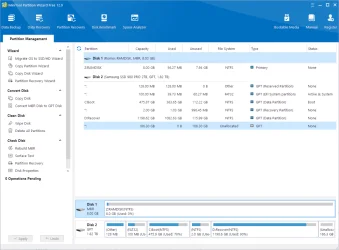
The latest version of PW has tiny fonts whose size you can't change. I decided to keep using an earlier version for this reason.
 

My Computer

System One

  • OS
    Windows 11 Pro
    Computer type
    PC/Desktop
    Manufacturer/Model
    Self build
    CPU
    Core i7-13700K
    Motherboard
    Asus TUF Gaming Plus WiFi Z790
    Memory
    64 GB Kingston Fury Beast DDR5
    Graphics Card(s)
    Gigabyte GeForce RTX 2060 Super Gaming OC 8G
    Sound Card
    Realtek S1200A
    Monitor(s) Displays
    Viewsonic VP2770 & Dell (secondary)
    Screen Resolution
    2560 x 1440
    Hard Drives
    Kingston KC3000 2TB NVME SSD & SATA HDDs & SSD
    PSU
    EVGA SuperNova G2 850W
    Case
    Nanoxia Deep Silence 1
    Cooling
    Noctua NH-D14
    Keyboard
    Microsoft Digital Media Pro
    Mouse
    Logitech Wireless
    Internet Speed
    80 Mb / s
    Browser
    Chrome
    Antivirus
    Defender, Malwarebytes Free & AdwCleaner
The latest version of PW has tiny fonts whose size you can't change. I decided to keep using an earlier version for this reason.
I can't see this problem.

partitionwizard 12.5.webp
 

My Computers

System One System Two

  • OS
    11 Home
    Computer type
    Laptop
    Manufacturer/Model
    Asus TUF Gaming F16 (2024)
    CPU
    i7 13650HX
    Memory
    16GB DDR5
    Graphics Card(s)
    GeForce RTX 4060 Mobile
    Sound Card
    Eastern Electric MiniMax DAC Supreme; Emotiva UMC-200; Astell & Kern AK240
    Monitor(s) Displays
    Sony Bravia XR-55X90J
    Screen Resolution
    3840×2160
    Hard Drives
    512GB SSD internal
    37TB external
    PSU
    Li-ion
    Cooling
    2× Arc Flow Fans, 4× exhaust vents, 5× heatpipes
    Keyboard
    Logitech K800
    Mouse
    Logitech G402
    Internet Speed
    30Mbit/s up, 500Mbit/s down
    Browser
    FF
    Antivirus
    What's an antivirus?
  • Operating System
    11 Home
    Computer type
    Laptop
    Manufacturer/Model
    Medion S15450
    CPU
    i5 1135G7
    Memory
    16GB DDR4
    Graphics card(s)
    Intel Iris Xe
    Sound Card
    Eastern Electric MiniMax DAC Supreme; Emotiva UMC-200; Astell & Kern AK240
    Monitor(s) Displays
    Sony Bravia XR-55X90J
    Screen Resolution
    3840×2160
    Hard Drives
    2TB SSD internal
    37TB external
    PSU
    Li-ion
    Keyboard
    Logitech K800
    Mouse
    Logitech G402
    Internet Speed
    30Mbit/s up, 500Mbit/s down
    Browser
    FF

My Computer

System One

  • OS
    Windows 11 Pro
    Computer type
    PC/Desktop
    Manufacturer/Model
    Self build
    CPU
    Core i7-13700K
    Motherboard
    Asus TUF Gaming Plus WiFi Z790
    Memory
    64 GB Kingston Fury Beast DDR5
    Graphics Card(s)
    Gigabyte GeForce RTX 2060 Super Gaming OC 8G
    Sound Card
    Realtek S1200A
    Monitor(s) Displays
    Viewsonic VP2770 & Dell (secondary)
    Screen Resolution
    2560 x 1440
    Hard Drives
    Kingston KC3000 2TB NVME SSD & SATA HDDs & SSD
    PSU
    EVGA SuperNova G2 850W
    Case
    Nanoxia Deep Silence 1
    Cooling
    Noctua NH-D14
    Keyboard
    Microsoft Digital Media Pro
    Mouse
    Logitech Wireless
    Internet Speed
    80 Mb / s
    Browser
    Chrome
    Antivirus
    Defender, Malwarebytes Free & AdwCleaner
Thanks for confirming the small fonts!
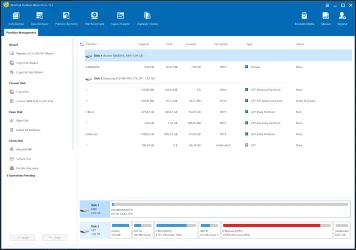
I still have absolutely no idea what you are talking about. The font size is exactly the same as before.

partition wizard 12.9.webp
 

My Computers

System One System Two

  • OS
    11 Home
    Computer type
    Laptop
    Manufacturer/Model
    Asus TUF Gaming F16 (2024)
    CPU
    i7 13650HX
    Memory
    16GB DDR5
    Graphics Card(s)
    GeForce RTX 4060 Mobile
    Sound Card
    Eastern Electric MiniMax DAC Supreme; Emotiva UMC-200; Astell & Kern AK240
    Monitor(s) Displays
    Sony Bravia XR-55X90J
    Screen Resolution
    3840×2160
    Hard Drives
    512GB SSD internal
    37TB external
    PSU
    Li-ion
    Cooling
    2× Arc Flow Fans, 4× exhaust vents, 5× heatpipes
    Keyboard
    Logitech K800
    Mouse
    Logitech G402
    Internet Speed
    30Mbit/s up, 500Mbit/s down
    Browser
    FF
    Antivirus
    What's an antivirus?
  • Operating System
    11 Home
    Computer type
    Laptop
    Manufacturer/Model
    Medion S15450
    CPU
    i5 1135G7
    Memory
    16GB DDR4
    Graphics card(s)
    Intel Iris Xe
    Sound Card
    Eastern Electric MiniMax DAC Supreme; Emotiva UMC-200; Astell & Kern AK240
    Monitor(s) Displays
    Sony Bravia XR-55X90J
    Screen Resolution
    3840×2160
    Hard Drives
    2TB SSD internal
    37TB external
    PSU
    Li-ion
    Keyboard
    Logitech K800
    Mouse
    Logitech G402
    Internet Speed
    30Mbit/s up, 500Mbit/s down
    Browser
    FF
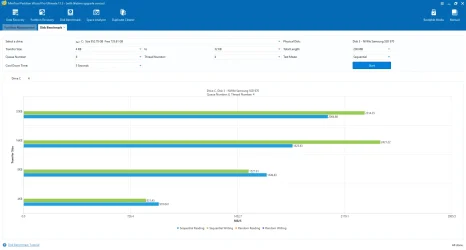
Does anyone ever use Disk Benchmark?

MiniTool Partition Wizard Pro Ultimate - Disk Benchmark.webp
 

My Computers

System One System Two

  • OS
    Windows 11 Pro
    Computer type
    PC/Desktop
    Manufacturer/Model
    Stigg's Build
    CPU
    Intel Core i9-10900X
    Motherboard
    GIGABYTE X299X DESIGNARE 10G
    Memory
    Corsair 64 GB (4 x 16 GB) CMW64GX4M4C3000C15 Vengeance RGB Pro 3000Mhz DDR4
    Graphics Card(s)
    GIGABYTE GeForce GTX 1660 Super Mini ITX 6 GB OC
    Sound Card
    Realtek ALC1220
    Monitor(s) Displays
    Samsung 27" FHD LED FreeSync Gaming Monitor (LS27F350FHEXXY)
    Screen Resolution
    1920 x 1080
    Hard Drives
    Samsung 970 Pro Series 1TB M.2 2280 NVMe SSD
    Western Digital Red Pro WD8003FFBX-68B9AN0 8 TB, 7200 RPM, SATA-III
    Western Digital Red Pro WD8003FFBX-68B9AN0 8 TB, 7200 RPM, SATA-III
    PSU
    Corsair HX1200 1200W 80 Plus Platinum
    Case
    Fractal Design Define 7 Black Solid Case
    Cooling
    Noctua NH-D15 Chromax Black
    Keyboard
    Razer Ornata V2
    Mouse
    Razer DeathAdder Essential
    Internet Speed
    FTTN 100Mbps / 40Mbps
    Browser
    Mozilla Firefox
    Antivirus
    N/A
    Other Info
    Logitech BRIO 4k Ultra HD USB-C Webcam
  • Operating System
    Windows 10 Pro
    Computer type
    Laptop
    Manufacturer/Model
    ASUS ROG Zephyrus M GM501GS
    CPU
    Core i7-8750H
    Motherboard
    Zephyrus M GM501GS
    Memory
    SK Hynix 32 GB (2 x 16 GB) HMA82GS6CJR8N-VK 16 GB DDR4-2666 DDR4 SDRAM
    Graphics card(s)
    NVIDIA GeForce GTX 1070
    Sound Card
    Realtek ALC294
    Monitor(s) Displays
    AU Optronics B156HAN07.1 [15.6" LCD]
    Screen Resolution
    1920 x 1080
    Hard Drives
    Samsung MZVKW512HMJP-00000 512 GB, PCI-E 3.0 x4
    Samsung SSD 860 QVO 4TB 4 TB, SATA-III
    PSU
    N/A
    Case
    N/A
    Cooling
    N/A
    Keyboard
    PC/AT Enhanced PS2 Keyboard (101/102-Key)
    Mouse
    Razer DeathAdder Essential
    Internet Speed
    FTTN 100Mbps / 40Mbps
    Browser
    Mozilla Firefox
    Antivirus
    N/A
    Other Info
    USB2.0 HD UVC Webcam
I'm using 13.0 because it does what I want. The font is small but it's not entirely illegible. MINITOOL13.0.webp
 

My Computer

System One

  • OS
    WIN 11, WIN 10, WIN 8.1, WIN 7 U, WIN 7 PRO, WIN 7 HOME (32 Bit), LINUX MINT
    Computer type
    PC/Desktop
    Manufacturer/Model
    DIY, ASUS, and DELL
    CPU
    Intel i7 6900K and i9-7960X / AMD 3800X (8 core)
    Motherboard
    ASUS X99E-WS USB 3.1 and ASUS X299 SAGE
    Memory
    128 GB CORSAIR DOMINATOR PLATINUM (B DIE)
    Graphics Card(s)
    NVIDIA 1070 and RTX 3070
    Sound Card
    Crystal Sound (onboard)
    Monitor(s) Displays
    single Samsung 30" 4K and 8" aux monitor
    Screen Resolution
    4K and something equally attrocious. I'll be working on this.
    Hard Drives
    A, B, C, D, E, F, G, H, I, J, K, L, M, N, O, P, Q, R, S, T, U, V, W

    Ports X, Y, and Z are reserved for USB access and removable drives.

    Drive types consist of the following: Various mechanical hard drives bearing the brand names, Seagate, Toshiba, and Western Digital. Various NVMe drives bearing the brand names Kingston, Intel, Silicon Power, Crucial, Western Digital, and Team Group. Various SATA SSDs bearing various different brand names.

    RAID arrays included:

    LSI RAID 10 (WD Velociraptors) 1115.72 GB
    LSI RAID 10 (WD SSDS) 463.80 GB

    INTEL RAID 0 (KINGSTON HYPER X) System 447.14 GB
    INTEL RAID 1 TOSHIBA ENTERPRIZE class Data 2794.52 GB
    INTEL RAID 1 SEAGATE HYBRID 931.51 GB
    PSU
    SEVERAL. I prefer my Corsair Platinum HX1000i but I also like EVGA power supplies
    Case
    ThermalTake Level 10 GT (among others)
    Cooling
    Noctua is my favorite and I use it in my main. I also own various other coolers.
    Keyboard
    all kinds.
    Mouse
    all kinds
    Internet Speed
    360 mbps - 1 gbps (depending)
    Browser
    FIREFOX
    Antivirus
    KASPERSKY (no apologies)
    Other Info
    Gave Dell touch screen with Windows 11 to daughter and got me an OTVOC. Being a PC builder I own many desktop PCs as well. I am a father of five providing PCs, laptops, and tablets for all my family, most of which I have modified, rebuilt, or simply built from scratch. I do not own a cell phone, never have, never will.

My Computers

System One System Two

  • OS
    11 Home
    Computer type
    Laptop
    Manufacturer/Model
    Asus TUF Gaming F16 (2024)
    CPU
    i7 13650HX
    Memory
    16GB DDR5
    Graphics Card(s)
    GeForce RTX 4060 Mobile
    Sound Card
    Eastern Electric MiniMax DAC Supreme; Emotiva UMC-200; Astell & Kern AK240
    Monitor(s) Displays
    Sony Bravia XR-55X90J
    Screen Resolution
    3840×2160
    Hard Drives
    512GB SSD internal
    37TB external
    PSU
    Li-ion
    Cooling
    2× Arc Flow Fans, 4× exhaust vents, 5× heatpipes
    Keyboard
    Logitech K800
    Mouse
    Logitech G402
    Internet Speed
    30Mbit/s up, 500Mbit/s down
    Browser
    FF
    Antivirus
    What's an antivirus?
  • Operating System
    11 Home
    Computer type
    Laptop
    Manufacturer/Model
    Medion S15450
    CPU
    i5 1135G7
    Memory
    16GB DDR4
    Graphics card(s)
    Intel Iris Xe
    Sound Card
    Eastern Electric MiniMax DAC Supreme; Emotiva UMC-200; Astell & Kern AK240
    Monitor(s) Displays
    Sony Bravia XR-55X90J
    Screen Resolution
    3840×2160
    Hard Drives
    2TB SSD internal
    37TB external
    PSU
    Li-ion
    Keyboard
    Logitech K800
    Mouse
    Logitech G402
    Internet Speed
    30Mbit/s up, 500Mbit/s down
    Browser
    FF
Any downside to installing 13.5? Did they remove any features, etc.?
 

My Computers

System One System Two

  • OS
    Win 11 Pro 25H2, Build 26200.8524
    Computer type
    PC/Desktop
    Manufacturer/Model
    Home Brew
    CPU
    Intel Core i5 14500
    Motherboard
    Gigabyte B760M G P WIFI
    Memory
    64GB DDR4
    Graphics Card(s)
    GeForce RTX 4060
    Sound Card
    Chipset Realtek
    Monitor(s) Displays
    LG 45" Ultragear, Acer 24" 1080p
    Screen Resolution
    5120x1440, 1920x1080
    Hard Drives
    Crucial P310 2TB 2280 PCIe Gen4 3D NAND NVMe M.2 SSD (O/S)
    Silicon Power 2TB US75 NVMe PCIe Gen4 M.2 2280 SSD (backup)
    Crucial BX500 2TB 3D NAND (2nd backup)
    Seagate 4TB Ironwolf, rotating HDD archive files
    External off-line backup Drives: 2 NVMe 4TB drives in external enclosures
    PSU
    Thermaltake Toughpower GF3 750W
    Case
    LIAN LI LANCOOL 216 E-ATX PC Case
    Cooling
    Lots of fans!
    Keyboard
    Microsoft Comfort Curve 2000
    Mouse
    Logitech G305
    Internet Speed
    Verizon FiOS 1GB
    Browser
    Firefox
    Antivirus
    Malware Bytes & Windows Defender Security
  • Operating System
    Win 11 Pro 25H2, Build 26200.8524
    Computer type
    PC/Desktop
    Manufacturer/Model
    Home Brew
    CPU
    Intel Core i5 14400
    Motherboard
    Gigabyte B760M DS3H AX
    Memory
    32GB DDR5
    Graphics card(s)
    Intel 700 Embedded GPU
    Sound Card
    Realtek Embedded
    Monitor(s) Displays
    27" HP 1080p
    Screen Resolution
    1920x1080
    Hard Drives
    Crucial P310 2TB 2280 PCIe Gen4 eD NAND PCIe SSD
    Samsung EVO 990 2TB NVMe Gen4 SSD
    Samsung 2TB SATA SSD
    PSU
    Thermaltake Smart BM3 650W
    Case
    Okinos Micro ATX Case
    Cooling
    Fans
    Keyboard
    Microsoft Comfort Curve 2000
    Mouse
    Logitech G305
    Internet Speed
    Verizon FiOS 1GB
    Browser
    Firefox
    Antivirus
    Malware Bytes & Windows Defender Security
Any downside to installing 13.5? Did they remove any features, etc.?
I've been wondering the same. This is why I've stayed with 13 this long. I certainly don't need the font to get any smaller.
 

My Computer

System One

  • OS
    WIN 11, WIN 10, WIN 8.1, WIN 7 U, WIN 7 PRO, WIN 7 HOME (32 Bit), LINUX MINT
    Computer type
    PC/Desktop
    Manufacturer/Model
    DIY, ASUS, and DELL
    CPU
    Intel i7 6900K and i9-7960X / AMD 3800X (8 core)
    Motherboard
    ASUS X99E-WS USB 3.1 and ASUS X299 SAGE
    Memory
    128 GB CORSAIR DOMINATOR PLATINUM (B DIE)
    Graphics Card(s)
    NVIDIA 1070 and RTX 3070
    Sound Card
    Crystal Sound (onboard)
    Monitor(s) Displays
    single Samsung 30" 4K and 8" aux monitor
    Screen Resolution
    4K and something equally attrocious. I'll be working on this.
    Hard Drives
    A, B, C, D, E, F, G, H, I, J, K, L, M, N, O, P, Q, R, S, T, U, V, W

    Ports X, Y, and Z are reserved for USB access and removable drives.

    Drive types consist of the following: Various mechanical hard drives bearing the brand names, Seagate, Toshiba, and Western Digital. Various NVMe drives bearing the brand names Kingston, Intel, Silicon Power, Crucial, Western Digital, and Team Group. Various SATA SSDs bearing various different brand names.

    RAID arrays included:

    LSI RAID 10 (WD Velociraptors) 1115.72 GB
    LSI RAID 10 (WD SSDS) 463.80 GB

    INTEL RAID 0 (KINGSTON HYPER X) System 447.14 GB
    INTEL RAID 1 TOSHIBA ENTERPRIZE class Data 2794.52 GB
    INTEL RAID 1 SEAGATE HYBRID 931.51 GB
    PSU
    SEVERAL. I prefer my Corsair Platinum HX1000i but I also like EVGA power supplies
    Case
    ThermalTake Level 10 GT (among others)
    Cooling
    Noctua is my favorite and I use it in my main. I also own various other coolers.
    Keyboard
    all kinds.
    Mouse
    all kinds
    Internet Speed
    360 mbps - 1 gbps (depending)
    Browser
    FIREFOX
    Antivirus
    KASPERSKY (no apologies)
    Other Info
    Gave Dell touch screen with Windows 11 to daughter and got me an OTVOC. Being a PC builder I own many desktop PCs as well. I am a father of five providing PCs, laptops, and tablets for all my family, most of which I have modified, rebuilt, or simply built from scratch. I do not own a cell phone, never have, never will.
Any downside to installing 13.5? Did they remove any features, etc.?
I haven't found any problem on any of my computers.
I have it installed on three desktops and one laptop.

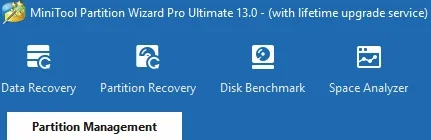
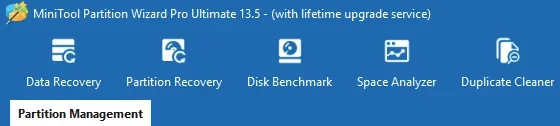
No features removed. There is an added feature called Duplicate Cleaner. 13.0 vs 13.5 toolbar comparison. ↓

MiniTool Partition Manager (With Lifetime Upgrade Service) 02.webpMiniTool Partition Manager (With Lifetime Upgrade Service) 03.webp

Regarding the small font issue that Steve C posted about. I haven't noticed it on any of my computers.
 

My Computers

System One System Two

  • OS
    Windows 11 Pro
    Computer type
    PC/Desktop
    Manufacturer/Model
    Stigg's Build
    CPU
    Intel Core i9-10900X
    Motherboard
    GIGABYTE X299X DESIGNARE 10G
    Memory
    Corsair 64 GB (4 x 16 GB) CMW64GX4M4C3000C15 Vengeance RGB Pro 3000Mhz DDR4
    Graphics Card(s)
    GIGABYTE GeForce GTX 1660 Super Mini ITX 6 GB OC
    Sound Card
    Realtek ALC1220
    Monitor(s) Displays
    Samsung 27" FHD LED FreeSync Gaming Monitor (LS27F350FHEXXY)
    Screen Resolution
    1920 x 1080
    Hard Drives
    Samsung 970 Pro Series 1TB M.2 2280 NVMe SSD
    Western Digital Red Pro WD8003FFBX-68B9AN0 8 TB, 7200 RPM, SATA-III
    Western Digital Red Pro WD8003FFBX-68B9AN0 8 TB, 7200 RPM, SATA-III
    PSU
    Corsair HX1200 1200W 80 Plus Platinum
    Case
    Fractal Design Define 7 Black Solid Case
    Cooling
    Noctua NH-D15 Chromax Black
    Keyboard
    Razer Ornata V2
    Mouse
    Razer DeathAdder Essential
    Internet Speed
    FTTN 100Mbps / 40Mbps
    Browser
    Mozilla Firefox
    Antivirus
    N/A
    Other Info
    Logitech BRIO 4k Ultra HD USB-C Webcam
  • Operating System
    Windows 10 Pro
    Computer type
    Laptop
    Manufacturer/Model
    ASUS ROG Zephyrus M GM501GS
    CPU
    Core i7-8750H
    Motherboard
    Zephyrus M GM501GS
    Memory
    SK Hynix 32 GB (2 x 16 GB) HMA82GS6CJR8N-VK 16 GB DDR4-2666 DDR4 SDRAM
    Graphics card(s)
    NVIDIA GeForce GTX 1070
    Sound Card
    Realtek ALC294
    Monitor(s) Displays
    AU Optronics B156HAN07.1 [15.6" LCD]
    Screen Resolution
    1920 x 1080
    Hard Drives
    Samsung MZVKW512HMJP-00000 512 GB, PCI-E 3.0 x4
    Samsung SSD 860 QVO 4TB 4 TB, SATA-III
    PSU
    N/A
    Case
    N/A
    Cooling
    N/A
    Keyboard
    PC/AT Enhanced PS2 Keyboard (101/102-Key)
    Mouse
    Razer DeathAdder Essential
    Internet Speed
    FTTN 100Mbps / 40Mbps
    Browser
    Mozilla Firefox
    Antivirus
    N/A
    Other Info
    USB2.0 HD UVC Webcam
I haven't found any problem on any of my computers.
I have it installed on three desktops and one laptop.

No features removed. There is an added feature called Duplicate Cleaner. 13.0 vs 13.5 toolbar comparison. ↓

View attachment 160810View attachment 160811

Regarding the small font issue that Steve C posted about. I haven't noticed it on any of my computers.
Looks good. I think I'll leave the 13 on this ole X99 and upgrade to 13.5 on the X299. It should work well with an authentic un-tweaked version of 25H2.

The new lifetime license allows you 5 devices. Alas, I got mine back when it only allowed it for 3 so I have to be very selective about where I install it.
 

My Computer

System One

  • OS
    WIN 11, WIN 10, WIN 8.1, WIN 7 U, WIN 7 PRO, WIN 7 HOME (32 Bit), LINUX MINT
    Computer type
    PC/Desktop
    Manufacturer/Model
    DIY, ASUS, and DELL
    CPU
    Intel i7 6900K and i9-7960X / AMD 3800X (8 core)
    Motherboard
    ASUS X99E-WS USB 3.1 and ASUS X299 SAGE
    Memory
    128 GB CORSAIR DOMINATOR PLATINUM (B DIE)
    Graphics Card(s)
    NVIDIA 1070 and RTX 3070
    Sound Card
    Crystal Sound (onboard)
    Monitor(s) Displays
    single Samsung 30" 4K and 8" aux monitor
    Screen Resolution
    4K and something equally attrocious. I'll be working on this.
    Hard Drives
    A, B, C, D, E, F, G, H, I, J, K, L, M, N, O, P, Q, R, S, T, U, V, W

    Ports X, Y, and Z are reserved for USB access and removable drives.

    Drive types consist of the following: Various mechanical hard drives bearing the brand names, Seagate, Toshiba, and Western Digital. Various NVMe drives bearing the brand names Kingston, Intel, Silicon Power, Crucial, Western Digital, and Team Group. Various SATA SSDs bearing various different brand names.

    RAID arrays included:

    LSI RAID 10 (WD Velociraptors) 1115.72 GB
    LSI RAID 10 (WD SSDS) 463.80 GB

    INTEL RAID 0 (KINGSTON HYPER X) System 447.14 GB
    INTEL RAID 1 TOSHIBA ENTERPRIZE class Data 2794.52 GB
    INTEL RAID 1 SEAGATE HYBRID 931.51 GB
    PSU
    SEVERAL. I prefer my Corsair Platinum HX1000i but I also like EVGA power supplies
    Case
    ThermalTake Level 10 GT (among others)
    Cooling
    Noctua is my favorite and I use it in my main. I also own various other coolers.
    Keyboard
    all kinds.
    Mouse
    all kinds
    Internet Speed
    360 mbps - 1 gbps (depending)
    Browser
    FIREFOX
    Antivirus
    KASPERSKY (no apologies)
    Other Info
    Gave Dell touch screen with Windows 11 to daughter and got me an OTVOC. Being a PC builder I own many desktop PCs as well. I am a father of five providing PCs, laptops, and tablets for all my family, most of which I have modified, rebuilt, or simply built from scratch. I do not own a cell phone, never have, never will.
Back
Top Bottom