Missing files


Looks like you have no care to try my suggestions so i'm out helping you.
 

My Computer My Computer

At a glance

Windows 11AMD Ryzen 7 5700GMicron Technology DDR4-3200 16GBNVIDIA GeForce RTX 3060
OS
Windows 11
Computer type
PC/Desktop
Manufacturer/Model
HP Pavilion
CPU
AMD Ryzen 7 5700G
Motherboard
Erica6
Memory
Micron Technology DDR4-3200 16GB
Graphics Card(s)
NVIDIA GeForce RTX 3060
Sound Card
Realtek ALC671
Monitor(s) Displays
Samsung SyncMaster U28E590
Screen Resolution
3840 x 2160
Hard Drives
SAMSUNG MZVLQ1T0HALB-000H1

System restore is not going to bring files back . . . is my guess.

My bad re: I havent got system restore set up

Screenshot 2026-08-22 035305.webp


I dont know what files are missing so I wont know if its recovered
 

My Computer My Computer

At a glance

Win 11 Home, 25H2, build 26200.8737Intel(R) Core(TM) i3-N305 (1.80 GHz)8.00 GB (7.70 GB usable)
OS
Win 11 Home, 25H2, build 26200.8737
Computer type
Laptop
Manufacturer/Model
Lenovo.
CPU
Intel(R) Core(TM) i3-N305 (1.80 GHz)
Motherboard
64-bit operating system, x64-based processor
Memory
8.00 GB (7.70 GB usable)
Hard Drives
2 TB
Browser
Google Chrome, Version 151.0.7922.172 (Official Build) (64-bit)

My Computer My Computer

At a glance

Windows 7
OS
Windows 7
Oh so why search for files you don't know weird case for me, but you know where these files missing like i said before you can browse system points for that folder who is missing files.
 

My Computer My Computer

At a glance

Windows 11AMD Ryzen 7 5700GMicron Technology DDR4-3200 16GBNVIDIA GeForce RTX 3060
OS
Windows 11
Computer type
PC/Desktop
Manufacturer/Model
HP Pavilion
CPU
AMD Ryzen 7 5700G
Motherboard
Erica6
Memory
Micron Technology DDR4-3200 16GB
Graphics Card(s)
NVIDIA GeForce RTX 3060
Sound Card
Realtek ALC671
Monitor(s) Displays
Samsung SyncMaster U28E590
Screen Resolution
3840 x 2160
Hard Drives
SAMSUNG MZVLQ1T0HALB-000H1

I want to know why files are missing and how to stop it

There may be some situations where I will know what files were there, like in the capture that has the whole alphabet
 

My Computer My Computer

At a glance

Win 11 Home, 25H2, build 26200.8737Intel(R) Core(TM) i3-N305 (1.80 GHz)8.00 GB (7.70 GB usable)
OS
Win 11 Home, 25H2, build 26200.8737
Computer type
Laptop
Manufacturer/Model
Lenovo.
CPU
Intel(R) Core(TM) i3-N305 (1.80 GHz)
Motherboard
64-bit operating system, x64-based processor
Memory
8.00 GB (7.70 GB usable)
Hard Drives
2 TB
Browser
Google Chrome, Version 151.0.7922.172 (Official Build) (64-bit)
Well, you need to describe the problem in more detail. I see you were sorting files like a telephone directory. Why? There are many ways to look for files and this is an odd way to organise files. How do you know that files are missing? Have you found any files in any of the folders with names like ABC?
 

My Computers My Computers

  • At a glance

    Windows 11 Pro 25H2 26200.9168AMD Ryzen 7 5825U with Radeon Graphics16GB
    OS
    Windows 11 Pro 25H2 26200.9168
    Computer type
    Laptop
    Manufacturer/Model
    Acemagic LX15PRO
    CPU
    AMD Ryzen 7 5825U with Radeon Graphics
    Motherboard
    BIOS CT_BI_AMI_LX15PRO_AB8139_A-004
    Memory
    16GB
    Screen Resolution
    1920 x 1080
    Hard Drives
    SSD 2TB
    Internet Speed
    30 Mbps
    Browser
    Brave
    Antivirus
    Webroot SecureAnywhere Complete beta
  • At a glance

    Windows 11 Pro 23H2 22631.2506Atom N450 1.66GHz2GB
    Operating System
    Windows 11 Pro 23H2 22631.2506
    Computer type
    Laptop
    Manufacturer/Model
    HP Mini 210-1090NR PC (bought in late 2009!)
    CPU
    Atom N450 1.66GHz
    Memory
    2GB
    Browser
    Brave
    Antivirus
    Webroot
  • Acer Swift SF114-34 laptop
    OS Windows 11 Pro 26200.8894
    CPU Pentium Silver N6000
    RAM 4GB
    BIOS v1.17
    SSD Samsung 970 EVO Plus SSD 2TB (an upgrade)
I havent got system restore set up

Are you sure it is not on?

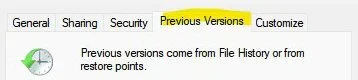
If it is you can right-click on a folder and select properties.

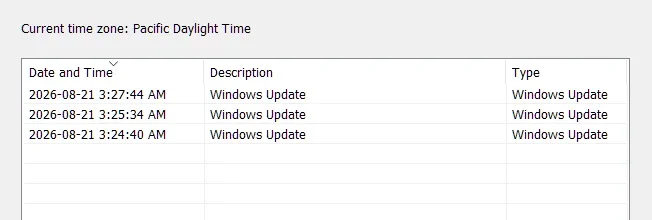
Go to the previous versions tab and there may be previous versions in there you can restore that have your files.

Screenshot 2026-08-22 075650.webp
 

My Computer My Computer

At a glance

Windows 11 Pro
OS
Windows 11 Pro
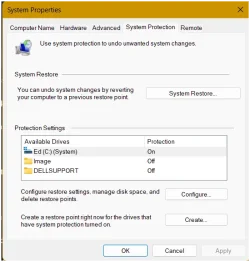
Go to the start menu, look for Settings, It will take you to System>Recovery, at the top type in System Restore,

then you will see (near or at the bottom) Create a restore point. when this page come's up in the pic. Create a Restore Point, Don't close it yet, you

may have t hit apply? Create a point call it "missed filles" post back - one of us will reply to you !!!
 

Attachments

  • Screenshot 2026-08-22 130902.webp
    Screenshot 2026-08-22 130902.webp
    31.5 KB · Views: 1

My Computer My Computer

At a glance

Windows 11 25H2 (OS Build 26200.9168)Processor: 11th Gen Intel(R) Core(TM) i5-1135...12GBIntel R Iris R XE Graphics family
OS
Windows 11 25H2 (OS Build 26200.9168)
Computer type
Laptop
Manufacturer/Model
Dell
CPU
Processor: 11th Gen Intel(R) Core(TM) i5-1135G7 @ 2.40G
Motherboard
64-bit operating system Dell 0XMF7W
Memory
12GB
Graphics Card(s)
Intel R Iris R XE Graphics family
Sound Card
Cirrus Speakers High Definition Audio
Monitor(s) Displays
Generic PnP monitor
Screen Resolution
1920 x 1080
Hard Drives
NVMe 670p SSDPEKNU512GZ NVMe I NTEL 512GB
Case
cheap
Mouse
Logitech wireless mouse
Internet Speed
16 Mps download
Browser
Google Chrome
Antivirus
Security: Microsoft Defender & Malwarebytes Premium (with browser guard)
Other Info
Dell model: Inspiron 15 3511
Well, you need to describe the problem in more detail. I see you were sorting files like a telephone directory. Why? There are many ways to look for files and this is an odd way to organise files. How do you know that files are missing? Have you found any files in any of the folders with names like ABC?

Did you listen to the video I posted in post 37?

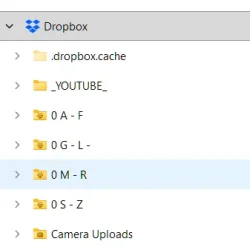
I organise files using A - F; G - L; M - R; S - Z
For example, 'stamps', if I collected, but I dont, would be under S - Z

I know the files are missing because I created folders, named it, placed files in the folder, and now its gone
 

My Computer My Computer

At a glance

Win 11 Home, 25H2, build 26200.8737Intel(R) Core(TM) i3-N305 (1.80 GHz)8.00 GB (7.70 GB usable)
OS
Win 11 Home, 25H2, build 26200.8737
Computer type
Laptop
Manufacturer/Model
Lenovo.
CPU
Intel(R) Core(TM) i3-N305 (1.80 GHz)
Motherboard
64-bit operating system, x64-based processor
Memory
8.00 GB (7.70 GB usable)
Hard Drives
2 TB
Browser
Google Chrome, Version 151.0.7922.172 (Official Build) (64-bit)
Are you sure it is not on?
It is on, but 'manage space' was 2% so I increased the size. That might be why it was not working
 

My Computer My Computer

At a glance

Win 11 Home, 25H2, build 26200.8737Intel(R) Core(TM) i3-N305 (1.80 GHz)8.00 GB (7.70 GB usable)
OS
Win 11 Home, 25H2, build 26200.8737
Computer type
Laptop
Manufacturer/Model
Lenovo.
CPU
Intel(R) Core(TM) i3-N305 (1.80 GHz)
Motherboard
64-bit operating system, x64-based processor
Memory
8.00 GB (7.70 GB usable)
Hard Drives
2 TB
Browser
Google Chrome, Version 151.0.7922.172 (Official Build) (64-bit)
Go to the start menu, look for Settings, It will take you to System>Recovery, at the top type in System Restore,

then you will see (near or at the bottom) Create a restore point. when this page come's up in the pic. Create a Restore Point, Don't close it yet, you

may have t hit apply? Create a point call it "missed filles" post back - one of us will reply to you !!!
I created a restore point. thanks
 

My Computer My Computer

At a glance

Win 11 Home, 25H2, build 26200.8737Intel(R) Core(TM) i3-N305 (1.80 GHz)8.00 GB (7.70 GB usable)
OS
Win 11 Home, 25H2, build 26200.8737
Computer type
Laptop
Manufacturer/Model
Lenovo.
CPU
Intel(R) Core(TM) i3-N305 (1.80 GHz)
Motherboard
64-bit operating system, x64-based processor
Memory
8.00 GB (7.70 GB usable)
Hard Drives
2 TB
Browser
Google Chrome, Version 151.0.7922.172 (Official Build) (64-bit)
Here is how dropbox is set up (to show how the folders are set up alphabetically)

Screenshot 2026-08-22 135053.webp
 

My Computer My Computer

At a glance

Win 11 Home, 25H2, build 26200.8737Intel(R) Core(TM) i3-N305 (1.80 GHz)8.00 GB (7.70 GB usable)
OS
Win 11 Home, 25H2, build 26200.8737
Computer type
Laptop
Manufacturer/Model
Lenovo.
CPU
Intel(R) Core(TM) i3-N305 (1.80 GHz)
Motherboard
64-bit operating system, x64-based processor
Memory
8.00 GB (7.70 GB usable)
Hard Drives
2 TB
Browser
Google Chrome, Version 151.0.7922.172 (Official Build) (64-bit)
You have to pick an instruction & follow it please - I would advise you go to
Page 1 post 20

Page 2 Post 23 & 24 read please......

Restore files from System Restore Points using ShadowExplorer.


Start by downloading the latest version of ShadowExplorer: there posted on the pages by FreeBooter. Can you do that?
 

My Computer My Computer

At a glance

Windows 11 25H2 (OS Build 26200.9168)Processor: 11th Gen Intel(R) Core(TM) i5-1135...12GBIntel R Iris R XE Graphics family
OS
Windows 11 25H2 (OS Build 26200.9168)
Computer type
Laptop
Manufacturer/Model
Dell
CPU
Processor: 11th Gen Intel(R) Core(TM) i5-1135G7 @ 2.40G
Motherboard
64-bit operating system Dell 0XMF7W
Memory
12GB
Graphics Card(s)
Intel R Iris R XE Graphics family
Sound Card
Cirrus Speakers High Definition Audio
Monitor(s) Displays
Generic PnP monitor
Screen Resolution
1920 x 1080
Hard Drives
NVMe 670p SSDPEKNU512GZ NVMe I NTEL 512GB
Case
cheap
Mouse
Logitech wireless mouse
Internet Speed
16 Mps download
Browser
Google Chrome
Antivirus
Security: Microsoft Defender & Malwarebytes Premium (with browser guard)
Other Info
Dell model: Inspiron 15 3511
Another thing to keep in mind...

Regarding using ShadowExplorer...you don't have to know the names of all the files.

You would look in the corresponding folders, and see what files are there.

If there are files showing that you don't have on your computer (which appear to be none), those are probably ones you would want to get.

And you may need to check more than one restore point, since we don't really know when they disappeared.

All that said, you really need to start doing frequent drive image backups (backs up your entire drive), and similarly, a daily backup routine for your personal files and folders only, since those can change pretty frequently (they do on our systems).

An external USB drive is perfect for home users to store backups, and should be disconnected from the system when not in use.

A few simple steps, and a small investment in an external USB drive would have likely prevented this situation.
.
 

My Computer My Computer

At a glance

Windows 11 Pro 25H2
OS
Windows 11 Pro 25H2
Computer type
Laptop
Manufacturer/Model
Toshiba
As I said before, system restore wont work because I dont know what files, by name, are missing

I only know when files are missing when I come across an empty folder

System restore wouldnt work because it has not been creating restore points (probably due to low percentage / manage space)
 

My Computer My Computer

At a glance

Win 11 Home, 25H2, build 26200.8737Intel(R) Core(TM) i3-N305 (1.80 GHz)8.00 GB (7.70 GB usable)
OS
Win 11 Home, 25H2, build 26200.8737
Computer type
Laptop
Manufacturer/Model
Lenovo.
CPU
Intel(R) Core(TM) i3-N305 (1.80 GHz)
Motherboard
64-bit operating system, x64-based processor
Memory
8.00 GB (7.70 GB usable)
Hard Drives
2 TB
Browser
Google Chrome, Version 151.0.7922.172 (Official Build) (64-bit)
I dont know what files, by name, are missing
You are not doing a "system restore"...you are looking at a system restore point "file", using a tool called ShadowExplorer to see if any of your missing files exist there.

If they do, you can then extract those files from the restore point file using ShadowExplorer.
 
Last edited:

My Computer My Computer

At a glance

Windows 11 Pro 25H2
OS
Windows 11 Pro 25H2
Computer type
Laptop
Manufacturer/Model
Toshiba
System restore wouldnt work because it has not been creating restore points (probably due to low percentage / manage space)
Then, if there are no restore points, and you have no other backup methods (did you try checking OneDrive online? or Dropbox?)...you are screwed.
 

My Computer My Computer

At a glance

Windows 11 Pro 25H2
OS
Windows 11 Pro 25H2
Computer type
Laptop
Manufacturer/Model
Toshiba
Ok
Ill try it (shadowcopy)

my Onedrive is empty
 
Last edited:

My Computer My Computer

At a glance

Win 11 Home, 25H2, build 26200.8737Intel(R) Core(TM) i3-N305 (1.80 GHz)8.00 GB (7.70 GB usable)
OS
Win 11 Home, 25H2, build 26200.8737
Computer type
Laptop
Manufacturer/Model
Lenovo.
CPU
Intel(R) Core(TM) i3-N305 (1.80 GHz)
Motherboard
64-bit operating system, x64-based processor
Memory
8.00 GB (7.70 GB usable)
Hard Drives
2 TB
Browser
Google Chrome, Version 151.0.7922.172 (Official Build) (64-bit)
when installed, I go to task scheduler , like he did?


My Computer My Computer

At a glance

Win 11 Home, 25H2, build 26200.8737Intel(R) Core(TM) i3-N305 (1.80 GHz)8.00 GB (7.70 GB usable)
OS
Win 11 Home, 25H2, build 26200.8737
Computer type
Laptop
Manufacturer/Model
Lenovo.
CPU
Intel(R) Core(TM) i3-N305 (1.80 GHz)
Motherboard
64-bit operating system, x64-based processor
Memory
8.00 GB (7.70 GB usable)
Hard Drives
2 TB
Browser
Google Chrome, Version 151.0.7922.172 (Official Build) (64-bit)
Ill try it (shadowcopy)

my Onedrive is empty
So, unless that stuff is stored in the cloud somewhere, your method of last resort is data recovery software.

You might download and install Disk Drill.

If will show you what is recoverable on your hard drive, but the free version only allows you minimal recovery.

I am not affliated with Disk Drill.
 

My Computer My Computer

At a glance

Windows 11 Pro 25H2
OS
Windows 11 Pro 25H2
Computer type
Laptop
Manufacturer/Model
Toshiba
Back
Top Bottom