mod that can restore taskbar Toolbars


King Mustard

Well-known member
Local time
3:15 AM
Posts
36
OS
Windows 11
Is there a mod that can restore taskbar Toolbars?

I was happy with StartAllBack but a month or two ago, the option for taskbar Toolbars disappeared.
 

My Computer

System One

  • OS
    Windows 11
    Computer type
    PC/Desktop
    CPU
    AMD Ryzen 7 7800X3D
    Motherboard
    ASRock B650M Pro RS
    Memory
    32 GB DDR5-6000
    Graphics Card(s)
    Radeon RX 9070 XT
    Monitor(s) Displays
    42" LG C4 OLED, 42" LG C2 OLED
    Screen Resolution
    2x 4K (100% scaling)
    PSU
    Corsair RM850x
    Case
    Cooler Master MasterBox NR400
    Keyboard
    Tecware Phantom RGB
    Mouse
    Logitech G309
    Internet Speed
    1 Gbps down, 1 Gbps up
    Browser
    Google Chrome

My Computers

System One System Two

  • OS
    11 Home
    Computer type
    Laptop
    Manufacturer/Model
    Asus TUF Gaming F16 (2024)
    CPU
    i7 13650HX
    Memory
    16GB DDR5
    Graphics Card(s)
    GeForce RTX 4060 Mobile
    Sound Card
    Eastern Electric MiniMax DAC Supreme; Emotiva UMC-200; Astell & Kern AK240
    Monitor(s) Displays
    Sony Bravia XR-55X90J
    Screen Resolution
    3840×2160
    Hard Drives
    512GB SSD internal
    37TB external
    PSU
    Li-ion
    Cooling
    2× Arc Flow Fans, 4× exhaust vents, 5× heatpipes
    Keyboard
    Logitech K800
    Mouse
    Logitech G402
    Internet Speed
    30Mbit/s up, 500Mbit/s down
    Browser
    FF
    Antivirus
    What's an antivirus?
  • Operating System
    11 Home
    Computer type
    Laptop
    Manufacturer/Model
    Medion S15450
    CPU
    i5 1135G7
    Memory
    16GB DDR4
    Graphics card(s)
    Intel Iris Xe
    Sound Card
    Eastern Electric MiniMax DAC Supreme; Emotiva UMC-200; Astell & Kern AK240
    Monitor(s) Displays
    Sony Bravia XR-55X90J
    Screen Resolution
    3840×2160
    Hard Drives
    2TB SSD internal
    37TB external
    PSU
    Li-ion
    Keyboard
    Logitech K800
    Mouse
    Logitech G402
    Internet Speed
    30Mbit/s up, 500Mbit/s down
    Browser
    FF
You can use the Win10 taskbar on Win11 24H2 mod but it doesn’t work with the portable version. You will have to install Windhawk.
In versions 21H2 to 23H2 it works in any version, even without Windhawk, just with changing a registry key.
 

My Computer

System One

  • OS
    Windows 11
In versions 21H2 to 23H2 it works in any version, even without Windhawk, just with changing a registry key.
Do you know which registry key this is?

I have searched online and cannot find it.
 

My Computer

System One

  • OS
    Windows 11
    Computer type
    PC/Desktop
    CPU
    AMD Ryzen 7 7800X3D
    Motherboard
    ASRock B650M Pro RS
    Memory
    32 GB DDR5-6000
    Graphics Card(s)
    Radeon RX 9070 XT
    Monitor(s) Displays
    42" LG C4 OLED, 42" LG C2 OLED
    Screen Resolution
    2x 4K (100% scaling)
    PSU
    Corsair RM850x
    Case
    Cooler Master MasterBox NR400
    Keyboard
    Tecware Phantom RGB
    Mouse
    Logitech G309
    Internet Speed
    1 Gbps down, 1 Gbps up
    Browser
    Google Chrome
In versions 21H2 to 23H2 it works in any version, even without Windhawk, just with changing a registry key.
That nasty old registry tweak was causing multiple other features of explorer.exe to be broken, it was the very reason why ExplorerPatcher was invented anyway in the first place. Additionally, on 24H2/25H2, setting the Taskbar style option to "Windows 10 (ExplorerPatcher)" in ExplorerPatcher's settings does not cause any major troubles such as "Notification toasts may cause Explorer to crash, it is recommended to disable notifications." Maybe it's just me, but I have absolutely no idea why anyone would want to replace ExplorerPatcher with something that not only tries to mimic that part of ExplorerPatcher, but also creates issues where there aren't any. (Even, if you don't use ExplorerPatcher's other useful features like the Simple Window Switcher, for example.)
 

My Computers

System One System Two

  • OS
    11 Home
    Computer type
    Laptop
    Manufacturer/Model
    Asus TUF Gaming F16 (2024)
    CPU
    i7 13650HX
    Memory
    16GB DDR5
    Graphics Card(s)
    GeForce RTX 4060 Mobile
    Sound Card
    Eastern Electric MiniMax DAC Supreme; Emotiva UMC-200; Astell & Kern AK240
    Monitor(s) Displays
    Sony Bravia XR-55X90J
    Screen Resolution
    3840×2160
    Hard Drives
    512GB SSD internal
    37TB external
    PSU
    Li-ion
    Cooling
    2× Arc Flow Fans, 4× exhaust vents, 5× heatpipes
    Keyboard
    Logitech K800
    Mouse
    Logitech G402
    Internet Speed
    30Mbit/s up, 500Mbit/s down
    Browser
    FF
    Antivirus
    What's an antivirus?
  • Operating System
    11 Home
    Computer type
    Laptop
    Manufacturer/Model
    Medion S15450
    CPU
    i5 1135G7
    Memory
    16GB DDR4
    Graphics card(s)
    Intel Iris Xe
    Sound Card
    Eastern Electric MiniMax DAC Supreme; Emotiva UMC-200; Astell & Kern AK240
    Monitor(s) Displays
    Sony Bravia XR-55X90J
    Screen Resolution
    3840×2160
    Hard Drives
    2TB SSD internal
    37TB external
    PSU
    Li-ion
    Keyboard
    Logitech K800
    Mouse
    Logitech G402
    Internet Speed
    30Mbit/s up, 500Mbit/s down
    Browser
    FF
I am running standard 25H2 26200.7462.

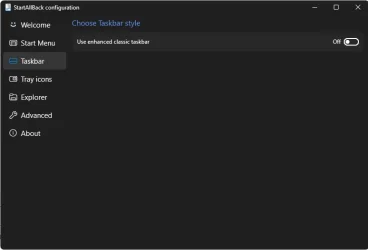
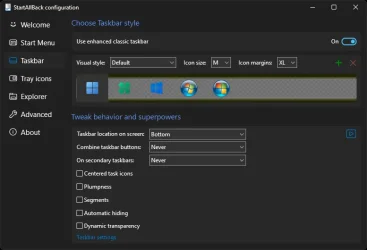
I have just installed ExplorerPatcher and disabled taskbar settings from within StartAllBack.

eb_taskbar-1.webp

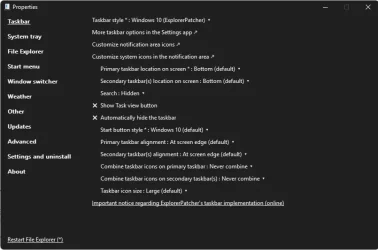
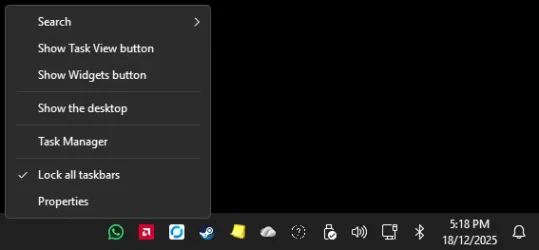
ExplorerPatcher is telling it is using the 'Windows 10 (ExplorerPatcher)' style but it is not.

eb_taskbar-2.webp

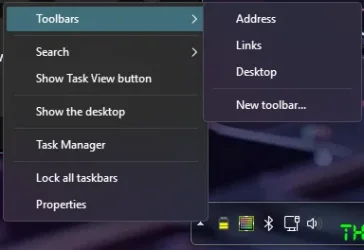
When I right-click on the taskbar, I still only get Task Manager and Taskbar Settings, as per Windows 11.

Restarting Explorer does not seem to solve it.

Any ideas?
 

My Computer

System One

  • OS
    Windows 11
    Computer type
    PC/Desktop
    CPU
    AMD Ryzen 7 7800X3D
    Motherboard
    ASRock B650M Pro RS
    Memory
    32 GB DDR5-6000
    Graphics Card(s)
    Radeon RX 9070 XT
    Monitor(s) Displays
    42" LG C4 OLED, 42" LG C2 OLED
    Screen Resolution
    2x 4K (100% scaling)
    PSU
    Corsair RM850x
    Case
    Cooler Master MasterBox NR400
    Keyboard
    Tecware Phantom RGB
    Mouse
    Logitech G309
    Internet Speed
    1 Gbps down, 1 Gbps up
    Browser
    Google Chrome
Last edited:

My Computers

System One System Two

  • OS
    11 Home
    Computer type
    Laptop
    Manufacturer/Model
    Asus TUF Gaming F16 (2024)
    CPU
    i7 13650HX
    Memory
    16GB DDR5
    Graphics Card(s)
    GeForce RTX 4060 Mobile
    Sound Card
    Eastern Electric MiniMax DAC Supreme; Emotiva UMC-200; Astell & Kern AK240
    Monitor(s) Displays
    Sony Bravia XR-55X90J
    Screen Resolution
    3840×2160
    Hard Drives
    512GB SSD internal
    37TB external
    PSU
    Li-ion
    Cooling
    2× Arc Flow Fans, 4× exhaust vents, 5× heatpipes
    Keyboard
    Logitech K800
    Mouse
    Logitech G402
    Internet Speed
    30Mbit/s up, 500Mbit/s down
    Browser
    FF
    Antivirus
    What's an antivirus?
  • Operating System
    11 Home
    Computer type
    Laptop
    Manufacturer/Model
    Medion S15450
    CPU
    i5 1135G7
    Memory
    16GB DDR4
    Graphics card(s)
    Intel Iris Xe
    Sound Card
    Eastern Electric MiniMax DAC Supreme; Emotiva UMC-200; Astell & Kern AK240
    Monitor(s) Displays
    Sony Bravia XR-55X90J
    Screen Resolution
    3840×2160
    Hard Drives
    2TB SSD internal
    37TB external
    PSU
    Li-ion
    Keyboard
    Logitech K800
    Mouse
    Logitech G402
    Internet Speed
    30Mbit/s up, 500Mbit/s down
    Browser
    FF
Do you know which registry key this is?

I have searched online and cannot find it.
Search by the word UndockingDisabled. The WH mod also uses registry query hook to make Windows to think this key is set.
 

My Computer

System One

  • OS
    Windows 11
That nasty old registry tweak was causing multiple other features of explorer.exe to be broken, it was the very reason why ExplorerPatcher was invented anyway in the first place. Additionally, on 24H2/25H2, setting the Taskbar style option to "Windows 10 (ExplorerPatcher)" in ExplorerPatcher's settings does not cause any major troubles
It does. It is not compatible with Classic theme, not compatible with 7+ Taskbar Tweaker and with most Windhawk mods that modify the taskbar.
 

My Computer

System One

  • OS
    Windows 11
Try rebooting your computer.
Unfortunately, no dice. Which makes sense, as restarting Explorer would do the same thing anyway.

It appears ExplorerPatcher also no longer supports taskbar toolbars.
 

My Computer

System One

  • OS
    Windows 11
    Computer type
    PC/Desktop
    CPU
    AMD Ryzen 7 7800X3D
    Motherboard
    ASRock B650M Pro RS
    Memory
    32 GB DDR5-6000
    Graphics Card(s)
    Radeon RX 9070 XT
    Monitor(s) Displays
    42" LG C4 OLED, 42" LG C2 OLED
    Screen Resolution
    2x 4K (100% scaling)
    PSU
    Corsair RM850x
    Case
    Cooler Master MasterBox NR400
    Keyboard
    Tecware Phantom RGB
    Mouse
    Logitech G309
    Internet Speed
    1 Gbps down, 1 Gbps up
    Browser
    Google Chrome

My Computer

System One

  • OS
    Windows 11
    Computer type
    PC/Desktop
    CPU
    AMD Ryzen 7 7800X3D
    Motherboard
    ASRock B650M Pro RS
    Memory
    32 GB DDR5-6000
    Graphics Card(s)
    Radeon RX 9070 XT
    Monitor(s) Displays
    42" LG C4 OLED, 42" LG C2 OLED
    Screen Resolution
    2x 4K (100% scaling)
    PSU
    Corsair RM850x
    Case
    Cooler Master MasterBox NR400
    Keyboard
    Tecware Phantom RGB
    Mouse
    Logitech G309
    Internet Speed
    1 Gbps down, 1 Gbps up
    Browser
    Google Chrome
very odd. i just checked it on 26200.6901 and 26200.7462 and both have Toolbars. you can try going back to 3.9.19 and see if its a hiccup during the install...
 

My Computer

System One

  • OS
    Windows 11 Pro
very odd. i just checked it on 26200.6901 and 26200.7462 and both have Toolbars. you can try going back to 3.9.19 and see if its a hiccup during the install...
Unfortunately, dropping back to 3.9.19 did not help.
 

My Computer

System One

  • OS
    Windows 11
    Computer type
    PC/Desktop
    CPU
    AMD Ryzen 7 7800X3D
    Motherboard
    ASRock B650M Pro RS
    Memory
    32 GB DDR5-6000
    Graphics Card(s)
    Radeon RX 9070 XT
    Monitor(s) Displays
    42" LG C4 OLED, 42" LG C2 OLED
    Screen Resolution
    2x 4K (100% scaling)
    PSU
    Corsair RM850x
    Case
    Cooler Master MasterBox NR400
    Keyboard
    Tecware Phantom RGB
    Mouse
    Logitech G309
    Internet Speed
    1 Gbps down, 1 Gbps up
    Browser
    Google Chrome
any other mod software running that could interfere with sab?
disregard; see post 17
 

My Computer

System One

  • OS
    Windows 11 Pro
I suggest you uninstall both SAB & ExplorerPatcher then start again [just reinstall one of them].

If you ever have the problem in the future, just get the latest version of whichever one you chose and reinstall it.
- That was probably all you needed to have done this time as well.
- For example, I had to reinstall ExplorerPatcher after I'd upgraded to 25H2 and this worked without any complications.


Best of luck,
Denis
 

My Computer

System One

  • OS
    Windows 11 Home x64 Version 25H2 Build 26200.8037
oh.. lol duh. my mistake. overlooked this. unlock taskbars and then check the context menu again
That fixed it! Thank you!

What an odd bug.
 

My Computer

System One

  • OS
    Windows 11
    Computer type
    PC/Desktop
    CPU
    AMD Ryzen 7 7800X3D
    Motherboard
    ASRock B650M Pro RS
    Memory
    32 GB DDR5-6000
    Graphics Card(s)
    Radeon RX 9070 XT
    Monitor(s) Displays
    42" LG C4 OLED, 42" LG C2 OLED
    Screen Resolution
    2x 4K (100% scaling)
    PSU
    Corsair RM850x
    Case
    Cooler Master MasterBox NR400
    Keyboard
    Tecware Phantom RGB
    Mouse
    Logitech G309
    Internet Speed
    1 Gbps down, 1 Gbps up
    Browser
    Google Chrome
no problem. i knew i'd read that issue before. thanks @Edwin for keeping me from thinking i'd lost my mind haha.
please mark as solved.


My Computer

System One

  • OS
    Windows 11 Pro
Unfortunately, no dice. Which makes sense, as restarting Explorer would do the same thing anyway.
No, it does not always do the same thing.
It appears ExplorerPatcher also no longer supports taskbar toolbars.
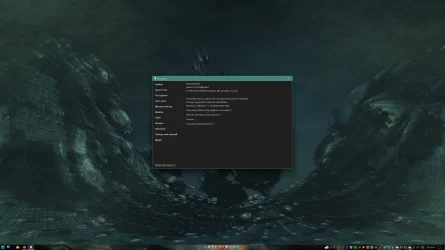
See my screenshot. I actually have a toolbar with 10 icons sitting right in the middle of my taskbar, yet I am running the exact same build of Windows 11 25H2 as you, 26200.7462. (It says so in ExplorerPatcher's settings window, like visible in that same screenshot.)

If it downloaded all the symbols from Microsoft and you rebooted after you selected Taskbar style: "Windows 10 (ExplorerPatcher)", then if it still doesn't work for you, it indicates that something must have already been broken in your Windows 11 (24H2 or 25H2) installation before you installed ExplorerPatcher.

That said, for many months, Amrsatrio worked very hard to bring the Windows 10 taskbar back on 24H2. I'll never forget I was holding my breath that entire time, but he managed to pull it off before 24H2 officially came out. The result? It prevents explorer.exe from crashing. Stop. It's the bees knees. Full stop.
 

My Computers

System One System Two

  • OS
    11 Home
    Computer type
    Laptop
    Manufacturer/Model
    Asus TUF Gaming F16 (2024)
    CPU
    i7 13650HX
    Memory
    16GB DDR5
    Graphics Card(s)
    GeForce RTX 4060 Mobile
    Sound Card
    Eastern Electric MiniMax DAC Supreme; Emotiva UMC-200; Astell & Kern AK240
    Monitor(s) Displays
    Sony Bravia XR-55X90J
    Screen Resolution
    3840×2160
    Hard Drives
    512GB SSD internal
    37TB external
    PSU
    Li-ion
    Cooling
    2× Arc Flow Fans, 4× exhaust vents, 5× heatpipes
    Keyboard
    Logitech K800
    Mouse
    Logitech G402
    Internet Speed
    30Mbit/s up, 500Mbit/s down
    Browser
    FF
    Antivirus
    What's an antivirus?
  • Operating System
    11 Home
    Computer type
    Laptop
    Manufacturer/Model
    Medion S15450
    CPU
    i5 1135G7
    Memory
    16GB DDR4
    Graphics card(s)
    Intel Iris Xe
    Sound Card
    Eastern Electric MiniMax DAC Supreme; Emotiva UMC-200; Astell & Kern AK240
    Monitor(s) Displays
    Sony Bravia XR-55X90J
    Screen Resolution
    3840×2160
    Hard Drives
    2TB SSD internal
    37TB external
    PSU
    Li-ion
    Keyboard
    Logitech K800
    Mouse
    Logitech G402
    Internet Speed
    30Mbit/s up, 500Mbit/s down
    Browser
    FF
Back
Top Bottom