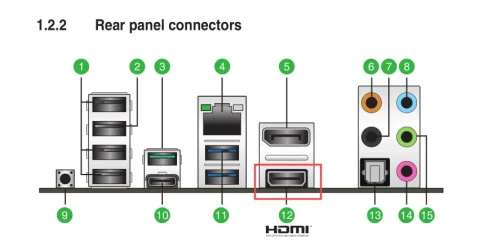
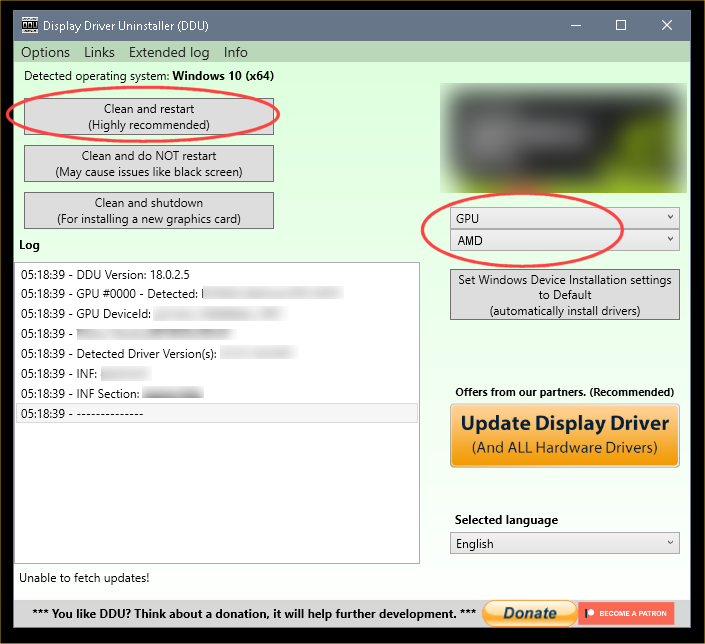
Greetings! I have a very strange and aggravating problem that has kept my PC at a computer shop for going on 2 weeks not getting fixed. I've decided to reach out to the Gurus on here to see if anyone has any idea what might be going on.
Several weeks ago, I started having a graphics problem. I would be working sometimes looking at video sometimes not and my screen would go black then to a color (light blue, lime green, etc.) and tell me no HDMI connection. I tried unplugging the HDMI cable and plugging it back in from both ends (PC and Monitor) and could not re-establish the connection. I would then power down the PC and bring it back up, the monitor would reconnect and the desktop return. Sometimes the error would only occur once or twice a day. There was even a time where it worked fine for almost a week before the error reoccurred. Then it got to where it would do it several times a day.
Upon taking it to a computer shop, they decided it was due to outdated drivers. My BIOS and graphics drivers were approximately 3 or so years out of date but everything had still worked fine up until several weeks to a month ago with these same drivers. After doing this, they thought the problem was solved so I brought it home. It was up 10 minutes and the error re-occurred.
Also, when the monitor "blinked out", it would occasionally "corrupt" the graphics driver. I verified this in the device manager. However, if I tried reinstalling the proper driver from AMD, when the monitor blinks as it's installing the driver, the monitor goes out and stays out and I can't see to finish the installation. I'm forced to shutdown the computer and power it back on. The last time this happened, the PC would not re-establish a connection at all. The monitor just continually said "No HDMI Connection".
The monitor has been verified still working because I can leave it on and see it's message about going into sleep mode after losing HDMI connectivity.
So, it goes back to the shop. She is telling me the next step is for her to connect it to, I guess she means a version of windows on one of her drives at the shop and if it doesn't blink out over the day, she's telling me she needs to reinstall Windows.
Here's another weird thing though. When the PC left my home there was no way to get the screen to come up. It was blacked out and would not reconnect; however, I just spoke to her again and told her this and she's telling me they were able to get it to come up with no problem. Yes, they had the error happen for them but how can you go from nothing to something with just going from my home to a PC shop? The only difference was this time, she told me she didn't need my HDMI cable which she had the first time.
Can anyone shed any light on this? I do not want to bring this home again or let her reinstall Windows if anyone can give me further insight on how to correct this problem.
Thank you taking time to read all this!
Several weeks ago, I started having a graphics problem. I would be working sometimes looking at video sometimes not and my screen would go black then to a color (light blue, lime green, etc.) and tell me no HDMI connection. I tried unplugging the HDMI cable and plugging it back in from both ends (PC and Monitor) and could not re-establish the connection. I would then power down the PC and bring it back up, the monitor would reconnect and the desktop return. Sometimes the error would only occur once or twice a day. There was even a time where it worked fine for almost a week before the error reoccurred. Then it got to where it would do it several times a day.
Upon taking it to a computer shop, they decided it was due to outdated drivers. My BIOS and graphics drivers were approximately 3 or so years out of date but everything had still worked fine up until several weeks to a month ago with these same drivers. After doing this, they thought the problem was solved so I brought it home. It was up 10 minutes and the error re-occurred.
Also, when the monitor "blinked out", it would occasionally "corrupt" the graphics driver. I verified this in the device manager. However, if I tried reinstalling the proper driver from AMD, when the monitor blinks as it's installing the driver, the monitor goes out and stays out and I can't see to finish the installation. I'm forced to shutdown the computer and power it back on. The last time this happened, the PC would not re-establish a connection at all. The monitor just continually said "No HDMI Connection".
The monitor has been verified still working because I can leave it on and see it's message about going into sleep mode after losing HDMI connectivity.
So, it goes back to the shop. She is telling me the next step is for her to connect it to, I guess she means a version of windows on one of her drives at the shop and if it doesn't blink out over the day, she's telling me she needs to reinstall Windows.
Here's another weird thing though. When the PC left my home there was no way to get the screen to come up. It was blacked out and would not reconnect; however, I just spoke to her again and told her this and she's telling me they were able to get it to come up with no problem. Yes, they had the error happen for them but how can you go from nothing to something with just going from my home to a PC shop? The only difference was this time, she told me she didn't need my HDMI cable which she had the first time.
Can anyone shed any light on this? I do not want to bring this home again or let her reinstall Windows if anyone can give me further insight on how to correct this problem.
Thank you taking time to read all this!
My Computer
At a glance
Windows 11 Pro 24H2AMD Ryzen 7 5700G32.0GB Dual-Channel DDR4 @ 1197MHzRadeon (TM) RX 470
- OS
- Windows 11 Pro 24H2
- Computer type
- PC/Desktop
- Manufacturer/Model
- ASUSTeK COMPUTER INC.
- CPU
- AMD Ryzen 7 5700G
- Motherboard
- TUF GAMING B550-PRO (AM4)
- Memory
- 32.0GB Dual-Channel DDR4 @ 1197MHz
- Graphics Card(s)
- Radeon (TM) RX 470
- Sound Card
- AMD High Definition Audio Device
- Monitor(s) Displays
- Dell P2219H
- Screen Resolution
- 1920x1080
- Hard Drives
- 238GB Patriot M.2 P300, 2 1863GB Western Digital WDC WD20EURX-63T0FY0 (SATA) drives
- Keyboard
- Logitec K450
- Mouse
- Logitec M310
- Internet Speed
- 100Mbps
- Browser
- Brave
- Antivirus
- Windows Defender, Malwarebytes Pro