
Solved Monitor Blinking Out/Losing HDMI Connection


Xoanon

Active member
Member
Local time
6:22 PM
Posts
32
OS
Windows 11 Pro 24H2
Greetings! I have a very strange and aggravating problem that has kept my PC at a computer shop for going on 2 weeks not getting fixed. I've decided to reach out to the Gurus on here to see if anyone has any idea what might be going on.

Several weeks ago, I started having a graphics problem. I would be working sometimes looking at video sometimes not and my screen would go black then to a color (light blue, lime green, etc.) and tell me no HDMI connection. I tried unplugging the HDMI cable and plugging it back in from both ends (PC and Monitor) and could not re-establish the connection. I would then power down the PC and bring it back up, the monitor would reconnect and the desktop return. Sometimes the error would only occur once or twice a day. There was even a time where it worked fine for almost a week before the error reoccurred. Then it got to where it would do it several times a day.

Upon taking it to a computer shop, they decided it was due to outdated drivers. My BIOS and graphics drivers were approximately 3 or so years out of date but everything had still worked fine up until several weeks to a month ago with these same drivers. After doing this, they thought the problem was solved so I brought it home. It was up 10 minutes and the error re-occurred.

Also, when the monitor "blinked out", it would occasionally "corrupt" the graphics driver. I verified this in the device manager. However, if I tried reinstalling the proper driver from AMD, when the monitor blinks as it's installing the driver, the monitor goes out and stays out and I can't see to finish the installation. I'm forced to shutdown the computer and power it back on. The last time this happened, the PC would not re-establish a connection at all. The monitor just continually said "No HDMI Connection".

The monitor has been verified still working because I can leave it on and see it's message about going into sleep mode after losing HDMI connectivity.

So, it goes back to the shop. She is telling me the next step is for her to connect it to, I guess she means a version of windows on one of her drives at the shop and if it doesn't blink out over the day, she's telling me she needs to reinstall Windows.

Here's another weird thing though. When the PC left my home there was no way to get the screen to come up. It was blacked out and would not reconnect; however, I just spoke to her again and told her this and she's telling me they were able to get it to come up with no problem. Yes, they had the error happen for them but how can you go from nothing to something with just going from my home to a PC shop? The only difference was this time, she told me she didn't need my HDMI cable which she had the first time.

Can anyone shed any light on this? I do not want to bring this home again or let her reinstall Windows if anyone can give me further insight on how to correct this problem.

Thank you taking time to read all this!
 

My Computer My Computer

At a glance

Windows 11 Pro 24H2AMD Ryzen 7 5700G32.0GB Dual-Channel DDR4 @ 1197MHzRadeon (TM) RX 470
OS
Windows 11 Pro 24H2
Computer type
PC/Desktop
Manufacturer/Model
ASUSTeK COMPUTER INC.
CPU
AMD Ryzen 7 5700G
Motherboard
TUF GAMING B550-PRO (AM4)
Memory
32.0GB Dual-Channel DDR4 @ 1197MHz
Graphics Card(s)
Radeon (TM) RX 470
Sound Card
AMD High Definition Audio Device
Monitor(s) Displays
Dell P2219H
Screen Resolution
1920x1080
Hard Drives
238GB Patriot M.2 P300, 2 1863GB Western Digital WDC WD20EURX-63T0FY0 (SATA) drives
Keyboard
Logitec K450
Mouse
Logitec M310
Internet Speed
100Mbps
Browser
Brave
Antivirus
Windows Defender, Malwarebytes Pro
Greetings! I have a very strange and aggravating problem that has kept my PC at a computer shop for going on 2 weeks not getting fixed. I've decided to reach out to the Gurus on here to see if anyone has any idea what might be going on.

Several weeks ago, I started having a graphics problem. I would be working sometimes looking at video sometimes not and my screen would go black then to a color (light blue, lime green, etc.) and tell me no HDMI connection. I tried unplugging the HDMI cable and plugging it back in from both ends (PC and Monitor) and could not re-establish the connection. I would then power down the PC and bring it back up, the monitor would reconnect and the desktop return. Sometimes the error would only occur once or twice a day. There was even a time where it worked fine for almost a week before the error reoccurred. Then it got to where it would do it several times a day.

Upon taking it to a computer shop, they decided it was due to outdated drivers. My BIOS and graphics drivers were approximately 3 or so years out of date but everything had still worked fine up until several weeks to a month ago with these same drivers. After doing this, they thought the problem was solved so I brought it home. It was up 10 minutes and the error re-occurred.

Also, when the monitor "blinked out", it would occasionally "corrupt" the graphics driver. I verified this in the device manager. However, if I tried reinstalling the proper driver from AMD, when the monitor blinks as it's installing the driver, the monitor goes out and stays out and I can't see to finish the installation. I'm forced to shutdown the computer and power it back on. The last time this happened, the PC would not re-establish a connection at all. The monitor just continually said "No HDMI Connection".

The monitor has been verified still working because I can leave it on and see it's message about going into sleep mode after losing HDMI connectivity.

So, it goes back to the shop. She is telling me the next step is for her to connect it to, I guess she means a version of windows on one of her drives at the shop and if it doesn't blink out over the day, she's telling me she needs to reinstall Windows.

Here's another weird thing though. When the PC left my home there was no way to get the screen to come up. It was blacked out and would not reconnect; however, I just spoke to her again and told her this and she's telling me they were able to get it to come up with no problem. Yes, they had the error happen for them but how can you go from nothing to something with just going from my home to a PC shop? The only difference was this time, she told me she didn't need my HDMI cable which she had the first time.

Can anyone shed any light on this? I do not want to bring this home again or let her reinstall Windows if anyone can give me further insight on how to correct this problem.

Thank you taking time to read all this!
First thing I would I have tried is a new or another certified HDMI 2.1b cable. You didn't mention what resolution and refresh you're running at.
Also, 10 year old graphics card. I wouldn't be surprised if the thermal paste on the die is as hard a a rock. This can cause issues with freezing and crashing.
 

My Computer My Computer

At a glance

Windows 11 25H2Broadwell-e 6850K 4.5ghz @1.36v32GB Corsair LPM 3600 C16EVGA RTX 3080Ti FTW
OS
Windows 11 25H2
Computer type
PC/Desktop
Manufacturer/Model
EVGA home brew
CPU
Broadwell-e 6850K 4.5ghz @1.36v
Motherboard
EVGA X99 FTW K
Memory
32GB Corsair LPM 3600 C16
Graphics Card(s)
EVGA RTX 3080Ti FTW
Sound Card
Asus Centurion true 7.1 headset. (5 speakers in each earpeice)
Monitor(s) Displays
LG C4 55"
Screen Resolution
4K 144hz
Hard Drives
Various models of SSDs ~10TB No HDDs installed.
PSU
be quiet! BN516 Straight Power 12-1000w 80 Plus Platinum
Case
Corsair 780T modified to dual 200mm intake fans
Cooling
Corsair H110i
Keyboard
Corsair K95 Platinum
Mouse
Corsair M65 RGB Elite
Internet Speed
50Mbs
I dont know what the computer shop did or didn't do.

But bad connection on connector surfaces has always given wired symptoms.
Turn off the computer and disconnect the main power. (remove that cable from the wall socket)
after the main power is disconnected push the power button, so it discharge the PSU.
Open the computer, remove all cables to the GPU and then remove the GPU from the motherboard.. Then put it all back again.
This manoeuvrer will refresh the contact on all connector surfaces..

If it is that the GPU goes hot, there is a few monitor programs to measure temperatures. (i dont remember the name of them now as its ages since i used them, but someone in here will know more then one software) :-)
Keep the program up in one corner of the screen while doing other things and see if the temperature spikes before it goes dark... if you dont see an temperature spike, you can rule out bad thermal paste.

That was my five cents to the thread. :-) Good luck with the troubleshooting. (y)
 

My Computers My Computers

  • At a glance

    Linux: Debian, Kali-linux, Alma, Win:7,10IoT,...i3, i5 and i7 From 2gen to 9th gen... Server ...
    OS
    Linux: Debian, Kali-linux, Alma, Win:7,10IoT,2012R
    Manufacturer/Model
    HP Elitebook 840, AsusX53, Aspire E1-572. AsusUX32A, HP Pro3130mt+3010mt, HP Proliant ML150, 3xCustom-PC, i3, i5, i7
    CPU
    i3, i5 and i7 From 2gen to 9th gen... Server dual Xenon
    Hard Drives
    Sata, M.2, SAS
  • At a glance

    Retro: 2003server.XPpro, Win2000, Win98SE, Wi...Oldest intel 8088 up to P4 dual core
    Operating System
    Retro: 2003server.XPpro, Win2000, Win98SE, Win95, Win3.11, MS-DOS, IBM-DOS
    Manufacturer/Model
    Commodore, AST, Fujitsu, Compaq, etc etc. etc Around 15 desktops and 20 laptops in the collection
    CPU
    Oldest intel 8088 up to P4 dual core
    Hard Drives
    MFM, IDE, SCSI
Thank you taking time to read all this!

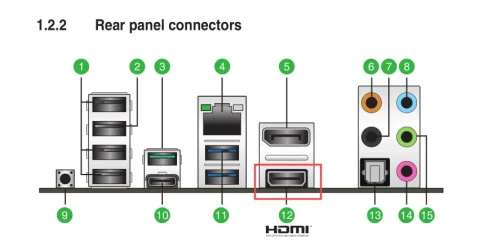
Try using the graphics part of the CPU.

Image1.webp


If that works OK, then you should...
...get a new vid card. That RX 470 is pretty old and pretty wimpy.

Here's ten points for filling out your computer specs though. :-)
 

My Computers My Computers

  • At a glance

    Win 11 Home ♦♦♦26200.9168 ♦♦♦♦♦♦♦25H2AMD Ryzen 7 3700XG.Skill (F4-3200C14D-16GTZKW)EVGA RTX 2070 (08G-P4-2171-KR)
    OS
    Win 11 Home ♦♦♦26200.9168 ♦♦♦♦♦♦♦25H2
    Computer type
    PC/Desktop
    Manufacturer/Model
    Built by Ghot® [May 2020]
    CPU
    AMD Ryzen 7 3700X
    Motherboard
    Asus Pro WS X570-ACE (BIOS 5302)
    Memory
    G.Skill (F4-3200C14D-16GTZKW)
    Graphics Card(s)
    EVGA RTX 2070 (08G-P4-2171-KR)
    Sound Card
    Realtek ALC1220P / ALC S1220A
    Monitor(s) Displays
    Dell U3011 30"
    Screen Resolution
    2560 x 1600
    Hard Drives
    2x Samsung 860 EVO 500GB,
    WD 4TB Black FZBX - SATA III,
    WD 8TB Black FZBX - SATA III,
    DRW-24B1ST CD/DVD Burner
    PSU
    PC Power & Cooling 750W Quad EPS12V
    Case
    Cooler Master ATCS 840 Tower
    Cooling
    CM Hyper 212 EVO (push/pull)
    Keyboard
    Ducky DK9008 Shine II Blue LED
    Mouse
    Logitech Optical M-100
    Internet Speed
    300/300
    Browser
    Firefox (latest)
    Antivirus
    Bitdefender Total Security
    Other Info
    Speakers: Klipsch Pro Media 2.1
  • At a glance

    Windows XP Pro 32bit w/SP3AMD Athlon 64 X2 5000+ (OC'd @ 3.2Ghz)TWIN2X2048-6400C4DHX (2 x 1GB, DDR2 800)EVGA 256-P2-N758-TR GeForce 8600GT SSC
    Operating System
    Windows XP Pro 32bit w/SP3
    Computer type
    PC/Desktop
    Manufacturer/Model
    Built by Ghot® (not in use)
    CPU
    AMD Athlon 64 X2 5000+ (OC'd @ 3.2Ghz)
    Motherboard
    ASUS M2N32-SLI Deluxe Wireless Edition
    Memory
    TWIN2X2048-6400C4DHX (2 x 1GB, DDR2 800)
    Graphics card(s)
    EVGA 256-P2-N758-TR GeForce 8600GT SSC
    Sound Card
    Onboard
    Monitor(s) Displays
    ViewSonic G90FB Black 19" Professional (CRT)
    Screen Resolution
    up to 2048 x 1536
    Hard Drives
    WD 36GB 10,000rpm Raptor SATA
    Seagate 80GB 7200rpm SATA
    Lite-On LTR-52246S CD/RW
    Lite-On LH-18A1P CD/DVD Burner
    PSU
    PC Power & Cooling Silencer 750 Quad EPS12V
    Case
    Generic Beige case, 80mm fans
    Cooling
    ZALMAN 9500A 92mm CPU Cooler
    Keyboard
    Logitech Classic Keybooard 200
    Mouse
    Logitech Optical M-BT96a
    Internet Speed
    300/300
    Browser
    Firefox 3.x ??
    Antivirus
    Symantec (Norton)
    Other Info
    Still assembled, still runs. Haven't turned it on for 15 years?
First thing I would I have tried is a new or another certified HDMI 2.1b cable. You didn't mention what resolution and refresh you're running at.
Also, 10 year old graphics card. I wouldn't be surprised if the thermal paste on the die is as hard a a rock. This can cause issues with freezing and crashing.
I would hope they used current industry standard cables while testing. The resolution is 1080p and I am unsure of the refresh rate. Yeah, I realize the graphics card is quite old but shop swears in checking all hardware there are no problems. Would a problem with thermal paste not show with a standard hardware check? Thanks for your input!
 

My Computer My Computer

At a glance

Windows 11 Pro 24H2AMD Ryzen 7 5700G32.0GB Dual-Channel DDR4 @ 1197MHzRadeon (TM) RX 470
OS
Windows 11 Pro 24H2
Computer type
PC/Desktop
Manufacturer/Model
ASUSTeK COMPUTER INC.
CPU
AMD Ryzen 7 5700G
Motherboard
TUF GAMING B550-PRO (AM4)
Memory
32.0GB Dual-Channel DDR4 @ 1197MHz
Graphics Card(s)
Radeon (TM) RX 470
Sound Card
AMD High Definition Audio Device
Monitor(s) Displays
Dell P2219H
Screen Resolution
1920x1080
Hard Drives
238GB Patriot M.2 P300, 2 1863GB Western Digital WDC WD20EURX-63T0FY0 (SATA) drives
Keyboard
Logitec K450
Mouse
Logitec M310
Internet Speed
100Mbps
Browser
Brave
Antivirus
Windows Defender, Malwarebytes Pro
I dont know what the computer shop did or didn't do.

But bad connection on connector surfaces has always given wired symptoms.
Turn off the computer and disconnect the main power. (remove that cable from the wall socket)
after the main power is disconnected push the power button, so it discharge the PSU.
Open the computer, remove all cables to the GPU and then remove the GPU from the motherboard.. Then put it all back again.
This manoeuvrer will refresh the contact on all connector surfaces..

If it is that the GPU goes hot, there is a few monitor programs to measure temperatures. (i dont remember the name of them now as its ages since i used them, but someone in here will know more then one software) :-)
Keep the program up in one corner of the screen while doing other things and see if the temperature spikes before it goes dark... if you dont see an temperature spike, you can rule out bad thermal paste.

That was my five cents to the thread. :-) Good luck with the troubleshooting. (y)

Well, I know they updated the BIOS, CPU & Graphics drivers to the most current versions. Other than that, they did a complete check of the hardware and tell me there's no issue with any of it but I don't know what a check of hardware includes.
If what you've listed is a standard procedure for this type of issue, I HOPE they are aware of this type of thing and would have performed a similar check of the GPU.
I used HWInfo and everytime I check the GPU temperature it is well within acceptable ranges even when doing graphic-intensive tasks.
Thank you for your help and input!
 

My Computer My Computer

At a glance

Windows 11 Pro 24H2AMD Ryzen 7 5700G32.0GB Dual-Channel DDR4 @ 1197MHzRadeon (TM) RX 470
OS
Windows 11 Pro 24H2
Computer type
PC/Desktop
Manufacturer/Model
ASUSTeK COMPUTER INC.
CPU
AMD Ryzen 7 5700G
Motherboard
TUF GAMING B550-PRO (AM4)
Memory
32.0GB Dual-Channel DDR4 @ 1197MHz
Graphics Card(s)
Radeon (TM) RX 470
Sound Card
AMD High Definition Audio Device
Monitor(s) Displays
Dell P2219H
Screen Resolution
1920x1080
Hard Drives
238GB Patriot M.2 P300, 2 1863GB Western Digital WDC WD20EURX-63T0FY0 (SATA) drives
Keyboard
Logitec K450
Mouse
Logitec M310
Internet Speed
100Mbps
Browser
Brave
Antivirus
Windows Defender, Malwarebytes Pro

Try using the graphics part of the CPU.

View attachment 179247


If that works OK, then you should...
...get a new vid card. That RX 470 is pretty old and pretty wimpy.

Here's ten points for filling out your computer specs though. :-)
Actually, I did know enough to give that a try. I unplugged it from the graphics card and plugged it into the CPU port. Still no connection. Thanks for your input & the points! No reason to use a technical support forum if you don't have your system specs listed. :)
 

My Computer My Computer

At a glance

Windows 11 Pro 24H2AMD Ryzen 7 5700G32.0GB Dual-Channel DDR4 @ 1197MHzRadeon (TM) RX 470
OS
Windows 11 Pro 24H2
Computer type
PC/Desktop
Manufacturer/Model
ASUSTeK COMPUTER INC.
CPU
AMD Ryzen 7 5700G
Motherboard
TUF GAMING B550-PRO (AM4)
Memory
32.0GB Dual-Channel DDR4 @ 1197MHz
Graphics Card(s)
Radeon (TM) RX 470
Sound Card
AMD High Definition Audio Device
Monitor(s) Displays
Dell P2219H
Screen Resolution
1920x1080
Hard Drives
238GB Patriot M.2 P300, 2 1863GB Western Digital WDC WD20EURX-63T0FY0 (SATA) drives
Keyboard
Logitec K450
Mouse
Logitec M310
Internet Speed
100Mbps
Browser
Brave
Antivirus
Windows Defender, Malwarebytes Pro
Actually, I did know enough to give that a try. I unplugged it from the graphics card and plugged it into the CPU port. Still no connection. Thanks for your input & the points! No reason to use a technical support forum if you don't have your system specs listed. :)


Well, the only things common to both sources (vid card and CPU), are the cable, the drivers, and the monitor.


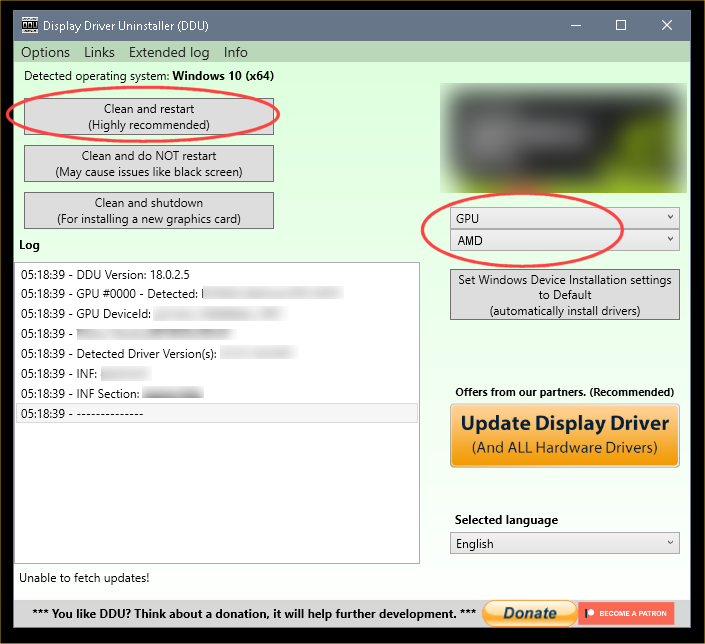
This will make sure your drivers are OK...


 DDU Instructions - AMD


I don't know if this will solve your issue, but everyone should know about the Tutorial below, and the DDU instructions.

Sometimes the drivers that MS occasionally includes with Windows Updates... can conflict with drivers that are already installed. Which is what the tutorial below is for.

DDU, on the other hand, will remove all the leftovers from MS or AMD graphics drivers, so when you install an AMD graphics driver, it has a clean slate to work with.


1. First, do Option Two, step #3 and onward, here...
2. This will block MS from including drivers in Windows Updates.
3. They'll still be listed in the Optional Updates, if you ever need them.


1. Get this program, here: Display Driver Uninstaller (DDU) | Wagnardsoft ...get the latest version, and save it to your desktop.
2. Get your vid card driver here, use the Manual Search: http://support.amd.com/en-us/download ...save this to your desktop.
Unhook the internet completely.
3. Reboot into Safe Mode and run DDU (Display Driver Uninstaller) choose the "Highly Recommend Option", and just do what it tells you.
4. After it's done, reboot to normal mode, then just double click the AMD driver to install. If it want's to reboot, let it.
Rehook the internet.

ZeG5oTO.png
 

My Computers My Computers

  • At a glance

    Win 11 Home ♦♦♦26200.9168 ♦♦♦♦♦♦♦25H2AMD Ryzen 7 3700XG.Skill (F4-3200C14D-16GTZKW)EVGA RTX 2070 (08G-P4-2171-KR)
    OS
    Win 11 Home ♦♦♦26200.9168 ♦♦♦♦♦♦♦25H2
    Computer type
    PC/Desktop
    Manufacturer/Model
    Built by Ghot® [May 2020]
    CPU
    AMD Ryzen 7 3700X
    Motherboard
    Asus Pro WS X570-ACE (BIOS 5302)
    Memory
    G.Skill (F4-3200C14D-16GTZKW)
    Graphics Card(s)
    EVGA RTX 2070 (08G-P4-2171-KR)
    Sound Card
    Realtek ALC1220P / ALC S1220A
    Monitor(s) Displays
    Dell U3011 30"
    Screen Resolution
    2560 x 1600
    Hard Drives
    2x Samsung 860 EVO 500GB,
    WD 4TB Black FZBX - SATA III,
    WD 8TB Black FZBX - SATA III,
    DRW-24B1ST CD/DVD Burner
    PSU
    PC Power & Cooling 750W Quad EPS12V
    Case
    Cooler Master ATCS 840 Tower
    Cooling
    CM Hyper 212 EVO (push/pull)
    Keyboard
    Ducky DK9008 Shine II Blue LED
    Mouse
    Logitech Optical M-100
    Internet Speed
    300/300
    Browser
    Firefox (latest)
    Antivirus
    Bitdefender Total Security
    Other Info
    Speakers: Klipsch Pro Media 2.1
  • At a glance

    Windows XP Pro 32bit w/SP3AMD Athlon 64 X2 5000+ (OC'd @ 3.2Ghz)TWIN2X2048-6400C4DHX (2 x 1GB, DDR2 800)EVGA 256-P2-N758-TR GeForce 8600GT SSC
    Operating System
    Windows XP Pro 32bit w/SP3
    Computer type
    PC/Desktop
    Manufacturer/Model
    Built by Ghot® (not in use)
    CPU
    AMD Athlon 64 X2 5000+ (OC'd @ 3.2Ghz)
    Motherboard
    ASUS M2N32-SLI Deluxe Wireless Edition
    Memory
    TWIN2X2048-6400C4DHX (2 x 1GB, DDR2 800)
    Graphics card(s)
    EVGA 256-P2-N758-TR GeForce 8600GT SSC
    Sound Card
    Onboard
    Monitor(s) Displays
    ViewSonic G90FB Black 19" Professional (CRT)
    Screen Resolution
    up to 2048 x 1536
    Hard Drives
    WD 36GB 10,000rpm Raptor SATA
    Seagate 80GB 7200rpm SATA
    Lite-On LTR-52246S CD/RW
    Lite-On LH-18A1P CD/DVD Burner
    PSU
    PC Power & Cooling Silencer 750 Quad EPS12V
    Case
    Generic Beige case, 80mm fans
    Cooling
    ZALMAN 9500A 92mm CPU Cooler
    Keyboard
    Logitech Classic Keybooard 200
    Mouse
    Logitech Optical M-BT96a
    Internet Speed
    300/300
    Browser
    Firefox 3.x ??
    Antivirus
    Symantec (Norton)
    Other Info
    Still assembled, still runs. Haven't turned it on for 15 years?
Well, I know they updated the BIOS, CPU & Graphics drivers to the most current versions. Other than that, they did a complete check of the hardware and tell me there's no issue with any of it but I don't know what a check of hardware includes.
If what you've listed is a standard procedure for this type of issue, I HOPE they are aware of this type of thing and would have performed a similar check of the GPU.
I used HWInfo and everytime I check the GPU temperature it is well within acceptable ranges even when doing graphic-intensive tasks.
Thank you for your help and input!
i have no idea of how they work.. first of all i live on the other side of the pond (Sweden) and not all even here check that as they often assume all is good.

I have messed around with hardware since my first computer 1987.. i even repair hardware (soldering components etc.) and i have even experimented with hardware that even long time users get scared of even to hear about and is so far from recommended its even closer to visit our neighbor galaxy*LOL*😅

So i have a tendency to think outside the box.. So if they checked that.... i dont know... I know from earlier experiences that can be the problem on rare occasions.. when i mean rare its so rare its not the first thing you even thinking of as the PCIe slots is gold-plated to prevent oxidation(bad contact) but dust etc. is as good(evil) as oxidation over time.

So its worth checking as it only take time and no money to test. :-) :-)
If you never-ever have open a computer ask a friend if they have, and if they can help you if it feels a bit scary :-) :-)
Even i was scared the first time i open a computer in the 80's. :-) we all starts from zero in life :-)
 

My Computers My Computers

  • At a glance

    Linux: Debian, Kali-linux, Alma, Win:7,10IoT,...i3, i5 and i7 From 2gen to 9th gen... Server ...
    OS
    Linux: Debian, Kali-linux, Alma, Win:7,10IoT,2012R
    Manufacturer/Model
    HP Elitebook 840, AsusX53, Aspire E1-572. AsusUX32A, HP Pro3130mt+3010mt, HP Proliant ML150, 3xCustom-PC, i3, i5, i7
    CPU
    i3, i5 and i7 From 2gen to 9th gen... Server dual Xenon
    Hard Drives
    Sata, M.2, SAS
  • At a glance

    Retro: 2003server.XPpro, Win2000, Win98SE, Wi...Oldest intel 8088 up to P4 dual core
    Operating System
    Retro: 2003server.XPpro, Win2000, Win98SE, Win95, Win3.11, MS-DOS, IBM-DOS
    Manufacturer/Model
    Commodore, AST, Fujitsu, Compaq, etc etc. etc Around 15 desktops and 20 laptops in the collection
    CPU
    Oldest intel 8088 up to P4 dual core
    Hard Drives
    MFM, IDE, SCSI
i have no idea of how they work.. first of all i live on the other side of the pond (Sweden) and not all even here check that as they often assume all is good.

I have messed around with hardware since my first computer 1987.. i even repair hardware (soldering components etc.) and i have even experimented with hardware that even long time users get scared of even to hear about and is so far from recommended its even closer to visit our neighbor galaxy*LOL*😅

So i have a tendency to think outside the box.. So if they checked that.... i dont know... I know from earlier experiences that can be the problem on rare occasions.. when i mean rare its so rare its not the first thing you even thinking of as the PCIe slots is gold-plated to prevent oxidation(bad contact) but dust etc. is as good(evil) as oxidation over time.

So its worth checking as it only take time and no money to test. :-) :-)
If you never-ever have open a computer ask a friend if they have, and if they can help you if it feels a bit scary :-) :-)
Even i was scared the first time i open a computer in the 80's. :-) we all starts from zero in life :-)
It's good to think out of the box. Sometimes that's exactly what is needed. The repair shop is supposed to call me tomorrow with the "results" of whatever she's trying out now to fix the issue. I'm at a point I'm ready to pick it up and take it to another (probably more costly) repair shop. I appreciate your input, I really do but unfortunately, I don't have any friends who deal with computers. I will pass on the information you've shared though and see if she might want to check it. Thanks again so much for your time!
 

My Computer My Computer

At a glance

Windows 11 Pro 24H2AMD Ryzen 7 5700G32.0GB Dual-Channel DDR4 @ 1197MHzRadeon (TM) RX 470
OS
Windows 11 Pro 24H2
Computer type
PC/Desktop
Manufacturer/Model
ASUSTeK COMPUTER INC.
CPU
AMD Ryzen 7 5700G
Motherboard
TUF GAMING B550-PRO (AM4)
Memory
32.0GB Dual-Channel DDR4 @ 1197MHz
Graphics Card(s)
Radeon (TM) RX 470
Sound Card
AMD High Definition Audio Device
Monitor(s) Displays
Dell P2219H
Screen Resolution
1920x1080
Hard Drives
238GB Patriot M.2 P300, 2 1863GB Western Digital WDC WD20EURX-63T0FY0 (SATA) drives
Keyboard
Logitec K450
Mouse
Logitec M310
Internet Speed
100Mbps
Browser
Brave
Antivirus
Windows Defender, Malwarebytes Pro
From what you have said, so far, it would appear to a faulty cable or the plugs on each end, possibly the monitor socket.

Pre-made cables are not overly reliable, and some people are very heavy handed with plugs/sockets.
Potentially broken plugs/sockets need some visual examination with a magnifying glass these days as they are small and dense contacts.
Cable itself can have problems somewhere along it's length, judicious wiggling may ID exactly where.

Always have spare cables, HDMI, DisplayPort. Helps diagnosis.
Upon taking it to a computer shop, they decided it was due to outdated drivers. My BIOS and graphics drivers were approximately 3 or so years out of date but everything had still worked fine up until several weeks to a month ago with these same drivers. After doing this, they thought the problem was solved so I brought it home. It was up 10 minutes and the error re-occurred.
That is typical of such places, no experience or fault finding knowledge. Just standard "it's the drivers".
They used a different HDMI cable and the problem did not show up, that tells you something yes ?
 

My Computer My Computer

At a glance

Windows 11
OS
Windows 11
I had to give a quick update on this. After >2weeks at the shop and expecting a call yesterday which I didn't receive but was told she left a VM today which I didn't get (guess my phone's broke too, right?), I asked the person at the shop about the "thermal paste" and "age of the card" mentioned by 2 members above and guess what? She told me when she finished with current customer, she would check the "thermal paste" and then run some video and see what happens. Ok, the other technician calls me back about an hour later and tells me the initial technician is on the phone with ASUS as they cannot get on-board or card graphics at all!!! I said, this is EXACTLY what it was doing for me at home. Now tell me WHY I had to tell them their job to bring them to the same problem I was having here at home.
 

My Computer My Computer

At a glance

Windows 11 Pro 24H2AMD Ryzen 7 5700G32.0GB Dual-Channel DDR4 @ 1197MHzRadeon (TM) RX 470
OS
Windows 11 Pro 24H2
Computer type
PC/Desktop
Manufacturer/Model
ASUSTeK COMPUTER INC.
CPU
AMD Ryzen 7 5700G
Motherboard
TUF GAMING B550-PRO (AM4)
Memory
32.0GB Dual-Channel DDR4 @ 1197MHz
Graphics Card(s)
Radeon (TM) RX 470
Sound Card
AMD High Definition Audio Device
Monitor(s) Displays
Dell P2219H
Screen Resolution
1920x1080
Hard Drives
238GB Patriot M.2 P300, 2 1863GB Western Digital WDC WD20EURX-63T0FY0 (SATA) drives
Keyboard
Logitec K450
Mouse
Logitec M310
Internet Speed
100Mbps
Browser
Brave
Antivirus
Windows Defender, Malwarebytes Pro

Latest Support Threads

Back
Top Bottom




