Solved Monitor - No Signal after move


Loki

Well-known member
VIP
Local time
6:16 PM
Posts
184
OS
Windows 11
Moved to new home and setup my PC (tower) and reconnected everything, start the PC and get NO Signal. Everything worked before move.

1. I've disconnect the monitor cable and reconnect it.
2. I've attach that moniter to another PC and it works.
3. I've tried another monitor
4. I've removed the video card and reinserted it.
5. I've tried another video card in the PC same issue.
6. I've tried both the HDMI 1 and 2 port plus the DP port on both the PC and Monitor.

I'm sure the PC is working as all the motherboard lights are on and both the mouse and keyboard light up. Plus CRTL+ALT+DEL restarts the PC as I can hear it and see the motherboard lights plus the monitor comes back up with no signal.
 

My Computer My Computer

At a glance

Windows 11AMD Ryzen 5 5600G with Radeon Graphics64.0GB Dual-Channel DDR4 @ 1330MHz (20-19-19-43)4096MB ATI Radeon RX550/550 Series (ATI)
OS
Windows 11
Computer type
PC/Desktop
CPU
AMD Ryzen 5 5600G with Radeon Graphics
Motherboard
MAG X570S TOMAHAWK MAX WIFI (MS-7D54) (AM4)
Memory
64.0GB Dual-Channel DDR4 @ 1330MHz (20-19-19-43)
Graphics Card(s)
4096MB ATI Radeon RX550/550 Series (ATI)
Monitor(s) Displays
1. SMXL2370HD (1920x1080@60Hz) 2. ASUS VE278 (1920x1080@60Hz) 3. Sceptre F27 on Radeon RX550/550 Series
Hard Drives
CT1000P5PSSD8 (SSD) - M2. NvME
CT1000P5PSSD8 (SSD)- M2. NvME
WDC WD5000AAKX-00ERMA0
119GB Crucial_ CT128MX100SSD1 SATA Disk Device (SATA (SSD))
931GB Seagate ST1000DM 003-1CH162 SATA Disk Device (SATA )
Browser
Chrome, Firefox, Edge (Chrome)
Antivirus
MalwareBytes Premium

@Loki

When you attached the monitor to another PC, did you use the other PC's cable?
Also, I would try "your" vid card in another computer.


The only thing I can think of that fits all your testing... is...

1. Bad cable(s) on "your" PC.
2. Did you try the motherboard's HDMI port?


For your #3, when you tried another monitor... did it work or not?
 
Last edited:

My Computers My Computers

  • At a glance

    Win 11 Home ♦♦♦26200.8655 ♦♦♦♦♦♦♦25H2AMD Ryzen 7 3700XG.Skill (F4-3200C14D-16GTZKW)EVGA RTX 2070 (08G-P4-2171-KR)
    OS
    Win 11 Home ♦♦♦26200.8655 ♦♦♦♦♦♦♦25H2
    Computer type
    PC/Desktop
    Manufacturer/Model
    Built by Ghot® [May 2020]
    CPU
    AMD Ryzen 7 3700X
    Motherboard
    Asus Pro WS X570-ACE (BIOS 5302)
    Memory
    G.Skill (F4-3200C14D-16GTZKW)
    Graphics Card(s)
    EVGA RTX 2070 (08G-P4-2171-KR)
    Sound Card
    Realtek ALC1220P / ALC S1220A
    Monitor(s) Displays
    Dell U3011 30"
    Screen Resolution
    2560 x 1600
    Hard Drives
    2x Samsung 860 EVO 500GB,
    WD 4TB Black FZBX - SATA III,
    WD 8TB Black FZBX - SATA III,
    DRW-24B1ST CD/DVD Burner
    PSU
    PC Power & Cooling 750W Quad EPS12V
    Case
    Cooler Master ATCS 840 Tower
    Cooling
    CM Hyper 212 EVO (push/pull)
    Keyboard
    Ducky DK9008 Shine II Blue LED
    Mouse
    Logitech Optical M-100
    Internet Speed
    300/300
    Browser
    Firefox (latest)
    Antivirus
    Bitdefender Total Security
    Other Info
    Speakers: Klipsch Pro Media 2.1
  • At a glance

    Windows XP Pro 32bit w/SP3AMD Athlon 64 X2 5000+ (OC'd @ 3.2Ghz)TWIN2X2048-6400C4DHX (2 x 1GB, DDR2 800)EVGA 256-P2-N758-TR GeForce 8600GT SSC
    Operating System
    Windows XP Pro 32bit w/SP3
    Computer type
    PC/Desktop
    Manufacturer/Model
    Built by Ghot® (not in use)
    CPU
    AMD Athlon 64 X2 5000+ (OC'd @ 3.2Ghz)
    Motherboard
    ASUS M2N32-SLI Deluxe Wireless Edition
    Memory
    TWIN2X2048-6400C4DHX (2 x 1GB, DDR2 800)
    Graphics card(s)
    EVGA 256-P2-N758-TR GeForce 8600GT SSC
    Sound Card
    Onboard
    Monitor(s) Displays
    ViewSonic G90FB Black 19" Professional (CRT)
    Screen Resolution
    up to 2048 x 1536
    Hard Drives
    WD 36GB 10,000rpm Raptor SATA
    Seagate 80GB 7200rpm SATA
    Lite-On LTR-52246S CD/RW
    Lite-On LH-18A1P CD/DVD Burner
    PSU
    PC Power & Cooling Silencer 750 Quad EPS12V
    Case
    Generic Beige case, 80mm fans
    Cooling
    ZALMAN 9500A 92mm CPU Cooler
    Keyboard
    Logitech Classic Keybooard 200
    Mouse
    Logitech Optical M-BT96a
    Internet Speed
    300/300
    Browser
    Firefox 3.x ??
    Antivirus
    Symantec (Norton)
    Other Info
    Still assembled, still runs. Haven't turned it on for 15 years?
Hi Ghot,

I tried the the video cards HDMI and DP port and the Monitors HDMI and DP ports. I tried the Motherboard HDMI port. Not sure if I tried it without the video card installed, I'll try that tomorrow.
The cables are the same as they were before the move and in good condition. It's the same video card that was working.
PC was not dropped or moved roughly. The other PC works fine and was moved at the same time. (of course it's the lesser of the 2)
I'm going to try the video card in another PC tomorrow.
I have tried other cables, I've 3 other HDMI cables.

Thanks for the reply.
Loki
 

My Computer My Computer

At a glance

Windows 11AMD Ryzen 5 5600G with Radeon Graphics64.0GB Dual-Channel DDR4 @ 1330MHz (20-19-19-43)4096MB ATI Radeon RX550/550 Series (ATI)
OS
Windows 11
Computer type
PC/Desktop
CPU
AMD Ryzen 5 5600G with Radeon Graphics
Motherboard
MAG X570S TOMAHAWK MAX WIFI (MS-7D54) (AM4)
Memory
64.0GB Dual-Channel DDR4 @ 1330MHz (20-19-19-43)
Graphics Card(s)
4096MB ATI Radeon RX550/550 Series (ATI)
Monitor(s) Displays
1. SMXL2370HD (1920x1080@60Hz) 2. ASUS VE278 (1920x1080@60Hz) 3. Sceptre F27 on Radeon RX550/550 Series
Hard Drives
CT1000P5PSSD8 (SSD) - M2. NvME
CT1000P5PSSD8 (SSD)- M2. NvME
WDC WD5000AAKX-00ERMA0
119GB Crucial_ CT128MX100SSD1 SATA Disk Device (SATA (SSD))
931GB Seagate ST1000DM 003-1CH162 SATA Disk Device (SATA )
Browser
Chrome, Firefox, Edge (Chrome)
Antivirus
MalwareBytes Premium
@Loki

Try reseating the RAM.
If that jiggled partially loose during the move, it could cause black screen.

And... it would fit with the fact that when you tried a different vid card, you had the same problem.


Also... everyone should have one of these, beeper/speaker/thingies...

mini speaker

You get one beep, when the POST finishes.
Well, any of the beep codes needed. But the single beep is the good one. :cool:
 

My Computers My Computers

  • At a glance

    Win 11 Home ♦♦♦26200.8655 ♦♦♦♦♦♦♦25H2AMD Ryzen 7 3700XG.Skill (F4-3200C14D-16GTZKW)EVGA RTX 2070 (08G-P4-2171-KR)
    OS
    Win 11 Home ♦♦♦26200.8655 ♦♦♦♦♦♦♦25H2
    Computer type
    PC/Desktop
    Manufacturer/Model
    Built by Ghot® [May 2020]
    CPU
    AMD Ryzen 7 3700X
    Motherboard
    Asus Pro WS X570-ACE (BIOS 5302)
    Memory
    G.Skill (F4-3200C14D-16GTZKW)
    Graphics Card(s)
    EVGA RTX 2070 (08G-P4-2171-KR)
    Sound Card
    Realtek ALC1220P / ALC S1220A
    Monitor(s) Displays
    Dell U3011 30"
    Screen Resolution
    2560 x 1600
    Hard Drives
    2x Samsung 860 EVO 500GB,
    WD 4TB Black FZBX - SATA III,
    WD 8TB Black FZBX - SATA III,
    DRW-24B1ST CD/DVD Burner
    PSU
    PC Power & Cooling 750W Quad EPS12V
    Case
    Cooler Master ATCS 840 Tower
    Cooling
    CM Hyper 212 EVO (push/pull)
    Keyboard
    Ducky DK9008 Shine II Blue LED
    Mouse
    Logitech Optical M-100
    Internet Speed
    300/300
    Browser
    Firefox (latest)
    Antivirus
    Bitdefender Total Security
    Other Info
    Speakers: Klipsch Pro Media 2.1
  • At a glance

    Windows XP Pro 32bit w/SP3AMD Athlon 64 X2 5000+ (OC'd @ 3.2Ghz)TWIN2X2048-6400C4DHX (2 x 1GB, DDR2 800)EVGA 256-P2-N758-TR GeForce 8600GT SSC
    Operating System
    Windows XP Pro 32bit w/SP3
    Computer type
    PC/Desktop
    Manufacturer/Model
    Built by Ghot® (not in use)
    CPU
    AMD Athlon 64 X2 5000+ (OC'd @ 3.2Ghz)
    Motherboard
    ASUS M2N32-SLI Deluxe Wireless Edition
    Memory
    TWIN2X2048-6400C4DHX (2 x 1GB, DDR2 800)
    Graphics card(s)
    EVGA 256-P2-N758-TR GeForce 8600GT SSC
    Sound Card
    Onboard
    Monitor(s) Displays
    ViewSonic G90FB Black 19" Professional (CRT)
    Screen Resolution
    up to 2048 x 1536
    Hard Drives
    WD 36GB 10,000rpm Raptor SATA
    Seagate 80GB 7200rpm SATA
    Lite-On LTR-52246S CD/RW
    Lite-On LH-18A1P CD/DVD Burner
    PSU
    PC Power & Cooling Silencer 750 Quad EPS12V
    Case
    Generic Beige case, 80mm fans
    Cooling
    ZALMAN 9500A 92mm CPU Cooler
    Keyboard
    Logitech Classic Keybooard 200
    Mouse
    Logitech Optical M-BT96a
    Internet Speed
    300/300
    Browser
    Firefox 3.x ??
    Antivirus
    Symantec (Norton)
    Other Info
    Still assembled, still runs. Haven't turned it on for 15 years?
You may have to remove the RX550 GPU to use the HDMI port in the motherboard's I/O panel.

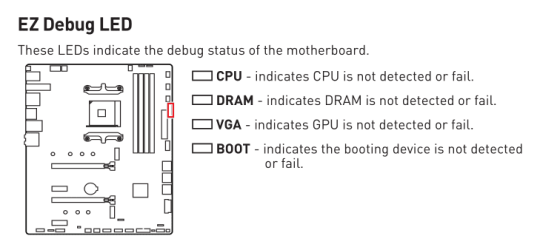
Your MAG X570S TOMAHAWK MAX WIFI has 4 debug LEDs. (p. 31 in the downloadable manual.) I hope they are different colors, like Asus does, but they may be all the same color, like my Gigabyte board. The "EZ Debug" LEDs should all be extinguished after the bootup is complete.
 

My Computers My Computers

  • At a glance

    Windows 11 26200.8728Amd Threadripper 7970X128GB (4 X 32) G.Skill DDR5 6400 (RDIMM)Gigabyte RTX 4090 OC
    OS
    Windows 11 26200.8728
    Computer type
    PC/Desktop
    Manufacturer/Model
    homebuilt
    CPU
    Amd Threadripper 7970X
    Motherboard
    Gigabyte TRX50 Aero D Rev. 1.0
    Memory
    128GB (4 X 32) G.Skill DDR5 6400 (RDIMM)
    Graphics Card(s)
    Gigabyte RTX 4090 OC
    Sound Card
    none (USB to speakers), Realtek
    Monitor(s) Displays
    Innocn 32" OLED
    Screen Resolution
    3840 X 2160 @ 60Hz
    Hard Drives
    Crucial T700 2TB M.2 NVME SSD
    WD 4TB Blue SATA SSD
    Seagate 18TB IronWolf Pro
    PSU
    BeQuiet! Straight Power 12 1500W
    Case
    Lian Li 011 Dynamic Evo XL
    Cooling
    SilverStone Technology XE360-TR5, with 3 Phanteks T30 fans
    Keyboard
    Cherry KC 500 MX LP (mechanical)
    Mouse
    Logitech M500s (wired)
    Internet Speed
    2000/250 Mbps (down/up)
    Other Info
    xFinity gateway
  • At a glance

    windows 11 26200.8728Intel I9-13900K64GB G.Skill DDR5-6000Gigabyte RTX 3090 ti
    Operating System
    windows 11 26200.8728
    Computer type
    PC/Desktop
    Manufacturer/Model
    homebuilt
    CPU
    Intel I9-13900K
    Motherboard
    Asus RoG Strix Z690-E
    Memory
    64GB G.Skill DDR5-6000
    Graphics card(s)
    Gigabyte RTX 3090 ti
    Sound Card
    built in Realtek
    Monitor(s) Displays
    Philips 27E1N8900 27" OLED
    Screen Resolution
    3840 X 2160 @60Hz
    Hard Drives
    WDC SN850 1TB
    8TB Seagate Ironwolf
    4TB Seagate Ironwolf
    PSU
    eVGA SuperNOVA 1300 GT
    Case
    Lian Li 011 Dynamic Evo
    Cooling
    Corsair iCUE H150i ELITE CAPELLIX Liquid CPU Cooler
    Keyboard
    Cherry Streaming (wired)
    Mouse
    Logitech M500s (wired)
Thanks Ghot & BOBKN,

I saw a solid red light on the motherboard, the MSI Tomahawk manual doesn't really show or tell what the colors mean or where the EZDebug LED is. So thank you bobkn for the link to the online manual which at least showed where that LED is. After a little searching I found that RED light means the CPU failed. White light is the goal :-)
I've reseated the RAM, used one RAM stick in each DIMM and rebooted each time. Still have solid RED light.

I'm taking a break and the next step is to remove the CPU and reinsert it after cleaning old thermal paste and applying new thermal paste.

Again thanks for the help.

Loki
 

My Computer My Computer

At a glance

Windows 11AMD Ryzen 5 5600G with Radeon Graphics64.0GB Dual-Channel DDR4 @ 1330MHz (20-19-19-43)4096MB ATI Radeon RX550/550 Series (ATI)
OS
Windows 11
Computer type
PC/Desktop
CPU
AMD Ryzen 5 5600G with Radeon Graphics
Motherboard
MAG X570S TOMAHAWK MAX WIFI (MS-7D54) (AM4)
Memory
64.0GB Dual-Channel DDR4 @ 1330MHz (20-19-19-43)
Graphics Card(s)
4096MB ATI Radeon RX550/550 Series (ATI)
Monitor(s) Displays
1. SMXL2370HD (1920x1080@60Hz) 2. ASUS VE278 (1920x1080@60Hz) 3. Sceptre F27 on Radeon RX550/550 Series
Hard Drives
CT1000P5PSSD8 (SSD) - M2. NvME
CT1000P5PSSD8 (SSD)- M2. NvME
WDC WD5000AAKX-00ERMA0
119GB Crucial_ CT128MX100SSD1 SATA Disk Device (SATA (SSD))
931GB Seagate ST1000DM 003-1CH162 SATA Disk Device (SATA )
Browser
Chrome, Firefox, Edge (Chrome)
Antivirus
MalwareBytes Premium
This is fairly random, but I see that the MAG X570S TOMAHAWK MAX WIFI has two CPU power connectors. I don't know whether both, or either, are required.

If present, are the connectors well-seated? I can imagine something coming loose during a move.

I doubt that failing thermal paste could cause a boot issue like you're seeing, but I can't swear to it.
 
Last edited:

My Computers My Computers

  • At a glance

    Windows 11 26200.8728Amd Threadripper 7970X128GB (4 X 32) G.Skill DDR5 6400 (RDIMM)Gigabyte RTX 4090 OC
    OS
    Windows 11 26200.8728
    Computer type
    PC/Desktop
    Manufacturer/Model
    homebuilt
    CPU
    Amd Threadripper 7970X
    Motherboard
    Gigabyte TRX50 Aero D Rev. 1.0
    Memory
    128GB (4 X 32) G.Skill DDR5 6400 (RDIMM)
    Graphics Card(s)
    Gigabyte RTX 4090 OC
    Sound Card
    none (USB to speakers), Realtek
    Monitor(s) Displays
    Innocn 32" OLED
    Screen Resolution
    3840 X 2160 @ 60Hz
    Hard Drives
    Crucial T700 2TB M.2 NVME SSD
    WD 4TB Blue SATA SSD
    Seagate 18TB IronWolf Pro
    PSU
    BeQuiet! Straight Power 12 1500W
    Case
    Lian Li 011 Dynamic Evo XL
    Cooling
    SilverStone Technology XE360-TR5, with 3 Phanteks T30 fans
    Keyboard
    Cherry KC 500 MX LP (mechanical)
    Mouse
    Logitech M500s (wired)
    Internet Speed
    2000/250 Mbps (down/up)
    Other Info
    xFinity gateway
  • At a glance

    windows 11 26200.8728Intel I9-13900K64GB G.Skill DDR5-6000Gigabyte RTX 3090 ti
    Operating System
    windows 11 26200.8728
    Computer type
    PC/Desktop
    Manufacturer/Model
    homebuilt
    CPU
    Intel I9-13900K
    Motherboard
    Asus RoG Strix Z690-E
    Memory
    64GB G.Skill DDR5-6000
    Graphics card(s)
    Gigabyte RTX 3090 ti
    Sound Card
    built in Realtek
    Monitor(s) Displays
    Philips 27E1N8900 27" OLED
    Screen Resolution
    3840 X 2160 @60Hz
    Hard Drives
    WDC SN850 1TB
    8TB Seagate Ironwolf
    4TB Seagate Ironwolf
    PSU
    eVGA SuperNOVA 1300 GT
    Case
    Lian Li 011 Dynamic Evo
    Cooling
    Corsair iCUE H150i ELITE CAPELLIX Liquid CPU Cooler
    Keyboard
    Cherry Streaming (wired)
    Mouse
    Logitech M500s (wired)
the MSI Tomahawk manual doesn't really show or tell what the colors mean


Generally, the lights are supposed to come on one at a time for a second or two... then go out.
If they stay on... that indicates a problem area...


As @bobkn mentioned, this is on page 31 in your PDF manual.

Image1.png


On some motherboards... they only come ON, if there's a problem in that area.
 

My Computers My Computers

  • At a glance

    Win 11 Home ♦♦♦26200.8655 ♦♦♦♦♦♦♦25H2AMD Ryzen 7 3700XG.Skill (F4-3200C14D-16GTZKW)EVGA RTX 2070 (08G-P4-2171-KR)
    OS
    Win 11 Home ♦♦♦26200.8655 ♦♦♦♦♦♦♦25H2
    Computer type
    PC/Desktop
    Manufacturer/Model
    Built by Ghot® [May 2020]
    CPU
    AMD Ryzen 7 3700X
    Motherboard
    Asus Pro WS X570-ACE (BIOS 5302)
    Memory
    G.Skill (F4-3200C14D-16GTZKW)
    Graphics Card(s)
    EVGA RTX 2070 (08G-P4-2171-KR)
    Sound Card
    Realtek ALC1220P / ALC S1220A
    Monitor(s) Displays
    Dell U3011 30"
    Screen Resolution
    2560 x 1600
    Hard Drives
    2x Samsung 860 EVO 500GB,
    WD 4TB Black FZBX - SATA III,
    WD 8TB Black FZBX - SATA III,
    DRW-24B1ST CD/DVD Burner
    PSU
    PC Power & Cooling 750W Quad EPS12V
    Case
    Cooler Master ATCS 840 Tower
    Cooling
    CM Hyper 212 EVO (push/pull)
    Keyboard
    Ducky DK9008 Shine II Blue LED
    Mouse
    Logitech Optical M-100
    Internet Speed
    300/300
    Browser
    Firefox (latest)
    Antivirus
    Bitdefender Total Security
    Other Info
    Speakers: Klipsch Pro Media 2.1
  • At a glance

    Windows XP Pro 32bit w/SP3AMD Athlon 64 X2 5000+ (OC'd @ 3.2Ghz)TWIN2X2048-6400C4DHX (2 x 1GB, DDR2 800)EVGA 256-P2-N758-TR GeForce 8600GT SSC
    Operating System
    Windows XP Pro 32bit w/SP3
    Computer type
    PC/Desktop
    Manufacturer/Model
    Built by Ghot® (not in use)
    CPU
    AMD Athlon 64 X2 5000+ (OC'd @ 3.2Ghz)
    Motherboard
    ASUS M2N32-SLI Deluxe Wireless Edition
    Memory
    TWIN2X2048-6400C4DHX (2 x 1GB, DDR2 800)
    Graphics card(s)
    EVGA 256-P2-N758-TR GeForce 8600GT SSC
    Sound Card
    Onboard
    Monitor(s) Displays
    ViewSonic G90FB Black 19" Professional (CRT)
    Screen Resolution
    up to 2048 x 1536
    Hard Drives
    WD 36GB 10,000rpm Raptor SATA
    Seagate 80GB 7200rpm SATA
    Lite-On LTR-52246S CD/RW
    Lite-On LH-18A1P CD/DVD Burner
    PSU
    PC Power & Cooling Silencer 750 Quad EPS12V
    Case
    Generic Beige case, 80mm fans
    Cooling
    ZALMAN 9500A 92mm CPU Cooler
    Keyboard
    Logitech Classic Keybooard 200
    Mouse
    Logitech Optical M-BT96a
    Internet Speed
    300/300
    Browser
    Firefox 3.x ??
    Antivirus
    Symantec (Norton)
    Other Info
    Still assembled, still runs. Haven't turned it on for 15 years?
Hi Ghot & bobkn,

I've reseated the CPU and started the PC the RED light came on and stayed for a bit then turned white. Still no signal to monitor.

Will work on it tomorrow.
 

My Computer My Computer

At a glance

Windows 11AMD Ryzen 5 5600G with Radeon Graphics64.0GB Dual-Channel DDR4 @ 1330MHz (20-19-19-43)4096MB ATI Radeon RX550/550 Series (ATI)
OS
Windows 11
Computer type
PC/Desktop
CPU
AMD Ryzen 5 5600G with Radeon Graphics
Motherboard
MAG X570S TOMAHAWK MAX WIFI (MS-7D54) (AM4)
Memory
64.0GB Dual-Channel DDR4 @ 1330MHz (20-19-19-43)
Graphics Card(s)
4096MB ATI Radeon RX550/550 Series (ATI)
Monitor(s) Displays
1. SMXL2370HD (1920x1080@60Hz) 2. ASUS VE278 (1920x1080@60Hz) 3. Sceptre F27 on Radeon RX550/550 Series
Hard Drives
CT1000P5PSSD8 (SSD) - M2. NvME
CT1000P5PSSD8 (SSD)- M2. NvME
WDC WD5000AAKX-00ERMA0
119GB Crucial_ CT128MX100SSD1 SATA Disk Device (SATA (SSD))
931GB Seagate ST1000DM 003-1CH162 SATA Disk Device (SATA )
Browser
Chrome, Firefox, Edge (Chrome)
Antivirus
MalwareBytes Premium
Hi Ghot & bobkn,

I've reseated the CPU and started the PC the RED light came on and stayed for a bit then turned white. Still no signal to monitor.

Will work on it tomorrow.
If the white LED stayed lit, the PC isn't finding your graphics card properly. (Or have you removed the graphics card, in favor of the onboard graphics?)
 

My Computers My Computers

  • At a glance

    Windows 11 26200.8728Amd Threadripper 7970X128GB (4 X 32) G.Skill DDR5 6400 (RDIMM)Gigabyte RTX 4090 OC
    OS
    Windows 11 26200.8728
    Computer type
    PC/Desktop
    Manufacturer/Model
    homebuilt
    CPU
    Amd Threadripper 7970X
    Motherboard
    Gigabyte TRX50 Aero D Rev. 1.0
    Memory
    128GB (4 X 32) G.Skill DDR5 6400 (RDIMM)
    Graphics Card(s)
    Gigabyte RTX 4090 OC
    Sound Card
    none (USB to speakers), Realtek
    Monitor(s) Displays
    Innocn 32" OLED
    Screen Resolution
    3840 X 2160 @ 60Hz
    Hard Drives
    Crucial T700 2TB M.2 NVME SSD
    WD 4TB Blue SATA SSD
    Seagate 18TB IronWolf Pro
    PSU
    BeQuiet! Straight Power 12 1500W
    Case
    Lian Li 011 Dynamic Evo XL
    Cooling
    SilverStone Technology XE360-TR5, with 3 Phanteks T30 fans
    Keyboard
    Cherry KC 500 MX LP (mechanical)
    Mouse
    Logitech M500s (wired)
    Internet Speed
    2000/250 Mbps (down/up)
    Other Info
    xFinity gateway
  • At a glance

    windows 11 26200.8728Intel I9-13900K64GB G.Skill DDR5-6000Gigabyte RTX 3090 ti
    Operating System
    windows 11 26200.8728
    Computer type
    PC/Desktop
    Manufacturer/Model
    homebuilt
    CPU
    Intel I9-13900K
    Motherboard
    Asus RoG Strix Z690-E
    Memory
    64GB G.Skill DDR5-6000
    Graphics card(s)
    Gigabyte RTX 3090 ti
    Sound Card
    built in Realtek
    Monitor(s) Displays
    Philips 27E1N8900 27" OLED
    Screen Resolution
    3840 X 2160 @60Hz
    Hard Drives
    WDC SN850 1TB
    8TB Seagate Ironwolf
    4TB Seagate Ironwolf
    PSU
    eVGA SuperNOVA 1300 GT
    Case
    Lian Li 011 Dynamic Evo
    Cooling
    Corsair iCUE H150i ELITE CAPELLIX Liquid CPU Cooler
    Keyboard
    Cherry Streaming (wired)
    Mouse
    Logitech M500s (wired)
@Loki


If the DRAM light is RED... then take out all the RAM except one stick.
Put it in the 2nd slot counting away from the CPU (to the right).

Try each of the sticks (one at a time), in the 2nd slot.

See if you can get a white DRAM light. The white light should go out after a second or two.


_____________________________________________________________________________________________________________

If it's anything like my ASUS board... RED light is bad.
Mine starts at one end, and each light comes on white, for a second or two.
If one of those areas is bad... it'll get a RED light.

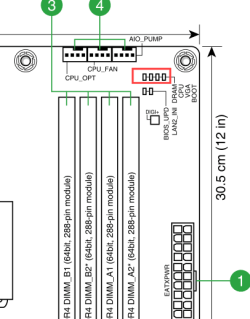
Here's mine. The lights progress from left to right as each area is checked.
DRAM, CPU, VGA, Boot


Image1.png


They each show a white light (one at a time), for about a second, then the light goes out and stays out.
Then the check moves to the next area.
That's why Boot is last. :cool:


When all four lights have come on and gone out... the computer boots.
 
Last edited:

My Computers My Computers

  • At a glance

    Win 11 Home ♦♦♦26200.8655 ♦♦♦♦♦♦♦25H2AMD Ryzen 7 3700XG.Skill (F4-3200C14D-16GTZKW)EVGA RTX 2070 (08G-P4-2171-KR)
    OS
    Win 11 Home ♦♦♦26200.8655 ♦♦♦♦♦♦♦25H2
    Computer type
    PC/Desktop
    Manufacturer/Model
    Built by Ghot® [May 2020]
    CPU
    AMD Ryzen 7 3700X
    Motherboard
    Asus Pro WS X570-ACE (BIOS 5302)
    Memory
    G.Skill (F4-3200C14D-16GTZKW)
    Graphics Card(s)
    EVGA RTX 2070 (08G-P4-2171-KR)
    Sound Card
    Realtek ALC1220P / ALC S1220A
    Monitor(s) Displays
    Dell U3011 30"
    Screen Resolution
    2560 x 1600
    Hard Drives
    2x Samsung 860 EVO 500GB,
    WD 4TB Black FZBX - SATA III,
    WD 8TB Black FZBX - SATA III,
    DRW-24B1ST CD/DVD Burner
    PSU
    PC Power & Cooling 750W Quad EPS12V
    Case
    Cooler Master ATCS 840 Tower
    Cooling
    CM Hyper 212 EVO (push/pull)
    Keyboard
    Ducky DK9008 Shine II Blue LED
    Mouse
    Logitech Optical M-100
    Internet Speed
    300/300
    Browser
    Firefox (latest)
    Antivirus
    Bitdefender Total Security
    Other Info
    Speakers: Klipsch Pro Media 2.1
  • At a glance

    Windows XP Pro 32bit w/SP3AMD Athlon 64 X2 5000+ (OC'd @ 3.2Ghz)TWIN2X2048-6400C4DHX (2 x 1GB, DDR2 800)EVGA 256-P2-N758-TR GeForce 8600GT SSC
    Operating System
    Windows XP Pro 32bit w/SP3
    Computer type
    PC/Desktop
    Manufacturer/Model
    Built by Ghot® (not in use)
    CPU
    AMD Athlon 64 X2 5000+ (OC'd @ 3.2Ghz)
    Motherboard
    ASUS M2N32-SLI Deluxe Wireless Edition
    Memory
    TWIN2X2048-6400C4DHX (2 x 1GB, DDR2 800)
    Graphics card(s)
    EVGA 256-P2-N758-TR GeForce 8600GT SSC
    Sound Card
    Onboard
    Monitor(s) Displays
    ViewSonic G90FB Black 19" Professional (CRT)
    Screen Resolution
    up to 2048 x 1536
    Hard Drives
    WD 36GB 10,000rpm Raptor SATA
    Seagate 80GB 7200rpm SATA
    Lite-On LTR-52246S CD/RW
    Lite-On LH-18A1P CD/DVD Burner
    PSU
    PC Power & Cooling Silencer 750 Quad EPS12V
    Case
    Generic Beige case, 80mm fans
    Cooling
    ZALMAN 9500A 92mm CPU Cooler
    Keyboard
    Logitech Classic Keybooard 200
    Mouse
    Logitech Optical M-BT96a
    Internet Speed
    300/300
    Browser
    Firefox 3.x ??
    Antivirus
    Symantec (Norton)
    Other Info
    Still assembled, still runs. Haven't turned it on for 15 years?
Have you tried resetting the CMOS on the Motherboard?
You never know.
 

My Computers My Computers

  • At a glance

    Windows 11 Pro 25H2 Build 26200.8655Intel(R) Core(TM) i7-4770K CPU @ 3.50GHz32.0 GB of I forget and the box is in storage.Gigabyte nVidia GeForce GTX 1660 Super OC 6GB
    OS
    Windows 11 Pro 25H2 Build 26200.8655
    Computer type
    PC/Desktop
    Manufacturer/Model
    Sin-built 2013
    CPU
    Intel(R) Core(TM) i7-4770K CPU @ 3.50GHz
    Motherboard
    ASUS ROG Maximus VI Formula
    Memory
    32.0 GB of I forget and the box is in storage.
    Graphics Card(s)
    Gigabyte nVidia GeForce GTX 1660 Super OC 6GB
    Sound Card
    ROG SupremeFX Formula 8-Channel High Definition Audio
    Monitor(s) Displays
    5 x LG 25MS500-B - 1 x 24MK430H-B - 1 x Wacom Pro 22" Touch Screen Tablet
    Screen Resolution
    All over the place
    Hard Drives
    Too many to list. OS on Samsung 1TB 870 QVO SATA
    PSU
    Silverstone 1500
    Case
    NZXT Phantom 820 Full-Tower Case
    Cooling
    Noctua NH-D15 Elite Class Dual Tower CPU Cooler / 6 x EziDIY 120mm / 2 x Corsair 140mm somethings / 1 x 140mm Thermaltake something / 2 x 200mm Corsair.
    Keyboard
    Corsair K95 / Logitech diNovo Edge Wireless
    Mouse
    Logitech: G402 / G502 / Mx Masters / Mx Air Cordless
    Internet Speed
    2000/500Mbps
    Browser
    All sorts
    Antivirus
    Kaspersky Premium
    Other Info
    ㅤㅤㅤㅤㅤㅤㅤㅤㅤㅤㅤㅤㅤㅤㅤㅤㅤㅤㅤㅤㅤㅤㅤㅤㅤㅤㅤㅤㅤㅤㅤㅤㅤㅤㅤㅤㅤㅤㅤㅤ⠀⠀⠀⠀⠀⠀⠀⠀⠀⠀
    TP-Link BE9300 WiFi 7 Bluetooth 5.4 (Archer TBE550E)
    TP-Link TX201 V1 2.5GB Lan

    Grandstream HT812 - VoIP
    ASUS DSL-AX82U - Mesh
    ASUS RT-AC68U - Mesh
    ASUS RT-BE88U Router

    Brother MFC-L2880DW Printer

    I’m on a horse.
  • At a glance

    Windows 11 Pro 25H2 Build 26200.8655 (Wifes)13th Generation Intel® Core™ i5-1340P Process...16GB LPDDR5-52001x Intel® Iris® Xe Graphics
    Operating System
    Windows 11 Pro 25H2 Build 26200.8655 (Wifes)
    Computer type
    Laptop
    Manufacturer/Model
    LENOVO Yoga 7 14IRL8 - Type 82YL
    CPU
    13th Generation Intel® Core™ i5-1340P Processor(Core™ i5-1340P)
    Memory
    16GB LPDDR5-5200
    Graphics card(s)
    1x Intel® Iris® Xe Graphics
    Sound Card
    Optimized with Dolby Atmos®
    Screen Resolution
    QHD 2880 x 1800 OLED
    Hard Drives
    M.2 512 GB SSD PCIe
    Mouse
    Logiteck MX Master 3S
    Internet Speed
    2000/500
    Antivirus
    Defender / Malwarebytes
    Other Info
    …still on a horse.


    Wireless Network: Wi-Fi 6E 2x2 AX; Bluetooth® 5.1 or above
    Ports: 1x 1 Novo button; 2 in 1 Audio Combo jack; Micro SD Card Reader; HDMI 1.4b; 2 x USB Type-C (TBT4)
    USB 3.2 Gen 2 DP 1.4a
    PD 3.0); 1 x USB 3.2 Gen1 Type A
    Camera
    1x 1080P FHD IR/RGB Hybrid with Privacy Shutter and Dual Array Microphone
    Graphics
    1x Intel® Iris® Xe Graphics
    Monitor
    14" WUXGA
    Form Factor
    Convertible Notebook
  • Windows 11 Pro 25H2 Build 26200.8655 (Wifes)

    Yoga 7 2-in-1 14IML9 - Type 83DJ

    Processor: Intel® Core™ Ultra 7 155H Processor(Core™ Ultra 7 155H)

    Memory: 32GB LPD5X-7467

    Hard Drive: 1 TB SSD PCIe

    Wireless Network: 1x Wi-Fi 6E 2x2 AX; Bluetooth® 5.1 or above

    Ports: 1 x HDMI 2.1 TMDS; 1 x Novo Button; 1 x Combo Audio Jack
    2 x USB-C (USB 4.0)
    1 x USB-A 3.2 Gen 1

    Camera: 1080P FHD IR Hybrid with Dual Microphone

    Graphics: Intel® Arc™ Graphics

    Monitor: 14" 2.8K

    ...Where's my horse?
Hi Ghot, bobkn, and antspants.

I reset the CMOS, this didn't fix issue.
I removed both M.2 SSD and reseated them. this didn't fix issue.
I then reset the CMOS again and also removed the RAM.

System came up.

I want to thank each of you and may you all have a Great Day.
Loki
 

My Computer My Computer

At a glance

Windows 11AMD Ryzen 5 5600G with Radeon Graphics64.0GB Dual-Channel DDR4 @ 1330MHz (20-19-19-43)4096MB ATI Radeon RX550/550 Series (ATI)
OS
Windows 11
Computer type
PC/Desktop
CPU
AMD Ryzen 5 5600G with Radeon Graphics
Motherboard
MAG X570S TOMAHAWK MAX WIFI (MS-7D54) (AM4)
Memory
64.0GB Dual-Channel DDR4 @ 1330MHz (20-19-19-43)
Graphics Card(s)
4096MB ATI Radeon RX550/550 Series (ATI)
Monitor(s) Displays
1. SMXL2370HD (1920x1080@60Hz) 2. ASUS VE278 (1920x1080@60Hz) 3. Sceptre F27 on Radeon RX550/550 Series
Hard Drives
CT1000P5PSSD8 (SSD) - M2. NvME
CT1000P5PSSD8 (SSD)- M2. NvME
WDC WD5000AAKX-00ERMA0
119GB Crucial_ CT128MX100SSD1 SATA Disk Device (SATA (SSD))
931GB Seagate ST1000DM 003-1CH162 SATA Disk Device (SATA )
Browser
Chrome, Firefox, Edge (Chrome)
Antivirus
MalwareBytes Premium
Hi Ghot, bobkn, and antspants.

I reset the CMOS, this didn't fix issue.
I removed both M.2 SSD and reseated them. this didn't fix issue.
I then reset the CMOS again and also removed the RAM.

System came up.

I want to thank each of you and may you all have a Great Day.
Loki
To be clear: the RAM needed to be reseated?
 

My Computers My Computers

  • At a glance

    Windows 11 26200.8728Amd Threadripper 7970X128GB (4 X 32) G.Skill DDR5 6400 (RDIMM)Gigabyte RTX 4090 OC
    OS
    Windows 11 26200.8728
    Computer type
    PC/Desktop
    Manufacturer/Model
    homebuilt
    CPU
    Amd Threadripper 7970X
    Motherboard
    Gigabyte TRX50 Aero D Rev. 1.0
    Memory
    128GB (4 X 32) G.Skill DDR5 6400 (RDIMM)
    Graphics Card(s)
    Gigabyte RTX 4090 OC
    Sound Card
    none (USB to speakers), Realtek
    Monitor(s) Displays
    Innocn 32" OLED
    Screen Resolution
    3840 X 2160 @ 60Hz
    Hard Drives
    Crucial T700 2TB M.2 NVME SSD
    WD 4TB Blue SATA SSD
    Seagate 18TB IronWolf Pro
    PSU
    BeQuiet! Straight Power 12 1500W
    Case
    Lian Li 011 Dynamic Evo XL
    Cooling
    SilverStone Technology XE360-TR5, with 3 Phanteks T30 fans
    Keyboard
    Cherry KC 500 MX LP (mechanical)
    Mouse
    Logitech M500s (wired)
    Internet Speed
    2000/250 Mbps (down/up)
    Other Info
    xFinity gateway
  • At a glance

    windows 11 26200.8728Intel I9-13900K64GB G.Skill DDR5-6000Gigabyte RTX 3090 ti
    Operating System
    windows 11 26200.8728
    Computer type
    PC/Desktop
    Manufacturer/Model
    homebuilt
    CPU
    Intel I9-13900K
    Motherboard
    Asus RoG Strix Z690-E
    Memory
    64GB G.Skill DDR5-6000
    Graphics card(s)
    Gigabyte RTX 3090 ti
    Sound Card
    built in Realtek
    Monitor(s) Displays
    Philips 27E1N8900 27" OLED
    Screen Resolution
    3840 X 2160 @60Hz
    Hard Drives
    WDC SN850 1TB
    8TB Seagate Ironwolf
    4TB Seagate Ironwolf
    PSU
    eVGA SuperNOVA 1300 GT
    Case
    Lian Li 011 Dynamic Evo
    Cooling
    Corsair iCUE H150i ELITE CAPELLIX Liquid CPU Cooler
    Keyboard
    Cherry Streaming (wired)
    Mouse
    Logitech M500s (wired)
That and the CMOS cleared seems to be the fix.
 

My Computer My Computer

At a glance

Windows 11AMD Ryzen 5 5600G with Radeon Graphics64.0GB Dual-Channel DDR4 @ 1330MHz (20-19-19-43)4096MB ATI Radeon RX550/550 Series (ATI)
OS
Windows 11
Computer type
PC/Desktop
CPU
AMD Ryzen 5 5600G with Radeon Graphics
Motherboard
MAG X570S TOMAHAWK MAX WIFI (MS-7D54) (AM4)
Memory
64.0GB Dual-Channel DDR4 @ 1330MHz (20-19-19-43)
Graphics Card(s)
4096MB ATI Radeon RX550/550 Series (ATI)
Monitor(s) Displays
1. SMXL2370HD (1920x1080@60Hz) 2. ASUS VE278 (1920x1080@60Hz) 3. Sceptre F27 on Radeon RX550/550 Series
Hard Drives
CT1000P5PSSD8 (SSD) - M2. NvME
CT1000P5PSSD8 (SSD)- M2. NvME
WDC WD5000AAKX-00ERMA0
119GB Crucial_ CT128MX100SSD1 SATA Disk Device (SATA (SSD))
931GB Seagate ST1000DM 003-1CH162 SATA Disk Device (SATA )
Browser
Chrome, Firefox, Edge (Chrome)
Antivirus
MalwareBytes Premium

Latest Support Threads

Back
Top Bottom